charging HYUNDAI IONIQ 5 2023 Owners Manual
[x] Cancel search | Manufacturer: HYUNDAI, Model Year: 2023, Model line: IONIQ 5, Model: HYUNDAI IONIQ 5 2023Pages: 680, PDF Size: 48.22 MB
Page 6 of 680
1
Electric Vehicle...................................................................................................1 -7
Electric Vehicle .............................................................................................................. 1 -7
Characteristics of Electric Vehicles .............................................................................. 1 -7
Battery Information ....................................................................................................... 1 -7
Main Components of Electric Vehicle .............................................................. 1-8
Main Components of Electric Vehicle ........................................................................ 1-8
High Voltage Battery (lithium-ion battery) .................................................................1-8
High Voltage Battery Warmer System ........................................................................ 1-9
EV Mode ........................................................................................................... 1-10
EV Mode Screen .......................................................................................................... 1-10
Energy Information ...................................................................................................... 1-11
Next Departure ............................................................................................................ 1-12
Charging and Climate ................................................................................................ 1-13
Vehicle to Load (V2L) .................................................................................................. 1-14
Nearby Stations .......................................................................................................... 1-19
EV Settings .................................................................................................................. 1-20
Charge Types for Electric Vehicle ................................................................... 1-23
Charging Information .................................................................................................. 1-23
Charging Time Information ........................................................................................ 1-23
Charging Types ............................................................................................................ 1-24
Charge Indicator Lamp for Electric Vehicle ...................................................1-25
Charging Status ........................................................................................................... 1-25
Front Center Bumper .................................................................................................. 1-25
Charging Connector Lock ............................................................................... 1-26
Locking Charging Cable............................................................................................. 1-26
Scheduled Charging ........................................................................................ 1-27
Scheduled Charging.................................................................................................... 1-27
Charging Electric Vehicle ................................................................................ 1-28
Electric Charging Door .............................................................................................. 1-28
Charging Precautions ................................................................................................ 1-29
Unlock Charging Door in Emergency ....................................................................... 1-30
AC Charge ................................................................................................................... 1-30
DC Charge................................................................................................................... 1-34 Portable Charge ......................................................................................................... 1-36
1. Foreword / Electric Vehicle
System Overview
Page 7 of 680
1
Charging the Electric Vehicle (abrupt stop) ...................................................1-49
Action to be taken when charging stops abruptly ...................................................1-49
Driving Electric Vehicle ................................................................................... 1-50
How to Start the Vehicle ............................................................................................ 1-50
How to Stop the Vehicle ............................................................................................ 1-50
Virtual Engine Sound System ..................................................................................... 1-51
Distance to Empty ....................................................................................................... 1-51
Tips for Improving Distance to Empty ...................................................................... 1-52
ECO Driving ................................................................................................................ 1-53
Electricity Use ............................................................................................................. 1-53
Power/Charge Gauge ................................................................................................ 1-54
State Of Charge (SOC) Gauge for High Voltage Battery ..........................................1-54
Aux. Battery Saver+ .................................................................................................... 1-55
Warning and Indicator Lights (related to electric vehicle) ......................................1-56
LCD Display Messages ............................................................................................... 1-58
Safety Precautions for Electric Vehicle ..........................................................1-63
If an Accident Occurs ................................................................................................. 1-63
Other Precautions for Electric Vehicle ...................................................................... 1-64
High Voltage cut-off Switch ...................................................................................... 1-65
Page 14 of 680
01
1-9
•
Natural degradation may occur with
the high voltage battery depending
on the number of years the vehicle is
used. This may reduce the distance to
empty.
• When the charge capacity and
distance to empty keep falling,
contact an authorized HYUNDAI
dealer for inspection and
maintenance.
• If the vehicle will not be in use for an
extended period of time, charge the
high voltage battery once every three
months to prevent it from discharging.
Also, if the charge amount is not
enough, immediately charge to full
and store the vehicle.
• AC charge is recommended to keep
the high voltage battery in optimal condition.
If the high voltage battery charge
amount is below 20%, you can keep
the high voltage battery performance
in optimal condition if you charge the
high voltage battery to 100%. (Once a
month or more is recommended.)
The value of the high voltage battery
charge level may vary according to
the charging conditions (state of
charger, outside temperature, battery
temperature, etc.). In order to fully
charge the battery, the current of the
high voltage battery will be gradually
decreased, so that the longevity and
safety of the battery can be secured.
CAUTION
• If the vehicle is kept with insufficient
charge for a long period, it may
damage the high voltage battery and
the high voltage battery may have to
be replaced depending on the level
of degradation.
• If the vehicle is in a collision, contact
an authorized HYUNDAI dealer to
inspect whether the high voltage
battery is still connected.
• Using the V2L function may reduce
the mileage due to the use of high
voltage battery energy, and repeated
use of the V2L function may cause
a decrease in the life of the high
voltage battery.
High Voltage Battery Warmer
System
The high voltage battery warmer system
prevents reduction of battery output
when battery temperature is low. If the
charging connector is connected, the
warmer system automatically operates
according to the battery temperature.
Charging time may shorten compare to
vehicles without the high voltage battery
warmer system. But, electricity charge
may increase because of high voltage
battery warmer system operation.
CAUTION
The high voltage battery warmer
system operates when the charging
connector is connected to the vehicle.
However, the high voltage warmer
system may not operate when battery
temperature drops below -31°F (-35°C).
Page 15 of 680
Foreword / Electric Vehicle System Overview
1-10
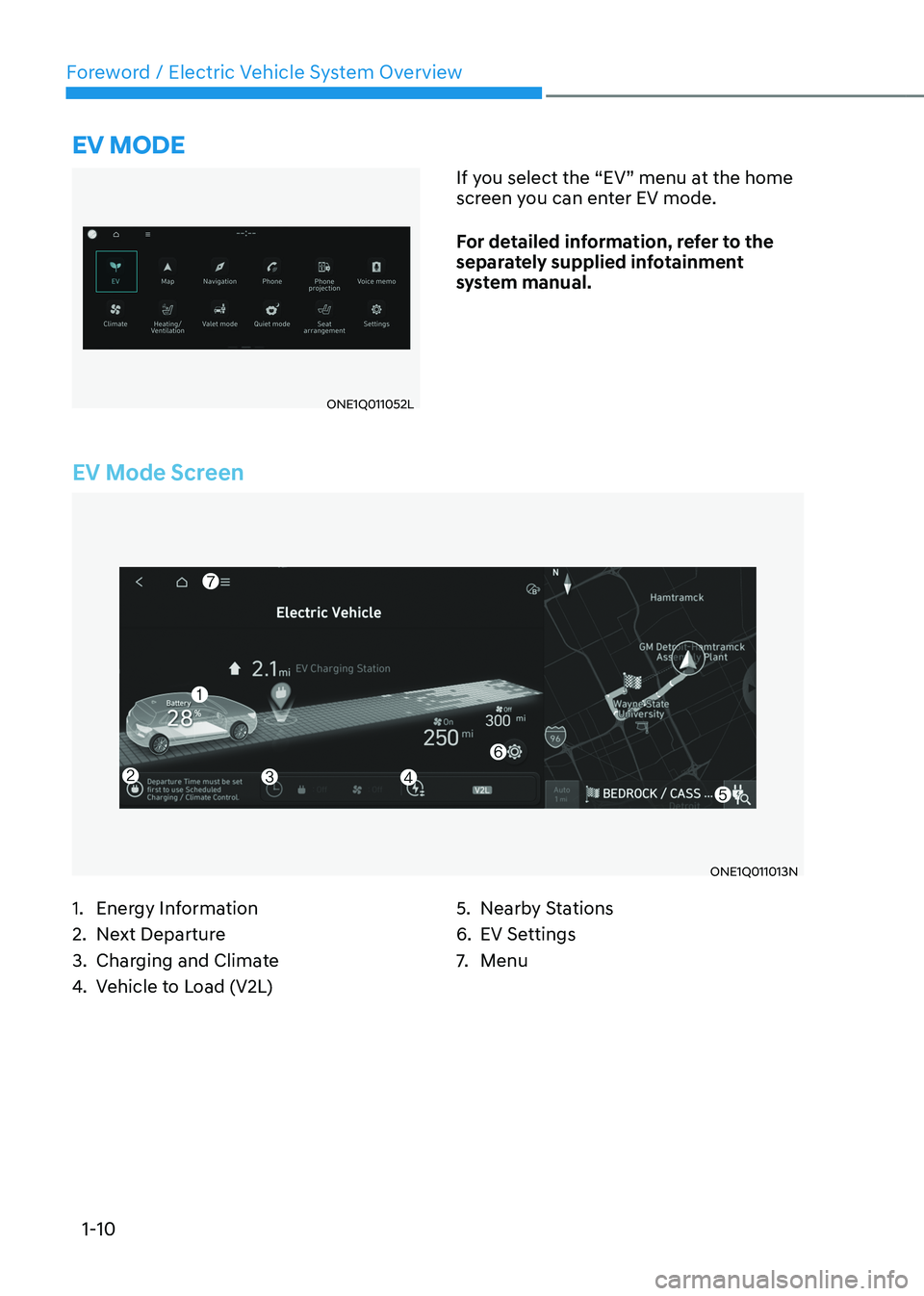
EV Mode Screen
ONE1Q011013N
eV mode
ONE1Q011052LIf you select the “EV” menu at the home
screen you can enter EV mode.
For detailed information, refer to the
separately supplied infotainment
system manual.
1. Energy Information
2. Next Departure
3. Charging and Climate
4. Vehicle to Load (V2L) 5. Nearby Stations
6. EV Settings
7.
Menu
Page 16 of 680
01
1-11
Energy Information
ONE1Q011006N
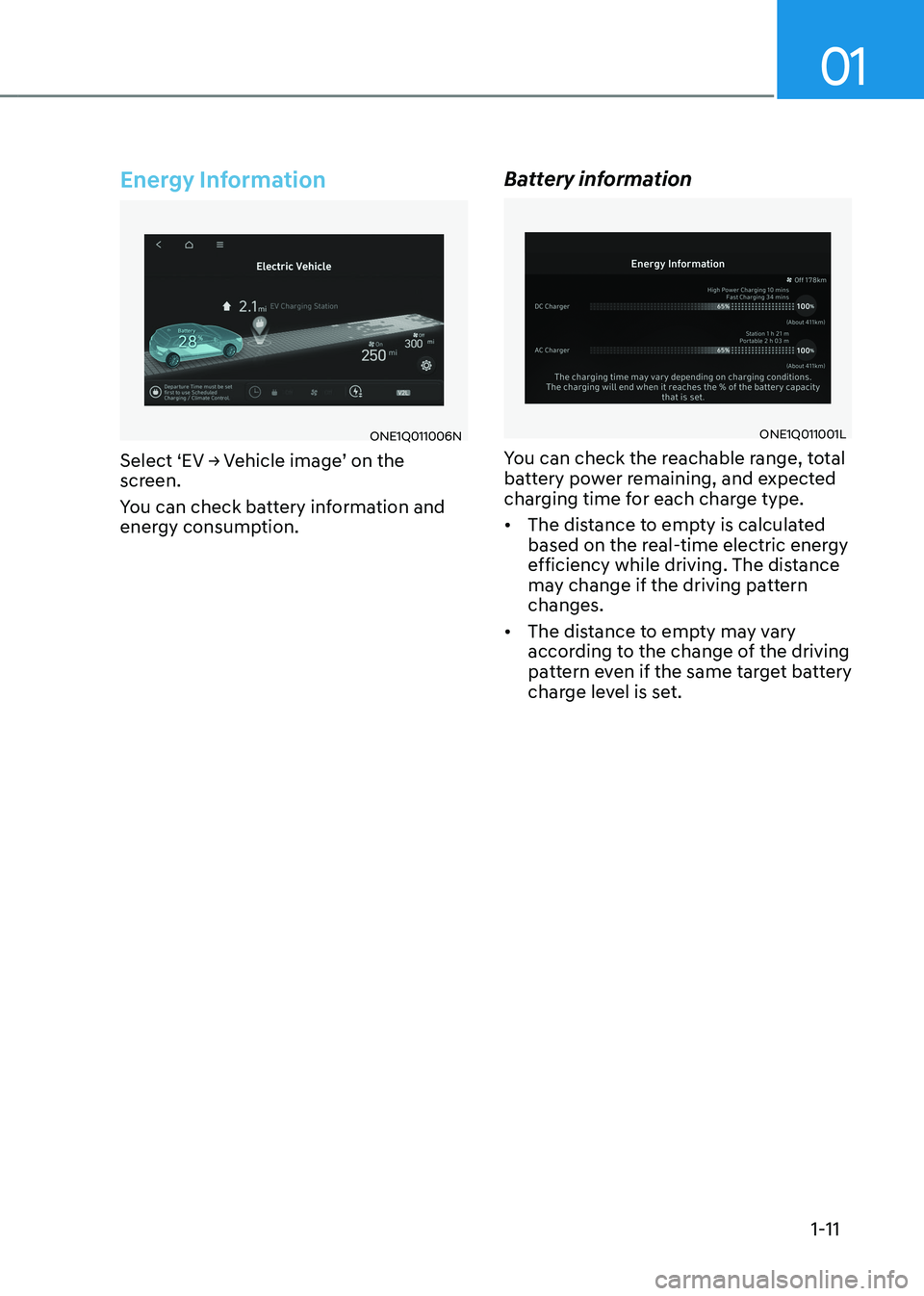
Select ‘EV → Vehicle image’ on the
screen.
You can check battery information and
energy consumption. Battery informationONE1Q011001L
You can check the reachable range, total
battery power remaining, and expected
charging time for each charge type. • The distance to empty is calculated
based on the real-time electric energy
efficiency while driving. The distance
may change if the driving pattern changes.
• The distance to empty may vary
according to the change of the driving
pattern even if the same target battery
charge level is set.
Page 17 of 680
Foreword / Electric Vehicle System Overview
1-12
Next Departure
ONE1Q011016N
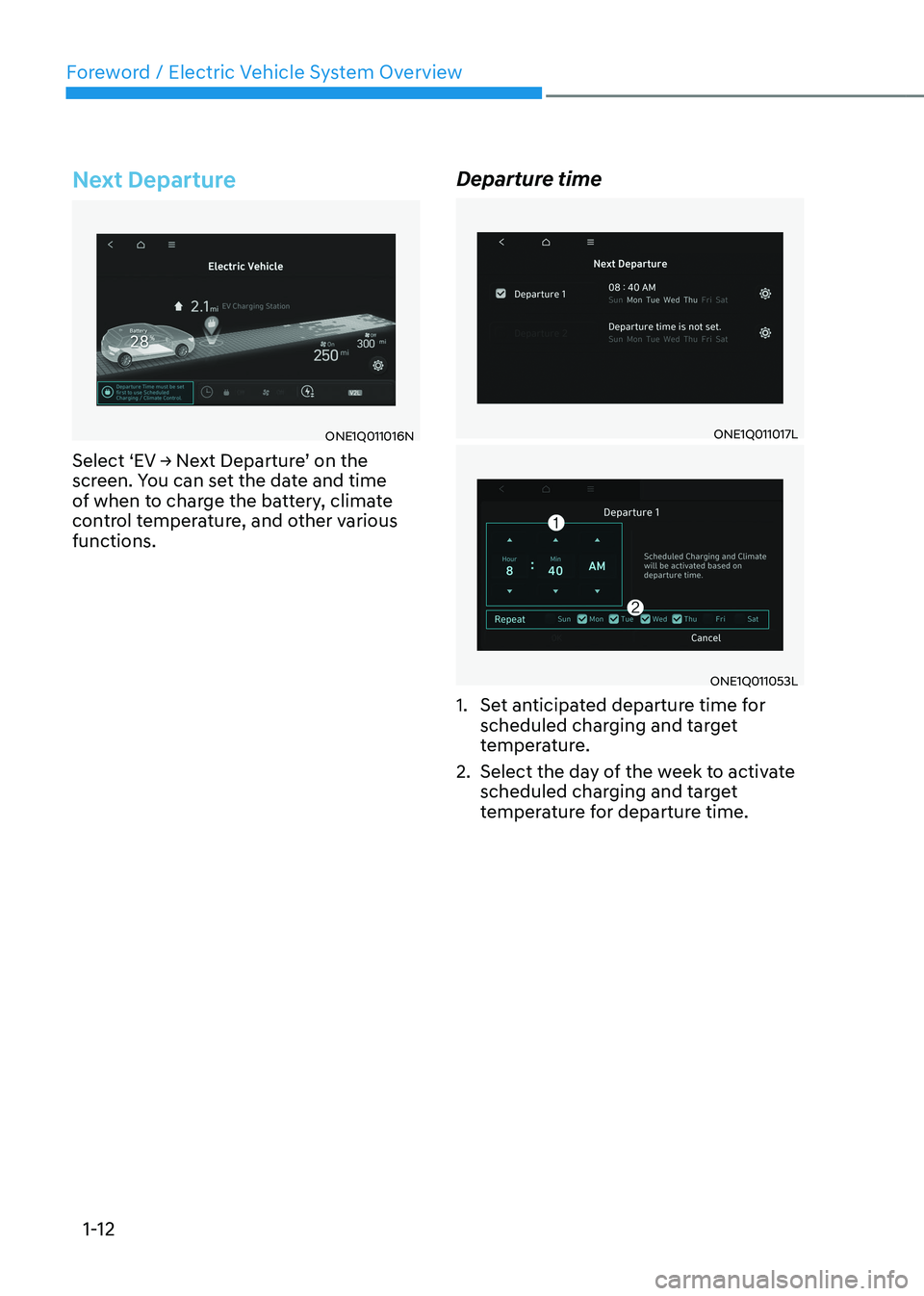
Select ‘EV → Next Departure’ on the
screen. You can set the date and time
of when to charge the battery, climate
control temperature, and other various functions. Departure timeONE1Q011017L
ONE1Q011053L
1. Set anticipated departure time for scheduled charging and target
temperature.
2. Select the day of the week to activate scheduled charging and target
temperature for departure time.
Page 18 of 680
01
1-13
Charging and Climate
ONE1Q011019N
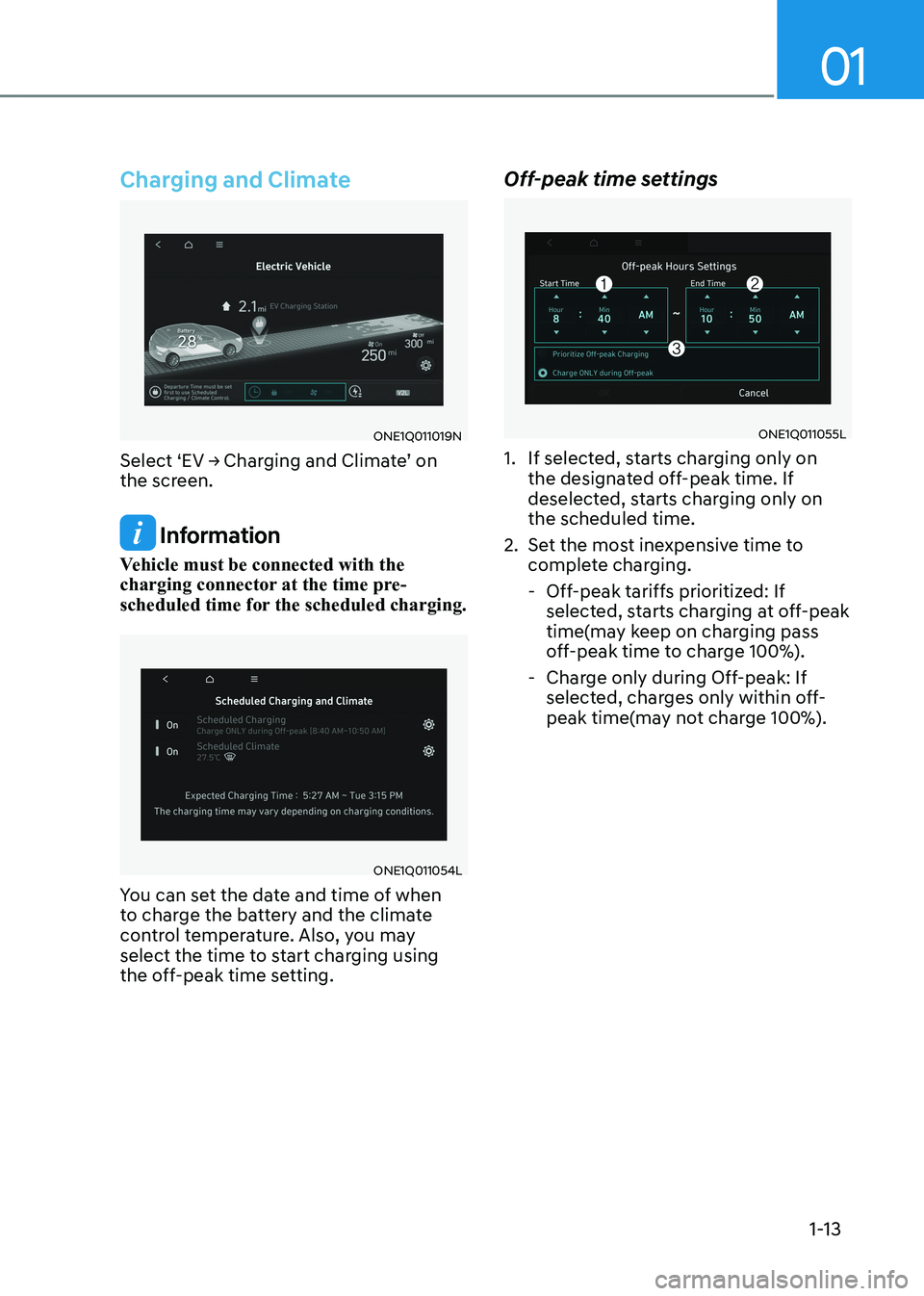
Select ‘EV → Charging and Climate’ on
the screen.
Information
Vehicle must be connected with the
charging connector at the time pre-
scheduled time for the scheduled charging.
ONE1Q011054L
You can set the date and time of when
to charge the battery and the climate
control temperature. Also, you may
select the time to start charging using
the off-peak time setting. Off-peak time settings
ONE1Q011055L
1. If selected, starts charging only on the designated off-peak time. If
deselected, starts charging only on the scheduled time.
2. Set the most inexpensive time to complete charging.
- Off-peak tariffs prioritized: If selected, starts charging at off-peak
time(may keep on charging pass
off-peak time to charge 100%).
- Charge only during Off-peak: If selected, charges only within off-
peak time(may not charge 100%).
Page 19 of 680
Foreword / Electric Vehicle System Overview
1-14
Target temperature settings
ONE1Q011021N
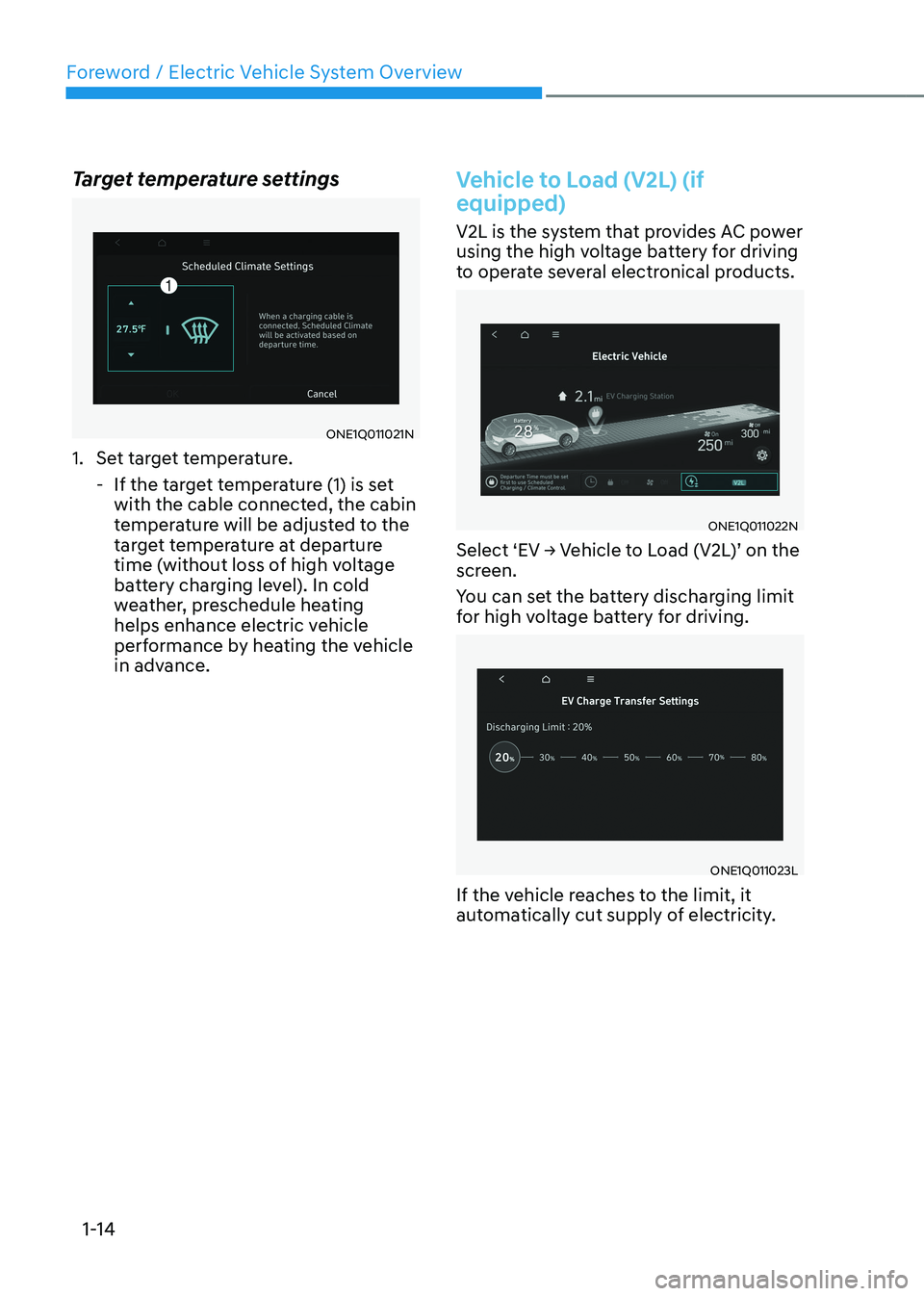
1. Set target temperature.
- If the target temperature (1) is set with the cable connected, the cabin
temperature will be adjusted to the
target temperature at departure
time (without loss of high voltage
battery charging level). In cold
weather, preschedule heating
helps enhance electric vehicle
performance by heating the vehicle
in advance.
Vehicle to Load (V2L) (if equipped)
V2L is the system that provides AC power
using the high voltage battery for driving
to operate several electronical products.
ONE1Q011022N
Select ‘EV → Vehicle to Load (V2L)’ on the
screen.
You can set the battery discharging limit
for high voltage battery for driving.
ONE1Q011023L
If the vehicle reaches to the limit, it
automatically cut supply of electricity.
Page 20 of 680
01
1-15
Energy information
Select ‘EV → Vehicle image’ on the
screen.
You can check battery discharging level.
How to connect
Outdoor
ONE1Q011063
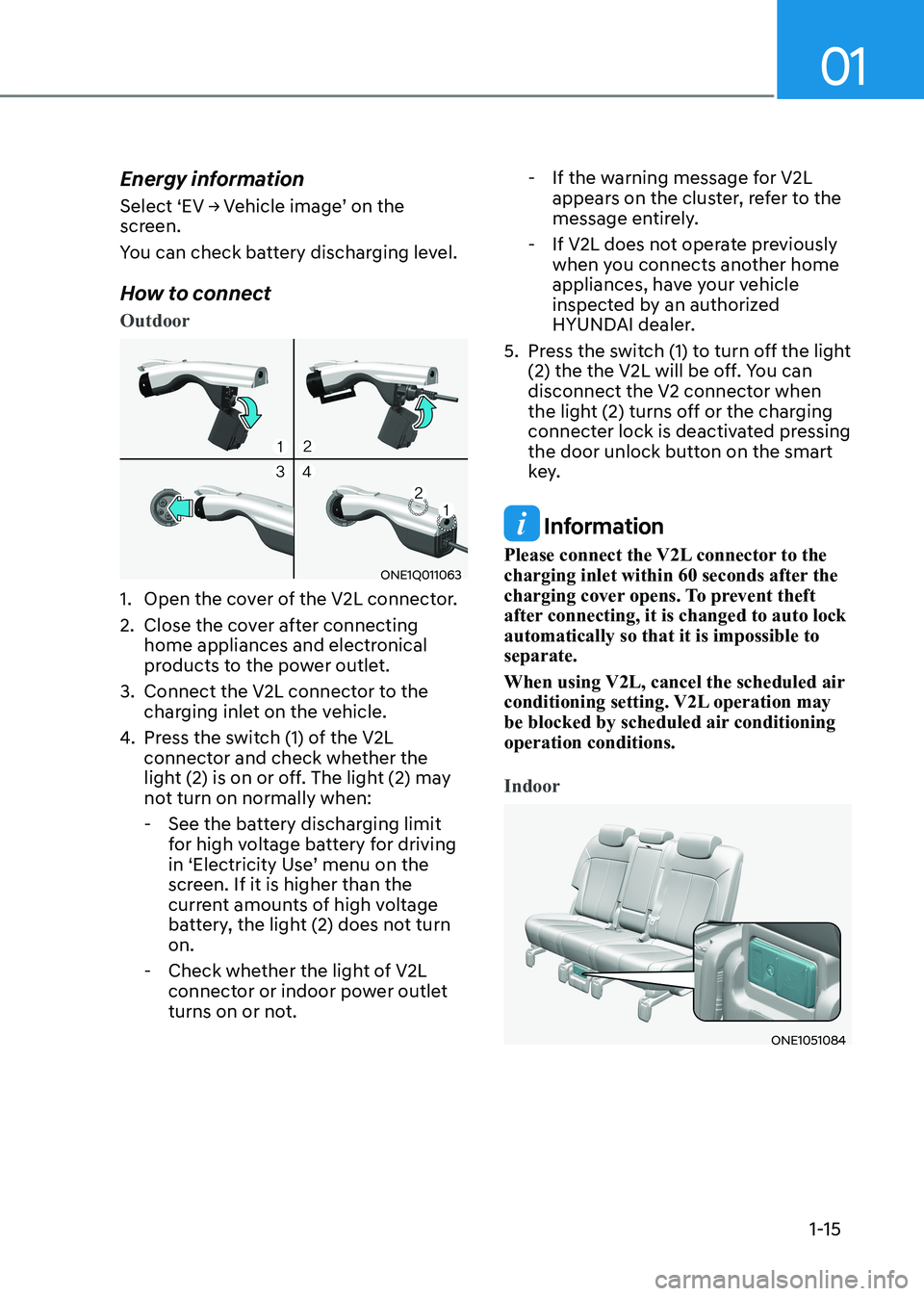
1. Open the cover of the V2L connector.
2. Close the cover after connecting home appliances and electronical
products to the power outlet.
3. Connect the V2L connector to the charging inlet on the vehicle.
4. Press the switch (1) of the V2L
connector and check whether the
light (2) is on or off. The light (2) may
not turn on normally when:
- See the battery discharging limit for high voltage battery for driving
in ‘Electricity Use’ menu on the
screen. If it is higher than the
current amounts of high voltage
battery, the light (2) does not turn on.
- Check whether the light of V2L connector or indoor power outlet
turns on or not. - If the warning message for V2L
appears on the cluster, refer to the
message entirely.
- If V2L does not operate previously when you connects another home
appliances, have your vehicle
inspected by an authorized
HYUNDAI dealer.
5. Press the switch (1) to turn off the light (2) the the V2L will be off. You can
disconnect the V2 connector when
the light (2) turns off or the charging
connecter lock is deactivated pressing
the door unlock button on the smart
key.
Information
Please connect the V2L connector to the
charging inlet within 60 seconds after the
charging cover opens. To prevent theft
after connecting, it is changed to auto lock automatically so that it is impossible to separate.
When using V2L, cancel the scheduled air
conditioning setting. V2L operation may
be blocked by scheduled air conditioning operation conditions.
Indoor
ONE1051084
Page 21 of 680
Foreword / Electric Vehicle System Overview
1-16
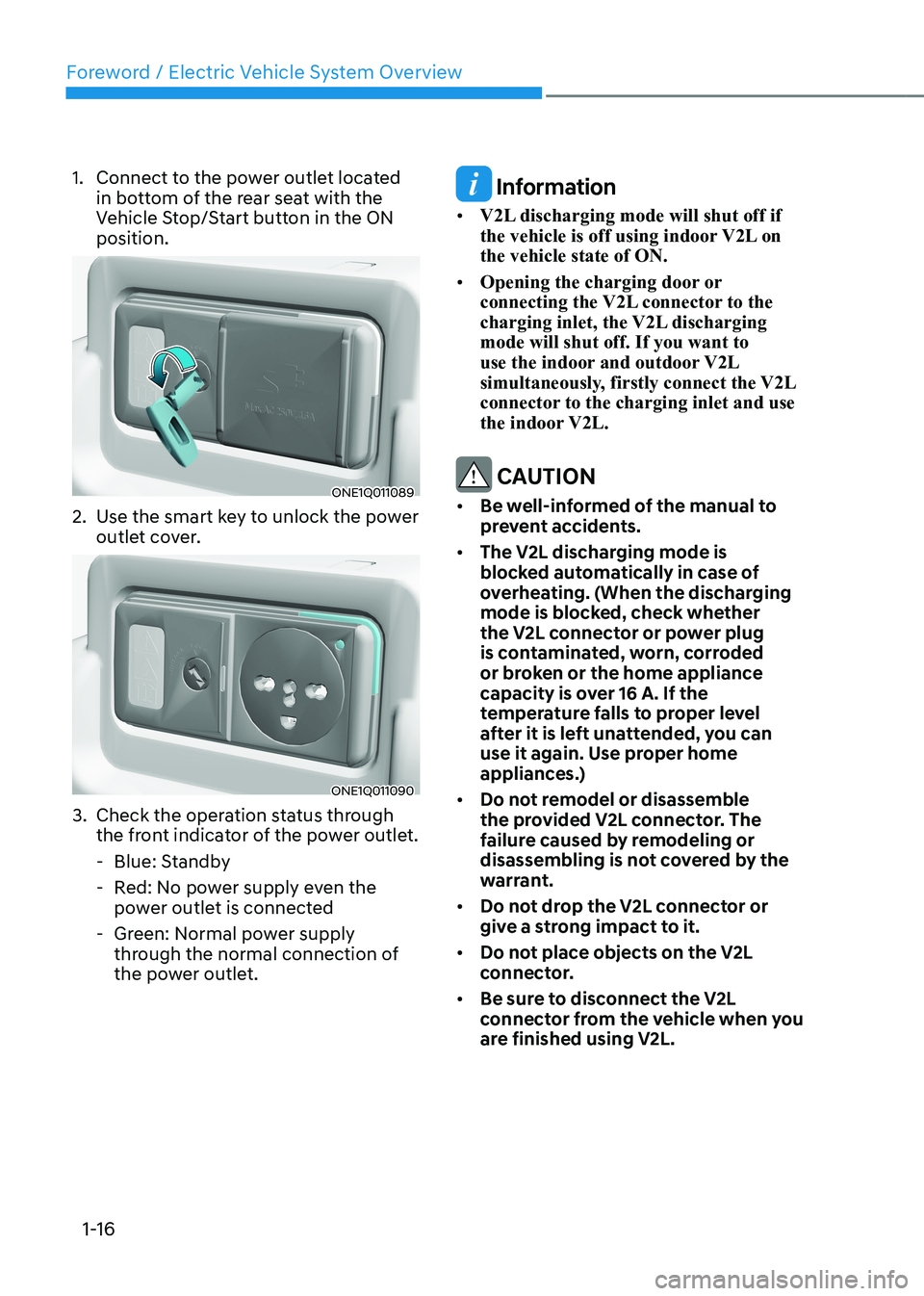
1. Connect to the power outlet located
in bottom of the rear seat with the
Vehicle Stop/Start button in the ON position.
ONE1Q011089
2. Use the smart key to unlock the power outlet cover.
ONE1Q011090
3. Check the operation status through the front indicator of the power outlet.
- Blue: Standby
- Red: No power supply even the power outlet is connected
- Green: Normal power supply through the normal connection of
the power outlet.
Information
• V2L discharging mode will shut off if
the vehicle is off using indoor V2L on the vehicle state of ON.
• Opening the charging door or
connecting the V2L connector to the
charging inlet, the V2L discharging mode will shut off. If you want to
use the indoor and outdoor V2L
simultaneously, firstly connect the V2L
connector to the charging inlet and use
the indoor V2L.
CAUTION
• Be well-informed of the manual to
prevent accidents.
• The V2L discharging mode is
blocked automatically in case of
overheating. (When the discharging
mode is blocked, check whether
the V2L connector or power plug
is contaminated, worn, corroded
or broken or the home appliance
capacity is over 16 A. If the
temperature falls to proper level
after it is left unattended, you can
use it again. Use proper home
appliances.)
• Do not remodel or disassemble
the provided V2L connector. The
failure caused by remodeling or
disassembling is not covered by the
warrant.
• Do not drop the V2L connector or
give a strong impact to it.
• Do not place objects on the V2L
connector.
• Be sure to disconnect the V2L
connector from the vehicle when you
are finished using V2L.