engine Hyundai Ioniq Electric 2018 User Guide
[x] Cancel search | Manufacturer: HYUNDAI, Model Year: 2018, Model line: Ioniq Electric, Model: Hyundai Ioniq Electric 2018Pages: 541, PDF Size: 19.83 MB
Page 310 of 541
5-49
Driving your vehicle
5
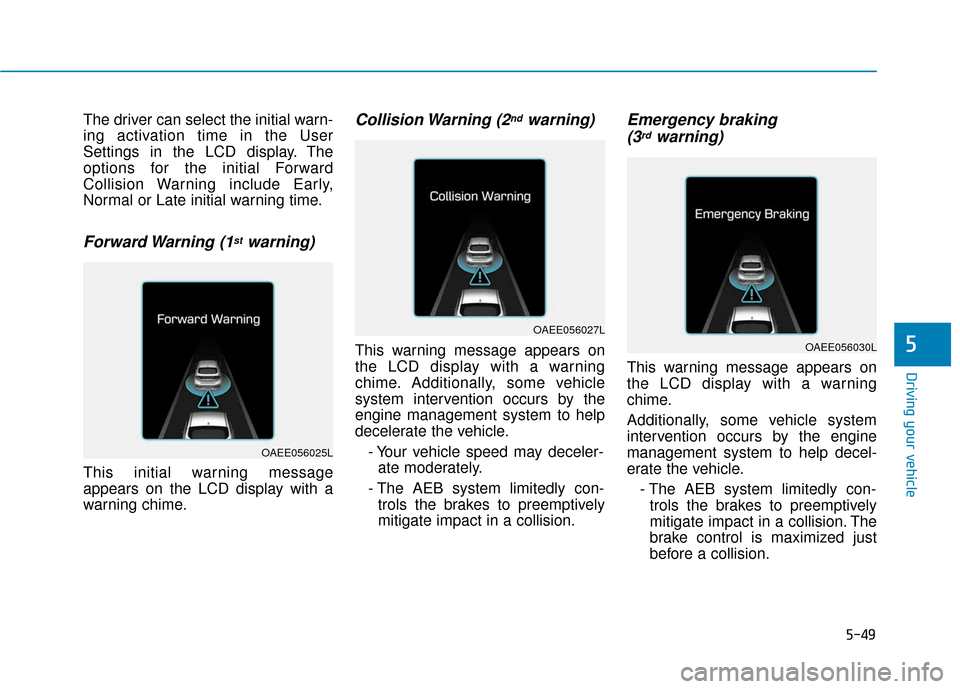
The driver can select the initial warn-
ing activation time in the User
Settings in the LCD display. The
options for the initial Forward
Collision Warning include Early,
Normal or Late initial warning time.
Forward Warning (1stwarning)
This initial warning message
appears on the LCD display with a
warning chime.
Collision Warning (2ndwarning)
This warning message appears on
the LCD display with a warning
chime. Additionally, some vehicle
system intervention occurs by the
engine management system to help
decelerate the vehicle.- Your vehicle speed may deceler-ate moderately.
- The AEB system limitedly con- trols the brakes to preemptively
mitigate impact in a collision.
Emergency braking (3rdwarning)
This warning message appears on
the LCD display with a warning
chime.
Additionally, some vehicle system
intervention occurs by the engine
management system to help decel-
erate the vehicle.
- The AEB system limitedly con-trols the brakes to preemptively
mitigate impact in a collision. The
brake control is maximized just
before a collision.
OAEE056025L
OAEE056027L
OAEE056030L
Page 325 of 541
5-64
Information
• Even though the steering is assistedby the system, the driver can still
steer to control the steering wheel.
• The steering wheel may feel heavier when the steering wheel is assisted
by the system than when it is not.
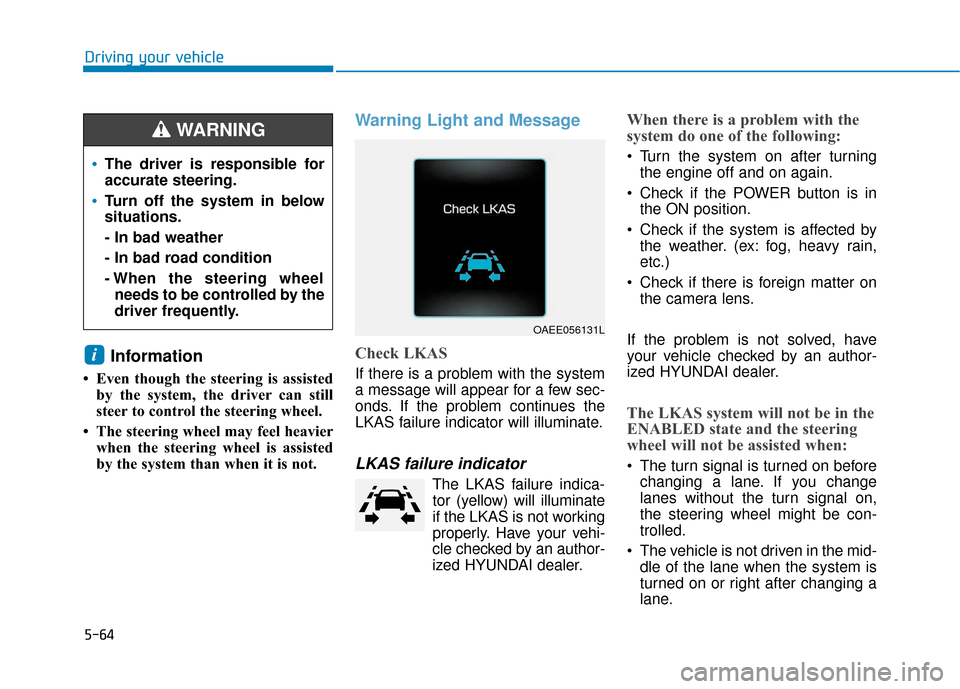
Warning Light and Message
Check LKAS
If there is a problem with the system
a message will appear for a few sec-
onds. If the problem continues the
LKAS failure indicator will illuminate.
LKAS failure indicator
The LKAS failure indica-tor (yellow) will illuminate
if the LKAS is not working
properly. Have your vehi-
cle checked by an author-
ized HYUNDAI dealer.
When there is a problem with the
system do one of the following:
Turn the system on after turning the engine off and on again.
Check if the POWER button is in the ON position.
Check if the system is affected by the weather. (ex: fog, heavy rain,
etc.)
Check if there is foreign matter on the camera lens.
If the problem is not solved, have
your vehicle checked by an author-
ized HYUNDAI dealer.
The LKAS system will not be in the
ENABLED state and the steering
wheel will not be assisted when:
The turn signal is turned on before changing a lane. If you change
lanes without the turn signal on,
the steering wheel might be con-
trolled.
The vehicle is not driven in the mid- dle of the lane when the system is
turned on or right after changing a
lane.
i
Driving your vehicle
OAEE056131L
The driver is responsible for
accurate steering.
Turn off the system in below
situations.
- In bad weather
- In bad road condition
- When the steering wheelneeds to be controlled by the
driver frequently.
WARNING
Page 367 of 541
6-6
What to do in an emergency
7. Connect the other end of the sec- ond jumper cable to the black,
negative (-) chassis ground of
your vehicle (4).
Do not allow the jumper cables to
contact anything except the cor-
rect battery or jumper terminals or
the correct ground. Do not lean
over the battery when making
connections.
8. Start the engine of the assisting vehicle and let it run at approxi-
mately 2,000 rpm for a few min-
utes. Then start your vehicle.
9. After your vehicle starts allow it to operate at least 30 minutes with-
out shutting it down, this will help
charge back the 12V battery.
If your vehicle will not start after a
few attempts, it probably requires
servicing. In this event please seek
qualified assistance. If the cause of
your battery discharging is not
apparent, have your vehicle checked
by an authorized HYUNDAI dealer. Disconnect the jumper cables in the
exact reverse order you connected
them:
1. Disconnect the jumper cable from
the black, negative (-) chassis
ground of your vehicle (4).
2. Disconnect the other end of the jumper cable from the black, neg-
ative (-) battery/chassis ground of
the assisting vehicle (3).
3. Disconnect the second jumper cable from the red, positive (+)
battery/jumper terminal of the
assisting vehicle (2).
4. Disconnect the other end of the jumper cable from the red, positive
(+) jumper terminal of your vehicle
(1). 1. Pull off the road and stop as soon
as it is safe to do so.
2. Shift to P (Park) and set the park- ing brake. If the air conditioning is
on, turn it off.
3. If coolant is running out under the vehicle or steam is coming out
from the hood, stop the vehicle.
Do not open the hood until the
coolant has stopped running or
the steaming has stopped. If there
is no visible loss of coolant and no
steam, leave the vehicle running
and check to be sure the vehicle
cooling fan is operating. If the fan
is not running, turn the vehicle off.
I IF
F
T
T H
H E
E
V
V E
EH
H I
IC
C L
LE
E
O
O V
VE
ER
R H
H E
EA
A T
TS
S
Page 401 of 541
7-16
Maintenance
B
BR
RA
A K
KE
E
F
F L
LU
U I
ID
D
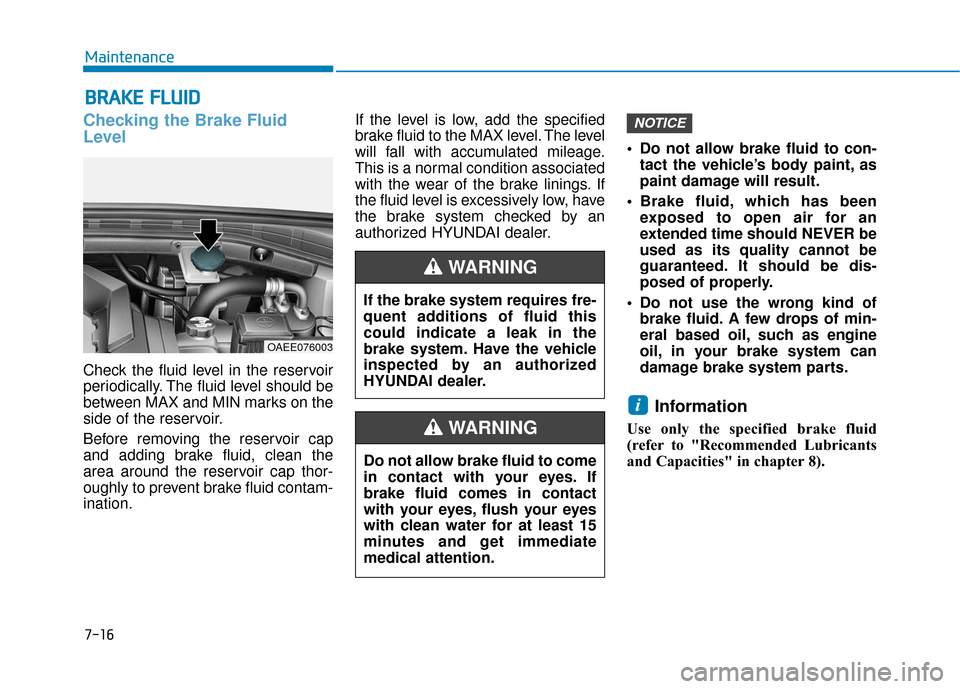
Checking the Brake Fluid
Level
Check the fluid level in the reservoir
periodically. The fluid level should be
between MAX and MIN marks on the
side of the reservoir.
Before removing the reservoir cap
and adding brake fluid, clean the
area around the reservoir cap thor-
oughly to prevent brake fluid contam-
ination. If the level is low, add the specified
brake fluid to the MAX level. The level
will fall with accumulated mileage.
This is a normal condition associated
with the wear of the brake linings. If
the fluid level is excessively low, have
the brake system checked by an
authorized HYUNDAI dealer.
Do not allow brake fluid to con-
tact the vehicle’s body paint, as
paint damage will result.
Brake fluid, which has been exposed to open air for an
extended time should NEVER be
used as its quality cannot be
guaranteed. It should be dis-
posed of properly.
Do not use the wrong kind of brake fluid. A few drops of min-
eral based oil, such as engine
oil, in your brake system can
damage brake system parts.
Information
Use only the specified brake fluid
(refer to "Recommended Lubricants
and Capacities" in chapter 8).
i
NOTICE
If the brake system requires fre-
quent additions of fluid this
could indicate a leak in the
brake system. Have the vehicle
inspected by an authorized
HYUNDAI dealer.
WARNING
Do not allow brake fluid to come
in contact with your eyes. If
brake fluid comes in contact
with your eyes, flush your eyes
with clean water for at least 15
minutes and get immediate
medical attention.
WARNING
OAEE076003
Page 476 of 541
I-8
LCD displayAssist mode ................................................................3-83
LCD display modes ....................................................3-81
Quick guide help ........................................................3-82
Trip computer mode ...................................................3-82
Turn By Turn (TBT) mode.........................................3-82
User settings mode .....................................................3-84
Warning mode ............................................................3-83
LCD display messages Aux. Battery Saver+ used while parked ....................3-75
Battery Overheated! Stop vehicle ..............................3-77
Charge immediately. Power limited ...........................3-76
Charger Error!/Quick Charger Error!.........................3-75
Charging door open ....................................................3-74
Check BRAKE SWITCH fuse ...................................3-70
Check brakes ..............................................................3-76
Check electric vehicle system ....................................3-79
Check headlamp FAN ................................................3-73
Check headlamp LED ................................................3-72
Check headlight ..........................................................3-72
Check steering wheel lock system .............................3-69
Check virtual engine sound ........................................3-79
Door, Hood, Tailgate Open ........................................3-70
Key not detected .........................................................3-69
Key not in vehicle ......................................................3-69
Lights mode ................................................................3-73
Low battery ................................................................3-76
Low Battery Temp. Power limited .............................3-77 Low Battery. Charge immediately .............................3-77
Low Key Battery ........................................................3-68
Low pressure ..............................................................3-72
Low washer fluid........................................................3-70
Power limited .............................................................3-78
Press brake pedal to start vehicle ...............................3-69
Press POWER button again .......................................3-69
Press POWER button while turning wheel ................3-69
Press POWER button with key ..................................3-70
Remaining time ..........................................................3-74
Shift to P.....................................................................3-6\
8
Shift to P to charge .....................................................3-74
Shift to P to start vehicle ............................................3-70
Stop vehicle and check brakes ...................................3-75
Stop vehicle and check power supply ........................3-78
Sunroof open ..............................................................3-71
Turn on "FUSE SWITCH".........................................3-71
Unplug vehicle to start ...............................................3-70
Wiper ........................................................................\
..3-73
LCD display modes ........................................................3-81
Liftgate ........................................................................\
....3-48
Light ........................................................................\
........3-94 Turn signals ................................................................3-96
Parking lamp position ................................................3-95
Lane change signals ...................................................3-96
High beam operation ..................................................3-96
Index
Page 484 of 541
How to Disconnect Portable Charger
(ICCB: In-Cable Control Box) ..........................................H39
Unlock Charging Connector in Emergency ................H40
Precautions for Portable Charger
(ICCB: In-Cable Control Box) ..........................................H40
How to Start the Vehicle ......................................H41
How to Stop the Vehicle.......................................H41
Virtual Engine Sound System ..............................H42
Distance to Empty .................................................H42
When destination is not set ...........................................H43
When destination is set...................................................H43
Tips for Improving Distance to Empty ...............H44
ECO Guide ...............................................................H44
State of Charge (SOC) Gauge for
High Voltage Battery ............................................H45
Warning and Indicator Lights
(related to electric vehicle) .................................H45
Ready Indicator .................................................................H45
Service Warning Light .....................................................H46
Power Down Warning Light ...........................................H46
Charging Indicator Light..................................................H46
High Voltage Battery Level Warning Light .................H46
Regenerative Brake Warning Light ..............................H47
LCD Display Messages ..........................................H47
Shift to P to charge .........................................................H47
Remaining time ..................................................................H47 Charging Door Open ........................................................H48
Charger Error! / Quick Charger Error!........................H48
Stop vehicle and check brakes .....................................H48
Check brakes......................................................................H4\
9
Low Battery........................................................................\
H49
Charge immediately. Power limited ..............................H49
Low Battery. Charge immediately.................................H50
Low Battery Temp. Power limited.................................H50
Battery Overheated! Stop vehicle ................................H50
Power limited .....................................................................H51\
Stop vehicle and check power supply .........................H51
Check Virtual Engine Sound System............................H52
Check electric vehicle system .......................................H52
Energy Flow ...........................................................H52
Vehicle Stop........................................................................\
H53
EV Propulsion ....................................................................H53
Regeneration ......................................................................H5\
3
Aux. Battery Saver+ .............................................H54
Mode ........................................................................\
............H54
System Setting...................................................................H55
LCD Message .....................................................................H55\
If an Accident Occurs ...........................................H56
Other Precautions for Electric Vehicle ..............H58
Service Plug ...........................................................H59
Page 485 of 541
H3
Electric Vehicle
An electric vehicle is driven using a
battery and an electric motor. While
general vehicles use an internal
combustion engine and gasoline as
fuel, electric vehicles use electrical
energy that is charged inside the
high voltage battery. As a result,
electric vehicles are eco-friendly in
that they do not require fuel and do
not emit exhaust gases.
Characteristics of Electric
Vehicles
1. It is driven using the electricalenergy that is charged inside the
high voltage battery. This method
prevents air pollution since fuel,
like gasoline, is not required,
negating the emission of exhaust
gases.
2. A high performance motor is used in the vehicle as well. Compared
to standard, internal combustion
engine vehicles, engine noise and
vibrations are much more minimal
when driving.
3. When decelerating or driving downhill, regenerative braking is
utilized to charge the high voltage
battery. This minimizes energy
loss and increases the distance to
empty.
4. When the battery charge is not sufficient, normal charge, quick
charge and trickle charge are
available. (Refer to "Charge Types
for Electric Vehicle" for details.)
Information
What does regenerative braking do?
It uses the electric motor when decel-
erating or braking which transforms
vehicle motion (kinetic energy) to elec-
trical energy to charge the high volt-
age batteries. (Torque is applied in the
opposite direction when decelerating
to generate braking force and electric
energy.)
Battery Information
• The vehicle is composed of a highvoltage battery that drives the
motor and air-conditioner, and an
auxiliary battery (12 V) that drives
the lamps, wipers, and audio sys-
tem.
The auxiliary battery is automati- cally charged when the vehicle is in
the ready ( ) mode or the high
voltage battery is being charged.
i
E
EL
LE
E C
CT
T R
R I
IC
C
V
V E
EH
H I
IC
C L
LE
E
Page 486 of 541
H4
M
MA
AI
IN
N
C
C O
O M
M P
PO
O N
NE
EN
N T
TS
S
O
O F
F
E
E L
LE
E C
CT
T R
R I
IC
C
V
V E
EH
H I
IC
C L
LE
E
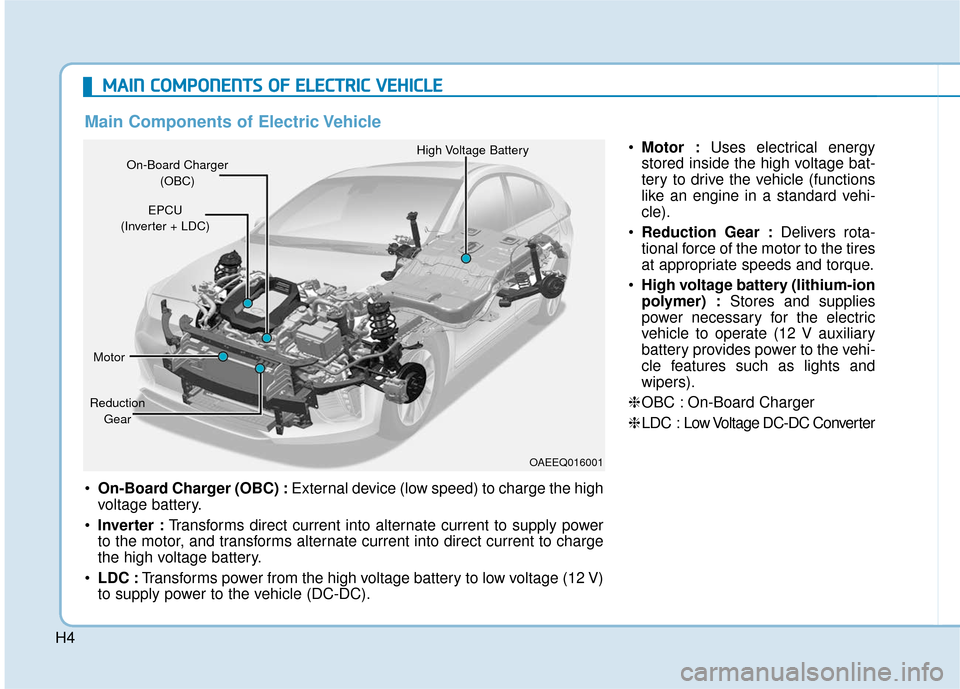
On-Board Charger (OBC) : External device (low speed) to charge the high
voltage battery.
Inverter : Transforms direct current into alternate current to supply power
to the motor, and transforms alternate current into direct current to charge
the high voltage battery.
LDC : Transforms power from the high voltage battery to low voltage (12 V)
to supply power to the vehicle (DC-DC).
On-Board Charger
(OBC) High Voltage Battery
EPCU
(Inverter + LDC)
Motor
Reduction Gear
Main Components of Electric Vehicle
Motor : Uses electrical energy
stored inside the high voltage bat-
tery to drive the vehicle (functions
like an engine in a standard vehi-
cle).
Reduction Gear : Delivers rota-
tional force of the motor to the tires
at appropriate speeds and torque.
High voltage battery (lithium-ion
polymer) : Stores and supplies
power necessary for the electric
vehicle to operate (12 V auxiliary
battery provides power to the vehi-
cle features such as lights and
wipers).
❈ OBC : On-Board Charger
❈ LDC : Low V oltage DC-DC Converter
OAEEQ016001
Page 524 of 541
H42
D
DR
RI
IV
V I
IN
N G
G
E
E L
LE
E C
CT
T R
R I
IC
C
V
V E
EH
H I
IC
C L
LE
E
(
( C
C O
O N
NT
T.
.)
)
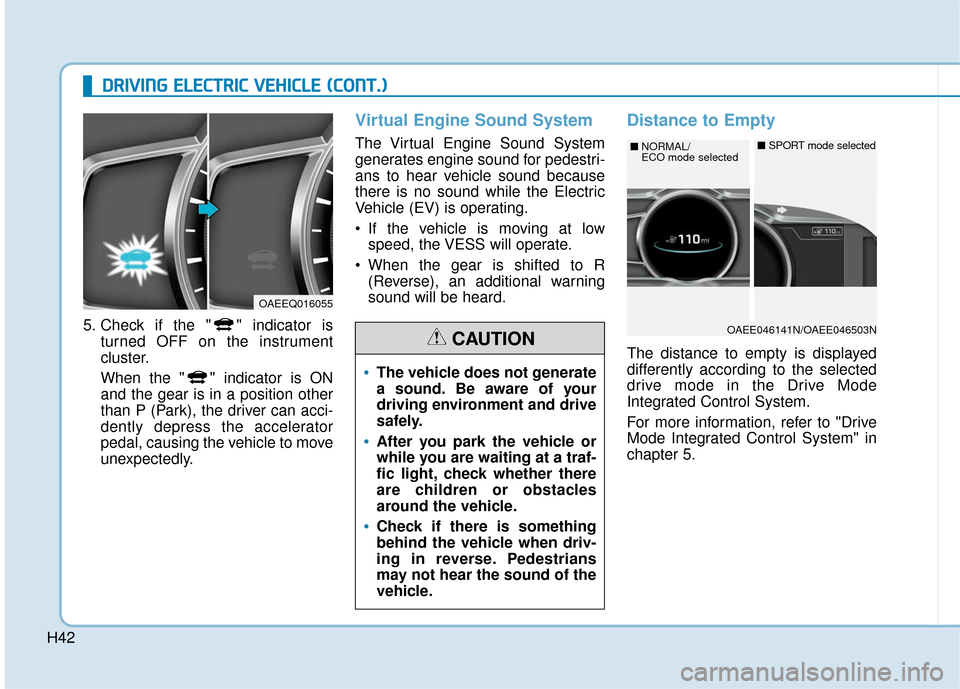
5. Check if the " " indicator is
turned OFF on the instrument
cluster.
When the " " indicator is ON
and the gear is in a position other
than P (Park), the driver can acci-
dently depress the accelerator
pedal, causing the vehicle to move
unexpectedly.
Virtual Engine Sound System
The Virtual Engine Sound System
generates engine sound for pedestri-
ans to hear vehicle sound because
there is no sound while the Electric
Vehicle (EV) is operating.
If the vehicle is moving at lowspeed, the VESS will operate.
When the gear is shifted to R (Reverse), an additional warning
sound will be heard.
Distance to Empty
The distance to empty is displayed
differently according to the selected
drive mode in the Drive Mode
Integrated Control System.
For more information, refer to "Drive
Mode Integrated Control System" in
chapter 5.
OAEEQ016055
The vehicle does not generate
a sound. Be aware of your
driving environment and drive
safely.
After you park the vehicle or
while you are waiting at a traf-
fic light, check whether there
are children or obstacles
around the vehicle.
Check if there is something
behind the vehicle when driv-
ing in reverse. Pedestrians
may not hear the sound of the
vehicle.
CAUTIONOAEE046141N/OAEE046503N
■ NORMAL/
ECO mode selected■SPORT mode selected
Page 534 of 541

H52
D
DR
RI
IV
V I
IN
N G
G
E
E L
LE
E C
CT
T R
R I
IC
C
V
V E
EH
H I
IC
C L
LE
E
(
( C
C O
O N
NT
T.
.)
)
Check Virtual Engine Sound
System
This message is displayed when
there is a problem with the Virtual
Engine Sound System (VESS).
In this case, have your vehicle inspect-
ed by an authorized HYUNDAI dealer.
Check electric vehicle system
This warning message is displayed
when there is a problem with the
electric vehicle control system.
Refrain from driving when the warn-
ing message is displayed.
In this case, have your vehicle inspect-
ed by an authorized HYUNDAI dealer.
Energy Flow
The electric vehicle system informs
the drivers its energy flow in various
operating modes. While driving, the
current energy flow is specified in 3
modes.
OLFH044543L
OAEE046149L