charging current Hyundai Ioniq Electric 2018 Owner's Manual
[x] Cancel search | Manufacturer: HYUNDAI, Model Year: 2018, Model line: Ioniq Electric, Model: Hyundai Ioniq Electric 2018Pages: 541, PDF Size: 19.83 MB
Page 178 of 541
3-93
Convenient features of your vehicle
3
Driving info display
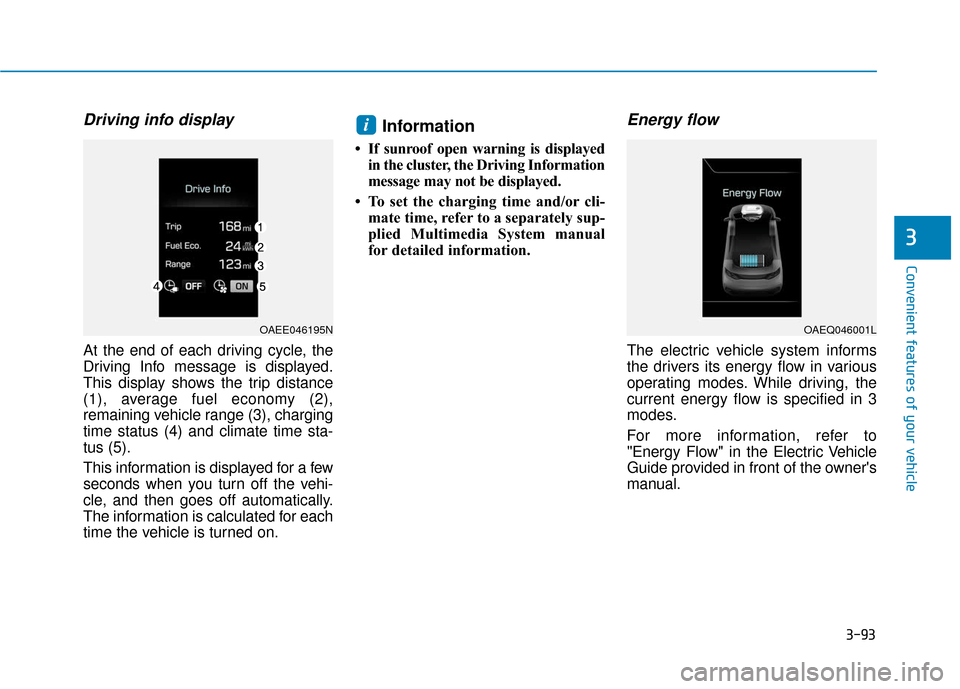
At the end of each driving cycle, the
Driving Info message is displayed.
This display shows the trip distance
(1), average fuel economy (2),
remaining vehicle range (3), charging
time status (4) and climate time sta-
tus (5).
This information is displayed for a few
seconds when you turn off the vehi-
cle, and then goes off automatically.
The information is calculated for each
time the vehicle is turned on.
Information
• If sunroof open warning is displayedin the cluster, the Driving Information
message may not be displayed.
• To set the charging time and/or cli- mate time, refer to a separately sup-
plied Multimedia System manual
for detailed information.
Energy flow
The electric vehicle system informs
the drivers its energy flow in various
operating modes. While driving, the
current energy flow is specified in 3
modes.
For more information, refer to
"Energy Flow" in the Electric Vehicle
Guide provided in front of the owner's
manual.
i
OAEE046195NOAEQ046001L
Page 241 of 541
![Hyundai Ioniq Electric 2018 Owners Manual 4-24
Multimedia System
(4) Save: Save the selected file(s)
.
- Select the files you want to save, and select [Save]. This saves the
selected files to My Music.
- Saving is canceled if phone calls are](/img/35/14904/w960_14904-240.png "Hyundai Ioniq Electric 2018 Owners Manual 4-24
Multimedia System
(4) Save: Save the selected file(s)
.
- Select the files you want to save, and select [Save]. This saves the
selected files to My Music.
- Saving is canceled if phone calls are")
4-24
Multimedia System
(4) Save: Save the selected file(s)
.
- Select the files you want to save, and select [Save]. This saves the
selected files to My Music.
- Saving is canceled if phone calls are received or made while saving.
- If Siri is activated, phone calls are received or made while sav-
ing, saving will be canceled.
- Up to 6,000 files can be saved.
- The currently playing file on the USB device cannot be changed
while saving.
- My Music cannot be used while saving.
- Up to 700 MB can be saved.
Information: Detailed information on the currently playing song is dis-
played.
Sound Settings: Audio sound set- tings can be changed.Information
-
Using the iPod®Devices
• To use the audio system’s iPod
®con-
trol function, use the dedicated
cable provided with your iPod
®.
• Connecting the iPod
®to the vehicle
during play may result in a loud
noise that lasts about one to two sec-
onds. Connect the iPod
®to the vehi-
cle after stopping or pausing play.
• Connect the iPod
®with the vehicle in
the ACC ON state to begin charging.
• When connecting the iPod
®cable,
be sure to fully push the cable into
the port.
• When EQ effects are enabled simul- taneously on external devices, such
as iPod
®s and the audio system, the
EQ effects may overlap, causing
sound quality deterioration or dis-
tortion. Deactivate the EQ function
for all external devices, if possible.
• Noise may occur when your iPod
®
or the AUX port is connected.
Disconnect and store separately
when not in use. (Continued)(Continued)
• There may be noise if the audio sys-
tem is used with an iPod
®or AUX
external device connected to the
power jack. In these cases, discon-
nect the iPod
®or external device
from the power jack.
• Play may be interrupted, or device malfunctions may occur depending
on the characteristics of your
iPod
®/iPhone®.
• Play may fail if your iPhone
®is con-
nected through both Bluetooth®
Wireless Technology and USB. In
this case, select Dock connector or
Bluetooth
®Wireless Technology on
your iPhone®to change the sound
output settings.
• If your software version does not support the communication proto-
col or your iPod
®is not recognized
due to device failure, anomalies or
defects, iPod
®mode cannot be used.
• iPod
®nano (5th generation) devices
may not be recognized if the battery
is low. Charge sufficiently before use.
(Continued)
i
Page 490 of 541
H8
E
EV
V
M
M O
OD
DE
E
(
( C
C O
O N
NT
T.
.)
)
Nearby by stations
Stations around the current location
are searched. Depending on the
symbol color of the station, it is cate-
gorized as Reachable, Risky and
Unreachable.
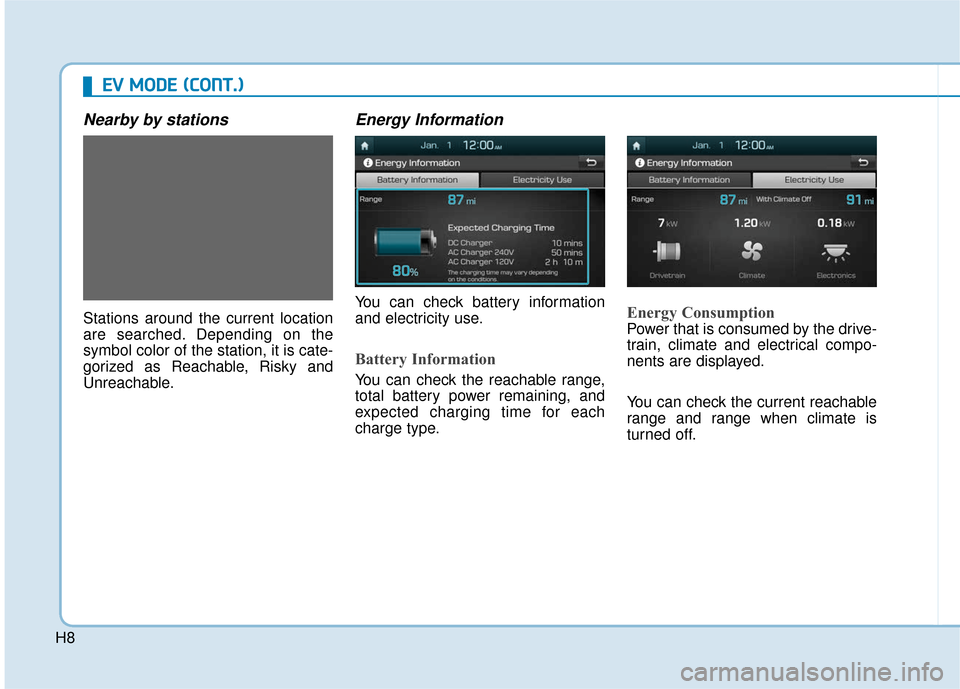
Energy Information
You can check battery information
and electricity use.
Battery Information
You can check the reachable range,
total battery power remaining, and
expected charging time for each
charge type.
Energy Consumption
Power that is consumed by the drive-
train, climate and electrical compo-
nents are displayed.
You can check the current reachable
range and range when climate is
turned off.
Page 493 of 541
H11
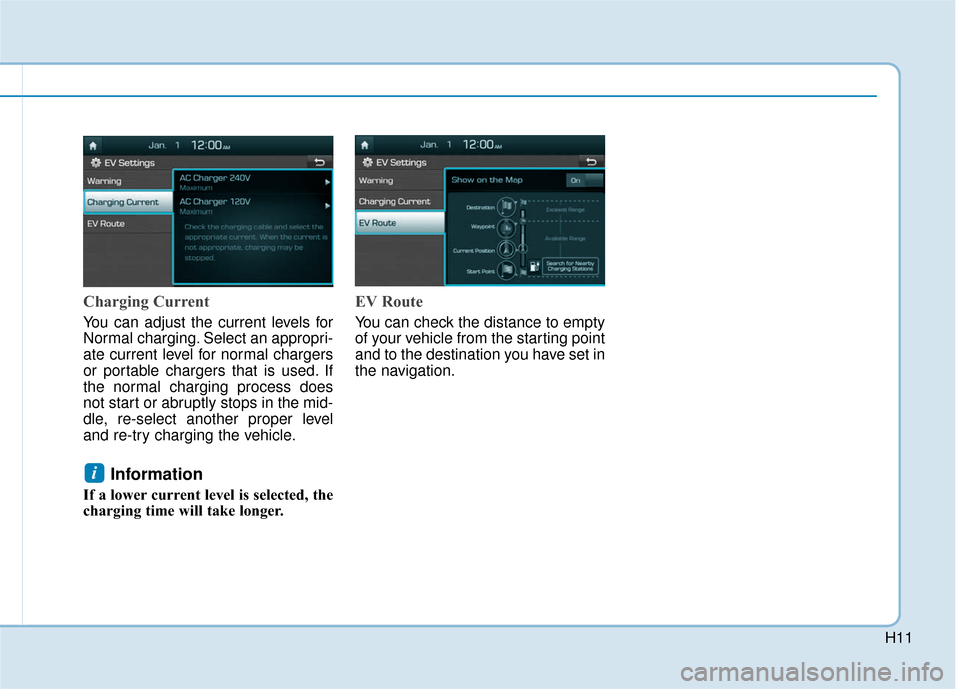
Charging Current
You can adjust the current levels for
Normal charging. Select an appropri-
ate current level for normal chargers
or portable chargers that is used. If
the normal charging process does
not start or abruptly stops in the mid-
dle, re-select another proper level
and re-try charging the vehicle.
Information
If a lower current level is selected, the
charging time will take longer.
EV Route
You can check the distance to empty
of your vehicle from the starting point
and to the destination you have set in
the navigation.
i
Page 494 of 541
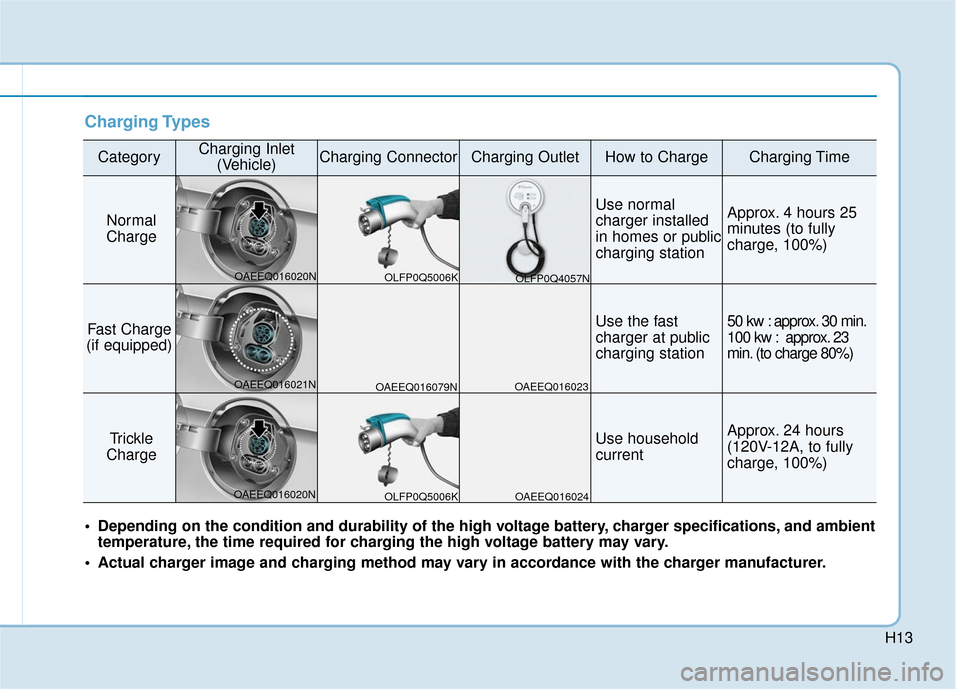
H12
Charging Information
Normal Charge :
The electric vehicle is charged by
plugging into a normal charger
installed in your home or a public
charging station. (For further details,
refer to the 'Normal Charge'.)
Fast Charge (if equipped):
You can charge at high speeds at
public charging stations. Refer to
the respective company's manual
that is provided for each fast charg-
er type.
Battery performance and durability
can deteriorate if the fast charger is
used constantly.
Use of fast charge should be mini-
mized in order to help prolong high
voltage battery life.
Trickle Charge :
The Electric vehicle can be charged
by using household electricity. The
electrical outlet in your home must
comply with regulations and can
safely accommodate the Voltage /
Current (Amps) / Power (Watts) rat-
ings specified on the portable
charge.
Charging Time Information
Normal Charge :
Takes about 4 hours 25 minutes at
room temperature. (Can be
charged to 100%.)
Fast Charge (if equipped):
- 50 kw charger : Takes about 30
minutes at room temperature
when charged to 80%.
- 100 kw charger : Takes about 23 minutes at room temperature
when charged to 80%.
Both 50/100 kw charger can be
charged to 94%.
Trickle Charge : Takes about 24 hours at room tem-
perature. (120V-12A) (Can be
charged to 100%.)
Information
Depending on the condition and dura-
bility of the high voltage battery,
charger specifications, and ambient
temperature, the time required for
charging the high voltage battery may
vary.
i
C CH
H A
AR
RG
G E
E
T
T Y
Y P
PE
ES
S
F
F O
O R
R
E
E L
LE
E C
CT
T R
R I
IC
C
V
V E
EH
H I
IC
C L
LE
E
Page 495 of 541
H13
Charging Types
CategoryCharging Inlet(Vehicle)Charging ConnectorCharging OutletHow to ChargeCharging Time
Normal
Charge
Use normal
charger installed
in homes or public
charging stationApprox. 4 hours 25
minutes (to fully
charge, 100%)
Fast Charge
(if equipped)Use the fast
charger at public
charging station50 kw : approx. 30 min.
100 kw : approx. 23
min. (to charge 80%)
Trickle
Charge Use household
currentApprox. 24 hours
(120V-12A, to fully
charge, 100%)
Depending on the condition and durability of the high voltage battery, charger specifications, and ambient temperature, the time required for charging the high voltage battery may vary.
Actual charger image and charging method may vary in accordance with the charger manufacturer.
OLFP0Q5006K
OAEEQ016020N
OAEEQ016021N
OAEEQ016020N OAEEQ016079N
OAEEQ016023
OAEEQ016024 OLFP0Q4057N
OLFP0Q5006K
Page 518 of 541
H36
C
CH
H A
AR
RG
G I
IN
N G
G
E
E L
LE
E C
CT
T R
R I
IC
C
V
V E
EH
H I
IC
C L
LE
E
(
( T
T R
R I
IC
C K
K L
LE
E
C
C H
H A
AR
RG
G E
E)
)
(
( C
C O
O N
NT
T.
.)
)
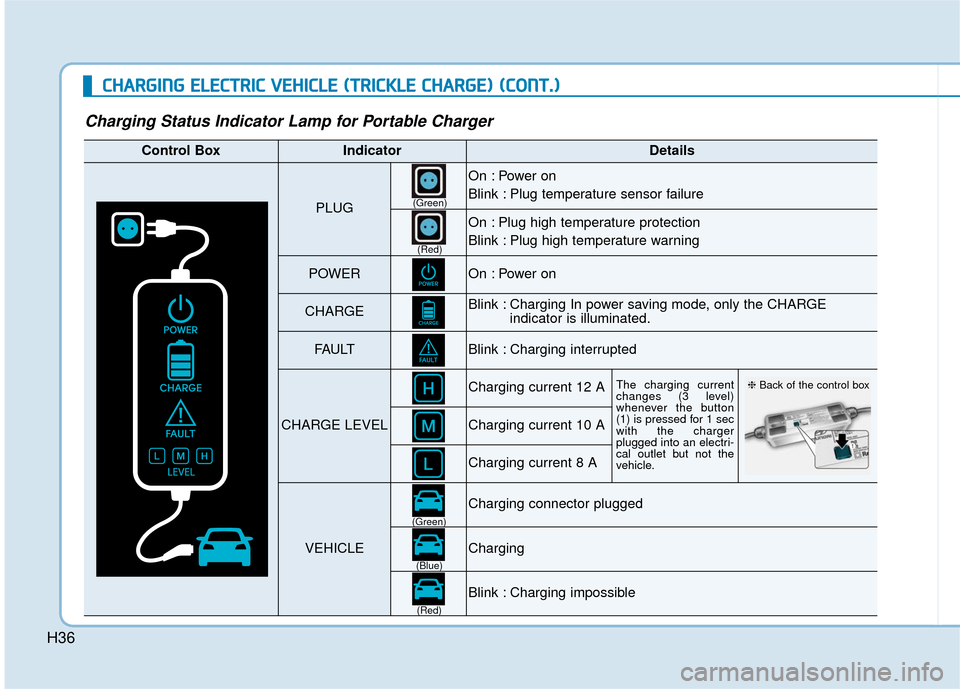
Charging Status Indicator Lamp for Portable Charger
Control BoxIndicatorDetails
PLUG
On : Power on
Blink : Plug temperature sensor failure
On : Plug high temperature protection
Blink : Plug high temperature warning
POWEROn : Power on
CHARGEBlink : Charging In power saving mode, only the CHARGE
indicator is illuminated.
FAU LTBlink : Charging interrupted
CHARGE LEVEL
Charging current 12 AThe charging current
changes (3 level)
whenever the button
(1) is pressed for 1 sec
with the charger
plugged into an electri-
cal outlet but not the
vehicle.
Charging current 10 A
Charging current 8 A
VEHICLE
Charging connector plugged
Charging
Blink : Charging impossible
(Green)
(Green) (Blue)
(Red)(Red)
❈
Back of the control box