windshield Hyundai Ioniq Electric 2018 Owner's Manual
[x] Cancel search | Manufacturer: HYUNDAI, Model Year: 2018, Model line: Ioniq Electric, Model: Hyundai Ioniq Electric 2018Pages: 541, PDF Size: 19.83 MB
Page 15 of 541
1-6
Your vehicle at a glance
M
MO
OT
TO
O R
R
C
C O
O M
M P
PA
A R
RT
TM
M E
EN
N T
T
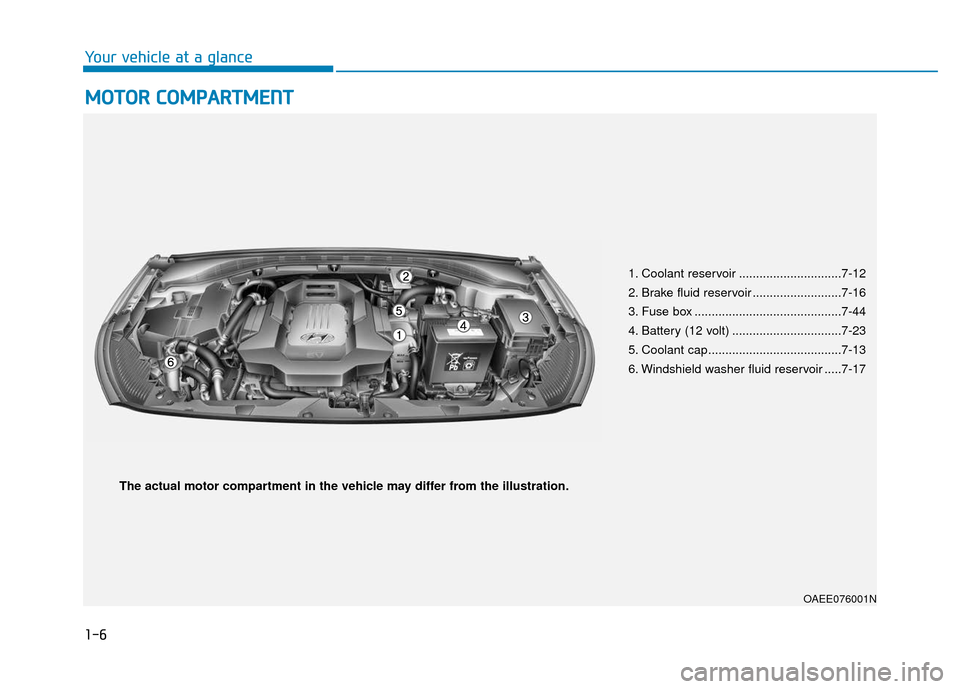
1. Coolant reservoir ..............................7-12
2. Brake fluid reservoir ..........................7-16
3. Fuse box ...........................................7-44
4. Battery (12 volt) ................................7-23
5. Coolant cap.......................................7-13
6. Windshield washer fluid reservoir .....7-17
OAEE076001N
The actual motor compartment in the vehicle may differ from the illustration.
Page 65 of 541
![Hyundai Ioniq Electric 2018 Owners Manual 2-50
Safety system of your vehicle
Side air bags ]
Your vehicle is equipped with a side
air bag in each front seat. The pur-
pose of the air bag is to provide the
vehicles driver and the front passen](/img/35/14904/w960_14904-64.png "Hyundai Ioniq Electric 2018 Owners Manual 2-50
Safety system of your vehicle
Side air bags ]
Your vehicle is equipped with a side
air bag in each front seat. The pur-
pose of the air bag is to provide the
vehicles driver and the front passen")
2-50
Safety system of your vehicle
Side air bags ]
Your vehicle is equipped with a side
air bag in each front seat. The pur-
pose of the air bag is to provide the
vehicle's driver and the front passen-
ger with additional protection than
that offered by the seat belt alone.The side air bags are designed to
deploy only during certain side impact
collisions, depending on the crash
severity.
The side and curtain air bags on
both sides of the vehicle may deploy
if a rollover or possible rollover is
detected.
The side air bags are not designed to
deploy in all side impact or rollover
situations.
OAE036037
OAE036038
To reduce the risk of serious
injury or death from an inflating
side air bag, take the follo
wing
precautions:
Seat belts must be worn at all
times to help keep occupants
positioned properly.
(Continued)
WARNING
(Continued)
Move your seat as far back as
possible from front air bags,
while still maintaining control
of the vehicle.
Never lean against the door or
center console.
Do not allow the front passen-
ger to place their feet or legs
on the dashboard.
No objects (such as crash pad
cover, cellular phone holder,
cup holder, perfume or stick-
ers) should be placed over or
near the air bag modules on
the steering wheel, instrument
panel, windshield glass, and
the front passenger's panel
above the glove box. Such
objects could cause harm if
the vehicle is in a crash
severe enough to cause the
air bags to deploy.
Do not attach any objects on
front windshield and inside
mirror.
Page 72 of 541
2-57
Safety system of your vehicle
2
What to Expect After an Air
Bag Inflates
After a frontal or side air bag inflates,
it will deflate very quickly. Air bag
inflation will not prevent the driver
from seeing out of the windshield or
being able to steer. Curtain air bags
may remain partially inflated for
some time after they deploy.
Noise and smoke from inflatingair bag
When the air bags inflate, they make
a loud noise and may produce
smoke and powder in the air inside of
the vehicle. This is normal and is a
result of the ignition of the air bag
inflator. After the air bag inflates, you
may feel substantial discomfort in
breathing because of the contact of
your chest with both the seat belt and
the air bag, as well as from breathing
the smoke and powder. The powder
may aggravate asthma for some
people. If you experience breathing
problems after an air bag deploy-
ment, seek medical attention imme-
diately.
Though the smoke and powder are
nontoxic, they may cause irritation to
the skin, eyes, nose, throat, etc. If
this is the case, wash and rinse with
cold water immediately and seek
medical attention if the symptoms
persist.
(Continued)Always wash exposed skin
areas thoroughly with cold
and mild soap.
Always have an authorized
HYUNDAI dealer replace the
air bag immediately after
deployment. Air bags are
designed to be used only
once.
After an air bag inflates, take
the following precautions:
Open your windows and doors
as soon as possible after
impact to reduce prolonged
exposure to the smoke and
powder released by the inflat-
ing air bag.
Do not touch the air bag stor-
age area's internal compo-
nents immediately after an air
bag has inflated. The parts
that come into contact with an
inflating air bag may be very
hot.
(Continued)
WARNING
Page 87 of 541
Wipers and Washers..........................................3-103
Windshield Wipers ........................................................3-103
Windshield Washers .....................................................3-104
Driver Assist System .........................................3-105
Rear View Camera ........................................................3-105
Defroster .............................................................3-106
Rear Window Defroster ..............................................3-106
Automatic Climate Control System ..................3-107
Automatic Heating and Air Conditioning.................3-108
Manual Heating and Air Conditioning......................3-109
System Operation .........................................................3-117
System Maintenance....................................................3-118
Windshield Defrosting and Defogging ............3-120
To Defog Inside Windshield ........................................3-120
To Defrost Outside Windshield ..................................3-121
Defogging Logic ............................................................3-121
Auto Defogging System ..............................................3-121
Climate Control Additional Features ...............3-123
Automatic Ventilation ...................................................3-123
Storage Compartment .......................................3-123
Center Console Storage ..............................................3-123
Glove Box ........................................................................\
3-124
Sunglass Holder.............................................................3-124
Multi Box ........................................................................\
.3-125
Interior Features ................................................3-125
Cup Holder ......................................................................3-\
125
Sunvisor ........................................................................\
...3-126
Power Outlet ..................................................................3-127
Wireless Cellular Phone Charging System..............3-128
Clock ........................................................................\
.........3-129
Clothes Hanger ..............................................................3-130
Floor Mat Anchor(s).....................................................3-130
Cargo Security Screen .................................................3-131
3
Page 180 of 541
3-95
Convenient features of your vehicle
3
• Do not cover or spill anything onthe sensor (1) located in front of
the instrument panel.
Do not clean the sensor using a window cleaner, the cleanser may
leave a light film which could
interfere with sensor operation.
If your vehicle has window tint or other types of metallic coat-
ing on the front windshield, the
AUTO light system may not work
properly.
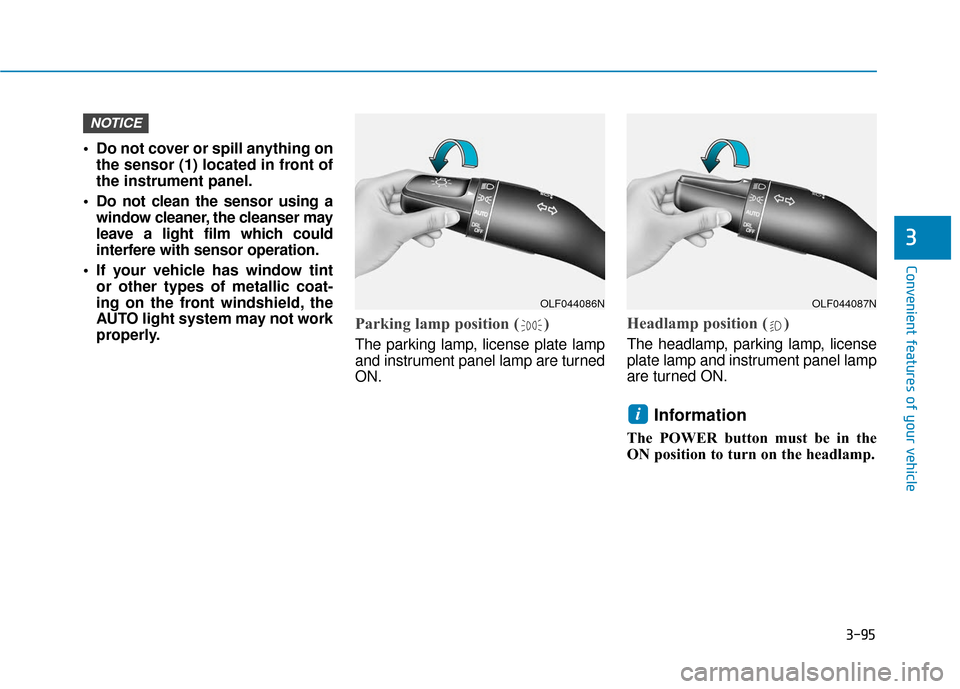
Parking lamp position ( )
The parking lamp, license plate lamp
and instrument panel lamp are turned
ON.
Headlamp position ( )
The headlamp, parking lamp, license
plate lamp and instrument panel lamp
are turned ON.
Information
The POWER button must be in the
ON position to turn on the headlamp.
i
NOTICE
OLF044086NOLF044087N
Page 188 of 541
3-103
Convenient features of your vehicle
3
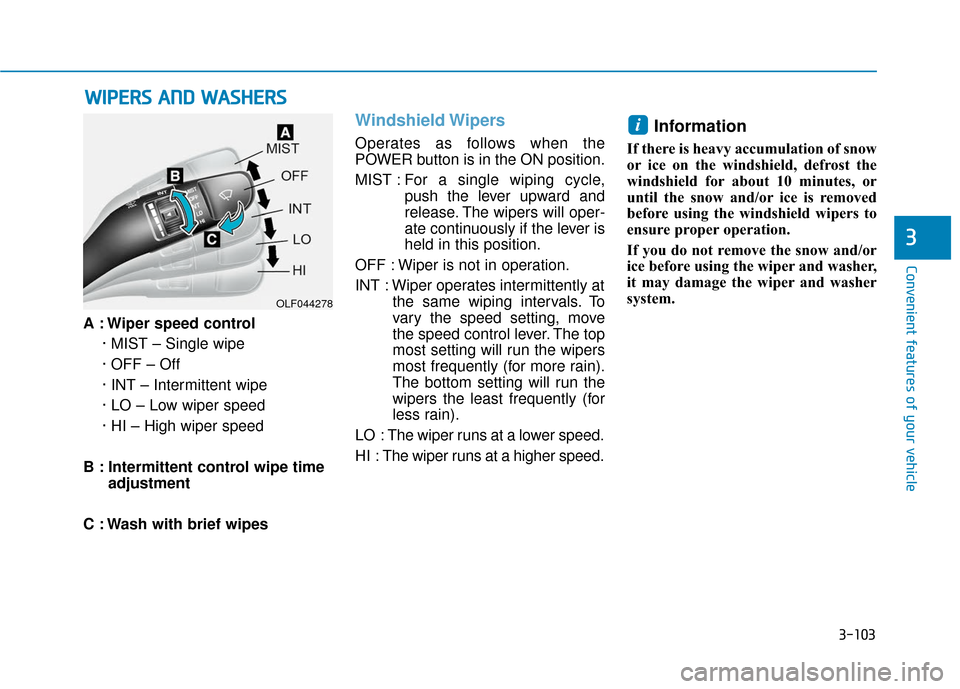
A : Wiper speed control· MIST – Single wipe
· OFF – Off
· INT – Intermittent wipe
· LO – Low wiper speed
· HI – High wiper speed
B : Intermittent control wipe time adjustment
C : Wash with brief wipes
Windshield Wipers
Operates as follows when the
POWER button is in the ON position.
MIST : For a single wiping cycle,
push the lever upward and
release. The wipers will oper-
ate continuously if the lever is
held in this position.
OFF : Wiper is not in operation.
INT : Wiper operates intermittently at the same wiping intervals. To
vary the speed setting, move
the speed control lever. The top
most setting will run the wipers
most frequently (for more rain).
The bottom setting will run the
wipers the least frequently (for
less rain).
LO : The wiper runs at a lower speed.
HI : The wiper runs at a higher speed.
Information
If there is heavy accumulation of snow
or ice on the windshield, defrost the
windshield for about 10 minutes, or
until the snow and/or ice is removed
before using the windshield wipers to
ensure proper operation.
If you do not remove the snow and/or
ice before using the wiper and washer,
it may damage the wiper and washer
system.
i
W W I
IP
P E
ER
R S
S
A
A N
N D
D
W
W A
AS
SH
H E
ER
R S
S
OLF044278
Page 189 of 541
3-104
Convenient features of your vehicle
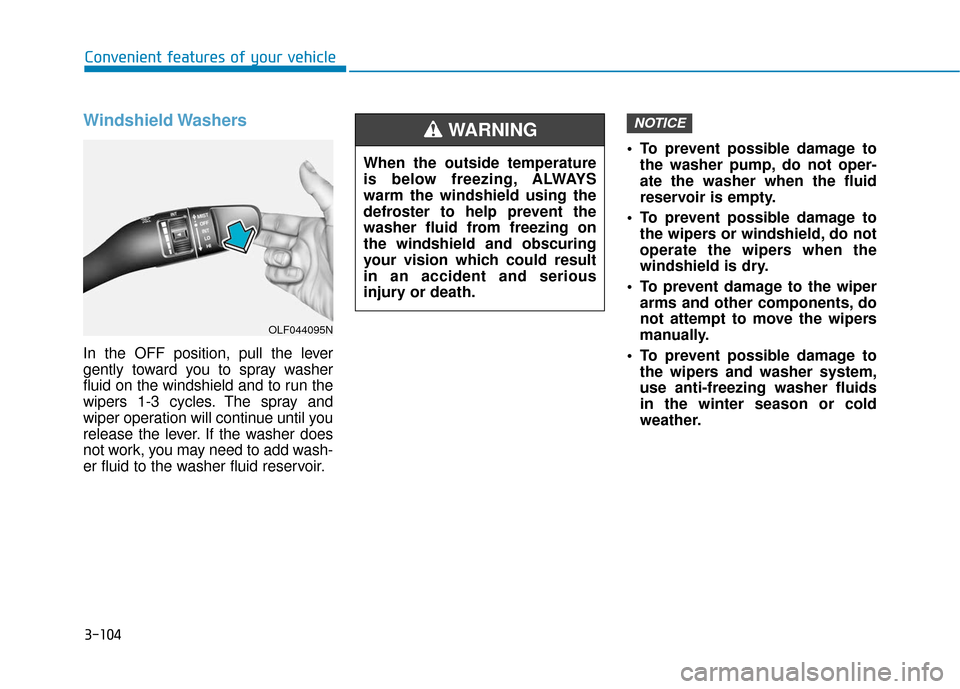
Windshield Washers
In the OFF position, pull the lever
gently toward you to spray washer
fluid on the windshield and to run the
wipers 1-3 cycles. The spray and
wiper operation will continue until you
release the lever. If the washer does
not work, you may need to add wash-
er fluid to the washer fluid reservoir. To prevent possible damage to
the washer pump, do not oper-
ate the washer when the fluid
reservoir is empty.
To prevent possible damage to the wipers or windshield, do not
operate the wipers when the
windshield is dry.
To prevent damage to the wiper arms and other components, do
not attempt to move the wipers
manually.
To prevent possible damage to the wipers and washer system,
use anti-freezing washer fluids
in the winter season or cold
weather.
NOTICE
When the outside temperature
is below freezing, ALWAYS
warm the windshield using the
defroster to help prevent the
washer fluid from freezing on
the windshield and obscuring
your vision which could result
in an accident and serious
injury or death.
WARNING
OLF044095N
Page 191 of 541
3-106
Convenient features of your vehicle
D
DE
EF
FR
R O
O S
ST
T E
ER
R
To prevent damage to the conduc-
tors bonded to the inside surface
of the rear window, never use
sharp instruments or window
cleaners containing abrasives to
clean the window.
If you want to defrost and defog
the front windshield, refer to
the "Windshield Defrosting and
Defogging" section in this chapter.
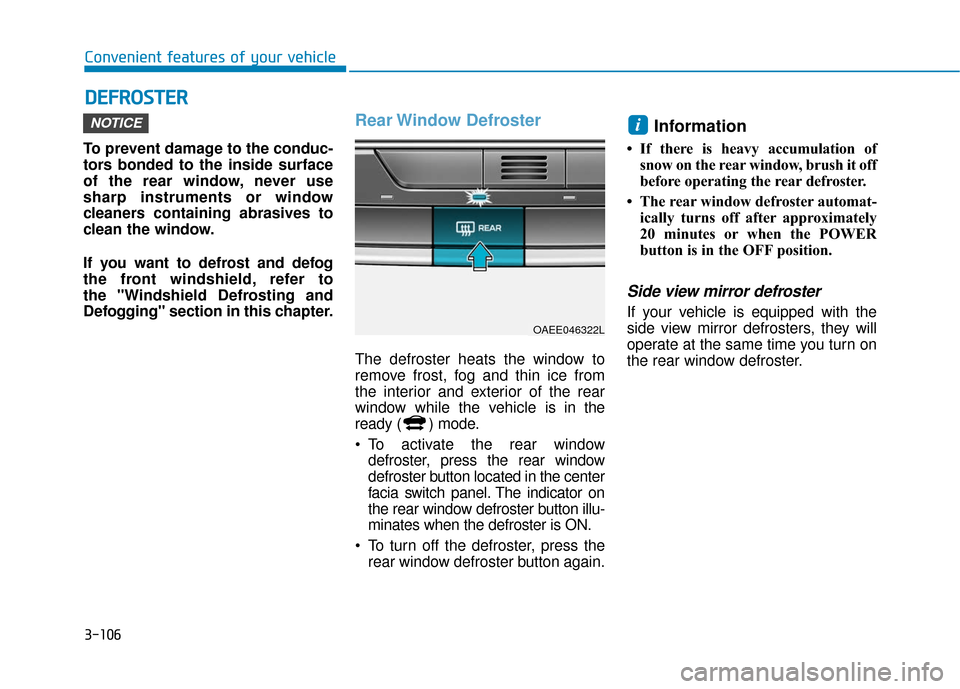
Rear Window Defroster
The defroster heats the window to
remove frost, fog and thin ice from
the interior and exterior of the rear
window while the vehicle is in the
ready ( ) mode.
To activate the rear window
defroster, press the rear window
defroster button located in the center
facia switch panel. The indicator on
the rear window defroster button illu-
minates when the defroster is ON.
To turn off the defroster, press the rear window defroster button again.
Information
• If there is heavy accumulation ofsnow on the rear window, brush it off
before operating the rear defroster.
• The rear window defroster automat- ically turns off after approximately
20 minutes or when the POWER
button is in the OFF position.
Side view mirror defroster
If your vehicle is equipped with the
side view mirror defrosters, they will
operate at the same time you turn on
the rear window defroster.
iNOTICE
OAEE046322L
Page 192 of 541
3-107
Convenient features of your vehicle
3
A
AU
U T
TO
O M
M A
AT
TI
IC
C
C
C L
LI
IM
M A
AT
TE
E
C
C O
O N
NT
TR
R O
O L
L
S
S Y
Y S
ST
T E
EM
M
OAEE046300N/OAEE046301N
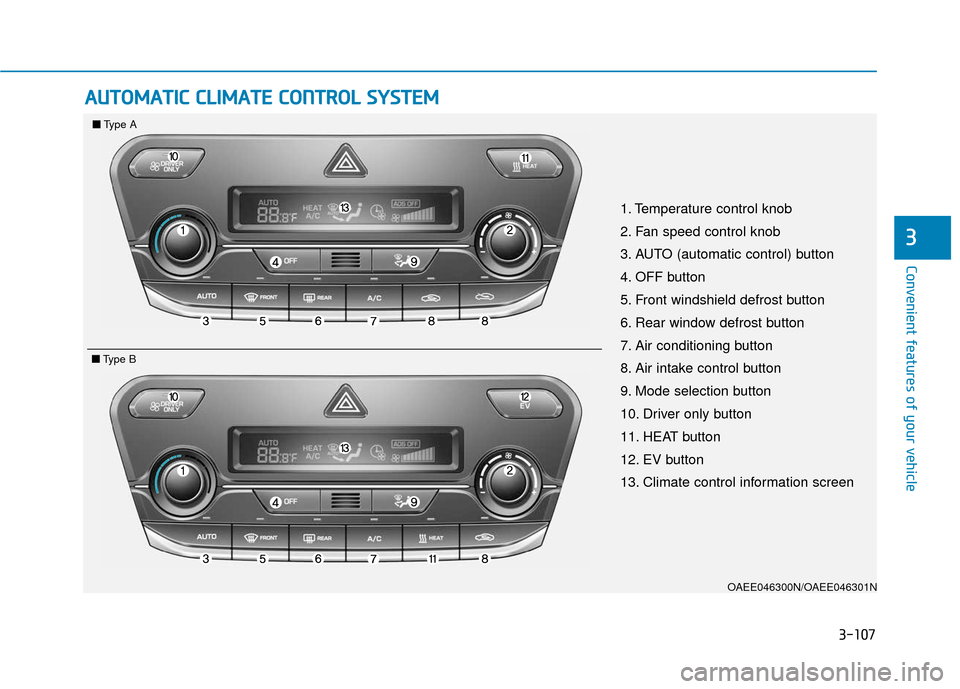
1. Temperature control knob
2. Fan speed control knob
3. AUTO (automatic control) button
4. OFF button
5. Front windshield defrost button
6. Rear window defrost button
7. Air conditioning button
8. Air intake control button
9. Mode selection button
10. Driver only button
11. HEAT button
12. EV button
13. Climate control information screen
■ ■
Type A
■
■Type B
Page 193 of 541
3-108
Convenient features of your vehicle
Automatic Heating and Air
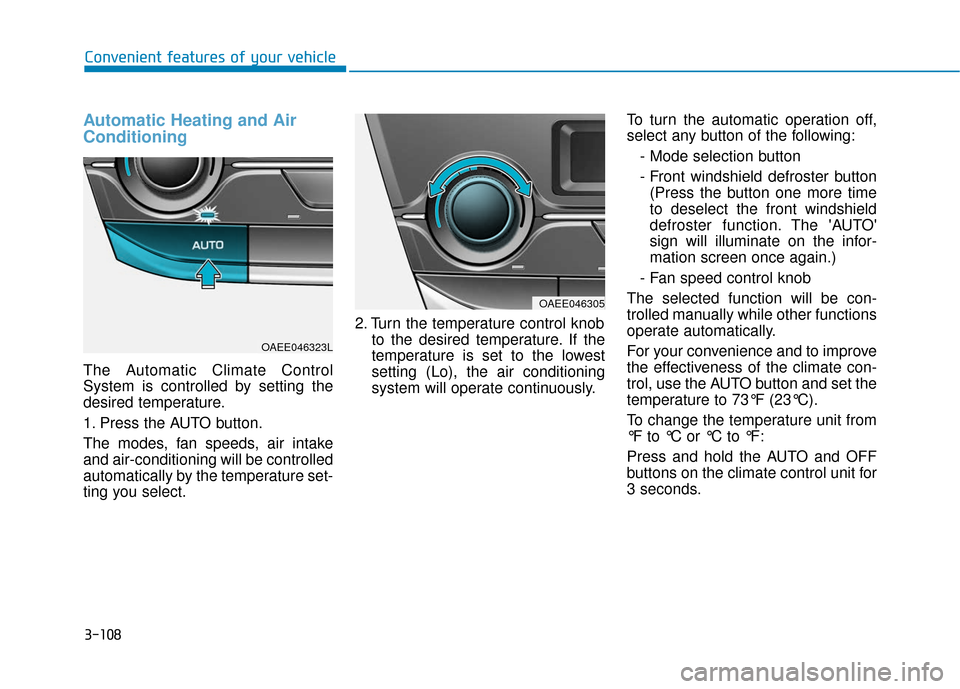
Conditioning
The Automatic Climate Control
System is controlled by setting the
desired temperature.
1. Press the AUTO button.
The modes, fan speeds, air intake
and air-conditioning will be controlled
automatically by the temperature set-
ting you select.2. Turn the temperature control knob
to the desired temperature. If the
temperature is set to the lowest
setting (Lo), the air conditioning
system will operate continuously. To turn the automatic operation off,
select any button of the following:
- Mode selection button
- Front windshield defroster button(Press the button one more time
to deselect the front windshield
defroster function. The 'AUTO'
sign will illuminate on the infor-
mation screen once again.)
- Fan speed control knob
The selected function will be con-
trolled manually while other functions
operate automatically.
For your convenience and to improve
the effectiveness of the climate con-
trol, use the AUTO button and set the
temperature to 73°F (23°C).
To change the temperature unit from
°F to °C or °C to °F:
Press and hold the AUTO and OFF
buttons on the climate control unit for
3 seconds.
OAEE046305
OAEE046323L