charging Hyundai Ioniq Electric 2019 Owner's Manual - RHD (UK, Australia)
[x] Cancel search | Manufacturer: HYUNDAI, Model Year: 2019, Model line: Ioniq Electric, Model: Hyundai Ioniq Electric 2019Pages: 526, PDF Size: 16.63 MB
Page 1 of 526
H
Hy
yb
br
ri
id
d
s
s y
y s
st
te
e m
m
o
o v
ve
e r
rv
v i
ie
e w
w
Electric vehicle.........................................................H3
Characteristics of electric vehicles ......................H3
Battery information ................................................H3
Main components of electric vehicle ...................H4
High voltage battery (lithium-ion polymer) ........H5
High voltage battery warmer system ...................H6
EV mode ....................................................................H7
Range ........................................................................\
.............H7
Nearby by stations .............................................................H8
Energy Information ............................................................H8
ECO Driving ........................................................................\
...H9
Charging and Climate Settings.........................................H9
EV Settings ........................................................................\
.H10
Charging information ............................................H12
Charging time information ...................................H12
Charging types .......................................................H13
Charging status ......................................................H14
Charging connector auto/ lock mode ................H15
When the Charging Connector Is Locked ...................H15
Scheduled charging ...............................................H16
Charging precautions ............................................H18 Normal charge........................................................H20
How to Connect Normal Charger..................................H20
Unlock Charging Door in Emergency ..........................H23
Checking Charging Status ...............................................H24
How to Disconnect Normal Charger ............................H25
Unlock Charging Connector in Emergency ................H26
Fast charge.............................................................H27
How to Connect Fast Charger .......................................H27
Unlock Charging Door in Emergency ..........................H29
Checking Charging Status ...............................................H29
How to Disconnect Fast Charger ..................................H30
Trickle charge ........................................................H32
How to set the charge level of the
portable charger ...............................................................H32
How to Connect Portable Charger
(ICCB: In-Cable Control Box) ..........................................H34
Unlock Charging Door in Emergency ..........................H38
Checking Charging Status ...............................................H38
Charging Status Indicator Lamp for
Portable Charger ...............................................................H40
How to Disconnect Portable Charger
(ICCB: In-Cable Control Box) ..........................................H43
Unlock Charging Connector in Emergency ................H44
Precautions for Portable Charger
(ICCB: In-Cable Control Box) ..........................................H44
Page 2 of 526
How to start the vehicle.......................................H46
How to stop the vehicle .......................................H47
Virtual engine sound system ...............................H47
Distance to empty .................................................H48
When destination is not set ...........................................H48
When destination is set...................................................H49
Tips for improving distance to empty ................H49
ECO guide ...............................................................H50
State of charge (SOC) gauge for
high voltage battery..............................................H50
Warning and indicator lights
(related to electric vehicle) .................................H51
Ready Indicator ................................................................H51
Service Warning Light .....................................................H51
Power down warning light..............................................H52
Charging indicator light ...................................................H52
High voltage battery level warning light ....................H52
Regenerative Brake Warning Light ..............................H53
LCD Dispaly.............................................................H53
Shift to P to charge .........................................................H53
Remaining time ..................................................................H53
Charging Door Open ........................................................H54
Charger Error! / Quick Charger Error!........................H54
Stop vehicle and check brakes .....................................H54
Check brakes......................................................................H5\
5
Low Battery........................................................................\
H55Charge immediately. Power limited ..............................H55
Low Battery. Charge immediately.................................H56
Low Battery Temp. Power limited.................................H56
Battery Overheated! Stop vehicle ................................H56
Power limited .....................................................................H57\
Stop vehicle and check power supply .........................H57
Check Active Air Flap System........................................H58
Check Virtual Engine Sound System............................H58
Check electric vehicle system .......................................H58
Energy flow ............................................................H59
Vehicle Stop........................................................................\
H59
EV Propulsion ....................................................................H59
Regeneration......................................................................H6\
0
Aux. battery saver+ ..............................................H60
Mode ........................................................................\
............H60
System Setting...................................................................H61
LCD Message .....................................................................H61\
If an accident occurs ............................................H62
Other precautions for electric vehicle ...............H64
Service plug ............................................................H65
Page 6 of 526
H6
If the vehicle will not be in use foran extended period of time, charge
the high voltage battery once every
three months to prevent it from dis-
charging. Also, if the charge
amount is not enough, immediate-
ly charge to full and store the vehi-
cle.
Normal charge is recommended to keep the high voltage battery in
optimal condition.
If the high voltage battery charge
amount is below 20%, you can
keep the high voltage battery per-
formance in optimal condition if
you charge the high voltage battery
to 100%. (Once a month or more is
recommended.)High Voltage Battery Warmer
System
The high voltage battery warmer
system prevents reduction of battery
output when battery temperature is
low. If the charging connector is con-
nected, the warmer system automat-
ically operate according to the bat-
tery temperature.
Charging time may shorten compare
to vehicles without the high voltage
battery warmer system. But, electric-
ity charge may increase because of
high voltage battery warmer system
operation.Make sure to use a designated
charger when charging the
high voltage battery. Using dif-
ferent types of chargers may
have a serious impact on vehi-
cle durability.
Make sure that the high volt-
age battery charger gauge
does not reach ''0". If the vehi-
cle is kept at ''0" for a long
period, it may damage the high
voltage battery and the high
voltage battery may have to be
replaced depending on the
level of degradation.
If the vehicle is in a collision,
we recommend that you con-
tact a HYUNDAI authorised
repairer to inspect whether the
high voltage battery is still
connected.
CAUTION
The high voltage battery warmer
system operates when the charg-
ing connector is connected to
the vehicle.
However, the high voltage
warmer system may not operate
when battery temperature drops
below -35°C (-31°F).
CAUTION
M M A
AI
IN
N
C
C O
O M
M P
PO
O N
NE
EN
N T
TS
S
O
O F
F
E
E L
LE
E C
CT
T R
R I
IC
C
V
V E
EH
H I
IC
C L
LE
E
(
( C
C O
O N
NT
T.
.)
)
Page 7 of 526
H7
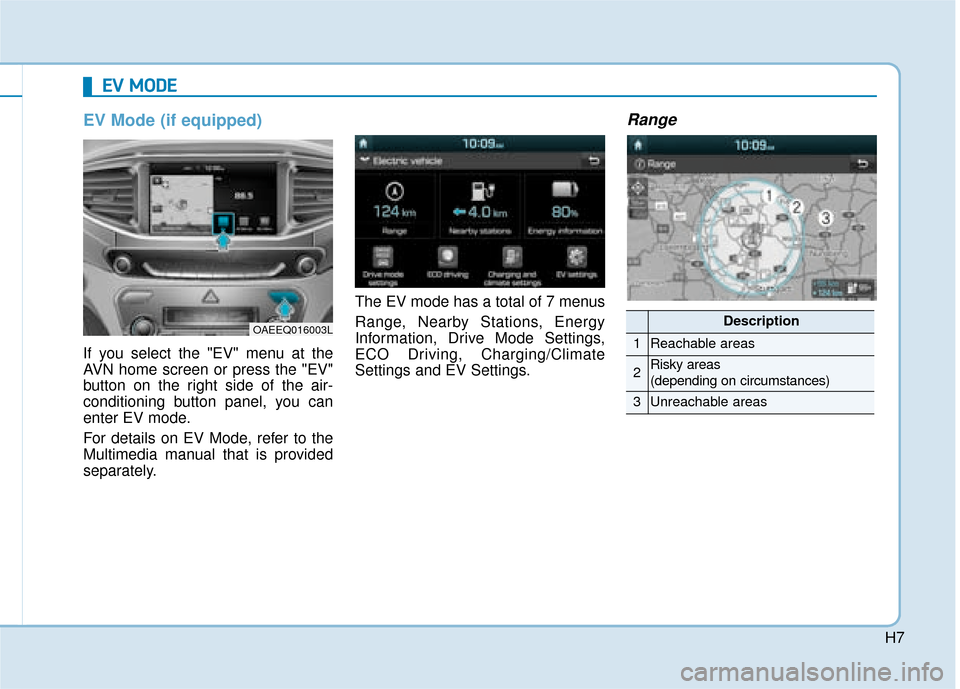
EV Mode (if equipped)
If you select the "EV" menu at the
AVN home screen or press the "EV"
button on the right side of the air-
conditioning button panel, you can
enter EV mode.
For details on EV Mode, refer to the
Multimedia manual that is provided
separately.The EV mode has a total of 7 menus
Range, Nearby Stations, Energy
Information, Drive Mode Settings,
ECO Driving, Charging/Climate
Settings and EV Settings.
Range
E E
V
V
M
M O
OD
DE
E
OAEEQ016003LDescription
1Reachable areas
2Risky areas
(depending on circumstances)
3Unreachable areas
Page 8 of 526
H8
E
EV
V
M
M O
OD
DE
E
(
( C
C O
O N
NT
T.
.)
)
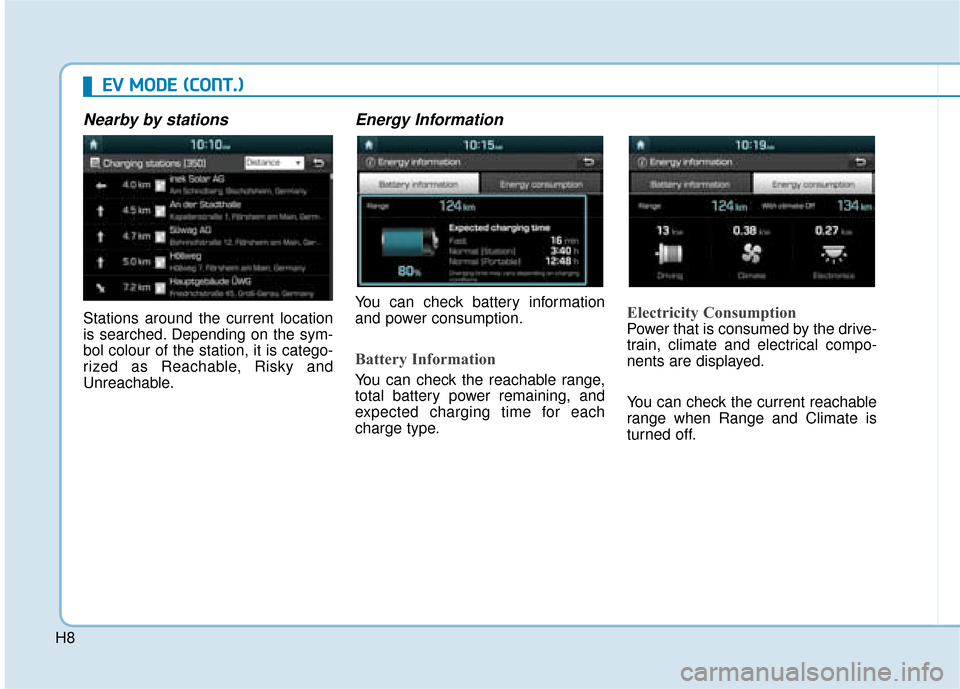
Nearby by stations
Stations around the current location
is searched. Depending on the sym-
bol colour of the station, it is catego-
rized as Reachable, Risky and
Unreachable.
Energy Information
You can check battery information
and power consumption.
Battery Information
You can check the reachable range,
total battery power remaining, and
expected charging time for each
charge type.
Electricity Consumption
Power that is consumed by the drive-
train, climate and electrical compo-
nents are displayed.
You can check the current reachable
range when Range and Climate is
turned off.
Page 9 of 526
H9
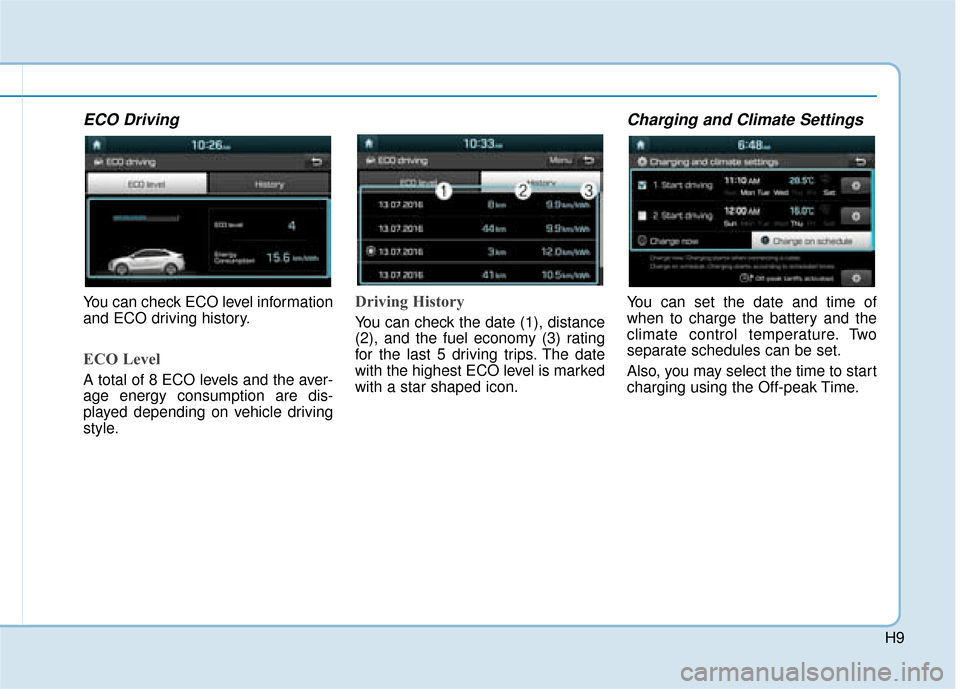
ECO Driving
You can check ECO level information
and ECO driving history.
ECO Level
A total of 8 ECO levels and the aver-
age energy consumption are dis-
played depending on vehicle driving
style.
Driving History
You can check the date (1), distance
(2), and the fuel economy (3) rating
for the last 5 driving trips. The date
with the highest ECO level is marked
with a star shaped icon.
Charging and Climate Settings
You can set the date and time of
when to charge the battery and the
climate control temperature. Two
separate schedules can be set.
Also, you may select the time to start
charging using the Off-peak Time.
Page 10 of 526
H10
E
EV
V
M
M O
OD
DE
E
(
( C
C O
O N
NT
T.
.)
)
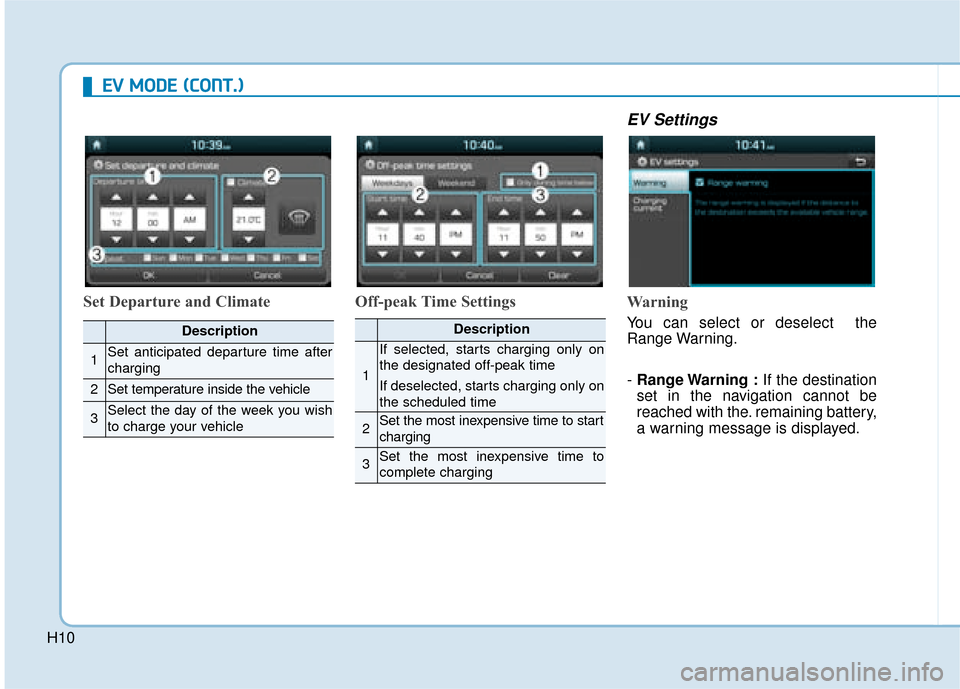
Set Departure and Climate Off-peak Time Settings
EV Settings
Warning
You can select or deselect the
Range Warning.
- Range Warning : If the destination
set in the navigation cannot be
reached with the. remaining battery,
a warning message is displayed.Description
1Set anticipated departure time after
charging
2Set temperature inside the vehicle
3Select the day of the week you wish
to charge your vehicle
Description
1
If selected, starts charging only on
the designated off-peak time
If deselected, starts charging only on
the scheduled time
2Set the most inexpensive time to start
charging
3Set the most inexpensive time to
complete charging
Page 11 of 526
H11
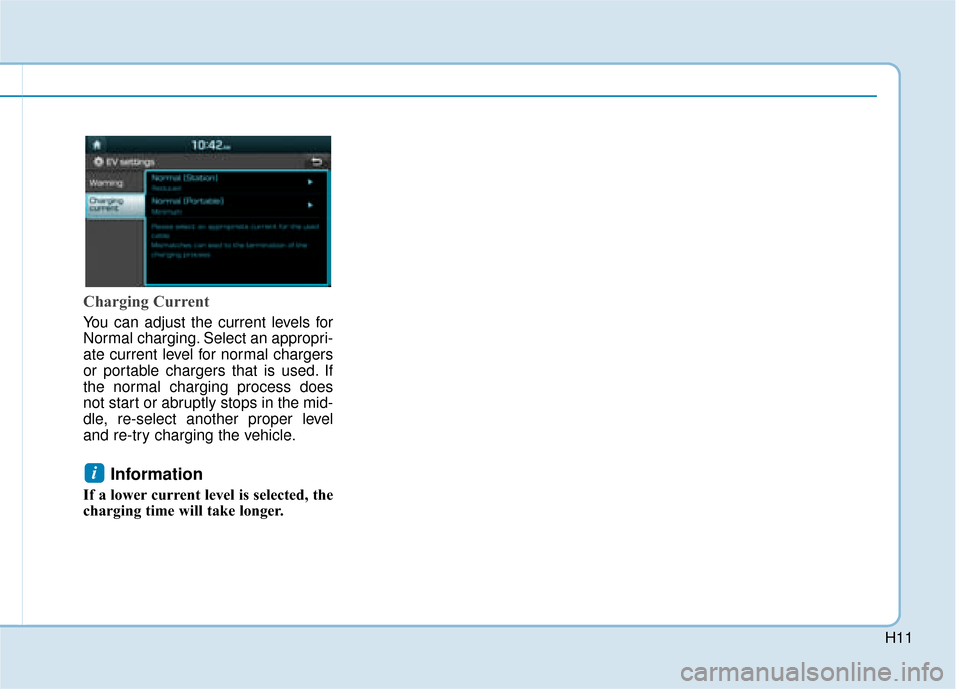
Charging Current
You can adjust the current levels for
Normal charging. Select an appropri-
ate current level for normal chargers
or portable chargers that is used. If
the normal charging process does
not start or abruptly stops in the mid-
dle, re-select another proper level
and re-try charging the vehicle.
Information
If a lower current level is selected, the
charging time will take longer.
i
Page 12 of 526
H12
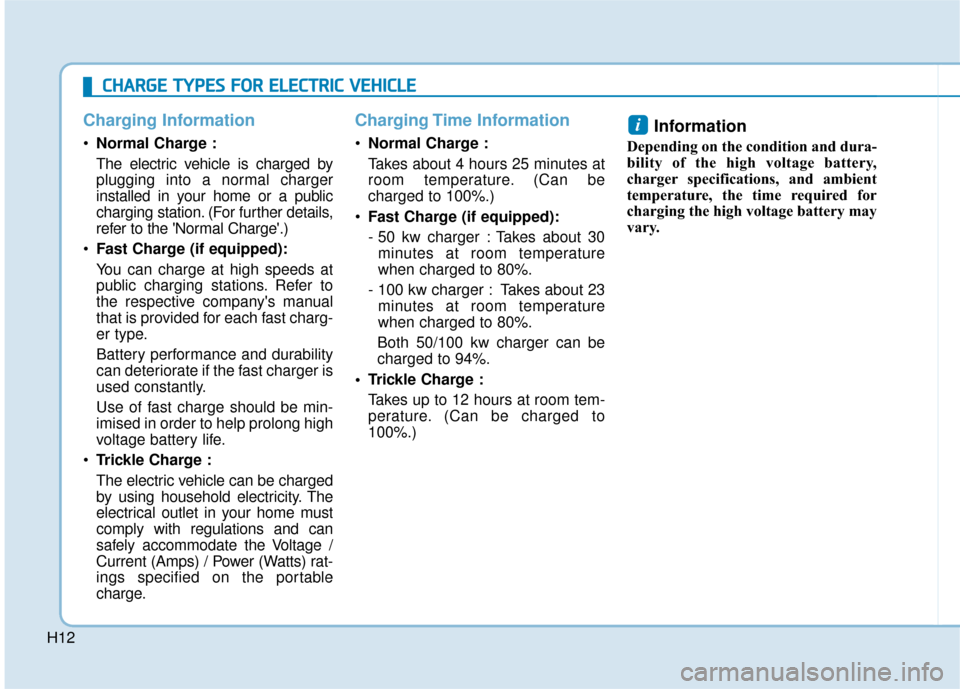
Charging Information
Normal Charge :
The electric vehicle is charged by
plugging into a normal charger
installed in your home or a public
charging station. (For further details,
refer to the 'Normal Charge'.)
Fast Charge (if equipped):
You can charge at high speeds at
public charging stations. Refer to
the respective company's manual
that is provided for each fast charg-
er type.
Battery performance and durability
can deteriorate if the fast charger is
used constantly.
Use of fast charge should be min-
imised in order to help prolong high
voltage battery life.
Trickle Charge :
The electric vehicle can be charged
by using household electricity. The
electrical outlet in your home must
comply with regulations and can
safely accommodate the Voltage /
Current (Amps) / Power (Watts) rat-
ings specified on the portable
charge.
Charging Time Information
Normal Charge :
Takes about 4 hours 25 minutes at
room temperature. (Can be
charged to 100%.)
Fast Charge (if equipped):
- 50 kw charger : Takes about 30
minutes at room temperature
when charged to 80%.
- 100 kw charger : Takes about 23 minutes at room temperature
when charged to 80%.
Both 50/100 kw charger can be
charged to 94%.
Trickle Charge : Takes up to 12 hours at room tem-
perature. (Can be charged to
100%.)
Information
Depending on the condition and dura-
bility of the high voltage battery,
charger specifications, and ambient
temperature, the time required for
charging the high voltage battery may
vary.
i
C CH
H A
AR
RG
G E
E
T
T Y
Y P
PE
ES
S
F
F O
O R
R
E
E L
LE
E C
CT
T R
R I
IC
C
V
V E
EH
H I
IC
C L
LE
E
Page 13 of 526
H13
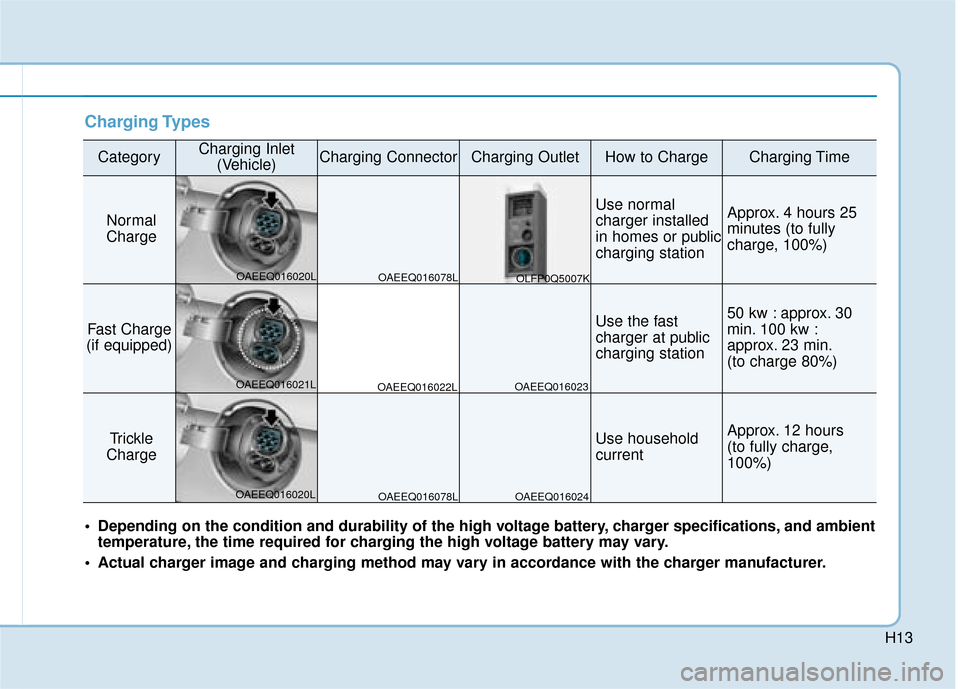
Charging Types
CategoryCharging Inlet(Vehicle)Charging ConnectorCharging OutletHow to ChargeCharging Time
Normal
Charge
Use normal
charger installed
in homes or public
charging stationApprox. 4 hours 25
minutes (to fully
charge, 100%)
Fast Charge
(if equipped)Use the fast
charger at public
charging station50 kw : approx. 30
min. 100 kw :
approx. 23 min.
(to charge 80%)
Trickle
ChargeUse household
currentApprox. 12 hours
(to fully charge,
100%)
Depending on the condition and durability of the high voltage battery, charger specifications, and ambient temperature, the time required for charging the high voltage battery may vary.
Actual charger image and charging method may vary in accordance with the charger manufacturer.
OAEEQ016078L
OAEEQ016020L
OAEEQ016021L
OAEEQ016020L OAEEQ016022L
OAEEQ016023
OAEEQ016024 OLFP0Q5007K
OAEEQ016078L