Interval Hyundai Ioniq Electric 2020 Owner's Manual
[x] Cancel search | Manufacturer: HYUNDAI, Model Year: 2020, Model line: Ioniq Electric, Model: Hyundai Ioniq Electric 2020Pages: 561, PDF Size: 41.18 MB
Page 150 of 561
3-65
Convenient features of your vehicle
3
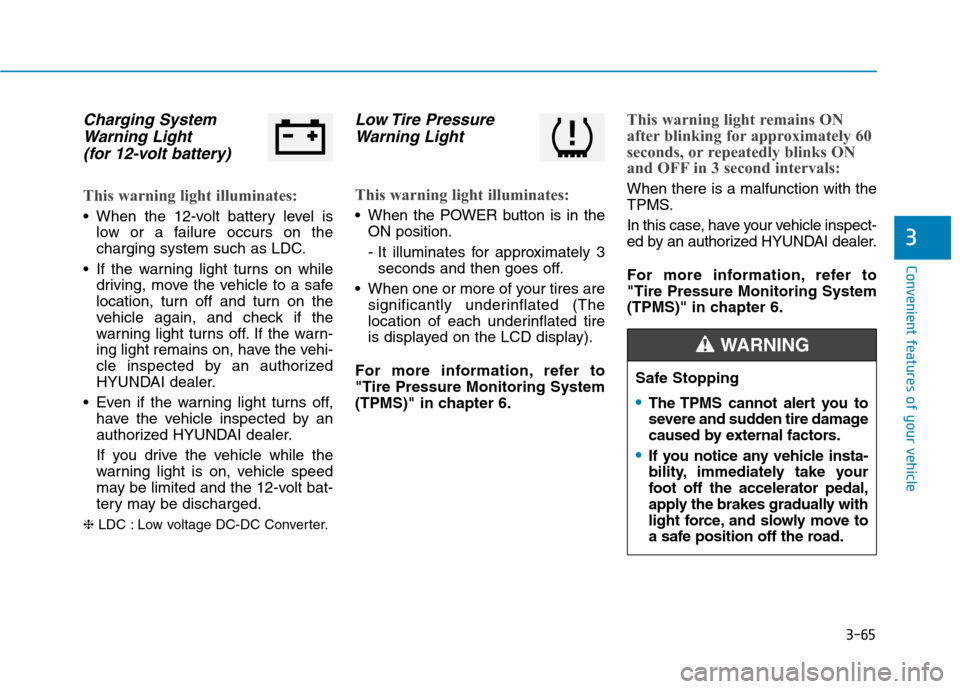
Charging System
Warning Light
(for 12-volt battery)
This warning light illuminates:
When the 12-volt battery level is
low or a failure occurs on the
charging system such as LDC.
If the warning light turns on while
driving, move the vehicle to a safe
location, turn off and turn on the
vehicle again, and check if the
warning light turns off. If the warn-
ing light remains on, have the vehi-
cle inspected by an authorized
HYUNDAI dealer.
Even if the warning light turns off,
have the vehicle inspected by an
authorized HYUNDAI dealer.
If you drive the vehicle while the
warning light is on, vehicle speed
may be limited and the 12-volt bat-
tery may be discharged.
❈LDC : Low voltage DC-DC Converter.
Low Tire Pressure
Warning Light
This warning light illuminates:
When the POWER button is in the
ON position.
- It illuminates for approximately 3
seconds and then goes off.
When one or more of your tires are
significantly underinflated (The
location of each underinflated tire
is displayed on the LCD display).
For more information, refer to
"Tire Pressure Monitoring System
(TPMS)" in chapter 6.
This warning light remains ON
after blinking for approximately 60
seconds, or repeatedly blinks ON
and OFF in 3 second intervals:
When there is a malfunction with the
TPMS.
In this case, have your vehicle inspect-
ed by an authorized HYUNDAI dealer.
For more information, refer to
"Tire Pressure Monitoring System
(TPMS)" in chapter 6.
Safe Stopping
The TPMS cannot alert you to
severe and sudden tire damage
caused by external factors.
If you notice any vehicle insta-
bility, immediately take your
foot off the accelerator pedal,
apply the brakes gradually with
light force, and slowly move to
a safe position off the road.
WARNING
Page 169 of 561
3-84
Convenient features of your vehicle
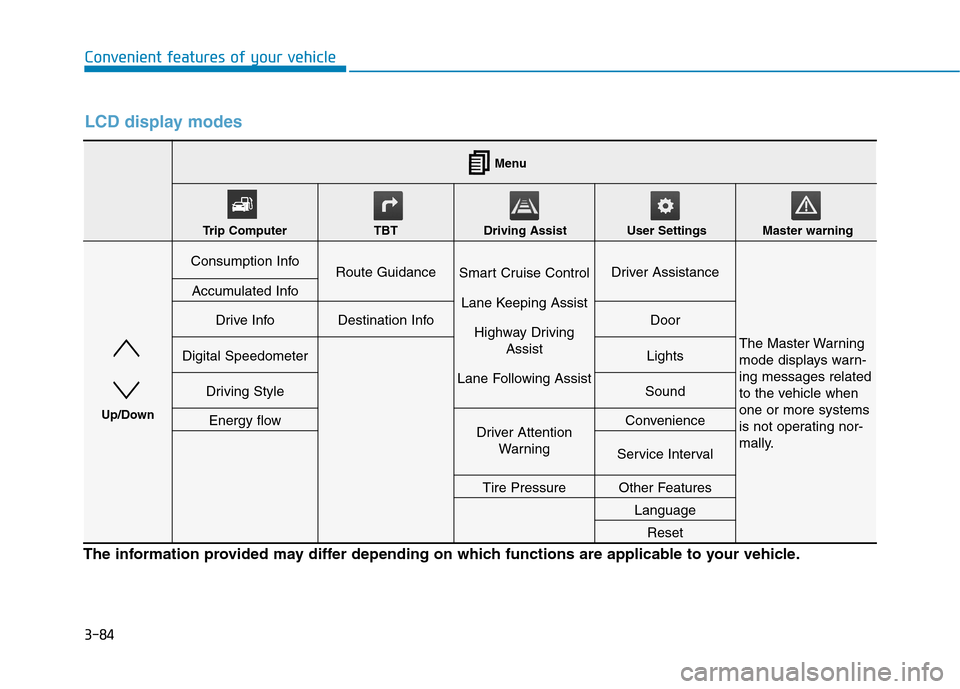
LCD display modes
The information provided may differ depending on which functions are applicable to your vehicle.
Consumption InfoRoute GuidanceSmart Cruise Control
Lane Keeping Assist
Highway Driving
Assist
Lane Following AssistDriver Assistance
The Master Warning
mode displays warn-
ing messages related
to the vehicle when
one or more systems
is not operating nor-
mally.
Accumulated Info
Drive InfoDestination InfoDoor
Digital SpeedometerLights
Driving StyleSound
Energy flowDriver Attention
WarningConvenience
Service Interval
Tire PressureOther Features
Language
Reset
Menu
Trip Computer TBT Driving Assist User Settings Master warning
Up/Down
Page 172 of 561
3-87
Convenient features of your vehicle
3
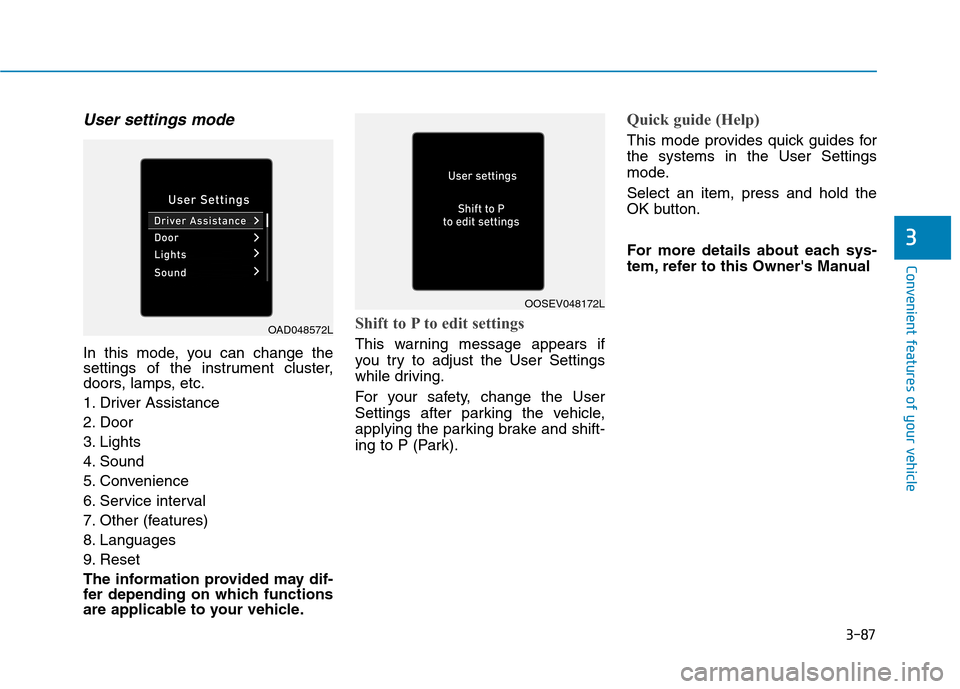
User settings mode
In this mode, you can change the
settings of the instrument cluster,
doors, lamps, etc.
1. Driver Assistance
2. Door
3. Lights
4. Sound
5. Convenience
6. Service interval
7. Other (features)
8. Languages
9. Reset
The information provided may dif-
fer depending on which functions
are applicable to your vehicle.
Shift to P to edit settings
This warning message appears if
you try to adjust the User Settings
while driving.
For your safety, change the User
Settings after parking the vehicle,
applying the parking brake and shift-
ing to P (Park).
Quick guide (Help)
This mode provides quick guides for
the systems in the User Settings
mode.
Select an item, press and hold the
OK button.
For more details about each sys-
tem, refer to this Owner's Manual
OAD048572L
OOSEV048172L
Page 178 of 561
3-93
Convenient features of your vehicle
3
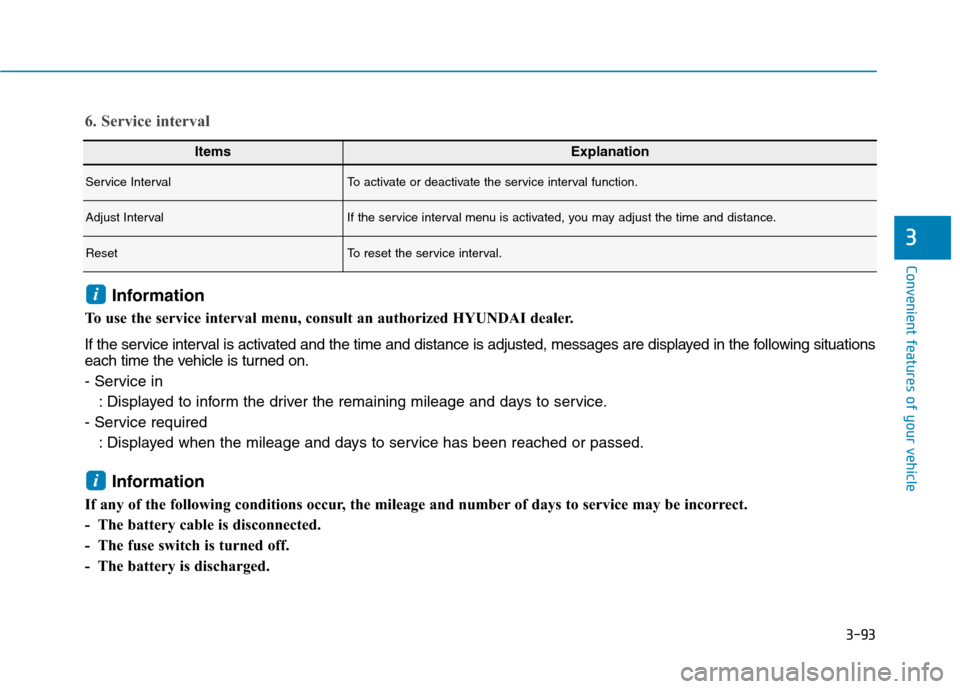
ItemsExplanation
Service IntervalTo activate or deactivate the service interval function.
Adjust IntervalIf the service interval menu is activated, you may adjust the time and distance.
ResetTo reset the service interval.
6. Service interval
Information
To use the service interval menu, consult an authorized HYUNDAI dealer.
If the service interval is activated and the time and distance is adjusted, messages are displayed in the following situations
each time the vehicle is turned on.
- Service in
: Displayed to inform the driver the remaining mileage and days to service.
- Service required
: Displayed when the mileage and days to service has been reached or passed.
Information
If any of the following conditions occur, the mileage and number of days to service may be incorrect.
- The battery cable is disconnected.
- The fuse switch is turned off.
- The battery is discharged.
i
i
Page 180 of 561
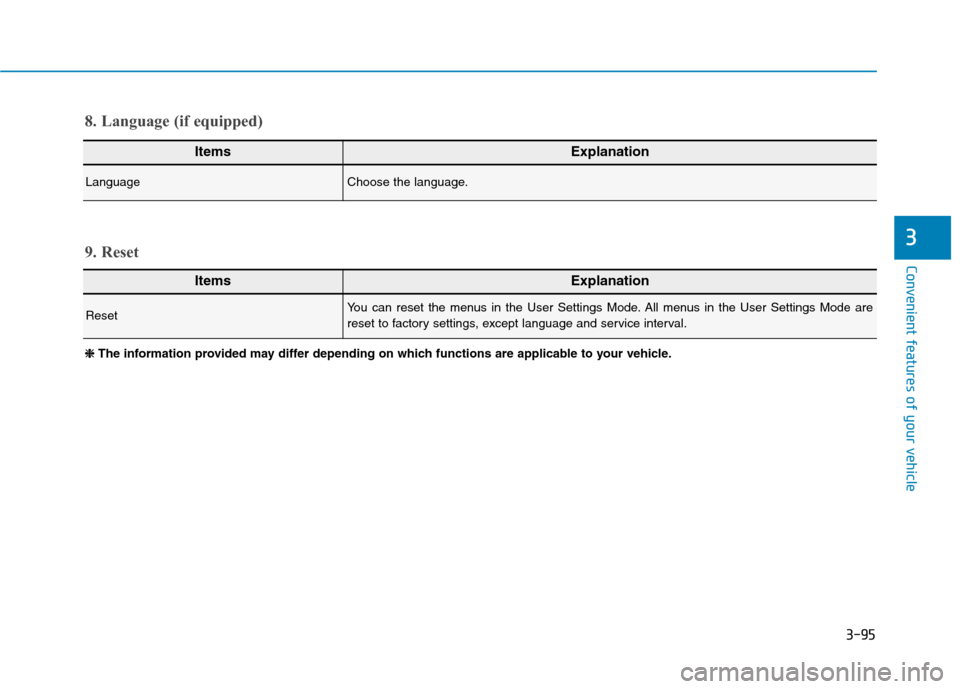
3-95
Convenient features of your vehicle
3
ItemsExplanation
LanguageChoose the language.
8. Language (if equipped)
ItemsExplanation
ResetYou can reset the menus in the User Settings Mode. All menus in the User Settings Mode are
reset to factory settings, except language and service interval.
9. Reset
❈ ❈
The information provided may differ depending on which functions are applicable to your vehicle.
Page 199 of 561
3-114
Convenient features of your vehicle
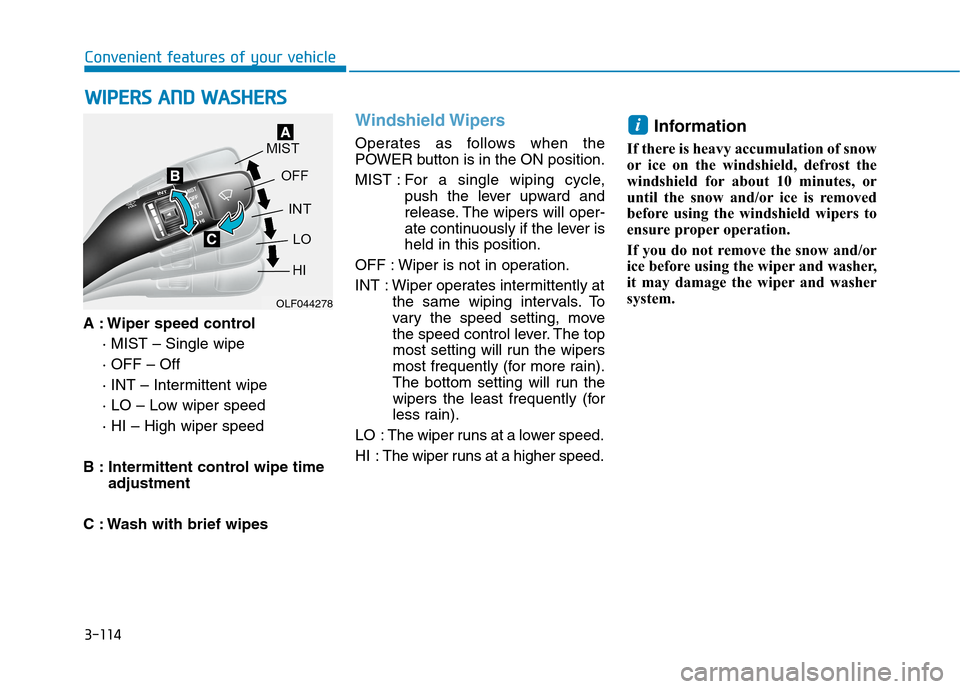
A : Wiper speed control
· MIST – Single wipe
· OFF – Off
· INT – Intermittent wipe
· LO – Low wiper speed
· HI – High wiper speed
B : Intermittent control wipe time
adjustment
C : Wash with brief wipes
Windshield Wipers
Operates as follows when the
POWER button is in the ON position.
MIST : For a single wiping cycle,
push the lever upward and
release. The wipers will oper-
ate continuously if the lever is
held in this position.
OFF : Wiper is not in operation.
INT : Wiper operates intermittently at
the same wiping intervals. To
vary the speed setting, move
the speed control lever. The top
most setting will run the wipers
most frequently (for more rain).
The bottom setting will run the
wipers the least frequently (for
less rain).
LO : The wiper runs at a lower speed.
HI : The wiper runs at a higher speed.
Information
If there is heavy accumulation of snow
or ice on the windshield, defrost the
windshield for about 10 minutes, or
until the snow and/or ice is removed
before using the windshield wipers to
ensure proper operation.
If you do not remove the snow and/or
ice before using the wiper and washer,
it may damage the wiper and washer
system.
i
W WI
IP
PE
ER
RS
S
A
AN
ND
D
W
WA
AS
SH
HE
ER
RS
S
OLF044278
Page 263 of 561
5-27
Driving your vehicle
5
Do not continue depressing the
brake pedal if the "
"indica-
tor is OFF. The battery may be
discharged.
Noise and vibration generated
during braking is normal.
Under normal operation, electric
brake pump noise and motor
vibration may occur temporarily
in below cases.
- When the pedal is depressed
suddenly.
- When the pedal is repeatedly
depressed in short intervals.
- When the ABS function is acti-
vated while braking.
Disc Brake Wear Indicator
When your brake pads are worn and
new pads are required, you will hear
a high pitched warning sound from
your front or rear brakes. You may
hear this sound come and go or it
may occur whenever you depress
the brake pedal.
Note that some driving conditions or
climates may cause a brake squeal
when you first apply (or lightly apply)
the brakes. This is normal and does
not indicate a problem with your
brakes.
To avoid costly brake repairs, do
not continue to drive with worn
brake pads.
Information
Always replace brake pads as com-
plete front or rear axle sets.
Electronic Parking Brake
(EPB)
Applying the parking brake
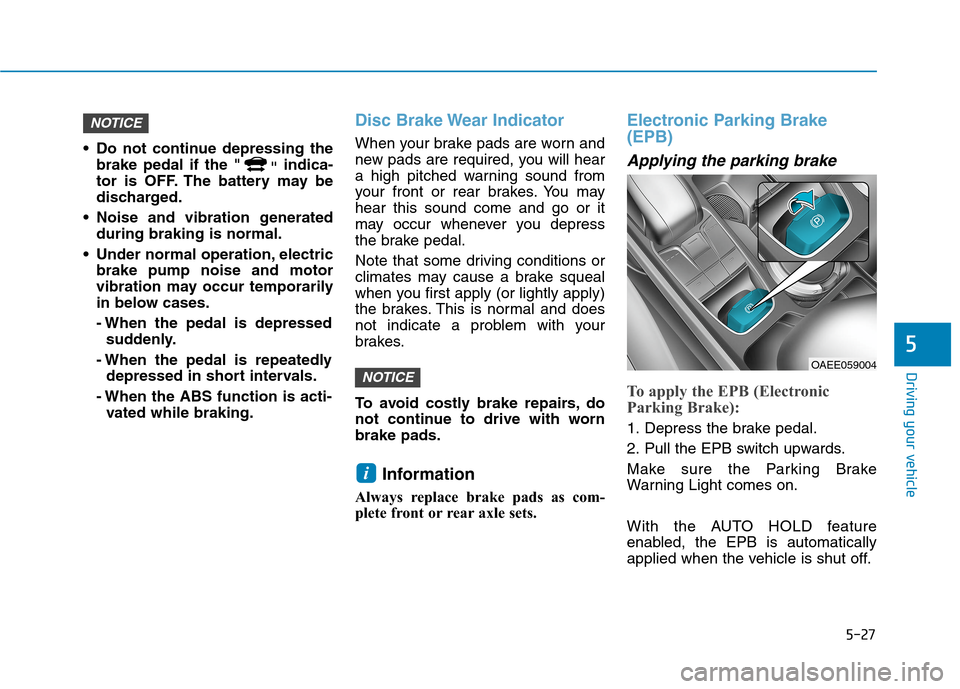
To apply the EPB (Electronic
Parking Brake):
1. Depress the brake pedal.
2. Pull the EPB switch upwards.
Make sure the Parking Brake
Warning Light comes on.
With the AUTO HOLD feature
enabled, the EPB is automatically
applied when the vehicle is shut off.
i
NOTICE
NOTICE
OAEE059004
Page 414 of 561
7-8
Maintenance
Normal Maintenance Schedule
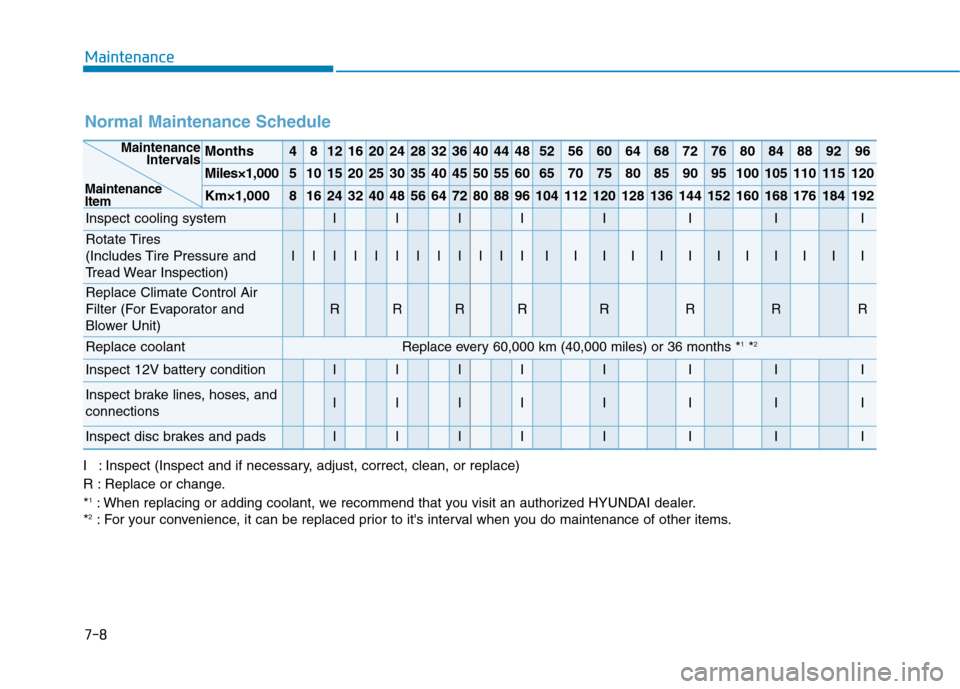
Months4812162024283236404448525660646872768084889296
Miles×1,0005101520253035404550556065707580859095100105110115120
Km×1,00081624324048566472808896104112120128136144152160168176184192
Inspect cooling systemIIIIIIII
Rotate Tires
(Includes Tire Pressure and
Tread Wear Inspection)
IIIIIIIIIIIIIIIIIIIIIIII
Replace Climate Control Air
Filter (For Evaporator and
Blower Unit)
RRRRRRRR
Replace coolant Replace every 60,000 km (40,000 miles) or 36 months *1*2
Inspect 12V battery conditionIIIIIIII
Inspect brake lines, hoses, and
connectionsIIIIIIII
Inspect disc brakes and padsIIIIIIII
Maintenance
Intervals
Maintenance
Item
I : Inspect (Inspect and if necessary, adjust, correct, clean, or replace)
R : Replace or change.
*
1: When replacing or adding coolant, we recommend that you visit an authorized HYUNDAI dealer.
*2: For your convenience, it can be replaced prior to it's interval when you do maintenance of other items.
Page 415 of 561
7-9
7
Maintenance
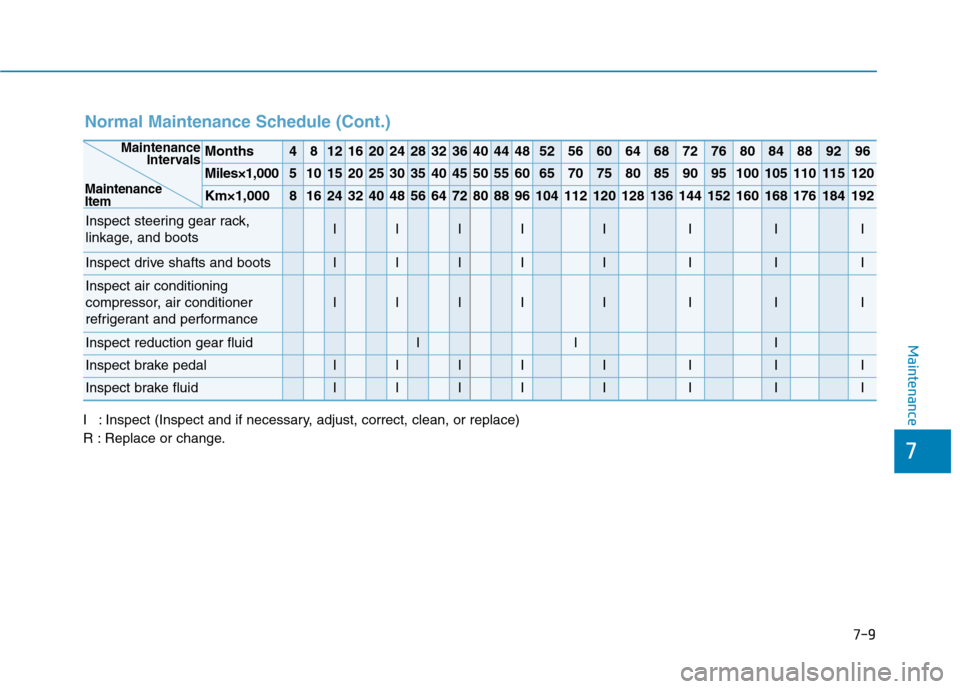
Normal Maintenance Schedule (Cont.)
I : Inspect (Inspect and if necessary, adjust, correct, clean, or replace)
R : Replace or change.
Months4812162024283236404448525660646872768084889296
Miles×1,0005101520253035404550556065707580859095100105110115120
Km×1,00081624324048566472808896104112120128136144152160168176184192
Inspect steering gear rack,
linkage, and bootsIIIIIIII
Inspect drive shafts and bootsIIIIIIII
Inspect air conditioning
compressor, air conditioner
refrigerant and performance
IIIIIIII
Inspect reduction gear fluidIII
Inspect brake pedalIIIIIIII
Inspect brake fluidIIIIIIII
Maintenance
Intervals
Maintenance
Item
Page 416 of 561
7-10
Maintenance
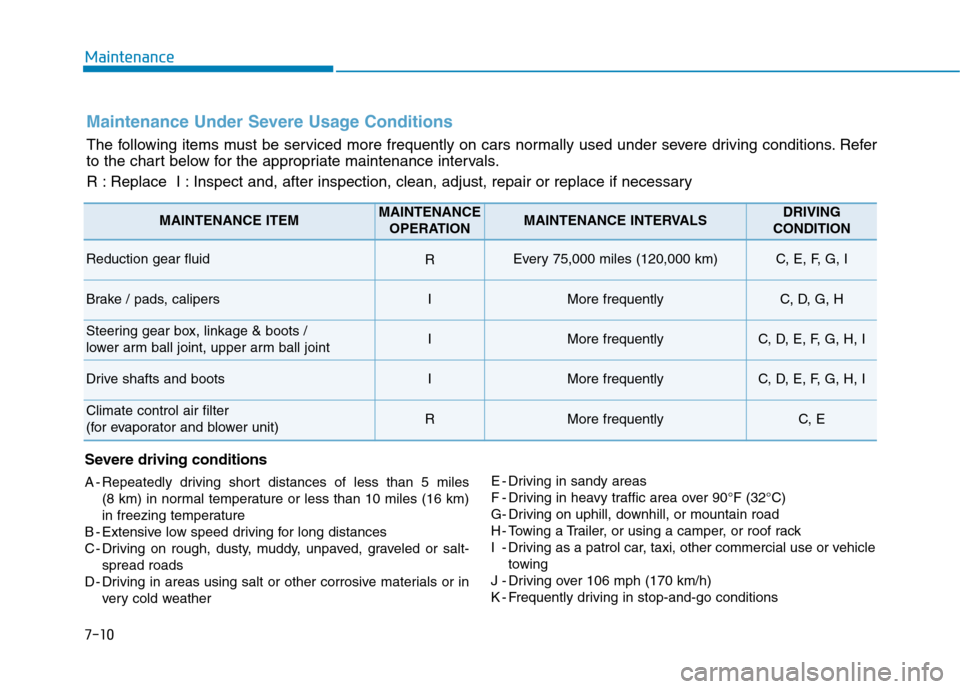
Maintenance Under Severe Usage Conditions
The following items must be serviced more frequently on cars normally used under severe driving conditions. Refer
to the chart below for the appropriate maintenance intervals.
R : Replace I : Inspect and, after inspection, clean, adjust, repair or replace if necessary
Severe driving conditions
A - Repeatedly driving short distances of less than 5 miles
(8 km) in normal temperature or less than 10 miles (16 km)
in freezing temperature
B - Extensive low speed driving for long distances
C - Driving on rough, dusty, muddy, unpaved, graveled or salt-
spread roads
D - Driving in areas using salt or other corrosive materials or in
very cold weatherE - Driving in sandy areas
F - Driving in heavy traffic area over 90°F (32°C)
G- Driving on uphill, downhill, or mountain road
H - Towing a Trailer, or using a camper, or roof rack
I - Driving as a patrol car, taxi, other commercial use or vehicle
towing
J - Driving over 106 mph (170 km/h)
K - Frequently driving in stop-and-go conditions
MAINTENANCE ITEMMAINTENANCE
OPERATIONMAINTENANCE INTERVALSDRIVING
CONDITION
Reduction gear fluid REvery 75,000 miles (120,000 km) C, E, F, G, I
Brake / pads, calipersIMore frequentlyC, D, G, H
Steering gear box, linkage & boots /
lower arm ball joint, upper arm ball jointIMore frequentlyC, D, E, F, G, H, I
Drive shafts and bootsIMore frequentlyC, D, E, F, G, H, I
Climate control air filter
(for evaporator and blower unit)RMore frequentlyC, E