sensor HYUNDAI IONIQ ELECTRIC 2021 Workshop Manual
[x] Cancel search | Manufacturer: HYUNDAI, Model Year: 2021, Model line: IONIQ ELECTRIC, Model: HYUNDAI IONIQ ELECTRIC 2021Pages: 546, PDF Size: 34.82 MB
Page 420 of 546
5-130
Driving your vehicle
When the BCW canceled warning
message is displayed in the cluster,
check to make sure that the rear
bumper is free from any dirt or snowin the areas where the sensor is
located. Remove any dirt, snow, or
foreign material that could interfere
with the radar sensors.
After any dirt or debris is removed,
RCCW system should operate nor-
mally after about 10 minutes of driv-
ing the vehicle.
If the system still does not operate
normally, we recommend that the
vehicle be inspected by an author-
ized HYUNDAI dealer.
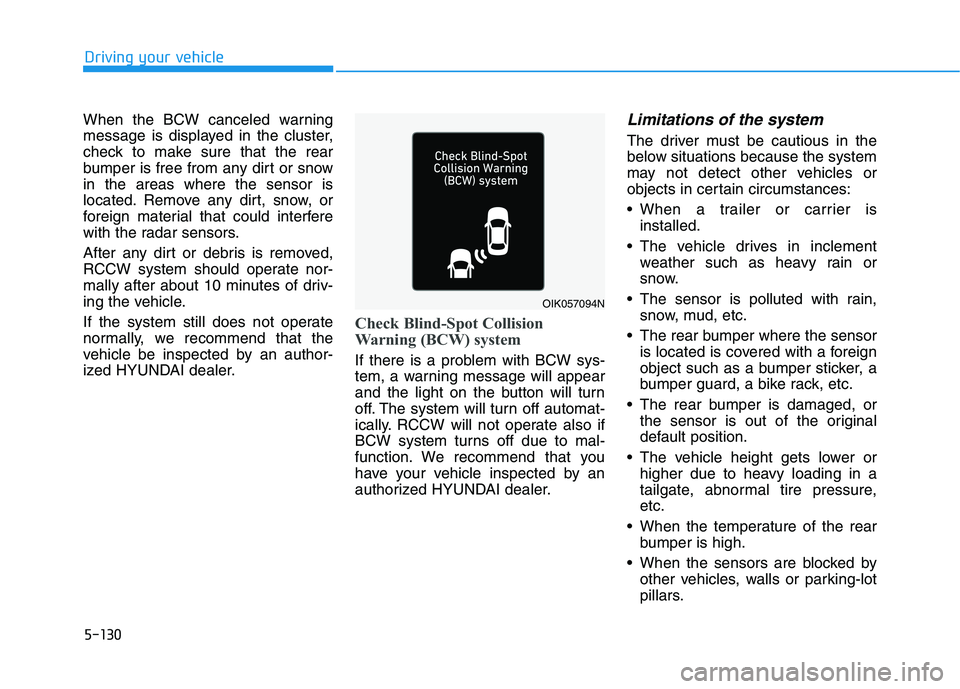
Check Blind-Spot Collision
Warning (BCW) system
If there is a problem with BCW sys-
tem, a warning message will appear
and the light on the button will turn
off. The system will turn off automat-
ically. RCCW will not operate also if
BCW system turns off due to mal-
function. We recommend that you
have your vehicle inspected by an
authorized HYUNDAI dealer.
Limitations of the system
The driver must be cautious in the
below situations because the system
may not detect other vehicles or
objects in certain circumstances:
When a trailer or carrier isinstalled.
The vehicle drives in inclement weather such as heavy rain or
snow.
The sensor is polluted with rain, snow, mud, etc.
The rear bumper where the sensor is located is covered with a foreign
object such as a bumper sticker, a
bumper guard, a bike rack, etc.
The rear bumper is damaged, or the sensor is out of the original
default position.
The vehicle height gets lower or higher due to heavy loading in a
tailgate, abnormal tire pressure,etc.
When the temperature of the rear bumper is high.
When the sensors are blocked by other vehicles, walls or parking-lot
pillars.
OIK057094N
Page 421 of 546
5-131
Driving your vehicle
5
The vehicle is driven on a curvedroad.
The road pavement (or the periph- eral ground) abnormally contains
metallic components (i.e. possibly
due to subway construction).
There is a fixed object near the vehicle, such as a guardrail.
While going down or up a steep road where the height of the lane is
different.
Driving on a narrow road where trees or grass or overgrown.
Driving in rural areas where the sensor does not detect another
vehicle for an extended period of
time.
Driving on a wet road.
Driving on a road where the guardrail or wall is in double struc-
ture.
A big vehicle is near such as a bus or truck.
When the other vehicle approach- es very close.
When the other vehicle passes at a very fast speed. While changing lanes.
If the vehicle has started at the
same time as the vehicle next to
you and has accelerated.
When the vehicle in the next lane moves two lanes away from you
OR when the vehicle two lanes
away moves to the next lane from
you.
A motorcycle or bicycle is near.
A flat trailer is near.
If there are small objects in the detecting area such as a shopping
cart or a baby stroller.
If there is a low height vehicle such as a sports car.
Temperature is extremely low around the vehicle.
The vehicle severely vibrates while driving over a bumpy road,
uneven/bumpy road, or concretepatch.
The vehicle is driven on a slippery surface due to snow, water puddle,
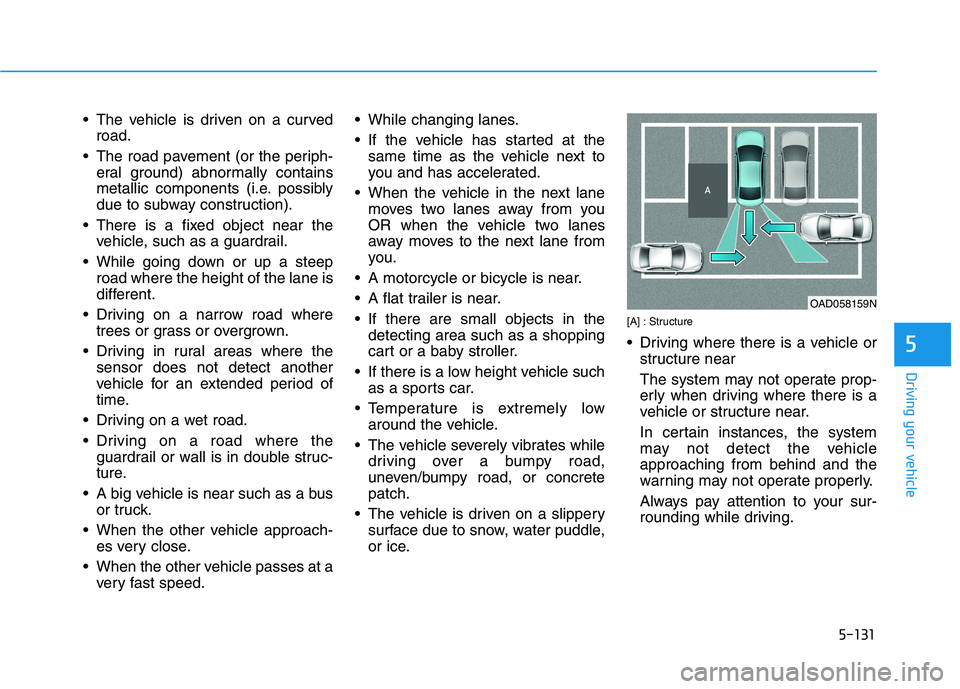
or ice. [A] : Structure
Driving where there is a vehicle or
structure near
The system may not operate prop-
erly when driving where there is a
vehicle or structure near.
In certain instances, the system
may not detect the vehicleapproaching from behind and the
warning may not operate properly.
Always pay attention to your sur-
rounding while driving.
OAD058159N
Page 423 of 546
![HYUNDAI IONIQ ELECTRIC 2021 Workshop Manual 5-133
Driving your vehicle
5
[A] : Structure, [B] : Wall
Pulling into the parking spacewhere there is a structure
The system may not operate prop-
erly when pulling in the vehicle to
the parking](/img/35/56167/w960_56167-422.png "HYUNDAI IONIQ ELECTRIC 2021 Workshop Manual 5-133
Driving your vehicle
5
[A] : Structure, [B] : Wall
Pulling into the parking spacewhere there is a structure
The system may not operate prop-
erly when pulling in the vehicle to
the parking")
5-133
Driving your vehicle
5
[A] : Structure, [B] : Wall
Pulling into the parking spacewhere there is a structure
The system may not operate prop-
erly when pulling in the vehicle to
the parking space where there is a
structure at the back or side of your
vehicle.
In certain instances, when backing
into the parking space, the system
may falsely detect the vehicle mov-
ing in front of your vehicle. In this
case, the warning may operate.
Always pay attention to the parking
space while driving. When the vehicle is parked rear-
ward
If the vehicle is parked rearward and the sensor detects another
vehicle in the rear area of the park-
ing space, warning may operate.
Always pay attention to the parking
space while driving. Information
This device complies with Industry
Canada RSS-210 standard.
Operation is subject to the following
three conditions:
1. This device may not cause harmful interference, and
2. This device must accept any inter- ference received, including interfer-
ence that may cause undesired
operation.
3. Changes or modifications not expressly approved by the party
responsible for compliance could
void the user's authority to operate
the device.
i
OAD058163NOAD058161L
Page 447 of 546
6-12
What to do in an emergency
The TPMS Malfunction Indicator
may illuminate after blinking for
one minute if the vehicle is near
electric power supply cables or
radio transmitters such as police
stations, government and public
offices, broadcasting stations,
military installations, airports,
transmitting towers, etc.
Additionally, the TPMS
Malfunction Indicator may illumi-
nate if electronic devices are used
such as computers, chargers,
remote starters, navigation, etc.
This may interfere with normal
operation of the TPMS.
Changing a Tire with TPMS
If you have a flat tire, the Low Tire Pressure and LCD position indicator
will come on. Have the flat tire
repaired by an authorized HYUNDAI
dealer as soon as possible orreplace the flat tire with the spare
tire.Once the original tire equipped with
a tire pressure monitoring sensor isreinflated to the recommended pres-
sure and reinstalled on the vehicle,
the Low Tire Pressure LCD position
indicator and TPMS Malfunction
Indicator will go off within a few min-
utes of driving. If the indicators do not disappear
after a few minutes, please visit an
authorized HYUNDAI dealer. Each wheel is equipped with a tire pressure sensor mounted inside the
tire behind the valve stem. You must
use TPMS specific wheels. It is rec-
ommended that you always have
your tires serviced by an authorized
HYUNDAI dealer.
NOTICE
Never use a puncture-repairing
agent not approved by HYUNDAIdealer to repair and/or inflate a
low pressure tire. Tire sealant
not approved by HYUNDAI deal-
er may damage the tire pressure
sensor.
CAUTION
Page 454 of 546
6-19
What to do in an emergency
6
8. Switch off the compressor.
9. Detach the hoses from the sealantbottle connector and from the tire
valve.
Return the Tire Mobility Kit to its stor-
age location in the vehicle.
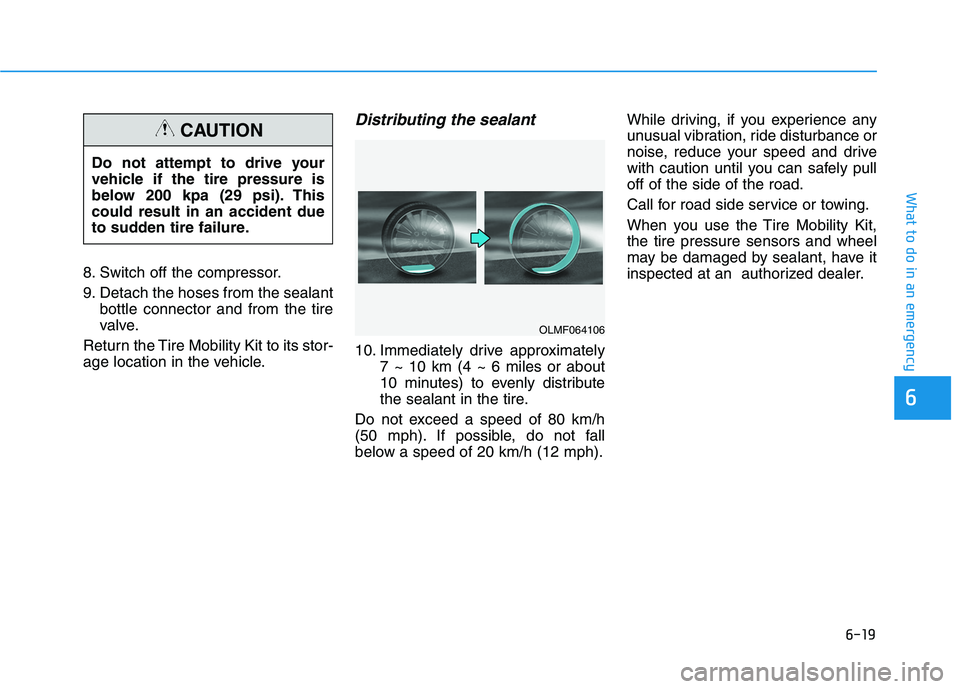
Distributing the sealant
10. Immediately drive approximately 7 ~ 10 km (4 ~ 6 miles or about
10 minutes) to evenly distribute
the sealant in the tire.
Do not exceed a speed of 80 km/h
(50 mph). If possible, do not fall
below a speed of 20 km/h (12 mph). While driving, if you experience any
unusual vibration, ride disturbance or
noise, reduce your speed and drive
with caution until you can safely pulloff of the side of the road.
Call for road side service or towing.
When you use the Tire Mobility Kit, the tire pressure sensors and wheel
may be damaged by sealant, have it
inspected at an authorized dealer.
Do not attempt to drive your
vehicle if the tire pressure is
below 200 kpa (29 psi). Thiscould result in an accident due
to sudden tire failure.
CAUTION
OLMF064106
Page 457 of 546
6-22
What to do in an emergency
When towing your vehicle in an emergency without wheel dollies:
1. While depressing the brake pedalshift to the N (Neutral) position
and turn the vehicle off. The
POWER button will be in the ACCposition.
2. Release the parking brake.
Failure to shift to N (Neutral) may
cause internal damage to the vehi-
cle.
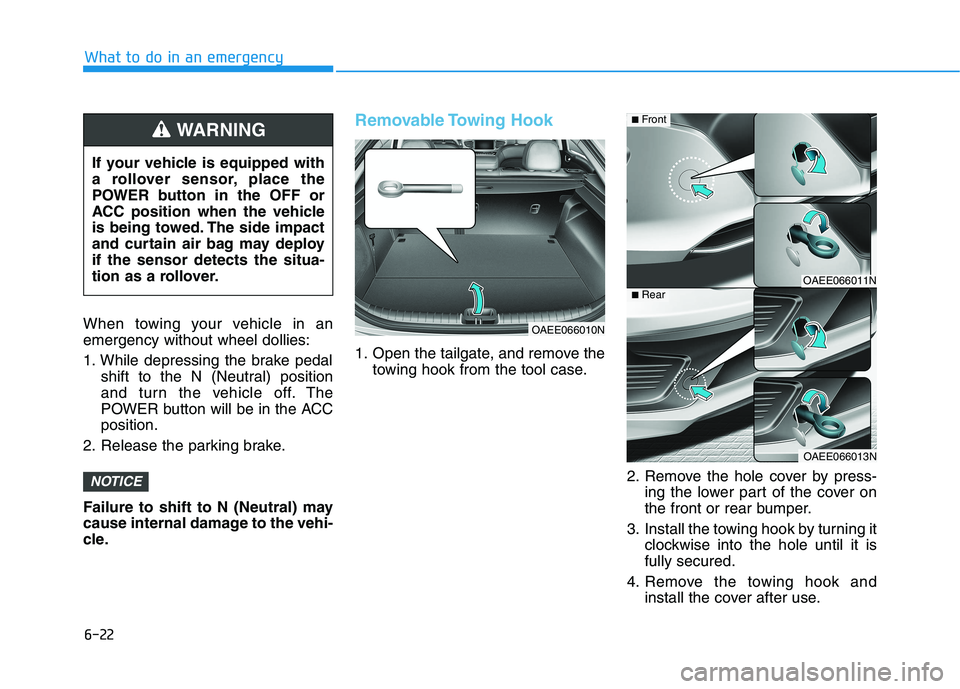
Removable Towing Hook
1. Open the tailgate, and remove the towing hook from the tool case.
2. Remove the hole cover by press-ing the lower part of the cover on
the front or rear bumper.
3. Install the towing hook by turning it clockwise into the hole until it isfully secured.
4. Remove the towing hook and install the cover after use.
NOTICE
If your vehicle is equipped with
a rollover sensor, place the
POWER button in the OFF or
ACC position when the vehicle
is being towed. The side impact
and curtain air bag may deployif the sensor detects the situa-
tion as a rollover.
WARNING
OAEE066010N
OAEE066011N
OAEE066013N
■Front
■Rear
Page 503 of 546
7-44
Maintenance
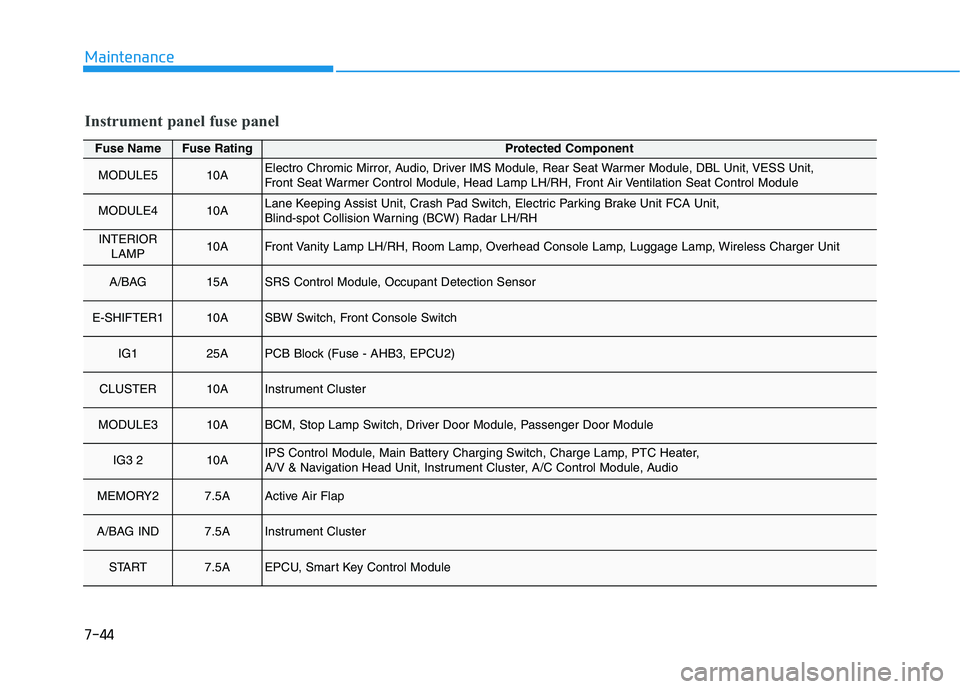
Fuse NameFuse RatingProtected Component
MODULE510AElectro Chromic Mirror, Audio, Driver IMS Module, Rear Seat Warmer Module, DBL Unit, VESS Unit,
Front Seat Warmer Control Module, Head Lamp LH/RH, Front Air Ventilation Seat Control Module
MODULE410ALane Keeping Assist Unit, Crash Pad Switch, Electric Parking Brake Unit FCA Unit,
Blind-spot Collision Warning (BCW) Radar LH/RH
INTERIORLAMP10AFront Vanity Lamp LH/RH, Room Lamp, Overhead Console Lamp, Luggage Lamp, Wireless Charger Unit
A/BAG 15ASRS Control Module, Occupant Detection Sensor
E-SHIFTER110ASBW Switch, Front Console Switch
IG125APCB Block (Fuse - AHB3, EPCU2)
CLUSTER10AInstrument Cluster
MODULE310ABCM, Stop Lamp Switch, Driver Door Module, Passenger Door Module
IG3 210AIPS Control Module, Main Battery Charging Switch, Charge Lamp, PTC Heater,
A/V & Navigation Head Unit, Instrument Cluster, A/C Control Module, Audio
MEMORY27.5AActive Air Flap
A/BAG IND7.5AInstrument Cluster
START7.5AEPCU, Smart Key Control Module
Instrument panel fuse panel
Page 504 of 546
7-45
7
Maintenance
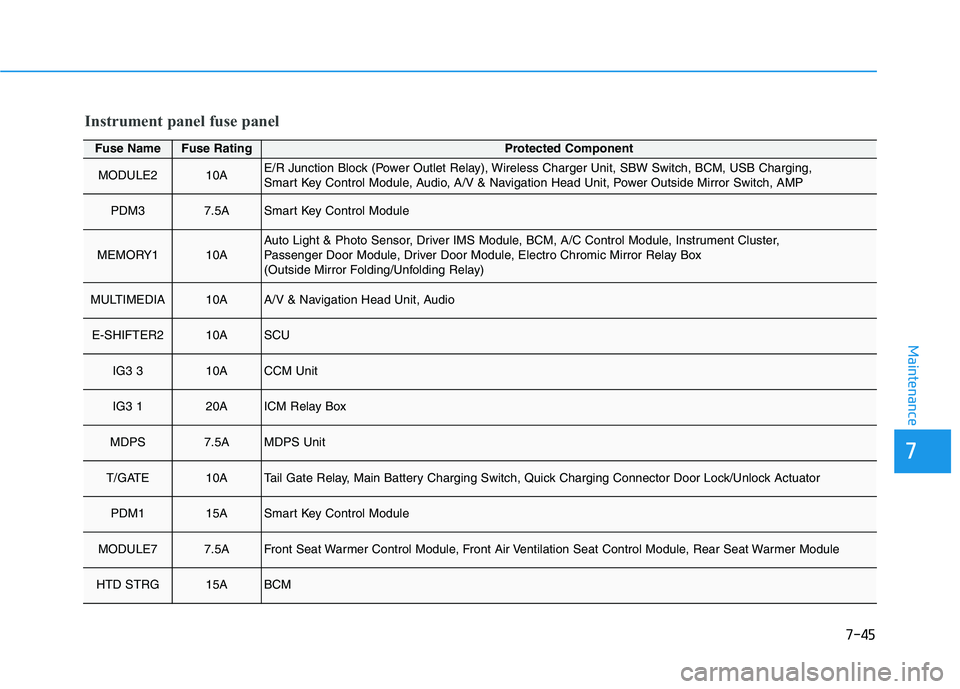
Fuse NameFuse RatingProtected Component
MODULE210AE/R Junction Block (Power Outlet Relay), Wireless Charger Unit, SBW Switch, BCM, USB Charging,
Smart Key Control Module, Audio, A/V & Navigation Head Unit, Power Outside Mirror Switch, AMP
PDM37.5ASmart Key Control Module
MEMORY110AAuto Light & Photo Sensor, Driver IMS Module, BCM, A/C Control Module, Instrument Cluster,
Passenger Door Module, Driver Door Module, Electro Chromic Mirror Relay Box
(Outside Mirror Folding/Unfolding Relay)
MULTIMEDIA10AA/V & Navigation Head Unit, Audio
E-SHIFTER210ASCU
IG3 310ACCM Unit
IG3 120AICM Relay Box
MDPS7.5AMDPS Unit
T/GATE10ATail Gate Relay, Main Battery Charging Switch, Quick Charging Connector Door Lock/Unlock Actuator
PDM115ASmart Key Control Module
MODULE77.5AFront Seat Warmer Control Module, Front Air Ventilation Seat Control Module, Rear Seat Warmer Module
HTD STRG15ABCM
Instrument panel fuse panel
Page 523 of 546
7-64
Maintenance
Do not use strong soap, chemi-cal detergents or hot water, and
do not wash the vehicle in direct
sunlight or when the body of the
vehicle is warm.
Be careful when washing the side windows of your vehicle.
Especially, with high-pressure
water, water may leak through
the windows and wet the interi-
or.
To prevent damage to the plastic parts, do not clean with chemi-
cal solvents or strong deter-
gents.
To prevent damage to the charg- ing door, make sure to close and
lock the vehicle doors whenwashing (high-pressure wash-
ing, automatic car washing, etc.)
the vehicle.
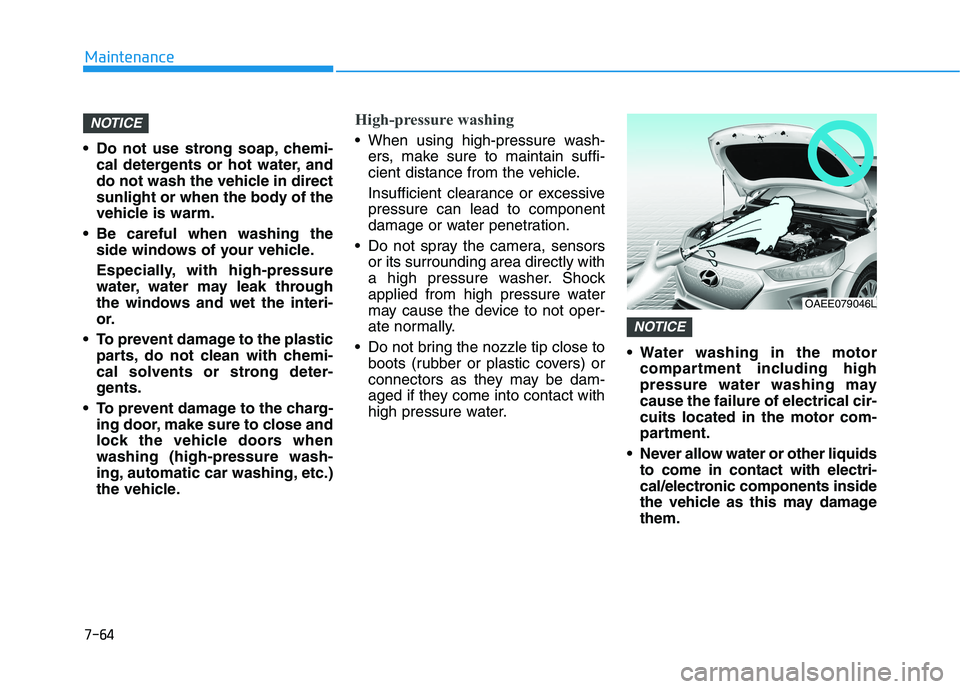
High-pressure washing
When using high-pressure wash-ers, make sure to maintain suffi-
cient distance from the vehicle.
Insufficient clearance or excessive pressure can lead to component
damage or water penetration.
Do not spray the camera, sensors or its surrounding area directly with
a high pressure washer. Shock
applied from high pressure water
may cause the device to not oper-
ate normally.
Do not bring the nozzle tip close to boots (rubber or plastic covers) or
connectors as they may be dam-
aged if they come into contact with
high pressure water. Water washing in the motor
compartment including high
pressure water washing maycause the failure of electrical cir-cuits located in the motor com-
partment.
Never allow water or other liquids to come in contact with electri-
cal/electronic components inside
the vehicle as this may damagethem.
NOTICE
NOTICE
OAEE079046L
Page 541 of 546
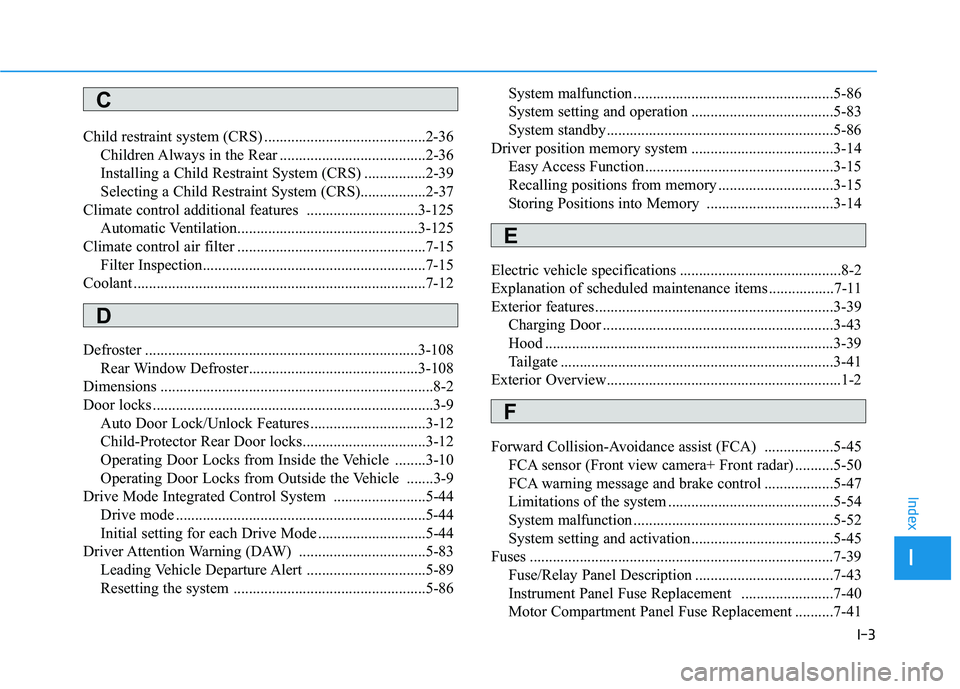
I-3
Child restraint system (CRS) ..........................................2-36
Children Always in the Rear ......................................2-36
Installing a Child Restraint System (CRS) ................2-39
Selecting a Child Restraint System (CRS).................2-37
Climate control additional features .............................3-125 Automatic Ventilation...............................................3-125
Climate control air filter .................................................7-15 Filter Inspection..........................................................7-15
Coolant ............................................................................7-12
Defroster .......................................................................3-108 Rear Window Defroster............................................3-108
Dimensions .......................................................................8-2
Door locks .........................................................................3-9 Auto Door Lock/Unlock Features ..............................3-12
Child-Protector Rear Door locks................................3-12
Operating Door Locks from Inside the Vehicle ........3-10
Operating Door Locks from Outside the Vehicle .......3-9
Drive Mode Integrated Control System ........................5-44
Drive mode .................................................................5-44
Initial setting for each Drive Mode ............................5-44
Driver Attention Warning (DAW) .................................5-83
Leading Vehicle Departure Alert ...............................5-89
Resetting the system ..................................................5-86 System malfunction ....................................................5-86
System setting and operation .....................................5-83
System standby...........................................................5-86
Driver position memory system .....................................3-14
Easy Access Function .................................................3-15
Recalling positions from memory ..............................3-15
Storing Positions into Memory .................................3-14
Electric vehicle specifications ..........................................8-2
Explanation of scheduled maintenance items .................7-11
Exterior features..............................................................3-39 Charging Door ............................................................3-43
Hood ...........................................................................3-39
Tailgate .......................................................................3-41
Exterior Overview.............................................................1-2
Forward Collision-Avoidance assist (FCA) ..................5-45 FCA sensor (Front view camera+ Front radar) ..........5-50
FCA warning message and brake control ..................5-47
Limitations of the system ...........................................5-54
System malfunction ....................................................5-52
System setting and activation .....................................5-45
Fuses ...............................................................................7-39 Fuse/Relay Panel Description ....................................7-43
Instrument Panel Fuse Replacement ........................7-40
Motor Compartment Panel Fuse Replacement ..........7-41
I
Index
C
D
E
F