fuse HYUNDAI IONIQ ELECTRIC 2021 Owners Manual
[x] Cancel search | Manufacturer: HYUNDAI, Model Year: 2021, Model line: IONIQ ELECTRIC, Model: HYUNDAI IONIQ ELECTRIC 2021Pages: 546, PDF Size: 34.82 MB
Page 78 of 546
1-4
Your vehicle at a glanceI
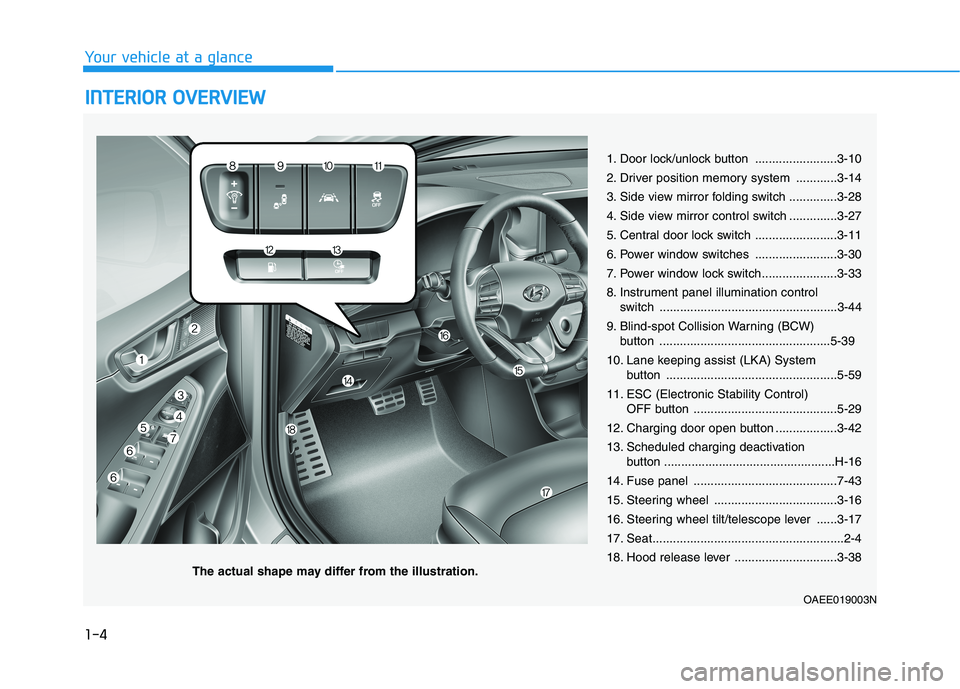
I NN TTEERR IIOO RR OO VVEERR VV IIEE WW
1. Door lock/unlock button ........................3-10
2. Driver position memory system ............3-14
3. Side view mirror folding switch ..............3-28
4. Side view mirror control switch ..............3-27
5. Central door lock switch ........................3-11
6. Power window switches ........................3-30
7. Power window lock switch......................3-33
8. Instrument panel illumination control
switch ....................................................3-44
9. Blind-spot Collision Warning (BCW) button ..................................................5-39
10. Lane keeping assist (LKA) System button ..................................................5-59
11. ESC (Electronic Stability Control) OFF button ..........................................5-29
12. Charging door open button ..................3-42
13. Scheduled charging deactivation button ..................................................H-16
14. Fuse panel ..........................................7-43
15. Steering wheel ....................................3-16
16. Steering wheel tilt/telescope lever ......3-17
17. Seat........................................................2-4
18. Hood release lever ..............................3-38
OAEE019003N
The actual shape may differ from the illustration.
Page 80 of 546
1-6
Your vehicle at a glanceM
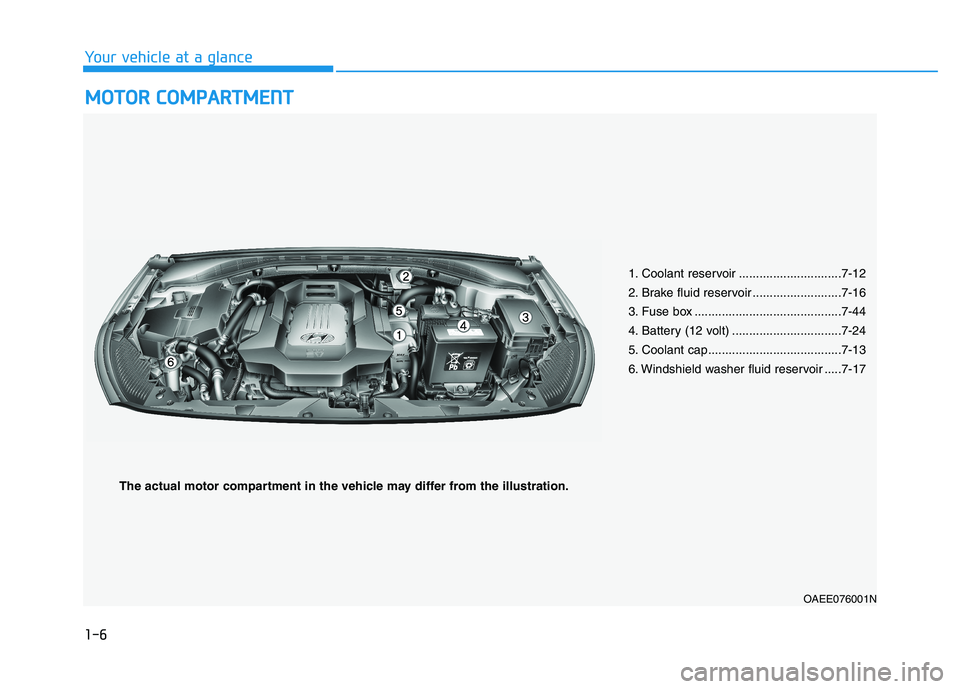
M OOTTOO RR CC OO MM PPAA RRTTMM EENN TT
1. Coolant reservoir ..............................7-12
2. Brake fluid reservoir ..........................7-16
3. Fuse box ...........................................7-44
4. Battery (12 volt) ................................7-24
5. Coolant cap.......................................7-13
6. Windshield washer fluid reservoir .....7-17
OAEE076001N
The actual motor compartment in the vehicle may differ from the illustration.
Page 184 of 546
3-34
Convenient features of your vehicle
Information
The automatic reverse feature is only
active when the "Auto Up" feature is
used by fully pulling up the switch to
the second detent.
Do not install any accessories on
the windows. The automatic
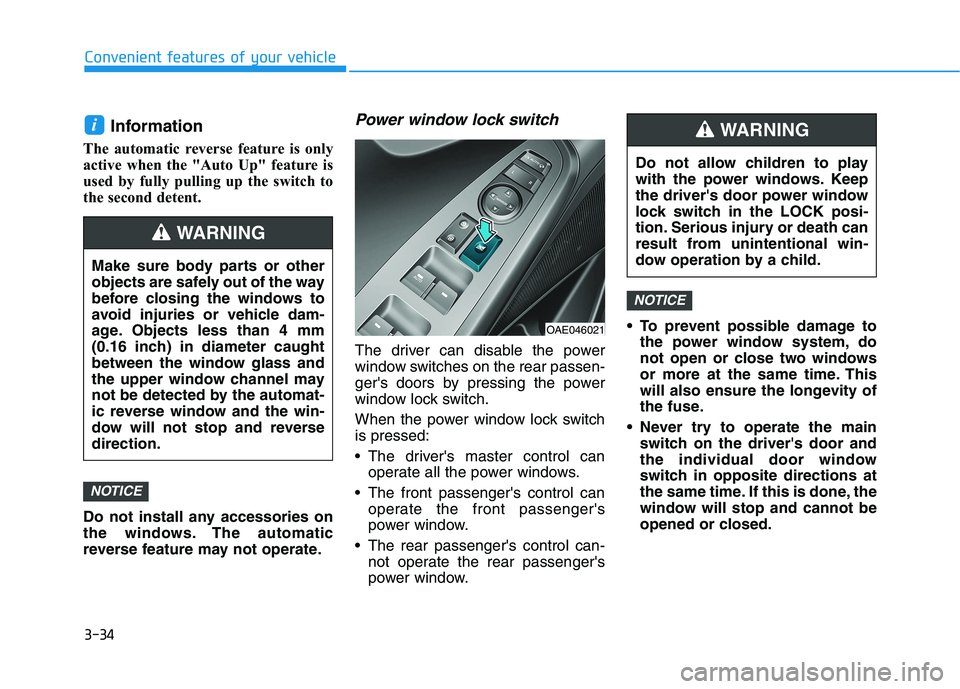
reverse feature may not operate.Power window lock switch
The driver can disable the power
window switches on the rear passen-
ger's doors by pressing the power
window lock switch.
When the power window lock switch is pressed:
The driver's master control can operate all the power windows.
The front passenger's control can operate the front passenger's
power window.
The rear passenger's control can- not operate the rear passenger's
power window. To prevent possible damage to
the power window system, do
not open or close two windows
or more at the same time. This
will also ensure the longevity of
the fuse.
Never try to operate the main switch on the driver's door and
the individual door window
switch in opposite directions at
the same time. If this is done, the
window will stop and cannot be
opened or closed.
NOTICE
NOTICE
i
OAE046021 Do not allow children to play
with the power windows. Keep
the driver's door power window
lock switch in the LOCK posi-
tion. Serious injury or death can
result from unintentional win-
dow operation by a child.
WARNING
Make sure body parts or other
objects are safely out of the way
before closing the windows to
avoid injuries or vehicle dam-
age. Objects less than 4 mm
(0.16 inch) in diameter caught
between the window glass and
the upper window channel may
not be detected by the automat-
ic reverse window and the win-
dow will not stop and reversedirection.
WARNING
Page 188 of 546
3-38
Convenient features of your vehicle
Resetting the sunroof
Sunroof needs to be reset if the fol-
lowing occurs :
- Battery is discharged or discon-nected or the related fuse has been replaced or disconnected
- The one-touch sliding function of the sunroof does not normally oper-ate
Reset procedure :
1. Place the POWER button to the ON position or start the vehicle
( indicator ON). It is recom-mended to reset the sunroof while
the vehicle is in the ready ( )
mode.
2. Push the control lever forward. The sunroof will close completelyor tilt depending on the condition
of the sunroof.
3. Release the control lever when the sunroof stops moving. 4. Push the control lever forward
about 10 seconds.
- When the sunroof is in the closed position :
The glass will tilt and slightly move up and down.
- When the sunroof is in the tilt position:
The glass will slightly move up and down.
Do not release the lever until the
operation is completed.
If you release the lever during opera-
tion, start the procedure again fromstep 2.
5. Within 3 seconds, push and hold the control lever forward until the
sunroof operates as follows:
Tilt down Slide Open Slide
Close.
Do not release the lever until the
operation is completed. If you release the lever during opera-
tion, start the procedure again fromstep 2.
6. Release the sunroof control lever
after all steps have completed. The sunroof system has beenreset.
Information
If the sunroof is not reset when the vehicle battery is disconnected or
discharged, or the sunroof fuse is
blown, the sunroof may not operate
normally.
For more detailed information, con- tact an authorized HYUNDAI dealer.
i
Page 213 of 546
3-63
Convenient features of your vehicle
3
Press POWER button with key
This warning message is displayed if
you press the POWER button while
the warning message "Key not
detected" is displayed.
At this time, the immobilizer indicator
light blinks.
Check BRAKE SWITCH fuse
This warning message is displayed if
the brake switch fuse is disconnected.
You need to replace the fuse with a
new one before starting the vehicle.
If that is not possible, you can start the
vehicle by pressing the POWER but-
ton for 10 seconds in the ACC posi-tion.
Shift to P to start vehicle
This warning message is displayed if
you try to start the vehicle without
shifting to the P (Park) position.
Unplug vehicle to start
This message is displayed when you
start the vehicle without unplugging
the charging cable. Unplug the
charging cable, and then start the
vehicle.
Low Washer Fluid (if equipped)
This warning message is displayed
if the washer fluid level in the reser-
voir is nearly empty.
Have the washer fluid reservoir refilled.
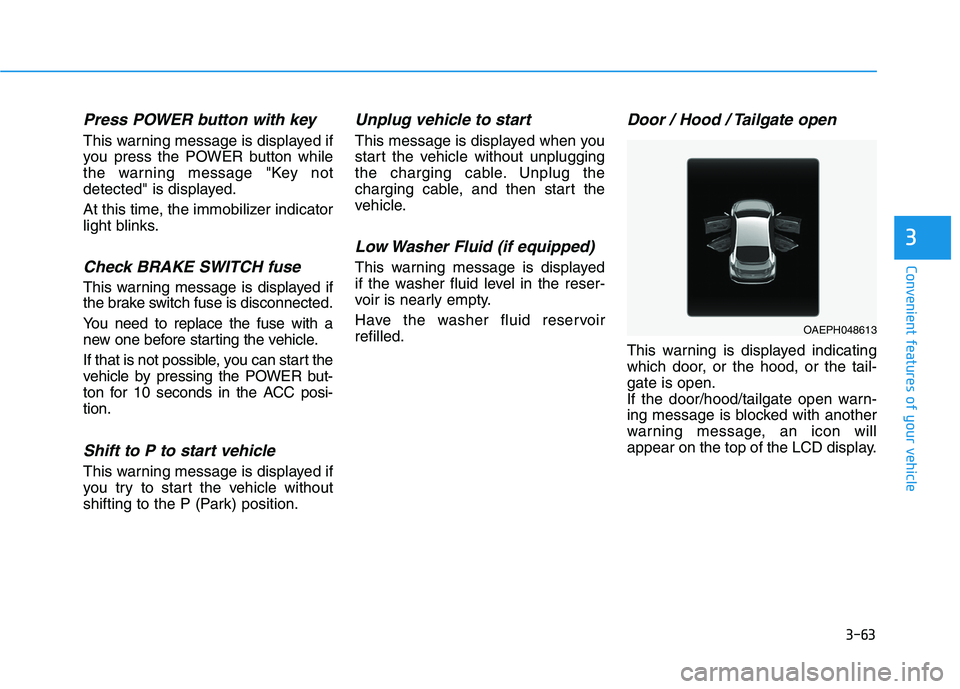
Door / Hood / Tailgate open
This warning is displayed indicating
which door, or the hood, or the tail-gate is open.
If the door/hood/tailgate open warn-
ing message is blocked with another
warning message, an icon will
appear on the top of the LCD display.
OAEPH048613
Page 215 of 546
3-65
Convenient features of your vehicle
3
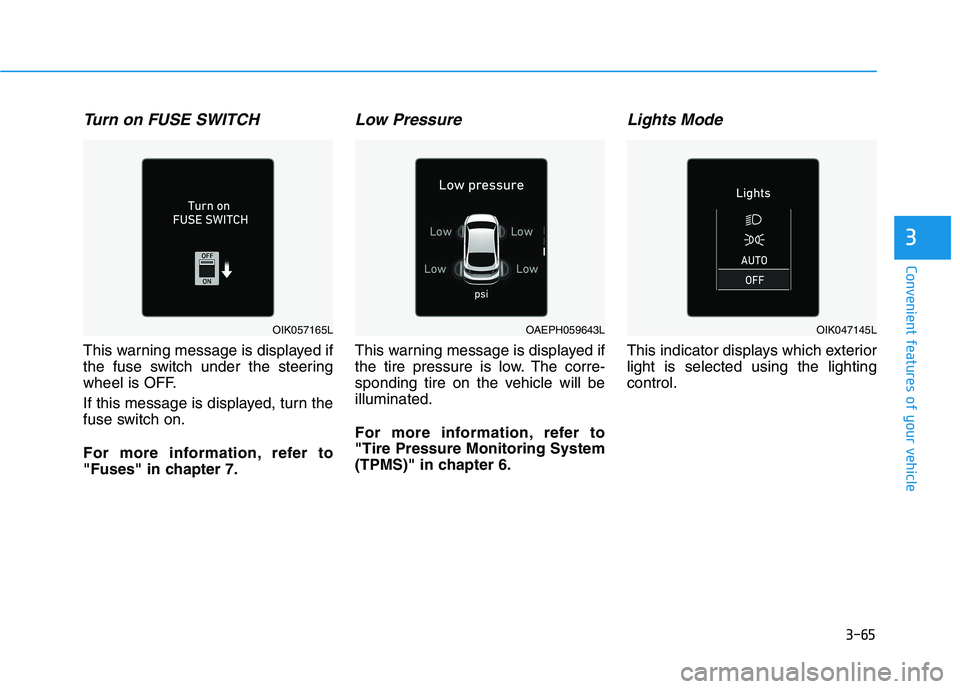
Turn on FUSE SWITCH
This warning message is displayed if
the fuse switch under the steering
wheel is OFF.
If this message is displayed, turn the
fuse switch on.
For more information, refer to
"Fuses" in chapter 7.
Low Pressure
This warning message is displayed if
the tire pressure is low. The corre-
sponding tire on the vehicle will beilluminated.
For more information, refer to "Tire Pressure Monitoring System
(TPMS)" in chapter 6.
Lights Mode
This indicator displays which exteriorlight is selected using the lightingcontrol.
OAEPH059643LOIK057165LOIK047145L
Page 233 of 546
3-83
Convenient features of your vehicle
3
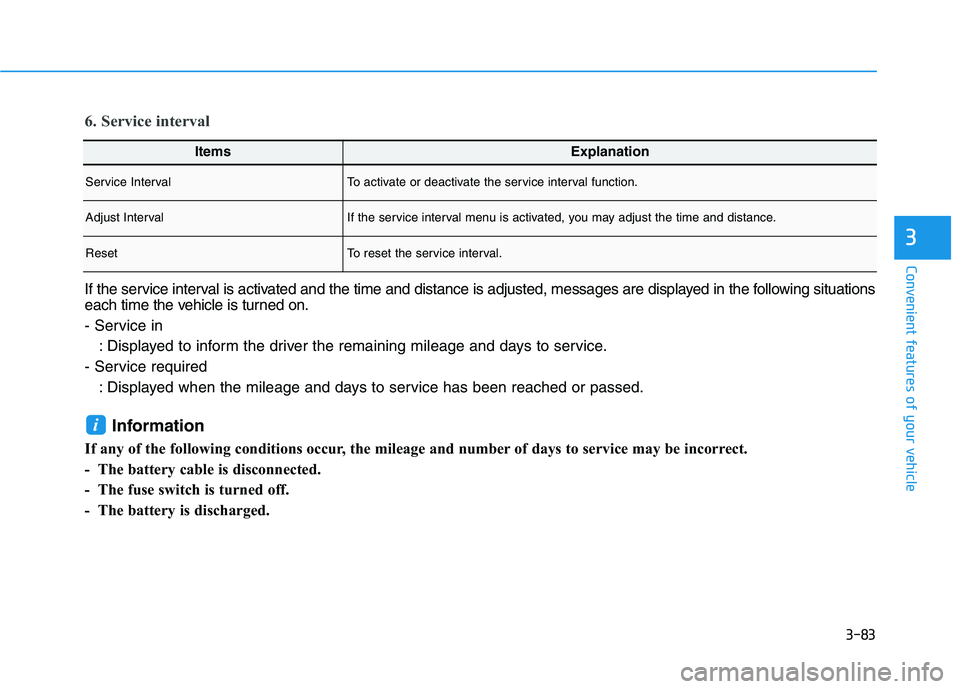
ItemsExplanation
Service IntervalTo activate or deactivate the service interval function.
Adjust IntervalIf the service interval menu is activated, you may adjust the time and distance.
ResetTo reset the service interval.
6. Service interval
If the service interval is activated and the time and distance is adjusted, messages are displayed in the following situations
each time the vehicle is turned on.
- Service in: Displayed to inform the driver the remaining mileage and days to service.
- Service required : Displayed when the mileage and days to service has been reached or passed.
Information
If any of the following conditions occur, the mileage and number of days to service may be incorrect.
- The battery cable is disconnected.
- The fuse switch is turned off.
- The battery is discharged.
i
Page 280 of 546
3-130
Convenient features of your vehicle
To prevent damage to the Power Outlets :
Use the power outlet only whenthe vehicle is in the ready ( )
mode and remove the accessory
plug after use. Using the acces-
sory plug for prolonged periods
of time with the vehicle off could
cause the battery to discharge.
Only use 12V electric acces- sories which are less than 180 W
(Watts) in electric capacity.
Adjust the air-conditioner or heater to the lowest operating
level when using the power outlet.
Close the cover when not in use.
Some electronic devices can cause electronic interference
when plugged into a vehicle’s
power outlet. These devices may
cause excessive audio staticand malfunctions in other elec-
tronic systems or devices used
in your vehicle.
(Continued)(Continued)
Push the plug in as far as it will
go. If good contact is not made,
the plug may overheat and the
fuse may open.
Plug in battery equipped electri- cal/electronic devices with
reverse current protection. The
current from the battery may
flow into the vehicle’s electri-
cal/electronic system and causesystem malfunction.
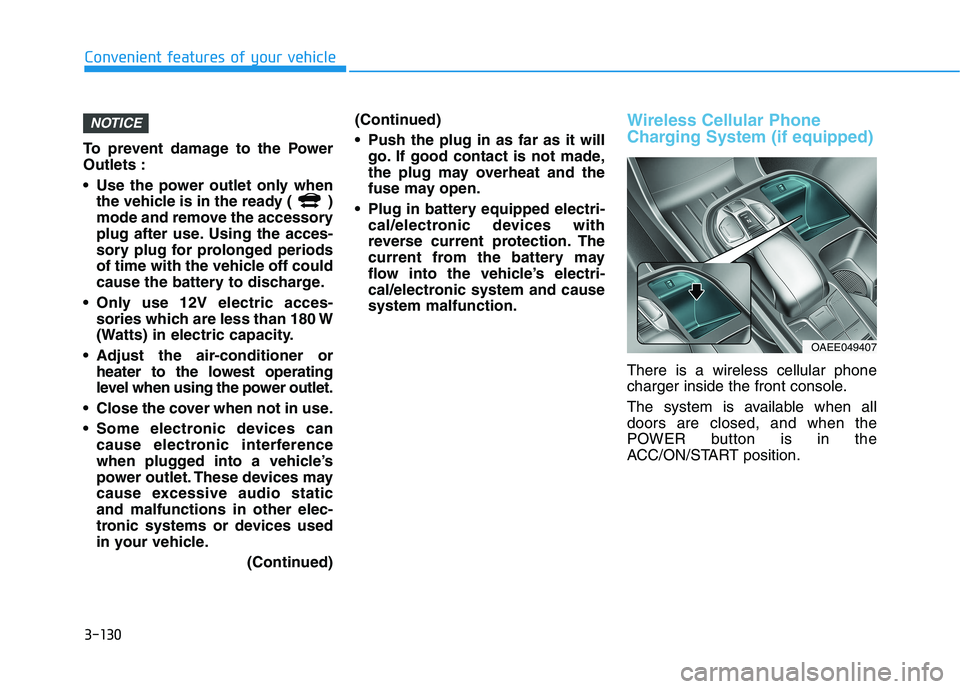
Wireless Cellular Phone
Charging System (if equipped)
There is a wireless cellular phone
charger inside the front console.
The system is available when all doors are closed, and when the
POWER button is in the
ACC/ON/START position.
NOTICE
OAEE049407
Page 299 of 546
5-9
Driving your vehicle
5
To prevent damage to the vehicle:
If the " " indicator turns off
while you are in motion, do not
attempt to shift to the P (Park)position.
To prevent damage to the vehicle:
When the stop lamp fuse is blown,
you cannot normally start the
vehicle. Replace the fuse with a
new one. If you are not able to
replace the fuse, you can start the
vehicle by pressing and holding
the POWER button for 10 seconds
with the POWER button in the ACCposition.
Do not press the POWER button
for more than 10 seconds except
when the stop lamp fuse is blown.
For your safety always depress
the brake pedal before starting the
vehicle.Information
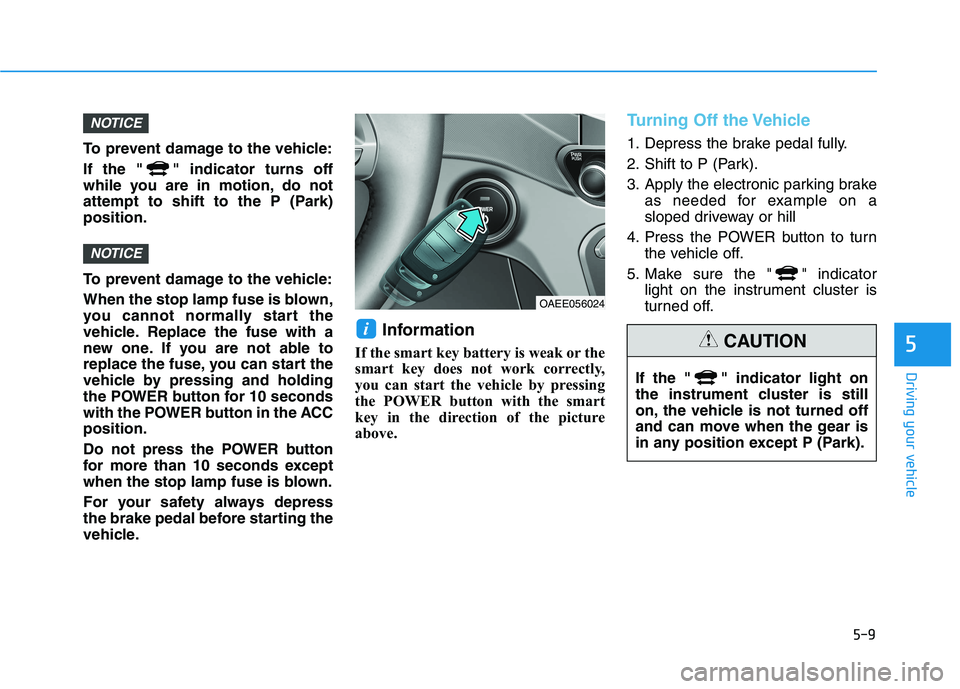
If the smart key battery is weak or the
smart key does not work correctly,
you can start the vehicle by pressing
the POWER button with the smart
key in the direction of the picture
above.
Turning Off the Vehicle
1. Depress the brake pedal fully.
2. Shift to P (Park).
3. Apply the electronic parking brake as needed for example on a
sloped driveway or hill
4. Press the POWER button to turn the vehicle off.
5. Make sure the " " indicator light on the instrument cluster is
turned off.
i
NOTICE
NOTICE
OAEE056024
If the " " indicator light on
the instrument cluster is still
on, the vehicle is not turned off
and can move when the gear is
in any position except P (Park).
CAUTION
Page 460 of 546
7
Maintenance
7
Maintenance
Motor compartment .............................................7-3
Maintenance services ...........................................7-4Owner's Responsibility .....................................................7-4
Owner Maintenance Precautions..................................7-4
Owner maintenance ...............................................7-5 Owner Maintenance Schedule .......................................7-6
Scheduled maintenance services.........................7-7
Explanation of scheduled maintenance items .7-11Coolant...................................................................7-12
Brake fluid ............................................................7-13 Checking the Brake Fluid Level ...................................7-13
Washer fluid .........................................................7-14 Checking the Washer Fluid Level................................7-14
Climate control air filter .....................................7-15 Filter Inspection ...............................................................7-15
Wiper blades .........................................................7-17 Blade Inspection ..............................................................7-17
Blade Replacement .........................................................7-17
12V Battery ...........................................................7-20 For Best Battery Service .............................................7-21
Battery Recharging ........................................................7-21
Reset Features.................................................................7-22 Tires and wheels ..................................................7-23
Tire Care ............................................................................7-23
Recommended Cold Tire Inflation Pressures ...........7-24
Check Tire Inflation Pressure ......................................7-25
Tire Rotation ...................................................................7-26
Wheel Alignment and Tire Balance ............................7-27
Tire Replacement ............................................................7-27
Wheel Replacement ........................................................7-28
Tire Traction ....................................................................7-28
Tire Maintenance ............................................................7-28
Tire Sidewall Labeling ....................................................7-28
Tire Terminology and Definitions ..............................7-32
All Season Tires ...............................................................7-36
Summer Tires ...................................................................7-36
Snow Tires ........................................................................7-36
Radial-Ply Tires ...............................................................7-36
Low Aspect Ratio Tires ................................................7-37
Fuses ......................................................................7-39 Instrument Panel Fuse Replacement .......................7-40
Motor Compartment Panel Fuse Replacement ........7-41
Fuse/Relay Panel Description ......................................7-43
7