display HYUNDAI IONIQ ELECTRIC 2022 Owner's Manual
[x] Cancel search | Manufacturer: HYUNDAI, Model Year: 2022, Model line: IONIQ ELECTRIC, Model: HYUNDAI IONIQ ELECTRIC 2022Pages: 546, PDF Size: 34.82 MB
Page 151 of 546
Convenient features of your vehicle
Accessing your vehicle .........................................3-3Smart Key ..........................................................................3-3
Immobilizer System ...........................................................3-8
Door locks ...............................................................3-9 Operating Door Locks from Outside the Vehicle .....3-9
Operating Door Locks from Inside the Vehicle ......3-10
Auto Door Lock/Unlock Features ...............................3-12
Child-Protector Rear Door locks ................................3-12
Theft-alarm system.............................................3-13
Driver position memory system .........................3-14 Storing Positions into Memory ..................................3-14
Recalling positions from memory ...............................3-15
Easy Access Function ....................................................3-15
Steering wheel......................................................3-16 Electric Power Steering (EPS) .....................................3-16
Tilt Steering / Telescope Steering ..............................3-17
Horn ....................................................................................3-18
Heated Steering Wheel ..................................................3-18
Mirrors ...................................................................3-19 Inside Rearview Mirror ..................................................3-19
Side View Mirrors .........................................................3-27
Reverse Parking Aid Function ....................................3-30
Windows ................................................................3-31 Power Windows ...............................................................3-32 Sunroof ................................................................3-35
Sunroof opening and closing .......................................3-36
Sliding the sunroof .........................................................3-36
Tilting the sunroof ..........................................................3-37
Sunshade ...........................................................................3-37
Resetting the sunroof ....................................................3-38
Exterior features .................................................3-39 Hood ...................................................................................3-39
Tailgate...............................................................................3-41
Charging Door ..................................................................3-43
Instrument cluster................................................3-44 Instrument Cluster Control............................................3-45
Gauges and Meters ........................................................3-46
Warning and Indicator lights ........................................3-50
LCD Display Messages ..................................................3-62
LCD Display ...........................................................3-73 LCD Display Control ........................................................3-73
LCD display modes ..........................................................3-74
TRIP Computer .....................................................3-86 Trip modes ........................................................................3-86
Light .......................................................................3-91 Exterior Lights .................................................................3-91
Interior Lights...................................................................3-99
Welcome System ...........................................................3-102
3
Page 154 of 546
3-4
Convenient features of your vehicle
Unlocking
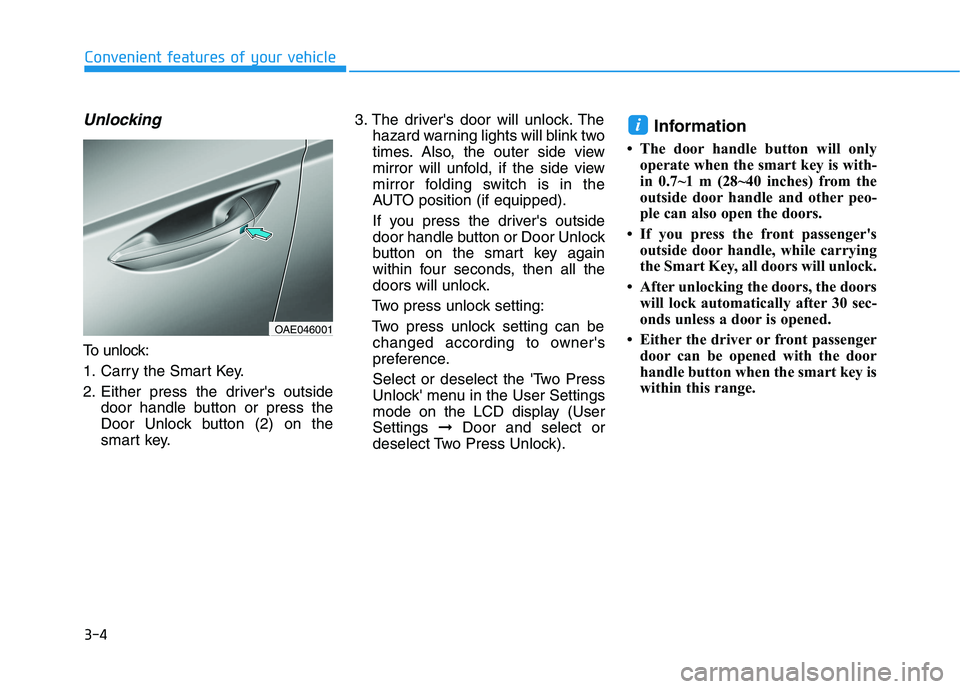
To unlock:
1. Carry the Smart Key.
2. Either press the driver's outsidedoor handle button or press the
Door Unlock button (2) on the
smart key. 3. The driver's door will unlock. The
hazard warning lights will blink two
times. Also, the outer side view
mirror will unfold, if the side view
mirror folding switch is in the
AUTO position (if equipped).
If you press the driver's outside
door handle button or Door Unlock
button on the smart key again
within four seconds, then all the
doors will unlock.
Two press unlock setting:
Two press unlock setting can be changed according to owner's
preference.
Select or deselect the 'Two Press
Unlock' menu in the User Settings
mode on the LCD display (UserSettings ➞Door and select or
deselect Two Press Unlock). Information
The door handle button will only operate when the smart key is with-
in 0.7~1 m (28~40 inches) from the
outside door handle and other peo-
ple can also open the doors.
If you press the front passenger's outside door handle, while carrying
the Smart Key, all doors will unlock.
After unlocking the doors, the doors will lock automatically after 30 sec-
onds unless a door is opened.
Either the driver or front passenger door can be opened with the door
handle button when the smart key is
within this range.
i
OAE046001
Page 162 of 546
3-12
Convenient features of your vehicle
Auto Door Lock/Unlock Features
Impact sensing door unlock
All doors will be automatically
unlocked when an impact causes the
air bags to deploy.
Speed sensing door lock
All doors will be automatically locked
(when set on cluster) when vehicle
speed exceeds 15 km/h (9 mph). All of the doors will be automatically
unlocked after the vehicle is turned off.
Shift lever auto door lock
All doors will be automatically locked
when shifted out of P (Park) with the
vehicle in the ready ( ) mode.
You can activate or deactivate the
Auto Door Lock/Unlock features fromthe User Settings mode on the LCD
display.
For more information, refer to the
"LCD Display" section in this
chapter.
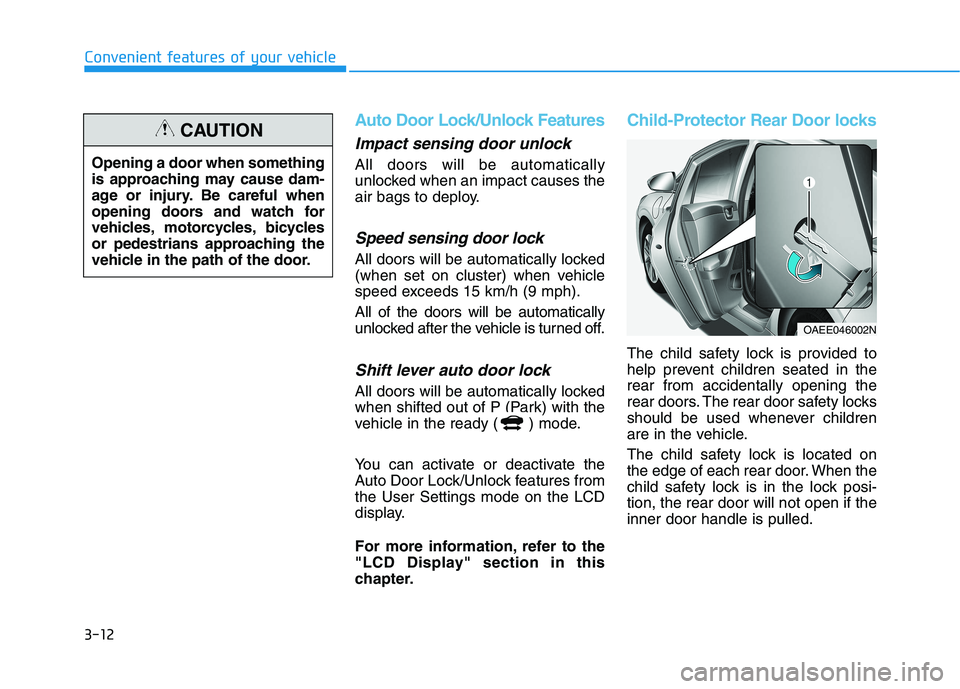
Child-Protector Rear Door locks
The child safety lock is provided to
help prevent children seated in therear from accidentally opening the
rear doors. The rear door safety locks
should be used whenever children
are in the vehicle.
The child safety lock is located on
the edge of each rear door. When the
child safety lock is in the lock posi-tion, the rear door will not open if theinner door handle is pulled.
OAEE046002N
Opening a door when something
is approaching may cause dam-
age or injury. Be careful when
opening doors and watch for
vehicles, motorcycles, bicycles
or pedestrians approaching the
vehicle in the path of the door.
CAUTION
Page 164 of 546
3-14
Convenient features of your vehicle
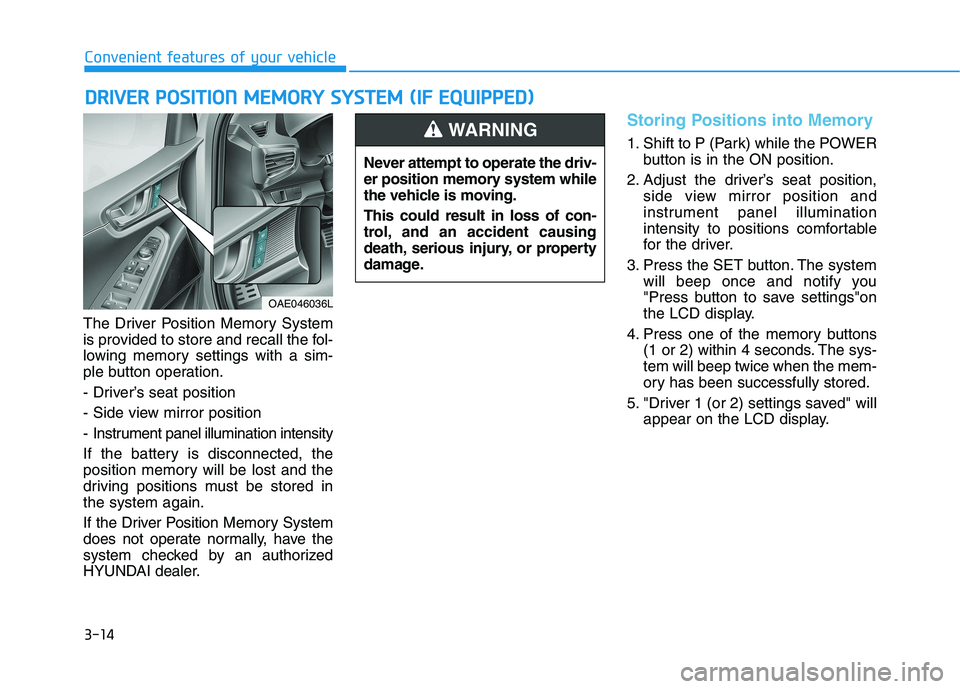
The Driver Position Memory System
is provided to store and recall the fol-
lowing memory settings with a sim-
ple button operation.
- Driver’s seat position
- Side view mirror position
- Instrument panel illumination intensity
If the battery is disconnected, the
position memory will be lost and the
driving positions must be stored inthe system again.
If the Driver Position Memory System
does not operate normally, have the
system checked by an authorized
HYUNDAI dealer.
Storing Positions into Memory
1. Shift to P (Park) while the POWERbutton is in the ON position.
2. Adjust the driver’s seat position, side view mirror position and
instrument panel illumination
intensity to positions comfortable
for the driver.
3. Press the SET button. The system will beep once and notify you
"Press button to save settings"on
the LCD display.
4. Press one of the memory buttons (1 or 2) within 4 seconds. The sys-tem will beep twice when the mem-
ory has been successfully stored.
5. "Driver 1 (or 2) settings saved" will appear on the LCD display.
DDRRIIVV EERR PP OO SSIITT IIOO NN MM EEMM OORRYY SS YY SSTT EEMM (( IIFF EE QQ UUIIPP PPEEDD ))
OAE046036L Never attempt to operate the driv-
er position memory system while
the vehicle is moving. This could result in loss of con-
trol, and an accident causing
death, serious injury, or property
damage.
WARNING
Page 165 of 546
3-15
Convenient features of your vehicle
3
Recalling positions from mem-
ory
1. Shift to P (Park) while the POWERbutton is in the ON position.
2. Press the desired memory button (1 or 2). The system will beep once,
and then the driver’s seat position,
side view mirror position and instru-ment panel illumination intensitywill automatically adjust to the
stored positions.
3. "Driver 1(or 2) settings is applied" will appear on the LCD display. While recalling the "1" memory
position, pressing the SET or 1
button temporarily stops theadjustment of the recalled memo-
ry position. Pressing the 2 button
recalls the "2" memory position.
While recalling the "2" memory position, pressing the SET or 2
button temporarily stops theadjustment of the recalled memo-
ry position. Pressing the 1 button
recalls the "1" memory position.
While recalling the stored posi- tions, pressing one of the con-
trol buttons for the driver’s seat,
side view mirror or instrumentpanel illumination will cause the
movement of that component to
stop and move in the direction
that the control button ispressed.
Easy Access Function
When exiting the vehicle the driver’s
seat will move rearward when the
vehicle is turned off, and the gear in
P (Park).
When entering the vehicle the dri-
ver’s seat will move forward when the
smart key is detected with the
POWER button in the ACC/ON/
START position.
You can activate or deactivate the Easy Access Function from the User
Settings mode on the LCD display.
For more information, refer to the
"LCD Display" section in this
chapter.
NOTICE
Page 170 of 546
3-20
Convenient features of your vehicle
Electric chromic mirror (ECM)with compass and HomeLink®
system
Your vehicle may be equipped with a
Gentex Automatic-Dimming Mirror
with a Z-Nav™ Electronic Compass
Display and an Integrated HomeLink ®
Wireless Control System.
During nighttime driving, this feature will automatically detect and reduce
rearview mirror glare while the com-
pass indicates the direction the vehi-
cle is pointed. The HomeLink ®
Universal Transceiver allows you to
activate your garage door(s), electric
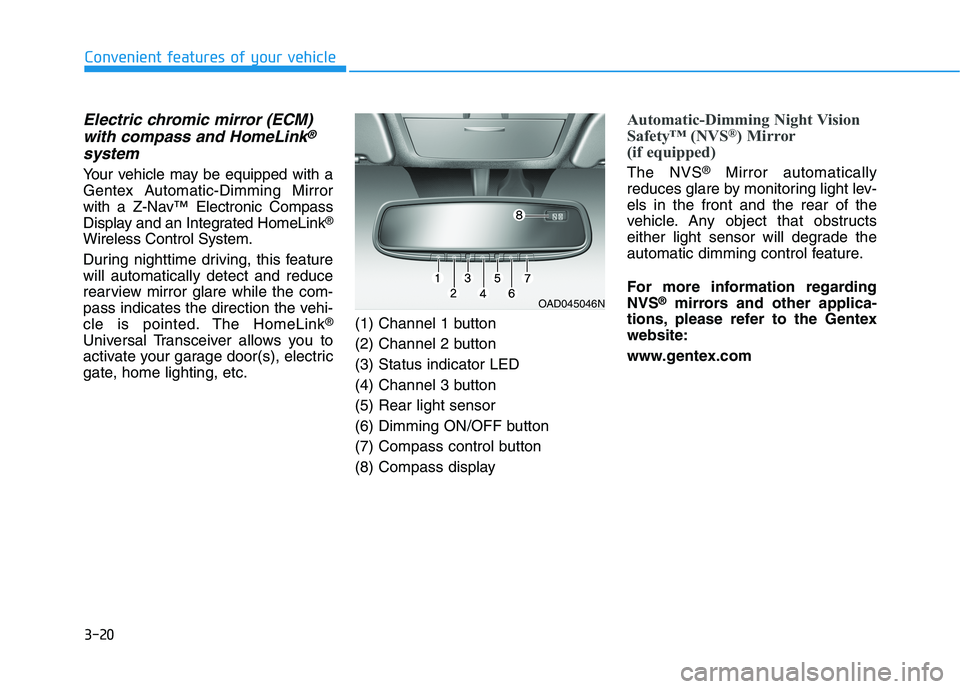
gate, home lighting, etc. (1) Channel 1 button
(2) Channel 2 button(3) Status indicator LED
(4) Channel 3 button(5) Rear light sensor
(6) Dimming ON/OFF button
(7) Compass control button
(8) Compass display
Automatic-Dimming Night Vision
Safety™ (NVS
®
) Mirror
(if equipped)
The NVS ®
Mirror automatically
reduces glare by monitoring light lev- els in the front and the rear of the
vehicle. Any object that obstructs
either light sensor will degrade the
automatic dimming control feature.
For more information regarding NVS ®
mirrors and other applica-
tions, please refer to the Gentexwebsite:
www.gentex.com
OAD045046N
Page 171 of 546
3-21
Convenient features of your vehicle
3
The auto-dimming function can be
controlled by pressing the ON/OFF
button:
1. Pressing the button turns the auto-dimming function OFF which is
indicated by the green Status
Indicator LED turning off.
2. Pressing the button again turns the auto-dimming function ON
which is indicated by the green
Status Indicator LED turning on.
The mirror defaults to the ON posi-
tion each time the vehicle is started.Z-Nav™ Compass Display
The NVS™ Mirror in your vehicle is
also equipped with a Z-Nav™
Compass that shows the vehicle
Compass heading in the Display
Window using the 8 basic cardinalheadings (N, NE, E, SE, etc.).
Compass function
The Compass can be turned ON andOFF and will remember the last state
when the vehicle is cycled. To turn
the display feature ON/OFF:
1. Press and release the button to turn the display feature OFF.
2. Press and release the button again to turn the display back ON.
Additional options can be set with
press and hold sequences of the but-
ton and are detailed below.
There is a difference between mag-
netic north and true north. To com-
pensate for this difference you willneed to adjust the Zone setting
based on where you live.
Page 172 of 546
3-22
Convenient features of your vehicle
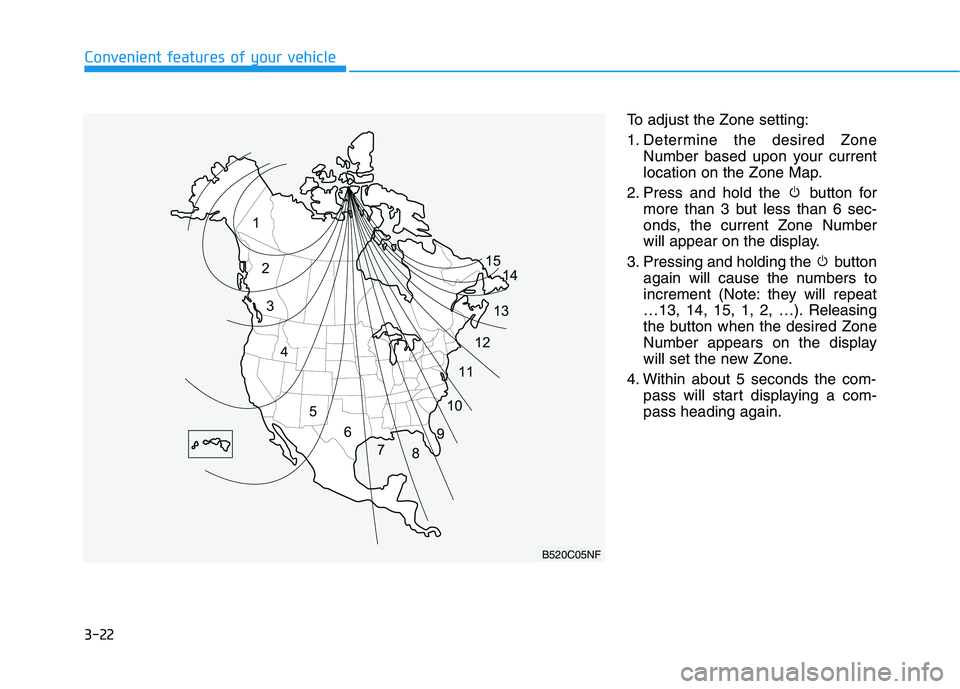
To adjust the Zone setting:
1. Determine the desired ZoneNumber based upon your current
location on the Zone Map.
2. Press and hold the button for more than 3 but less than 6 sec-
onds, the current Zone Number
will appear on the display.
3. Pressing and holding the button again will cause the numbers to
increment (Note: they will repeat
…13, 14, 15, 1, 2, …). Releasing
the button when the desired Zone
Number appears on the display
will set the new Zone.
4. Within about 5 seconds the com- pass will start displaying a com-pass heading again.
B520C05NF
Page 173 of 546
3-23
Convenient features of your vehicle
3
There are some conditions that can
cause changes to the vehicle mag-
nets, such as installing a ski rack or
a CB antenna. Body repair work on
the vehicle can also cause changes
to the vehicle’s magnetic field. In
these situations, the compass will
need to be re-calibrated to quickly
correct these changes.
If you need to recalibrate the com- pass:
1. Press and hold the button formore than 6 seconds. When the
compass memory is cleared a "C"
will appear in the display.
2. Drive the vehicle in 2 complete cir- cles at less than 8 km/h (5 mph).Integrated HomeLink ®
Wireless
Control System
The HomeLink ®
Wireless Control
System can replace up to three hand-
held radio-frequency (RF) transmit-
ters with a single built-in device. This
innovative feature will learn the radiofrequency codes of most current
transmitters to operate devices such
as gate operators, garage door open-
ers, entry door locks, security sys-
tems, even home lighting. Both stan-
dard and rolling code-equipped trans-
mitters can be programmed by fol-
lowing the outlined procedures. Additional HomeLink ®
information
can be found at: www.homelink.com
or by calling 1-800-355-3515.
Retain the original transmitter of the
RF device you are programming for
use in other vehicles as well as forfuture HomeLink ®
programming. It is
also suggested that upon the sale of
the vehicle, the programmedHomeLink ®
buttons be erased for
security purposes.Before programming HomeLink ®
to a garage door
opener or gate operator, makesure people and objects are out
of the way of the device to pre-
vent potential harm or damage.Do not use the HomeLink ®
with
any garage door opener that
lacks the safety stop and
reverse features required by
federal safety standards (this
includes any garage door open-
er model manufactured before
April 1, 1982). A garage doorthat cannot detect an object -signaling the door to stop and
reverse - does not meet current
federal safety standards. Using
a garage door opener without
these features increases the
risk of serious injury or death.
WARNING
Page 194 of 546
3-44
Convenient features of your vehicleI
I NN SSTT RR UU MM EENN TT CC LLUU SSTT EERR
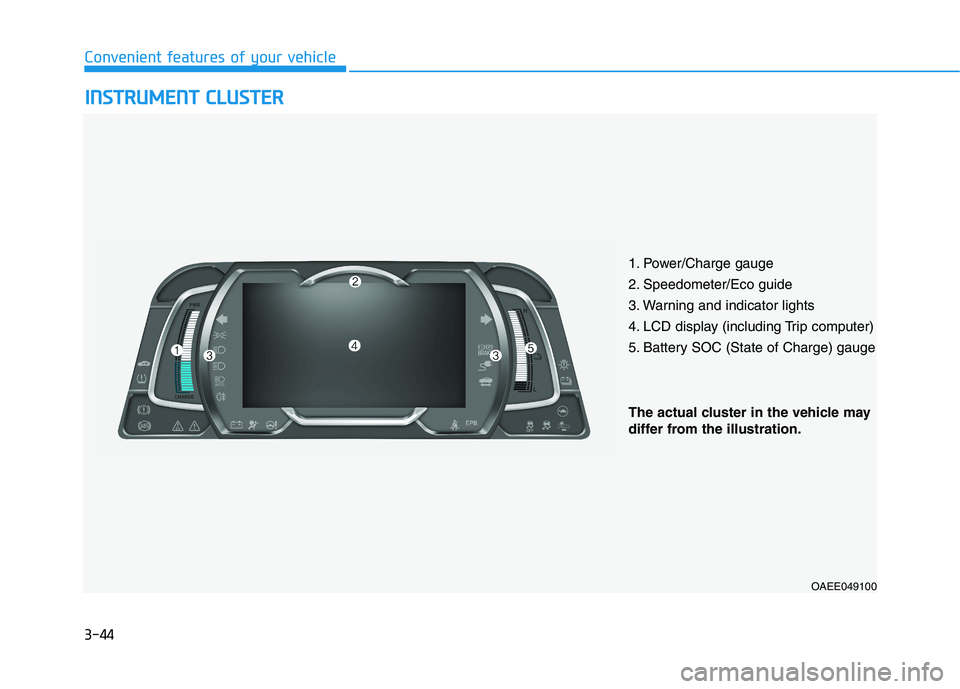
1. Power/Charge gauge
2. Speedometer/Eco guide
3. Warning and indicator lights
4. LCD display (including Trip computer)
5. Battery SOC (State of Charge) gauge
OAEE049100
The actual cluster in the vehicle may
differ from the illustration.