mirror Hyundai Ioniq Hybrid 2018 Owner's Guide
[x] Cancel search | Manufacturer: HYUNDAI, Model Year: 2018, Model line: Ioniq Hybrid, Model: Hyundai Ioniq Hybrid 2018Pages: 642, PDF Size: 16.33 MB
Page 290 of 642
3-140
Convenient features of your vehicle
• For maximum defrosting, set the
temperature control to the extreme
right/hot position and the fan speed
control to the highest speed.
• If warm air to the floor is desired
while defrosting or defogging, set the
mode to the floor-defrost position.
• Before driving, clear all snow and
ice from the windshield, rear win-
dow, outside rear view mirrors, and
all side windows.
• Clear all snow and ice from the
hood and air inlet in the cowl grill to
improve heater and defroster effi-
ciency and to reduce the probabili-
ty of fogging up inside of the wind-
shield.
Automatic climate control system
To defog inside windshield
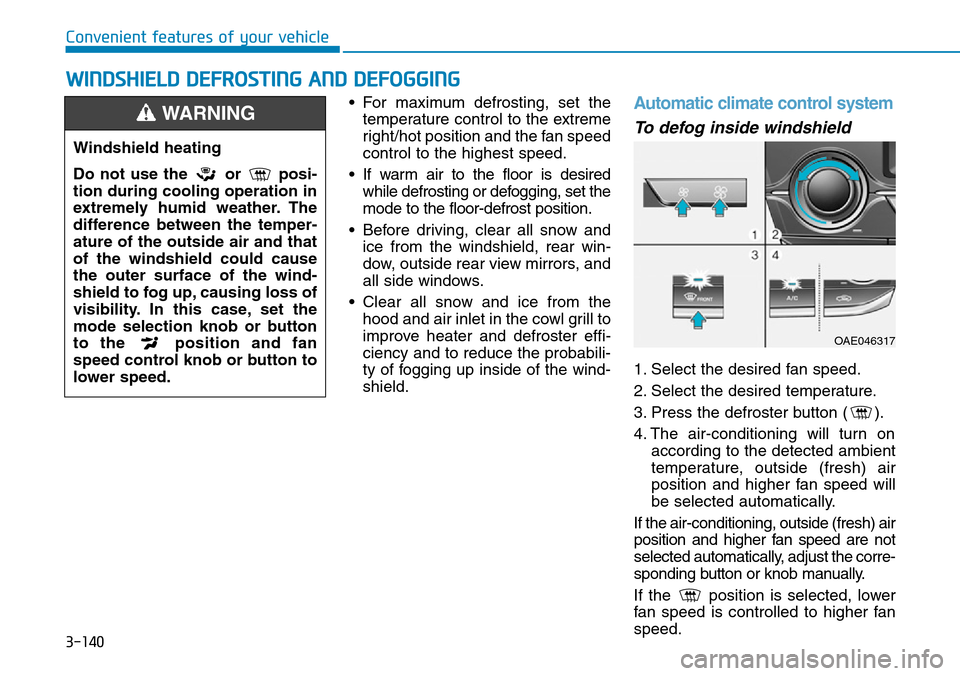
1. Select the desired fan speed.
2. Select the desired temperature.
3. Press the defroster button ( ).
4. The air-conditioning will turn on
according to the detected ambient
temperature, outside (fresh) air
position and higher fan speed will
be selected automatically.
If the air-conditioning, outside (fresh) air
position and higher fan speed are not
selected automatically, adjust the corre-
sponding button or knob manually.
If the position is selected, lower
fan speed is controlled to higher fan
speed.
WWINDSHIELD DEFROSTING AND DEFOGGING
Windshield heating
Do not use the or posi-
tion during cooling operation in
extremely humid weather. The
difference between the temper-
ature of the outside air and that
of the windshield could cause
the outer surface of the wind-
shield to fog up, causing loss of
visibility. In this case, set the
mode selection knob or button
to the position and fan
speed control knob or button to
lower speed.
WARNING
OAE046317
Page 296 of 642
3-146
Convenient features of your vehicle
Sunglass holder (if equipped)
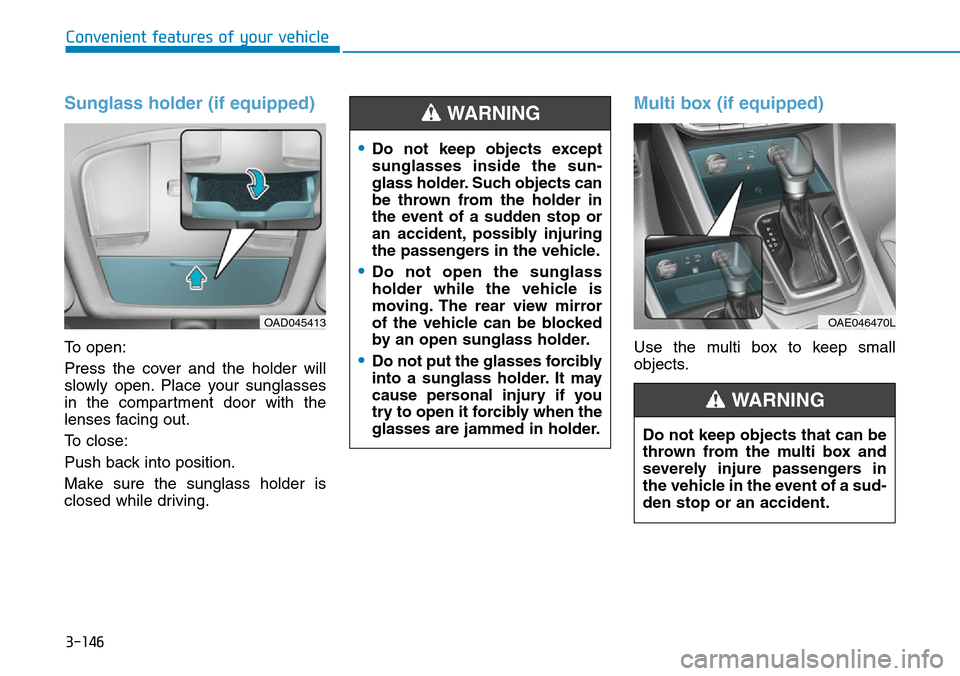
To open:
Press the cover and the holder will
slowly open. Place your sunglasses
in the compartment door with the
lenses facing out.
To close:
Push back into position.
Make sure the sunglass holder is
closed while driving.
Multi box (if equipped)
Use the multi box to keep small
objects.
OAD045413
•Do not keep objects except
sunglasses inside the sun-
glass holder. Such objects can
be thrown from the holder in
the event of a sudden stop or
an accident, possibly injuring
the passengers in the vehicle.
•Do not open the sunglass
holder while the vehicle is
moving. The rear view mirror
of the vehicle can be blocked
by an open sunglass holder.
•Do not put the glasses forcibly
into a sunglass holder. It may
cause personal injury if you
try to open it forcibly when the
glasses are jammed in holder.
WARNING
OAE046470L
Do not keep objects that can be
thrown from the multi box and
severely injure passengers in
the vehicle in the event of a sud-
den stop or an accident.
WARNING
Page 298 of 642
3-148
Convenient features of your vehicle
• Keep your drinks sealed while
driving to prevent spilling your
drink. If liquid spills, it may get
into the vehicle's electrical/elec-
tronic system and damage elec-
trical/electronic parts.
• When cleaning spilled liquids,
do not dry the cup holder using
hot temperatures. This may dam-
age the cup holder.
Sunvisor
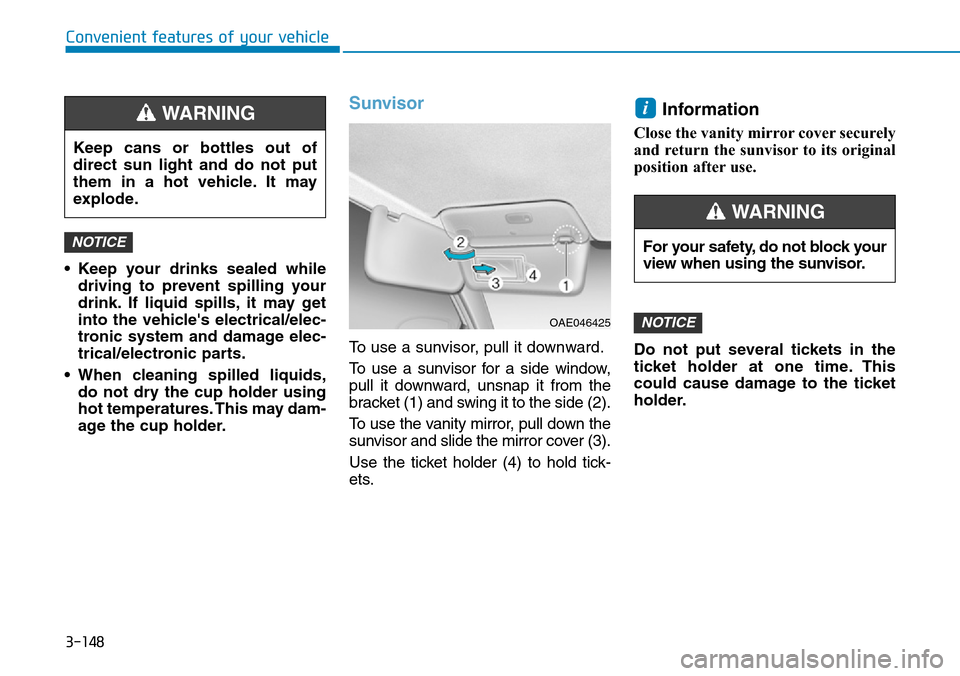
To use a sunvisor, pull it downward.
To use a sunvisor for a side window,
pull it downward, unsnap it from the
bracket (1) and swing it to the side (2).
To use the vanity mirror, pull down the
sunvisor and slide the mirror cover (3).
Use the ticket holder (4) to hold tick-
ets.
Information
Close the vanity mirror cover securely
and return the sunvisor to its original
position after use.
Do not put several tickets in the
ticket holder at one time. This
could cause damage to the ticket
holder.
NOTICE
i
NOTICE
Keep cans or bottles out of
direct sun light and do not put
them in a hot vehicle. It may
explode.
WARNING
OAE046425
For your safety, do not block your
view when using the sunvisor.
WARNING
Page 351 of 642
5-4
Driving your vehicle
Before entering the vehicle
• Be sure all windows, outside mir-
ror(s), and outside lights are clean
and unobstructed.
• Remove frost, snow, or ice.
• Visually check the tires for uneven
wear and damage.
• Check under the vehicle for any
sign of leaks.
• Be sure there are no obstacles
behind you if you intend to back up.
Before starting
• Make sure the hood, the tailgate,
and the doors are securely closed
and locked.
• Adjust the position of the seat and
steering wheel.
• Adjust the inside and outside
rearview mirrors.
• Verify all the lights work.
• Fasten your seat belt. Check that
all passengers have fastened their
seat belts.
• Check the gauges and indicators in
the instrument panel and the mes-
sages on the instrument display
when the ignition switch is in the
ON position.
• Check that any items you are car-
rying are stored properly or fas-
tened down securely.
BEFORE DRIVING
To reduce the risk of SERIOUS
INJURY or DEATH, take the fol-
lowing precautions:
•ALWAYS wear your seat belt.
All passengers must be prop-
erly belted whenever the vehi-
cle is moving. For more infor-
mation, refer to "Seat Belts" in
chapter 2.
•Always drive defensively.
Assume other drivers or pedes-
trians may be careless and
make mistakes.
•Stay focused on the task of
driving. Driver distraction can
cause accidents.
•Leave plenty of space between
you and the vehicle in front of
you.
WARNING
Page 387 of 642
5-40
Driving your vehicle
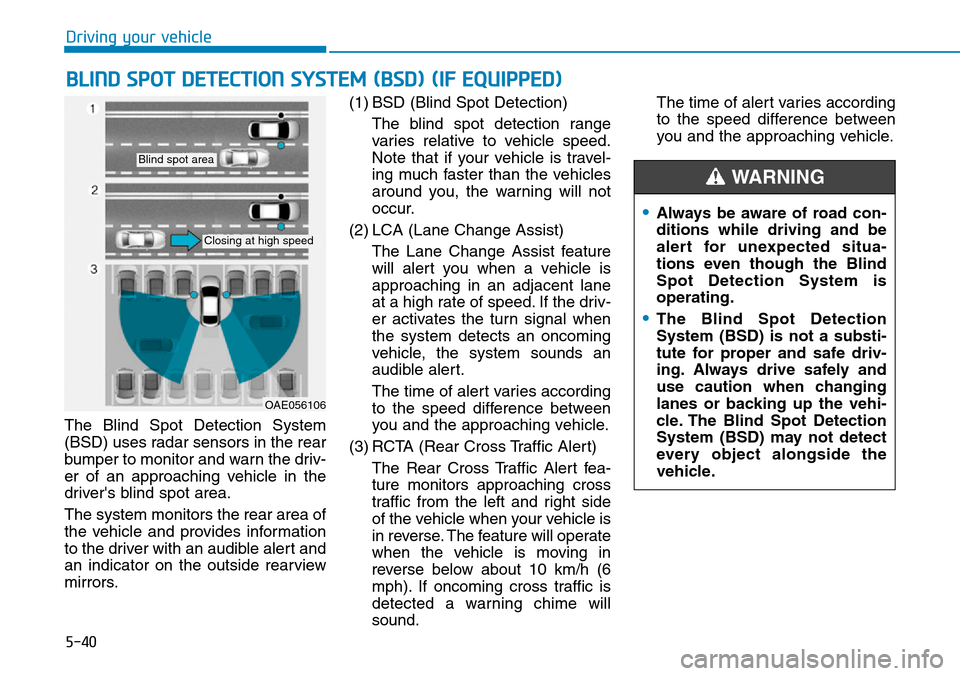
The Blind Spot Detection System
(BSD) uses radar sensors in the rear
bumper to monitor and warn the driv-
er of an approaching vehicle in the
driver's blind spot area.
The system monitors the rear area of
the vehicle and provides information
to the driver with an audible alert and
an indicator on the outside rearview
mirrors.(1) BSD (Blind Spot Detection)
The blind spot detection range
varies relative to vehicle speed.
Note that if your vehicle is travel-
ing much faster than the vehicles
around you, the warning will not
occur.
(2) LCA (Lane Change Assist)
The Lane Change Assist feature
will alert you when a vehicle is
approaching in an adjacent lane
at a high rate of speed. If the driv-
er activates the turn signal when
the system detects an oncoming
vehicle, the system sounds an
audible alert.
The time of alert varies according
to the speed difference between
you and the approaching vehicle.
(3) RCTA (Rear Cross Traffic Alert)
The Rear Cross Traffic Alert fea-
ture monitors approaching cross
traffic from the left and right side
of the vehicle when your vehicle is
in reverse. The feature will operate
when the vehicle is moving in
reverse below about 10 km/h (6
mph). If oncoming cross traffic is
detected a warning chime will
sound.The time of alert varies according
to the speed difference between
you and the approaching vehicle.
BLIND SPOT DETECTION SYSTEM (BSD) (IF EQUIPPED)
OAE056106
Blind spot area
Closing at high speed
•Always be aware of road con-
ditions while driving and be
alert for unexpected situa-
tions even though the Blind
Spot Detection System is
operating.
•The Blind Spot Detection
System (BSD) is not a substi-
tute for proper and safe driv-
ing. Always drive safely and
use caution when changing
lanes or backing up the vehi-
cle. The Blind Spot Detection
System (BSD) may not detect
every object alongside the
vehicle.
WARNING
Page 388 of 642
5-41
Driving your vehicle
5
BSD (Blind Spot Detection) /
LCA (Lane Change Assist)
(if equipped)
Operating conditions
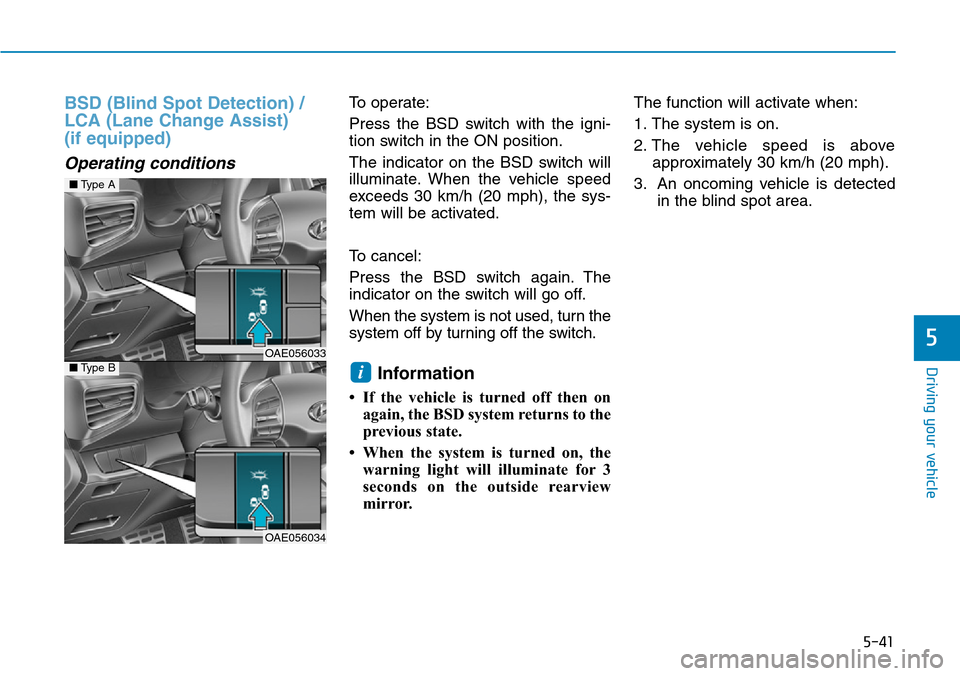
To operate:
Press the BSD switch with the igni-
tion switch in the ON position.
The indicator on the BSD switch will
illuminate. When the vehicle speed
exceeds 30 km/h (20 mph), the sys-
tem will be activated.
To cancel:
Press the BSD switch again. The
indicator on the switch will go off.
When the system is not used, turn the
system off by turning off the switch.
Information
• If the vehicle is turned off then on
again, the BSD system returns to the
previous state.
• When the system is turned on, the
warning light will illuminate for 3
seconds on the outside rearview
mirror. The function will activate when:
1. The system is on.
2. The vehicle speed is above
approximately 30 km/h (20 mph).
3. An oncoming vehicle is detected
in the blind spot area.
i
■Type A
OAE056033■Type B
OAE056034
Page 389 of 642
5-42
Driving your vehicle
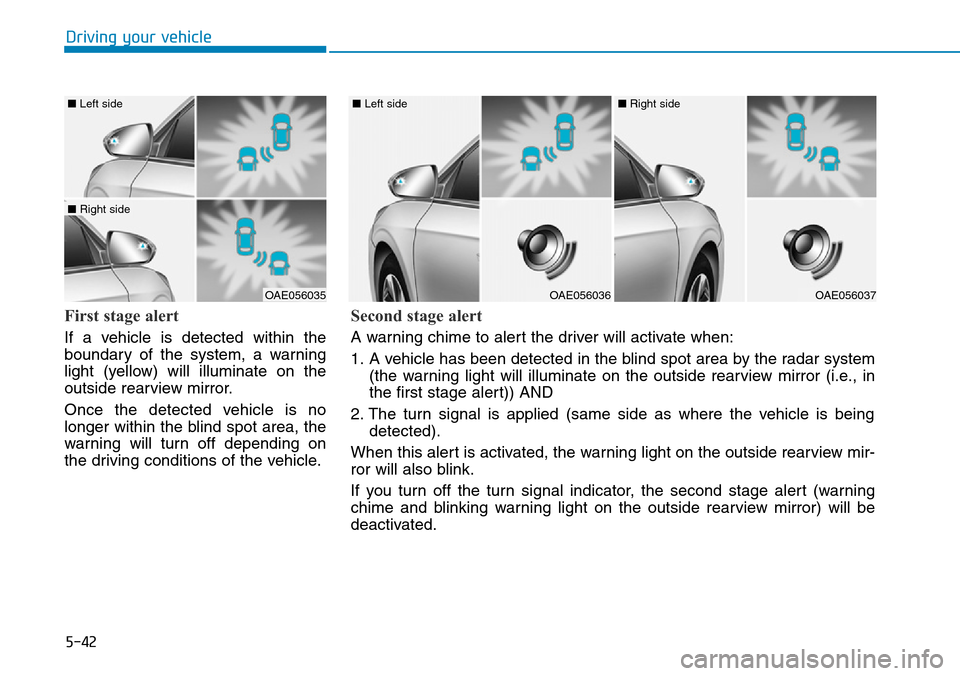
First stage alert
If a vehicle is detected within the
boundary of the system, a warning
light (yellow) will illuminate on the
outside rearview mirror.
Once the detected vehicle is no
longer within the blind spot area, the
warning will turn off depending on
the driving conditions of the vehicle.
OAE056035
■ Left side
■ Right side
OAE056036
■ Left side
OAE056037
■ Right side
Second stage alert
A warning chime to alert the driver will activate when:
1. A vehicle has been detected in the blind spot area by the radar system
(the warning light will illuminate on the outside rearview mirror (i.e., in
the first stage alert)) AND
2. The turn signal is applied (same side as where the vehicle is being
detected).
When this alert is activated, the warning light on the outside rearview mir-
ror will also blink.
If you turn off the turn signal indicator, the second stage alert (warning
chime and blinking warning light on the outside rearview mirror) will be
deactivated.
Page 391 of 642
5-44
Driving your vehicle
Operating conditions
To operate:
Cluster type A
Go to the 'User Settings →Driving
Assist →Rear Collision Warning and
select Rear Cross Traffic Alert' on the
LCD display.
Cluster type B
Go to the 'User Settings →Driving
Assist and select Rear Cross Traffic
Alert' on the LCD display.
The system will turn on and standby
to activate. The system will activate
when vehicle speed is below 10 km/h
(6.2 mph) and with the shift lever in R
(Reverse).
If the function is deselected from the
instrument cluster, the function will
deactivate.
For more information, refer to
"LCD Display Modes" in chapter 3.Information
• The last selected setting (ON or
OFF) of the RCTA is remained in
the system.
• The system will activate when vehi-
cle speed is below 10 km/h (6.2 mph)
and with the shift lever in R
(Reverse).
• The Rear Cross Traffic Alert
(RCTA) detecting range is approxi-
mately 0.5 m ~ 20 m (1 ft ~ 65 ft) in
the direction of both lateral sides of
the vehicle.
An approaching vehicle will be
detected if their vehicle speed is
within 4 km/h ~36 km/h (2.5 ~ 22.5
mph).
Note that the detecting range may
vary under certain conditions. As
always, use caution and pay close
attention to your surroundings
when backing up your vehicle.
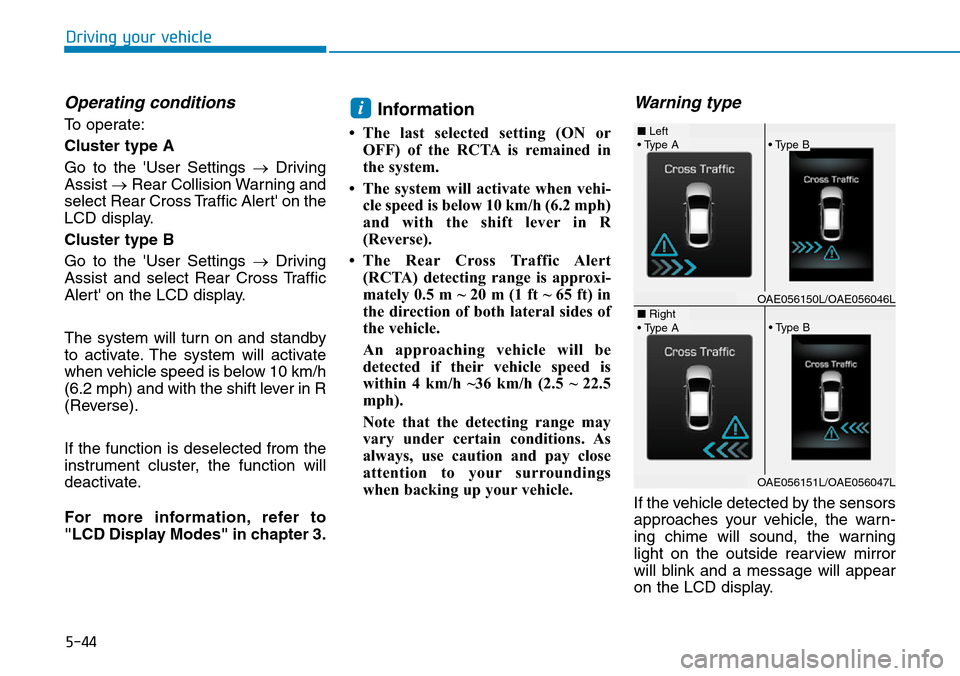
Warning type
If the vehicle detected by the sensors
approaches your vehicle, the warn-
ing chime will sound, the warning
light on the outside rearview mirror
will blink and a message will appear
on the LCD display.
i
• Type A■ Left
■ Right
• Type B
• Type A• Type B
OAE056150L/OAE056046L
OAE056151L/OAE056047L
Page 392 of 642
5-45
Driving your vehicle
5
Information
• The warning chime will turn off
when:
- The detected vehicle moves out of
the sensing area or
- when the vehicle is right behind
your vehicle or
- when the vehicle is not approach-
ing your vehicle or
- when the other vehicle slows down.
• The system may not operate proper-
ly due to other factors or circum-
stances. Always pay attention to
your surroundings.
• If the sensing area near the rear
bumper is blocked by either a wall
or barrier or by a parked vehicle,
the system sensing area may be
reduced.
i(Continued)
•The Blind Spot Detection
System (BSD) and Rear Cross
Traffic Alert (RCTA) are not a
substitute for proper and safe
driving practices. Always
drive safely and use caution
when changing lanes or back-
ing up your vehicle. The Blind
Spot Detection System (BSD)
may not detect every object
alongside the vehicle.
•With the system activated, the
warning light on the outside
rearview mirror will illuminate
whenever a vehicle is detect-
ed at the rear side by the sys-
tem.
To avoid accidents, do not
focus only on the warning
light and neglect to see the
surrounding of the vehicle.
•Drive safely even though the
vehicle is equipped with a
Blind Spot Detection System
(BSD) and Rear Cross Traffic
Alert (RCTA). Do not solely
rely on the system but check
your surrounding before
changing lanes or backing the
vehicle up.
The system may not alert the
driver in some conditions so
always check your surround-
ings while driving.
(Continued)
WARNING
Page 395 of 642
5-48
Driving your vehicle
• When the sensors are blocked by
other vehicles, walls or parking-lot
pillars.
• The vehicle drives on a curved
road or through a tollgate.
• The vehicle is driven near areas
containing metal substances such
as a construction zone, railroad,
etc.
• There is a fixed object near the
vehicle, such as a guardrail, per-
son, animal, etc.
• While going down or up a steep
road where the height of the lane is
different.
• When driving through a narrow
road with many trees or bushes.
• When driving on wet surfaces.
• When driving through a large area
with few vehicles or structures
around, such as a desert, rural
area, etc.
• A big vehicle is near such as a bus
or truck.
• When other vehicles are close to
your vehicle.
• When the other vehicle approach-
es very close.• When the detected vehicle also
moves back, as your vehicle drives
back.
• While changing lanes.
• The vehicle is turning left or right at
a crossroad.
• If the vehicle has started at the
same time as the vehicle next to
you and has accelerated.
• When the other vehicle passes at a
very fast speed.
• When the vehicle in the next lane
moves two lanes away from you
OR when the vehicle two lanes
away moves to the next lane to
you.
• A motorcycle or bicycle is near.
• A flat trailer is near.
• If there are small objects in the
detecting area such as a shopping
cart or a baby stroller.
• If there is a low height vehicle such
as a sports car.
Non-operating condition
The BSD indicator on the outside
rearview mirror may not illuminate
properly when:
• The outside rearview mirror hous-
ing is damaged.
• The mirror is covered with dirt,
snow, or debris.
• The window is covered with dirt,
snow, or debris.
• The window is tinted.