cruise control Hyundai Ioniq Hybrid 2019 User Guide
[x] Cancel search | Manufacturer: HYUNDAI, Model Year: 2019, Model line: Ioniq Hybrid, Model: Hyundai Ioniq Hybrid 2019Pages: 603, PDF Size: 21.91 MB
Page 193 of 603
3-101
Convenient features of your vehicle
3
Warning mode
If one of followings occurs, warning
messages will be displayed on the
LCD display for several seconds.
- Lower washer fluid (if equipped)
- Exterior lamp malfunction
- Blind-Spot Collision Warning(BCW) system malfunction (if
equipped)
- Forward Collision-Avoidance Assist (FCA) malfunction (if
equipped)
- High Beam Assist malfunction (if equipped)
- Smart cruise control malfunction
- Tire Pressure Monitoring System (TPMS) malfunction
User settings mode
In this mode, you can change the
settings of the instrument cluster,
doors, lamps, etc.
1. Driver Assistance
2. Door
3. Lights
4. Convenience
5. Service Interval
6. Other (Features)
7. Reset
The information provided may dif-
fer depending on which functions
are applicable to your vehicle. 1. Driver Assistance
- Lane Departure Warning/
Standard LKA/Active LKA
To adjust the sensitivity of the Lane
Keeping Assist (LKA) System.
For more information, refer to the
"Lane Keeping Assist (LKA)
System" in chapter 5.
- High Sensitivity/Normal Sensitivity/ Off
To adjust the sensitivity of the Driver
Attention Warning.
For more information, refer to the
"Driver Attention Warning (DAW)
System" in chapter 5.
- Fast/Normal/Slow To adjust the sensitivity of the
Smart Cruise Control system.
For more information, refer to the
"Smart Cruise Control" in chapter
5.
Page 297 of 603
Driving your vehicle
5
Before Driving ........................................................5-4
Before Entering the Vehicle ...........................................5-4
Before Starting ..................................................................5-4
Engine Start/Stop Button .....................................5-6
Engine Start/Stop Button Positions .............................5-7
Starting the Vehicle ..........................................................5-9
Turning Off the Vehicle .................................................5-11
Dual Clutch Transmission ....................................5-12
Dual Clutch Transmission Operation ..........................5-12
Shift Lever Position ........................................................5-16
Paddle Shifter ..................................................................5-19
Parking ........................................................................\
.......5-20
Good Driving Practices ..................................................5-20
Coasting Guide (Plug-in hybrid vehicle) ..........5-22
Braking System ....................................................5-23
Power Brakes ...................................................................5-23
Disc Brake Wear Indicator ............................................5-24
Parking Brake...................................................................5-24
Anti-lock Brake System (ABS) ....................................5-26
Electronic Stability Control (ESC)................................5-28
Vehicle Stability Management (VSM).........................5-31
Hill-Start Assist Control (HAC) ....................................5-33
Good Braking Practices .................................................5-33
Blind-spot Collision Warning (BCW) system ...5-34
BCW (Blind-spot Collision Warning) ...........................5-35
RCCW (Rear Cross-Traffic Collision Warning) .........5-37
Detecting sensor .............................................................5-40
Limitations of the system .............................................5-41
Forward Collision-Avoidance Assist (FCA)
system....................................................................5-43\
System Setting and Activation.....................................5-43
FCA Warning Message and System Control ............5-45
FCA Sensor .......................................................................5\
-47
System Malfunction .......................................................5-49
Limitations of the System .............................................5-51
Lane Keeping Assist (LKA) System ...................5-56
LKA System Operation...................................................5-57
Warning Light and Message.........................................5-61
Driver's attention ............................................................5-62
LKA System Function Change......................................5-64
Driver Attention Warning (DAW) system .........5-66
System Setting and Activation.....................................5-66
Resetting the System .....................................................5-68
System Standby ...............................................................5-68
System Malfunction .......................................................5-69
Cruise Control .......................................................5-71
Cruise Control Operation...............................................5-71
Page 298 of 603
5
Smart Cruise Control System .............................5-76
Smart Cruise Control Speed .........................................5-77
Smart Cruise Control Vehicle-to-Vehicle
Distance ........................................................................\
.....5-82
Sensor to Detect Distance to the Vehicle Ahead ...5-84
To Adjust the Sensitivity of
Smart Cruise Control ......................................................5-86
To Convert to Cruise Control Mode............................5-87
Limitations of the System .............................................5-87
Special Driving Conditions ..................................5-93
Hazardous Driving Conditions ......................................5-93
Rocking the Vehicle ........................................................5-93
Smooth Cornering ...........................................................5-94
Driving at Night................................................................5-94
Driving in the Rain ..........................................................5-94
Driving in Flooded Areas ...............................................5-95
Highway Driving...............................................................5-95
Winter Driving ......................................................5-96
Snow or Icy Conditions ..................................................5-96
Winter Precautions .........................................................5-98
Vehicle Load Limit..............................................5-100
Tire Loading Information Label .................................5-101
Trailer Towing .....................................................5-105
Page 325 of 603
5-29
Driving your vehicle
5
ESC operation
ESC ON condition
When the Engine Start/Stop button
is in the ON position, the ESC and
the ESC OFF indicator lights illumi-
nate for approximately three sec-
onds. After both lights go off, the
ESC is enabled.
When operating
When the ESC is in opera-
tion, the ESC indicator light
blinks:
When you apply your brakes under conditions which may lock the
wheels, you may hear sounds from
the brakes, or feel a corresponding
sensation in the brake pedal. This
is normal and it means your ESC is
active.
When the ESC activates, the vehi- cle may not respond to the accel-
erator as it does under routine con-
ditions.
If the Cruise Control was in use when the ESC activates, the
Cruise Control automatically disen-
gages. The Cruise Control can be
reengaged when the road condi-
tions allow. See "Cruise Control
System" later in this chapter. (if
equipped)
When moving out of the mud or driving on a slippery road, the
engine RPM (revolutions per
minute) may not increase even if
you press the accelerator pedal
deeply. This is to maintain the sta-
bility and traction of the vehicle and
does not indicate a problem.
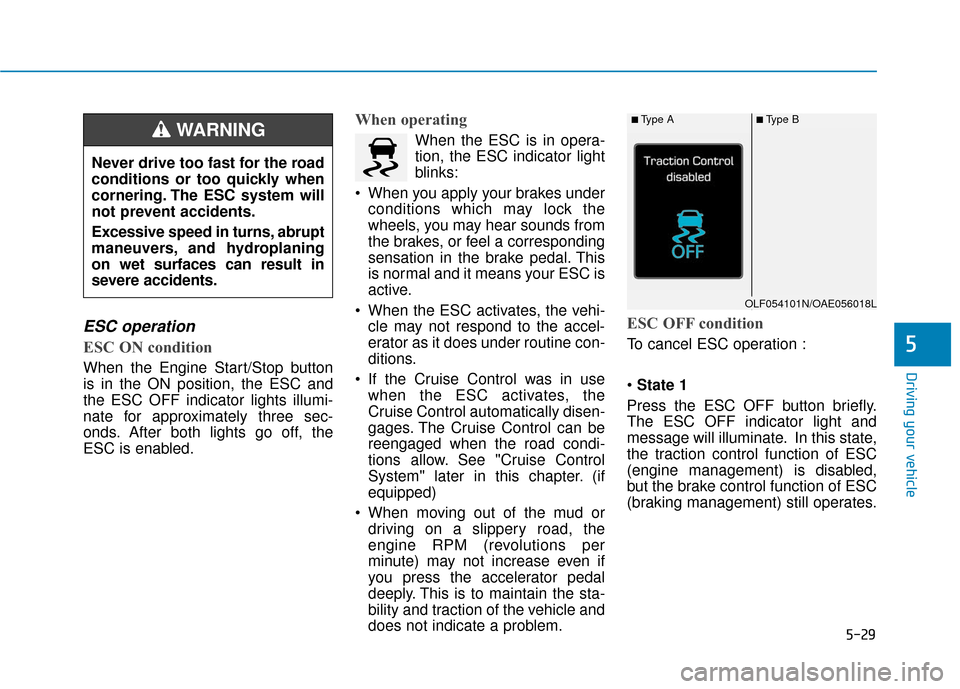
ESC OFF condition
To cancel ESC operation :
State 1
Press the ESC OFF button briefly.
The ESC OFF indicator light and
message will illuminate. In this state,
the traction control function of ESC
(engine management) is disabled,
but the brake control function of ESC
(braking management) still operates.
Never drive too fast for the road
conditions or too quickly when
cornering. The ESC system will
not prevent accidents.
Excessive speed in turns, abrupt
maneuvers, and hydroplaning
on wet surfaces can result in
severe accidents.
WARNING ■Type A■Type B
OLF054101N/OAE056018L
Page 366 of 603
5-70
Driving your vehicleThe Driver Attention Warning
(DAW) system may not properly
operate with limited alerting in
the following situations:
The lane detection perform-
ance is limited. (For more infor-
mation, refer to "Lane Keeping
Assist (LKA) system" in this
chapter.)
The vehicle is violently driven
or is abruptly turned for obsta-
cle avoidance (e.g. construc-
tion area, other vehicles, fallen
objects, bumpy road).
Forward drivability of the vehi-
cle is severely undermined
(possibly due to wide variation
in tire pressures, uneven tire
wear-out, toe-in/toe-out align-
ment).
The vehicle drives on a curvy
road.
The vehicle drives on a bumpy
road. (Continued)
(Continued)
The vehicle drives through a
windy area.
The vehicle is controlled by the
following driving assist sys-
tems:
- Lane Keeping Assist (LKA)system
- Forward Collision-avoidance Assist (FCA) system
- Smart Cruise Control (SCC) system
CAUTION
Playing the vehicle audio sys-
tem at high volume may offset
the Driver Attention Warning
(DAW) system warning sounds.
CAUTION
Page 367 of 603
5-71
Driving your vehicle
5
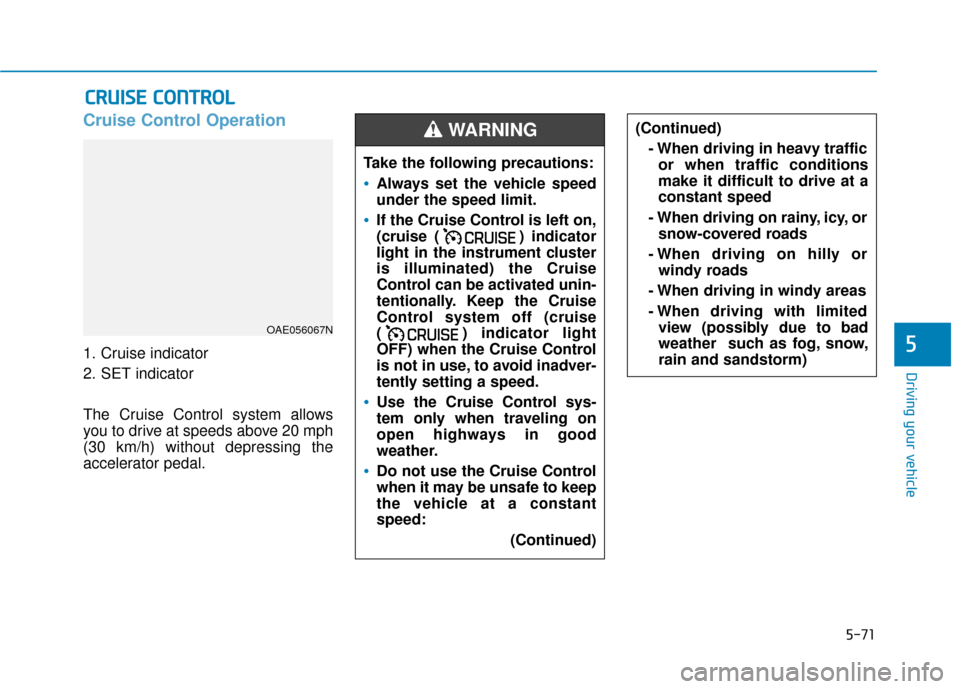
Cruise Control Operation
1. Cruise indicator
2. SET indicator
The Cruise Control system allows
you to drive at speeds above 20 mph
(30 km/h) without depressing the
accelerator pedal.
C CR
R U
U I
IS
S E
E
C
C O
O N
NT
TR
R O
O L
L
(Continued)
- When driving in heavy trafficor when traffic conditions
make it difficult to drive at a
constant speed
- When driving on rainy, icy, or snow-covered roads
- When driving on hilly or windy roads
- When driving in windy areas
- When driving with limited view (possibly due to bad
weather such as fog, snow,
rain and sandstorm)
OAE056067N
Take the following precautions:
Always set the vehicle speed
under the speed limit.
If the Cruise Control is left on,
(cruise ( ) indicator
light in the instrument cluster
is illuminated) the Cruise
Control can be activated unin-
tentionally. Keep the Cruise
Control system off (cruise
( ) indicator light
OFF) when the Cruise Control
is not in use, to avoid inadver-
tently setting a speed.
Use the Cruise Control sys-
tem only when traveling on
open highways in good
weather.
Do not use the Cruise Control
when it may be unsafe to keep
the vehicle at a constant
speed:
(Continued)
WARNING
Page 368 of 603
5-72
Driving your vehicle
Information
• During normal cruise control opera-tion, when the SET switch is activat-
ed or reactivated after applying the
brakes, the cruise control will ener-
gize after approximately 3 seconds.
This delay is normal.
• Before activating the cruise control function, the system will check to
verify that the brake switch is oper-
ating normally. Depress the brake
pedal at least once after turning ON
the ignition or starting the engine.
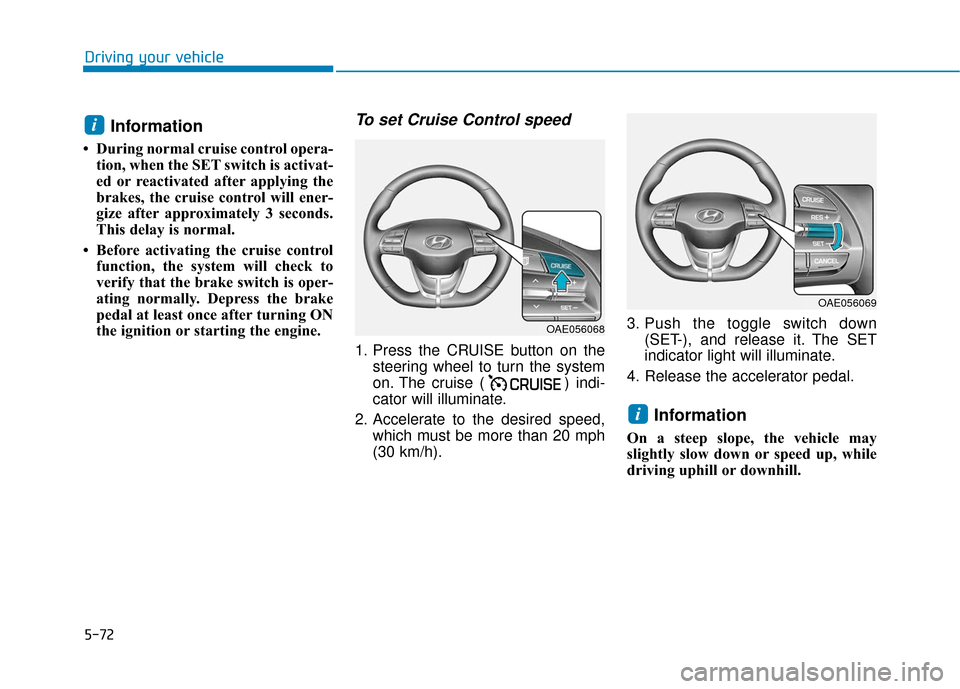
To set Cruise Control speed
1. Press the CRUISE button on the steering wheel to turn the system
on. The cruise ( ) indi-
cator will illuminate.
2. Accelerate to the desired speed, which must be more than 20 mph
(30 km/h). 3. Push the toggle switch down
(SET-), and release it. The SET
indicator light will illuminate.
4. Release the accelerator pedal.
Information
On a steep slope, the vehicle may
slightly slow down or speed up, while
driving uphill or downhill.
i
i
OAE056068
OAE056069
Page 369 of 603
5-73
Driving your vehicle
5
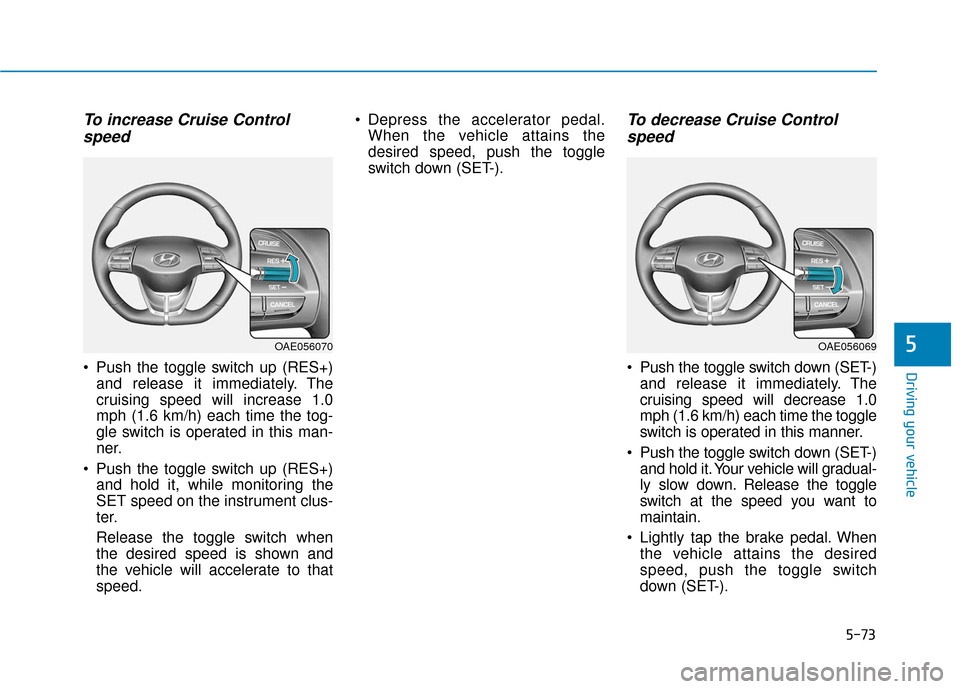
To increase Cruise Controlspeed
Push the toggle switch up (RES+)
and release it immediately. The
cruising speed will increase 1.0
mph (1.6 km/h) each time the tog-
gle switch is operated in this man-
ner.
Push the toggle switch up (RES+) and hold it, while monitoring the
SET speed on the instrument clus-
ter.
Release the toggle switch when
the desired speed is shown and
the vehicle will accelerate to that
speed. Depress the accelerator pedal.
When the vehicle attains the
desired speed, push the toggle
switch down (SET-).
To decrease Cruise Controlspeed
Push the toggle switch down (SET-)
and release it immediately. The
cruising speed will decrease 1.0
mph (1.6 km/h) each time the toggle
switch is operated in this manner.
Push the toggle switch down (SET-) and hold it. Your vehicle will gradual-
ly slow down. Release the toggle
switch at the speed you want to
maintain.
Lightly tap the brake pedal. When the vehicle attains the desired
speed, push the toggle switch
down (SET-).
OAE056069OAE056070
Page 370 of 603
5-74
Driving your vehicle
To temporarily accelerate withthe Cruise Control ON
Depress the accelerator pedal. When
you take your foot off the accelerator,
the vehicle will return to the previ-
ously set speed.
If you push the toggle switch down
(SET-) at the increased speed, the
Cruise Control will maintain the
increased speed.
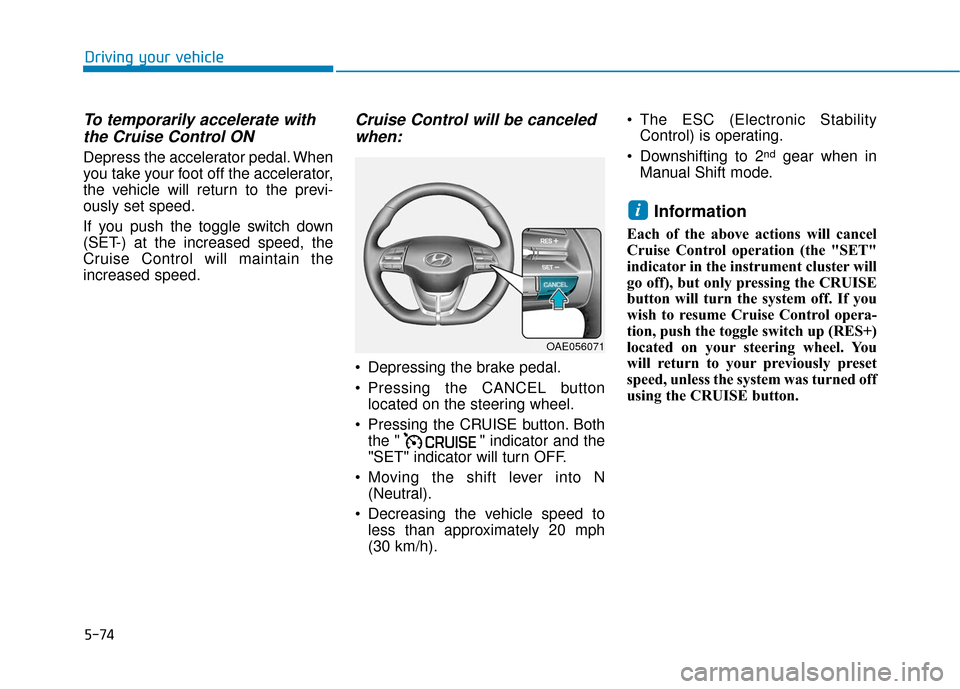
Cruise Control will be canceledwhen:
Depressing the brake pedal.
Pressing the CANCEL button
located on the steering wheel.
Pressing the CRUISE button. Both the " " indicator and the
"SET" indicator will turn OFF.
Moving the shift lever into N (Neutral).
Decreasing the vehicle speed to less than approximately 20 mph
(30 km/h). The ESC (Electronic Stability
Control) is operating.
Downshifting to 2
ndgear when in
Manual Shift mode.
Information
Each of the above actions will cancel
Cruise Control operation (the "SET"
indicator in the instrument cluster will
go off), but only pressing the CRUISE
button will turn the system off. If you
wish to resume Cruise Control opera-
tion, push the toggle switch up (RES+)
located on your steering wheel. You
will return to your previously preset
speed, unless the system was turned off
using the CRUISE button.
i
OAE056071
Page 371 of 603
5-75
Driving your vehicle
5
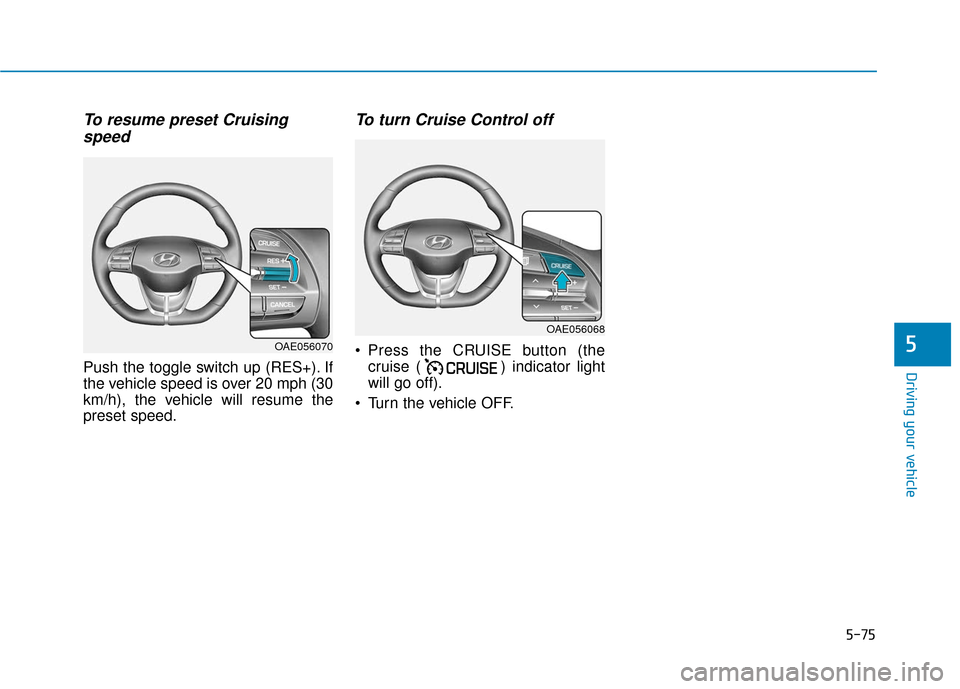
To resume preset Cruisingspeed
Push the toggle switch up (RES+). If
the vehicle speed is over 20 mph (30
km/h), the vehicle will resume the
preset speed.
To turn Cruise Control off
Press the CRUISE button (the
cruise ( ) indicator light
will go off).
Turn the vehicle OFF.
OAE056068
OAE056070