roof Hyundai Ioniq Hybrid 2019 User Guide
[x] Cancel search | Manufacturer: HYUNDAI, Model Year: 2019, Model line: Ioniq Hybrid, Model: Hyundai Ioniq Hybrid 2019Pages: 603, PDF Size: 21.91 MB
Page 136 of 603
3-44
Convenient features of your vehicle
Resetting the Sunroof
The sunroof may need to be reset if
the following conditions occur:
- The battery is discharged or dis-connected or the sunroof fuse has
been replaced or disconnected
- The sunroof control lever is not operating correctly
To reset the sunroof, perform the fol-
lowing steps:
1. Place the Engine Start/Stop but- ton to the ON position or start the
vehicle ( indicator ON). It is
recommended to reset the sunroof
while the vehicle is in the ready
( ) mode.
2. Push the control lever forward. The sunroof will close completely or tilt
depending on the condition of the
sunroof.
3. Release the control lever when the sunroof stops moving. 4. Push the control lever forward
about 10 seconds.
- When the sunroof is in the closed position :
The glass will tilt and slightly move up and down.
- When the sunroof is in the tilt position:
The glass will slightly move up and down.
Do not release the lever until the
operation is completed.
If you release the lever during opera-
tion, start the procedure again from
step 2. 5. Within 3 seconds, push and hold
the control lever forward until the
sunroof operates as follows:
Tilt down → Slide Open → Slide
Close.
Do not release the lever until the
operation is completed.
If you release the lever during opera-
tion, start the procedure again from
step 2.
6. Release the sunroof control lever after all steps have completed.
The sunroof system has been
reset.
Information
• If the sunroof is not reset when thevehicle battery is disconnected or
discharged, or the sunroof fuse is
blown, the sunroof may not operate
normally.
• For more detailed information, con- tact an authorized HYUNDAI dealer.
i
Page 167 of 603
3-75
Convenient features of your vehicle
If the door/liftgate open warning is
blocked with another warning mes-
sage, an icon will appear on the top
of the LCD display.
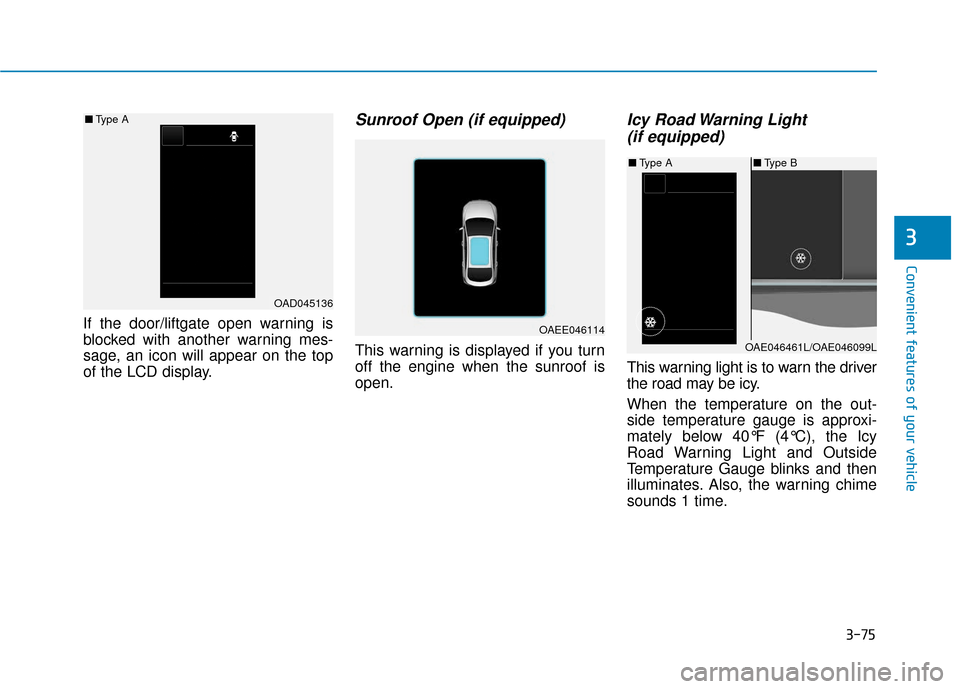
Sunroof Open (if equipped)
This warning is displayed if you turn
off the engine when the sunroof is
open.
Icy Road Warning Light (if equipped)
This warning light is to warn the driver
the road may be icy.
When the temperature on the out-
side temperature gauge is approxi-
mately below 40°F (4°C), the Icy
Road Warning Light and Outside
Temperature Gauge blinks and then
illuminates. Also, the warning chime
sounds 1 time.
3
OAD045136
■
Type A
OAEE046114
■Type B
■ Type A
OAE046461L/OAE046099L
Page 200 of 603
3-108
Convenient features of your vehicle
Digital speedometer
This message shows the speed of
the vehicle.
Drive Info display
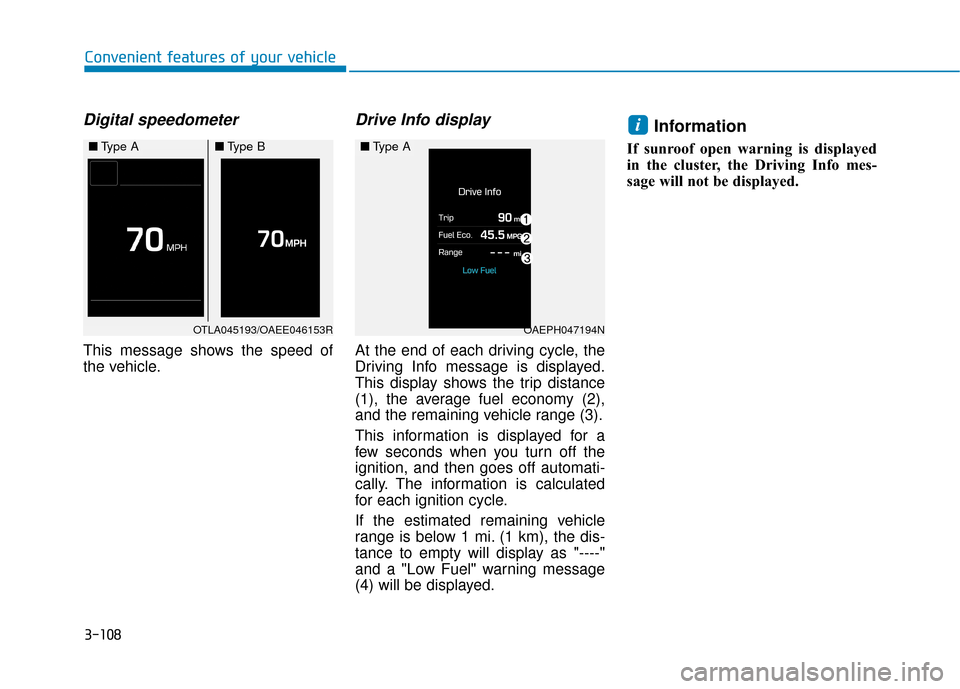
At the end of each driving cycle, the
Driving Info message is displayed.
This display shows the trip distance
(1), the average fuel economy (2),
and the remaining vehicle range (3).
This information is displayed for a
few seconds when you turn off the
ignition, and then goes off automati-
cally. The information is calculated
for each ignition cycle.
If the estimated remaining vehicle
range is below 1 mi. (1 km), the dis-
tance to empty will display as "----"
and a "Low Fuel" warning message
(4) will be displayed.
Information
If sunroof open warning is displayed
in the cluster, the Driving Info mes-
sage will not be displayed.
i
OTLA045193/OAEE046153R
■Type A■Type B
OAEPH047194N
■Type A
Page 206 of 603
3-114
Convenient features of your vehicle
Timer (3)
The timer is the total driving timesince the last timer reset.
To reset the timer, press the OK button on the steering wheel for
more than 1 second when the timer
is displayed.
Information
The timer will continue to be counted
while the engine is still running (for
example, when the vehicle is in traffic
or stopped at a stop light.)
Digital speedometer
This message shows the speed of
the vehicle.
Drive Info display
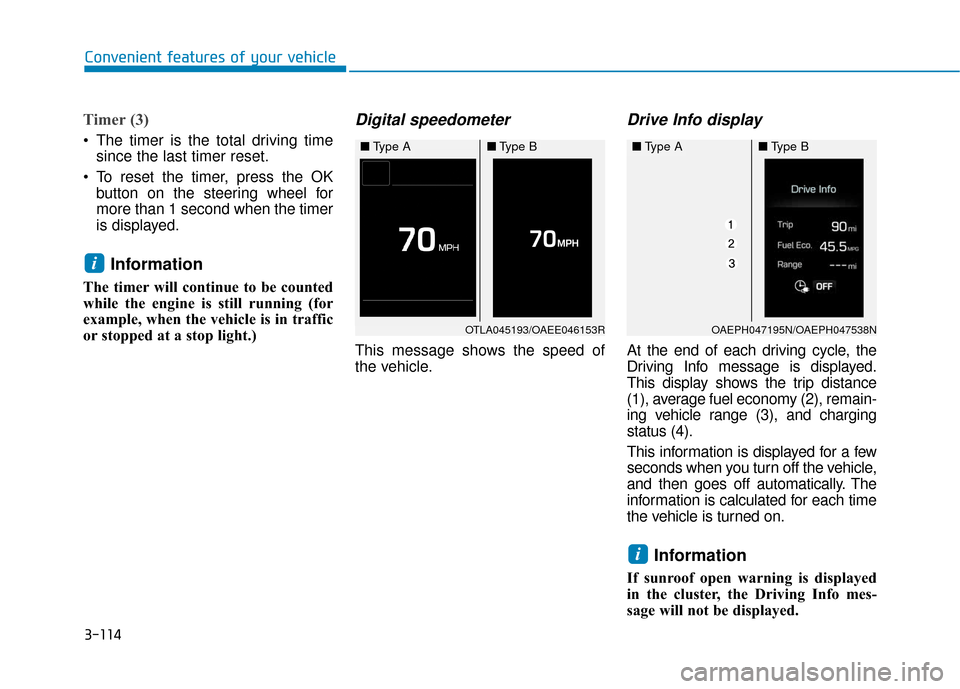
At the end of each driving cycle, the
Driving Info message is displayed.
This display shows the trip distance
(1), average fuel economy (2), remain-
ing vehicle range (3), and charging
status (4).
This information is displayed for a few
seconds when you turn off the vehicle,
and then goes off automatically. The
information is calculated for each time
the vehicle is turned on.
Information
If sunroof open warning is displayed
in the cluster, the Driving Info mes-
sage will not be displayed.
i
i
OTLA045193/OAEE046153R
■ Type A■Type B
OAEPH047195N/OAEPH047538N
■Type A■Type B
Page 235 of 603
3-143
Convenient features of your vehicle
3
Air conditioning system operation
tips
If the vehicle has been parked indirect sunlight during hot weather,
open the windows for a short time
to let the hot air inside the vehicle
escape.
After sufficient cooling has been achieved, switch back from the
recirculated air to the fresh outside
air position.
To help reduce moisture inside of the windows on rainy or humid
days, decrease the humidity inside
the vehicle by operating the air
conditioning system with the win-
dows and sunroof closed.
Use the air conditioning system every month only for a few minutes
to ensure maximum system per-
formance. If you operate air conditioner
excessively, the difference between
the temperature of the outside air
and that of the windshield could
cause the outer surface of the
windshield to fog up, causing loss
of visibility. In this case, set the
mode selection knob or button to
the position and fan speed
control to the lower speed.
System Maintenance
Climate control air filter
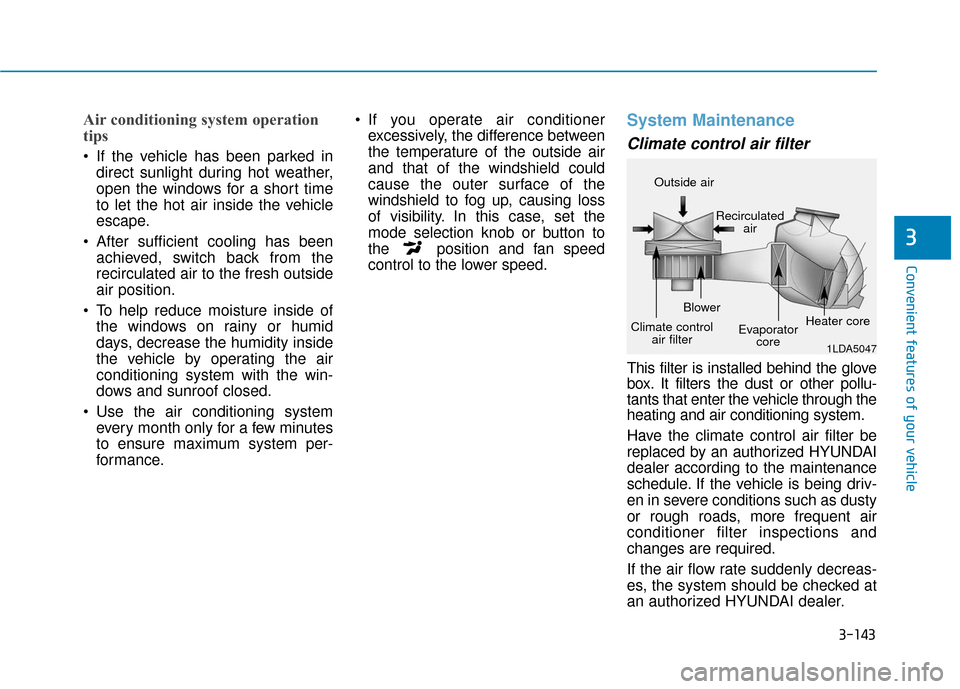
This filter is installed behind the glove
box. It filters the dust or other pollu-
tants that enter the vehicle through the
heating and air conditioning system.
Have the climate control air filter be
replaced by an authorized HYUNDAI
dealer according to the maintenance
schedule. If the vehicle is being driv-
en in severe conditions such as dusty
or rough roads, more frequent air
conditioner filter inspections and
changes are required.
If the air flow rate suddenly decreas-
es, the system should be checked at
an authorized HYUNDAI dealer.
1LDA5047
Outside air
Recirculatedair
Climate control air filter Blower
Evaporatorcore Heater core
Page 255 of 603
4-3
Multimedia System
4
Roof antenna
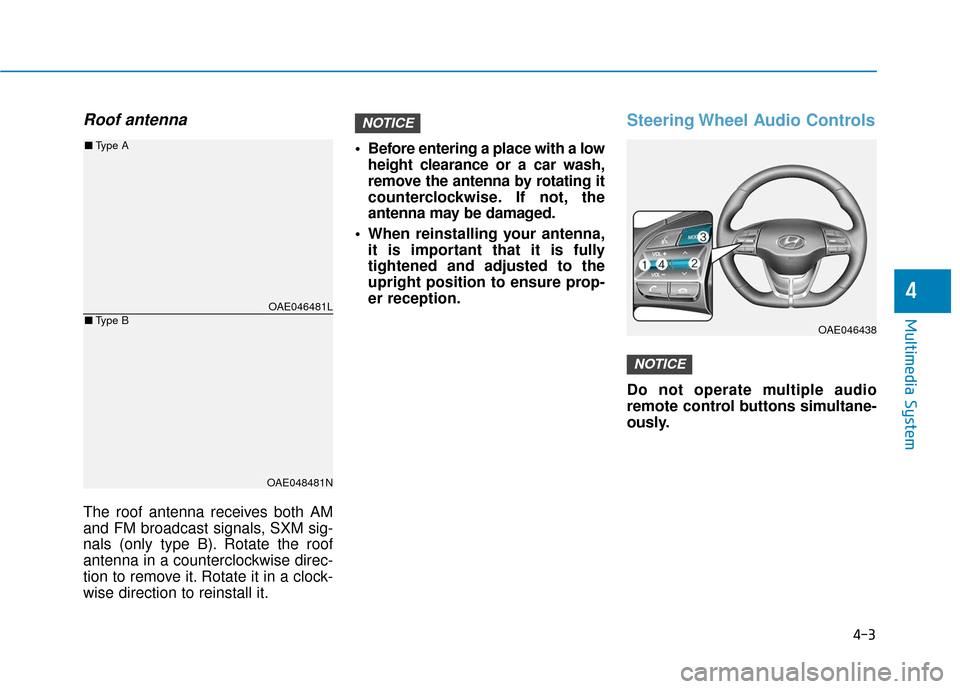
The roof antenna receives both AM
and FM broadcast signals, SXM sig-
nals (only type B). Rotate the roof
antenna in a counterclockwise direc-
tion to remove it. Rotate it in a clock-
wise direction to reinstall it. Before entering a place with a low
height clearance or a car wash,
remove the antenna by rotating it
counterclockwise. If not, the
antenna may be damaged.
When reinstalling your antenna, it is important that it is fully
tightened and adjusted to the
upright position to ensure prop-
er reception.
Steering Wheel Audio Controls
Do not operate multiple audio
remote control buttons simultane-
ously.
NOTICE
NOTICE
OAE046438
OAE046481L
OAE048481N
■ Type A
■Type B
Page 269 of 603
4-17
Multimedia System
4
Information- SiriusXM®
Satellite Radio information
(if equipped)
• Satellite Radio channels: Enjoy SiriusXM Satellite Radio with a
3-month trial subscription to the
Sirius Select package. You’ll get over
variable channels, including commer-
cial free music, plus all your favorite
sports, exclusive talk, entertainment,
and a selection of premium program-
ming. For more information and a
complete list of SiriusXM channels,
visit siriusxm.com in the United States,
siriusxm.ca in Canada, or call
SiriusXM at 1-888-539-7474.
• Satellite Radio reception factors: To receive the satellite signal, your
vehicle has been equipped with a
satellite radio antenna located on
the roof of your vehicle. The vehicle
roof provides the best location for
an unobstructed, open view of the
sky, a requirement of a satellite
radio system. Like AM/FM, there
are several factors that can affect
satellite radio reception perform-
ance: (Continued)(Continued)
- Antenna obstructions: For opti-mal reception performance, keep
the antenna clear of snow and ice
build-up and keep luggage and
other material as far away from
the antenna as possible.
• SiriusXM Satellite Radio service: SiriusXM is a subscription-based satel-
lite radio service that broadcasts music,
sports, news and entertainment pro-
gramming to radio receivers, which are
available for installation in motor vehi-
cles or factory installed, as well as for
the home, portable and wireless devices,
and through an Internet connection on
a personal computer.
Vehicles that are equipped with a
factory installed SiriusXM Satellite
Radio system include:
- Hardware and an introductorytrial subscription term, which
begins on the date of sale or lease
of the vehicle.
- For a small upgrade fee, access to SiriusXM music channels, and
other select channels over the
Internet using any computer con-
nected to the Internet (U.S. cus-
tomers only).
(Continued)(Continued)
• SiriusXM services require a sub-
scription sold separately, or as a
package, by Sirius XM Radio Inc. If
you decide to continue service after
your trial, the subscription plan you
choose will automatically renew
thereafter and you will be charged
according to your chosen payment
method at then-current rates. Fees
and taxes apply. To cancel you must
call SiriusXM at 1-866-635-2349.
See SiriusXM Customer Agreement
for complete terms at www.sir-
iusxm.com. SiriusXM U.S. satellite
and data services are available only
in the 48 contiguous states, DC and
Puerto Rico (with coverage limita-
tions). SiriusXM satellite service is
also available in Canada; see
www.siriusxm.ca. All fees and pro-
gramming subject to change. Sirius,
XM and all related marks and logos
are trademarks of Sirius XM Radio
Inc.
i
Page 407 of 603
6-6
What to do in an emergency
The following items may need to be
reset after the battery has been dis-
charged or the battery has been dis-
connected. See chapter 3 or 4 for:
Power Windows
Trip Computer
Climate Control System
Clock
Audio System
Sunroof
Driver Position Memory System
External power source using 12V
battery
The use of external power acces-
sories may reduce performance
and function of the vehicle.
Especially, the use of dash cam-
eras may shut off the power of the
vehicle prior to the dash camera's
automatic shut-down.
If the power of the vehicle is shut
off, start the vehicle as explained.
(refer to "Using the 12V Battery
Switch")
Jump Starting
In the event vehicle still does not
have a functional 12V battery (check
if interior lights will not turn on) then
you can try a jump start to the engine
compartment jumper terminals using
a 12V booster pack or jumper cables
from another vehicle's 12V battery
according to the following instruc-
tions. 1. Position the vehicles close enough
that the jumper cables will reach,
but do not allow the vehicles to
touch.
2. Avoid fans or any moving parts in the engine compartment at all
times, even when the vehicles are
turned off.
3. Turn off all electrical devices such as radios, lights, air conditioning,
etc. Put the vehicles in P (Park)
and set the parking brake. Turn
both vehicles OFF.
NOTICEJump starting can be danger-
ous if done incorrectly. Follow
the jump starting procedure in
this section to avoid serious
injury or damage to your vehi-
cle. If in doubt about how to
properly jump start your vehi-
cle, we strongly recommend
that you have a service techni-
cian or towing service do it for
you.
CAUTION
Page 458 of 603
7-13
7
MaintenanceSevere driving conditions
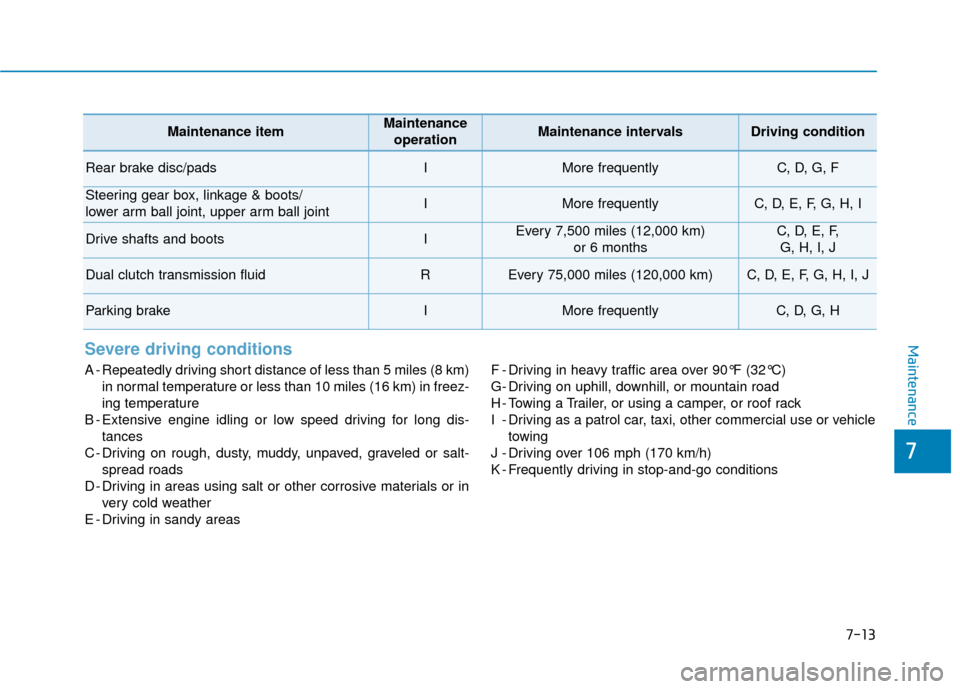
A - Repeatedly driving short distance of less than 5 miles (8 km)in normal temperature or less than 10 miles (16 km) in freez-
ing temperature
B - Extensive engine idling or low speed driving for long dis- tances
C - Driving on rough, dusty, muddy, unpaved, graveled or salt- spread roads
D - Driving in areas using salt or other corrosive materials or in very cold weather
E - Driving in sandy areas F - Driving in heavy traffic area over 90°F (32°C)
G- Driving on uphill, downhill, or mountain road
H - Towing a Trailer, or using a camper, or roof rack
I - Driving as a patrol car, taxi, other commercial use or vehicle
towing
J - Driving over 106 mph (170 km/h)
K - Frequently driving in stop-and-go conditions
Maintenance itemMaintenance operationMaintenance intervalsDriving condition
Rear brake disc/padsIMore frequentlyC, D, G, F
Steering gear box, linkage & boots/
lower arm ball joint, upper arm ball jointIMore frequentlyC, D, E, F, G, H, I
Drive shafts and bootsIEvery 7,500 miles (12,000 km) or 6 monthsC, D, E, F, G, H, I, J
Dual clutch transmission fluidREvery 75,000 miles (120,000 km)C, D, E, F, G, H, I, J
Parking brakeIMore frequentlyC, D, G, H
Page 478 of 603
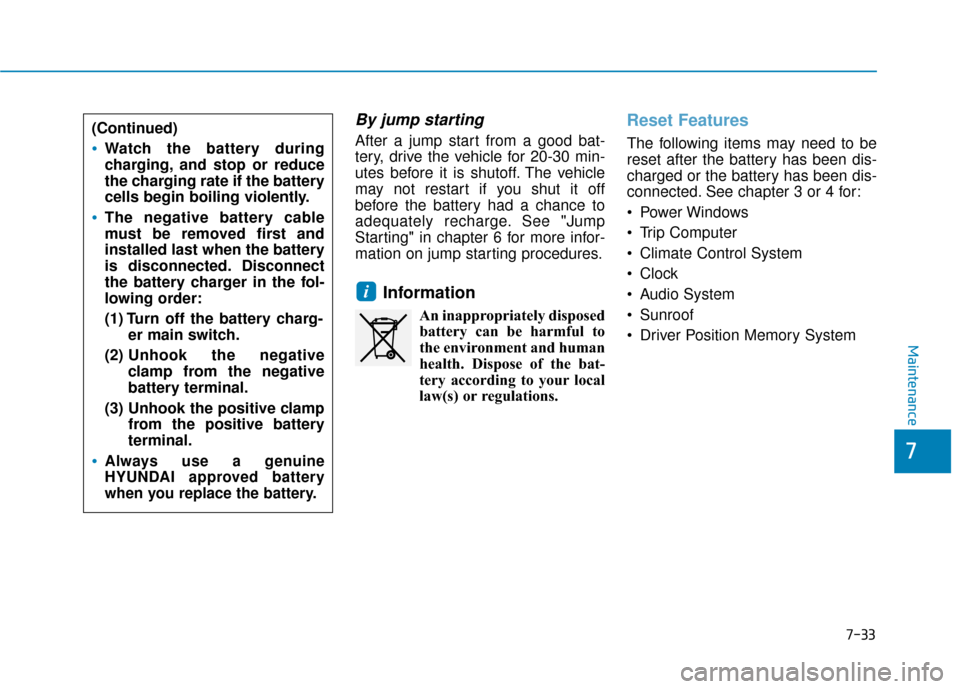
By jump starting
After a jump start from a good bat-
tery, drive the vehicle for 20-30 min-
utes before it is shutoff. The vehicle
may not restart if you shut it off
before the battery had a chance to
adequately recharge. See "Jump
Starting" in chapter 6 for more infor-
mation on jump starting procedures.
Information
An inappropriately disposedbattery can be harmful to
the environment and human
health. Dispose of the bat-
tery according to your local
law(s) or regulations.
Reset Features
The following items may need to be
reset after the battery has been dis-
charged or the battery has been dis-
connected. See chapter 3 or 4 for:
Power Windows
Trip Computer
Climate Control System
Clock
Audio System
Sunroof
Driver Position Memory System
i
7-33
7
Maintenance
(Continued)
Watch the battery during
charging, and stop or reduce
the charging rate if the battery
cells begin boiling violently.
The negative battery cable
must be removed first and
installed last when the battery
is disconnected. Disconnect
the battery charger in the fol-
lowing order:
(1) Turn off the battery charg- er main switch.
(2) Unhook the negative
clamp from the negative
battery terminal.
(3) Unhook the positive clamp from the positive battery
terminal.
Always use a genuine
HYUNDAI approved battery
when you replace the battery.