AUX Hyundai Ioniq Hybrid 2019 Owner's Manual
[x] Cancel search | Manufacturer: HYUNDAI, Model Year: 2019, Model line: Ioniq Hybrid, Model: Hyundai Ioniq Hybrid 2019Pages: 603, PDF Size: 21.91 MB
Page 16 of 603
I
IN
N S
ST
T R
R U
U M
M E
EN
N T
T
P
P A
A N
N E
EL
L
O
O V
VE
ER
R V
V I
IE
E W
W
-
-
H
H Y
Y B
BR
RI
ID
D
V
V E
EH
H I
IC
C L
LE
E
The actual shape may differ from the illustration.
1-5
Your vehicle at a glance
1
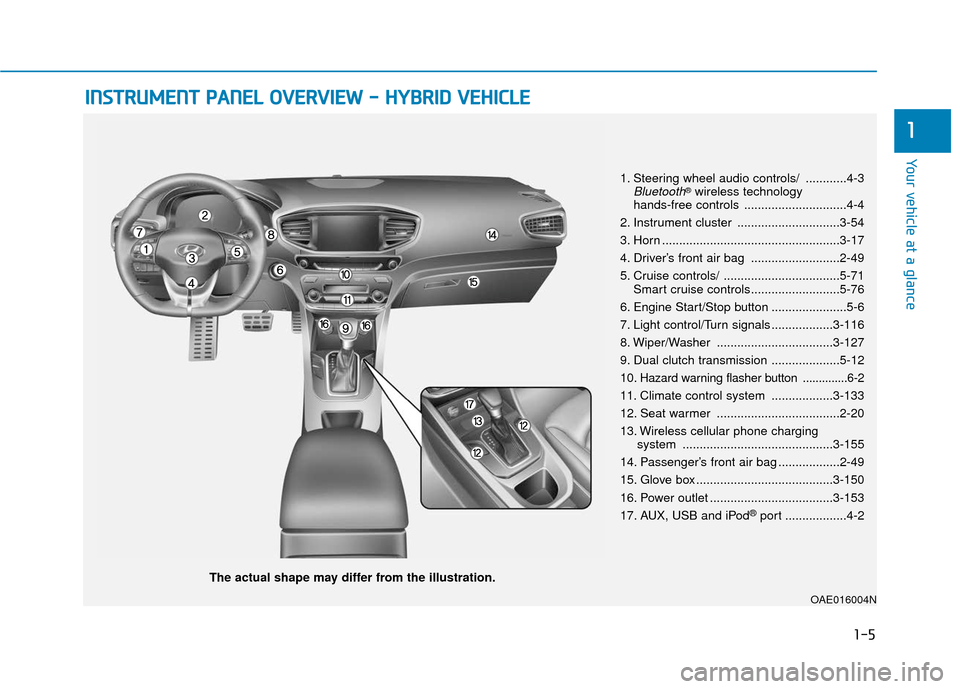
1. Steering wheel audio controls/ ............4-3Bluetooth®wireless technology
hands-free controls ..............................4-4
2. Instrument cluster ..............................3-54
3. Horn ....................................................3-17
4. Driver’s front air bag ..........................2-49
5. Cruise controls/ ..................................5-71 Smart cruise controls..........................5-76
6. Engine Start/Stop button ......................5-6
7. Light control/Turn signals ..................3-116
8. Wiper/Washer ..................................3-127
9. Dual clutch transmission ....................5-12
10
. Hazard warning flasher button ..............6-2
11. Climate control system ..................3-133
12. Seat warmer ....................................2-20
13. Wireless cellular phone charging system ............................................3-155
14. Passenger’s front air bag ..................2-49
15. Glove box ........................................3-150
16. Power outlet ....................................3-153
17. AUX, USB and iPod
®port ..................4-2
OAE016004N
Page 21 of 603
1-10
Your vehicle at a glance
I
IN
N S
ST
T R
R U
U M
M E
EN
N T
T
P
P A
A N
N E
EL
L
O
O V
VE
ER
R V
V I
IE
E W
W
-
-
P
P L
LU
U G
G-
-I
IN
N
H
H Y
Y B
BR
RI
ID
D
V
V E
EH
H I
IC
C L
LE
E
The actual shape may differ from the illustration.
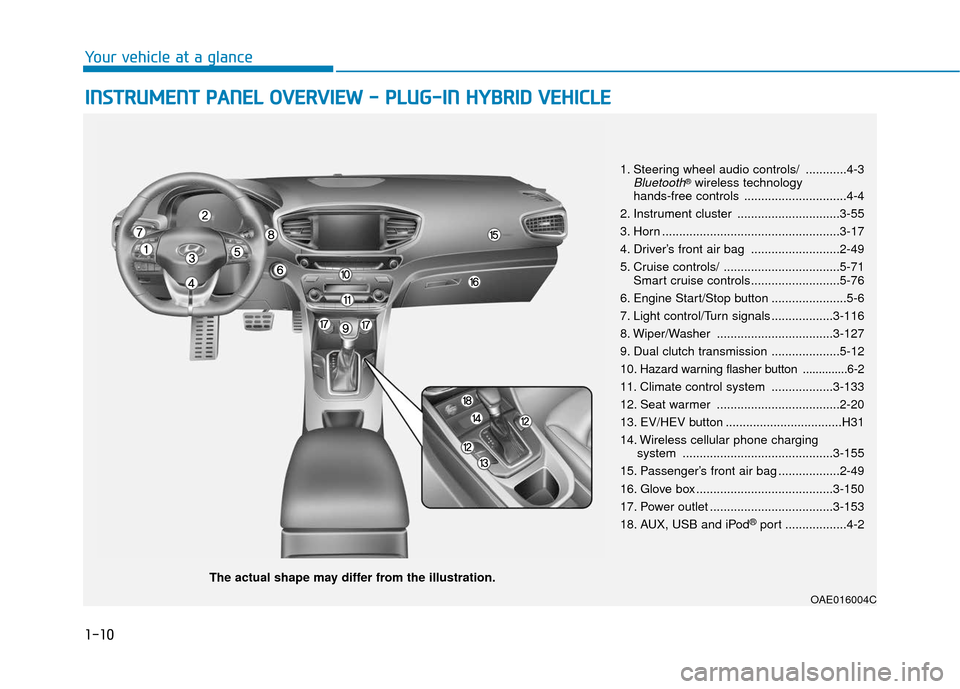
1. Steering wheel audio controls/ ............4-3Bluetooth®wireless technology
hands-free controls ..............................4-4
2. Instrument cluster ..............................3-55
3. Horn ....................................................3-17
4. Driver’s front air bag ..........................2-49
5. Cruise controls/ ..................................5-71 Smart cruise controls..........................5-76
6. Engine Start/Stop button ......................5-6
7. Light control/Turn signals ..................3-116
8. Wiper/Washer ..................................3-127
9. Dual clutch transmission ....................5-12
10
. Hazard warning flasher button ..............6-2
11. Climate control system ..................3-133
12. Seat warmer ....................................2-20
13. EV/HEV button ..................................H31
14. Wireless cellular phone charging system ............................................3-155
15. Passenger’s front air bag ..................2-49
16. Glove box ........................................3-150
17. Power outlet ....................................3-153
18. AUX, USB and iPod
®port ..................4-2
OAE016004C
Page 178 of 603
3-86
Convenient features of your vehicle
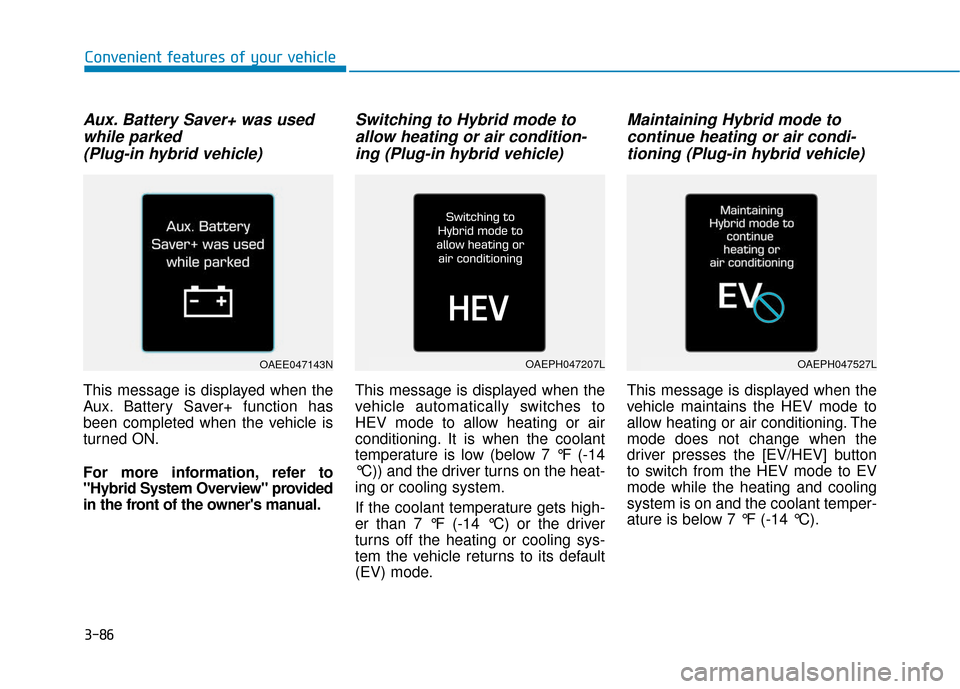
Aux. Battery Saver+ was usedwhile parked (Plug-in hybrid vehicle)
This message is displayed when the
Aux. Battery Saver+ function has
been completed when the vehicle is
turned ON.
For more information, refer to
"Hybrid System Overview" provided
in the front of the owner's manual.
Switching to Hybrid mode toallow heating or air condition-ing (Plug-in hybrid vehicle)
This message is displayed when the
vehicle automatically switches to
HEV mode to allow heating or air
conditioning. It is when the coolant
temperature is low (below 7 °F (-14
°C)) and the driver turns on the heat-
ing or cooling system.
If the coolant temperature gets high-
er than 7 °F (-14 °C) or the driver
turns off the heating or cooling sys-
tem the vehicle returns to its default
(EV) mode.
Maintaining Hybrid mode tocontinue heating or air condi-tioning (Plug-in hybrid vehicle)
This message is displayed when the
vehicle maintains the HEV mode to
allow heating or air conditioning. The
mode does not change when the
driver presses the [EV/HEV] button
to switch from the HEV mode to EV
mode while the heating and cooling
system is on and the coolant temper-
ature is below 7 °F (-14 °C).
OAEE047143NOAEPH047207LOAEPH047527L
Page 189 of 603
3-97
Convenient features of your vehicle
3
If the service interval is activated and
the time and distance is adjusted,
messages are displayed in the fol-
lowing situations each time the vehi-
cle is turned on.
- Service in: Displayed to inform the driver theremaining mileage and days to
service.
- Service required : Displayed when the mileage anddays to service has been reached
or passed.
Information
If any of the following conditions
occur, the mileage and number of days
to service may be incorrect.
- The battery cable is disconnected.
- The fuse switch is turned off.
- The battery is discharged. 6. Other (Features)
Battery Saver+
To activate or deactivate the Aux.
Battery Saver+ function.
When activated, the high voltage bat-
tery is used to keep the 12V battery
charged.
For more information, refer to
"Hybrid System Overview" provid-
ed in the front of the owner’s man-
ual.
- Off: The average fuel economy will
not reset automatically whenever
refueling.
- After Ignition: When the vehicle has been OFF for 4 hours or longer the
average fuel economy will reset
automatically.
- After Refueling: The average fuel economy will reset automatically
after adding 1.6 gallons (6 liters) of
fuel or more and after driving speed
exceeds 1 mph (1 km/h).
For more information, refer to
"Trip Computer" in this chapter.
To select the fuel economy unit.
(US gallon, UK gallon)
To select the temperature unit.
(°C,°F)
To select the tire pressure unit.
(psi, kPa, bar)
To select language.
7. Reset
You can reset the menus in the User
Settings Mode. All menus in the User
Settings Mode are reset to factory
settings, except language and serv-
ice interval.
i
Page 196 of 603
3-104
Convenient features of your vehicle
If the service interval is activated and
the time and distance is adjusted,
messages are displayed in the fol-
lowing situations each time the vehi-
cle is turned on.
- Service in : Displayed to inform the driver theremaining mileage and days to
service.
- Service required : Displayed when the mileage anddays to service has been reached
or passed.
Information
If any of the following conditions
occur, the mileage and number of days
to service may be incorrect.
- The battery cable is disconnected.
- The fuse switch is turned off.
- The battery is discharged. 6. Other (Features)
Battery Saver+
To activate or deactivate the Aux.
Battery Saver+ function.
When activated, the high voltage bat-
tery is used to keep the 12V battery
charged.
For more information, refer to
"Hybrid System Overview" provid-
ed in the front of the owner's man-
ual.
- Off: The average fuel economy will
not reset automatically whenever
refueling.
- After Ignition: When the engine has been OFF for 4 hours or longer the
average fuel economy will reset
automatically.
- After Refueling: The average fuel economy will reset automatically
after adding 1.6 gallons (6 liters) of
fuel or more and after driving speed
exceeds 1 mph (1 km/h).
For more information, refer to
"Trip Computer" in this chapter.
To select the fuel economy unit.
(US gallon, UK gallon)
To select the temperature unit.
(°C,°F)
To select the tire pressure unit.
(psi, kPa, bar)
To select language.
7. Reset
You can reset the menus in the User
Settings Mode. All menus in the User
Settings Mode are reset to factory
settings, except language and serv-
ice interval.
i
Page 253 of 603
Multimedia System
Multimedia System.................................................4-2
AUX, USB and iPod®port ...............................................4-2
Antenna ........................................................................\
.......4-2
Steering Wheel Audio Controls ......................................4-3
Bluetooth®Wireless Technology Hands-Free ...........4-4
Audio (Display Audio) / Video /
Navigation System (AVN).................................................4-5
How Vehicle Audio Works ...............................................4-5
Features of Your Vehicle.................................................4-7
Audio (with Touch Screen) .................................4-10
Feature of Your Audio ...................................................4-11
Radio........................................................................\
...........4-16
SiriusXM ........................................................................\
....4-18
Media........................................................................\
..........4-19
Phone ........................................................................\
.........4-32
Siri ........................................................................\
...............4-40
Setup ........................................................................\
..........4-41
Declaration of Conformity ..................................4-44
FCC ........................................................................\
..............4-44
4
Page 254 of 603
4-2
Multimedia System
• If you install an aftermarket HID head lamp, your vehicle's audio
and electronic devices may not
function properly.
Prevent chemicals such as per- fume, cosmetic oil, sun cream,
hand cleaner, and air freshener
from contacting the interior
parts because they may cause
damage or discoloration.
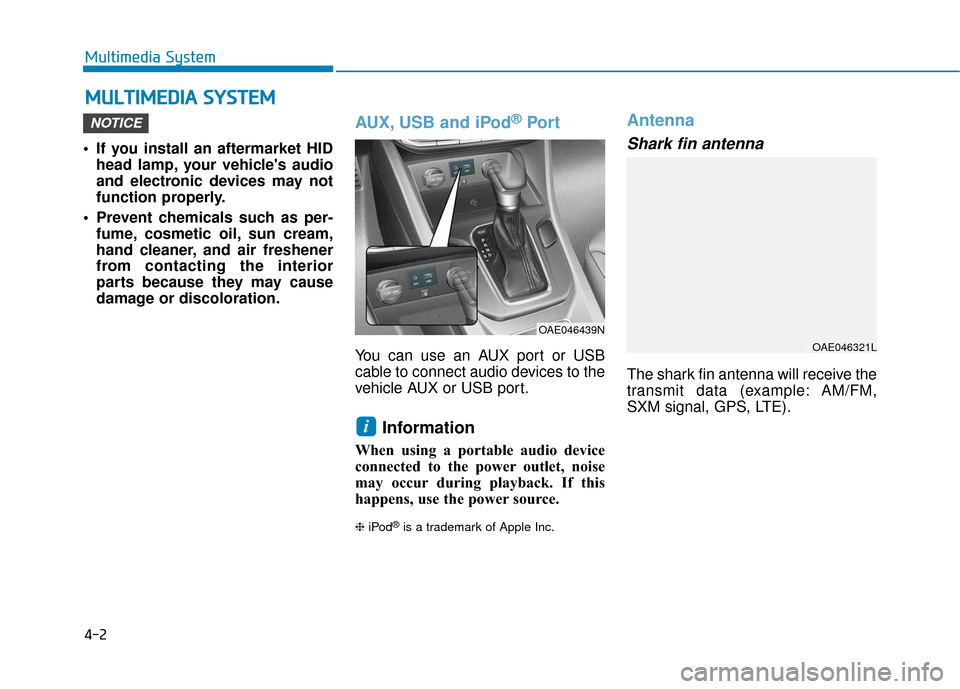
AUX, USB and iPod®Por t
You can use an AUX port or USB
cable to connect audio devices to the
vehicle AUX or USB port.
Information
When using a portable audio device
connected to the power outlet, noise
may occur during playback. If this
happens, use the power source.
❈ iPod®is a trademark of Apple Inc.
Antenna
Shark fin antenna
The shark fin antenna will receive the
transmit data (example: AM/FM,
SXM signal, GPS, LTE).
i
NOTICE
M MU
UL
LT
T I
IM
M E
ED
D I
IA
A
S
S Y
Y S
ST
T E
EM
M
OAE046439N
OAE046321L
Page 256 of 603
4-4
Multimedia System
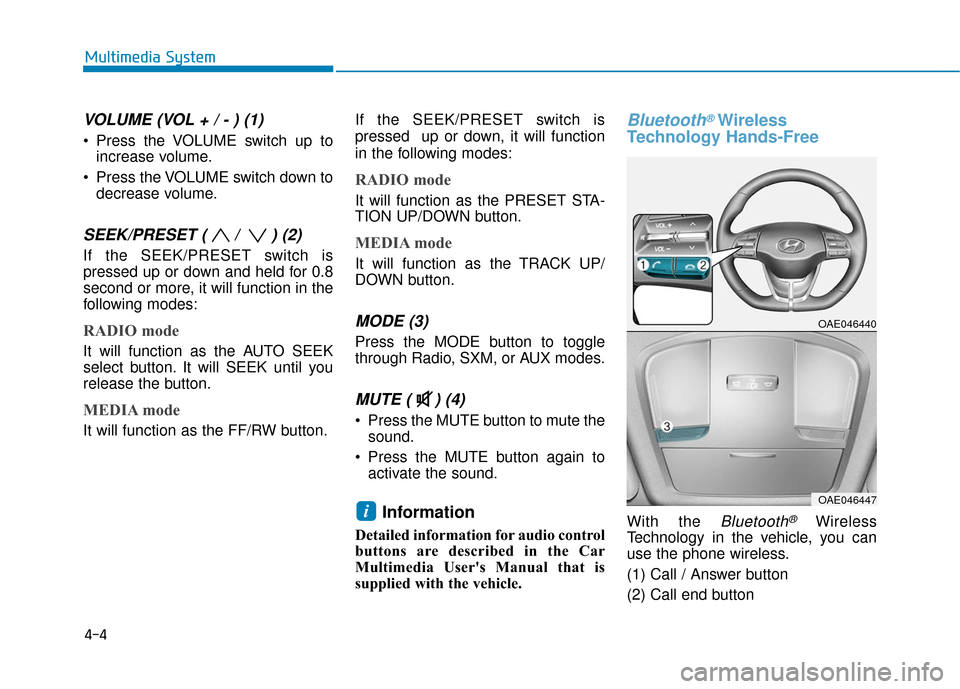
VOLUME (VOL + / - ) (1)
Press the VOLUME switch up toincrease volume.
Press the VOLUME switch down to decrease volume.
SEEK/PRESET ( / ) (2)
If the SEEK/PRESET switch is
pressed up or down and held for 0.8
second or more, it will function in the
following modes:
RADIO mode
It will function as the AUTO SEEK
select button. It will SEEK until you
release the button.
MEDIA mode
It will function as the FF/RW button. If the SEEK/PRESET switch is
pressed up or down, it will function
in the following modes:
RADIO mode
It will function as the PRESET STA-
TION UP/DOWN button.
MEDIA mode
It will function as the TRACK UP/
DOWN button.
MODE (3)
Press the MODE button to toggle
through Radio, SXM, or AUX modes.
MUTE ( ) (4)
Press the MUTE button to mute the
sound.
Press the MUTE button again to activate the sound.
Information
Detailed information for audio control
buttons are described in the Car
Multimedia User's Manual that is
supplied with the vehicle.
Bluetooth®Wireless
Technology Hands-Free
With the Bluetooth®Wireless
Technology in the vehicle, you can
use the phone wireless.
(1) Call / Answer button
(2) Call end buttoni
OAE046440
OAE046447
Page 263 of 603
4-11
Multimedia System
4
Feature of Your Audio
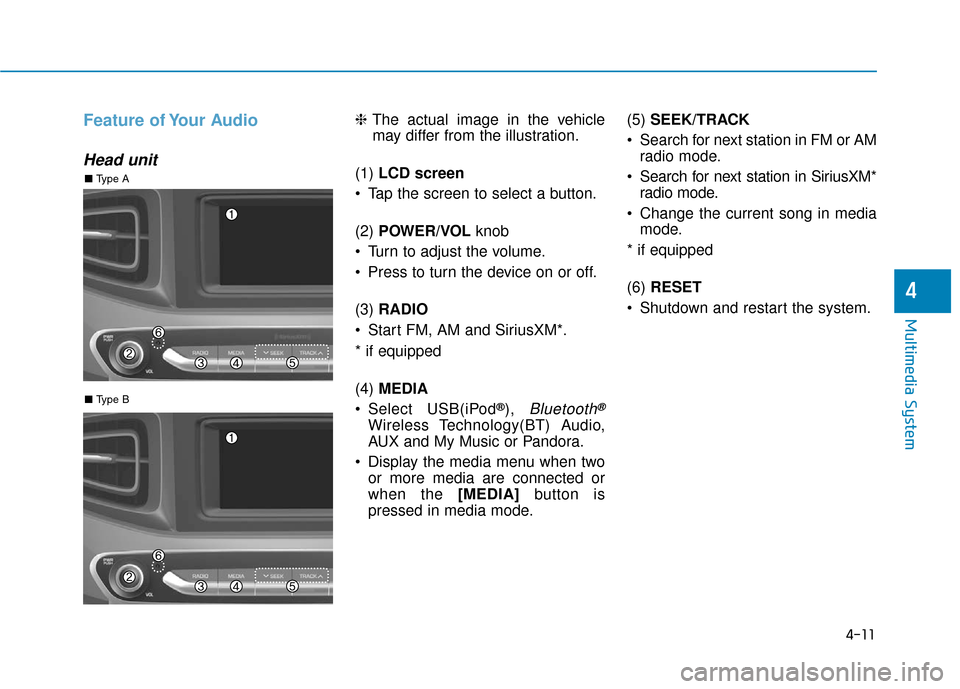
Head unit
❈The actual image in the vehicle
may differ from the illustration.
(1) LCD screen
Tap the screen to select a button.
(2) POWER/VOL knob
Turn to adjust the volume.
Press to turn the device on or off.
(3) RADIO
Start FM, AM and SiriusXM*.
* if equipped
(4) MEDIA
Select USB(iPod
®), Bluetooth®
Wireless Technology(BT) Audio,
AUX and My Music or Pandora.
Display the media menu when two or more media are connected or
when the [MEDIA] button is
pressed in media mode. (5)
SEEK/TRACK
Search for next station in FM or AM radio mode.
Search for next station in SiriusXM* radio mode.
Change the current song in media mode.
* if equipped
(6) RESET
Shutdown and restart the system.
■ Type B
■ Type A
Page 274 of 603
4-22
Multimedia System
(Continued)
• Operation is guaranteed only for standard (Metal Cover Type) USB
Memory drives.
• Operation of HDD, CF, SD and mem- ory stick devices is not guaranteed.
• DRM (Digital Rights Management) files cannot be played.
• SD-type USB memory, CF-type USB memory, and other USB mem-
ory devices that require adapters
for connection are not supported.
• Proper operation of USB HDDs or USB drives with connectors that
loosen due to vehicle vibrations is
not guaranteed. (iStick, etc.)
• USB products that are used as key chains or
cell phone accessories
may damage the USB
jack and affect proper
file playback. Please refrain from
use. Use only products with plug
connectors, as shown in the follow-
ing illustration.
• When MP3 devices or cell phones are connected simultaneously
through AUX, BT Audio and USB
modes, a popping noise or malfunc-
tion may occur.
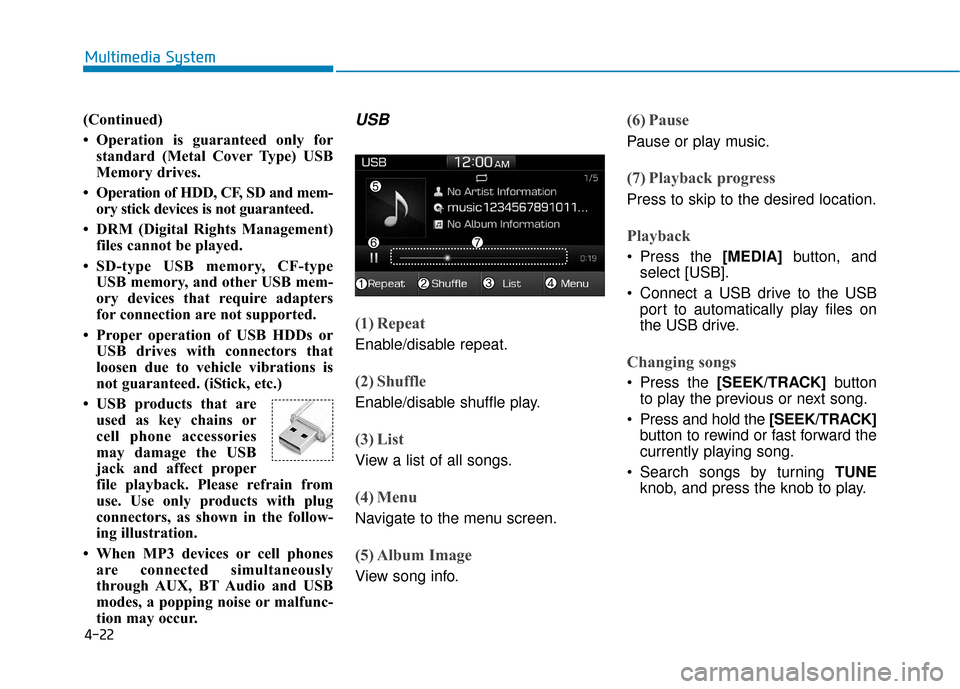
USB
(1) Repeat
Enable/disable repeat.
(2) Shuffle
Enable/disable shuffle play.
(3) List
View a list of all songs.
(4) Menu
Navigate to the menu screen.
(5) Album Image
View song info.
(6) Pause
Pause or play music.
(7) Playback progress
Press to skip to the desired location.
Playback
Press the [MEDIA] button, and
select [USB].
Connect a USB drive to the USB port to automatically play files on
the USB drive.
Changing songs
Press the [SEEK/TRACK] button
to play the previous or next song.
Press and hold the [SEEK/TRACK] button to rewind or fast forward the
currently playing song.
Search songs by turning TUNE knob, and press the knob to play.