Symbol Hyundai Ioniq Hybrid 2019 Owner's Manual
[x] Cancel search | Manufacturer: HYUNDAI, Model Year: 2019, Model line: Ioniq Hybrid, Model: Hyundai Ioniq Hybrid 2019Pages: 603, PDF Size: 21.91 MB
Page 6 of 603
F6
Introduction
We want to help you get the greatest
possible driving pleasure from your
vehicle. Your Owner's Manual can
assist you in many ways. To gain an
overview of the contents of your
Owner's Manual, use the Table of
Contents in the front of the manual.
The first page of each Chapter
includes a detailed Table of Contents
of the topics in that Chapter.
To quickly locate information about
your vehicle, use the Index in the
back of the manual. It is an alphabet-
ical list of what is in this manual and
the page number where it can be
found.
For your convenience, we have
incorporated tabs on the right-hand
page edges. These tabs are coded
with the Chapter titles to assist you
with navigating through the manual. Your safety, and the safety of others,
is very important. This Owner's
Manual provides you with many safe-
ty precautions and operating proce-
dures. This information alerts you to
potential hazards that may hurt you
or others, as well as damage to your
vehicle.
Safety messages found on vehicle
labels and in this manual describe
these hazards and what to do to
avoid or reduce the risks.
Warnings and instructions contained
in this manual are for your safety.
Failure to follow safety warnings and
instructions can lead to serious injury
or death.
Throughout this manual DANGER,
WARNING, CAUTION, NOTICE and
the SAFETY ALERT SYMBOL will
be used.
This is the safety alert sym-bol. It is used to alert you to
potential physical injury haz-
ards. Obey all safety mes-
sages that follow this symbol
to avoid possible injury or
death. The safety alert sym-
bol precedes the signal words
DANGER, WARNING and
CAUTION.
H H O
O W
W
T
T O
O
U
U S
SE
E
T
T H
H I
IS
S
M
M A
AN
N U
U A
AL
L
DANGER indicates a hazardous
situation which, if not avoided,
will result in death or serious
injury.
DANGER
WARNING indicates a hazardous
situation which, if not avoided,
could result in death or serious
injury.
WARNING
S SA
A F
FE
E T
T Y
Y
M
M E
ES
SS
SA
A G
G E
ES
S
Page 63 of 603
2-41
Safety system of your vehicle
2
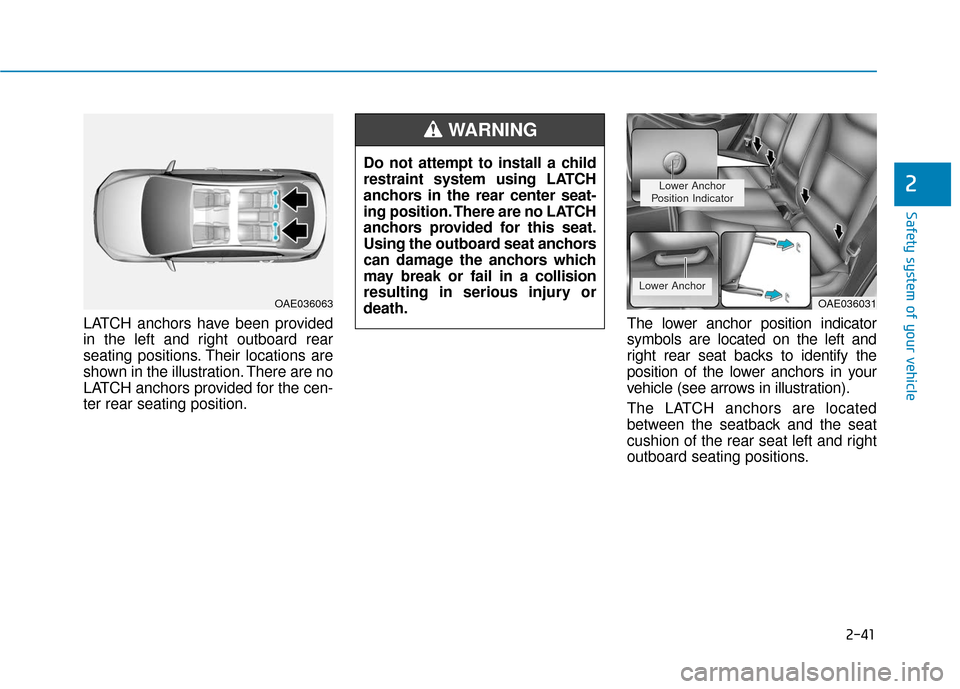
LATCH anchors have been provided
in the left and right outboard rear
seating positions. Their locations are
shown in the illustration. There are no
LATCH anchors provided for the cen-
ter rear seating position.The lower anchor position indicator
symbols are located on the left and
right rear seat backs to identify the
position of the lower anchors in your
vehicle (see arrows in illustration).
The LATCH anchors are located
between the seatback and the seat
cushion of the rear seat left and right
outboard seating positions.
Do not attempt to install a child
restraint system using LATCH
anchors in the rear center seat-
ing position. There are no LATCH
anchors provided for this seat.
Using the outboard seat anchors
can damage the anchors which
may break or fail in a collision
resulting in serious injury or
death.
WARNING
OAE036063OAE036031
Lower Anchor
Position Indicator
Lower Anchor
Page 75 of 603
2-53
Safety system of your vehicle
2
8. Front impact sensors
9. Side pressure sensors
10. Emergency Fastening DeviceSystem
11. Occupant classification system
The SRSCM (Supplemental
Restraint System Control Module)
continually monitors all SRS compo-
nents while the Engine Start/Stop
button is in the ON position to deter-
mine if a crash impact is severe
enough to require air bag deploy-
ment or pre-tensioner seat belt
deployment.SRS warning light
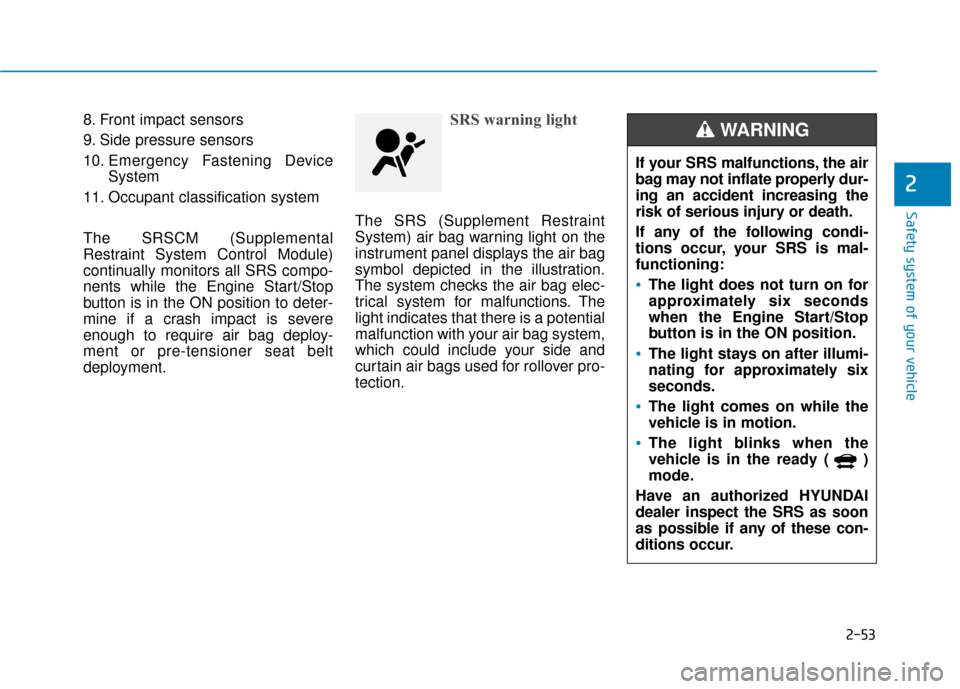
The SRS (Supplement Restraint
System) air bag warning light on the
instrument panel displays the air bag
symbol depicted in the illustration.
The system checks the air bag elec-
trical system for malfunctions. The
light indicates that there is a potential
malfunction with your air bag system,
which could include your side and
curtain air bags used for rollover pro-
tection.
If your SRS malfunctions, the air
bag may not inflate properly dur-
ing an accident increasing the
risk of serious injury or death.
If any of the following condi-
tions occur, your SRS is mal-
functioning:
The light does not turn on for
approximately six seconds
when the Engine Start/Stop
button is in the ON position.
The light stays on after illumi-
nating for approximately six
seconds.
The light comes on while the
vehicle is in motion.
The light blinks when the
vehicle is in the ready ( )
mode.
Have an authorized HYUNDAI
dealer inspect the SRS as soon
as possible if any of these con-
ditions occur.
WARNING
Page 109 of 603
3-17
Convenient features of your vehicle
3
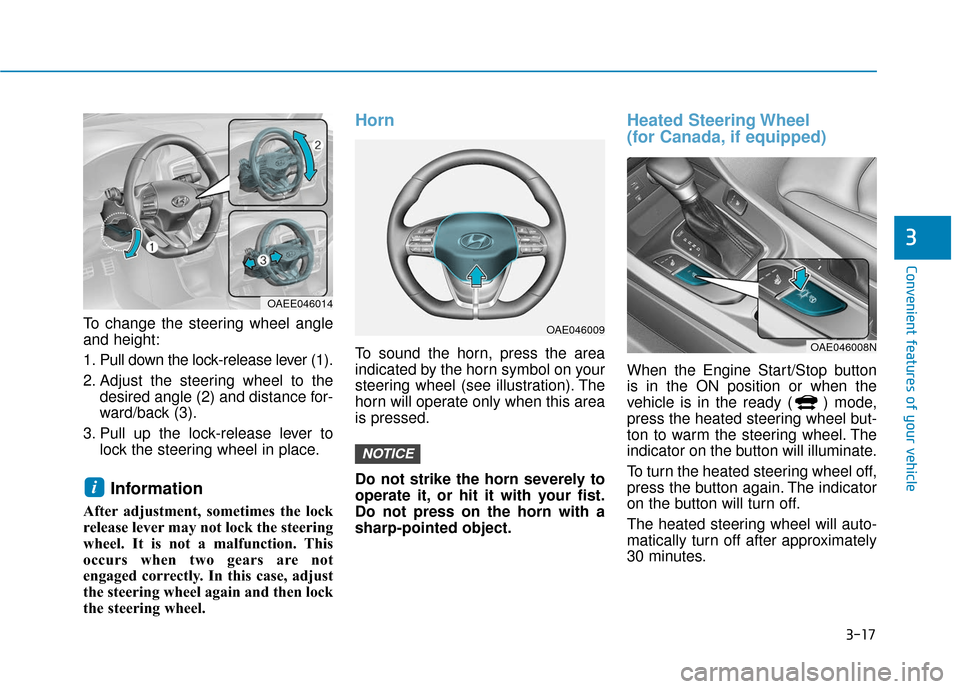
To change the steering wheel angle
and height:
1. Pull down the lock-release lever (1).
2. Adjust the steering wheel to thedesired angle (2) and distance for-
ward/back (3).
3. Pull up the lock-release lever to lock the steering wheel in place.
Information
After adjustment, sometimes the lock
release lever may not lock the steering
wheel. It is not a malfunction. This
occurs when two gears are not
engaged correctly. In this case, adjust
the steering wheel again and then lock
the steering wheel.
Horn
To sound the horn, press the area
indicated by the horn symbol on your
steering wheel (see illustration). The
horn will operate only when this area
is pressed.
Do not strike the horn severely to
operate it, or hit it with your fist.
Do not press on the horn with a
sharp-pointed object.
Heated Steering Wheel
(for Canada, if equipped)
When the Engine Start/Stop button
is in the ON position or when the
vehicle is in the ready ( ) mode,
press the heated steering wheel but-
ton to warm the steering wheel. The
indicator on the button will illuminate.
To turn the heated steering wheel off,
press the button again. The indicator
on the button will turn off.
The heated steering wheel will auto-
matically turn off after approximately
30 minutes.
NOTICE
i
OAEE046014
OAE046009
OAE046008N
Page 182 of 603
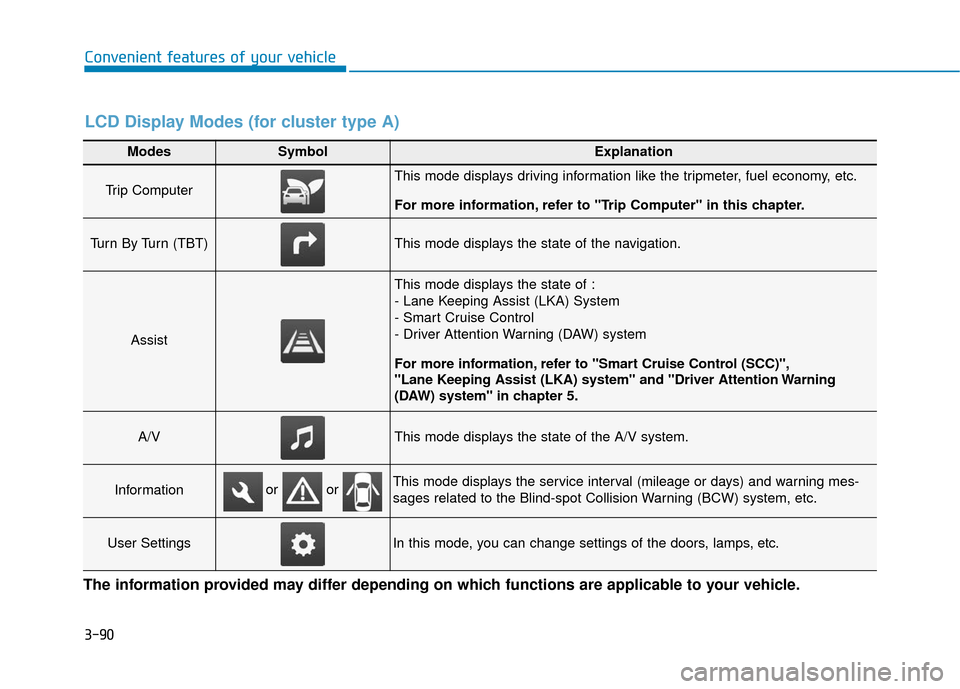
3-90
Convenient features of your vehicle
Modes SymbolExplanation
Trip Computer This mode displays driving information like the tripmeter, fuel economy, etc.
For more information, refer to "Trip Computer" in this chapter.
Turn By Turn (TBT)This mode displays the state of the navigation.
Assist
This mode displays the state of :
- Lane Keeping Assist (LKA) System
- Smart Cruise Control
- Driver Attention Warning (DAW) system
For more information, refer to "Smart Cruise Control (SCC)",
"Lane Keeping Assist (LKA) system" and "Driver Attention Warning
(DAW) system" in chapter 5.
A/VThis mode displays the state of the A/V system.
InformationThis mode displays the service interval (mileage or days) and warning mes-
sages related to the Blind-spot Collision Warning (BCW) system, etc.
User SettingsIn this mode, you can change settings of the doors, lamps, etc.
or or
LCD Display Modes (for cluster type A)
The information provided may differ depending on which functions are applicable to your vehicle.
Page 190 of 603
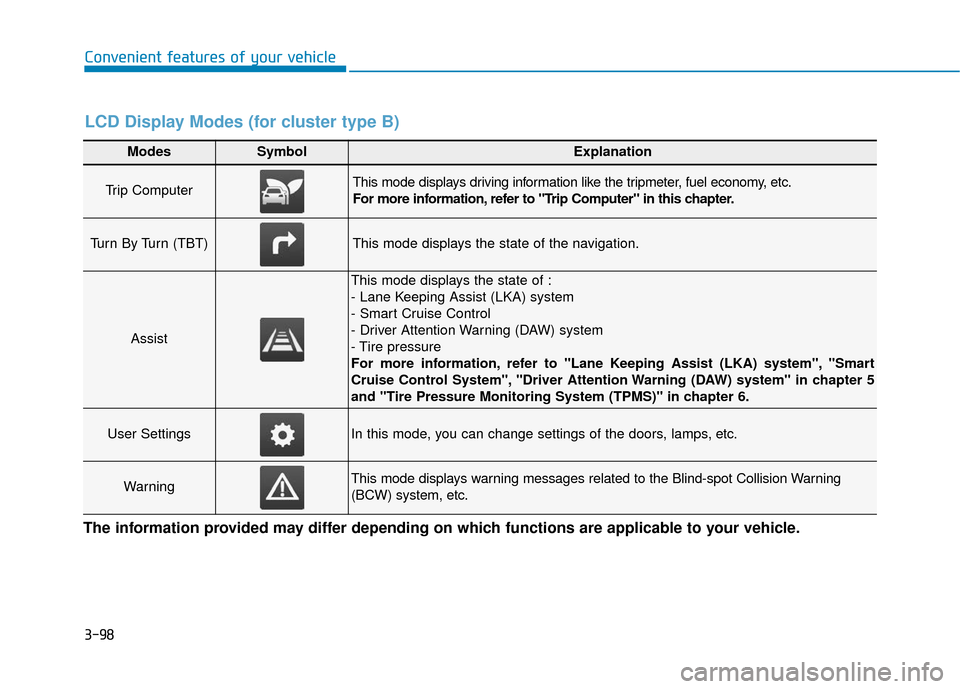
3-98
Convenient features of your vehicle
Modes SymbolExplanation
Trip Computer This mode displays driving information like the tripmeter, fuel economy, etc.
For more information, refer to "Trip Computer" in this chapter.
Turn By Turn (TBT)This mode displays the state of the navigation.
Assist
This mode displays the state of :
- Lane Keeping Assist (LKA) system
- Smart Cruise Control
- Driver Attention Warning (DAW) system
- Tire pressure
For more information, refer to "Lane Keeping Assist (LKA) system", "Smart
Cruise Control System", "Driver Attention Warning (DAW) system" in chapter 5
and "Tire Pressure Monitoring System (TPMS)" in chapter 6.
User SettingsIn this mode, you can change settings of the doors, lamps, etc.
WarningThis mode displays warning messages related to the Blind-spot Collision Warning
(BCW) system, etc.
The information provided may differ depending on which functions are applicable to your vehicle.
LCD Display Modes (for cluster type B)
Page 236 of 603
3-144
Convenient features of your vehicle
Checking the amount of air conditioner refrigerant andcompressor lubricant
When the amount of refrigerant is
low, the performance of the air con-
ditioning is reduced. Overfilling also
reduces the performance of the air
conditioning system.
Therefore, if abnormal operation is
found, have the system inspected by
an authorized HYUNDAI dealer.
It is important that the correct
type and amount of oil and refrig-
erant is used. Otherwise, damage
to the compressor and abnormal
system operation may occur. The air conditioning system should
be serviced by an authorized
HYUNDAI dealer.
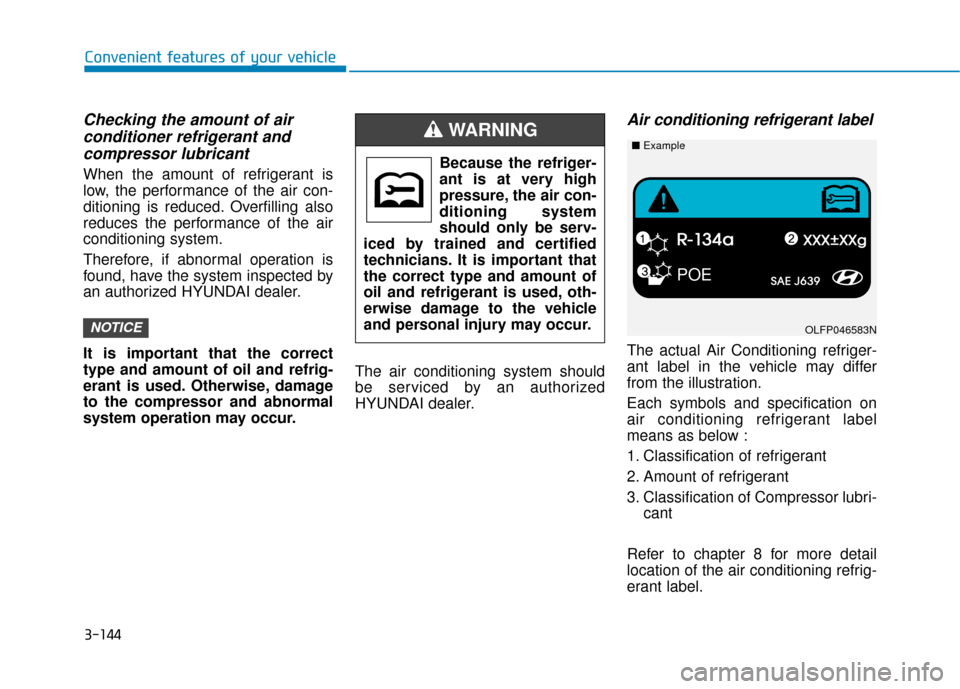
Air conditioning refrigerant label
The actual Air Conditioning refriger-
ant label in the vehicle may differ
from the illustration.
Each symbols and specification on
air conditioning refrigerant label
means as below :
1. Classification of refrigerant
2. Amount of refrigerant
3. Classification of Compressor lubri-
cant
Refer to chapter 8 for more detail
location of the air conditioning refrig-
erant label.
NOTICE
Because the refriger-
ant is at very high
pressure, the air con-
ditioning system
should only be serv-
iced by trained and certified
technicians. It is important that
the correct type and amount of
oil and refrigerant is used, oth-
erwise damage to the vehicle
and personal injury may occur.
WARNING
POE
OLFP046583N
■ Example
Page 240 of 603

3-148
Convenient features of your vehicleWhen the Auto Defogging
System operates, the indi-
cator will illuminate.
If high levels of moisture are sensed in
the vehicle, the Auto Defogging System
will operate in the following order:
Step 1 : Outside air position
Step 2 : Operating the air conditioning
Step 3 : Blowing air toward the wind- shield
Step 4 : Increasing air flow toward the windshield
If the air conditioning is off or recircu-
lated air position is manually select-
ed while Auto Defogging System is
ON, the Auto Defogging System
Indicator will blink 3 times to signal
that the manual operation has been
canceled.
To cancel or reset the
Auto Defogging System
Press the front windshield defroster
button for 3 seconds when the
Engine Start/Stop button is in the ON
position. When the Auto Defogging
System is canceled, the ADS OFF
symbol will blink 3 times and ADS
OFF will be displayed on the climate
control information screen.
When the Auto Defogging System is
reset, the ADS OFF symbol will blink
6 times without a signal.
Information
• When the air conditioning is turned on by Auto defogging system, if you
try to turn off the air conditioning, the
indicator will blink 3 times and the air
conditioning will not be turned off.
• For efficiency, do not select recircu- lated air position while the Auto
defogging system is operating.
• When Auto defogging mode is selected, fan speed, temperature and
intake mode which is adjusted man-
ually are canceled for better defog-
ging result. Do not remove the sensor cover
located on the upper end of the
windshield glass.
Damage to system parts could
occur and may not be covered by
your vehicle warranty.
NOTICE
i
Page 272 of 603
4-20
Multimedia System
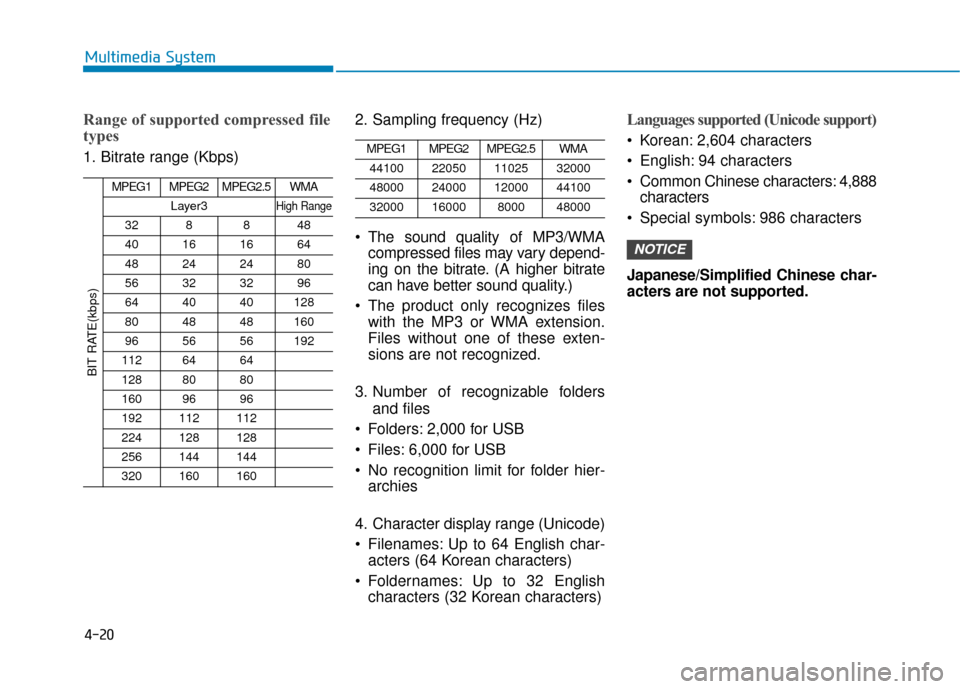
Range of supported compressed file
types
1. Bitrate range (Kbps)2. Sampling frequency (Hz)
The sound quality of MP3/WMA
compressed files may vary depend-
ing on the bitrate. (A higher bitrate
can have better sound quality.)
The product only recognizes files with the MP3 or WMA extension.
Files without one of these exten-
sions are not recognized.
3. Number of recognizable folders and files
Folders: 2,000 for USB
Files: 6,000 for USB
No recognition limit for folder hier- archies
4. Character display range (Unicode)
Filenames: Up to 64 English char- acters (64 Korean characters)
Foldernames: Up to 32 English characters (32 Korean characters)
Languages supported (Unicode support)
Korean: 2,604 characters
English: 94 characters
Common Chinese characters: 4,888characters
Special symbols: 986 characters
Japanese/Simplified Chinese char-
acters are not supported.
NOTICE
BIT RATE(kbps)
MPEG1MPEG2MPEG2.5WMA
Layer3High Range
328848
40161664
48242480
56323296
644040128
804848160
965656192
1126464
1288080
1609696
192112112
224128128
256144144
320160160
MPEG1MPEG2MPEG2.5WMA
44100220501102532000
48000240001200044100
3200016000800048000
Page 359 of 603
5-63
Driving your vehicle
The lane marker is not visible dueto snow, rain, stain, a puddle or
other factors.
A shadow is on the lane marker because of a median strip,
guardrail, noise barriers and oth-
ers.
When the lane markers are compli- cated or a structure substitutes for
the lines such as a construction
area.
There are crosswalk signs or other symbols on the road.
The lane suddenly disappears such as at the intersection.
The lane marker in a tunnel is cov- ered with dirt or oil and etc.
The lane is very wide or narrow. When external condition is inter-
vened
The brightness of outside changes
suddenly when entering/existing a
tunnel or passing under a bridge.
The headlamps are not on at night or in a tunnel, or light level is low.
There is a boundary structure in the roadway.
The light of street, sun, oncoming vehicle and so on reflects from the
water on the road.
When light shines brightly in the reverse direction you drive.
The distance from the vehicle ahead is very short or the vehicle
ahead drives hiding the lane line.
You drive on a steep grade or a sharp curve.
The vehicle vibrates heavily.
The temperature near inside mirror is very high due to direct sun light
and etc. When front visibility is poor
The lens or windshield is covered
by strange materials.
The sensor cannot detect the lane because of fog, heavy rain or snow.
The windshield is fogged by humid air in the vehicle.
Putting something on the crash pad and etc.
5