phone Hyundai Ioniq Plug-in Hybrid 2018 Owner's Manual
[x] Cancel search | Manufacturer: HYUNDAI, Model Year: 2018, Model line: Ioniq Plug-in Hybrid, Model: Hyundai Ioniq Plug-in Hybrid 2018Pages: 589, PDF Size: 21.53 MB
Page 2 of 589
F2
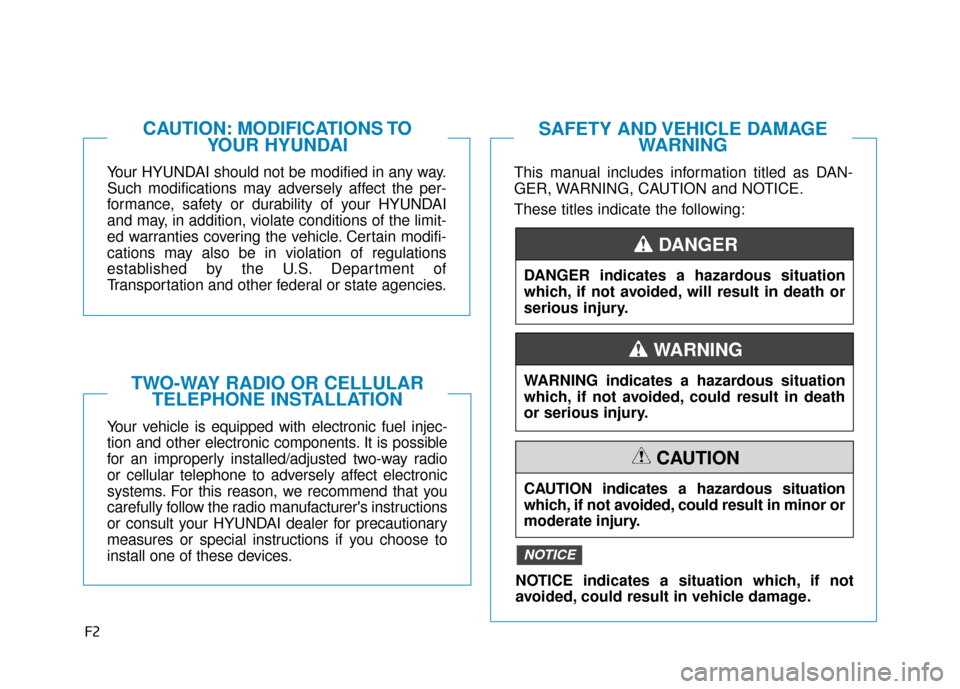
Your HYUNDAI should not be modified in any way.
Such modifications may adversely affect the per-
formance, safety or durability of your HYUNDAI
and may, in addition, violate conditions of the limit-
ed warranties covering the vehicle. Certain modifi-
cations may also be in violation of regulations
established by the U.S. Department of
Transportation and other federal or state agencies.
Your vehicle is equipped with electronic fuel injec-
tion and other electronic components. It is possible
for an improperly installed/adjusted two-way radio
or cellular telephone to adversely affect electronic
systems. For this reason, we recommend that you
carefully follow the radio manufacturer's instructions
or consult your HYUNDAI dealer for precautionary
measures or special instructions if you choose to
install one of these devices.
CAUTION: MODIFICATIONS TOYOUR HYUNDAI
TWO-WAY RADIO OR CELLULARTELEPHONE INSTALLATION
This manual includes information titled as DAN-
GER, WARNING, CAUTION and NOTICE.
These titles indicate the following:
SAFETY AND VEHICLE DAMAGE WARNING
DANGER indicates a hazardous situation
which, if not avoided, will result in death or
serious injury.
DANGER
WARNING indicates a hazardous situation
which, if not avoided, could result in death
or serious injury.
CAUTION indicates a hazardous situation
which, if not avoided, could result in minor or
moderate injury.
CAUTION
NOTICE indicates a situation which, if not
avoided, could result in vehicle damage.
NOTICE
WARNING
Page 16 of 589
I
IN
N S
ST
T R
R U
U M
M E
EN
N T
T
P
P A
A N
N E
EL
L
O
O V
VE
ER
R V
V I
IE
E W
W
-
-
H
H Y
Y B
BR
RI
ID
D
V
V E
EH
H I
IC
C L
LE
E
The actual shape may differ from the illustration.
1-5
Your vehicle at a glance
1
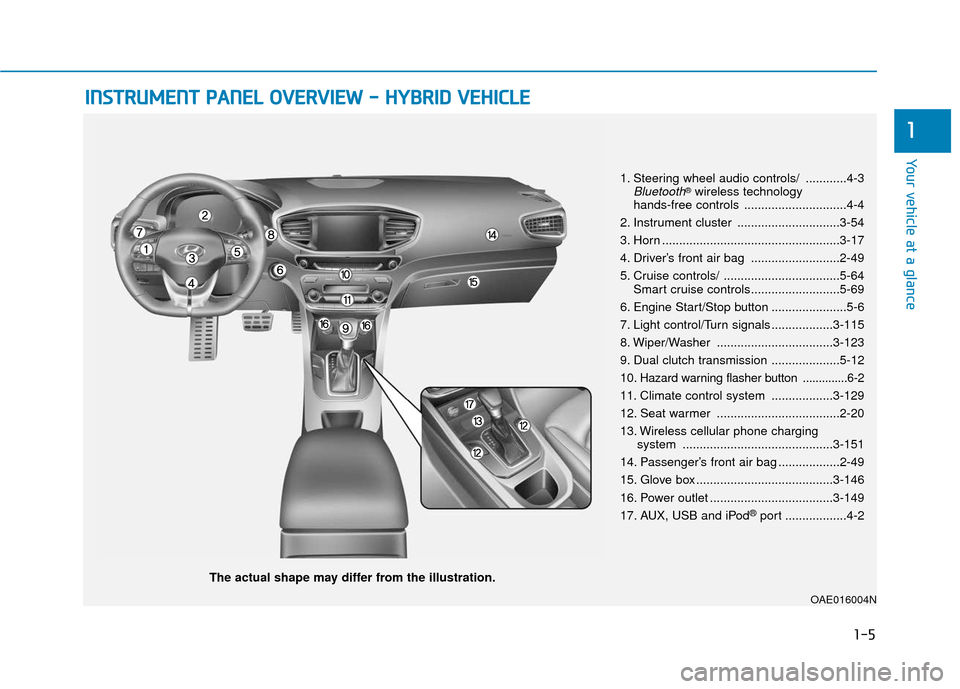
1. Steering wheel audio controls/ ............4-3Bluetooth®wireless technology
hands-free controls ..............................4-4
2. Instrument cluster ..............................3-54
3. Horn ....................................................3-17
4. Driver’s front air bag ..........................2-49
5. Cruise controls/ ..................................5-64 Smart cruise controls..........................5-69
6. Engine Start/Stop button ......................5-6
7. Light control/Turn signals ..................3-115
8. Wiper/Washer ..................................3-123
9. Dual clutch transmission ....................5-12
10
. Hazard warning flasher button ..............6-2
11. Climate control system ..................3-129
12. Seat warmer ....................................2-20
13. Wireless cellular phone charging system ............................................3-151
14. Passenger’s front air bag ..................2-49
15. Glove box ........................................3-146
16. Power outlet ....................................3-149
17. AUX, USB and iPod
®port ..................4-2
OAE016004N
Page 21 of 589
1-10
Your vehicle at a glance
I
IN
N S
ST
T R
R U
U M
M E
EN
N T
T
P
P A
A N
N E
EL
L
O
O V
VE
ER
R V
V I
IE
E W
W
-
-
P
P L
LU
U G
G-
-I
IN
N
H
H Y
Y B
BR
RI
ID
D
V
V E
EH
H I
IC
C L
LE
E
The actual shape may differ from the illustration.
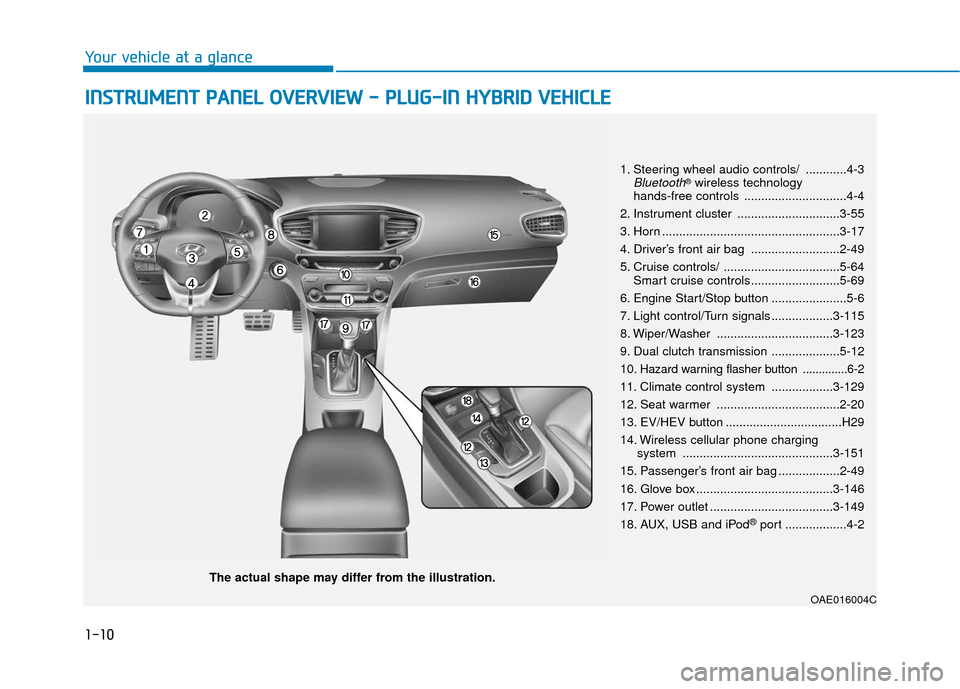
1. Steering wheel audio controls/ ............4-3Bluetooth®wireless technology
hands-free controls ..............................4-4
2. Instrument cluster ..............................3-55
3. Horn ....................................................3-17
4. Driver’s front air bag ..........................2-49
5. Cruise controls/ ..................................5-64 Smart cruise controls..........................5-69
6. Engine Start/Stop button ......................5-6
7. Light control/Turn signals ..................3-115
8. Wiper/Washer ..................................3-123
9. Dual clutch transmission ....................5-12
10
. Hazard warning flasher button ..............6-2
11. Climate control system ..................3-129
12. Seat warmer ....................................2-20
13. EV/HEV button ..................................H29
14. Wireless cellular phone charging system ............................................3-151
15. Passenger’s front air bag ..................2-49
16. Glove box ........................................3-146
17. Power outlet ....................................3-149
18. AUX, USB and iPod
®port ..................4-2
OAE016004C
Page 24 of 589
2-2
You will find many safety precautions
and recommendations throughout
this section, and throughout this man-
ual. The safety precautions in this sec-
tion are among the most important.
Always Wear Your Seat Belt
A seat belt is your best protection in
all types of accidents. Air bags are
designed to supplement seat belts,
not replace them. So even though
your vehicle is equipped with air bags,
ALWAYS make sure you and your
passengers wear your seat belts, and
wear them properly.
Restrain All Children
All children under age 13 should ride
in your vehicle properly restrained in
a rear seat, not the front seat. Infants
and small children should be
restrained in an appropriate child
restraint. Larger children should use
a booster seat with the lap/shoulder
belt until they can use the seat belt
properly without a booster seat.
Air Bag Hazards
While air bags can save lives, they
can also cause serious or fatal
injuries to occupants who sit too
close to them, or who are not prop-
erly restrained. Infants, young chil-
dren, and shorter adults are at the
greatest risk of being injured by an
inflating air bag. Follow all instruc-
tions and warnings in this manual.
Driver Distraction
Driver distraction presents a serious
and potentially deadly danger, espe-
cially for inexperienced drivers. Safety
should be the first concern when
behind the wheel and drivers need to
be aware of the wide array of potential
distractions, such as drowsiness,
reaching for objects, eating, personal
grooming, other passengers, and
using cellular phones.
Drivers can become distracted when
they take their eyes and attention off
the road or their hands off the wheel
to focus on activities other than driv-
ing. To reduce your risk of distraction
or getting into an accident:
I IM
M P
PO
O R
RT
TA
A N
N T
T
S
S A
A F
FE
E T
T Y
Y
P
P R
R E
EC
CA
A U
U T
TI
IO
O N
NS
S
Safety system of your vehicle
Page 25 of 589
2-3
Safety system of your vehicle
• ALWAYS set up your mobile devices(i.e., MP3 players, phones, naviga-
tion units, etc.) when your vehicle is
parked or safely stopped.
ONLY use your mobile device when allowed by laws and when conditions
permit safe use. NEVER text or
email while driving. Most states have
laws prohibiting drivers from texting.
Some states and cities also prohibit
drivers from using handheld phones.
NEVER let the use of a mobile device distract you from driving. You
have a responsibility to your passen-
gers and others on the road to
always drive safely, with your hands
on the wheel as well as your eyes
and attention on the road.Control Your Speed
Excessive speed is a major factor in
crash injuries and deaths. Generally,
the higher the speed, the greater the
risk, but serious injuries can also
occur at lower speeds. Never drive
faster than is safe for current condi-
tions, regardless of the maximum
speed posted.
Keep Your Vehicle in Safe
Condition
Having a tire blowout or a mechanical
failure can be extremely hazardous.
To reduce the possibility of such
problems, check your tire pressures
and condition frequently, and perform
all regularly scheduled maintenance.
2
Page 72 of 589
2-50
Safety system of your vehicle
Side air bags
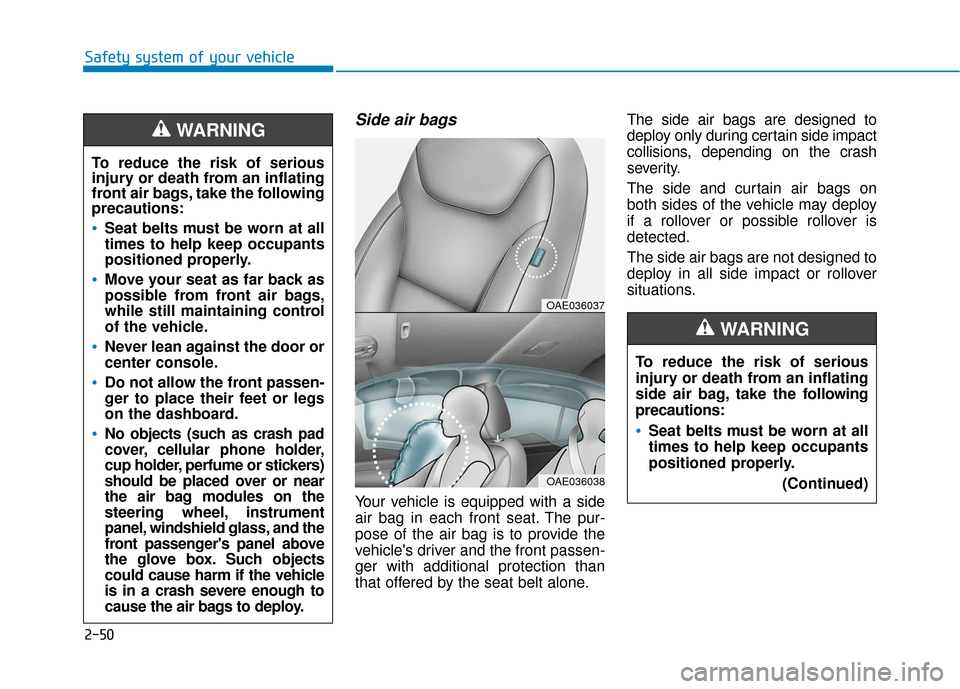
Your vehicle is equipped with a side
air bag in each front seat. The pur-
pose of the air bag is to provide the
vehicle's driver and the front passen-
ger with additional protection than
that offered by the seat belt alone.The side air bags are designed to
deploy only during certain side impact
collisions, depending on the crash
severity.
The side and curtain air bags on
both sides of the vehicle may deploy
if a rollover or possible rollover is
detected.
The side air bags are not designed to
deploy in all side impact or rollover
situations.
To reduce the risk of serious
injury or death from an inflating
front air bags, take the following
precautions:
Seat belts must be worn at all
times to help keep occupants
positioned properly.
Move your seat as far back as
possible from front air bags,
while still maintaining control
of the vehicle.
Never lean against the door or
center console.
Do not allow the front passen-
ger to place their feet or legs
on the dashboard.
No objects (such as crash pad
cover, cellular phone holder,
cup holder, perfume or stickers)
should be placed over or near
the air bag modules on the
steering wheel, instrument
panel, windshield glass, and the
front passenger's panel above
the glove box. Such objects
could cause harm if the vehicle
is in a crash severe enough to
cause the air bags to deploy.
WARNING
OAE036037
OAE036038
To reduce the risk of serious
injury or death from an inflating
side air bag, take the follo
wing
precautions:
Seat belts must be worn at all
times to help keep occupants
positioned properly.
(Continued)
WARNING
Page 94 of 589
Trip Computer (Hybrid Vehicle) .......................3-104
Trip Computer (Plug-In Hybrid Vehicle) .........3-109
Lighting................................................................3-115
Exterior Lights ...............................................................3-115
Interior Lights ................................................................3-120
Welcome System ...........................................................3-122
Wipers and Washers..........................................3-123
Windshield Wipers ........................................................3-123
Windshield Washers .....................................................3-124
Driver Assist System .........................................3-125
Rear View Camera ........................................................3-125
Rear Parking Assist System .......................................3-126
Automatic Climate Control System ..................3-129
Automatic Heating and Air Conditioning.................3-130
Manual Heating and Air Conditioning......................3-131
System Operation .........................................................3-138
System Maintenance....................................................3-139
Windshield Defrosting and Defogging ............3-141
To Defog Inside Windshield ........................................3-141
To Defrost Outside Windshield ..................................3-142
Defogging Logic ............................................................3-142
Rear Window Defroster ..............................................3-142
Auto Defogging System ..............................................3-143
Climate Control Additional Features ...............3-145
Automatic Ventilation ...................................................3-145
Storage Compartment .......................................3-146
Center Console Storage ..............................................3-146
Glove Box ........................................................................\
3-146
Sunglass Holder.............................................................3-147
Multi Box ........................................................................\
.3-147
Interior Features ................................................3-148
Cup Holder ......................................................................3-\
148
Sunvisor ........................................................................\
...3-149
Power Outlet ..................................................................3-149
USB Charger ...................................................................3-150\
Wireless Cellular Phone Charging System..............3-151
Clock ........................................................................\
.........3-152
Clothes Hanger ..............................................................3-153
Floor Mat Anchor(s).....................................................3-153
Cargo Security Screen .................................................3-154
3
Page 98 of 589
3-6
Mechanical key
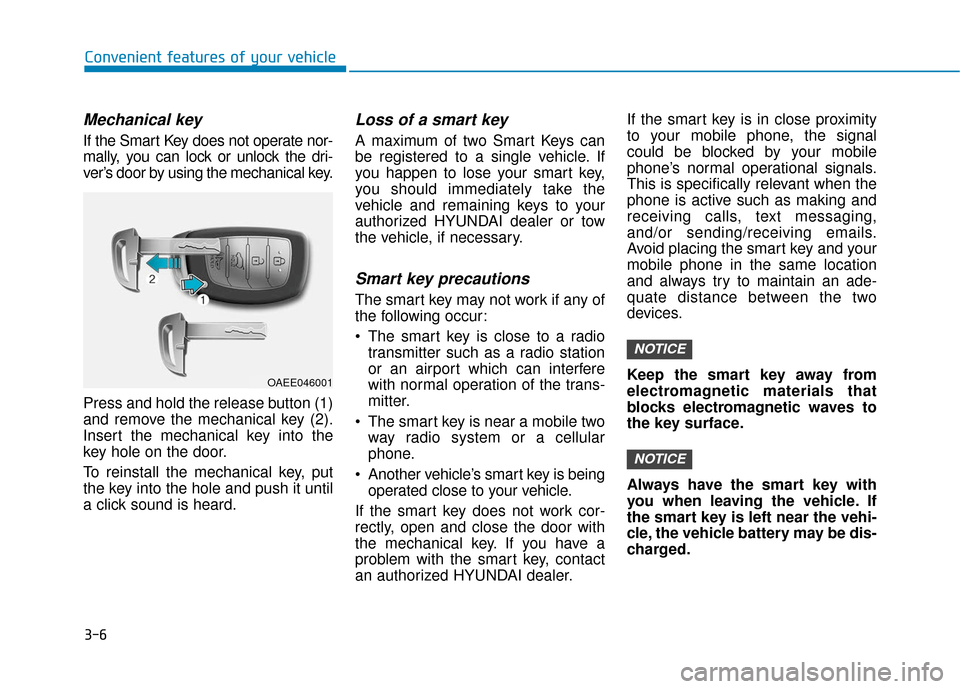
If the Smart Key does not operate nor-
mally, you can lock or unlock the dri-
ver’s door by using the mechanical key.
Press and hold the release button (1)
and remove the mechanical key (2).
Insert the mechanical key into the
key hole on the door.
To reinstall the mechanical key, put
the key into the hole and push it until
a click sound is heard.
Loss of a smart key
A maximum of two Smart Keys can
be registered to a single vehicle. If
you happen to lose your smart key,
you should immediately take the
vehicle and remaining keys to your
authorized HYUNDAI dealer or tow
the vehicle, if necessary.
Smart key precautions
The smart key may not work if any of
the following occur:
The smart key is close to a radiotransmitter such as a radio station
or an airport which can interfere
with normal operation of the trans-
mitter.
The smart key is near a mobile two way radio system or a cellular
phone.
Another vehicle’s smart key is being operated close to your vehicle.
If the smart key does not work cor-
rectly, open and close the door with
the mechanical key. If you have a
problem with the smart key, contact
an authorized HYUNDAI dealer. If the smart key is in close proximity
to your mobile phone, the signal
could be blocked by your mobile
phone’s normal operational signals.
This is specifically relevant when the
phone is active such as making and
receiving calls, text messaging,
and/or sending/receiving emails.
Avoid placing the smart key and your
mobile phone in the same location
and always try to maintain an ade-
quate distance between the two
devices.
Keep the smart key away from
electromagnetic materials that
blocks electromagnetic waves to
the key surface.
Always have the smart key with
you when leaving the vehicle. If
the smart key is left near the vehi-
cle, the vehicle battery may be dis-
charged.
NOTICE
NOTICE
Convenient features of your vehicle
OAEE046001
Page 141 of 589
3-49
Convenient features of your vehicle
3
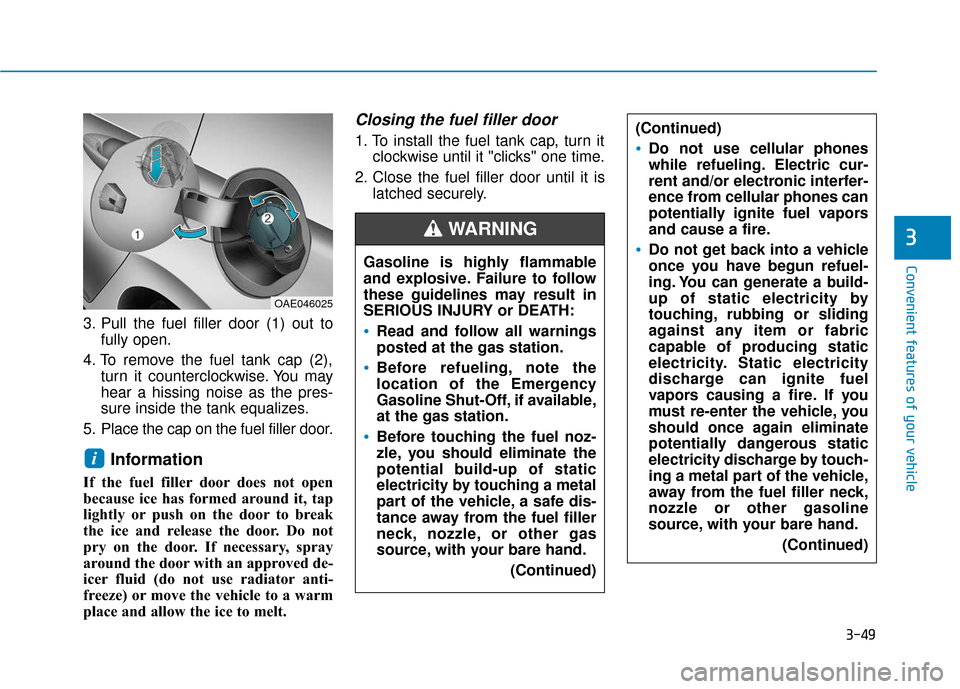
3. Pull the fuel filler door (1) out tofully open.
4. To remove the fuel tank cap (2), turn it counterclockwise. You may
hear a hissing noise as the pres-
sure inside the tank equalizes.
5. Place the cap on the fuel filler door.
Information
If the fuel filler door does not open
because ice has formed around it, tap
lightly or push on the door to break
the ice and release the door. Do not
pry on the door. If necessary, spray
around the door with an approved de-
icer fluid (do not use radiator anti-
freeze) or move the vehicle to a warm
place and allow the ice to melt.
Closing the fuel filler door
1. To install the fuel tank cap, turn it clockwise until it "clicks" one time.
2. Close the fuel filler door until it is latched securely.
i
Gasoline is highly flammable
and explosive. Failure to follow
these guidelines may result in
SERIOUS INJURY or DEATH:
Read and follow all warnings
posted at the gas station.
Before refueling, note the
location of the Emergency
Gasoline Shut-Off, if available,
at the gas station.
Before touching the fuel noz-
zle, you should eliminate the
potential build-up of static
electricity by touching a metal
part of the vehicle, a safe dis-
tance away from the fuel filler
neck, nozzle, or other gas
source, with your bare hand.
(Continued)
WARNING
(Continued)
Do not use cellular phones
while refueling. Electric cur-
rent and/or electronic interfer-
ence from cellular phones can
potentially ignite fuel vapors
and cause a fire.
Do not get back into a vehicle
once you have begun refuel-
ing. You can generate a build-
up of static electricity by
touching, rubbing or sliding
against any item or fabric
capable of producing static
electricity. Static electricity
discharge can ignite fuel
vapors causing a fire. If you
must re-enter the vehicle, you
should once again eliminate
potentially dangerous static
electricity discharge by touch-
ing a metal part of the vehicle,
away from the fuel filler neck,
nozzle or other gasoline
source, with your bare hand.(Continued)
OAE046025
Page 144 of 589
3-52
Closing the fuel filler door
1. To install the fuel tank cap, turn itclockwise until it "clicks" one time.
2. Close the fuel filler door until it is latched securely.
Convenient features of your vehicle
Gasoline is highly flammable
and explosive. Failure to follow
these guidelines may result in
SERIOUS INJURY or DEATH:
Read and follow all warnings
posted at the gas station.
Before refueling, note the
location of the Emergency
Gasoline Shut-Off, if available,
at the gas station.
Before touching the fuel noz-
zle, you should eliminate the
potential build-up of static
electricity by touching a metal
part of the vehicle, a safe dis-
tance away from the fuel filler
neck, nozzle, or other gas
source, with your bare hand.(Continued)
WARNING
(Continued)
Do not use cellular phones
while refueling. Electric cur-
rent and/or electronic interfer-
ence from cellular phones can
potentially ignite fuel vapors
and cause a fire.
Do not get back into a vehicle
once you have begun refuel-
ing. You can generate a build-
up of static electricity by
touching, rubbing or sliding
against any item or fabric
capable of producing static
electricity. Static electricity
discharge can ignite fuel
vapors causing a fire. If you
must re-enter the vehicle, you
should once again eliminate
potentially dangerous static
electricity discharge by touch-
ing a metal part of the vehicle,
away from the fuel filler neck,
nozzle or other gasoline
source, with your bare hand.(Continued)
Add fuel into the fuel tank
within 20 minutes after open-
ing the fuel filler door. After 20
minutes, the fuel tank may
shut off, causing fuel to over-
flow. In this case, re-press the
fuel filler door opening but-
ton.
Do not leave the fuel filler
door opened for an extended
period of time. It may dis-
charge the battery.
Close the fuel filler door after
fueling the vehicle. If you start
the vehicle with the fuel filler
door opened, the message,
"Check fuel door", illuminates
on the LCD display.
Avoid refueling the vehicle
while charging the (high-volt-
age) hybrid battery. It may
cause a fire or an explosion
due to static electricity.
WARNING