change wheel Hyundai Ioniq Plug-in Hybrid 2019 Owner's Manual - RHD (UK, Australia)
[x] Cancel search | Manufacturer: HYUNDAI, Model Year: 2019, Model line: Ioniq Plug-in Hybrid, Model: Hyundai Ioniq Plug-in Hybrid 2019Pages: 599, PDF Size: 17.32 MB
Page 166 of 599
3-20
Electric power steering (EPS)
The system assists you with steering
the vehicle. If the engine is off or if
the power steering system becomes
inoperative, the vehicle may still be
steered, but it will require increased
steering effort.
Also, the steering effort becomes
heavier as the vehicle’s speed
increases and becomes lighter as
the vehicle’s speed decreases for
better control of the steering wheel.
Should you notice any change in the
effort required to steer during normal
vehicle operation, we recommend
that the system be checked by a
HYUNDAI authorised repairer.
If the electric Power SteeringSystem does not operate nor-
mally, the warning light ( ) will
illuminate or blink on the instru-
ment cluster. The steering wheel
may become difficult to control
or operate. Take your vehicle to a
HYUNDAI authorised repairer
and have the system checked as
soon as possible.
(Continued)(Continued)
When abnormality is detected in
the electric power steering sys-
tem, to prevent a deadly acci-
dent, the steering assist func-
tion will stop. At this time, the
warning light turns on or blinks
on the cluster. The steering
wheel may become difficult to
control or operate. Have your
vehicle checked immediately,
after moving the vehicle to a
safe zone.
Information
The following symptoms may occur
during normal vehicle operation:
• The steering effort may be highimmediately after placing the igni-
tion switch or the Engine Start/Stop
button in the ON position.
This happens as the system per-
forms the EPS system diagnostics.
When the diagnostics are complet-
ed, the steering wheel will return to
its normal condition.
(Continued)(Continued)
• A click noise may be heard from the
EPS relay after the ignition switch is
placed in the ON or LOCK/OFF
position.
• Motor noise may be heard when the vehicle is at a stop or at a low driv-
ing speed.
• When you operate the steering wheel in low temperatures, abnor-
mal noise may occur. If the temper-
ature rises, the noise will disappear.
This is a normal condition.
• When the vehicle is stationary, if you turn the steering wheel all the
way to the left or right continuously,
the steering wheel effort increases.
This is not a system malfunction. As
time passes, the steering wheel
effort will return to its normal con-
dition.
i
NOTICE
S
ST
T E
EE
ER
R I
IN
N G
G
W
W H
HE
EE
EL
L
Convenient features of your vehicle
Page 211 of 599
3-65
Convenient features of your vehicle
3
LCD display messages
Shift to P (for smart key system)
This warning message is displayed
if you try to turn off the vehicle with
the shift lever the N (Neutral) posi-
tion.
At this time, the Engine Start/Stop
button turns to the ACC position (If
you press the Engine Start/Stop but-
ton once more, it will turn to the ON
position).
Low Key Battery (for smart key system)
This warning message is displayed if
the battery of the smart key is dis-
charged whilst changing the Engine
Start/Stop button to the OFF posi-
tion.
Press START button while turn-ing wheel (for smart key system)
This warning message is displayed if
the steering wheel does not unlock
normally when the Engine Start/Stop
button is pressed.
You should press the Engine
Start/Stop button whilst turning the
steering wheel right and left.
Check Steering Wheel Lock System (for smart key system)
This warning message is displayed if
the steering wheel does not lock nor-
mally whilst the Engine Start/Stop but-
ton changes to the OFF position.
Press brake pedal to start vehi-cle (for smart key system)
This warning message is displayed if
the Engine Start/Stop button changes
to the ACC position twice by pressing
the button repeatedly without depress-
ing the brake pedal.
You can start the vehicle by depressing
the brake pedal.
Key not in vehicle(for smart key system)
This warning message is displayed if
the smart key is not in the vehicle
when you press the Engine Start/Stop
button.
When attempting to start the vehicle,
always have the smart key with you.
Page 243 of 599
3-97
Convenient features of your vehicle
3
T
TR
R I
IP
P
C
C O
O M
M P
PU
U T
TE
ER
R
(
( H
H Y
Y B
BR
RI
ID
D
V
V E
EH
H I
IC
C L
LE
E )
)
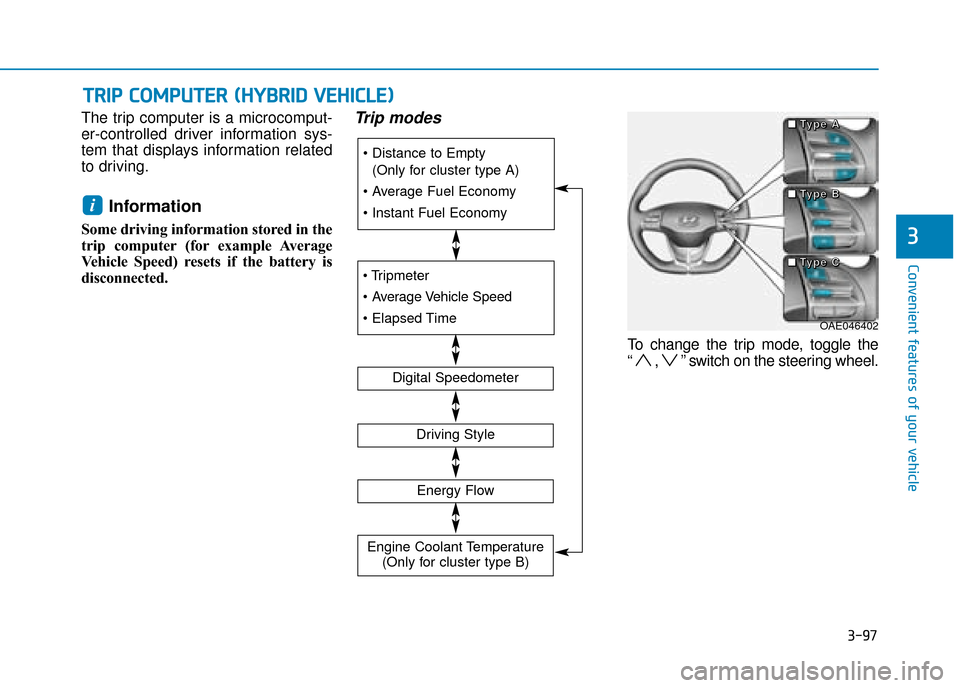
The trip computer is a microcomput-
er-controlled driver information sys-
tem that displays information related
to driving.
Information
Some driving information stored in the
trip computer (for example Average
Vehicle Speed) resets if the battery is
disconnected.
Trip modes
To change the trip mode, toggle the
“ , ” switch on the steering wheel.
i
(Only for cluster type A)
Digital Speedometer
Driving Style
Energy Flow
Engine Coolant Temperature (Only for cluster type B)
OAE046402
■
■
■
■
T
T
T
T
y
y
y
y
p
p
p
p
e
e
e
e
A
A
A
A
■
■
■
■
T
T
T
T
y
y
y
y
p
p
p
p
e
e
e
e
B
B
B
B
■
■
■
■
T
T
T
T
y
y
y
y
p
p
p
p
e
e
e
e
C
C
C
C
Page 249 of 599
3-103
Convenient features of your vehicle
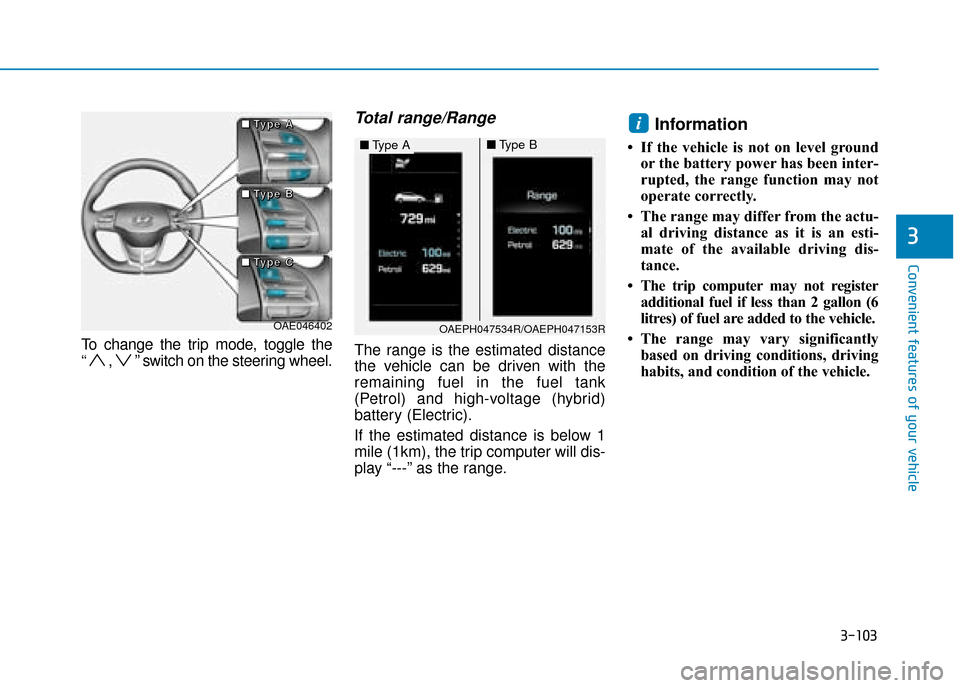
To change the trip mode, toggle the
“ , ” switch on the steering wheel.
Total range/Range
The range is the estimated distance
the vehicle can be driven with the
remaining fuel in the fuel tank
(Petrol) and high-voltage (hybrid)
battery (Electric).
If the estimated distance is below 1
mile (1km), the trip computer will dis-
play “---” as the range.
Information
• If the vehicle is not on level groundor the battery power has been inter-
rupted, the range function may not
operate correctly.
• The range may differ from the actu- al driving distance as it is an esti-
mate of the available driving dis-
tance.
• The trip computer may not register additional fuel if less than 2 gallon (6
litres) of fuel are added to the vehicle.
• The range may vary significantly based on driving conditions, driving
habits, and condition of the vehicle.
i
3
OAE046402
■
■
■
■
T
T
T
T
y
y
y
y
p
p
p
p
e
e
e
e
A
A
A
A
■
■
■
■
T
T
T
T
y
y
y
y
p
p
p
p
e
e
e
e
B
B
B
B
■
■
■
■
T
T
T
T
y
y
y
y
p
p
p
p
e
e
e
e
C
C
C
COAEPH047534R/OAEPH047153R
■
Type A■Type B
Page 315 of 599
4-13
Multimedia System
4
Multimedia System
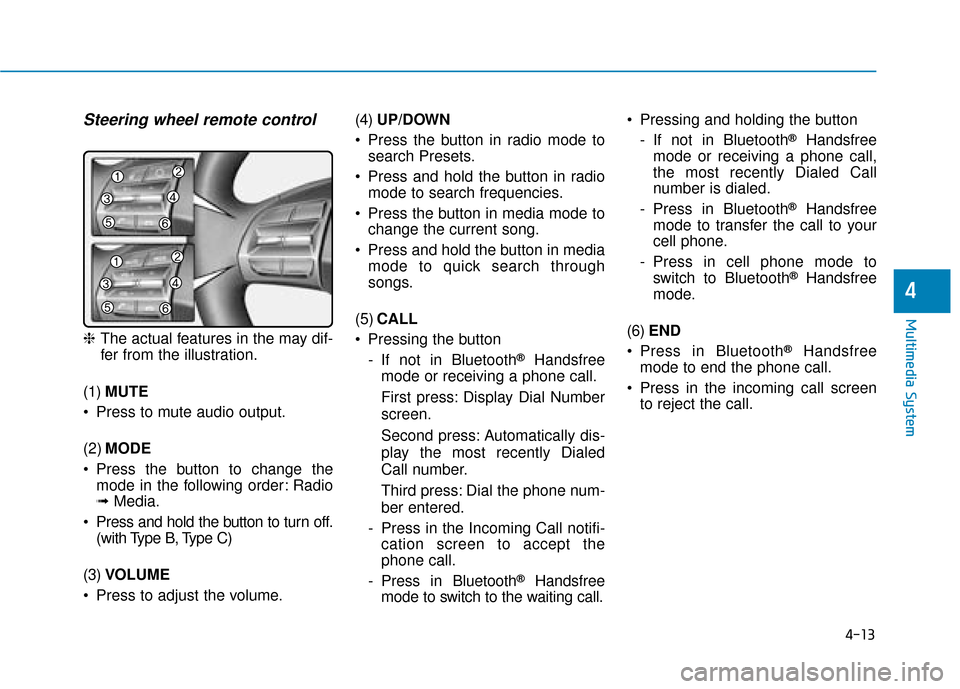
Steering wheel remote control
❈The actual features in the may dif-
fer from the illustration.
(1) MUTE
Press to mute audio output.
(2) MODE
Press the button to change the mode in the following order: Radio
➟ Media.
Press and hold the button to turn off. (with Type B, Type C)
(3) VOLUME
Press to adjust the volume. (4)
UP/DOWN
Press the button in radio mode to search Presets.
Press and hold the button in radio mode to search frequencies.
Press the button in media mode to change the current song.
Press and hold the button in media mode to quick search through
songs.
(5) CALL
Pressing the button - If not in Bluetooth
®Handsfree
mode or receiving a phone call.
First press: Display Dial Number
screen.
Second press: Automatically dis-
play the most recently Dialed
Call number.
Third press: Dial the phone num-
ber entered.
- Press in the Incoming Call notifi- cation screen to accept the
phone call.
- Press in Bluetooth
®Handsfree
mode to switch to the waiting call. Pressing and holding the button
- If not in Bluetooth
®Handsfree
mode or receiving a phone call,
the most recently Dialed Call
number is dialed.
- Press in Bluetooth
®Handsfree
mode to transfer the call to your
cell phone.
- Press in cell phone mode to switch to Bluetooth
®Handsfree
mode.
(6) END
Press in Bluetooth
®Handsfree
mode to end the phone call.
Press in the incoming call screen to reject the call.
Page 364 of 599
5-20
Driving your vehicle
R (Reverse)
Use this position to drive the vehicle
backward.
Always come to a complete stop
before shifting into or out of R
(Reverse); you may damage the
transmission if you shift into R
(Reverse) whilst the vehicle is in
motion.
N (Neutral)
The wheels and transmission are not
engaged.
D (Drive)
This is the normal driving position.
The transmission will automatically
shift through a 6-gear sequence, pro-
viding the best fuel economy and
power.
For extra power when passing anoth-
er vehicle or driving uphill, depress
the accelerator fully. The transmis-
sion will automatically downshift to
the next lower gear (or gears, as
appropriate).
If you drive the vehicle with the shift
lever in D (Drive), the vehicle will
automatically change to ECO mode.
The indicator will illuminate on
the instrument cluster.
When driving in ECO mode, the vehi-
cle improves fuel efficiency for eco-
friendly driving.
NOTICE
Shifting into P (Park) whilst
the vehicle is in motion may
cause you to lose control of
the vehicle.
After the vehicle has stopped,
always make sure the shift
lever is in P (Park), apply the
parking brake, and turn the
vehicle off.
Do not use the P (Park) posi-
tion in place of the parking
brake.
When parking on an incline,
place the shift lever in P (Park)
and apply the parking brake to
prevent the vehicle from
rolling downhill.
For safety, always engage the
parking brake with the shift
lever in the P (Park) position
except for the case of emer-
gency parking.
WARNING
Do not drive with the shift lever
in N (Neutral). The engine brake
will not work and lead to an
accident.
WARNING
Depress the brake pedal fully to
prevent unintended movement
when stopping the vehicle.
CAUTION
Page 369 of 599
5-25
Driving your vehicle
Exercise extreme caution whendriving on a slippery surface. Be
especially careful when braking,
accelerating or shifting gears. On a
slippery surface, an abrupt change
in vehicle speed can cause the
drive wheels to lose traction and
may cause loss of vehicle control
resulting in an accident
Optimum vehicle performance and economy is obtained by smoothly
depressing and releasing the
accelerator.
5
To reduce the risk of SERIOUS
INJURY or DEATH:
ALWAYS wear your seat belt.
In a collision, an unbelted
occupant is significantly more
likely to be seriously injured
or killed than a properly belt-
ed occupant.
Avoid high speeds when cor-
nering or turning.
Do not make quick steering
wheel movements, such as
sharp lane changes or fast,
sharp turns.
The risk of rollover is greatly
increased if you lose control
of your vehicle at highway
speeds.
Loss of control often occurs if
two or more wheels drop off
the roadway and the driver
over steers to reenter the
roadway.
(Continued)
(Continued)
In the event your vehicle
leaves the roadway, do not
steer sharply. Instead, slow
down before pulling back into
the travel lanes.
HYUNDAI recommends you
follow all posted speed limits.
WARNING
Page 375 of 599
5-31
Driving your vehicle
5
Anti-lock Brake System (ABS)
ABS is an electronic braking system
that helps prevent a braking skid.
ABS allows the driver to steer and
brake at the same time.
Using ABS
To obtain the maximum benefit from
your ABS in an emergency situation,
do not attempt to modulate your
brake pressure and do not try to
pump your brakes. Depress your
brake pedal as hard as possible.
When you apply your brakes under
conditions which may lock the
wheels, you may hear sounds from
the brakes, or feel a corresponding
sensation in the brake pedal. This is
normal and it means your ABS is
active.
ABS does not reduce the time or dis-
tance it takes to stop the vehicle.
Always maintain a safe distance from
the vehicle in front of you.
ABS will not prevent a skid that
results from sudden changes in
direction, such as trying to take a
corner too fast or making a sudden
lane change. Always drive at a safe
speed for the road and weather con-
ditions.
(Continued)On roads where the road sur-
face is pitted or has different
surface height.
Tyre chains are installed on
your vehicle.
The safety features of an ABS
or ESC equipped vehicle should
not be tested by high speed
driving or cornering. This could
endanger the safety of yourself
or others.An Anti-Lock Braking System
(ABS) or an Electronic Stability
Control (ESC) system will not
prevent accidents due to
improper or dangerous driving
manoeuvres. Even though vehi-
cle control is improved during
emergency braking, always
maintain a safe distance
between you and objects ahead
of you. Vehicle speeds should
always be reduced during
extreme road conditions. The
braking distance for cars
equipped with ABS or ESC may
be longer than for those without
these systems in the following
road conditions.
Drive your vehicle at reduced
speeds during the following
conditions:
Rough, gravel or snow-cov-
ered roads. (Continued)
WARNING
Page 408 of 599
5-64
Driving your vehicle
The indicator in the cluster display
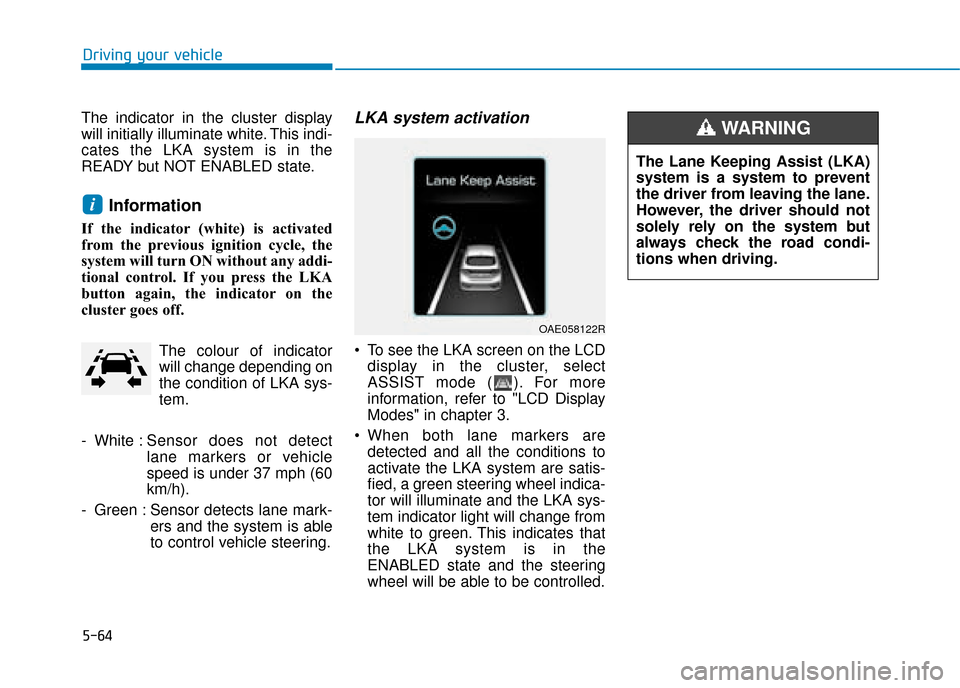
will initially illuminate white. This indi-
cates the LKA system is in the
READY but NOT ENABLED state.
Information
If the indicator (white) is activated
from the previous ignition cycle, the
system will turn ON without any addi-
tional control. If you press the LKA
button again, the indicator on the
cluster goes off. The colour of indicator
will change depending on
the condition of LKA sys-
tem.
- White : Sensor does not detect
lane markers or vehicle
speed is under 37 mph (60
km/h).
- Green : Sensor detects lane mark- ers and the system is able
to control vehicle steering.
LKA system activation
To see the LKA screen on the LCDdisplay in the cluster, select
ASSIST mode ( ). For more
information, refer to "LCD Display
Modes" in chapter 3.
When both lane markers are detected and all the conditions to
activate the LKA system are satis-
fied, a green steering wheel indica-
tor will illuminate and the LKA sys-
tem indicator light will change from
white to green. This indicates that
the LKA system is in the
ENABLED state and the steering
wheel will be able to be controlled.
i
OAE058122R
The Lane Keeping Assist (LKA)
system is a system to prevent
the driver from leaving the lane.
However, the driver should not
solely rely on the system but
always check the road condi-
tions when driving.
WARNING
Page 409 of 599
5-65
Driving your vehicle
5
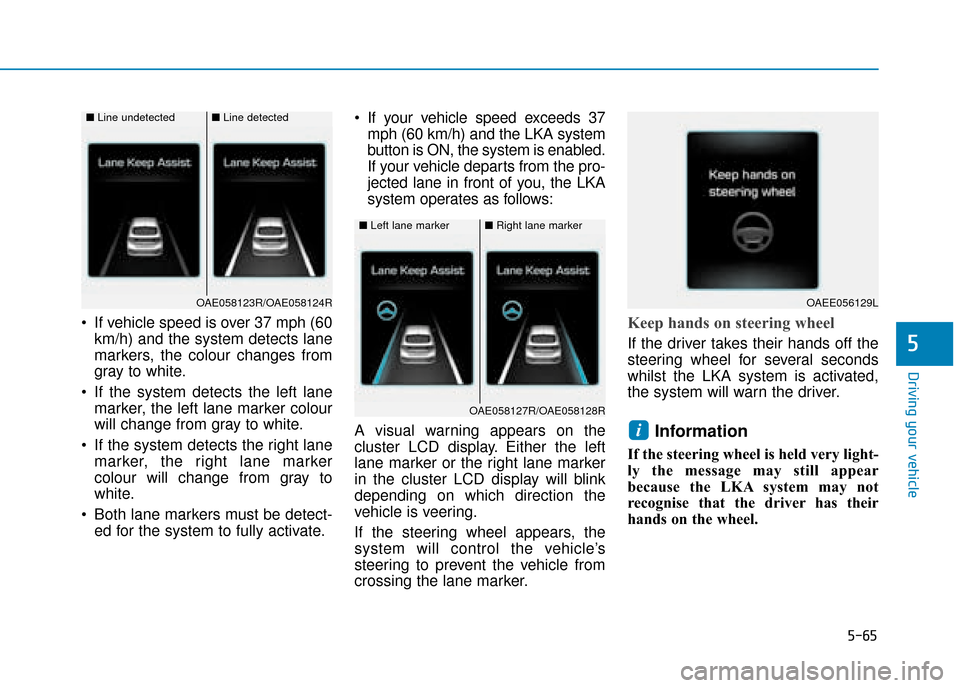
If vehicle speed is over 37 mph (60km/h) and the system detects lane
markers, the colour changes from
gray to white.
If the system detects the left lane marker, the left lane marker colour
will change from gray to white.
If the system detects the right lane marker, the right lane marker
colour will change from gray to
white.
Both lane markers must be detect- ed for the system to fully activate. If your vehicle speed exceeds 37
mph (60 km/h) and the LKA system
button is ON, the system is enabled.
If your vehicle departs from the pro-
jected lane in front of you, the LKA
system operates as follows:
A visual warning appears on the
cluster LCD display. Either the left
lane marker or the right lane marker
in the cluster LCD display will blink
depending on which direction the
vehicle is veering.
If the steering wheel appears, the
system will control the vehicle’s
steering to prevent the vehicle from
crossing the lane marker.Keep hands on steering wheel
If the driver takes their hands off the
steering wheel for several seconds
whilst the LKA system is activated,
the system will warn the driver.
Information
If the steering wheel is held very light-
ly the message may still appear
because the LKA system may not
recognise that the driver has their
hands on the wheel.
i
■ Left lane marker■Right lane marker
OAE058127R/OAE058128R
■Line undetected■Line detected
OAE058123R/OAE058124ROAEE056129L