key Hyundai Ioniq Plug-in Hybrid 2019 Owner's Manual - RHD (UK, Australia)
[x] Cancel search | Manufacturer: HYUNDAI, Model Year: 2019, Model line: Ioniq Plug-in Hybrid, Model: Hyundai Ioniq Plug-in Hybrid 2019Pages: 599, PDF Size: 17.32 MB
Page 28 of 599
H28
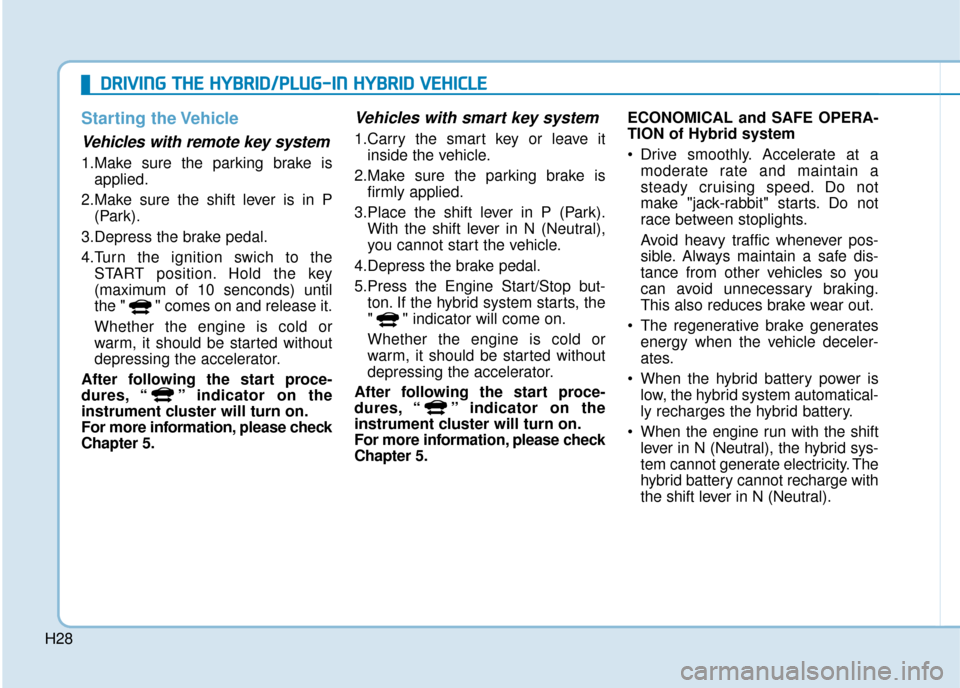
Starting the Vehicle
Vehicles with remote key system
1.Make sure the parking brake isapplied.
2.Make sure the shift lever is in P (Park).
3.Depress the brake pedal.
4.Turn the ignition swich to the START position. Hold the key
(maximum of 10 senconds) until
the " " comes on and release it.
Whether the engine is cold or
warm, it should be started without
depressing the accelerator.
After following the start proce-
dures, “ ” indicator on the
instrument cluster will turn on.
For more information, please check
Chapter 5.
Vehicles with smart key system
1.Carry the smart key or leave it inside the vehicle.
2.Make sure the parking brake is firmly applied.
3.Place the shift lever in P (Park). With the shift lever in N (Neutral),
you cannot start the vehicle.
4.Depress the brake pedal.
5.Press the Engine Start/Stop but- ton. If the hybrid system starts, the
" " indicator will come on.
Whether the engine is cold or
warm, it should be started without
depressing the accelerator.
After following the start proce-
dures, “ ” indicator on the
instrument cluster will turn on.
For more information, please check
Chapter 5. ECONOMICAL and SAFE OPERA-
TION of Hybrid system
Drive smoothly. Accelerate at a
moderate rate and maintain a
steady cruising speed. Do not
make "jack-rabbit" starts. Do not
race between stoplights.
Avoid heavy traffic whenever pos-
sible. Always maintain a safe dis-
tance from other vehicles so you
can avoid unnecessary braking.
This also reduces brake wear out.
The regenerative brake generates energy when the vehicle deceler-
ates.
When the hybrid battery power is low, the hybrid system automatical-
ly recharges the hybrid battery.
When the engine run with the shift lever in N (Neutral), the hybrid sys-
tem cannot generate electricity. The
hybrid battery cannot recharge with
the shift lever in N (Neutral).
D
DR
RI
IV
V I
IN
N G
G
T
T H
H E
E
H
H Y
Y B
BR
RI
ID
D /
/P
P L
LU
U G
G-
-I
IN
N
H
H Y
Y B
BR
RI
ID
D
V
V E
EH
H I
IC
C L
LE
E
Page 55 of 599
H55
When the Hybrid Vehicle Shuts
Off
When the high voltage battery is dis-
charged, when the 12-volt battery is
discharged, or when the fuel tank is
empty, the hybrid system may not
operate whilst driving. When the
Hybrid system does not operate, do
the followings:
1.Gradually reduce the vehiclespeed. Pull over your vehicle off
the road in a safe area.
2. Locate the shift lever in P (Park).
3. Turn ON the hazard warning flashers.
4.Turn OFF the vehicle, and try to start the hybrid system again,
whilst depressing the brake pedal
and turning on the ignition switch. 5.When the hybrid system still does
not operate, refer to "If the 12 Volt
Battery Is Discharged" in chapter 6.
Before jump-starting the vehicle,
check the fuel level and the exact
procedure to jump start. For further
details, refer to "If the 12 Volt
Battery Is Discharged" in the chap-
ter 6. When the fuel level is low, do
not attempt to drive the vehicle only
with the battery power. The high
voltage battery may be discharged,
and the hybrid system will turn OFF.When a submersion in water
occurs:
When your vehicle is flooded in
water, a high-voltage battery
may cause shock or fires. Thus,
turn the hybrid system OFF, take
the key in your possession and
escape to a safe place. Never
attempt physical contact with
your flooded vehicle.
Immediately contact a HYUNDAI
authorised repairer and advise
them that a hybrid vehicle is
involved.
WARNING
Page 71 of 599
1-5
Your vehicle at a glance
1
I
IN
N S
ST
T R
R U
U M
M E
EN
N T
T
P
P A
A N
N E
EL
L
O
O V
VE
ER
R V
V I
IE
E W
W
-
-
H
H Y
Y B
BR
RI
ID
D
V
V E
EH
H I
IC
C L
LE
E
OAEPH017005R
The actual shape may differ from the illustration.
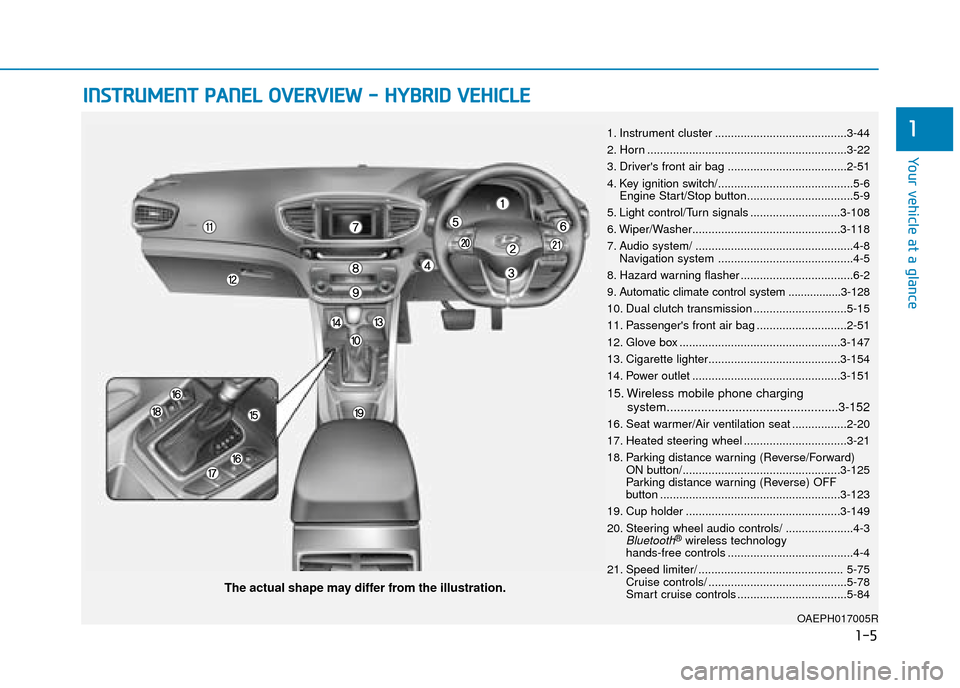
1. Instrument cluster .........................................3-44
2. Horn ..............................................................3-22
3. Driver's front air bag .....................................2-51
4. Key ignition switch/..........................................5-6
Engine Start/Stop button.................................5-9
5. Light control/Turn signals ............................3-108
6. Wiper/Washer..............................................3-118
7. Audio system/ .................................................4-8 Navigation system ..........................................4-5
8. Hazard warning flasher ...................................6-2
9. Automatic climate control system .................3-128
10. Dual clutch transmission .............................5-15
11. Passenger's front air bag ............................2-51
12. Glove box ..................................................3-147
13. Cigarette lighter.........................................3-154
14. Power outlet ..............................................3-151
15. Wireless mobile phone charging system..................................................3-152
16. Seat warmer/Air ventilation seat .................2-20
17. Heated steering wheel ................................3-21
18. Parking distance warning (Reverse/Forward) ON button/.................................................3-125
Parking distance warning (Reverse) OFF
button ........................................................3-123
19. Cup holder ................................................3-149
20. Steering wheel audio controls/ .....................4-3
Bluetooth®wireless technology
hands-free controls .......................................4-4
21. Speed limiter/ ............................................. 5-75 Cruise controls/ ...........................................5-78
Smart cruise controls ..................................5-84
Page 76 of 599
1-10
Your vehicle at a glance
I
IN
N S
ST
T R
R U
U M
M E
EN
N T
T
P
P A
A N
N E
EL
L
O
O V
VE
ER
R V
V I
IE
E W
W
-
-
P
P L
LU
U G
G-
-I
IN
N
H
H Y
Y B
BR
RI
ID
D
V
V E
EH
H I
IC
C L
LE
E
OAEPH017004R
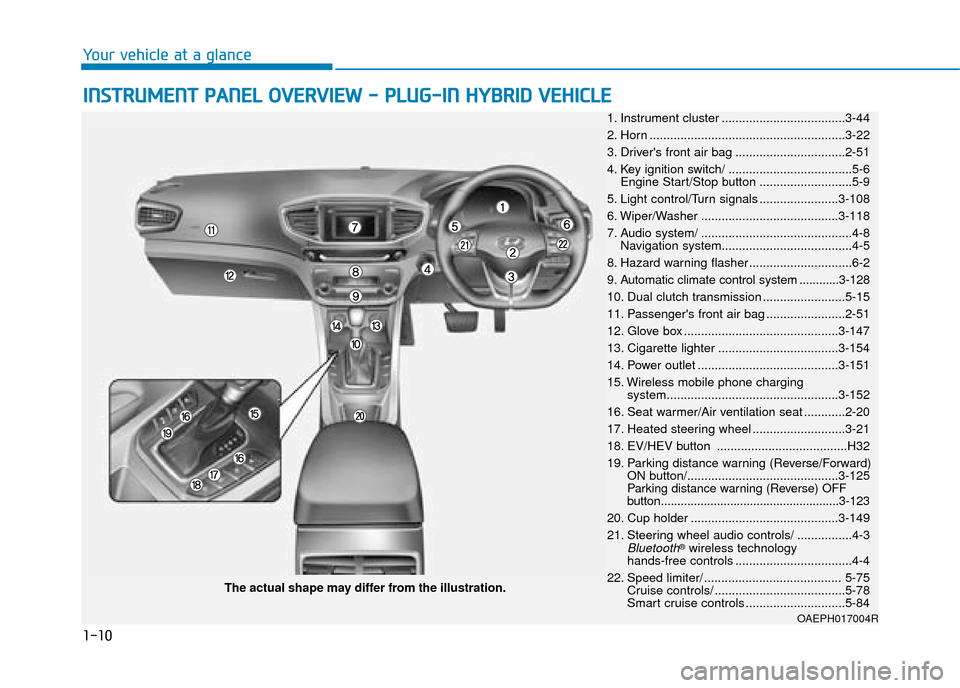
The actual shape may differ from the illustration. 1. Instrument cluster ....................................3-44
2. Horn .........................................................3-22
3. Driver's front air bag ................................2-51
4. Key ignition switch/ ....................................5-6 Engine Start/Stop button ...........................5-9
5. Light control/Turn signals .......................3-108
6. Wiper/Washer ........................................3-118
7. Audio system/ ............................................4-8 Navigation system......................................4-5
8. Hazard warning flasher ..............................6-2
9. Automatic climate control system ............3-128
10. Dual clutch transmission ........................5-15
11. Passenger's front air bag .......................2-51
12. Glove box .............................................3-147
13. Cigarette lighter ...................................3-154
14. Power outlet .........................................3-151
15. Wireless mobile phone charging system..................................................3-152
16. Seat warmer/Air ventilation seat ............2-20
17. Heated steering wheel ...........................3-21
18. EV/HEV button ......................................H32
19. Parking distance warning (Reverse/Forward) ON button/............................................3-125
Parking distance warning (Reverse) OFF
button......................................................3-123
20. Cup holder ...........................................3-149
21. Steering wheel audio controls/ ................4-3
Bluetooth®wireless technology
hands-free controls ..................................4-4
22. Speed limiter/ ........................................ 5-75 Cruise controls/ ......................................5-78
Smart cruise controls .............................5-84
Page 129 of 599
2-52
Safety system of your vehicle
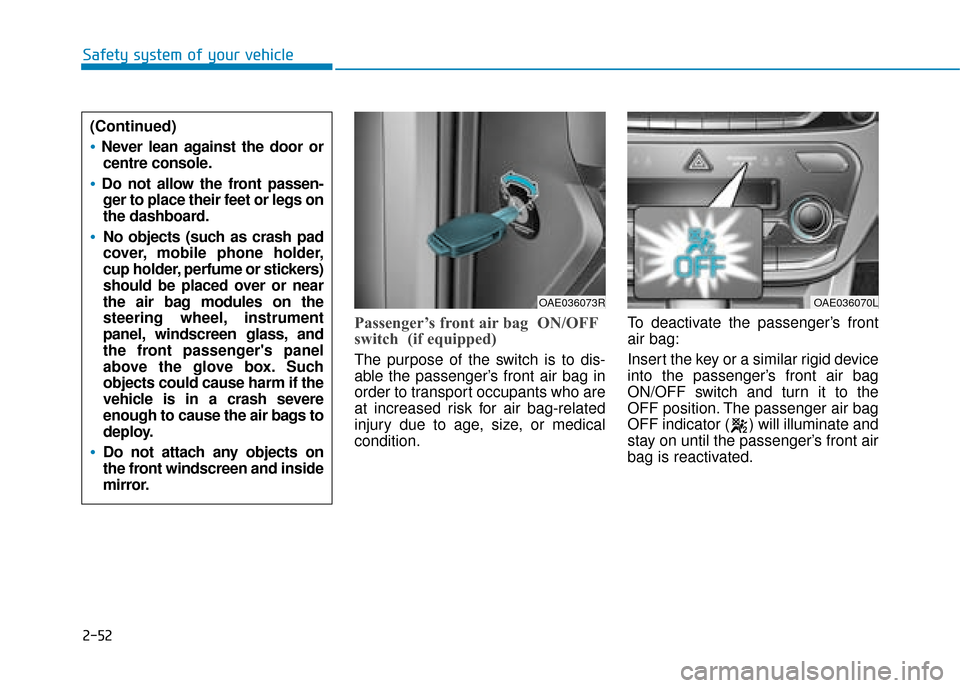
Passenger’s front air bag ON/OFF
switch (if equipped)
The purpose of the switch is to dis-
able the passenger’s front air bag in
order to transport occupants who are
at increased risk for air bag-related
injury due to age, size, or medical
condition.To deactivate the passenger’s front
air bag:
Insert the key or a similar rigid device
into the passenger’s front air bag
ON/OFF switch and turn it to the
OFF position. The passenger air bag
OFF indicator ( ) will illuminate and
stay on until the passenger’s front air
bag is reactivated.
OAE036073ROAE036070L
(Continued)
Never lean against the door or
centre console.
Do not allow the front passen-ger to place their feet or legs on
the dashboard.
No objects (such as crash pad
cover, mobile phone holder,
cup holder, perfume or stickers)
should be placed over or near
the air bag modules on the
steering wheel, instrument
panel, windscreen glass, and
the front passenger's panel
above the glove box. Such
objects could cause harm if the
vehicle is in a crash severe
enough to cause the air bags to
deploy.
Do not attach any objects on
the front windscreen and inside
mirror.
Page 130 of 599
2-53
Safety system of your vehicle
2
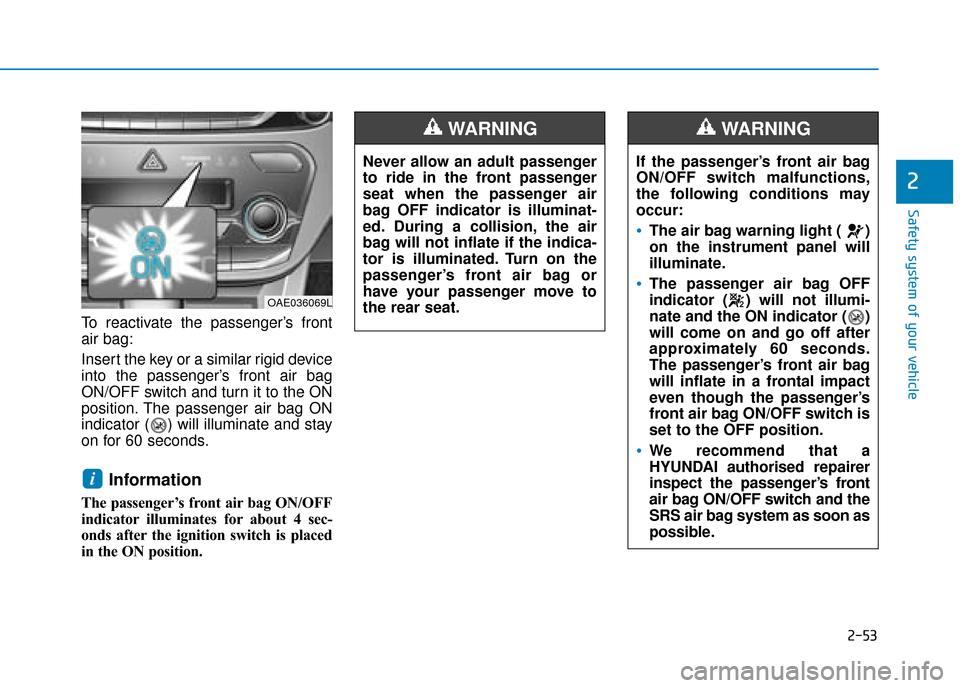
To reactivate the passenger’s front
air bag:
Insert the key or a similar rigid device
into the passenger’s front air bag
ON/OFF switch and turn it to the ON
position. The passenger air bag ON
indicator ( ) will illuminate and stay
on for 60 seconds.
Information
The passenger’s front air bag ON/OFF
indicator illuminates for about 4 sec-
onds after the ignition switch is placed
in the ON position.
i
Never allow an adult passenger
to ride in the front passenger
seat when the passenger air
bag OFF indicator is illuminat-
ed. During a collision, the air
bag will not inflate if the indica-
tor is illuminated. Turn on the
passenger’s front air bag or
have your passenger move to
the rear seat.
WARNING
If the passenger’s front air bag
ON/OFF switch malfunctions,
the following conditions may
occur:
The air bag warning light ( )
on the instrument panel will
illuminate.
The passenger air bag OFF
indicator ( ) will not illumi-
nate and the ON indicator ( )
will come on and go off after
approximately 60 seconds.
The passenger’s front air bag
will inflate in a frontal impact
even though the passenger’s
front air bag ON/OFF switch is
set to the OFF position.
We recommend that a
HYUNDAI authorised repairer
inspect the passenger’s front
air bag ON/OFF switch and the
SRS air bag system as soon as
possible.
WARNING
OAE036069L
Page 147 of 599
 Convenient features of your vehicle
Accessing your vehicle .........................................3-4
Remote key ........................................................................\
.3-4
Smart")
Convenient features of your vehicle
Accessing your vehicle .........................................3-4
Remote key ........................................................................\
.3-4
Smart key ........................................................................\
....3-7
Immobiliser system .........................................................3-11
Door locks .............................................................3-12
Operating door locks from outside the vehicle ......3-12
Operating door locks from inside the vehicle .........3-14
Deadlocks ........................................................................\
..3-15
Auto door lock/unlock features..................................3-16
Child-protector rear door locks ..................................3-16
Theft-alarm system.............................................3-17
Driver position memory system .........................3-18
Storing memory positions .............................................3-18
Recalling memory positions..........................................3-19
Easy access function .....................................................3-19
Steering wheel......................................................3-20
Electric power steering (EPS) ......................................3-20
Tilt steering / Telescopic steering ..............................3-21
Heated steering wheel ...................................................3-21
Horn ........................................................................\
............3-22
Mirrors ...................................................................3-22
Inside rearview mirror....................................................3-22
Outside rearview mirror ................................................3-24
Windows ................................................................3-27
Power windows................................................................3-27
Sunroof..................................................................3-31
Sunroof opening and closing .......................................3-32
Sliding the sunroof .........................................................3-32
Tilting the sunroof ..........................................................3-33
Sunshade ........................................................................\
...3-34
Resetting the sunroof ....................................................3-34
Exterior features .................................................3-35
Bonnet........................................................................\
........3-35
Tailgate.....................................................................\
..........3-37
Fuel filler door (Hybrid vehicle) ..................................3-38
Fuel filler door (Plug-in hybrid vehicle) ...................3-41
Instrument cluster................................................3-44
Instrument cluster control ............................................3-46
Gauges and meters .........................................................3-47
Warning and indicator lights ........................................3-53
LCD display messages ....................................................3-65
3
Page 150 of 599
3-4
Convenient features of your vehicle
Remote key (if equipped)
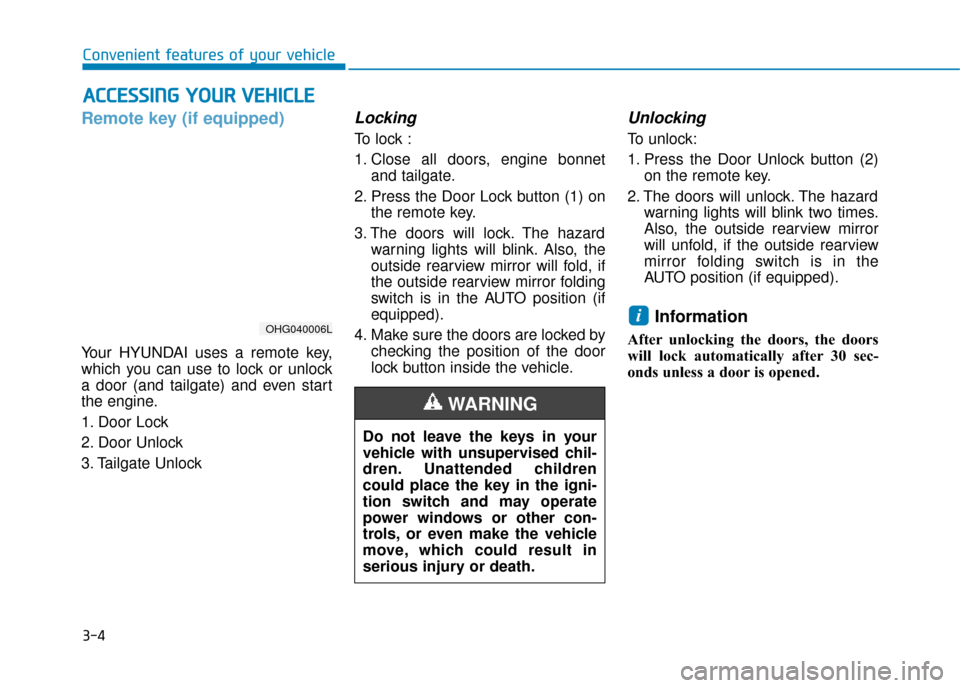
Your HYUNDAI uses a remote key,
which you can use to lock or unlock
a door (and tailgate) and even start
the engine.
1. Door Lock
2. Door Unlock
3. Tailgate Unlock
Locking
To lock :
1. Close all doors, engine bonnetand tailgate.
2. Press the Door Lock button (1) on the remote key.
3. The doors will lock. The hazard warning lights will blink. Also, the
outside rearview mirror will fold, if
the outside rearview mirror folding
switch is in the AUTO position (if
equipped).
4. Make sure the doors are locked by checking the position of the door
lock button inside the vehicle.
Unlocking
To unlock:
1. Press the Door Unlock button (2)on the remote key.
2. The doors will unlock. The hazard warning lights will blink two times.
Also, the outside rearview mirror
will unfold, if the outside rearview
mirror folding switch is in the
AUTO position (if equipped).
Information
After unlocking the doors, the doors
will lock automatically after 30 sec-
onds unless a door is opened.
i
A AC
CC
CE
E S
SS
SI
IN
N G
G
Y
Y O
O U
UR
R
V
V E
EH
H I
IC
C L
LE
E
Do not leave the keys in your
vehicle with unsupervised chil-
dren. Unattended children
could place the key in the igni-
tion switch and may operate
power windows or other con-
trols, or even make the vehicle
move, which could result in
serious injury or death.
WARNING
OHG040006L
Page 151 of 599
3-5
Convenient features of your vehicle
Tailgate unlocking
To unlock:
1. Press the Tailgate Unlock button(3) on the remote key for more
than one second.
2. The hazard warning lights will blink two times. Once the tailgate
is opened and then closed, the
tailgate will lock automatically.
Information
• After unlocking the tailgate, the tail-gate will lock automatically.
• The word "HOLD" is written on the button to inform you that you must
press and hold the button for more
than one second.
Start-up
For detailed information refer to “Key
Ignition Switch” in chapter 5.
To prevent damaging the remote
key:
• Keep the remote key away fromwater or any liquid and fire. If the
inside of the remote key gets
damp (due to drinks or mois-
ture), or is heated, internal cir-
cuit may malfunction and may
void the vehicle warranty.
Avoid dropping or throwing the remote key.
Protect the remote key from extreme temperatures.
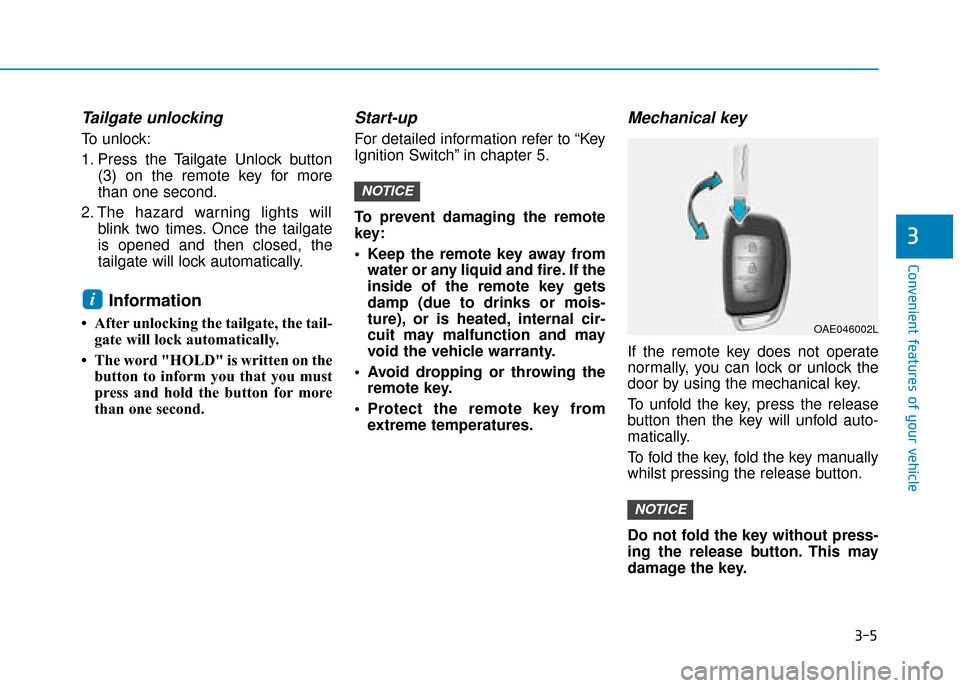
Mechanical key
If the remote key does not operate
normally, you can lock or unlock the
door by using the mechanical key.
To unfold the key, press the release
button then the key will unfold auto-
matically.
To fold the key, fold the key manually
whilst pressing the release button.
Do not fold the key without press-
ing the release button. This may
damage the key.
NOTICE
NOTICE
i
3
OAE046002L
Page 152 of 599
![Hyundai Ioniq Plug-in Hybrid 2019 Owners Manual - RHD (UK, Australia) 3-6
Remote key precautions
The remote key may not work if any
of the following occur:
The key is in the ignition switch.
You exceed the operating distance limit (about 30 m [90 feet]).
The remote k](/img/35/16215/w960_16215-151.png "Hyundai Ioniq Plug-in Hybrid 2019 Owners Manual - RHD (UK, Australia) 3-6
Remote key precautions
The remote key may not work if any
of the following occur:
The key is in the ignition switch.
You exceed the operating distance limit (about 30 m [90 feet]).
The remote k")
3-6
Remote key precautions
The remote key may not work if any
of the following occur:
The key is in the ignition switch.
You exceed the operating distance limit (about 30 m [90 feet]).
The remote key battery is weak.
Other vehicles or objects may be blocking the signal.
The weather is extremely cold.
The remote key is close to a radio transmitter such as a radio station
or an airport which can interfere
with normal operation of the remote
key.
When the remote key does not work
correctly, open and close the door
with the mechanical key. If you have a
problem with the remote key, it is rec-
ommended that you contact a
HYUNDAI authorised repairer.
If the remote key is in close proximity
to your mobile phone, the signal could
be blocked by your mobile phone's
normal operational signals. This is especially important when the
phone is active such as making and
receiving calls, text messaging,
and/or sending/receiving emails.
Avoid placing the remote key and your
mobile phone in the same location
and always try to maintain an ade-
quate distance between the two
devices.
Information
Changes or modifications not express-
ly approved by the party responsible
for compliance could void the user’s
authority to operate the equipment. If
the keyless entry system is inoperative
due to changes or modifications not
expressly approved by the party
responsible for compliance, it will not
be covered by your manufacturer’s
vehicle warranty.
Keep the remote key away from
electromagnetic materials that
block electromagnetic waves to
the key surface.
Battery replacement
If the remote key is not working prop-
erly, try replacing the battery with a
new one.
Battery Type: CR2032
To replace the battery:
1. Insert a slim tool into the slot and
gently pry open the cover.
2. Remove the old battery and insert the new battery. Make sure the
battery position is correct.
3. Reinstall the rear cover of the remote key.
NOTICE
i
Convenient features of your vehicle
OLM042302