reset HYUNDAI IX20 2011 User Guide
[x] Cancel search | Manufacturer: HYUNDAI, Model Year: 2011, Model line: IX20, Model: HYUNDAI IX20 2011Pages: 420, PDF Size: 20.53 MB
Page 195 of 420
4 117
Features of your vehicle
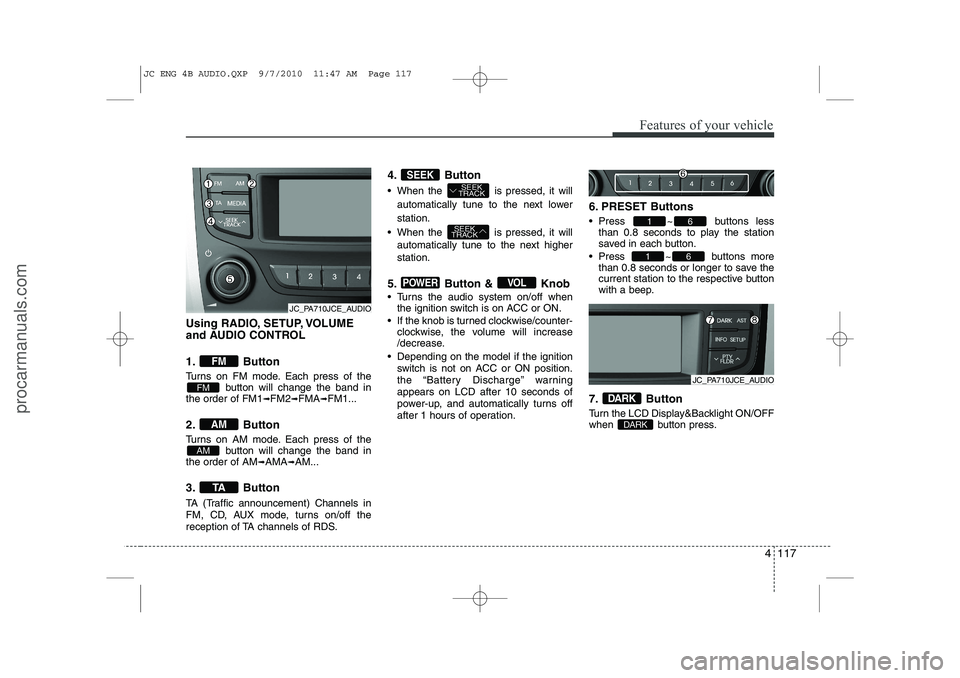
Using RADIO, SETUP, VOLUME
and AUDIO CONTROL
1. Button
Turns on FM mode. Each press of thebutton will change the band in
the order of FM1 ➟FM2 ➟FMA ➟FM1...
2. Button
Turns on AM mode. Each press of the button will change the band in
the order of AM ➟AMA ➟AM...
3. Button
TA (Traffic announcement) Channels in
FM, CD, AUX mode, turns on/off the
reception of TA channels of RDS. 4. Button
When the is pressed, it will
automatically tune to the next lower station.
When the is pressed, it will automatically tune to the next higher station.
5. Button & Knob
Turns the audio system on/off when the ignition switch is on ACC or ON.
If the knob is turned clockwise/counter- clockwise, the volume will increase
/decrease.
Depending on the model if the ignition switch is not on ACC or ON position.
the “Battery Discharge” warningappears on LCD after 10 seconds of
power-up, and automatically turns off
after 1 hours of operation. 6. PRESET Buttons
Press ~ buttons
less
than 0.8 seconds to play the station
saved in each button.
Press ~ buttons more
than 0.8 seconds or longer to save the
current station to the respective button
with a beep.
7. Button
Turn the LCD Display&Backlight ON/OFF
when button press.
DARK
DARK
61
61
VOLPOWER
SEEK
TRACK
SEEK
TRACKSEEK
TA
AM
AM
FM
FM
JC_PA710JCE_AUDIO
JC_PA710JCE_AUDIO
JC ENG 4B AUDIO.QXP 9/7/2010 11:47 AM Page 117
procarmanuals.com
Page 196 of 420
Features of your vehicle
118
4
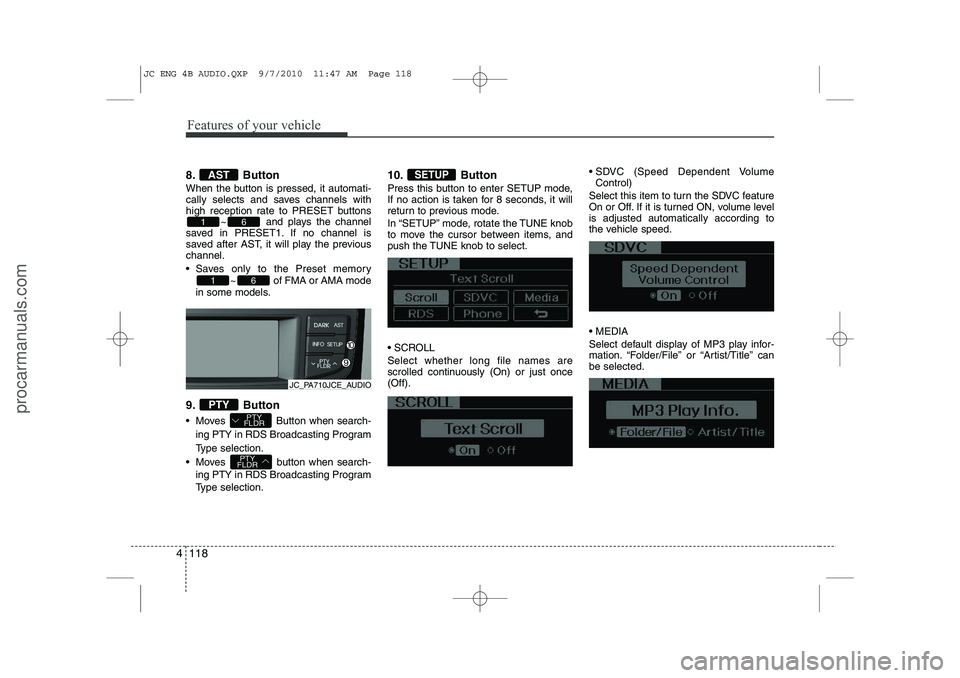
8. Button
When the button is pressed, it automati-
cally selects and saves channels with
high reception rate to PRESET buttons
~ and plays the channel
saved in PRESET1. If no channel is
saved after AST, it will play the previouschannel.
Saves only to the Preset memory
~ of FMA or AMA mode
in some models.
9. Button
Moves Button when search- ing PTY in RDS Broadcasting Program
Type selection.
Moves button when search- ing PTY in RDS Broadcasting Program
Type selection. 10. Button
Press this button to enter SETUP mode,
If no action is taken for 8 seconds, it will
return to previous mode.
In “SETUP” mode, rotate the TUNE knob
to move the cursor between items, and
push the TUNE knob to select.
SCROLL Select whether long file names are
scrolled continuously (On) or just once(Off).
SDVC (Speed Dependent Volume
Control)
Select this item to turn the SDVC feature
On or Off. If it is turned ON, volume levelis adjusted automatically according to
the vehicle speed. MEDIA
Select default display of MP3 play infor-
mation. “Folder/File” or “Artist/Title” canbe selected.SETUP
PTY
FLDR
PTY
FLDRPTY
61
61
AST
JC_PA710JCE_AUDIO
JC ENG 4B AUDIO.QXP 9/7/2010 11:47 AM Page 118
procarmanuals.com
Page 259 of 420
539
Driving your vehicle
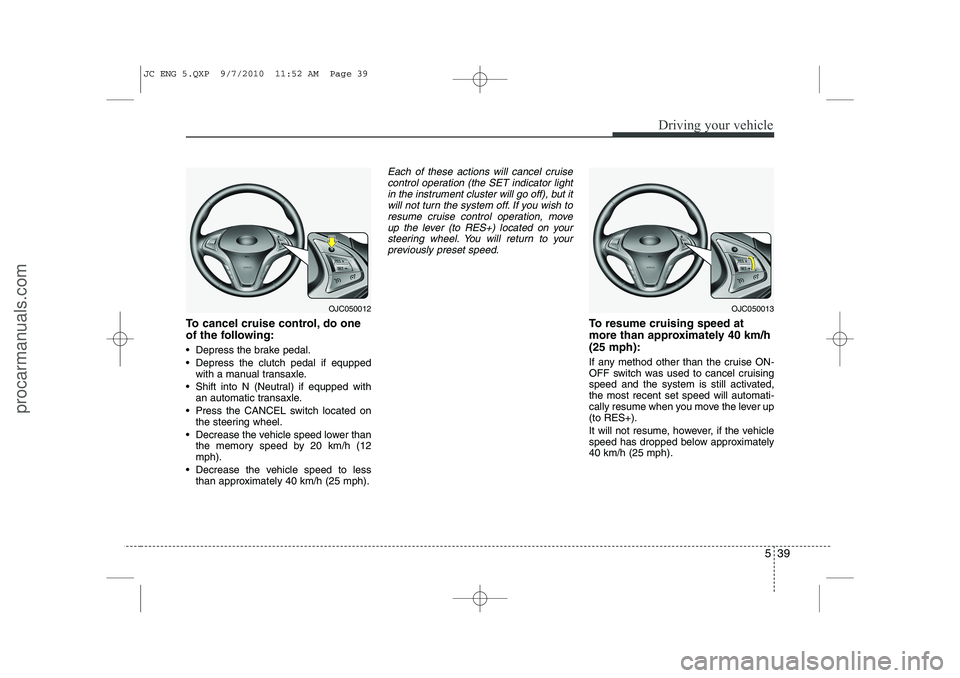
To cancel cruise control, do one
of the following:
Depress the brake pedal.
Depress the clutch pedal if equppedwith a manual transaxle.
Shift into N (Neutral) if equpped with an automatic transaxle.
Press the CANCEL switch located on the steering wheel.
Decrease the vehicle speed lower than the memory speed by 20 km/h (12 mph).
Decrease the vehicle speed to less than approximately 40 km/h (25 mph).
Each of these actions will cancel cruise
control operation (the SET indicator light in the instrument cluster will go off), but itwill not turn the system off. If you wish to
resume cruise control operation, moveup the lever (to RES+) located on your steering wheel. You will return to your
previously preset speed.
To resume cruising speed at
more than approximately 40 km/h(25 mph):
If any method other than the cruise ON-
OFF switch was used to cancel cruising
speed and the system is still activated,the most recent set speed will automati-
cally resume when you move the lever up(to RES+).
It will not resume, however, if the vehicle
speed has dropped below approximately40 km/h (25 mph).
OJC050012OJC050013
JC ENG 5.QXP 9/7/2010 11:52 AM Page 39
procarmanuals.com
Page 261 of 420
541
Driving your vehicle
You can set the speed limit when you do
not want to drive over a specific speed.
If you drive over the preset speed limit,
the warning system operates (set speed
limit will blink and chime will sound) until
the vehicle speed returns within thespeed limit.
✽✽NOTICE
While speed limit control is in opera-
tion, the cruise control system cannot beactivated.
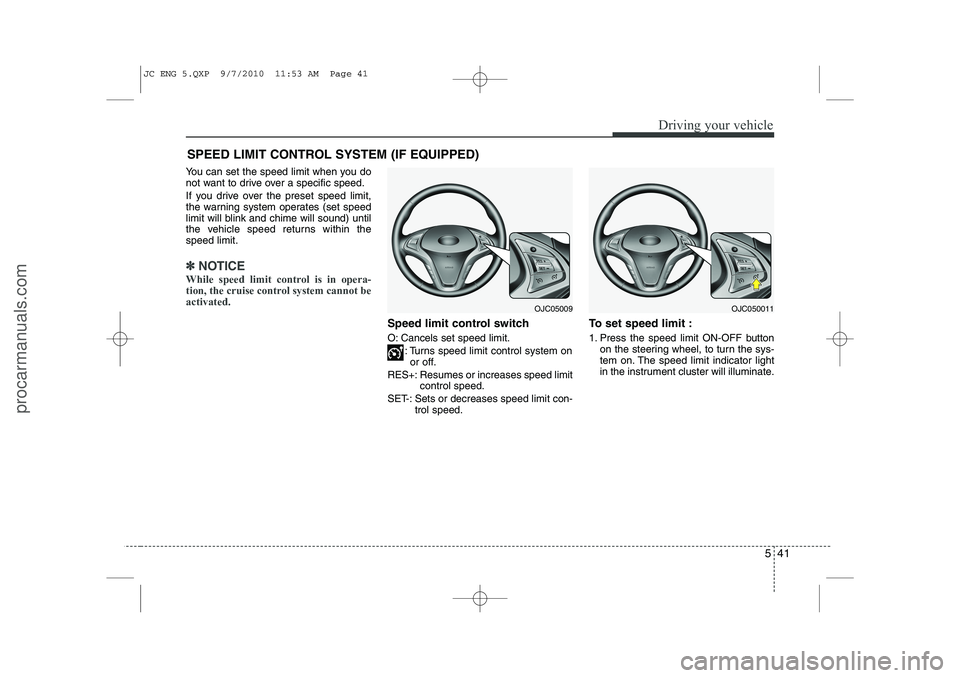
Speed limit control switch
O: Cancels set speed limit.
: Turns speed limit control system onor off.
RES+: Resumes or increases speed limit control speed.
SET-: Sets or decreases speed limit con- trol speed. To set speed limit :
1. Press the speed limit ON-OFF button
on the steering wheel, to turn the sys-
tem on. The speed limit indicator light
in the instrument cluster will illuminate.
SPEED LIMIT CONTROL SYSTEM (IF EQUIPPED)
OJC050011OJC05009
JC ENG 5.QXP 9/7/2010 11:53 AM Page 41
procarmanuals.com
Page 262 of 420
Driving your vehicle
42
5
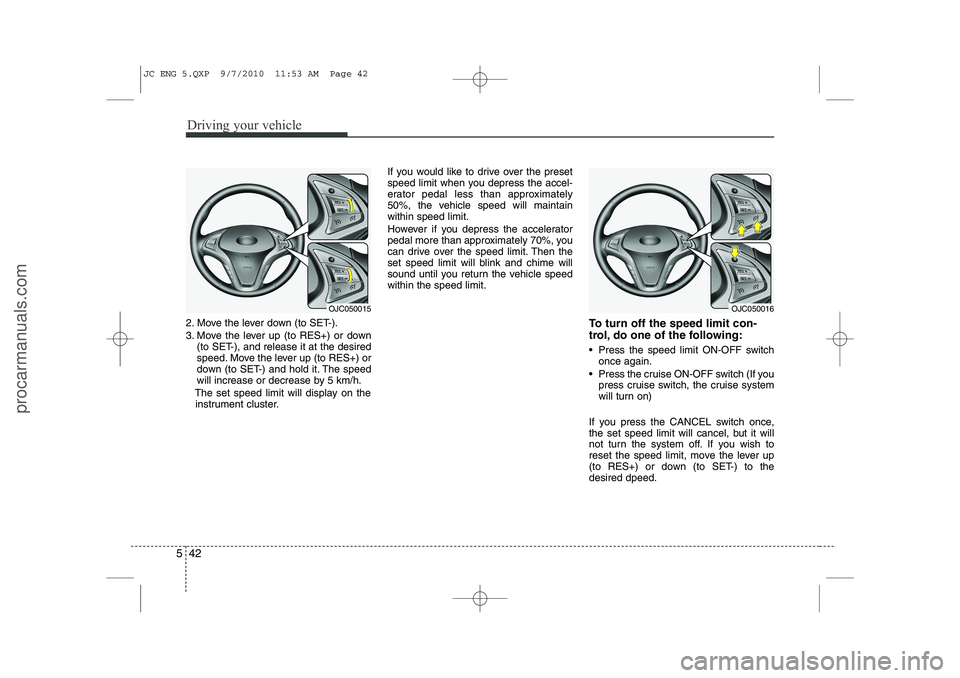
2. Move the lever down (to SET-).
3. Move the lever up (to RES+) or down
(to SET-), and release it at the desired
speed. Move the lever up (to RES+) or
down (to SET-) and hold it. The speed
will increase or decrease by 5 km/h.
The set speed limit will display on the instrument cluster. If you would like to drive over the preset
speed limit when you depress the accel-
erator pedal less than approximately
50%, the vehicle speed will maintainwithin speed limit.
However if you depress the accelerator
pedal more than approximately 70%, you
can drive over the speed limit. Then the
set speed limit will blink and chime will
sound until you return the vehicle speedwithin the speed limit.
To turn off the speed limit con-
trol, do one of the following:
Press the speed limit ON-OFF switchonce again.
Press the cruise ON-OFF switch (If you press cruise switch, the cruise system
will turn on)
If you press the CANCEL switch once,
the set speed limit will cancel, but it will
not turn the system off. If you wish to
reset the speed limit, move the lever up
(to RES+) or down (to SET-) to thedesired dpeed.
OJC050016OJC050015
JC ENG 5.QXP 9/7/2010 11:53 AM Page 42
procarmanuals.com
Page 362 of 420
749
Maintenance
Reset items
Items should be reset after the battery
has been discharged or the battery hasbeen disconnected.
Auto up/down window (See section 4)
Sunroof (See section 4)
Trip computer (See section 4)
Climate control system (See section 4)
Clock (See section 4)
Audio (See section 4)
WARNING
Before performing maintenance or recharging the battery, turn off all accessories and stop the
engine.
The negative battery cable must be removed first and installed
last when the battery is discon-nected.WARNING - Recharging
battery
When recharging the battery,
observe the following precautions:
The battery must be removed from the vehicle and placed in an area with good ventilation.
Do not allow cigarettes, sparks, or flame near the battery.
Watch the battery during charg- ing, and stop or reduce the charg-
ing rate if the battery cells begin
gassing (boiling) violently or if
the temperature of the electrolyte
of any cell exceeds 49°C (120°F).
Wear eye protection when check- ing the battery during charging.
Disconnect the battery charger in the following order.
1. Turn off the battery charger main switch.
2. Unhook the negative clamp from the negative battery terminal.
3. Unhook the positive clamp from the positive battery terminal.
JC ENG 7.QXP 9/7/2010 12:00 PM Page 49
procarmanuals.com
Page 366 of 420
753
Maintenance
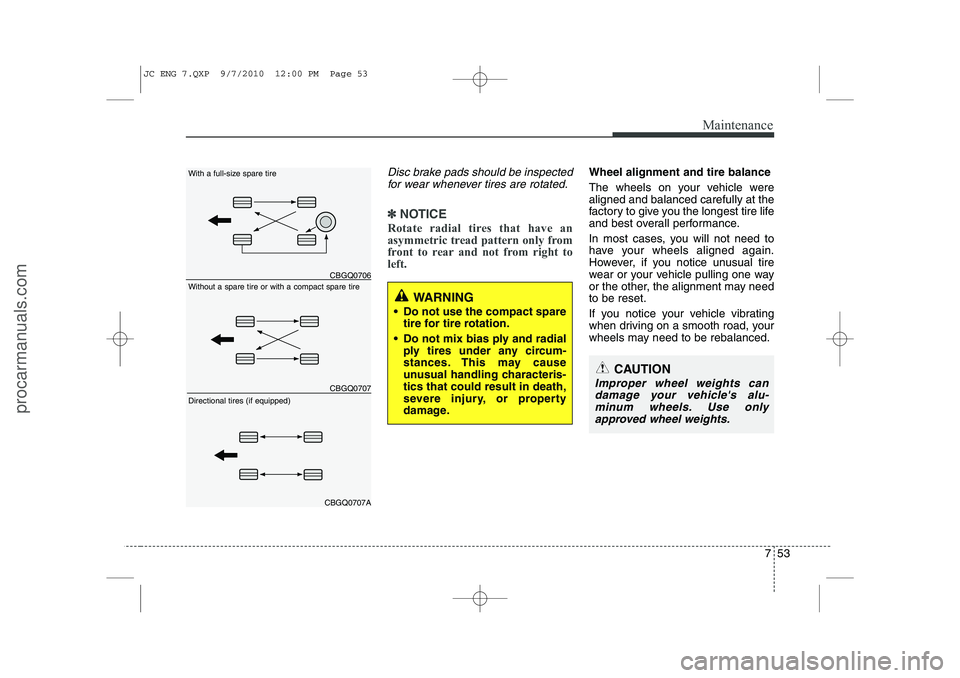
Disc brake pads should be inspectedfor wear whenever tires are rotated.
✽✽ NOTICE
Rotate radial tires that have an
asymmetric tread pattern only from
front to rear and not from right toleft.
Wheel alignment and tire balance
The wheels on your vehicle were aligned and balanced carefully at the
factory to give you the longest tire life
and best overall performance.
In most cases, you will not need to
have your wheels aligned again.
However, if you notice unusual tire
wear or your vehicle pulling one way
or the other, the alignment may needto be reset.
If you notice your vehicle vibrating
when driving on a smooth road, your
wheels may need to be rebalanced.
WARNING
Do not use the compact spare tire for tire rotation.
Do not mix bias ply and radial ply tires under any circum-
stances. This may cause
unusual handling characteris-tics that could result in death,
severe injury, or property
damage.
CAUTION
Improper wheel weights can
damage your vehicle's alu-minum wheels. Use onlyapproved wheel weights.
CBGQ0706
CBGQ0707
CBGQ0707A
Without a spare tire or with a compact spare tire
With a full-size spare tire Directional tires (if equipped)
JC ENG 7.QXP 9/7/2010 12:00 PM Page 53
procarmanuals.com