tow HYUNDAI IX20 2011 User Guide
[x] Cancel search | Manufacturer: HYUNDAI, Model Year: 2011, Model line: IX20, Model: HYUNDAI IX20 2011Pages: 420, PDF Size: 20.53 MB
Page 150 of 420
Features of your vehicle
72
4
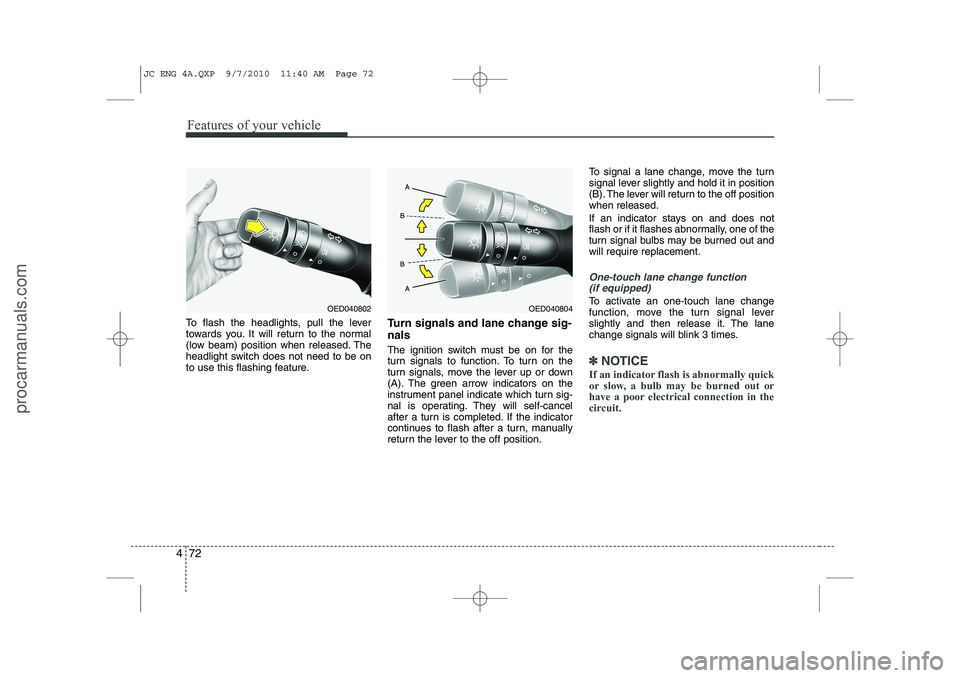
To flash the headlights, pull the lever
towards you. It will return to the normal
(low beam) position when released. The
headlight switch does not need to be on
to use this flashing feature. Turn signals and lane change sig- nals
The ignition switch must be on for the
turn signals to function. To turn on the
turn signals, move the lever up or down
(A). The green arrow indicators on the
instrument panel indicate which turn sig-
nal is operating. They will self-cancel
after a turn is completed. If the indicator
continues to flash after a turn, manually
return the lever to the off position.To signal a lane change, move the turn
signal lever slightly and hold it in position
(B). The lever will return to the off positionwhen released.
If an indicator stays on and does not
flash or if it flashes abnormally, one of the
turn signal bulbs may be burned out andwill require replacement.
One-touch lane change function
(if equipped)
To activate an one-touch lane change
function, move the turn signal lever
slightly and then release it. The lane
change signals will blink 3 times.
✽✽ NOTICE
If an indicator flash is abnormally quick
or slow, a bulb may be burned out or
have a poor electrical connection in the
circuit.
OED040804OED040802
JC ENG 4A.QXP 9/7/2010 11:40 AM Page 72
procarmanuals.com
Page 155 of 420
477
Features of your vehicle
Windshield washers (front)
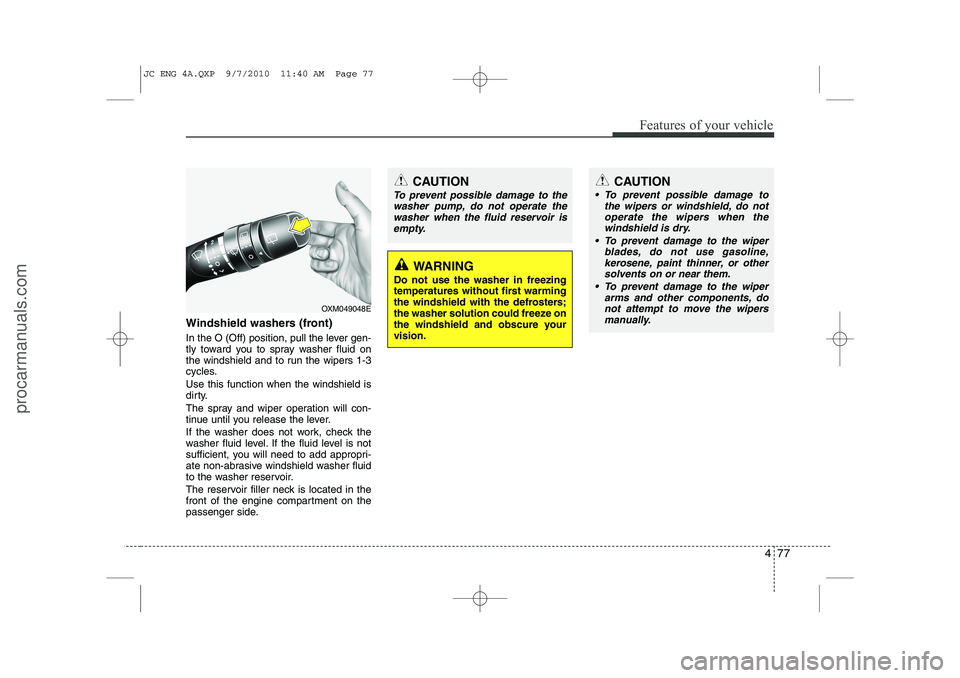
In the O (Off) position, pull the lever gen-
tly toward you to spray washer fluid on
the windshield and to run the wipers 1-3
cycles. Use this function when the windshield is
dirty.
The spray and wiper operation will con-
tinue until you release the lever.
If the washer does not work, check the
washer fluid level. If the fluid level is not
sufficient, you will need to add appropri-
ate non-abrasive windshield washer fluid
to the washer reservoir.
The reservoir filler neck is located in the
front of the engine compartment on the
passenger side.
OXM049048E
WARNING
Do not use the washer in freezing
temperatures without first warming
the windshield with the defrosters;
the washer solution could freeze on
the windshield and obscure yourvision.
CAUTION
To prevent possible damage to the wipers or windshield, do notoperate the wipers when the
windshield is dry.
To prevent damage to the wiper blades, do not use gasoline,
kerosene, paint thinner, or othersolvents on or near them.
To prevent damage to the wiper arms and other components, do
not attempt to move the wipersmanually.
CAUTION
To prevent possible damage to the
washer pump, do not operate the
washer when the fluid reservoir isempty.
JC ENG 4A.QXP 9/7/2010 11:40 AM Page 77
procarmanuals.com
Page 161 of 420
483
Features of your vehicle
Mode selection
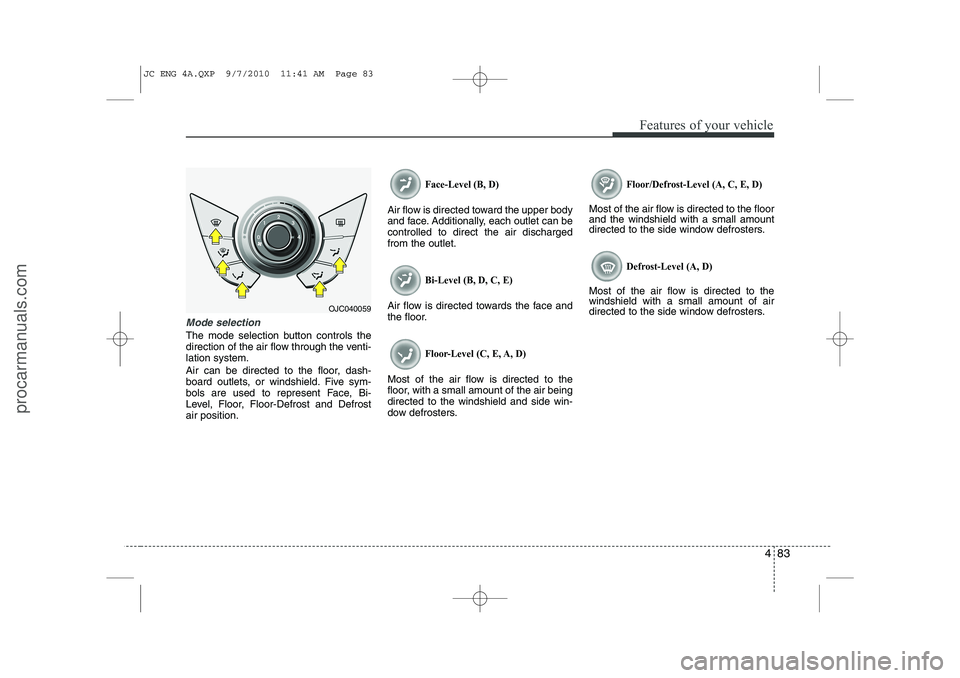
The mode selection button controls the
direction of the air flow through the venti-lation system.
Air can be directed to the floor, dash-
board outlets, or windshield. Five sym-
bols are used to represent Face, Bi-
Level, Floor, Floor-Defrost and Defrostair position.
Face-Level (B, D)
Air flow is directed toward the upper body
and face. Additionally, each outlet can becontrolled to direct the air dischargedfrom the outlet.
Bi-Level (B, D, C, E)
Air flow is directed towards the face and
the floor.
Floor-Level (C, E, A, D)
Most of the air flow is directed to the
floor, with a small amount of the air beingdirected to the windshield and side win-
dow defrosters.
Floor/Defrost-Level (A, C, E, D)
Most of the air flow is directed to the floor and the windshield with a small amount
directed to the side window defrosters.
Defrost-Level (A, D)
Most of the air flow is directed to thewindshield with a small amount of air
directed to the side window defrosters.
OJC040059
JC ENG 4A.QXP 9/7/2010 11:41 AM Page 83
procarmanuals.com
Page 170 of 420
Features of your vehicle
92
4
Manual heating and air condition- ing The heating and cooling system can be
controlled manually by pressing buttons
other than the AUTO button. In this case,
the system works sequentially according
to the order of buttons selected.
When pressing any button (or turning
any knob) except AUTO button while
automatic operation, the functions not
selected will be controlled automatically.
1. Start the engine.
2. Set the mode to the desired position.
3. Set the temperature control to the
desired position.
4. Set the air intake control to the outside (fresh) air position.
5. Set the fan speed control to the desired speed.
6. If air conditioning is desired, turn the air conditioning system on.
Press the AUTO button in order to con-
vert to full automatic control of the sys-tem.
Mode selection
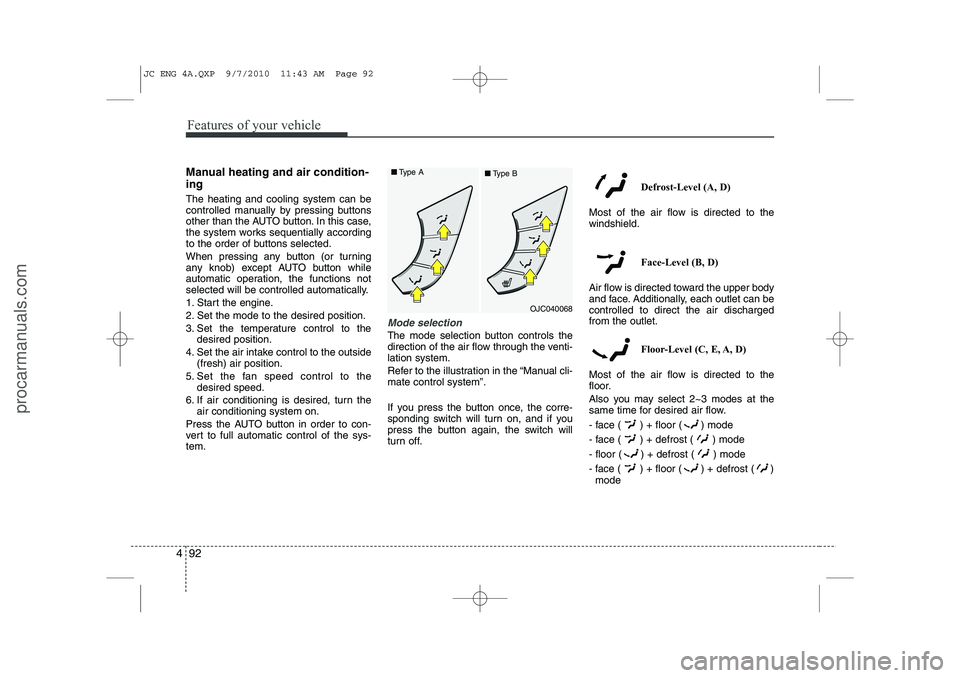
The mode selection button controls the
direction of the air flow through the venti-lation system.
Refer to the illustration in the “Manual cli- mate control system”.
If you press the button once, the corre-
sponding switch will turn on, and if you
press the button again, the switch will
turn off. Defrost-Level (A, D)
Most of the air flow is directed to thewindshield.
Face-Level (B, D)
Air flow is directed toward the upper body
and face. Additionally, each outlet can becontrolled to direct the air dischargedfrom the outlet.
Floor-Level (C, E, A, D)
Most of the air flow is directed to the
floor.
Also you may select 2~3 modes at the
same time for desired air flow.
- face ( ) + floor ( ) mode
- face ( ) + defrost ( ) mode
- floor ( ) + defrost ( ) mode
- face ( ) + floor ( ) + defrost ( ) mode
OJC040068
■
Type A
■Type B
JC ENG 4A.QXP 9/7/2010 11:43 AM Page 92
procarmanuals.com
Page 191 of 420
4 113
Features of your vehicle
RADIO mode
It will function as the PRESET STATION
buttons.
CD/USB / iPod mode
It will function as the TRACK UP/DOWN
button.
MODE (3)
Press the button to select Radio or CD (compact disc).
MUTE (4)
Press the MUTE button to cancel thesound.
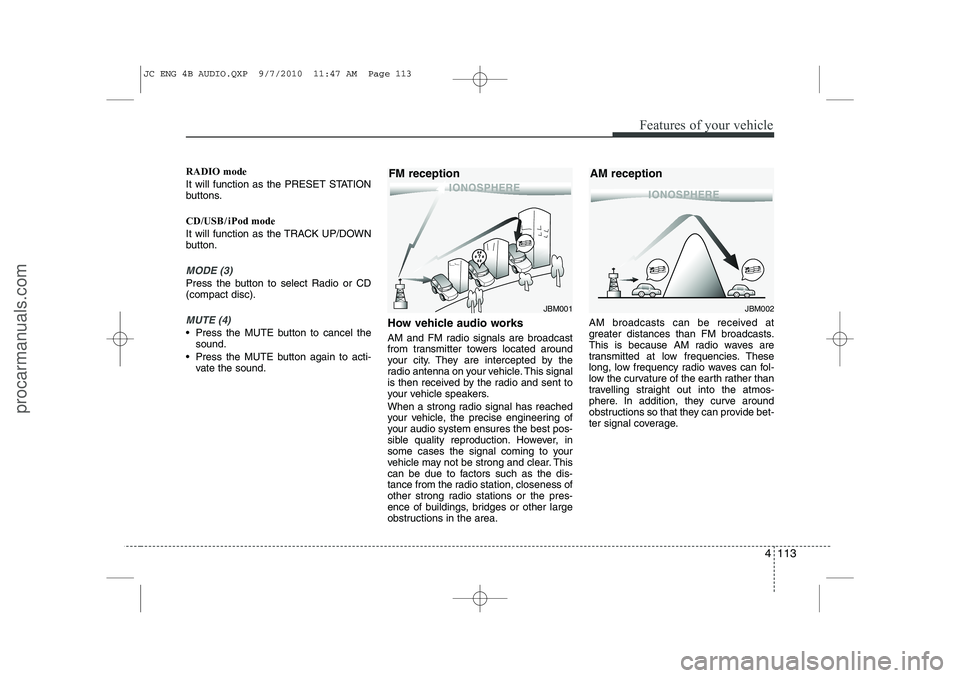
Press the MUTE button again to acti- vate the sound. How vehicle audio works
AM and FM radio signals are broadcast
from transmitter towers located around
your city. They are intercepted by the
radio antenna on your vehicle. This signal
is then received by the radio and sent to
your vehicle speakers.
When a strong radio signal has reached
your vehicle, the precise engineering of
your audio system ensures the best pos-
sible quality reproduction. However, in
some cases the signal coming to your
vehicle may not be strong and clear. This
can be due to factors such as the dis-
tance from the radio station, closeness of
other strong radio stations or the pres-
ence of buildings, bridges or other large
obstructions in the area. AM broadcasts can be received at
greater distances than FM broadcasts.
This is because AM radio waves are
transmitted at low frequencies. These
long, low frequency radio waves can fol-
low the curvature of the earth rather than
travelling straight out into the atmos-
phere. In addition, they curve around
obstructions so that they can provide bet-
ter signal coverage.
JBM002
AM receptionJBM001
FM reception
JC ENG 4B AUDIO.QXP 9/7/2010 11:47 AM Page 113
procarmanuals.com
Page 221 of 420
5
Before driving / 5-3 Key positions / 5-4Engine start/stop button / 5-8
ISG (Idle stop and go) system / 5-14Manual transaxle / 5-18Automatic transaxle / 5-21Brake system / 5-26
Cruise control system / 5-36
Speed limit control system / 5-41Economical operation / 5-43Special driving conditions / 5-45
Winter driving / 5-50
Trailer towing / 5-54
Vehicle weight / 5-62
Driving your vehicle
JC ENG 5.QXP 9/7/2010 11:49 AM Page 1
procarmanuals.com
Page 224 of 420
Driving your vehicle
4
5
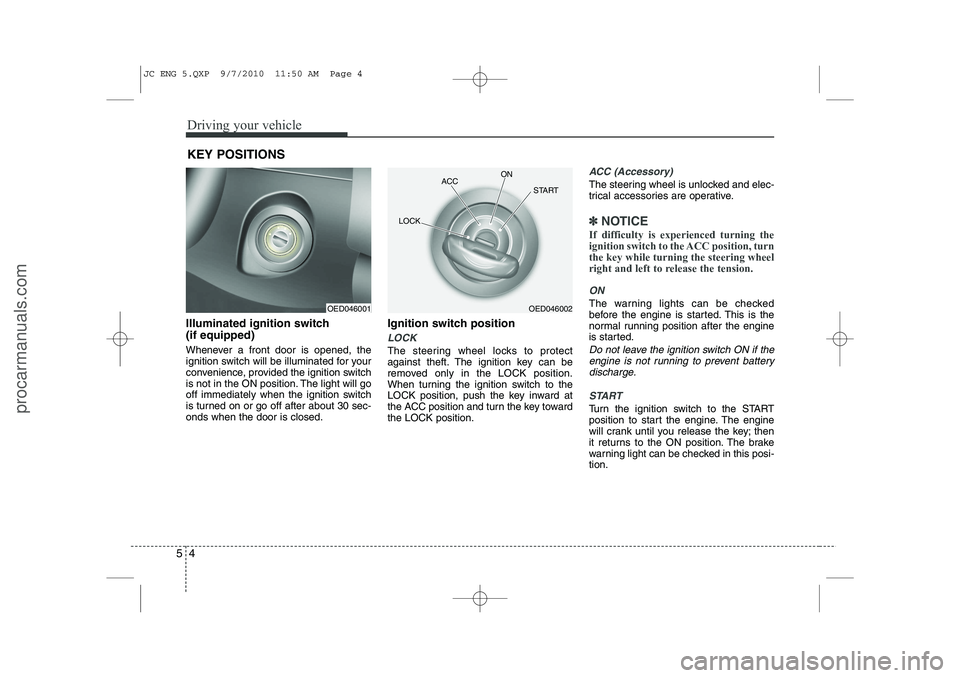
Illuminated ignition switch (if equipped)
Whenever a front door is opened, the
ignition switch will be illuminated for your
convenience, provided the ignition switch
is not in the ON position. The light will go
off immediately when the ignition switch
is turned on or go off after about 30 sec-onds when the door is closed. Ignition switch position
LOCK
The steering wheel locks to protect
against theft. The ignition key can be
removed only in the LOCK position.
When turning the ignition switch to the
LOCK position, push the key inward at
the ACC position and turn the key towardthe LOCK position.
ACC (Accessory)
The steering wheel is unlocked and elec-
trical accessories are operative.
✽✽
NOTICE
If difficulty is experienced turning the
ignition switch to the ACC position, turnthe key while turning the steering wheel
right and left to release the tension.
ON
The warning lights can be checked
before the engine is started. This is the
normal running position after the engine
is started.
Do not leave the ignition switch ON if the engine is not running to prevent battery discharge.
START
Turn the ignition switch to the START
position to start the engine. The engine
will crank until you release the key; then
it returns to the ON position. The brake
warning light can be checked in this posi-tion.
KEY POSITIONS
OED046001OED046002
ACC
ON
START
LOCK
JC ENG 5.QXP 9/7/2010 11:50 AM Page 4
procarmanuals.com
Page 243 of 420
523
Driving your vehicle
R (Reverse)
Use this position to drive the vehicle
backward. N (Neutral)
The wheels and transaxle are not locked.
The vehicle will roll freely even on the
slightest incline unless the parking brake
or service brakes are applied.D (Drive)
This is the normal forward driving posi-
tion. The transaxle will automatically shift
through a 4-gear sequence, providing the
best fuel economy and power.
For extra power when passing another
vehicle or climbing grades, depress the
accelerator fully, at which time the
transaxle will automatically downshift to
the next lower gear.
✽✽
NOTICE
Always ensure vehicle is stationary, at a
complete stop, before selecting D(Drive).
3 (Third Gear)
Move the shift lever to this position for
towing a trailer when climbing up a hill.
This position also provides engine brak-
ing when going down hills. 2 (Second Gear)
Use 2 (Second Gear) for more power
when climbing hills and for increased
braking when going down hills. This posi-tion also helps reduce wheel spin on slip-
pery surfaces. When the shift lever is
placed in 2 (Second Gear), the transaxlewill automatically shift from first to sec-
ond gear. 1 (First Gear)
Move the shift lever to this position in
hard pulling situations and for climbing
steep grades.
CAUTION
Always come to a complete stop
before shifting into or out of R (Reverse); you may damage the
transaxle if you shift into R(Reverse) while the vehicle is inmotion, except as explained in “Rocking the vehicle” in this sec-
tion.
CAUTION
Do not exceed the recommendedmaximum speeds in 2 (SecondGear) or 1 (First Gear). Operating
the vehicle at speeds above themaximum recommended for 2 (Second Gear) or 1 (First Gear) maycause excessive heat to develop
which could result in damage or failure of the automatic transaxle.
JC ENG 5.QXP 9/7/2010 11:51 AM Page 23
procarmanuals.com
Page 255 of 420
535
Driving your vehicle
Don't "ride" the brake pedal. Restingyour foot on the brake pedal while driv- ing can be dangerous because the
brakes might overheat and lose their
effectiveness. It also increases the
wear of the brake components.
If a tire goes flat while you are driving, apply the brakes gently and keep the
vehicle pointed straight ahead while
you slow down. When you are moving
slowly enough for it to be safe to do so,
pull off the road and stop in a safe
place.
If your vehicle is equipped with an automatic transaxle, don't let your vehi-
cle creep forward. To avoid creeping
forward, keep your foot firmly on the
brake pedal when the vehicle isstopped.
Be cautious when parking on a hill. Firmly engage the parking brake and
place the shift lever in P (automatic
transaxle) or in first or reverse gear
(manual transaxle). If your vehicle is
facing downhill, turn the front wheels
toward the curb to help keep the vehi-
cle from rolling. If your vehicle is facing
uphill, turn the front wheels away from
the curb to help keep the vehicle from
rolling. If there is no curb or if it is
required by other conditions to keep
the vehicle from rolling, block the
wheels. Under some conditions your parking
brake can freeze in the engaged posi-
tion. This is most likely to happen when
there is an accumulation of snow or ice
around or near the rear brakes or if the
brakes are wet. If there is a risk that the
parking brake may freeze, apply it only
temporarily while you put the shift lever
in P (automatic transaxle) or in first or
reverse gear (manual transaxle) and
block the rear wheels so the vehicle
cannot roll. Then release the parking
brake.
Do not hold the vehicle on an upgrade with the accelerator pedal. This can
cause the transaxle to overheat.
Always use the brake pedal or parking
brake.
JC ENG 5.QXP 9/7/2010 11:52 AM Page 35
procarmanuals.com
Page 266 of 420
Driving your vehicle
46
5
Rocking the vehicle
If it is necessary to rock the vehicle to
free it from snow, sand, or mud, first turn
the steering wheel right and left to clear
the area around your front wheels. Then,
shift back and forth between 1st (First)
and R (Reverse) in vehicles equipped
with a manual transaxle or R (Reverse)
and any forward gear in vehicles
equipped with an automatic transaxle. Do
not race the engine, and spin the wheels
as little as possible. If you are still stuck
after a few tries, have the vehicle pulled
out by a tow vehicle to avoid engine over-
heating and possible damage to the
transaxle.
CAUTION
Prolonged rocking may cause
engine over-heating, transaxle dam-
age or failure, and tire damage.
WARNING
Your vehicle is equipped with tires
designed to provide safe ride and
handling capability. Do not use a
size and type of tire and wheel that
is different from the one that is
originally installed on your vehicle.
It can affect the safety and perform-
ance of your vehicle, which could
lead to steering failure or rollover
and serious injury. When replacing
the tires, be sure to equip all fourtires with the tire and wheel of the
same size, type, tread, brand and
load-carrying capacity. If you never-
theless decide to equip your vehi-
cle with any tire/wheel combination
not recommended by HYUNDAI for
off road driving, you should not use
these tires for highway driving.WARNING - Rollover
As with other Multi Purpose Vehicle
(MPV), failure to operate this vehi-
cle correctly may result in loss of
control, an accident or vehicle
rollover.
Utility vehicles have a significant- ly higher rollover rate than other
types of vehicles.
Specific design characteristics (higher ground clearance, nar-
rower track, etc.) give this vehicle
a higher center of gravity than
ordinary vehicles.
A MPV is not designed for cor- nering at the same speeds as
conventional vehicles.
Avoid sharp turns or abrupt maneuvers.
In a rollover crash, an unbelted person is significantly more like-
ly to die than a person wearing a
seat belt. Make sure everyone in
the vehicle is properly buckledup.
JC ENG 5.QXP 9/7/2010 11:53 AM Page 46
procarmanuals.com