air condition HYUNDAI IX20 2011 Owner's Manual
[x] Cancel search | Manufacturer: HYUNDAI, Model Year: 2011, Model line: IX20, Model: HYUNDAI IX20 2011Pages: 420, PDF Size: 20.53 MB
Page 173 of 420
495
Features of your vehicle
✽✽NOTICE
It should be noted that prolonged oper-
ation of the heating in recirculated airposition will cause fogging of the wind-shield and side windows and the air
within the passenger compartment willbecome stale.
In addition, prolonged use of the air
conditioning with the recirculated air
position selected, will result in excessive-
ly dry air in the passenger compart-ment.
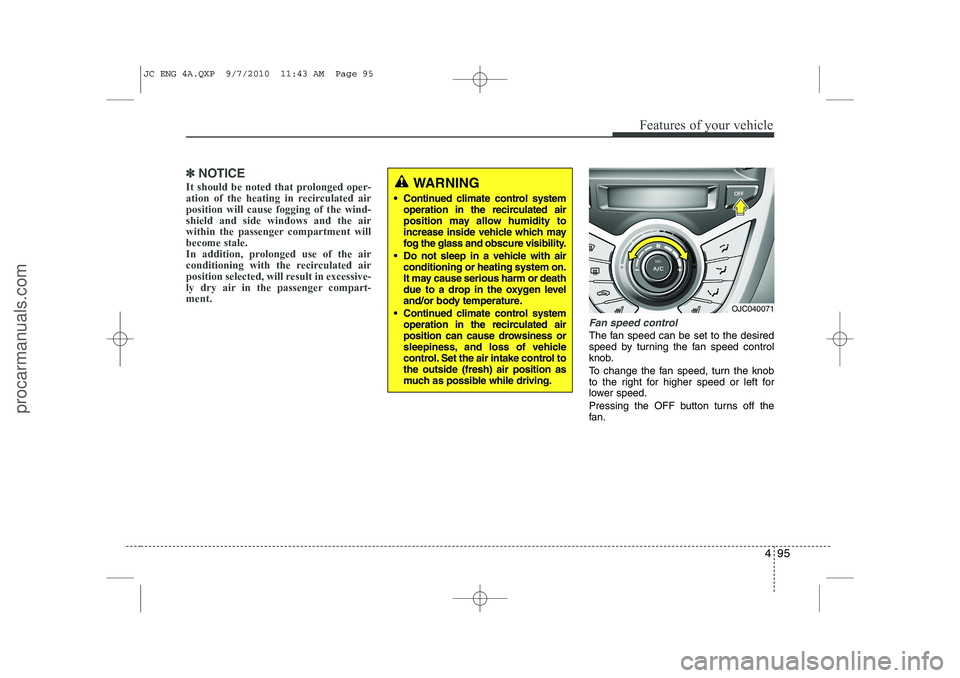
Fan speed control
The fan speed can be set to the desired
speed by turning the fan speed control
knob.
To change the fan speed, turn the knob
to the right for higher speed or left for
lower speed.
Pressing the OFF button turns off the
fan.
WARNING
Continued climate control system operation in the recirculated air
position may allow humidity to
increase inside vehicle which may
fog the glass and obscure visibility.
Do not sleep in a vehicle with air conditioning or heating system on.
It may cause serious harm or death
due to a drop in the oxygen level
and/or body temperature.
Continued climate control system operation in the recirculated air
position can cause drowsiness or
sleepiness, and loss of vehicle
control. Set the air intake control tothe outside (fresh) air position as
much as possible while driving.
OJC040071
JC ENG 4A.QXP 9/7/2010 11:43 AM Page 95
procarmanuals.com
Page 174 of 420
Features of your vehicle
96
4
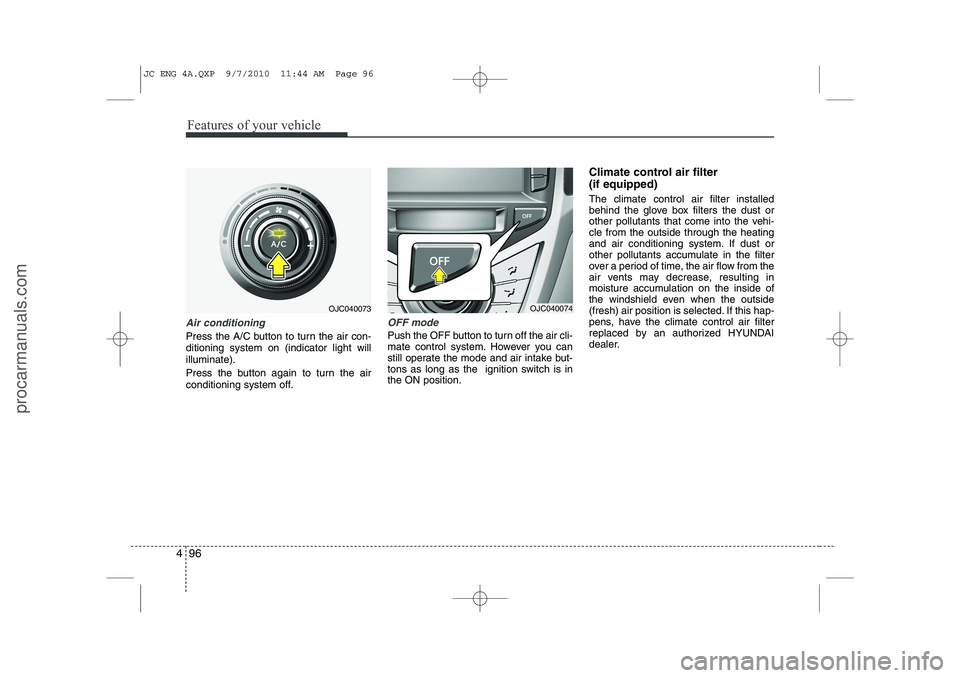
Air conditioning
Press the A/C button to turn the air con- ditioning system on (indicator light willilluminate).
Press the button again to turn the air
conditioning system off.
OFF mode
Push the OFF button to turn off the air cli-
mate control system. However you can
still operate the mode and air intake but-
tons as long as the ignition switch is inthe ON position. Climate control air filter (if equipped) The climate control air filter installed
behind the glove box filters the dust or
other pollutants that come into the vehi-cle from the outside through the heating
and air conditioning system. If dust or
other pollutants accumulate in the filter
over a period of time, the air flow from the
air vents may decrease, resulting in
moisture accumulation on the inside of
the windshield even when the outside
(fresh) air position is selected. If this hap-
pens, have the climate control air filter
replaced by an authorized HYUNDAI
dealer.
OJC040074OJC040073
JC ENG 4A.QXP 9/7/2010 11:44 AM Page 96
procarmanuals.com
Page 176 of 420
Features of your vehicle
98
4
For maximum defrosting, set the tem-
perature control to the extreme
right/hot position and the fan speedcontrol to the highest speed.
If warm air to the floor is desired while defrosting or defogging, set the modeto the floor-defrost position.
Before driving, clear all snow and ice from the windshield, rear window, out-
side rear view mirrors, and all side win-
dows.
Clear all snow and ice from the hood and air inlet in the cowl grill to improveheater and defroster efficiency and to
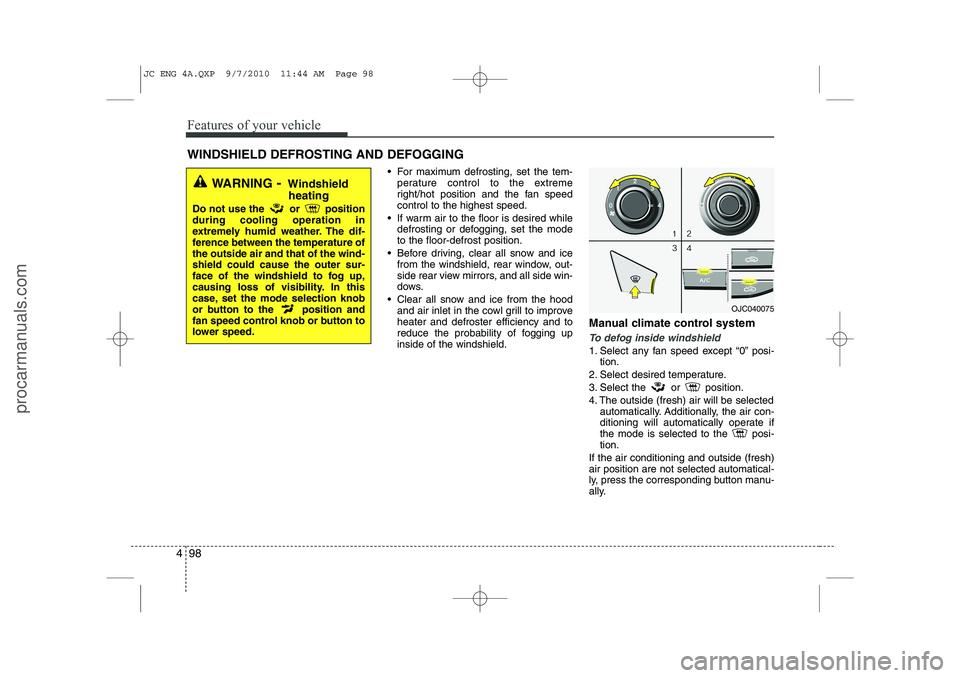
reduce the probability of fogging upinside of the windshield. Manual climate control system
To defog inside windshield
1. Select any fan speed except “0” posi-
tion.
2. Select desired temperature.
3. Select the or position.
4. The outside (fresh) air will be selected automatically. Additionally, the air con-
ditioning will automatically operate if
the mode is selected to the posi-tion.
If the air conditioning and outside (fresh)air position are not selected automatical-
ly, press the corresponding button manu-
ally.
WINDSHIELD DEFROSTING AND DEFOGGING
WARNING - Windshield
heating
Do not use the or position during cooling operation in
extremely humid weather. The dif-
ference between the temperature ofthe outside air and that of the wind-shield could cause the outer sur-
face of the windshield to fog up,
causing loss of visibility. In this
case, set the mode selection knob
or button to the position and
fan speed control knob or button to
lower speed.
OJC040075
JC ENG 4A.QXP 9/7/2010 11:44 AM Page 98
procarmanuals.com
Page 177 of 420
499
Features of your vehicle
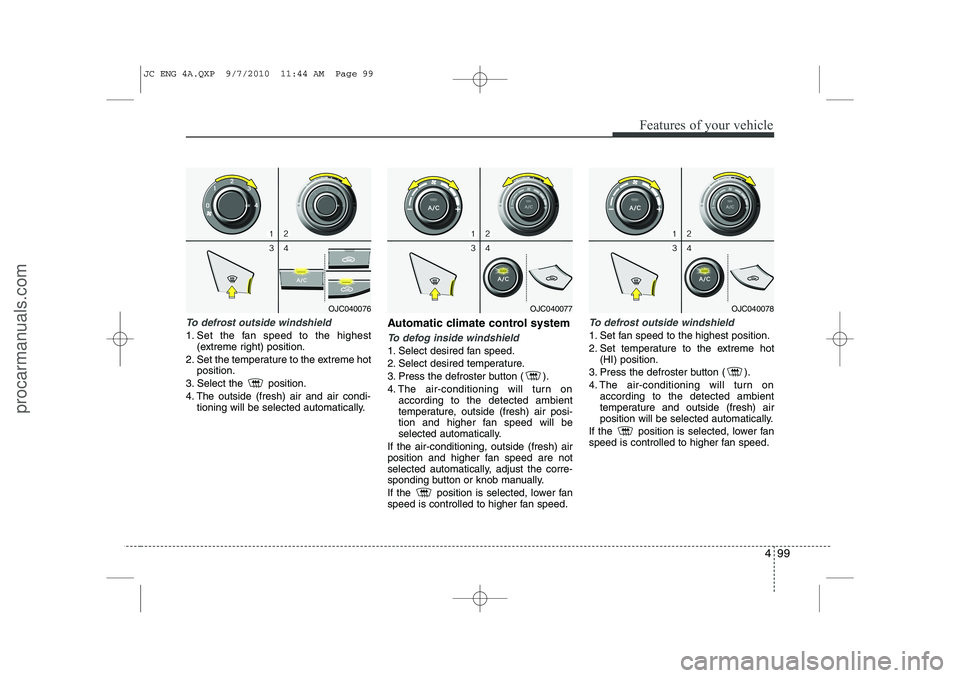
To defrost outside windshield
1. Set the fan speed to the highest(extreme right) position.
2. Set the temperature to the extreme hot position.
3. Select the position.
4. The outside (fresh) air and air condi- tioning will be selected automatically. Automatic climate control systemTo defog inside windshield
1. Select desired fan speed.
2. Select desired temperature.
3. Press the defroster button ( ).
4. The air-conditioning will turn on
according to the detected ambient
temperature, outside (fresh) air posi-
tion and higher fan speed will be
selected automatically.
If the air-conditioning, outside (fresh) air
position and higher fan speed are not
selected automatically, adjust the corre-
sponding button or knob manually.
If the position is selected, lower fan
speed is controlled to higher fan speed.
To defrost outside windshield
1. Set fan speed to the highest position.
2. Set temperature to the extreme hot (HI) position.
3. Press the defroster button ( ).
4. The air-conditioning will turn on according to the detected ambient
temperature and outside (fresh) air
position will be selected automatically.
If the position is selected, lower fan
speed is controlled to higher fan speed.
OJC040076OJC040077OJC040078
JC ENG 4A.QXP 9/7/2010 11:44 AM Page 99
procarmanuals.com
Page 184 of 420
Features of your vehicle
106
4
✽✽
NOTICE
Close the vanity mirror cover securely
and return the sunvisor to its original
position after use.
❈ To learn how to use the vanity mirror
lamp, refer to "Interior light" in this sec- tion.
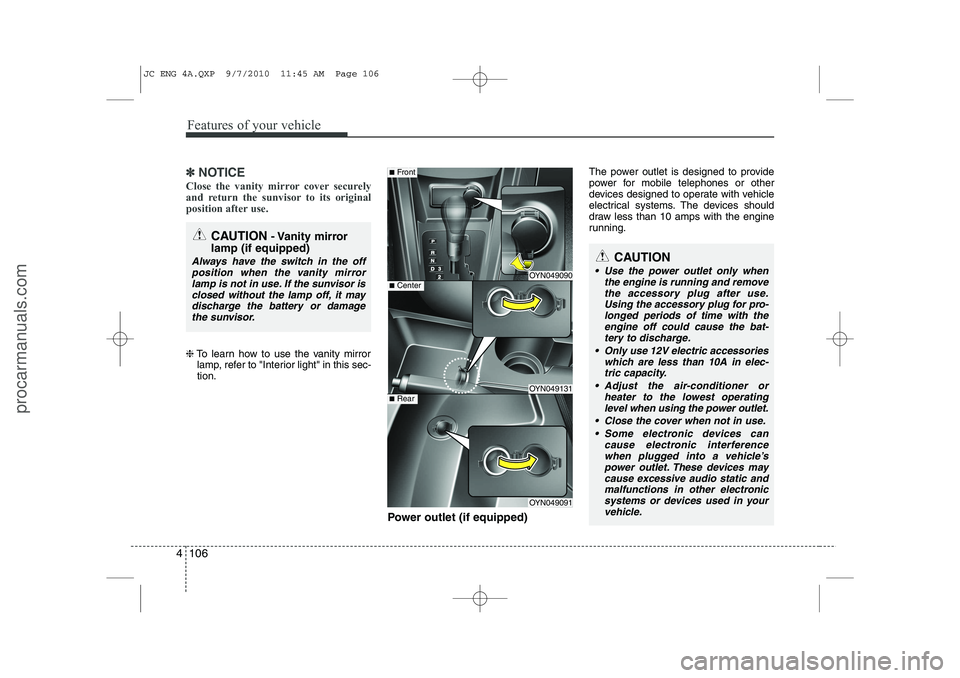
Power outlet (if equipped) The power outlet is designed to provide
power for mobile telephones or other
devices designed to operate with vehicle
electrical systems. The devices should
draw less than 10 amps with the engine
running.
CAUTION
- Vanity mirror
lamp (if equipped)
Always have the switch in the off position when the vanity mirror
lamp is not in use. If the sunvisor isclosed without the lamp off, it may discharge the battery or damagethe sunvisor.
OYN049090
OYN049131
OYN049091
■ Center
■Front
■Rear
CAUTION
Use the power outlet only when
the engine is running and remove
the accessory plug after use. Using the accessory plug for pro-longed periods of time with the engine off could cause the bat-
tery to discharge.
Only use 12V electric accessories which are less than 10A in elec-tric capacity.
Adjust the air-conditioner or heater to the lowest operatinglevel when using the power outlet.
Close the cover when not in use. Some electronic devices can cause electronic interference
when plugged into a vehicle’spower outlet. These devices maycause excessive audio static and malfunctions in other electronic
systems or devices used in your vehicle.
JC ENG 4A.QXP 9/7/2010 11:45 AM Page 106
procarmanuals.com
Page 218 of 420
Features of your vehicle
140
4
■
Receiving a Phone Call
When receiving a phone call, a ringtone
is audible from speakers and the audio
system changes into telephone mode.
When receiving a phone call, “Incoming
call” message and incoming phone num-
ber (if available) are displayed on the
audio.
To Answer a Call:
- Press button on the steering wheel.
To Reject a Call:
- Press button on the steering wheel.
To Adjust Ring Volume:
- Use VOLUME buttons on the steering wheel.
To Transfer a Call to the Phone (Secret Call):
- Press button on the steering wheel until the audio system transfers a
call to the phone. ■
Talking on the Phone
When talking on the phone, “Active Call”
message and the other party’s phone
number (if available) are displayed on the
audio.
To Mute the Microphone
- Press button on the steering wheel.
To Finish a Call
- Press button on the steering wheel.
✽✽ NOTICE
In the following situations, you or the
other party may have difficulty hearingeach other:
1. Speaking at the same time, your voice may not reach each other parties.(This is not a malfunction.) Speak
alternately with the other party on thephone.
2. Keep the Bluetooth ®
volume to a low
level. High-level volume may result indistortion and echo.
3. When driving on a rough road.
4. When driving at high speeds.
5. When the window is open.
6. When the air conditioning vents are facing the microphone.
7. When the sound of the air condition-
ing fan is loud.
■ Bluetooth ®
Audio Music
Streaming
The audio system supports Bluetooth ®
A2DP (Audio Advanced Distribution
Profile) and AVRCP (Audio Video
Remote Control Profile) technologies.
Both profiles provide steaming of music
via compatible “PAIRED” Bluetooth ®
Cellular phone.
To stream music from the Bluetooth ®
cel-
lular phone, play your music files on your
cellular phone according to your cellular
phone user’s manual and press the button on the audio system until
“MP3 play” is displayed on the LCD.
The audio system head unit displays ‘MP3 MODE’.
CD/AUX
MUTE
JC ENG 4B AUDIO.QXP 9/7/2010 11:48 AM Page 140
procarmanuals.com
Page 235 of 420
515
Driving your vehicle
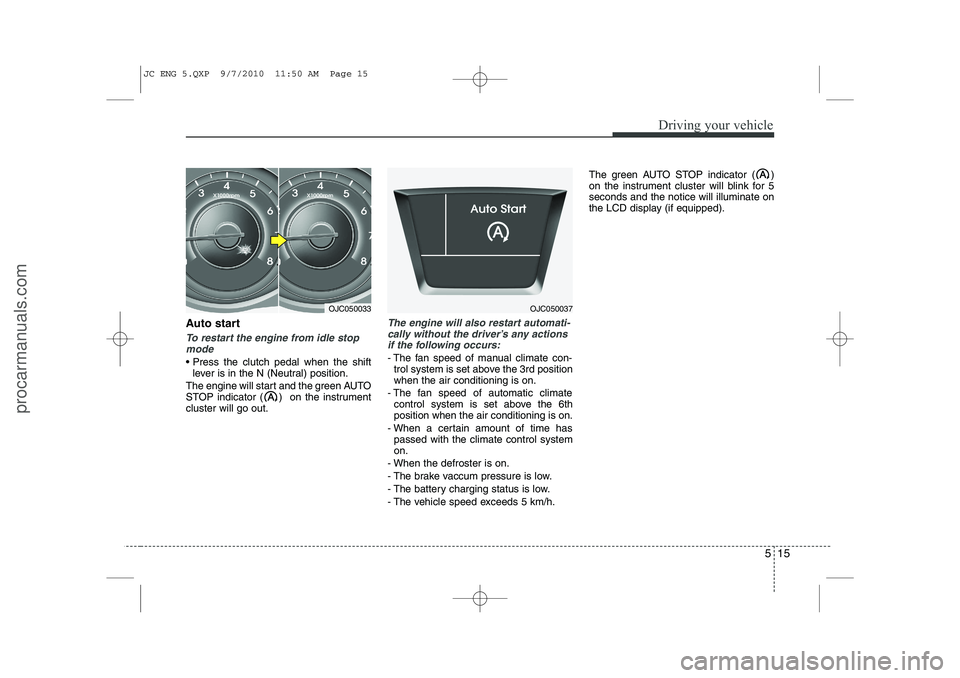
Auto start
To restart the engine from idle stopmode
Press the clutch pedal when the shift lever is in the N (Neutral) position.
The engine will start and the green AUTO
STOP indicator ( ) on the instrumentcluster will go out.
The engine will also restart automati- cally without the driver’s any actions
if the following occurs:
- The fan speed of manual climate con- trol system is set above the 3rd position when the air conditioning is on.
- The fan speed of automatic climate control system is set above the 6thposition when the air conditioning is on.
- When a certain amount of time has passed with the climate control systemon.
- When the defroster is on.
- The brake vaccum pressure is low.
- The battery charging status is low.
- The vehicle speed exceeds 5 km/h. The green AUTO STOP indicator ( )
on the instrument cluster will blink for 5seconds and the notice will illuminate on
the LCD display (if equipped).
OJC050033OJC050037
JC ENG 5.QXP 9/7/2010 11:50 AM Page 15
procarmanuals.com
Page 263 of 420
543
Driving your vehicle
Your vehicle's fuel economy depends
mainly on your style of driving, where you
drive and when you drive.
Each of these factors affects how many
kilometers (miles) you can get from a
liter (gallon) of fuel. To operate your vehi-
cle as economically as possible, use the
following driving suggestions to help
save money in both fuel and repairs:
Drive smoothly. Accelerate at a moder-ate rate. Don't make "jack-rabbit" starts or full-throttle shifts and maintain a
steady cruising speed. Don't race
between stoplights. Try to adjust your
speed to the traffic so you don't have to
change speeds unnecessarily. Avoid
heavy traffic whenever possible.
Always maintain a safe distance from
other vehicles so you can avoid unnec-
essary braking. This also reduces
brake wear.
Drive at a moderate speed. The faster you drive, the more fuel your vehicle
uses. Driving at a moderate speed,
especially on the highway, is one of the
most effective ways to reduce fuel con-sumption. Don't "ride" the brake or clutch pedal.
This can increase fuel consumption
and also increase wear on these com-
ponents. In addition, driving with your
foot resting on the brake pedal may
cause the brakes to overheat, which
reduces their effectiveness and may
lead to more serious consequences.
Take care of your tires. Keep them inflated to the recommended pressure.
Incorrect inflation, either too much or
too little, results in unnecessary tire
wear. Check the tire pressures at leastonce a month.
Be sure that the wheels are aligned correctly. Improper alignment can
result from hitting curbs or driving too
fast over irregular surfaces. Poor align-
ment causes faster tire wear and may
also result in other problems as well as
greater fuel consumption. Keep your vehicle in good condition.
For better fuel economy and reduced
maintenance costs, maintain your vehi-cle in accordance with the mainte-
nance schedule in section 7. If you
drive your vehicle in severe conditions,more frequent maintenance is required
(see section 7 for details).
Keep your vehicle clean. For maximum service, your vehicle should be kept
clean and free of corrosive materials. It
is especially important that mud, dirt,
ice, etc. not be allowed to accumulate
on the underside of the vehicle. This
extra weight can result in increased
fuel consumption and also contributeto corrosion.
Travel lightly. Don't carry unnecessary weight in your vehicle. Weight reduces
fuel economy.
Don't let the engine idle longer than necessary. If you are waiting (and not
in traffic), turn off your engine and
restart only when you're ready to go.
ECONOMICAL OPERATION
JC ENG 5.QXP 9/7/2010 11:53 AM Page 43
procarmanuals.com
Page 264 of 420
Driving your vehicle
44
5
Remember, your vehicle does not
require extended warm-up. After the
engine has started, allow the engine to
run for 10 to 20 seconds prior to plac-
ing the vehicle in gear. In very cold
weather, however, give your engine a
slightly longer warm-up period.
Don't "lug" or "over-rev" the engine. Lugging is driving too slowly in too
high a gear resulting engine bucking. If
this happens, shift to a lower gear.
Over-revving is racing the engine
beyond its safe limit. This can be avoid-
ed by shifting at the recommended
speeds.
Use your air conditioning sparingly. The air conditioning system is operat-
ed by engine power so your fuel econ-
omy is reduced when you use it.
Open windows at high speeds can reduce fuel economy.
Fuel economy is less in crosswinds and headwinds. To help offset some of
this loss, slow down when driving in
these conditions.
Keeping a vehicle in good operating con-
dition is important both for economy and
safety. Therefore, have an authorized
HYUNDAI dealer perform scheduled
inspections and maintenance.
WARNING - Engine off dur-
ing motion
Never turn the engine off to coast
down hills or anytime the vehicle is
in motion. The power steering and
power brakes will not function
properly without the engine run-
ning. Instead, keep the engine on
and downshift to an appropriate
gear for engine braking effect. In
addition, turning off the ignition
while driving could engage the
steering wheel lock resulting in
loss of vehicle steering which
could cause serious injury ordeath.
JC ENG 5.QXP 9/7/2010 11:53 AM Page 44
procarmanuals.com
Page 279 of 420
559
Driving your vehicle
When you are ready to leave after park- ing on a hill
1. With the manual transaxle in N(Neutral) or automatic transaxle in P
(Park), apply your brakes and hold the
brake pedal down while you:
Start your engine;
Shift into gear; and
Release the parking brake.
2. Slowly remove your foot from the brake pedal.
3. Drive slowly until the trailer is clear of the chocks.
4. Stop and have someone pick up and store the chocks. Maintenance when trailer towing
Your vehicle will need service more often
when you regularly pull a trailer.
Important items to pay particular atten-tion to include engine oil, automatic
transaxle fluid, axle lubricant and cooling
system fluid. Brake condition is another
important item to frequently check. Each
item is covered in this manual, and the
Index will help you find them quickly. If
you’re trailering, it’s a good idea to review
these sections before you start your trip.
Don’t forget to also maintain your trailer
and hitch. Follow the maintenance
schedule that accompanied your trailer
and check it periodically. Preferably, con-
duct the check at the start of each day’s
driving. Most importantly, all hitch nutsand bolts should be tight.CAUTION
Due to higher load during trailer
usage, overheating might occur
in hot days or during uphill driv- ing. If the coolant gauge indicatesover-heating, switch off the airconditioner and stop the vehicle
in a safe area to cool down theengine.
When towing, check the transaxle fluid more frequently.
If your vehicle is not equipped with an air conditioner, youshould install a condenser fan toimprove engine performance
when towing a trailer.
JC ENG 5.QXP 9/7/2010 11:54 AM Page 59
procarmanuals.com