bluetooth HYUNDAI IX20 2017 User Guide
[x] Cancel search | Manufacturer: HYUNDAI, Model Year: 2017, Model line: IX20, Model: HYUNDAI IX20 2017Pages: 456, PDF Size: 9.46 MB
Page 224 of 456
Features of your vehicle
146
4
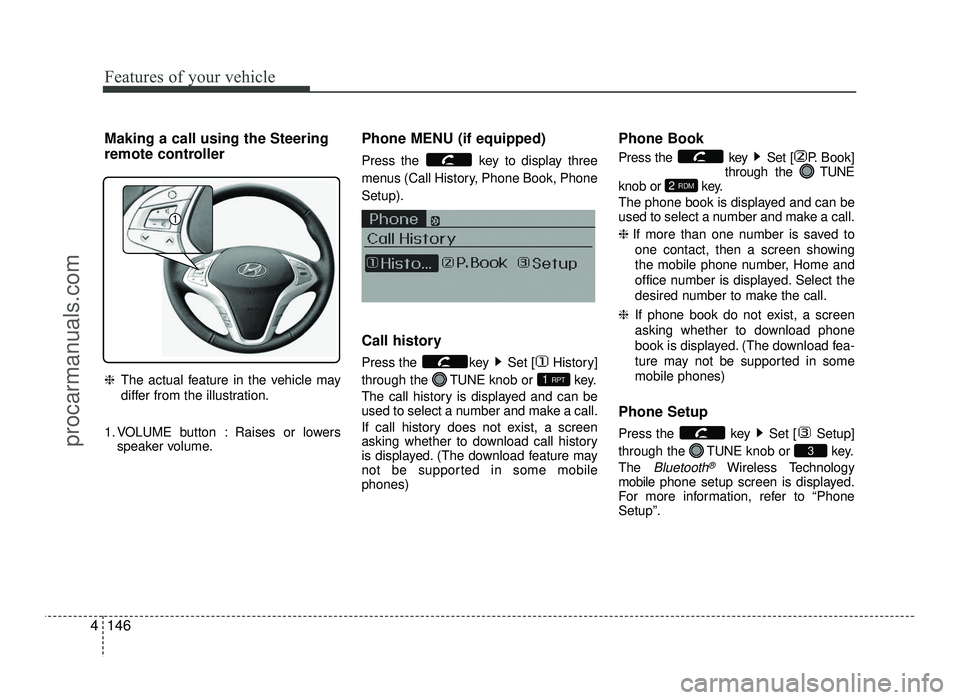
Making a call using the Steering
remote controller ❈ The actual feature in the vehicle may
differ from the illustration.
1. VOLUME button : Raises or lowers speaker volume. Phone MENU (if equipped)
Press the key to display three
menus (Call History, Phone Book, PhoneSetup).
Call history
Press the key Set [ History] through the
TUNEknob or key.
The call history is displayed and can be
used to select a number and make a call.
If call history does not exist, a screen
asking whether to download call history
is displayed. (The download feature may
not be supported in some mobilephones) Phone Book
Press the key Set [ P. Book]
through the TUNE
knob or key.
The phone book is displayed and can be
used to select a number and make a call. ❈ If more than one number is saved to
one contact, then a screen showing
the mobile phone number, Home and
office number is displayed. Select the
desired number to make the call.
❈ If phone book do not exist, a screen
asking whether to download phone
book is displayed. (The download fea-
ture may not be supported in somemobile phones)
Phone Setup
Press the key Set [ Setup] through the TUNEknob or key.
The
Bluetooth®Wireless Technology
mobile phone setup screen is displayed.
For more information, refer to “Phone Setup”.
3
2 RDM
1 RPT
procarmanuals.com
Page 226 of 456
Features of your vehicle
148
4
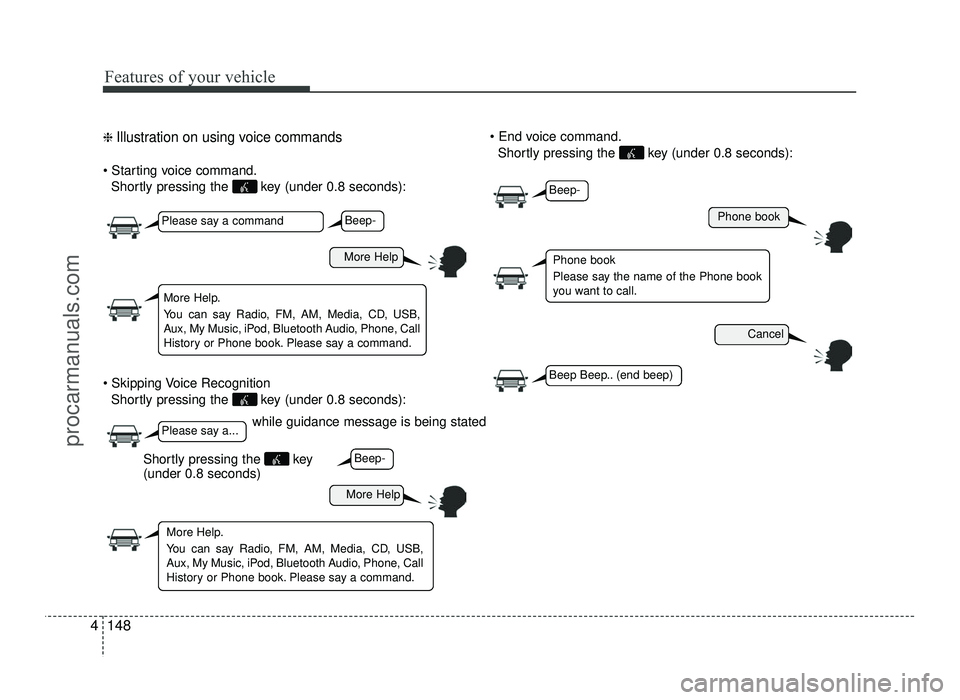
❈ Illustration on using voice commands
Shortly pressing the key (under 0.8 seconds):
Shortly pressing the key (under 0.8 seconds):
Shortly pressing the key (under 0.8 seconds):
while guidance message is being stated
More Help
Phone book
Cancel
More Help
Please say a command
Please say a...
More Help.
You can say Radio, FM, AM, Media, CD, USB,
Aux, My Music, iPod, Bluetooth Audio, Phone, Call
History or Phone book. Please say a command.
Phone book
Please say the name of the Phone book
you want to call.
More Help.
You can say Radio, FM, AM, Media, CD, USB,
Aux, My Music, iPod, Bluetooth Audio, Phone, Call
History or Phone book. Please say a command.
Beep-
Beep-
Beep-
Beep Beep.. (end beep)
Shortly pressing the key (under 0.8 seconds)
procarmanuals.com
Page 228 of 456
Features of your vehicle
150
4
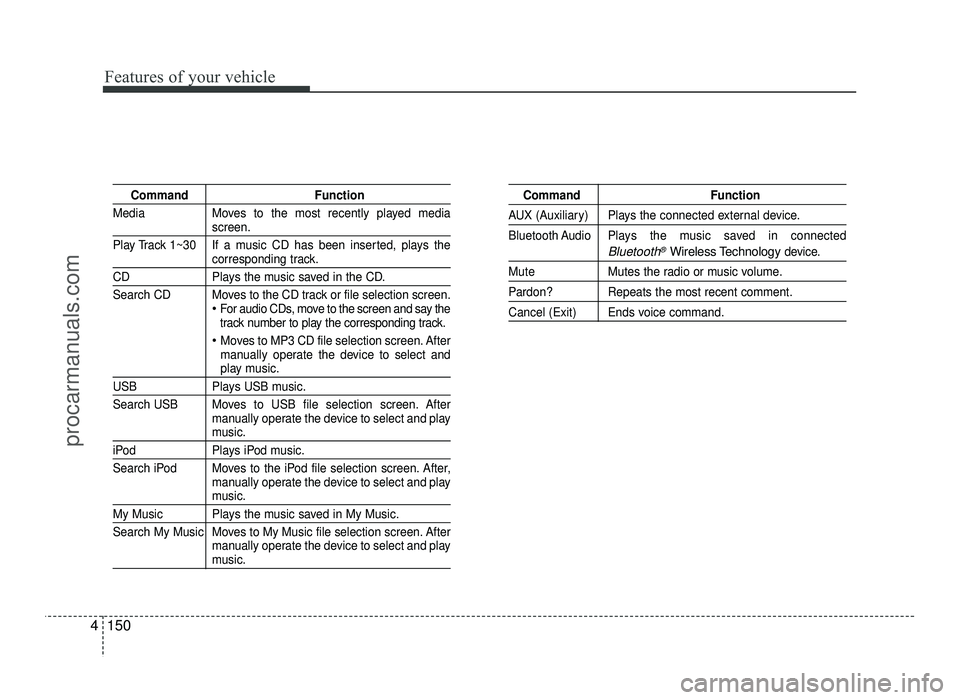
Command Function
Media Moves to the most recently played media
screen.
Play Track 1~30 If a music CD has been inserted, plays the
corresponding track.
CD Plays the music saved in the CD.
Search CD Moves to the CD track or file selection screen.
For audio CDs, move to the screen and say the
track number to play the corresponding track.
Moves to MP3 CD file selection screen. After
manually operate the device to select and
play music.
USB Plays USB music.
Search USB Moves to USB file selection screen. After manually operate the device to select and play
music.
iPod Plays iPod music.
Search iPod Moves to the iPod file selection screen. After,manually operate the device to select and play
music.
My Music Plays the music saved in My Music.
Search My Music Moves to My Music file selection screen. Aftermanually operate the device to select and play
music.
Command Function
AUX (Auxiliary) Plays the connected external device.
Bluetooth Audio Plays the music saved in connected
Bluetooth®Wireless Technologydevice.
Mute Mutes the radio or music volume.
Pardon? Repeats the most recent comment.
Cancel (Exit) Ends voice command.
procarmanuals.com
Page 231 of 456
4153
Features of your vehicle
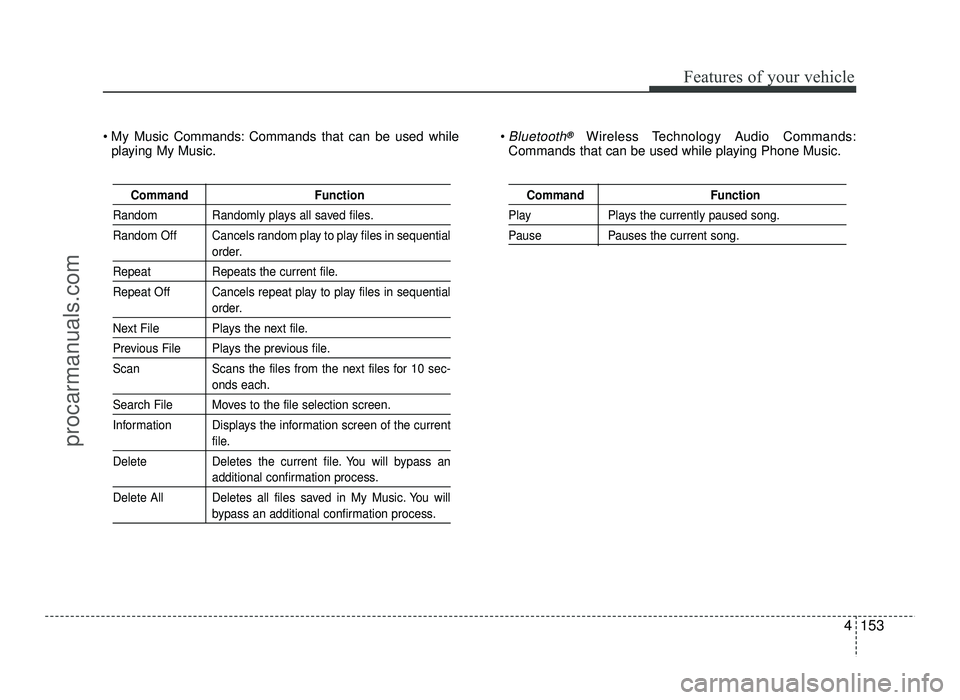
Command Function
Random Randomly plays all saved files.
Random Off Cancels random play to play files in sequential
order.
Repeat Repeats the current file.
Repeat Off Cancels repeat play to play files in sequential
order.
Next File Plays the next file.
Previous File Plays the previous file.
Scan Scans the files from the next files for 10 sec-
onds each.
Search File Moves to the file selection screen.
Information Displays the information screen of the current
file.
Delete Deletes the current file. You will bypass an
additional confirmation process.
Delete All Deletes all files saved in My Music. You will
bypass an additional confirmation process.
Command Function
Play Plays the currently paused song.
Pause Pauses the current song.
My Music Commands: Commands that can be used while playing My Music. Bluetooth®Wireless Technology Audio Commands:
Commands that can be used while playing Phone Music.
procarmanuals.com