phone HYUNDAI IX20 2017 User Guide
[x] Cancel search | Manufacturer: HYUNDAI, Model Year: 2017, Model line: IX20, Model: HYUNDAI IX20 2017Pages: 456, PDF Size: 9.46 MB
Page 199 of 456
4121
Features of your vehicle
✽✽NOTICE - USING THE
iPod ®
DEVICE
Some iPod models may not support communication protocol and files
may not properly play.
Supported iPod models:
- iPod Mini
- iPod 4th(Photo) ~ 6th(Classic)generation
- iPod Nano 1st~4th generation
- iPod Touch 1st~2nd generation
The order of search or playback of songs in the iPod can be different
from the order searched in the
audio system.
If the iPod disabled due to its own malfunction, reset the iPod. (Reset:
Refer to iPod manual)
An iPod may not operate normally on low battery.
Some iPod devices, such as the
iPhone, can be connected through the
Bluetooth ®
Wireless Technology inter-
face. The device must have audio
Bluetooth ®
Wireless Technology capa-
bility (such as for stereo headphone
Bluetooth ®
Wireless Technology). The
device can play, but it will not be con-
trolled by the audio system. (Continued)(Continued)
To use iPod features within the
audio, use the cable provided upon
purchasing an iPod device.
Skipping or improper operation may occur depending on the char-
acteristics of your iPod/Phone
device.
If your iPhone is connected to both the Bluetooth ®
Wireless Technology
and USB, the sound may not be
properly played. In your iPhone,
select the Dock connector or
Bluetooth ®
Wireless Technology to
change the sound output (source).
When connecting iPod with the iPod Power Cable, insert the con-
nector to the multimedia socket
completely. If not inserted com-
pletely, communications between
iPod and audio may be interrupted.
When adjusting the sound effects of the iPod and the audio system, the
sound effects of both devices will
overlap and might reduce or distort
the quality of the sound.
(Continued)(Continued)
Deactivate (turn off) the equalizer
function of an iPod when adjusting
the audio system’s volume, and
turn off the equalizer of the audio
system when using the equalizer of
an iPod.
When not using iPod with car
audio, detach the iPod cable from
iPod. Otherwise, iPod may remain
in accessory mode, and may not
work properly.
procarmanuals.com
Page 200 of 456
Features of your vehicle
122
4
✽✽
NOTICE - USING THE
Bluetooth®Wireless
Technology CELLULAR PHONE
Do not use a cellular phone or per- form Bluetooth ®
Wireless Technology
settings (e.g. pairing a phone) while
driving.
Some Bluetooth ®
Wireless Technology
enabled phones may not be recog-
nized by the system or fully compati-
ble with the system.
Before using Bluetooth®
Wireless
Technology related features of the
audio system, refer your phone’s
User’s Manual for phone-side
Bluetooth ®
Wireless Technology
operations.
The phone must be paired to the
audio system to use Bluetooth®
Wireless Technology related fea-
tures.
You will not be able to use the
hands-free feature when your
phone (in the car) is outside of the
cellular service area (e.g. in a tun-
nel, in a underground, in a moun-
tainous area, etc.). (Continued)(Continued)
If the cellular phone signal is poor
or the vehicles interior noise is too
loud, it may be difficult to hear the
other person’s voice during a call.
Do not place the phone near or
inside metallic objects, otherwise
communications with Bluetooth®
Wireless Technology system or cel-
lular service stations can be dis-
turbed.
While a phone is connected through
Bluetooth ®
Wireless Technology
your phone may discharge quicker
than usual for additional Bluetooth®
Wireless Technology-related opera-
tions.
Some cellular phones or other devices may cause interference
noise or malfunction to audio sys-
tem. In this case, store the device in
a different location may resolve the
condition.
Phone contact names should be saved in English or they may not be
displayed correctly. (Continued)(Continued)
If Priority is set upon vehicle igni-
tion(IGN/ACC ON), the Bluetooth®
Wireless Technology phone will be
automatically connected.
Even if you are outside, the Bluetooth®
Wireless Technology phone will be
automatically connected once you
are in the vicinity of the vehicle.
If you do not want automatic
Bluetooth ®
Wireless Technology con-
nection, turn the Bluetooth®
Wireless
Technology feature off.
The hands-free call volume and quality may differ depending on the
mobile phone type.
Bluetooth ®
Wireless Technology fea-
tures can be used only when the
mobile phone has been paired and
connected with the device. For
more information on pairing and
connecting Bluetooth®
Wireless
Technology enabled mobile phones,
refer to the “Phone Setup” section. (Continued)
procarmanuals.com
Page 201 of 456
4123
Features of your vehicle
(Continued)
When a Bluetooth®
Wireless
Technology mobile phone is con-
nected, a ( ) icon will appear at
the top of the scr een. If a ( ) icon is
not displayed, this indicates that a
Bluetooth ®
Wireless Technology
enabled device has not been con-
nected. You must connect the device
before use. For more information on
Bluetooth ®
Wireless Technology mobile
phones, refer to the “Phone Setup”
section.
Pairing and connecting a Bluetooth®
Wireless Technology enabled mobile
phone will work only when the
Bluetooth®Wireless Technology optionwithin your mobile phone has been
turned on. (Methods of turning on
the Bluetooth ®
Wireless Technology
enabled feature may differ depend-
ing on the mobile phone.)
In some mobile phones, starting the ignition while talking through
Bluetooth®Wireless Technology enabledhandsfree call will result in the call
becoming disconnected. (Switch the
call back to your mobile phone
when starting the ignition.) (Continued)
(Continued)
Some features may not be supported in
some Bluetooth®Wireless Technologymobile phone and devices.
Bluetooth®Wireless Technology enabledoperation may be unstable depending
on the communication state.
Placing the audio system within an electromagnetic environment may
result in noise interference.
procarmanuals.com
Page 202 of 456
Features of your vehicle
124
4
✽✽
NOTICE - USING VOICE COMMAND
The voice recognition feature of this product supports recognition of the
commands listed within this user’s
manual.
While using voice recognition, oper- ating the steering remote control or
the device will terminate voice recog-
nition and allow you to manually
operate desired functions.
Position the microphone above the head of the driver’s seat. For supe-
rior performance, maintain good
posture when saying voice com-
mands.
Voice recognition may not function
properly due to outside noise. The
following conditions can affect the
performance of Voice Recognition:
- When the windows and sunroof are open
- When the heating/cooling system is on
- When passing a tunnel
- When driving on rugged and uneven roads (Continued)(Continued)
After downloading
Bluetooth®
Wireless Technology phone book,
the system requires some times to
convert the phone book into voice
information. During this time, voice
recognition may not operate prop-
erly.
Upon inputting your phone book, special symbols and numbers can-
not be recognized by voice. For
example, “# John Doe%&” will be
recognized as “John Doe”.
procarmanuals.com
Page 204 of 456
Features of your vehicle
126
4
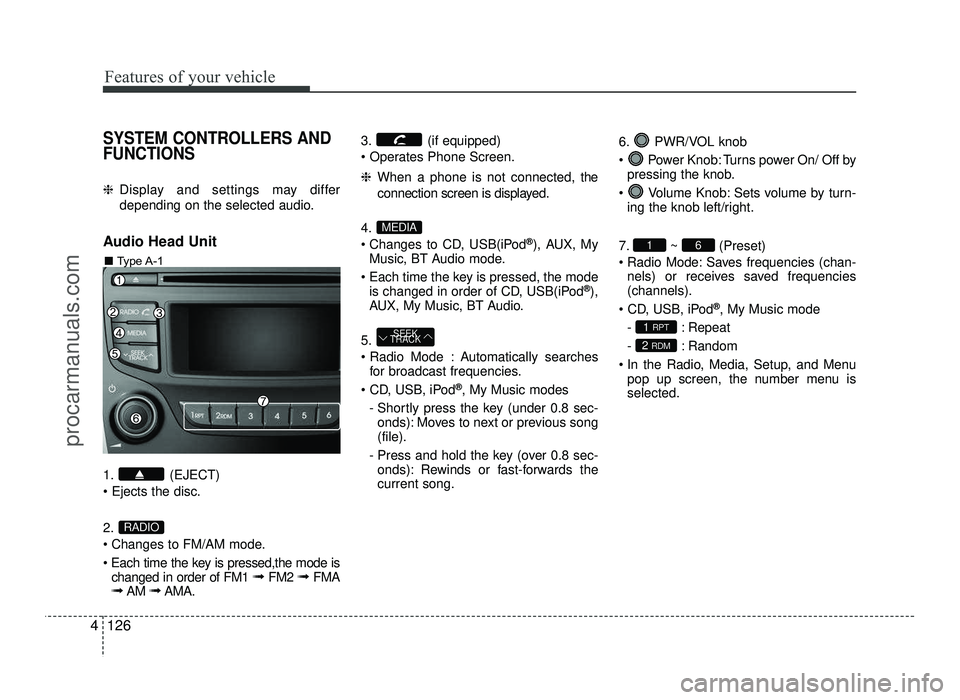
SYSTEM CONTROLLERS AND FUNCTIONS
❈ Display and settings may differ
depending on the selected audio.
Audio Head Unit
1. (EJECT) 2.
Changes to FM/AM mode.
Each time the key is pressed,the mode is changed in order of FM1 ➟ FM2 ➟ FMA
➟ AM ➟AMA. 3. (if equipped)
❈
When a phone is not connected, the
connection screen is displayed.
4.
Changes to CD, USB(iPod ®
), AUX, My
Music, BT Audio mode.
Each time the key is pressed, the mode is changed in order of CD, USB(iPod ®
),
AUX, My Music, BT Audio.
5.
Automatically searches for broadcast frequencies.
®
, My Music modes
- Shortly press the key (under 0.8 sec- onds): Moves to next or previous song (file).
- Press and hold the key (over 0.8 sec- onds): Rewinds or fast-forwards thecurrent song. 6. PWR/VOL knob
Power Knob: Turns power On/ Off by
pressing the knob.
Volume Knob: Sets volume by turn- ing the knob left/right.
7. ~ (Preset)
Radio Mode: Saves frequencies (chan- nels) or receives saved frequencies (channels).
®
, My Music mode
- : Repeat
- : Random
In the Radio, Media, Setup, and Menu pop up screen, the number menu is selected.
2 RDM
1 RPT
61
SEEK
TRACK
MEDIA
RADIO
■ Type A-1
procarmanuals.com
Page 205 of 456
4127
Features of your vehicle
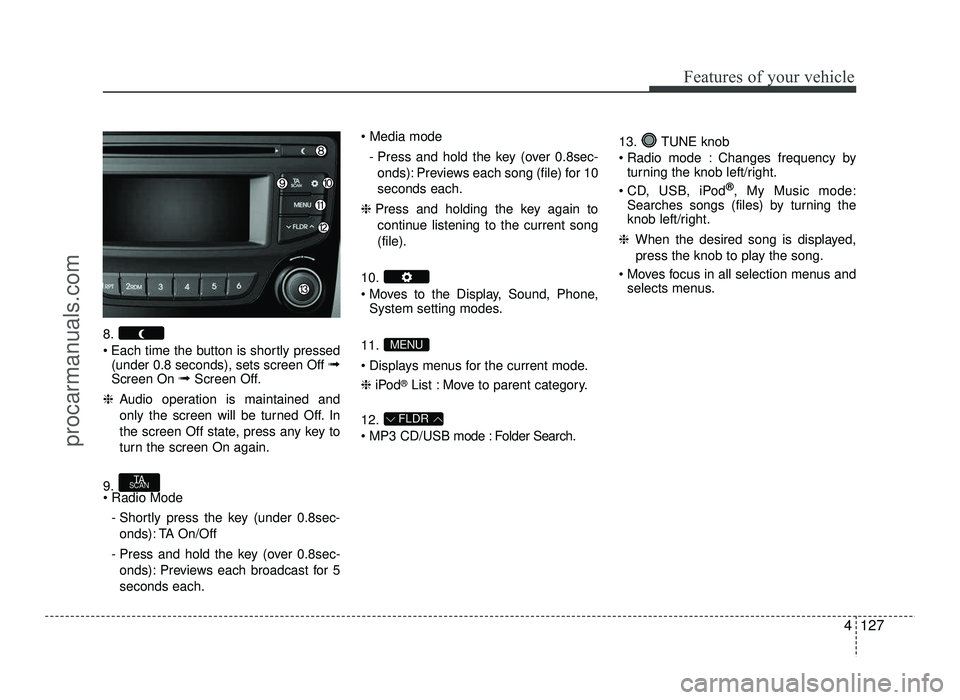
8.
Each time the button is shortly pressed(under 0.8 seconds), sets screen Off ➟
Screen On ➟Screen Off.
❈ Audio operation is maintained and
only the screen will be turned Off. In
the screen Off state, press any key to
turn the screen On again.
9. - Shortly press the key (under 0.8sec-onds): TA On/Off
- Press and hold the key (over 0.8sec- onds): Previews each broadcast for 5 seconds each.
- Press and hold the key (over 0.8sec-onds): Previews each song (file) for 10seconds each.
❈ Press and holding the key again to
continue listening to the current song(file).
10.
Moves to the Display, Sound, Phone, System setting modes.
11.
Displays menus for the current mode. ❈ iPod ®
List : Move to parent category.
12.
MP3 CD/USB mode : Folder Search. 13. TUNE knob
Radio mode : Changes frequency by
turning the knob left/right.
CD, USB, iPod ®
, My Music mode:
Searches songs (files) by turning the
knob left/right.
❈ When the desired song is displayed,
press the knob to play the song.
Moves focus in all selection menus and selects menus.
FLDR
MENU
TA
SCAN
procarmanuals.com
Page 209 of 456
![HYUNDAI IX20 2017 User Guide 4131
Features of your vehicle
Phone Settings (if equipped)
Press the key Select [Phone]
through TUNE knob or key
Select menu through TUNE knobPair Phone
Select [Pair Phone] Set through
TUNE](/img/35/57916/w960_57916-208.png "HYUNDAI IX20 2017 User Guide 4131
Features of your vehicle
Phone Settings (if equipped)
Press the key Select [Phone]
through TUNE knob or key
Select menu through TUNE knobPair Phone
Select [Pair Phone] Set through
TUNE")
4131
Features of your vehicle
Phone Settings (if equipped)
Press the key Select [Phone]
through TUNE knob or key
Select menu through TUNE knobPair Phone
Select [Pair Phone] Set through
TUNE knob
➀ Search for device names as displayed
on your mobile phone and connect.
➁ Input the passkey displayed on the
screen. (Passkey : 0000)
❈ The device name and passkey will be
displayed on the screen for up to 3
minutes. If pairing is not completed
within the 3 minutes, the mobile phone
pairing process will automatically becanceled.
➂ Pairing completion is displayed. ❈
In some mobile phones, pairing will
automatically be followed by connec-tion.
❈ It is possible to pair up to five
Bluetooth®Wireless Technology
enabled mobile phones.
Phone List The names of up to 5 paired phones will
be displayed.
A [ ] is displayed in front of the currently
connected phone. Select the desired name to setup the
selected phone.3
CAUTION
To pair a Bluetooth®Wireless
Technology enabled mobile phone,
authentication and connectionprocesses are first required. As aresult, you cannot pair your mobile
phone while driving the vehicle. First park your vehicle before use.
procarmanuals.com
Page 210 of 456
![HYUNDAI IX20 2017 User Guide Features of your vehicle
132
4
Select [Phone List] Select mobile
phone through TUNE knob Select[Connect Phone] ➀ Select a mobile phone that is not cur- rently connected.
➁ Connect the selec](/img/35/57916/w960_57916-209.png "HYUNDAI IX20 2017 User Guide Features of your vehicle
132
4
Select [Phone List] Select mobile
phone through TUNE knob Select[Connect Phone] ➀ Select a mobile phone that is not cur- rently connected.
➁ Connect the selec")
Features of your vehicle
132
4
Select [Phone List] Select mobile
phone through TUNE knob Select[Connect Phone] ➀ Select a mobile phone that is not cur- rently connected.
➁ Connect the selected mobile phone.
➂ Connection completion is displayed.
❈ If a phone is already connected, dis-
connect the currently connected
phone and select a new phone to con-nect.
Select [Phone List] Select mobile
phone through TUNE knob Select[Disconnect Phone] ➀
Select the currently connected mobile
phone.
➁ Disconnect the selected mobile
phone.
➂ Disconnection completion is dis-
played. Changing connection sequence
(Priority)
This is used to change the order (priori-
ty) of automatic connection for the paired
mobile phones.
Select [Phone List] Select [Priority]
through TUNE knob Select No. 1
Priority mobile phone ➀ Select [Priority].
➁ From the paired phones, select the
phone desired for No.1 priority.
➂ The changed priority sequence is dis-
played.
❈ Once the connection sequence (prior-
ity) is changed, the new no. 1 prioritymobile phone will be connected.
- When the no. 1 priority cannot be con- nected : Automatically attempts to con- nect the most recently connected
phone.
- Cases when the most recently con- nected phone cannot be connected:Attempts to connect in the order inwhich paired phones are listed.
- The connected phone will automati- cally be changed to No. 1 priority.
procarmanuals.com
Page 211 of 456
![HYUNDAI IX20 2017 User Guide 4133
Features of your vehicle
Select [Phone List] Select mobile
phone through TUNE knob Select[Delete] ➀Select the desired mobile phone.
➁ Delete the selected mobile phone.
➂ Deletion comp](/img/35/57916/w960_57916-210.png "HYUNDAI IX20 2017 User Guide 4133
Features of your vehicle
Select [Phone List] Select mobile
phone through TUNE knob Select[Delete] ➀Select the desired mobile phone.
➁ Delete the selected mobile phone.
➂ Deletion comp")
4133
Features of your vehicle
Select [Phone List] Select mobile
phone through TUNE knob Select[Delete] ➀Select the desired mobile phone.
➁ Delete the selected mobile phone.
➂ Deletion completion is displayed.
❈ When attempting to delete a currently
connected phone, the phone is firstdisconnected. Phone book Download
This feature is used to download phone
book and call histories into the audio sys-tem.
Select [Phone book Download] Select
through TUNE knob
Auto Download
When connecting a mobile phone, it is
possible to automatically download new
phone book and Call Histories.
Select [Auto Download] Set /
through TUNE knob Audio Streaming
Songs (files) saved in your
Bluetooth®
Wireless Technology enabled
mobile
phone can be played through the audio system.
Select [Audio Streaming] Set / through TUNE knob
Outgoing Volume
This is used to set the volume of your
voice as heard by the other party whileon a
Bluetooth®Wireless Technology
enabled handsfree call.
Select [Outgoing Volume] Set volume through
TUNEknob
❈ Even while on a call, the volume can
be changed by using the
key.
SEEK
TRACK
OffOn
OffOn
CAUTION
The download feature may not be
supported in some mobile phones.
If a different operation is performed
while phone book is being down-loaded, downloading will be discon-
tinued. Phone book already down-loaded will be saved.
When downloading new phone book, delete all previously savedphone book before starting down- load.
CAUTION
The Bluetooth®Wireless Technologyaudio streaming feature may not besupported in some mobile phones.
CAUTION
When you delete a mobile phone,
the mobile phone phone book willalso be erased.
For stable Bluetooth®Wireless
Technology communication, delete the
mobile phone from the audio andalso delete the audio from your
mobile phone.
procarmanuals.com
Page 212 of 456
![HYUNDAI IX20 2017 User Guide Features of your vehicle
134
4
Bluetooth®Wireless Technology
System Off
This feature is used when you do not wish to use the
Bluetooth®Wireless
Technologysystem.
Select [Bluetooth System Off] Set](/img/35/57916/w960_57916-211.png "HYUNDAI IX20 2017 User Guide Features of your vehicle
134
4
Bluetooth®Wireless Technology
System Off
This feature is used when you do not wish to use the
Bluetooth®Wireless
Technologysystem.
Select [Bluetooth System Off] Set")
Features of your vehicle
134
4
Bluetooth®Wireless Technology
System Off
This feature is used when you do not wish to use the
Bluetooth®Wireless
Technologysystem.
Select [Bluetooth System Off] Set
through TUNE knob ❈ If a phone is already connected, dis- connect the currently connected
phone and turn the
Bluetooth®
Wireless Technology system off. Using the
Bluetooth®Wireless
Technology System
To use
Bluetooth®Wireless Technology
when the system is currently off, follow
these next steps.
Turning On
Bluetooth®Wireless
Technology through the key
Press the key Screen Guidance ❈ Moves to the screen where
Bluetooth®
Wireless Technology functions can be
used and displays guidance.
Turning On
Bluetooth®Wireless
Technology through the key
Press the key Select [Phone]
through TUNE knob or key ➀ A screen asking whether to turn on
Bluetooth®Wireless Technologywill be
displayed.
➁ On the screen, select to turn on
Bluetooth®Wireless Technology and
display guidance. ❈
If the
Bluetooth®Wireless Technology
system is turned on, the system will
automatically try to connect the mostrecently connected
Bluetooth®Wireless
Technology mobile phone.
YES
3
CAUTION
Bluetooth®Wireless Technology
connection may become intermit-
tently disconnected in some mobilephones. Follow these next steps to try again.
1) Turn the Bluetooth
®Wireless
Technology function within the
mobile phone ON/OFF and try toconnect again.
2) Turn the mobile phone power ON/OFF and try to connectagain.
3) Completely remove the mobile phone battery, reboot, and thentry to connect again.
4) Reboot the audio system and try to connect again
5) Delete all paired devices in your mobile phone and the audio sys-
tem and pair again for use.
procarmanuals.com