heater HYUNDAI IX20 2017 Owners Manual
[x] Cancel search | Manufacturer: HYUNDAI, Model Year: 2017, Model line: IX20, Model: HYUNDAI IX20 2017Pages: 456, PDF Size: 9.46 MB
Page 13 of 456
Your vehicle at a glance
2
2
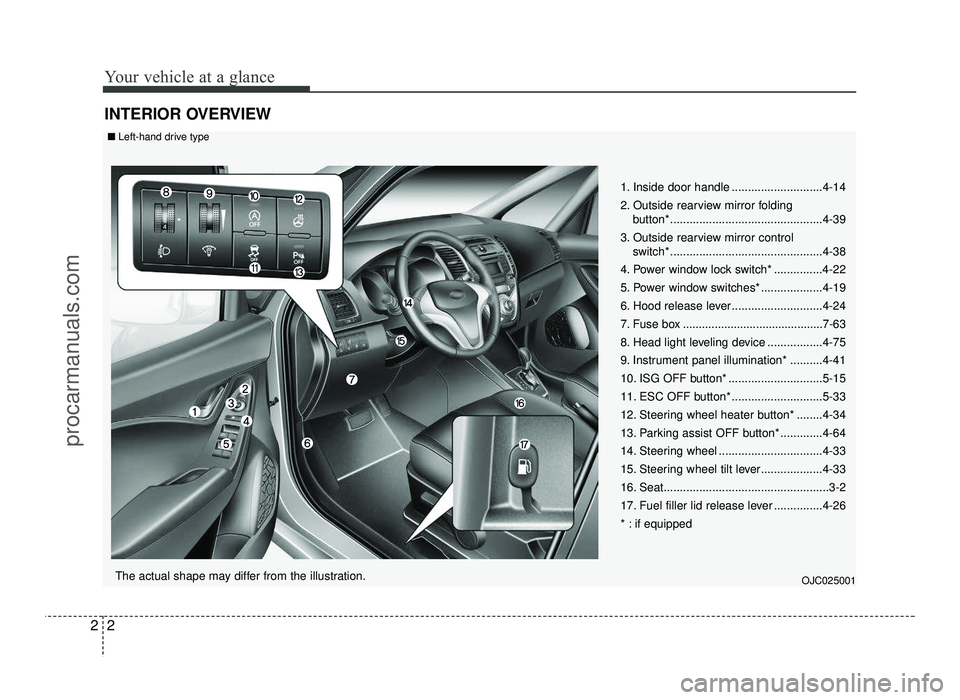
INTERIOR OVERVIEW
1. Inside door handle ............................4-14
2. Outside rearview mirror folding
button*...............................................4-39
3. Outside rearview mirror control switch* ...............................................4-38
4. Power window lock switch* ...............4-22
5. Power window switches* ...................4-19
6. Hood release lever ............................4-24
7. Fuse box ............................................7-63
8. Head light leveling device .................4-75
9. Instrument panel illumination* ..........4-41
10. ISG OFF button* .............................5-15
11. ESC OFF button* ............................5-33
12. Steering wheel heater button* ........4-34
13. Parking assist OFF button* .............4-64
14. Steering wheel ................................4-33
15. Steering wheel tilt lever...................4-33
16. Seat...................................................3-2
17. Fuel filler lid release lever ...............4-26
* : if equipped
OJC025001
■Left-hand drive type
The actual shape may differ from the illustration.
procarmanuals.com
Page 14 of 456
23
Your vehicle at a glance
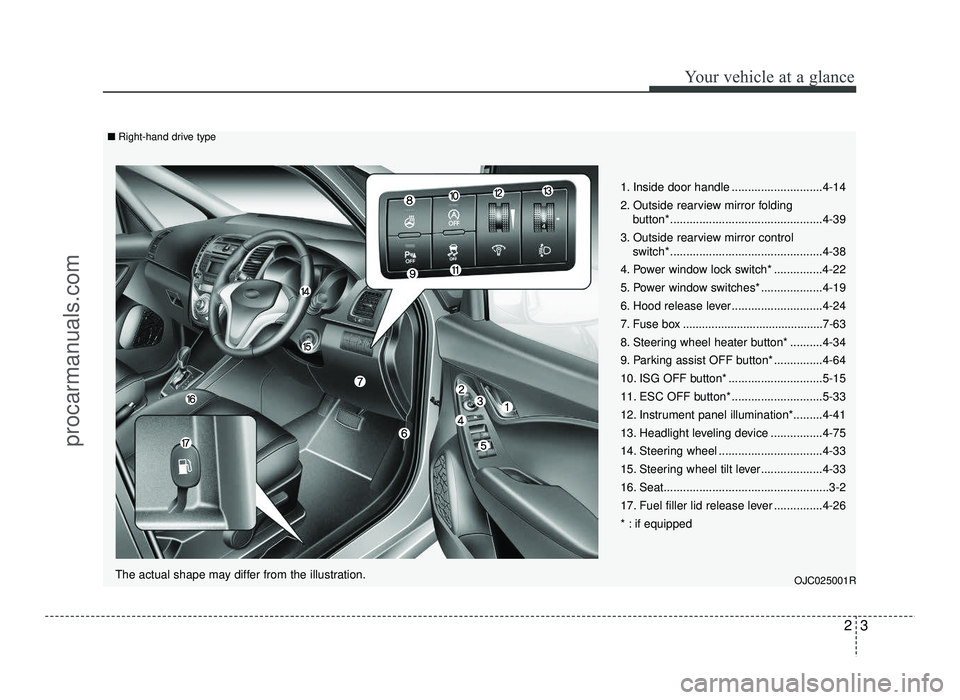
1. Inside door handle ............................4-14
2. Outside rearview mirror folding button*...............................................4-39
3. Outside rearview mirror control switch* ...............................................4-38
4. Power window lock switch* ...............4-22
5. Power window switches* ...................4-19
6. Hood release lever ............................4-24
7. Fuse box ............................................7-63
8. Steering wheel heater button* ..........4-34
9. Parking assist OFF button* ...............4-64
10. ISG OFF button* .............................5-15
11. ESC OFF button* ............................5-33
12. Instrument panel illumination*.........4-41
13. Headlight leveling device ................4-75
14. Steering wheel ................................4-33
15. Steering wheel tilt lever...................4-33
16. Seat...................................................3-2
17. Fuel filler lid release lever ...............4-26
* : if equipped
OJC025001R
■Right-hand drive type
The actual shape may differ from the illustration.
procarmanuals.com
Page 26 of 456
39
Safety features of your vehicle
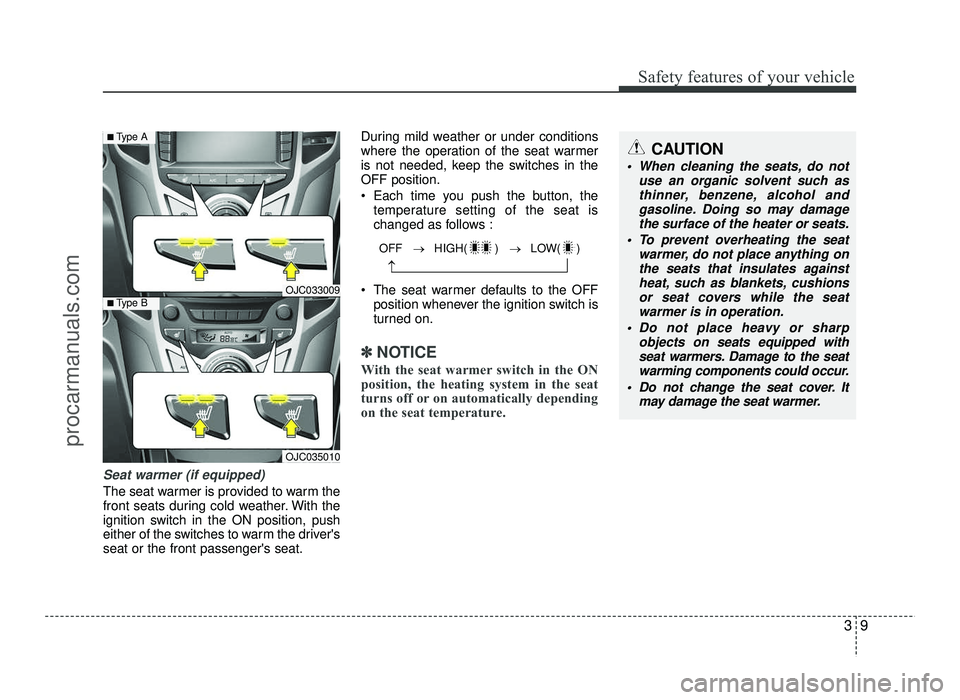
Seat warmer (if equipped)
The seat warmer is provided to warm the
front seats during cold weather. With the
ignition switch in the ON position, push
either of the switches to warm the driver'sseat or the front passenger's seat.During mild weather or under conditions
where the operation of the seat warmer
is not needed, keep the switches in theOFF position.
Each time you push the button, the
temperature setting of the seat is
changed as follows :
The seat warmer defaults to the OFF position whenever the ignition switch is
turned on.
✽✽ NOTICE
With the seat warmer switch in the ON
position, the heating system in the seat
turns off or on automatically depending
on the seat temperature.
CAUTION
When cleaning the seats, do not use an organic solvent such asthinner, benzene, alcohol and
gasoline. Doing so may damage the surface of the heater or seats.
To prevent overheating the seat warmer, do not place anything onthe seats that insulates against
heat, such as blankets, cushionsor seat covers while the seatwarmer is in operation.
Do not place heavy or sharp objects on seats equipped with
seat warmers. Damage to the seat
warming components could occur.
Do not change the seat cover. It may damage the seat warmer.
OJC033009
OJC035010
■Type A
■Type B
OFF → HIGH( ) → LOW( )
→
procarmanuals.com
Page 117 of 456
439
Features of your vehicle
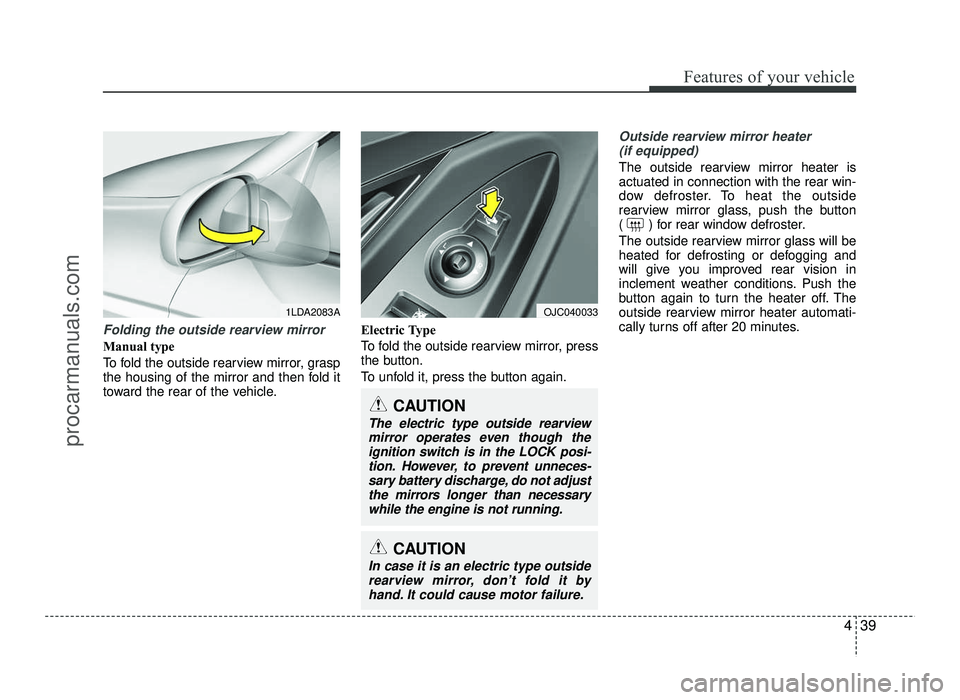
Folding the outside rearview mirror
Manual type
To fold the outside rearview mirror, grasp
the housing of the mirror and then fold it
toward the rear of the vehicle.Electric Type
To fold the outside rearview mirror, press
the button.
To unfold it, press the button again.
Outside rearview mirror heater
(if equipped)
The outside rearview mirror heater is actuated in connection with the rear win-
dow defroster. To heat the outside
rearview mirror glass, push the button
( ) for rear window defroster.
The outside rearview mirror glass will be
heated for defrosting or defogging and
will give you improved rear vision in
inclement weather conditions. Push the
button again to turn the heater off. The
outside rearview mirror heater automati-
cally turns off after 20 minutes.
1LDA2083A
CAUTION
In case it is an electric type outside
rearview mirror, don’t fold it byhand. It could cause motor failure.
CAUTION
The electric type outside rearviewmirror operates even though theignition switch is in the LOCK posi-
tion. However, to prevent unneces- sary battery discharge, do not adjust
the mirrors longer than necessary while the engine is not running.
OJC040033
procarmanuals.com
Page 163 of 456
485
Features of your vehicle
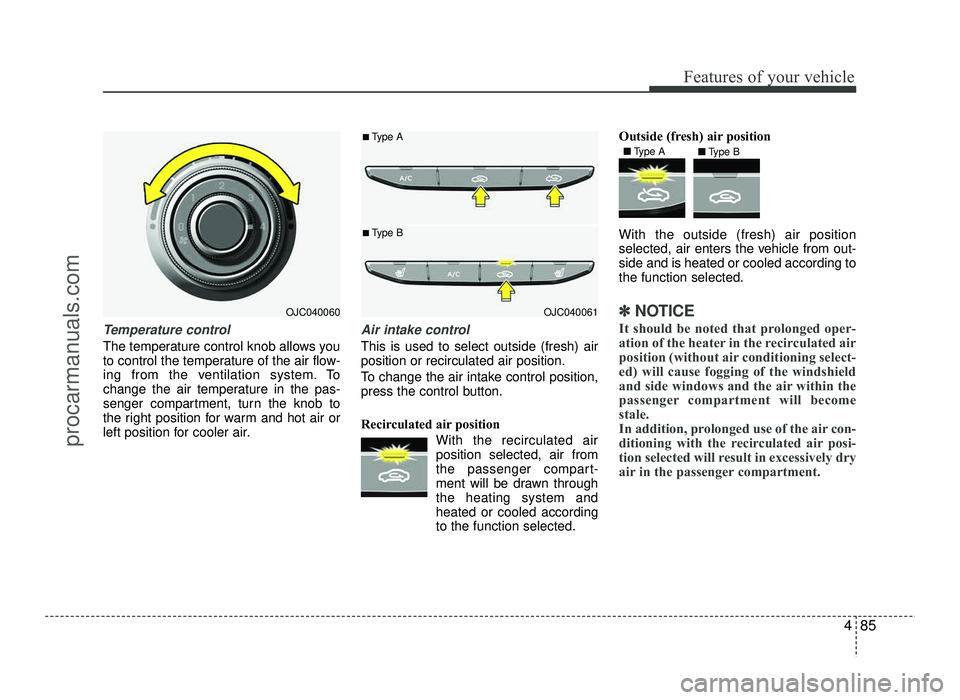
Temperature control
The temperature control knob allows you
to control the temperature of the air flow-
ing from the ventilation system. To
change the air temperature in the pas-
senger compartment, turn the knob to
the right position for warm and hot air or
left position for cooler air.
Air intake control
This is used to select outside (fresh) air position or recirculated air position.
To change the air intake control position,
press the control button.
Recirculated air position With the recirculated airposition selected, air from
the passenger compart-
ment will be drawn throughthe heating system andheated or cooled accordingto the function selected. Outside (fresh) air position With the outside (fresh) air position
selected, air enters the vehicle from out-side and is heated or cooled according tothe function selected.
✽✽
NOTICE
It should be noted that prolonged oper-
ation of the heater in the recirculated air
position (without air conditioning select-
ed) will cause fogging of the windshield
and side windows and the air within the
passenger compartment will become
stale.
In addition, prolonged use of the air con-
ditioning with the recirculated air posi-
tion selected will result in excessively dry
air in the passenger compartment. OJC040060OJC040061
■
Type A
■ Type B
■ Type A
■Type B
procarmanuals.com
Page 167 of 456
489
Features of your vehicle
During air conditioning system opera-tion, you may occasionally notice a slight change in engine speed as the
air conditioning compressor cycles.
This is a normal system operation
characteristic.
Use the air conditioning system every month only for a few minutes to ensure
maximum system performance.
When using the air conditioning sys- tem, you may notice clear water drip-
ping (or even puddling) on the ground
under the passenger side of the vehi-
cle. This is a normal system operation
characteristic.
Operating the air conditioning system in the recirculated air position provides
maximum cooling, however, continual
operation in this mode may cause the
air inside the vehicle to become stale.
During cooling operation, you may occasionally notice a misty air flow
because of rapid cooling and humid air
intake. This is a normal system opera-
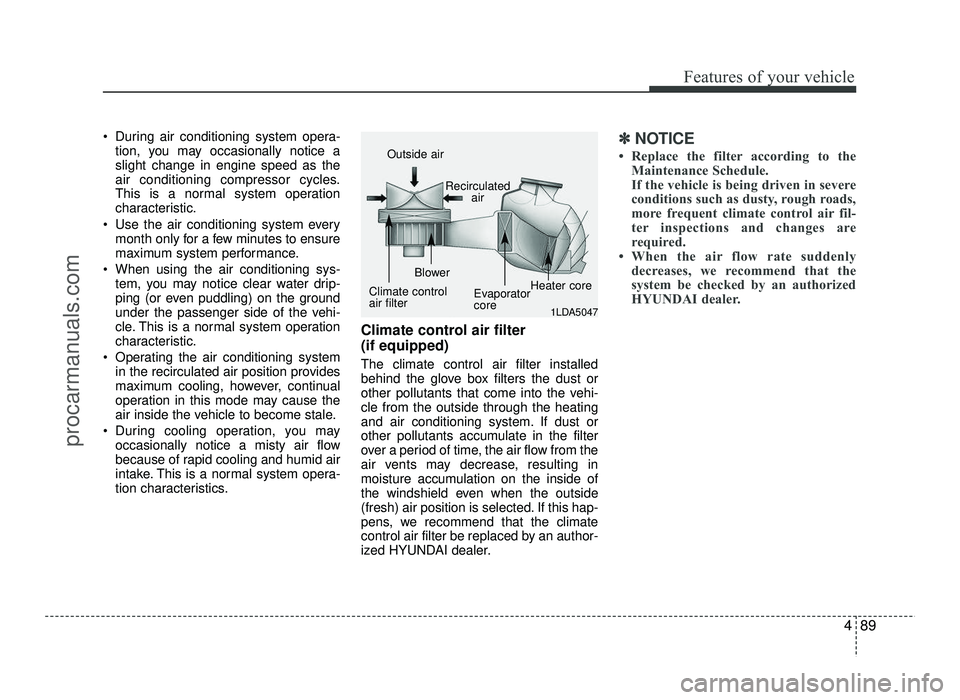
tion characteristics. Climate control air filter (if equipped) The climate control air filter installed
behind the glove box filters the dust or
other pollutants that come into the vehi-cle from the outside through the heating
and air conditioning system. If dust or
other pollutants accumulate in the filter
over a period of time, the air flow from the
air vents may decrease, resulting in
moisture accumulation on the inside of
the windshield even when the outside
(fresh) air position is selected. If this hap-
pens, we recommend that the climate
control air filter be replaced by an author-
ized HYUNDAI dealer.✽✽
NOTICE
Replace the filter according to the Maintenance Schedule.
If the vehicle is being driven in severe
conditions such as dusty, rough roads,
more frequent climate control air fil-
ter inspections and changes are
required.
When the air flow rate suddenly decreases, we recommend that the
system be checked by an authorized
HYUNDAI dealer.
1LDA5047
Outside air
Recirculatedair
Climate control air filter Blower
EvaporatorcoreHeater core
procarmanuals.com
Page 176 of 456
Features of your vehicle
98
4
During air conditioning system opera-
tion, you may occasionally notice a slight change in engine speed as the
air conditioning compressor cycles.
This is a normal system operation
characteristic.
Use the air conditioning system every month only for a few minutes to ensure
maximum system performance.
When using the air conditioning sys- tem, you may notice clear water drip-
ping (or even puddling) on the ground
under the passenger side of the vehi-
cle. This is a normal system operation
characteristic.
Operating the air conditioning system in the recirculated air position provides
maximum cooling, however, continual
operation in this mode may cause the
air inside the vehicle to become stale.
During cooling operation, you may occasionally notice a misty air flow
because of rapid cooling and humid air
intake. This is a normal system opera-
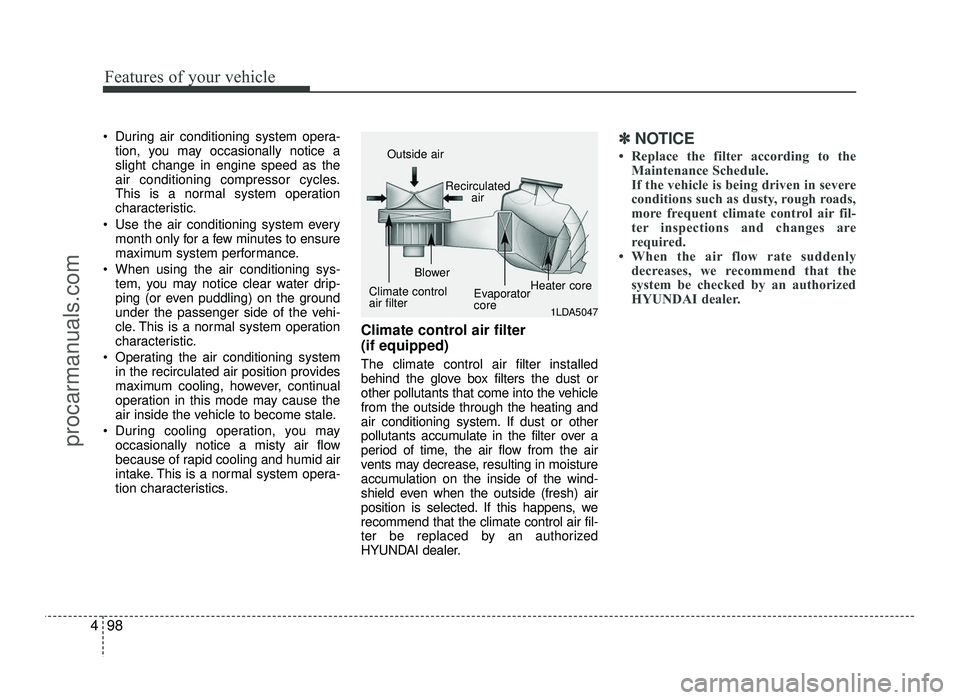
tion characteristics. Climate control air filter (if equipped) The climate control air filter installed
behind the glove box filters the dust or
other pollutants that come into the vehiclefrom the outside through the heating and
air conditioning system. If dust or other
pollutants accumulate in the filter over a
period of time, the air flow from the air
vents may decrease, resulting in moisture
accumulation on the inside of the wind-
shield even when the outside (fresh) air
position is selected. If this happens, werecommend that the climate control air fil-
ter be replaced by an authorized
HYUNDAI dealer.✽✽
NOTICE
Replace the filter according to the Maintenance Schedule.
If the vehicle is being driven in severe
conditions such as dusty, rough roads,
more frequent climate control air fil-
ter inspections and changes are
required.
When the air flow rate suddenly decreases, we recommend that the
system be checked by an authorized
HYUNDAI dealer.
1LDA5047
Outside air
Recirculatedair
Climate control air filter Blower
EvaporatorcoreHeater core
procarmanuals.com
Page 178 of 456
Features of your vehicle
100
4
For maximum defrosting, set the tem-
perature control to the extreme
right/hot position and the fan speedcontrol to the highest speed.
If warm air to the floor is desired while defrosting or defogging, set the modeto the floor-defrost position.
Before driving, clear all snow and ice from the windshield, rear window, out-
side rear view mirrors, and all side win-
dows.
Clear all snow and ice from the hood and air inlet in the cowl grill to improveheater and defroster efficiency and to
reduce the probability of fogging upinside of the windshield. Manual climate control system
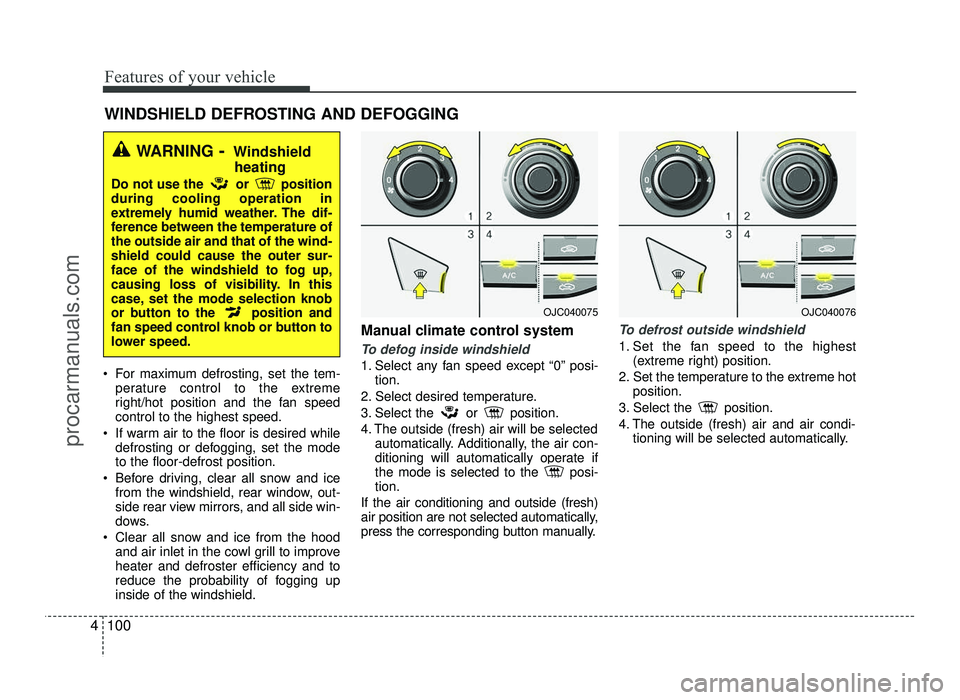
To defog inside windshield
1. Select any fan speed except “0” posi-
tion.
2. Select desired temperature.
3. Select the or position.
4. The outside (fresh) air will be selected automatically. Additionally, the air con-
ditioning will automatically operate if
the mode is selected to the posi-tion.
If the air conditioning and outside (fresh)
air position are not selected automatically,
press the corresponding button manually.
To defrost outside windshield
1. Set the fan speed to the highest (extreme right) position.
2. Set the temperature to the extreme hot position.
3. Select the position.
4. The outside (fresh) air and air condi- tioning will be selected automatically.
WINDSHIELD DEFROSTING AND DEFOGGING
WARNING - Windshield
heating
Do not use the or position during cooling operation in
extremely humid weather. The dif-
ference between the temperature ofthe outside air and that of the wind-shield could cause the outer sur-
face of the windshield to fog up,
causing loss of visibility. In this
case, set the mode selection knob
or button to the position and
fan speed control knob or button to
lower speed.
OJC040075OJC040076
procarmanuals.com
Page 186 of 456
Features of your vehicle
108
4
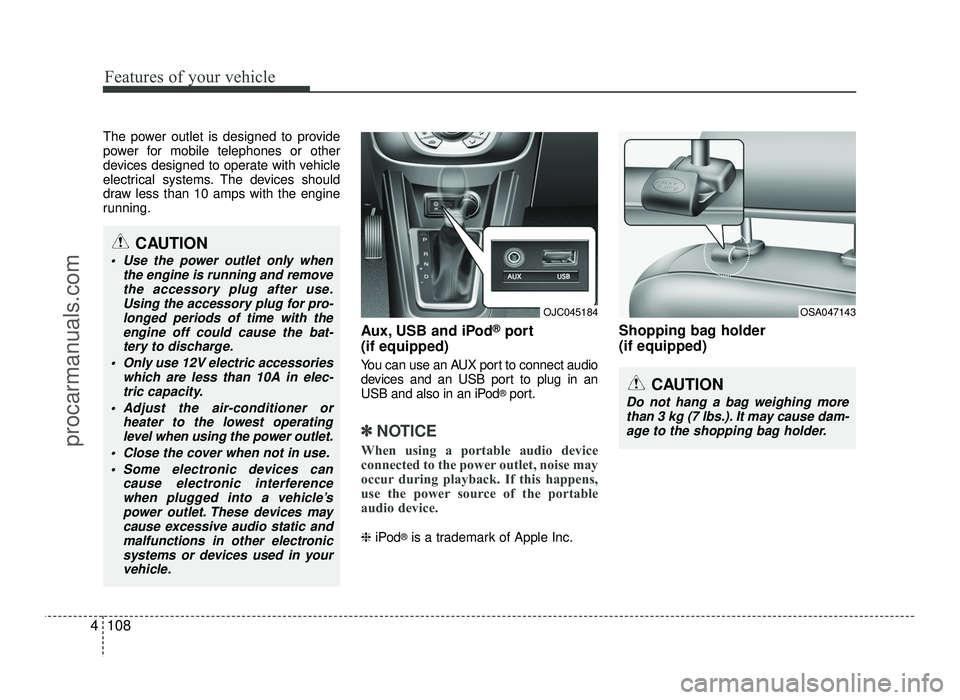
The power outlet is designed to provide
power for mobile telephones or other
devices designed to operate with vehicle
electrical systems. The devices should
draw less than 10 amps with the engine
running.
Aux, USB and iPod®
port
(if equipped)
You can use an AUX port to connect audio
devices and an USB port to plug in an
USB and also in an iPod ®
port.
✽✽ NOTICE
When using a portable audio device
connected to the power outlet, noise may
occur during playback. If this happens,
use the power source of the portable
audio device.
❈ iPod ®
is a trademark of Apple Inc. Shopping bag holder (if equipped)
OJC045184OSA047143
CAUTION
Do not hang a bag weighing more
than 3 kg (7 lbs.). It may cause dam-
age to the shopping bag holder.
CAUTION
Use the power outlet only when the engine is running and removethe accessory plug after use.
Using the accessory plug for pro-longed periods of time with theengine off could cause the bat-
tery to discharge.
Only use 12V electric accessories which are less than 10A in elec-
tric capacity.
Adjust the air-conditioner or heater to the lowest operatinglevel when using the power outlet.
Close the cover when not in use.
Some electronic devices can cause electronic interferencewhen plugged into a vehicle’s
power outlet. These devices may cause excessive audio static and
malfunctions in other electronicsystems or devices used in yourvehicle.
procarmanuals.com
Page 197 of 456
4119
Features of your vehicle
✽✽NOTICE - USING THE USB
DEVICE
To use an external USB device, make sure the device is not connect-
ed when starting up the vehicle.
Connect the device after starting
up.
If you start the engine when the
USB device is connected, it may
damage the USB device. (USB
flashdrives are very sensitive to
electric shock.)
If the engine is started up or turned
off while the external USB device is
connected, the external USB device
may not work.
The System may not play inauthen-
tic MP3 or WMA files.
1) It can only play MP3 files with the compression rate between
8Kbps ~ 320Kbps.
2) It can only play WMA music files with the compression rate
between 8Kbps ~ 320Kbps.
Take precautions for static electric-
ity when connecting or disconnect-
ing the external USB device. (Continued)(Continued)
An encrypted MP3 PLAYER is not
recognizable.
Depending on the condition of the external USB device, the connected
external USB device can be unrec-
ognizable.
When the formatted byte/sector
setting of External USB device is
not either 512BYTE or 2048BYTE,
then the device will not be recog-
nized.
Use only a USB device formatted to
FAT 12/16/32.
USB devices without USB I/F authentication may not be recog-
nizable.
Make sure the USB connection ter- minal does not come in contact with
the human body or other objects.
If you repeatedly connect or discon-
nect the USB device in a short peri-
od of time, it may break the device.
You may hear a strange noise when connecting or disconnecting a USB
device. (Continued)(Continued)
If you disconnect the external USB
device during playback in USB mode,
the external USB device can be dam-
aged or may malfunction. Therefore,
disconnect the external USB device
when the audio is turned off or in
another mode. (e.g, Radio, CD)
Depending on the type and capacity of the external USB device or the
type of the files stored in the device,
there is a difference in the time
taken for recognition of the device.
Do not use the USB device for pur- poses other than playing music
files.
Playing videos through the USB is
not supported.
Use of USB accessories such as rechargers or heaters using USB
I/F may lower performance or
cause trouble.
If you use devices such as a USB hub purchased separately, the vehi-
cle’s audio system may not recog-
nize the USB device. In that case,
connect the USB device directly to
the multimedia terminal of the
vehicle.
(Continued)
procarmanuals.com