AUX HYUNDAI IX35 2012 User Guide
[x] Cancel search | Manufacturer: HYUNDAI, Model Year: 2012, Model line: IX35, Model: HYUNDAI IX35 2012Pages: 560, PDF Size: 28.31 MB
Page 212 of 560
4137
Features of your vehicle
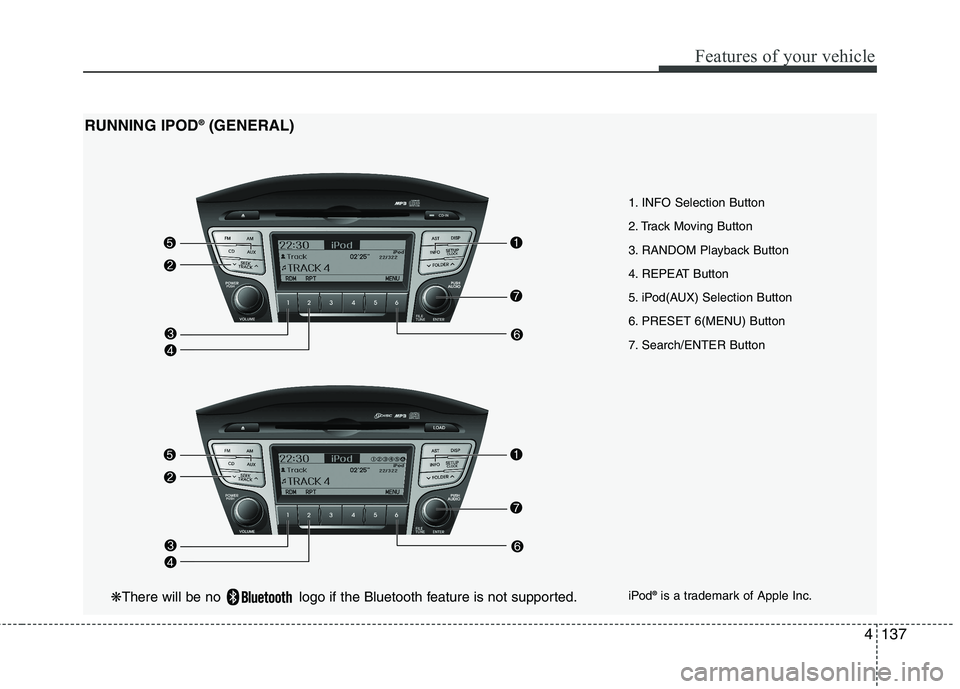
1. INFO Selection Button
2. Track Moving Button
3. RANDOM Playback Button
4. REPEAT Button
5. iPod(AUX) Selection Button
6. PRESET 6(MENU) Button
7. Search/ENTER Button
RUNNING IPOD
®
(GENERAL)
iPod®
is a trademark of Apple Inc.
❋ There will be no logo if the Bluetooth feature is not supported.
Page 213 of 560
Features of your vehicle
138
4
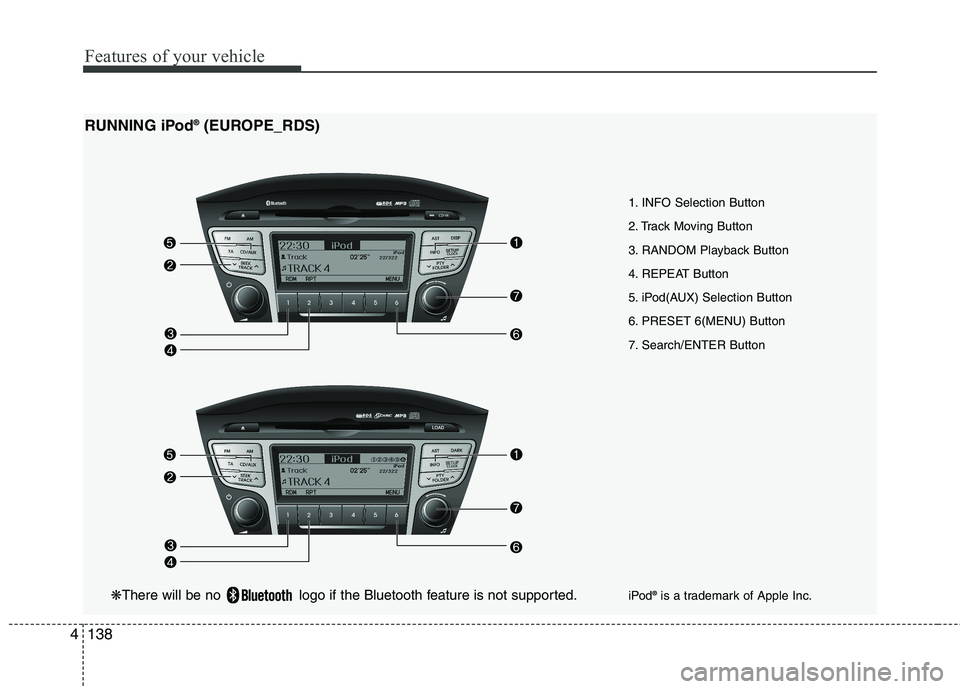
1. INFO Selection Button
2. Track Moving Button
3. RANDOM Playback Button
4. REPEAT Button
5. iPod(AUX) Selection Button
6. PRESET 6(MENU) Button
7. Search/ENTER Button
RUNNING iPod
®
(EUROPE_RDS)
iPod®
is a trademark of Apple Inc.
❋ There will be no logo if the Bluetooth feature is not supported.
Page 214 of 560
4139
Features of your vehicle
In case the iPod exclusive cable is con-
nected to the multiple terminal inside the
console on the right hand side of the dri-
ver's seat. When the iPod is connected,
the 'iPod' icon will be displayed on the top
left corner of the display screen.
1. INFO Selection Button
Displays the information of the file cur-
rently played in the order of Title ➟Artist
➟ Album... (Displays no information if the
file has no song information.)
2. Track Moving Button
Press the [ SEEK(TRACK)] button for less than 0.8 second to play from the beginning of the song currently
played. Press the button for less than0.8 second and press it again within 1
seconds to move and play the previous
track. Press the button for 0.8 second
or longer to play the song in reverse
direction in fast speed.
Press the [SEEK(TRACK) ] button for less than 0.8 second to move to the
next track. Press the button for 0.8 sec-
ond or longer to play the song in for-
ward direction in fast speed. 3. RANDOM Playback Button
Press the button for less than 0.8 second
to activate or deactivate the random play-
back of the songs within the current cat-
egory. Press the button for longer than
0.8 second to randomly play all songs in
the entire album of the iPod.
Press the button once again to cancel
the mode.
4. REPEAT Button
Repeats the song currently played.
5. iPod(AUX) Selection Button
If iPod is connected, it switches to the
iPod mode from the CD mode to play the
song files stored in the iPod. If no CD and
auxiliary device is not connected, it dis-
plays "NO Media" for 3 seconds and
returns to the previous mode.
6. PRESET 6(MENU) Button
MENU(preset6) you will be able to
search through the lower category of the
selected category. The order of iPod's
category is SONG, ALBUMES,
ARTISTS, GENRES, and iPod. 7. Search/ENTER Button
When you turn the button clockwise, it
will display the songs(category) next to
the song currently played(category in the
same level).
Also, when you turn the button counter-
clockwise, it will display the songs(cate-
gory) before the song currently played
(category in the same level).
If you want to listen to the song displayed
in the song category, press the button,then it will skip to the selected song and
play.
Page 215 of 560
Features of your vehicle
140
4
✽✽
NOTICE FOR USING IPOD DEVICE
Some iPod models might not support
the communication protocol and the
files will not be played. (iPod models
supported: Mini, 4G, Photo, Nano,
5G)
The order of search or playback of songs in the iPod can be different
from the order searched in the audio
system.
If the iPod crashes due to its own trou- ble, reset iPod. (Reset: Refer to iPod
manual)
iPod may not operate normally on low
battery.
(Continued)
When the iPod cable is connect- ed, the system can be switched tothe AUX mode even without theiPod device and can cause noise.
Disconnect iPod cable when youare not using the iPod device.
When the iPod is not used at audio system, iPod cable has to
be separate from iPod device.Origin display of iPod may not bedisplayed.CAUTION IN USING iPod DEVICE
You need the power cable exclu- sive for iPod in order to operate
iPod with the buttons on theaudio system. The PC cable pro-vided by Apple may cause mal- function and do not use it for
vehicle use.
When connecting the device with iPod cable, push in the jack fullynot to interfere with communica-
tion.
When adjusting the sound effects of iPod and the audio system, thesound effects of both devices will overlap each and might cause
reduce or distort the quality of thesound.
Deactivate (turn off) the equalizer function of iPod when adjustingthe audio system’s volume, and
turn off the equalizer of the audio system when using the equalizerof iPod.
(Continued)
Page 225 of 560
Features of your vehicle
150
4
■■
Using the head unit as
Bluetooth music
The head unit supports A2DP (Audio
Advanced Distribution Profile) and
AVRCP(Audio Video Remote ControlProfile).
Both profiles are available for listening to
the MP3 music via Bluetooth cellular
phone supporting above Bluetooth pro-
files.
To play MP3 music from the Bluetooth
cellular phone, press the [AUX] button
until “MP3 Play” is displayed on the LCD.
Then try playing music by phone.
When playing music from the Bluetooth
cellular phone, the head unit displaysMP3 MODE. NOTE:
Not only MP3 files, all the sounds
that the phone supports can be
heard by the audio system.
The Bluetooth cellular phones shall feature A2DP and AVRCP functions.
Some A2DP and AVRCP Bluetooth cellular phones may not play music
through the head unit on first try.
Please try the below;
i.e : Menu ➟
➟
Filemanager ➟➟
Music ➟➟
Option ➟➟
Play via Bluetooth
Please refer to User’s Guide of your phone for more detailed informa-
tion. To stop music, try stop music
by the phone and change audio
mode to different one. (e.g. FM, CD,
iPod, ...)
Page 403 of 560
Index
2
I
Active ECO system·························································5-47
Air bags ···········································································3-40
Air bag warning label................................................3-63
Air bag warning light ................................................3-43
Curtain air bag ..........................................................3-54
Driver's and passenger's front air bag ......................3-47
Passenger’s front air bag ON/OFF indicator ............3-44
Passenger’s front air bag ON/OFF switch ................3-50
Side impact air bag....................................................3-52
Air cleaner·······································································7-19
Alarm system ··································································4-11All wheel drive (AWD), see four wheel drive (4WD)·································································5-23
Antenna ·········································································4-116
Anti-lock brake system (ABS) ·······································5-33
Appearance care······························································7-57 Exterior care ······························································7-57
Interior care ·······························································7-62
Armrest ···········································································3-11
Ashtray ··········································································4-108
Audio system ································································4-116 Antenna ···································································4-116
Aux, USB and iPod ·················································4-111
Audio remote control ·············································4-117
Automatic climate control system ··································4-96 Air conditioning ······················································4-102
Automatic heating and air conditioning····················4-97
Manual heating and air conditioning ························4-98
Automatic transaxle ························································5-17 Ignition key interlock system ····································5-21
Shift lock system ·······················································5-20
Sports mode·······························································5-20
Battery ·············································································7-26
Battery saver function ·····················································4-72
Before driving ···································································5-3
Bonnet ·············································································4-24
Bottle holders, see cup holders ·····································4-109
Brake system ···································································5-30 Anti-lock brake system (ABS) ··································5-33
Downhill brake control (DBC) ·································5-39
Electronic stability program (ESP) ···························5-36
Emergency Stop Signal (ESS) ··································5-42
Hill-start assist control (HAC) ··································5-39
Parking brake ····························································5-31
Power brakes ·····························································5-30
Brakes/clutch fluid ··························································7-16
Bulb replacement ····························································7-49 Front fog light bulb replacement ······························7-52
Headlight bulb replacement ······································7-50
High mounted stop light replacement ·······················7-55
A
B
EL UK INDEX.QXP 1/12/2010 3:27 PM Page 2
Page 407 of 560
Index
6
I
Ignition key interlock system ········································5-21
ISOFIX system ······························································3-35
Immobiliser system ··························································4-3
Indicators and warnings ·················································4-49Indicator symbols on the instrument cluster ····················1-6
Instrument cluster ··························································4-42
ECO ON/OFF mode··················································4-49
Engine temperature gauge ········································4-44
Fuel gauge ································································4-45
Instrument panel illumination ··································4-43Odometer ··································································4-46
Outside thermometer ·················································4-45Speedometer ·····························································4-43Tachometer ·······························································4-43
Tripmeter ···································································4-47
Trip computer ···························································4-46
Warning and indicators ············································4-49
Instrument panel illumination ········································4-43
Instrument panel overview ··············································2-3
Interior care ····································································7-62
Interior features ····························································4-108 Ashtray ···································································4-108
Cigarette lighter ······················································4-108
Cargo security screen ·············································4-113
Cup holder ······························································4-109
Digital clock ···························································4-111 Aux, USB and iPod ················································4-111
Floor mat anchor(s) ················································4-112
Luggage net (holder) ··············································4-112
Power outlet ···························································4-110Sunvisor ··································································4-109
Interior light ···································································4-82 Glove box lamp ·························································4-84
Luggage room lamp ··················································4-83
Map lamp ··································································4-82
Room lamp ································································4-83
Vanity mirror lamp····················································4-83
Interior light bulb replacement ······································7-56
Interior overview ·····························································2-2
Interlock system ·····························································5-21
Jack and tools ·································································6-13
Jump starting ····································································6-5
Key positions ···································································5-4 Keys ·················································································4-2
K
J
I
EL UK INDEX.QXP 1/12/2010 3:27 PM Page 6
Page 523 of 560
4 111
Features of your vehicle
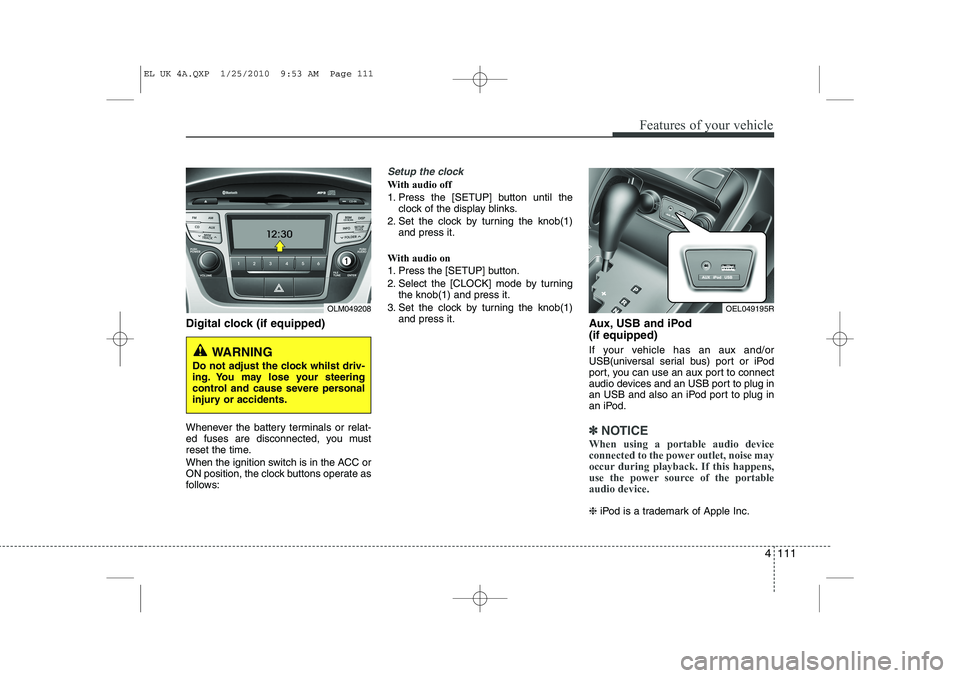
Digital clock (if equipped)
Whenever the battery terminals or relat-
ed fuses are disconnected, you must
reset the time.
When the ignition switch is in the ACC or
ON position, the clock buttons operate as
follows:
Setup the clock
With audio off
1. Press the [SETUP] button until theclock of the display blinks.
2. Set the clock by turning the knob(1) and press it.
With audio on
1. Press the [SETUP] button.
2. Select the [CLOCK] mode by turning the knob(1) and press it.
3. Set the clock by turning the knob(1) and press it. Aux, USB and iPod (if equipped)
If your vehicle has an aux and/or
USB(universal serial bus) port or iPod
port, you can use an aux port to connect
audio devices and an USB port to plug in
an USB and also an iPod port to plug in
an iPod.
✽✽NOTICE
When using a portable audio device
connected to the power outlet, noise may
occur during playback. If this happens,
use the power source of the portableaudio device.
❈ iPod is a trademark of Apple Inc.
OLM049208
WARNING
Do not adjust the clock whilst driv-
ing. You may lose your steering
control and cause severe personal
injury or accidents.
OEL049195R
EL UK 4A.QXP 1/25/2010 9:53 AM Page 111
Page 537 of 560
4 125
Features of your vehicle
POWER BASS (P.BASS)
Based on psychoacoustic technology,
this technology overcomes BASS limita-
tions which may occur due to the limited
number and size of speaker to offer
dynamic BASS sound quality.
It is possible to adjust in 3 levels of LOW/ MID/ HIGH. OFF ➟LOW ➟MID ➟HIGH
❈ AM, AMA is not supported.
❈ CDP ONLY.
RETURN
This function displays the previous MODE screen.
8. Manual Channel Selector & Sound Quality Control Knob
Turn this control whilst listening to a radio
channel to manually adjust frequency.
Turn clockwise to increase frequency
and counterclockwise to reduce frequen-
cy.
Pressing TUNE button changes the
BASS, MIDDLE, TREBLE, FADER and
BALANCE mode.
The mode selected is shown on the dis-
play. After selecting each mode, rotate
the Audio control knob clockwise or
counterclockwise. BASS Control
To increase the BASS, rotate the knob
clockwise, whilst to decrease the BASS,
rotate the knob counterclockwise.
MIDDLE Control
To increase the MIDDLE, rotate the knob
clockwise, whilst to decrease the MID-
DLE, rotate the knob counterclockwise.
TREBLE Control
To increase the TREBLE, rotate the knob
clockwise, whilst to decrease the TRE-
BLE, rotate the knob counterclockwise.
FADER Control
Turn the control knob clockwise to
emphasize rear speaker sound(front
speaker sound will be attenuated). When
the control knob is turned counterclock-
wise, front speaker sound will be empha-
sized(rear speaker sound will be attenu-ated).
BALANCE Control
Rotate the knob clockwise to emphasize
right speaker sound(left speaker sound
will be attenuated).
When the control knob is turned counter
clockwise, left speaker sound will be
emphasized(right speaker sound will be
attenuated).
9. DISP(DARK) Button
Turn the LCD Display & Backlight on/off
when [DISP] button press. ❈ GENERAL : DISP, EUROPE : DARK
10. TA Selection Button
In FM, CD, AUX mode, turns on/off the
reception of TA channels of RDS.
11. PTY(FOLDER) Button
Moves [ PTY(FOLDER)] Button when searching PTY in RDS
Broadcasting Program Type selection.
Moves [PTY(FOLDER) ] button when searching PTY in RDS
Broadcasting Program Type selection.
EL UK 4B AUDIO.QXP 1/12/2010 4:00 PM Page 125
Page 538 of 560
Features of your vehicle
126
4
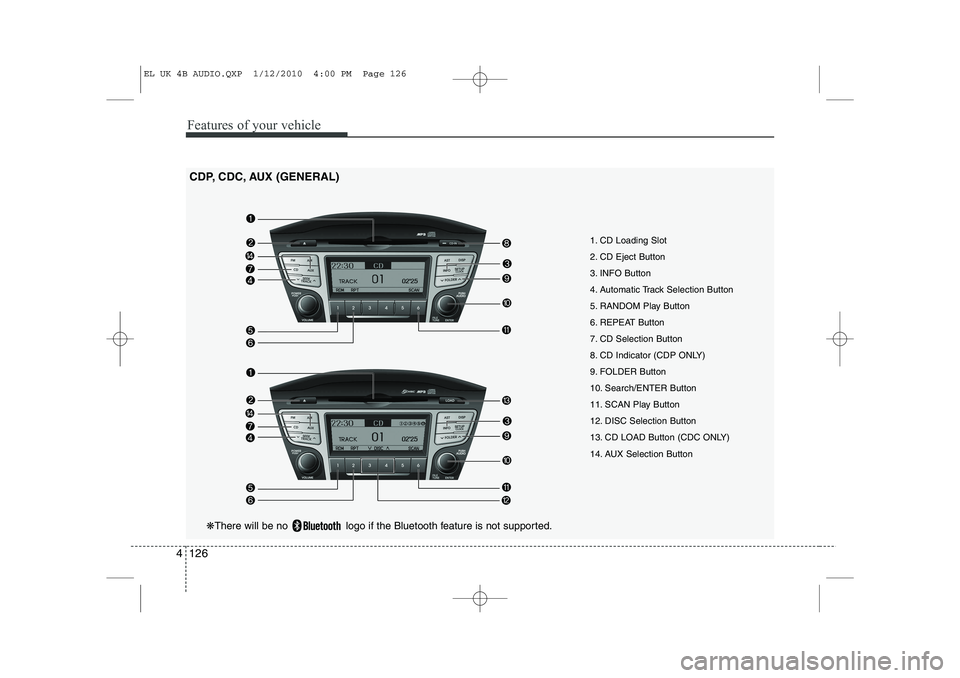
1. CD Loading Slot
2. CD Eject Button
3. INFO Button
4. Automatic Track Selection Button
5. RANDOM Play Button
6. REPEAT Button
7. CD Selection Button
8. CD Indicator (CDP ONLY)
9. FOLDER Button
10. Search/ENTER Button
11. SCAN Play Button
12. DISC Selection Button
13. CD LOAD Button (CDC ONLY)
14. AUX Selection Button
CDP, CDC, AUX (GENERAL)
❋
There will be no logo if the Bluetooth feature is not supported.
EL UK 4B AUDIO.QXP 1/12/2010 4:00 PM Page 126