USB HYUNDAI IX35 2012 User Guide
[x] Cancel search | Manufacturer: HYUNDAI, Model Year: 2012, Model line: IX35, Model: HYUNDAI IX35 2012Pages: 560, PDF Size: 28.31 MB
Page 542 of 560
Features of your vehicle
130
4
CAUTION IN USING USB DEVICE
To use the external USB device,
make sure the device is not
mounted when starting up thevehicle and mount the deviceafter starting up.
If you start the vehicle when the USB device is mounted, it maydamage the USB device. (USB isnot ESA)
If the vehicle is started up or turned off whilst the external USB
device is connected, the externalUSB device may not work.
It may not play inauthentic MP3 or WMA files.
1) It can only play MP3 files with the compression rate between8Kbps~320Kbps.
2) It can only play WMA music files with the compression ratebetween 8Kbps~320Kbps.
Take cautions for static electricity when mounting or dismountingthe external USB device.
Encoded MP3 PLAYER is not rec- ognizable.
(Continued)
(Continued) Depending on the condition of the external USB device, the con-nected external USB device canbe unrecognizable.
When the formatted byte/sector setting of External USB devices isnot either 512BYTE or 2048BYTE, then the device will not be recog-
nized.
Only the USB device formatted to FAT 12/16/32.
USB device without USB IF authentication may not be recog-
nizable.
Make sure the USB connection terminal does not come in con-tact with human body or anyobject.
If you repeat mounting or dis- mounting USB device in a shortperiod of time, it may break thedevice.
You might hear strange noise when mounting or dismounting aUSB device.
(Continued)(Continued) If you dismount the external USB device during playback in USBmode, the external USB device
can be damaged or malfunction. Therefore, mount the externalUSB device when the engine is turned off or in another mode.
Depending on the type and capacity of the external USBdevice or the type of the filesstored in the device, there is a dif-
ference in the time taken forrecognition of the device, but this is not a trouble. Please wait for amoment.
Do not use the USB device for other purposes than playingmusic files.
Use of USB accessories such as the recharger or heater usingUSB I/F may lower the perform-
ance or cause trouble.
If you use devices such as the USB hub you purchased sepa-rately, the vehicle’s audio system
may not recognize the USB device. Connect the USB devicedirectly to the multimedia termi- nal of the vehicle.
(Continued)
EL UK 4B AUDIO.QXP 1/12/2010 4:00 PM Page 130
Page 543 of 560
4 131
Features of your vehicle
(Continued) If USB device is divided by logical drives, only the music files on thehighest-priority drive are recog-nized by car audio.
Devices such as MP3 Player/ Mobile phone/Digital camerathose are not recognizable bystandard USB I/F can be unrecog-
nizable.
USB devices other than standard- ized goods (METAL COVER TYPEUSB) can be unrecognizable.
USB flash memory reader (such as CF, SD, microSD, etc.) or exter-nal-HDD type devices can be unrecognizable.
Music files protected by DRM (DIGITAL RIGHTS MANAGE-
MENT) are not recognizable.
The data in the USB memory may lost whilst using this AUDIO, It isrecommended to back up impor- tant data on a personal.
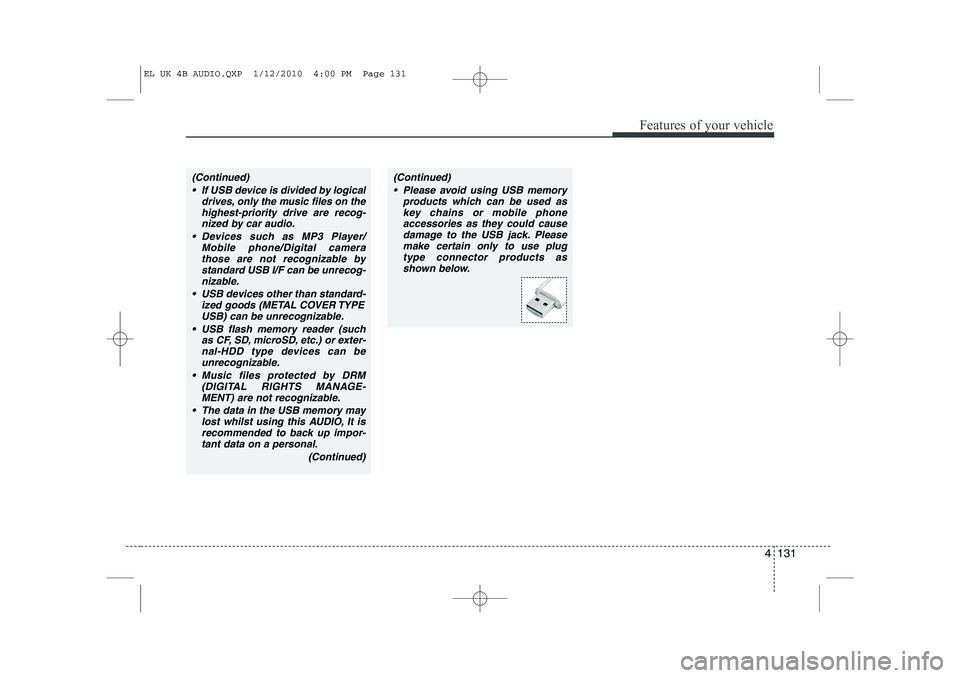
(Continued)(Continued) Please avoid using USB memory products which can be used askey chains or mobile phoneaccessories as they could cause
damage to the USB jack. Pleasemake certain only to use plug type connector products as
shown below.
EL UK 4B AUDIO.QXP 1/12/2010 4:00 PM Page 131
Page 544 of 560
Features of your vehicle
132
4
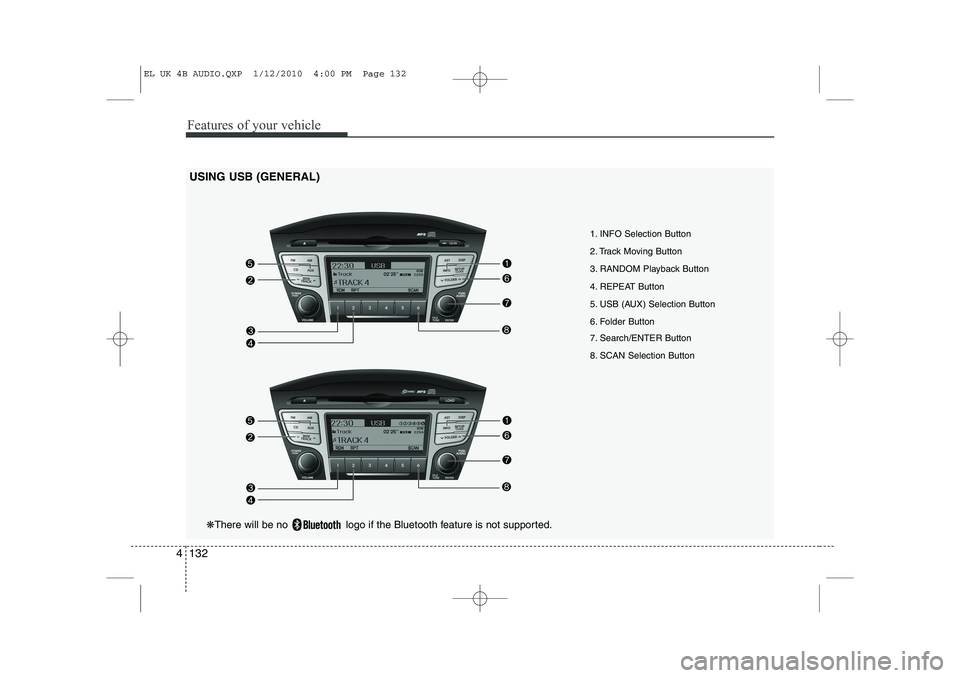
USING USB (GENERAL)
1. INFO Selection Button
2. Track Moving Button
3. RANDOM Playback Button
4. REPEAT Button
5. USB (AUX) Selection Button
6. Folder Button
7. Search/ENTER Button
8. SCAN Selection Button
❋There will be no logo if the Bluetooth feature is not supported.
EL UK 4B AUDIO.QXP 1/12/2010 4:00 PM Page 132
Page 545 of 560
4 133
Features of your vehicle
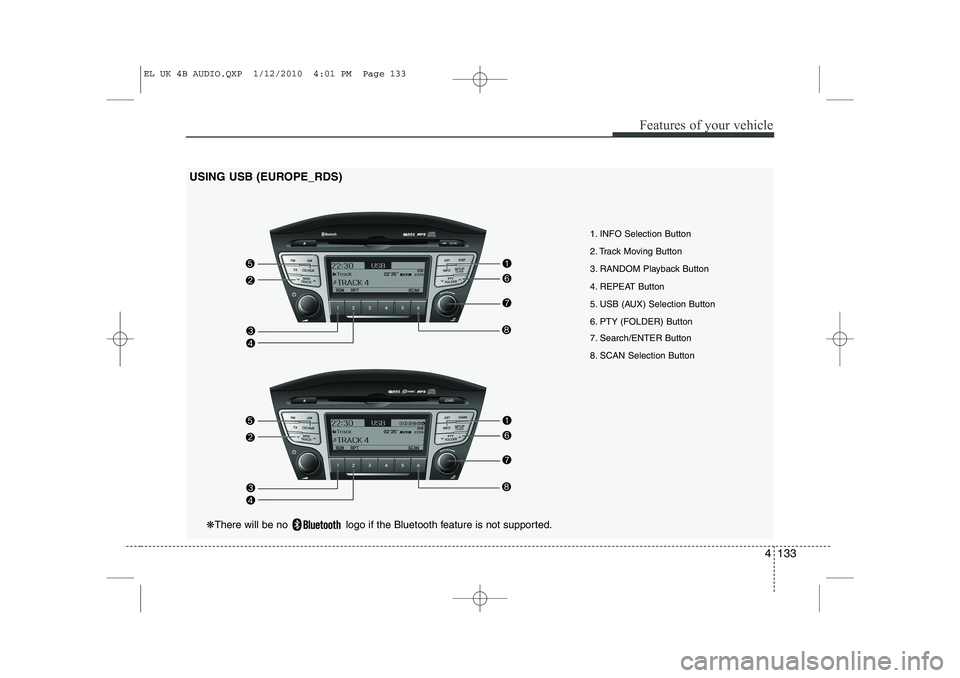
1. INFO Selection Button
2. Track Moving Button
3. RANDOM Playback Button
4. REPEAT Button
5. USB (AUX) Selection Button
6. PTY (FOLDER) Button
7. Search/ENTER Button
8. SCAN Selection Button
USING USB (EUROPE_RDS)
❋
There will be no logo if the Bluetooth feature is not supported.
EL UK 4B AUDIO.QXP 1/12/2010 4:01 PM Page 133
Page 546 of 560
Features of your vehicle
134
4
1. INFO Selection Button
Displays the information of the file cur-
rently played in the order of File Name ➟
Title ➟ Artist ➟ Album ➟ Foder ➟ Total
File... (Displays no information if the file
has no song information.)
2. Track Moving Button
Press the [SEEK(TRACK) ] button for less than 0.8 second to play from the beginning of the song currently
played. Press the button for less than0.8 second and press it again within 1
seconds to move and play the previous
track. Press the button for 0.8 second
or longer to play the song in reverse
direction in fast speed.
Press the [ SEEK(TRACK)] button for less than 0.8 second to move to the
next track. Press the button for 0.8 sec-
ond or longer to play the song in for-
ward direction in fast speed. 3. RANDOM Playback Button
Press this button for less than 0.8 sec-
onds to activate 'RDM' mode and more
than 0.8 seconds to activate 'ALL RDM'
mode.
RDM : Only files in a folder are played
back in a random sequence.
ALL RDM(A.RDM) : All files in a USB memory are played back in the random
sequence.
4. REPEAT Button
Press this button for less than 0.8 sec-
onds to activate 'RPT' mode and more
than 0.8 seconds to activate 'FLD RPT'
mode.
RPT : Only a file is repeatedly played back.
FOLDER RPT : Only files in a folder are repeatedly played back.
5. USB(AUX) Selection Button
If USB is connected, it switches to the
USB mode from the other mode to play
the song files stored in the USB. If no CD
and auxiliary device is not connected, it
displays "NO Media" for 3 seconds and
returns to the previous mode. 6. Folder Moving Button
Moves [ PTY(FOLDER)] button
child folder of the current folder and
displays the first song in the folder.
Press TUNE/ ENTER knob to move to
the folder displayed. It will play the first
song in the folder.
Moves [PTY(FOLDER) ] button par- ent folder and displays the first song in
the folder. Press TUNE/ENTER knob to
move to the folder displayed
7. Search/ENTER Button
Turn this button clockwise to display the
songs next to the currently played song.
Turn the button counterclockwise to dis-
play the songs before the currently
played song. Press the button to skip and
play the selected song.
8. SCAN Selection Button
Plays 10 seconds of each song in the
USB device. Press the button once againto cancel scanning.
EL UK 4B AUDIO.QXP 1/12/2010 4:01 PM Page 134