ECO mode HYUNDAI IX35 2012 Owner's Manual
[x] Cancel search | Manufacturer: HYUNDAI, Model Year: 2012, Model line: IX35, Model: HYUNDAI IX35 2012Pages: 560, PDF Size: 28.31 MB
Page 220 of 560
4145
Features of your vehicle
1. Press button.
2. Say “Set Up”.- The system replies with availablecommands.
- To skip the information message, press again and then a beep is heard.
3. Say “Pair Phone”
4. Proceed at Next step.
5. Say the name of your phone when prompted.
- Use any name to uniquely describe
your phone.
- Use Full name to voice tag.
- Not use to short name or similar to voice command.
6. Bluetooth ®
system will repeat the name
you stated.
7. Say "Yes" to confirm.
8. The audio displays “searching ---- passkey: 0000” and asks you to initiate
pairing procedure from the phone.
9. Search the Bluetooth ®
system on your
phone .Your phone should display your
[vehicle model name] on theBluetooth ®
device list. Then attempt
pairing on your phone
10. After Pairing is completed, your phone will start to transfer phone/contact list to the audio system. - This process may take from a few
minutes to over 10 minutes depend-
ing on the phone model and number
of entries in the phone/contact list.
11. By manual operation: - Select “PAIR” in PHONE menu,thenproceed from step 5
Note:
Until the audio displays “Transfer Complete”, Bluetooth ®
hands-free
feature may not be fully operational.
If the phone is paired to two or more vehicles of the same model, some
phones may not handle Bluetooth¢ç
devices of that name correctly. In
this case, you may need to change
the name displayed on your phone.
For example, if the vehicles' name is
HMC, you may need to change the
name displayed on you phone fromHMC.
Refer to your phone User’s Guide,
or contract your cellular carrier or
phone manufacturer for instruc-tions. When the Bluetooth
®
system is enabled,
the phone previously used is automati-
cally selected and re-connected. If you
want to select different phone previouslypaired, the phone can be selected
through “Select Phone” menu. Only a selected phone can be used with
the hands-free system at a time.
1. Press button.
2. Say "Set Up".
3. Say "Select Phone" after prompt
- The system lists all the registeredphone names.
4. Say the name or number of desired phone from the list.
5. Say "Yes" to confirm.
6. By manual operation: - Select “SELECT” in PHONE menu,then select desired phone from the list.
Page 223 of 560
Features of your vehicle
148
4
✽✽
NOTICE
The system can recognize single digits
from zero to nine. Numbers that are
ten or greater cannot be recognized.
You can enter each digit individually or group digits together in preferred
string lengths.
To speed up input, it is a good idea to
group all digits into a continuous
string.
The display corresponding to each operation appears on the screen as fol-
lows:
Input operation example:
1. Say: “Nine, nine, five” ➟
➟Display: “995”
2. And say: “Seven, three, four” ➟
➟Display: “995734”
1. Press button.
2. Say "Phonebook".
3. Say "Add Entry" after prompt.
4. Say "By Phone" to proceed.
5. Say “Yes” to confirm.
6. Your phone will start to transfer phone/
contact list to the audio system.
This process may take over 10 min-utes depending on the phone model
and number of entries
7. Wait till the audio displays “Transfer Complete” message.
The registered names can be modified.
1. Press button.
2. Say “Phonebook”
3. Say “Change Name” after prompt.
4. Say the name of the entry (voice tag)
5. Say “Yes” to confirm.
6. Say new desired name. The registered names can be deleted.
1. Press button.
2. Say “Phonebook”
3. Say “Delete Name” after prompt.
4. Say the name of the entry (voice tag)
5. Say “Yes” to confirm.
■
■ Making a Phone Call
A phone call can be made by speaking names registered in the audio system.
1. Press button.
2. Say "Call".
3. Say “Name” when prompted.
4. Say desired name (voice tag).
5. Say desired location (phone number type). Only stored locations can be selected.
6. Say “Yes” to confirm and make a call.
✽
✽ TIP
A shortcut to each of the following
functions is available:
1. Say “Call Name”
2. Say “Call
3. Say “Call
Page 224 of 560
4149
Features of your vehicle
A phone call can be made by dialing the
spoken numbers. The system can recog-
nize single digits from zero to nine.
1. Press button.
2. Say “Call”.
3. Say “Number” when prompted.
4. Say desired phone numbers.
5. Say “Dial” to complete the number andmake a call.
✽
✽ TIP
A shortcut to each of the following
functions is available:
1. Say “Dial Number”
2. Say “Dial
■
Receiving a Phone Call
When receiving a phone call, a ringtone
is audible from speakers and the audio
system changes into telephone mode.
When receiving a phone call, “Incoming”
message and incoming phone number
(if available) are displayed on the audio.
- Press button on the steering wheel.
- Press button on the steering wheel.
- Use VOLUME buttons on the steering wheel.
Call):
- Press and hold button on the steer- ing wheel until the audio system trans-
fers a call to the phone. ■■
Talking on the Phone
When talking on the phone, “Active Calls”
message and the other party’s phone
number (if available) are displayed on the
audio.
- Press button on the steering wheel.
- Press button on the steering wheel.
✽
✽ NOTICE
In the following situations, you or the
other party may have difficulty hearing
each other:
1. Speaking at the same time, your voice
may not reach each other parties.
(This is not a malfunction.) Speak
alternately with the other party on the
phone.
2. Keep the Bluetooth(R) volume to a
low level. High-level volume may
result in distortion and echo.
3. When driving on a rough road.
4. When driving at high speeds.
5. When the window is open.
6. When the air conditioning vents are facing the microphone.
7. When the sound of the air condition-
ing fan is loud.
Page 251 of 560
Driving your vehicle
26
5
You must consciously take the effort to
learn how to corner in a 4WD vehicle.
Do not rely on your experience in con-
ventional 2WD vehicles in choosing
safe cornering speed in 4WD mode.
For drivers with little or no experience
of driving a 4WD, you must drive more
slowly in 4WD.
Drive carefully off-road because your vehicle may be damaged by rocks or
roots of trees. Become familiar with the
off-road conditions where you are
going to drive before you begin driving.
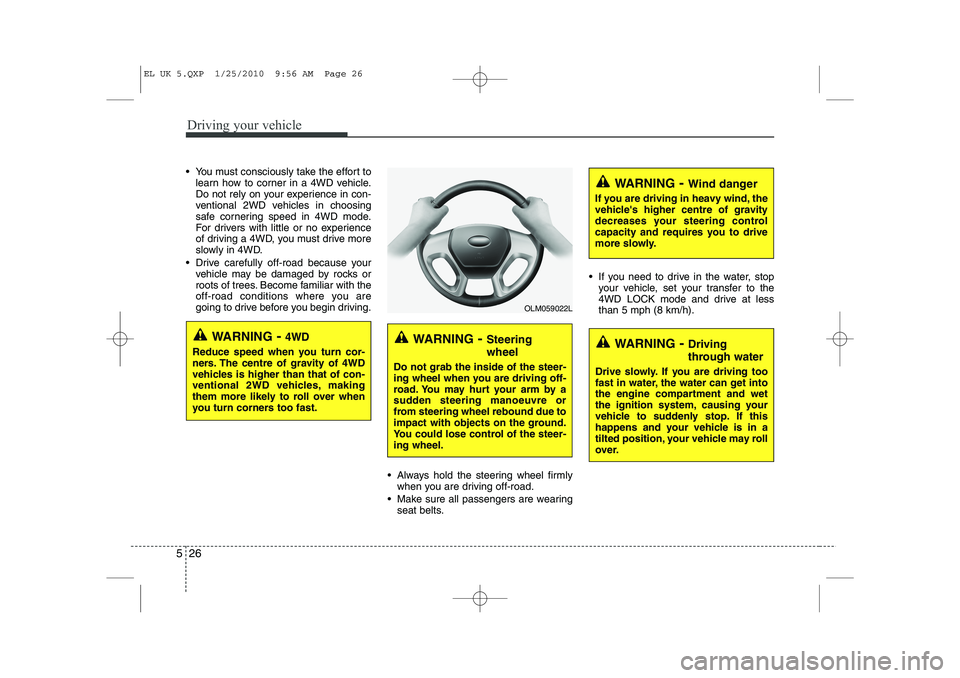
Always hold the steering wheel firmlywhen you are driving off-road.
Make sure all passengers are wearing seat belts. If you need to drive in the water, stop
your vehicle, set your transfer to the
4WD LOCK mode and drive at lessthan 5 mph (8 km/h).
WARNING - Steering wheel
Do not grab the inside of the steer-
ing wheel when you are driving off-
road. You may hurt your arm by a
sudden steering manoeuvre or
from steering wheel rebound due to
impact with objects on the ground.
You could lose control of the steer-ing wheel.
WARNING - Wind danger
If you are driving in heavy wind, the
vehicle's higher centre of gravity
decreases your steering control
capacity and requires you to drive
more slowly.
WARNING - Driving
through water
Drive slowly. If you are driving too
fast in water, the water can get into
the engine compartment and wet
the ignition system, causing your
vehicle to suddenly stop. If this
happens and your vehicle is in a
tilted position, your vehicle may roll
over.
OLM059022L
WARNING - 4WD
Reduce speed when you turn cor-
ners. The centre of gravity of 4WD
vehicles is higher than that of con-
ventional 2WD vehicles, making
them more likely to roll over when
you turn corners too fast.
EL UK 5.QXP 1/25/2010 9:56 AM Page 26
Page 272 of 560
547
Driving your vehicle
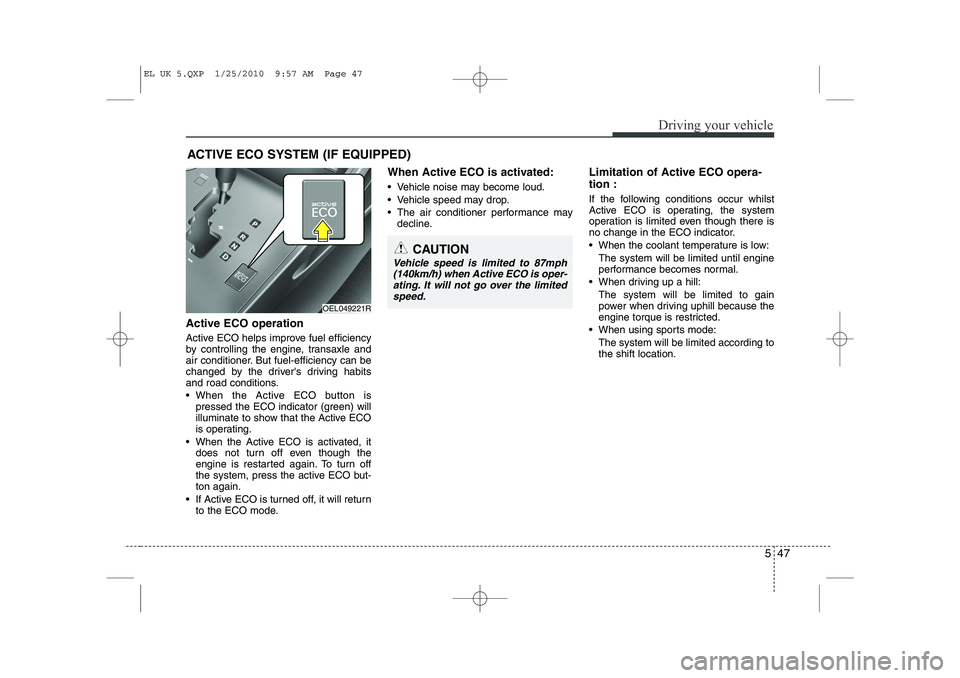
Active ECO operation
Active ECO helps improve fuel efficiency
by controlling the engine, transaxle and
air conditioner. But fuel-efficiency can be
changed by the driver's driving habits
and road conditions.
When the Active ECO button ispressed the ECO indicator (green) will
illuminate to show that the Active ECO
is operating.
When the Active ECO is activated, it does not turn off even though the
engine is restarted again. To turn off
the system, press the active ECO but-ton again.
If Active ECO is turned off, it will return to the ECO mode. When Active ECO is activated:
Vehicle noise may become loud.
Vehicle speed may drop.
The air conditioner performance may
decline. Limitation of Active ECO opera- tion :
If the following conditions occur whilst
Active ECO is operating, the system
operation is limited even though there is
no change in the ECO indicator.
When the coolant temperature is low:
The system will be limited until engine
performance becomes normal.
When driving up a hill: The system will be limited to gain
power when driving uphill because the
engine torque is restricted.
When using sports mode: The system will be limited according tothe shift location.
ACTIVE ECO SYSTEM (IF EQUIPPED)
OEL049221R
CAUTION
Vehicle speed is limited to 87mph
(140km/h) when Active ECO is oper- ating. It will not go over the limited
speed.
EL UK 5.QXP 1/25/2010 9:57 AM Page 47
Page 273 of 560
Driving your vehicle
48
5
ECONOMICAL OPERATION
Your vehicle's fuel economy depends
mainly on your style of driving, where you
drive and when you drive.
Each of these factors affects how many
miles (kilometers) you can get from a
gallon (litre) of fuel. To operate your vehi-
cle as economically as possible, use the
following driving suggestions to help
save money in both fuel and repairs:
Drive smoothly. Accelerate at a moder- ate rate. Don't make "jack-rabbit" starts or full-throttle shifts and maintain a
steady cruising speed. Don't race
between stoplights. Try to adjust your
speed to the traffic so you don't have to
change speeds unnecessarily. Avoid
heavy traffic whenever possible.
Always maintain a safe distance from
other vehicles so you can avoid unnec-
essary braking. This also reduces
brake wear.
Drive at a moderate speed. The faster you drive, the more fuel your vehicle
uses. Driving at a moderate speed,
especially on the highway, is one of the
most effective ways to reduce fuel con-sumption. Don't "ride" the brake or clutch pedal.
This can increase fuel consumption
and also increase wear on these com-
ponents. In addition, driving with your
foot resting on the brake pedal may
cause the brakes to overheat, which
reduces their effectiveness and may
lead to more serious consequences.
Take care of your tyres. Keep them inflated to the recommended pressure.
Incorrect inflation, either too much or
too little, results in unnecessary tyre
wear. Check the tyre pressures at leastonce a month.
Be sure that the wheels are aligned correctly. Improper alignment can
result from hitting kerbs or driving too
fast over irregular surfaces. Poor align-
ment causes faster tyre wear and may
also result in other problems as well as
greater fuel consumption. Keep your vehicle in good condition.
For better fuel economy and reduced
maintenance costs, maintain your vehi-cle in accordance with the mainte-
nance schedule. If you drive your vehi-
cle in severe conditions, more frequentmaintenance is required.
Keep your vehicle clean. For maximum service, your vehicle should be kept
clean and free of corrosive materials. It
is especially important that mud, dirt,
ice, etc. not be allowed to accumulate
on the underside of the vehicle. This
extra weight can result in increased
fuel consumption and also contributeto corrosion.
Travel lightly. Don't carry unnecessary weight in your vehicle. Weight reduces
fuel economy.
Don't let the engine idle longer than necessary. If you are waiting (and not
in traffic), turn off your engine and
restart only when you're ready to go.
EL UK 5.QXP 1/25/2010 9:57 AM Page 48
Page 290 of 560
565
Driving your vehicle
If you do decide to pull a trailer
Here are some important points if you
decide to pull a trailer:
Consider using a sway control. You canask a towbar dealer about sway con- trol.
Do not do any towing with your car dur- ing its first 1,200 miles (2,000 km) in
order to allow the engine to properly
break in. Failure to heed this caution
may result in serious engine or
transaxle damage.
When towing a trailer, be sure to con- sult a HYUNDAI authorised repairer for
further information on additional
requirements such as a towing kit, etc.
Always drive your vehicle at a moderate speed (less than 60 mph (100 km/h)).
On a long uphill grade, do not exceed 45 mph (70 km/h) or the posted towing
speed limit, whichever is lower.
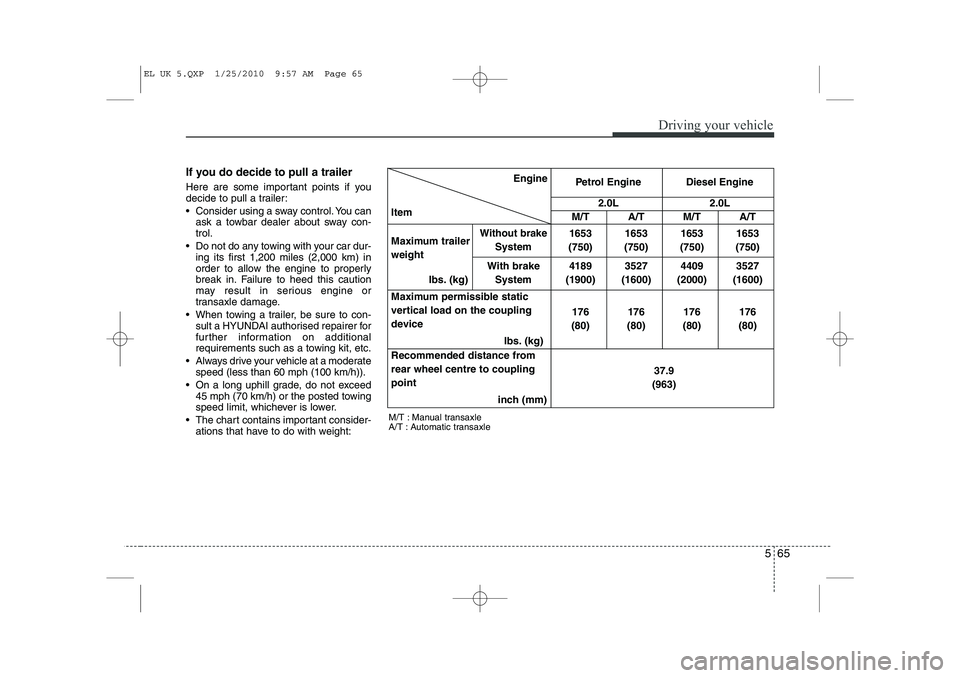
The chart contains important consider- ations that have to do with weight: Engine
Item Petrol Engine Diesel Engine
2.0L2.0L
M/T A/T M/T A/T
Maximum trailer weight
Ibs. (kg)
Without brake
System 1653
(750) 1653
(750) 1653
(750) 1653
(750)
With brake System 4189
(1900) 3527
(1600) 4409
(2000) 3527
(1600)
Maximum permissible static
vertical load on the coupling
device Ibs. (kg)176
(80) 176
(80) 176
(80) 176
(80)
Recommended distance fromrear wheel centre to couplingpoint inch (mm) 37.9
(963)
M/T : Manual transaxle
A/T : Automatic transaxle
EL UK 5.QXP 1/25/2010 9:57 AM Page 65
Page 403 of 560
Index
2
I
Active ECO system·························································5-47
Air bags ···········································································3-40
Air bag warning label................................................3-63
Air bag warning light ................................................3-43
Curtain air bag ..........................................................3-54
Driver's and passenger's front air bag ......................3-47
Passenger’s front air bag ON/OFF indicator ............3-44
Passenger’s front air bag ON/OFF switch ................3-50
Side impact air bag....................................................3-52
Air cleaner·······································································7-19
Alarm system ··································································4-11All wheel drive (AWD), see four wheel drive (4WD)·································································5-23
Antenna ·········································································4-116
Anti-lock brake system (ABS) ·······································5-33
Appearance care······························································7-57 Exterior care ······························································7-57
Interior care ·······························································7-62
Armrest ···········································································3-11
Ashtray ··········································································4-108
Audio system ································································4-116 Antenna ···································································4-116
Aux, USB and iPod ·················································4-111
Audio remote control ·············································4-117
Automatic climate control system ··································4-96 Air conditioning ······················································4-102
Automatic heating and air conditioning····················4-97
Manual heating and air conditioning ························4-98
Automatic transaxle ························································5-17 Ignition key interlock system ····································5-21
Shift lock system ·······················································5-20
Sports mode·······························································5-20
Battery ·············································································7-26
Battery saver function ·····················································4-72
Before driving ···································································5-3
Bonnet ·············································································4-24
Bottle holders, see cup holders ·····································4-109
Brake system ···································································5-30 Anti-lock brake system (ABS) ··································5-33
Downhill brake control (DBC) ·································5-39
Electronic stability program (ESP) ···························5-36
Emergency Stop Signal (ESS) ··································5-42
Hill-start assist control (HAC) ··································5-39
Parking brake ····························································5-31
Power brakes ·····························································5-30
Brakes/clutch fluid ··························································7-16
Bulb replacement ····························································7-49 Front fog light bulb replacement ······························7-52
Headlight bulb replacement ······································7-50
High mounted stop light replacement ·······················7-55
A
B
EL UK INDEX.QXP 1/12/2010 3:27 PM Page 2
Page 405 of 560
Index
4
I
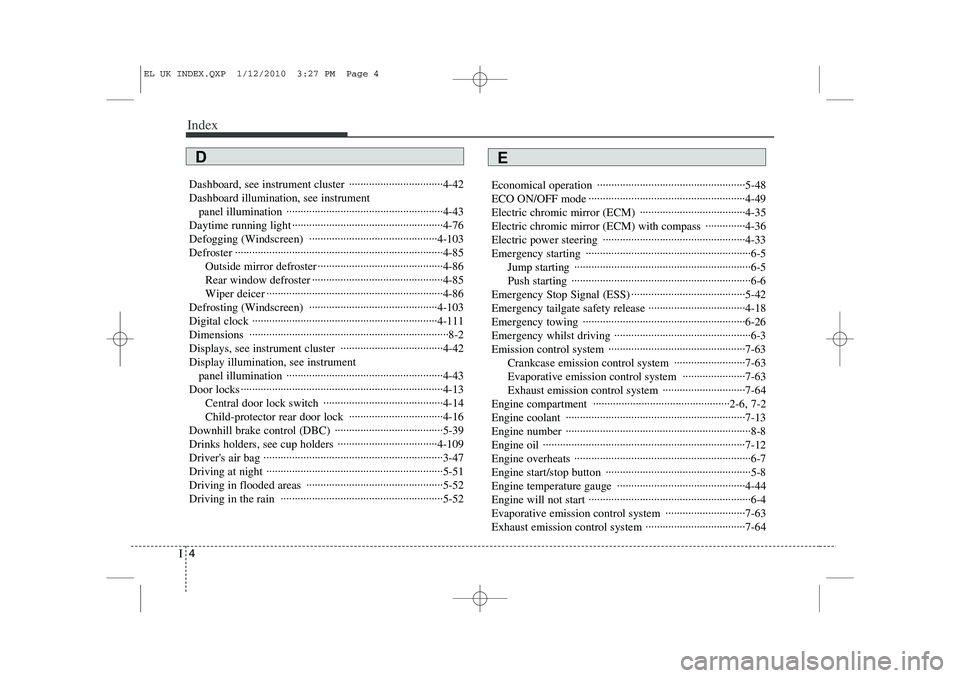
Dashboard, see instrument cluster ·································4-42 Dashboard illumination, see instrument
panel illumination ·······················································4-43
Daytime running light ·····················································4-76
Defogging (Windscreen) ·············································4-103
Defroster ·········································································4-85 Outside mirror defroster ············································4-86
Rear window defroster ··············································4-85
Wiper deicer ······························································4-86
Defrosting (Windscreen) ·············································4-103
Digital clock ·································································4-111Dimensions ······································································8-2
Displays, see instrument cluster ····································4-42Display illumination, see instrument panel illumination ·······················································4-43
Door locks ·······································································4-13 Central door lock switch ··········································4-14
Child-protector rear door lock ·································4-16
Downhill brake control (DBC) ······································5-39
Drinks holders, see cup holders ···································4-109
Driver's air bag ·······························································3-47
Driving at night ······························································5-51
Driving in flooded areas ················································5-52
Driving in the rain ·························································5-52 Economical operation ····················································5-48
ECO ON/OFF mode ·······················································4-49
Electric chromic mirror (ECM) ·····································4-35
Electric chromic mirror (ECM) with compass ··············4-36
Electric power steering ··················································4-33
Emergency starting ··························································6-5
Jump starting ······························································6-5
Push starting ·······························································6-6
Emergency Stop Signal (ESS) ········································5-42Emergency tailgate safety release ··································4-18
Emergency towing ·························································6-26
Emergency whilst driving ················································6-3
Emission control system ················································7-63 Crankcase emission control system ·························7-63
Evaporative emission control system ······················7-63
Exhaust emission control system ·····························7-64
Engine compartment ················································2-6, 7-2
Engine coolant ·······························································7-13
Engine number ·································································8-8
Engine oil ·······································································7-12
Engine overheats ······························································6-7
Engine start/stop button ···················································5-8
Engine temperature gauge ·············································4-44
Engine will not start ·························································6-4
Evaporative emission control system ····························7-63
Exhaust emission control system ···································7-64
ED
EL UK INDEX.QXP 1/12/2010 3:27 PM Page 4
Page 407 of 560
Index
6
I
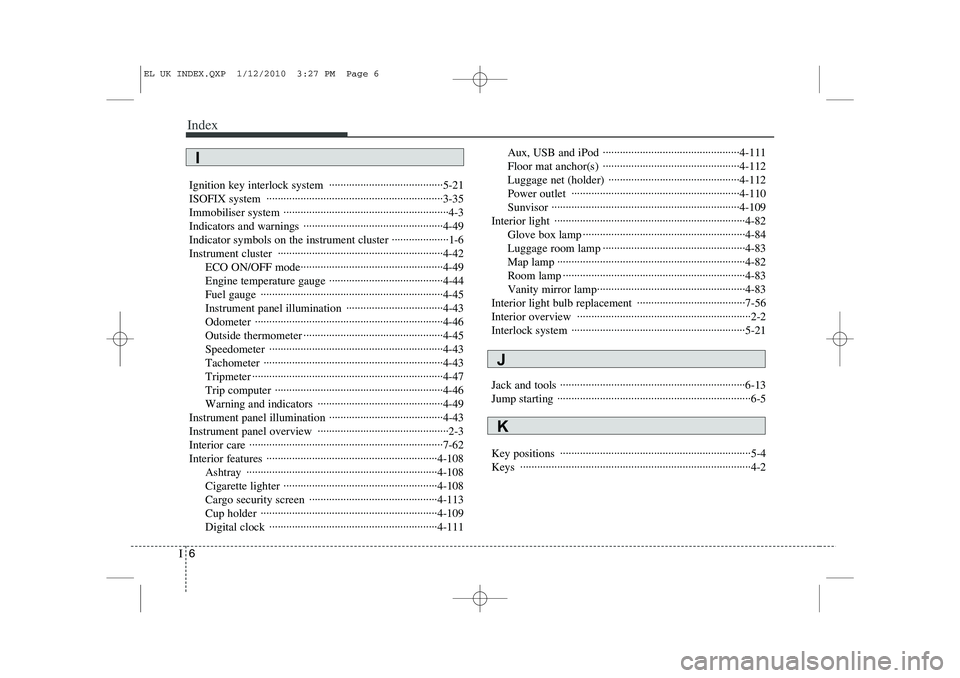
Ignition key interlock system ········································5-21
ISOFIX system ······························································3-35
Immobiliser system ··························································4-3
Indicators and warnings ·················································4-49Indicator symbols on the instrument cluster ····················1-6
Instrument cluster ··························································4-42
ECO ON/OFF mode··················································4-49
Engine temperature gauge ········································4-44
Fuel gauge ································································4-45
Instrument panel illumination ··································4-43Odometer ··································································4-46
Outside thermometer ·················································4-45Speedometer ·····························································4-43Tachometer ·······························································4-43
Tripmeter ···································································4-47
Trip computer ···························································4-46
Warning and indicators ············································4-49
Instrument panel illumination ········································4-43
Instrument panel overview ··············································2-3
Interior care ····································································7-62
Interior features ····························································4-108 Ashtray ···································································4-108
Cigarette lighter ······················································4-108
Cargo security screen ·············································4-113
Cup holder ······························································4-109
Digital clock ···························································4-111 Aux, USB and iPod ················································4-111
Floor mat anchor(s) ················································4-112
Luggage net (holder) ··············································4-112
Power outlet ···························································4-110Sunvisor ··································································4-109
Interior light ···································································4-82 Glove box lamp ·························································4-84
Luggage room lamp ··················································4-83
Map lamp ··································································4-82
Room lamp ································································4-83
Vanity mirror lamp····················································4-83
Interior light bulb replacement ······································7-56
Interior overview ·····························································2-2
Interlock system ·····························································5-21
Jack and tools ·································································6-13
Jump starting ····································································6-5
Key positions ···································································5-4 Keys ·················································································4-2
K
J
I
EL UK INDEX.QXP 1/12/2010 3:27 PM Page 6