bluetooth HYUNDAI IX35 2014 Owner's Manual
[x] Cancel search | Manufacturer: HYUNDAI, Model Year: 2014, Model line: IX35, Model: HYUNDAI IX35 2014Pages: 1534, PDF Size: 39.76 MB
Page 725 of 1534
4 235
Features of your vehicle
Pairing a Bluetooth®Wireless
Technology De vice
What is
Bluetooth®Wireless
Technology Pairing?
Pairing refers to the process of synchro-
nizing your
Bluetooth®Wireless
Technology phone or device with the car
audio system for connection. Pairing is
necessary to connect and use the
Bluetooth®Wireless Technology feature. Pairing Key / Key on
the Steering Remote Controller
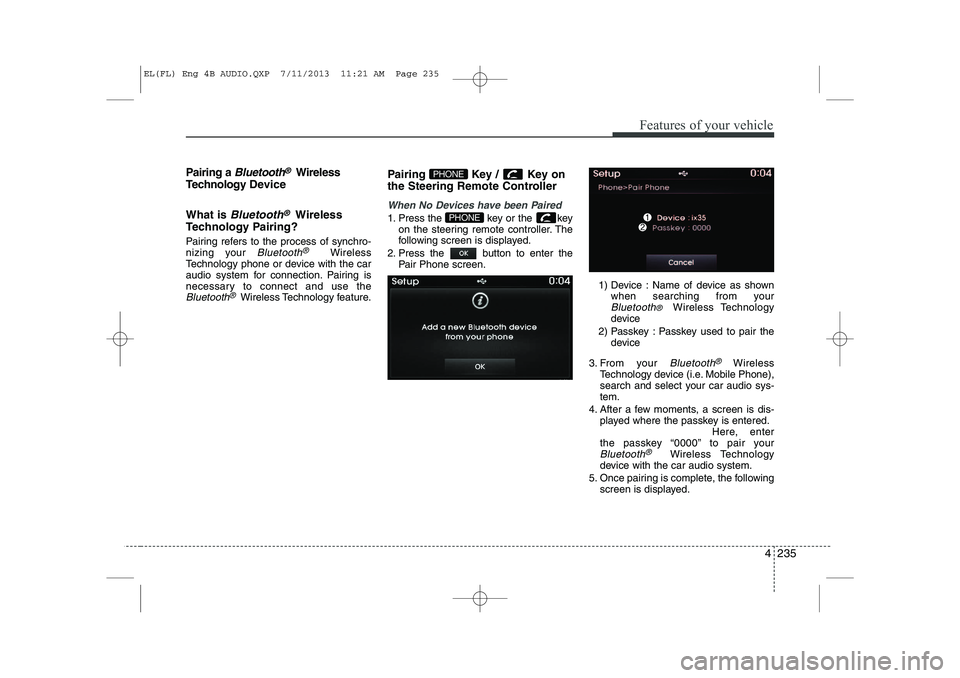
When No Devices have been Paired
1. Press the key or the key
on the steering remote controller. The
following screen is displayed.
2. Press the button to enter the Pair Phone screen.
1) Device : Name of device as shownwhen searching from your
Bluetooth® Wireless Technology
device
2) Passkey : Passkey used to pair the device
3. From your
Bluetooth®Wireless
Technology device (i.e. Mobile Phone),
search and select your car audio sys-tem.
4. After a few moments, a screen is dis- played where the passkey is entered. Here, enter
the passkey “0000” to pair your
Bluetooth®Wireless Technology
device with the car audio system.
5. Once pairing is complete, the following screen is displayed.
PHONE
PHONE
EL(FL) Eng 4B AUDIO.QXP 7/11/2013 11:21 AM Page 235
Page 726 of 1534
Features of your vehicle
236
4
✽✽
NOTICE
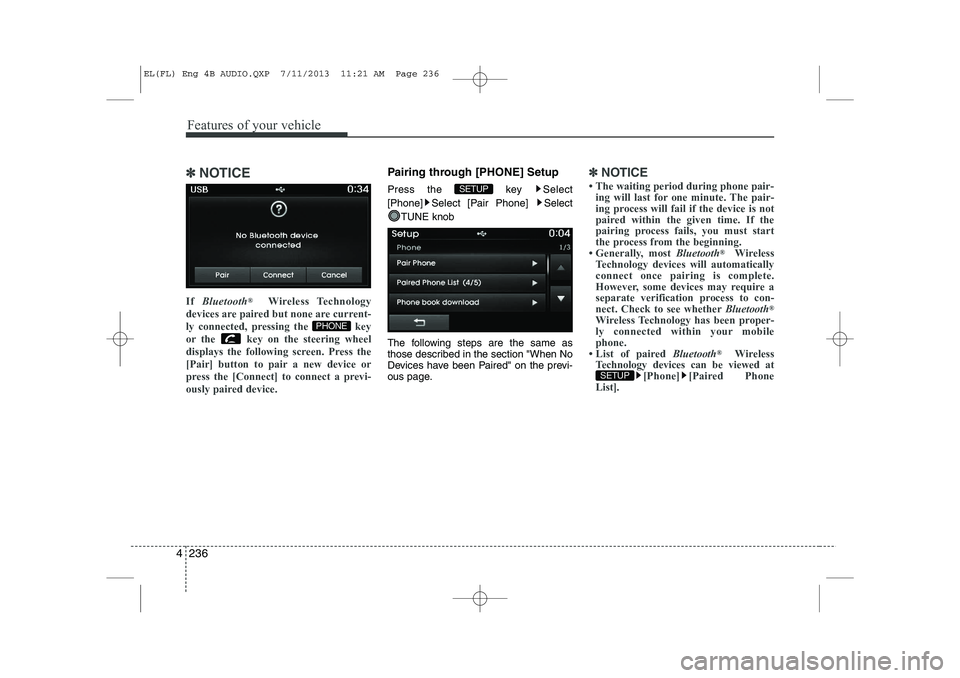
If Bluetooth ®
Wireless Technology
devices are paired but none are current-
ly connected, pressing the key
or the key on the steering wheel
displays the following screen. Press the
[Pair] button to pair a new device or
press the [Connect] to connect a previ-
ously paired device.Pairing through [PHONE] Setup
Press the key Select
[Phone] Select [Pair Phone] Select
TUNE knob
The following steps are the same as
those described in the section "When No
Devices have been Paired" on the previ-
ous page.✽✽ NOTICE
Page 728 of 1534
Features of your vehicle
238
4
Changing Priority
What is Priority?
It is possible to pair up to five Bluetooth®
Wireless Technology devices with the car
audio system. The "Change Priority" fea-
ture is used to set the connection priority
of paired phones. However, the most
recently connected phone will always be
set as the highest priority.
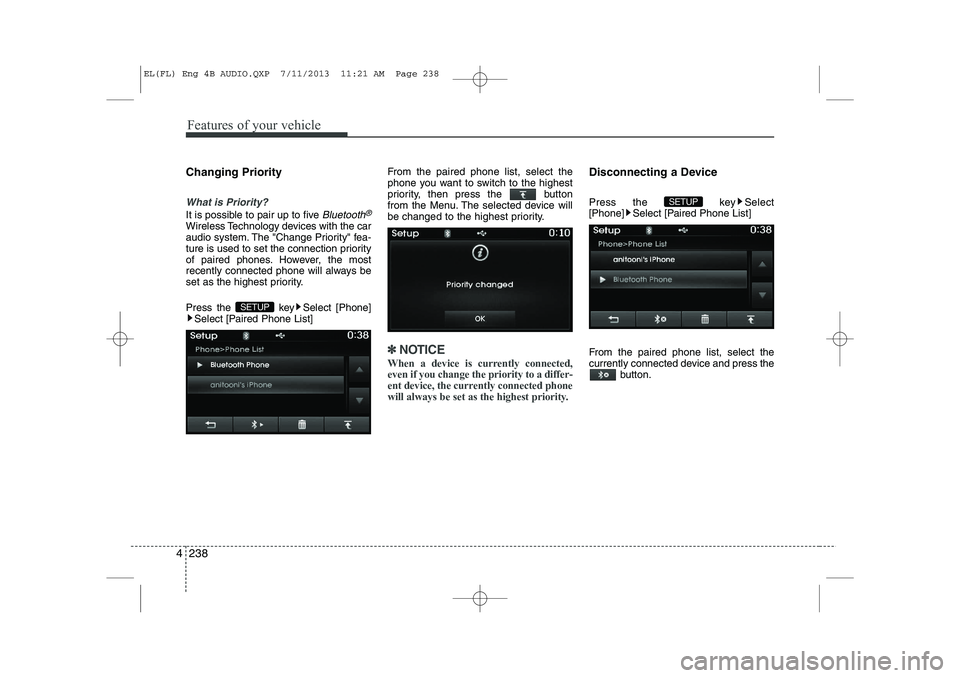
Press the key Select [Phone]
Select [Paired Phone List] From the paired phone list, select the
phone you want to switch to the highest
priority, then press the button
from the Menu. The selected device will
be changed to the highest priority.
✽✽
NOTICE
When a device is currently connected, even if you change the priority to a differ-
ent device, the currently connected phone
will always be set as the highest priority.
Disconnecting a Device
Press the key Select
[Phone] Select [Paired Phone List]
From the paired phone list, select the
currently connected device and press the button.
SETUP
SETUP
EL(FL) Eng 4B AUDIO.QXP 7/11/2013 11:21 AM Page 238
Page 730 of 1534
Features of your vehicle
240
4
USING Bluetooth®Wireless
Technology
Phone Menu Screen
Phone Menus
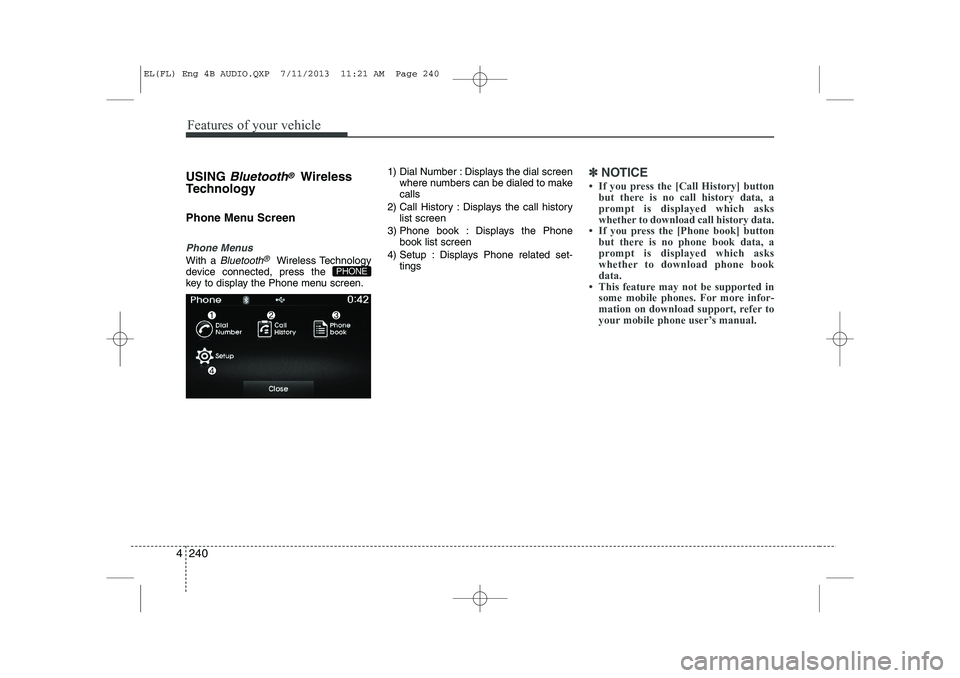
With a Bluetooth®Wireless Technology
device connected, press the
key to display the Phone menu screen. 1) Dial Number : Displays the dial screen
where numbers can be dialed to makecalls
2) Call History : Displays the call history list screen
3) Phone book : Displays the Phone book list screen
4) Setup : Displays Phone related set- tings
✽✽NOTICE
Page 731 of 1534
![HYUNDAI IX35 2014 Owners Manual 4 241
Features of your vehicle
Calling by Dialing a Number
Press the key Select [Dial Number]
1) Dial Pad : Used to enter phone num-ber
2) Call : If a number has been entered, calls the number If n](/img/35/56237/w960_56237-730.png "HYUNDAI IX35 2014 Owners Manual 4 241
Features of your vehicle
Calling by Dialing a Number
Press the key Select [Dial Number]
1) Dial Pad : Used to enter phone num-ber
2) Call : If a number has been entered, calls the number If n")
4 241
Features of your vehicle
Calling by Dialing a Number
Press the key Select [Dial Number]
1) Dial Pad : Used to enter phone num-ber
2) Call : If a number has been entered, calls the number If no number has
been entered, switches to call historyscreen
3) End : Deletes the entered phone num- ber
4) Delete : Deletes entered numbers one digit at a time Answering Calls
Answering a Call
Answering a call with a Bluetooth®
Wireless Technology device connected
will display the following screen.
1) Caller : Displays the other party’s
name when the incoming caller is
saved within your phone book
2) Incoming Number : Displays the incoming number
3) Accept : Accept the incoming call
4) Reject : Reject the incoming call
✽✽ NOTICE
Page 737 of 1534
4 247
Features of your vehicle
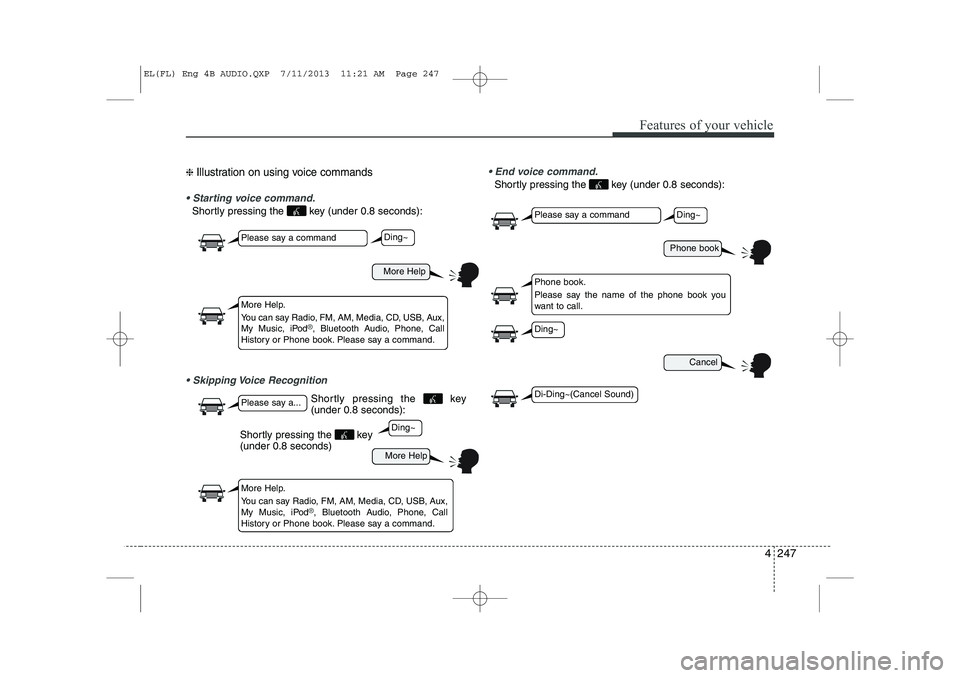
❈ Illustration on using voice commands
Starting voice command.
Shortly pressing the key (under 0.8 seconds):
Skipping Voice Recognition End voice command.
Shortly pressing the key (under 0.8 seconds):
More Help
More Help
Please say a command
Please say a...
More Help.
You can say Radio, FM, AM, Media, CD, USB, Aux,
My Music, iPod
®, Bluetooth Audio, Phone, Call
History or Phone book. Please say a command.
More Help.
You can say Radio, FM, AM, Media, CD, USB, Aux,
My Music, iPod
®, Bluetooth Audio, Phone, Call
History or Phone book. Please say a command.
Ding~
Ding~
Shortly pressing the key (under 0.8 seconds)
Phone book
Cancel
Please say a command
Phone book.
Please say the name of the phone book you
want to call.
Ding~
Di-Ding~(Cancel Sound)
Ding~
Shortly pressing the key (under 0.8 seconds):
EL(FL) Eng 4B AUDIO.QXP 7/11/2013 11:21 AM Page 247
Page 739 of 1534
4 249
Features of your vehicle
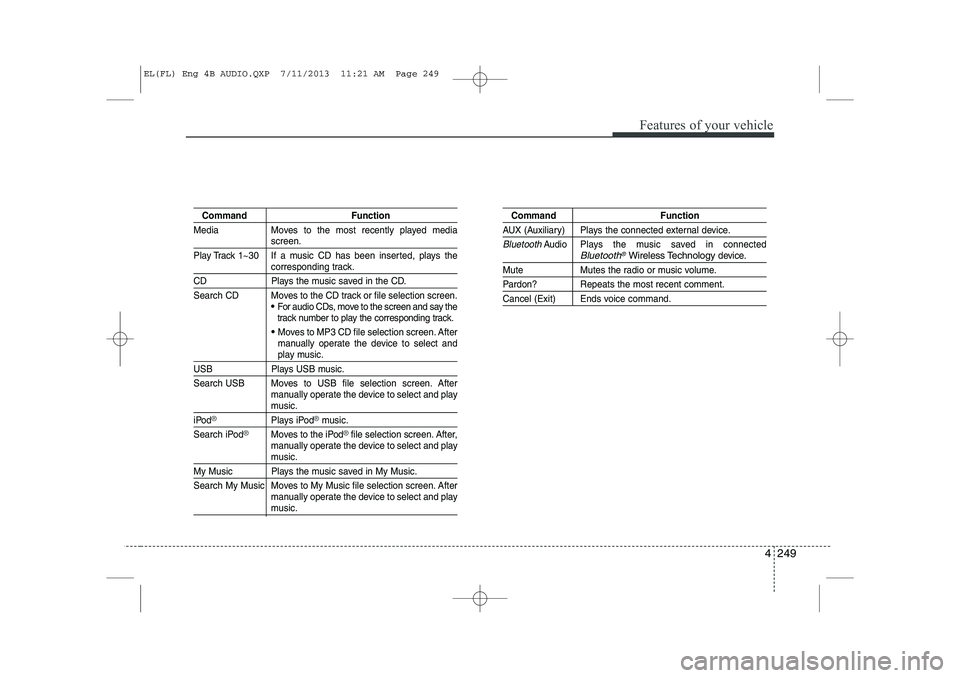
Command Function
Media Moves to the most recently played media
screen.
Play Track 1~30 If a music CD has been inserted, plays the
corresponding track.
CD Plays the music saved in the CD.
Search CD Moves to the CD track or file selection screen.
For audio CDs, move to the screen and say the
track number to play the corresponding track.
Moves to MP3 CD file selection screen. After
manually operate the device to select and
play music.
USB Plays USB music.
Search USB Moves to USB file selection screen. After manually operate the device to select and play
music.
iPod®Plays iPod®music.
Search iPod
®Moves to the iPod®file selection screen. After,
manually operate the device to select and play
music.
My Music Plays the music saved in My Music.
Search My Music Moves to My Music file selection screen. After manually operate the device to select and play
music.
Command Function
AUX (Auxiliary) Plays the connected external device.
BluetoothAudio Plays the music saved in connectedBluetooth®Wireless Technologydevice.
Mute Mutes the radio or music volume.
Pardon? Repeats the most recent comment.
Cancel (Exit) Ends voice command.
EL(FL) Eng 4B AUDIO.QXP 7/11/2013 11:21 AM Page 249
Page 742 of 1534
Features of your vehicle
252
4
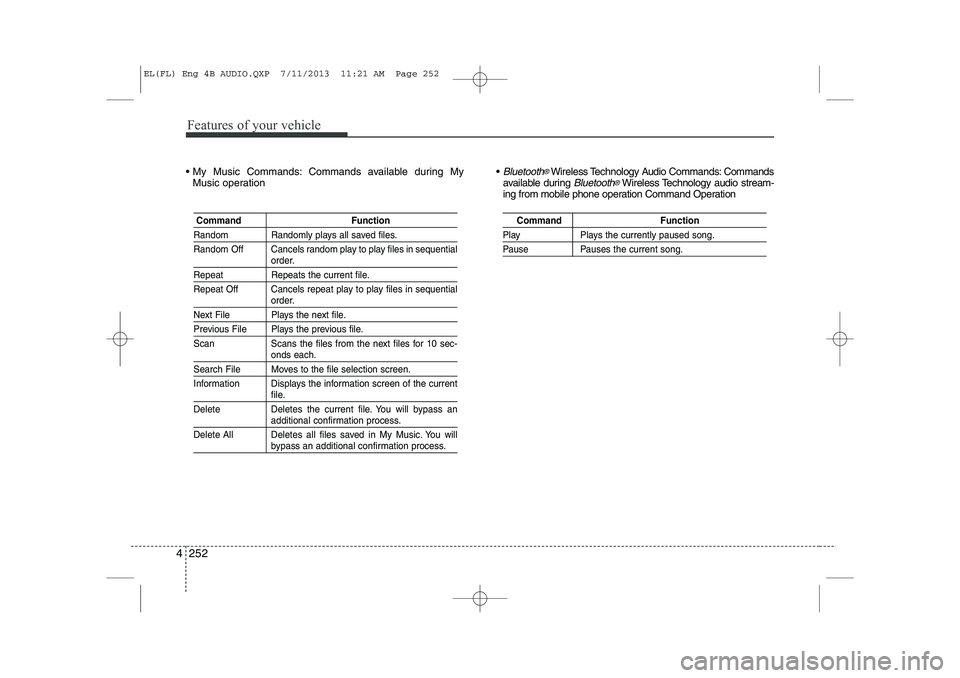
My Music Commands: Commands available during My
Music operation Bluetooth®Wireless Technology Audio Commands: Commands
available during Bluetooth®Wireless Technology audio stream-
ing from mobile phone operation Command Operation
Command Function
Random Randomly plays all saved files.
Random Off Cancels random play to play files in sequential
order.
Repeat Repeats the current file.
Repeat Off Cancels repeat play to play files in sequential
order.
Next File Plays the next file.
Previous File Plays the previous file.
Scan Scans the files from the next files for 10 sec-
onds each.
Search File Moves to the file selection screen.
Information Displays the information screen of the current
file.
Delete Deletes the current file. You will bypass an
additional confirmation process.
Delete All Deletes all files saved in My Music. You will
bypass an additional confirmation process.
Command Function
Play Plays the currently paused song.
Pause Pauses the current song.
EL(FL) Eng 4B AUDIO.QXP 7/11/2013 11:21 AM Page 252
Page 749 of 1534
4 259
Features of your vehicle
Bluetooth®Wireless Technology
Setting The
Bluetooth®word mark and logos are
registered trademarks owned by
Bluetooth SIG, Inc. and any use of such
marks is under license. Other trademarks
and trade names are those of their
respective owners. A
Bluetooth®enabled
cell phone is required to use
Bluetooth®
wireless technology
Pairing a New Device
Press the key Select
[Phone] Select [Pair Phone]
Bluetooth®Wireless Technology devices
can be paired with the audio system.
For more information, refer to the “Pairing
through Phone Setup” section within
Bluetooth®Wireless Technology.
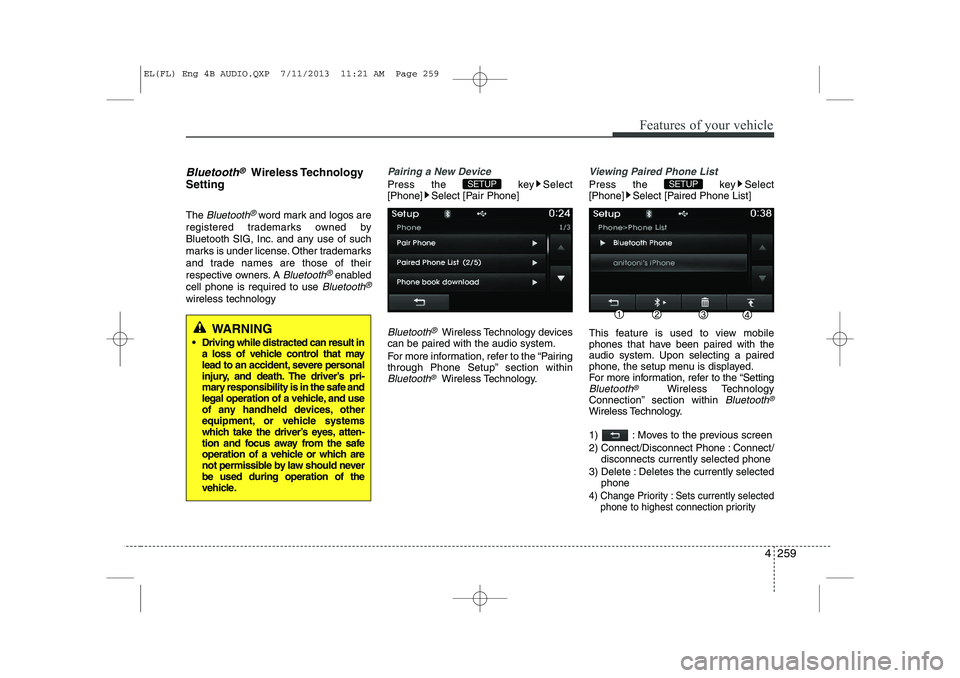
Viewing Paired Phone List
Press the key Select
[Phone] Select [Paired Phone List]
This feature is used to view mobile
phones that have been paired with the
audio system. Upon selecting a paired
phone, the setup menu is displayed.
For more information, refer to the “Setting
Bluetooth®Wireless Technology
Connection” section within Bluetooth®
Wireless Technology.
1) : Moves to the previous screen
2) Connect/Disconnect Phone : Connect/ disconnects currently selected phone
3) Delete : Deletes the currently selected phone
4) Change Priority : Sets currently selected
phone to highest connection priority
SETUP SETUP
WARNING
Driving while distracted can result in a loss of vehicle control that may
lead to an accident, severe personal
injury, and death. The driver’s pri-
mary responsibility is in the safe and
legal operation of a vehicle, and use
of any handheld devices, other
equipment, or vehicle systems
which take the driver’s eyes, atten-
tion and focus away from the safe
operation of a vehicle or which are
not permissible by law should neverbe used during operation of the
vehicle.
EL(FL) Eng 4B AUDIO.QXP 7/11/2013 11:21 AM Page 259
Page 751 of 1534
![HYUNDAI IX35 2014 Owners Manual 4 261
Features of your vehicle
Audio Streaming
Press the key Select
[Phone] Select [Audio Streaming]
When Audio Streaming is turned on, you
can play music files saved in your
Bluetooth®Wireless T](/img/35/56237/w960_56237-750.png "HYUNDAI IX35 2014 Owners Manual 4 261
Features of your vehicle
Audio Streaming
Press the key Select
[Phone] Select [Audio Streaming]
When Audio Streaming is turned on, you
can play music files saved in your
Bluetooth®Wireless T")
4 261
Features of your vehicle
Audio Streaming
Press the key Select
[Phone] Select [Audio Streaming]
When Audio Streaming is turned on, you
can play music files saved in your
Bluetooth®Wireless Technology device
through the audio system.
Outgoing Volume
Press the key Select
[Phone] Select [Outgoing Volume]
Use the , buttons to adjust the
outgoing volume level.
Turning Bluetooth System Off
Press the key Select
[Phone] Select [Bluetooth System Off] Once
Bluetooth®Wireless Technology is
turned off, Bluetooth®Wireless
Technology related features will not be
supported within the audio system.
✽✽ NOTICE
To turn Bluetooth ®
Wireless Technology
back on, go to [Phone] and
press “Yes”.
SETUP
SETUP
SETUP SETUP
CAUTION
Bluetooth ®
Wireless Technology
audio streaming may not be support-
ed in some Bluetooth ®
Wireless
Technology phones.
EL(FL) Eng 4B AUDIO.QXP 7/11/2013 11:21 AM Page 261