clock HYUNDAI IX35 2014 Owner's Manual
[x] Cancel search | Manufacturer: HYUNDAI, Model Year: 2014, Model line: IX35, Model: HYUNDAI IX35 2014Pages: 1534, PDF Size: 39.76 MB
Page 421 of 1534
25
Your vehicle at a glance
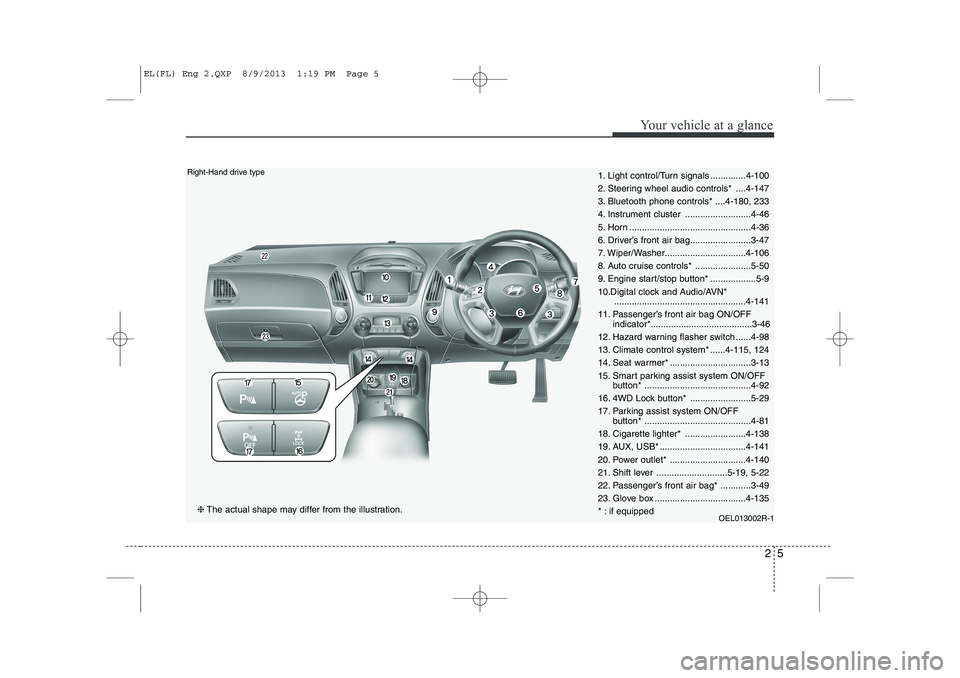
1. Light control/Turn signals ..............4-100
2. Steering wheel audio controls* ....4-147
3. Bluetooth phone controls* ....4-180, 233
4. Instrument cluster ..........................4-46
5. Horn ................................................4-36
6. Driver’s front air bag........................3-47
7. Wiper/Washer................................4-106
8. Auto cruise controls* ......................5-50
9. Engine start/stop button* ..................5-9
10.Digital clock and Audio/AVN*....................................................4-141
11. Passenger’s front air bag ON/OFF indicator*........................................3-46
12. Hazard warning flasher switch ......4-98
13. Climate control system* ......4-115, 124
14. Seat warmer* ................................3-13
15. Smart parking assist system ON/OFF button* ..........................................4-92
16. 4WD Lock button* ........................5-29
17. Parking assist system ON/OFF button* ..........................................4-81
18. Cigarette lighter* ........................4-138
19. AUX, USB* ..................................4-141
20. Power outlet* ..............................4-140
21. Shift lever ............................5-19, 5-22
22. Passenger’s front air bag* ............3-49
23. Glove box ....................................4-135
* : if equipped OEL013002R-1Right-Hand drive type
❈The actual shape may differ from the illustration.
EL(FL) Eng 2.QXP 8/9/2013 1:19 PM Page 5
Page 517 of 1534
427
Features of your vehicle
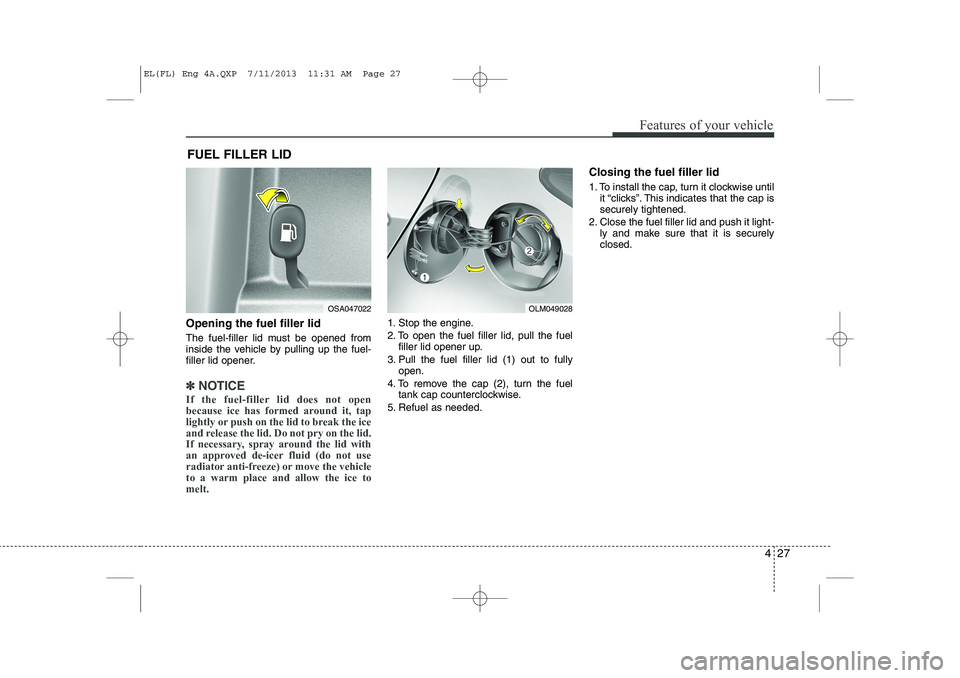
Opening the fuel filler lid
The fuel-filler lid must be opened from
inside the vehicle by pulling up the fuel-
filler lid opener.
✽✽NOTICE
If the fuel-filler lid does not open
because ice has formed around it, tap
lightly or push on the lid to break the ice
and release the lid. Do not pry on the lid.
If necessary, spray around the lid with
an approved de-icer fluid (do not use
radiator anti-freeze) or move the vehicleto a warm place and allow the ice tomelt.
1. Stop the engine.
2. To open the fuel filler lid, pull the fuel filler lid opener up.
3. Pull the fuel filler lid (1) out to fully open.
4. To remove the cap (2), turn the fuel tank cap counterclockwise.
5. Refuel as needed. Closing the fuel filler lid
1. To install the cap, turn it clockwise until
it “clicks”. This indicates that the cap is securely tightened.
2. Close the fuel filler lid and push it light- ly and make sure that it is securelyclosed.
FUEL FILLER LID
OSA047022OLM049028
EL(FL) Eng 4A.QXP 7/11/2013 11:31 AM Page 27
Page 631 of 1534
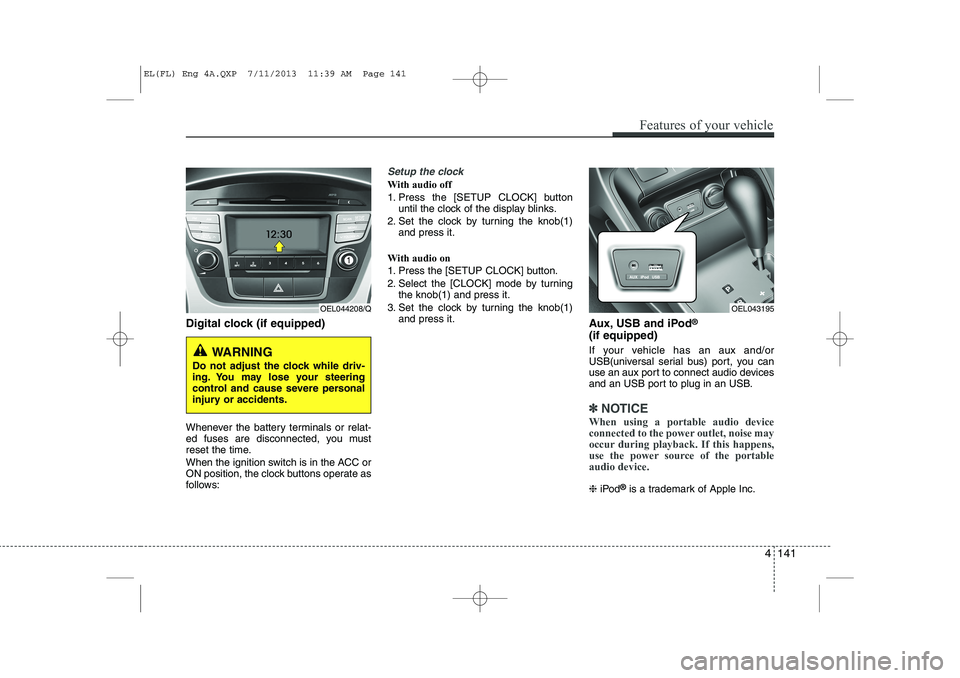
Digital clock (if equipped)
Whenever the battery terminals or relat-
ed fuses are disconnected, you must
reset the time.
When the ignition switch is in the ACC or
ON position, the clock buttons operate as
follows:
Setup the clock
With audio off
1. Press the [SETUP CLOCK] buttonuntil the clock of the display blinks.
2. Set the clock by turning the knob(1) and press it.
With audio on
1. Press the [SETUP CLOCK] button.
2. Select the [CLOCK] mode by turning the knob(1) and press it.
3. Set the clock by turning the knob(1) and press it. Aux, USB and iPod®
(if equipped)
If your vehicle has an aux and/or
USB(universal serial bus) port, you can
use an aux port to connect audio devices
and an USB port to plug in an USB.
✽✽ NOTICE
When using a portable audio device
connected to the power outlet, noise may
occur during playback. If this happens,
use the power source of the portableaudio device.
❈ iPod ®
is a trademark of Apple Inc.
Features of your vehicle
141
4
OEL044208/Q
WARNING
Do not adjust the clock while driv-
ing. You may lose your steering
control and cause severe personal
injury or accidents.
OEL043195
EL(FL) Eng 4A.QXP 7/11/2013 11:39 AM Page 141
Page 648 of 1534
Features of your vehicle
158
4
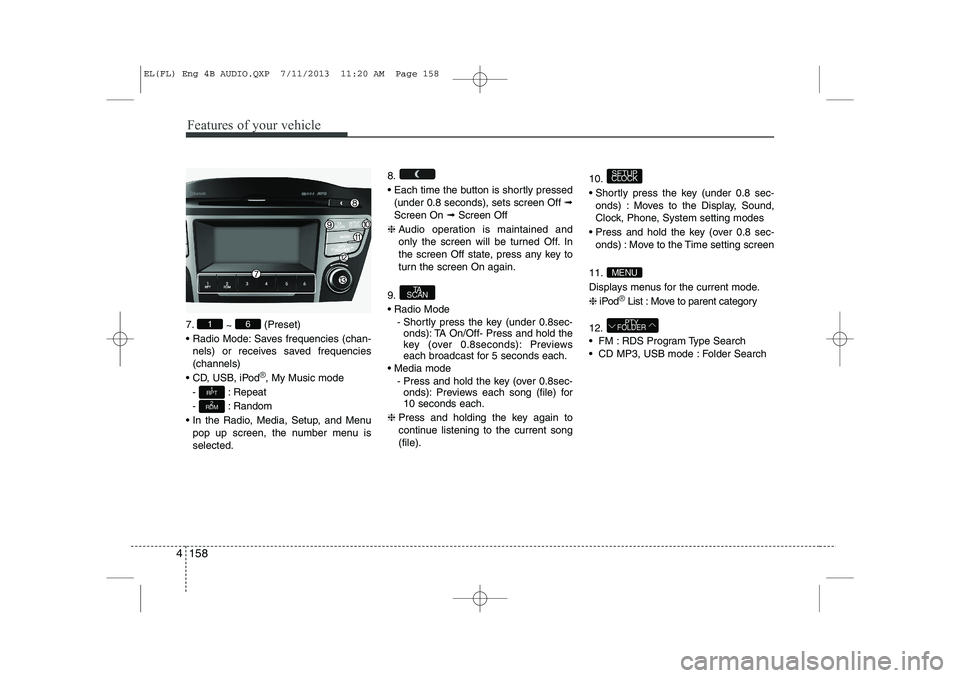
7.
~ (Preset)
Radio Mode: Saves frequencies (chan- nels) or receives saved frequencies (channels)
CD, USB, iPod
®, My Music mode
- : Repeat
- : Random
In the Radio, Media, Setup, and Menu pop up screen, the number menu is selected. 8.
Each time the button is shortly pressed
(under 0.8 seconds), sets screen Off ➟
Screen On ➟Screen Off
❈ Audio operation is maintained and
only the screen will be turned Off. In
the screen Off state, press any key to
turn the screen On again.
9. Radio Mode - Shortly press the key (under 0.8sec-onds): TA On/Off- Press and hold the
key (over 0.8seconds): Previews
each broadcast for 5 seconds each.
Media mode - Press and hold the key (over 0.8sec-onds): Previews each song (file) for10 seconds each.
❈ Press and holding the key again to
continue listening to the current song(file). 10.
Shortly press the key (under 0.8 sec-
onds) : Moves to the Display, Sound,
Clock, Phone, System setting modes
Press and hold the key (over 0.8 sec- onds) : Move to the Time setting screen
11.
Displays menus for the current mode.❈ iPod
®List : Move to parent category
12.
FM : RDS Program Type Search
CD MP3, USB mode : Folder Search
PTY
FOLDER
MENU
SETUP
CLOCK
TA
SCAN
2
RDM
1
RPT
61
EL(FL) Eng 4B AUDIO.QXP 7/11/2013 11:20 AM Page 158
Page 650 of 1534
![HYUNDAI IX35 2014 Owners Manual Features of your vehicle
160
4
SETUP
- AC100ELEE, AC110ELEE
Display Settings
Press the key Select [Display]
through TUNE knob or key
Select menu through TUNE knob Mode Pop up
[Mode Pop up]](/img/35/56237/w960_56237-649.png "HYUNDAI IX35 2014 Owners Manual Features of your vehicle
160
4
SETUP
- AC100ELEE, AC110ELEE
Display Settings
Press the key Select [Display]
through TUNE knob or key
Select menu through TUNE knob Mode Pop up
[Mode Pop up]")
Features of your vehicle
160
4
SETUP
- AC100ELEE, AC110ELEE
Display Settings
Press the key Select [Display]
through TUNE knob or key
Select menu through TUNE knob Mode Pop up
[Mode Pop up] Changes . selec- tion mode
During On state, press the or
key to display the mode
change pop up screen.
When the pop up screen is displayed, use the TUNE knob or keys
~ to select the desired mode.
Scroll text
[Scroll text] Set /
: Maintains scroll
: Scrolls only one (1) time.
Song Info
When playing an MP3 file, select the
desired display info from ‘Folder/File’ or
‘Album/Artist/Song’. Sound Settings
Press the key Select [Sound]
through TUNE knob or key
Select menu through TUNE knob
2
RDM
SETUP
CLOCK
Off
On
OffOn
6
1
MEDIA
RADIO
On
1
RPT
SETUP
CLOCK
EL(FL) Eng 4B AUDIO.QXP 7/11/2013 11:20 AM Page 160
Page 652 of 1534
![HYUNDAI IX35 2014 Owners Manual Features of your vehicle
162
4
Clock Settings
Press the key Select [Clock]
through TUNE knob or key
Select menu through TUNE knob Clock Settings
This menu is used to set the time.
Select [Cloc](/img/35/56237/w960_56237-651.png "HYUNDAI IX35 2014 Owners Manual Features of your vehicle
162
4
Clock Settings
Press the key Select [Clock]
through TUNE knob or key
Select menu through TUNE knob Clock Settings
This menu is used to set the time.
Select [Cloc")
Features of your vehicle
162
4
Clock Settings
Press the key Select [Clock]
through TUNE knob or key
Select menu through TUNE knob Clock Settings
This menu is used to set the time.
Select [Clock Settings] Set through
TUNE knob Press TUNE knob ❈
Adjust the number currently in focus to set the [hour] and press the tune knob
to set the [minute]. Day Settings
This menu is used to set the date.
Select [Day Settings] Set through
TUNE knob Press TUNE knob
❈ Adjust the number currently in focus to
make the settings and press the tune
knob to move to the next setting. (Set
in order of Year/Month/Day)
3
SETUP
CLOCK
EL(FL) Eng 4B AUDIO.QXP 7/11/2013 11:20 AM Page 162
Page 653 of 1534
![HYUNDAI IX35 2014 Owners Manual 4 163
Features of your vehicle
Time Format This function is used to set the 12/24
hour time format of the audio system.
Select [Time Format] Set 12Hr / 24Hr
through TUNE knob
Clock Display when Po](/img/35/56237/w960_56237-652.png "HYUNDAI IX35 2014 Owners Manual 4 163
Features of your vehicle
Time Format This function is used to set the 12/24
hour time format of the audio system.
Select [Time Format] Set 12Hr / 24Hr
through TUNE knob
Clock Display when Po")
4 163
Features of your vehicle
Time Format This function is used to set the 12/24
hour time format of the audio system.
Select [Time Format] Set 12Hr / 24Hr
through TUNE knob
Clock Display when Power is OFF
Select [Clock Disp.(Pwr Off) Set /through TUNE knob
: Displays time/date on screen
: Turn off. Automatic RDS Time This option is used to automatically set
the time by synchronizing with RDS.
Select [Automatic RDS Time] Set
/ through TUNE
knob
: Turn on Automatic Time
: Turn off.
Off
On
Off
On
Off
On
Off
On
EL(FL) Eng 4B AUDIO.QXP 7/11/2013 11:20 AM Page 163
Page 654 of 1534
![HYUNDAI IX35 2014 Owners Manual Features of your vehicle
164
4
Phone Setup (if eqipped)
Press the key Select [Phone] Pair Phone
Select [Pair Phone] Set through TUNE knob ➀
Search for device names as displayed
on your mobil](/img/35/56237/w960_56237-653.png "HYUNDAI IX35 2014 Owners Manual Features of your vehicle
164
4
Phone Setup (if eqipped)
Press the key Select [Phone] Pair Phone
Select [Pair Phone] Set through TUNE knob ➀
Search for device names as displayed
on your mobil")
Features of your vehicle
164
4
Phone Setup (if eqipped)
Press the key Select [Phone] Pair Phone
Select [Pair Phone] Set through TUNE knob ➀
Search for device names as displayed
on your mobile phone and connect.
➁ Input the passkey displayed on the
screen. (Passkey : 0000)
❈ The device name and passkey will be
displayed on the screen for up to 3
minutes. If pairing is not completed
within the 3 minutes, the mobile phone
pairing process will automatically becanceled. ➂
Pairing completion is displayed.
❈ In some mobile phones, pairing will
automatically be followed by connec-tion.
❈ It is possible to pair up to five
Bluetooth®Wireless Technology
enabled mobile phones.
SETUP
CLOCKCAUTION
To pair a Bluetooth®Wireless
Technology enabled mobile phone, authentication and connection processes are first required. As aresult, you cannot pair your mobile
phone while driving the vehicle.First park your vehicle before use.
EL(FL) Eng 4B AUDIO.QXP 7/11/2013 11:20 AM Page 164
Page 658 of 1534
Features of your vehicle
168
4
Using the Bluetooth®Wireless
Technology System
To use
Bluetooth®Wireless Technology
when the system is currently off, follow
these next steps.
Turning On
Bluetooth®Wireless
Technology through the Key
Press the key Screen Guidance ❈ Moves to the screen where
Bluetooth®
Wireless Technology functions can be
used and displays guidance. Turning On
Bluetooth®Wireless
Technology through the Key
Press the key Select [Phone] ➀ A screen asking whether to turn on
Bluetooth®Wireless Technology will be
displayed.
➁ On the screen, select to turn on
Bluetooth®Wireless Technology and
display guidance.
❈ If the
Bluetooth®Wireless Technology
system is turned on, the system will
automatically try to connect the mostrecently connected
Bluetooth®Wireless
Technology mobile phone. YES
SETUP
CLOCK
SETUP
CLOCK
PHONE
PHONE
CAUTION
Bluetooth ®
Wireless Technology con-
nection may become intermittently
disconnected in some mobilephones. Follow these next steps totry again.
1) Turn the Bluetooth ®
Wireless
Technology function within the mobile phone ON/OFF and try to connect again.
2) Turn the mobile phone power ON/OFF and try to connect again.
3) Completely remove the mobile phone battery, reboot, and thentry to connect again.
4) Reboot the audio system and try to connect again
5) Delete all paired devices in your mobile phone and the audio sys-tem and pair again for use.
EL(FL) Eng 4B AUDIO.QXP 7/11/2013 11:20 AM Page 168
Page 659 of 1534
![HYUNDAI IX35 2014 Owners Manual 4 169
Features of your vehicle
System Settings
Press the key Select [System]Memory Information (if equipped)
Displays currently used memory and
total system memory.
Select [Memory Information] O](/img/35/56237/w960_56237-658.png "HYUNDAI IX35 2014 Owners Manual 4 169
Features of your vehicle
System Settings
Press the key Select [System]Memory Information (if equipped)
Displays currently used memory and
total system memory.
Select [Memory Information] O")
4 169
Features of your vehicle
System Settings
Press the key Select [System]Memory Information (if equipped)
Displays currently used memory and
total system memory.
Select [Memory Information] OK
The currently used memory is displayed on the left side while the total system
memory is displayed on the right side.Language
This menu is used to set the display
and voice recognition language.
Select [Language] Set through TUNE knob ❈
The system will reboot after the lan- guage is changed.
❈ Language support by region
-
SETUP
CLOCK
EL(FL) Eng 4B AUDIO.QXP 7/11/2013 11:20 AM Page 169