instrument panel HYUNDAI IX35 2014 Owner's Guide
[x] Cancel search | Manufacturer: HYUNDAI, Model Year: 2014, Model line: IX35, Model: HYUNDAI IX35 2014Pages: 1534, PDF Size: 39.76 MB
Page 488 of 1534
363
Safety features of your vehicle
SRS Care
The SRS is virtually maintenance-free
and so there are no parts you can safely
service by yourself. If the SRS air bag
warning light does not illuminate, or con-
tinuously remains on, we recommend
that the system be inspected by an
authorized HYUNDAI dealer.
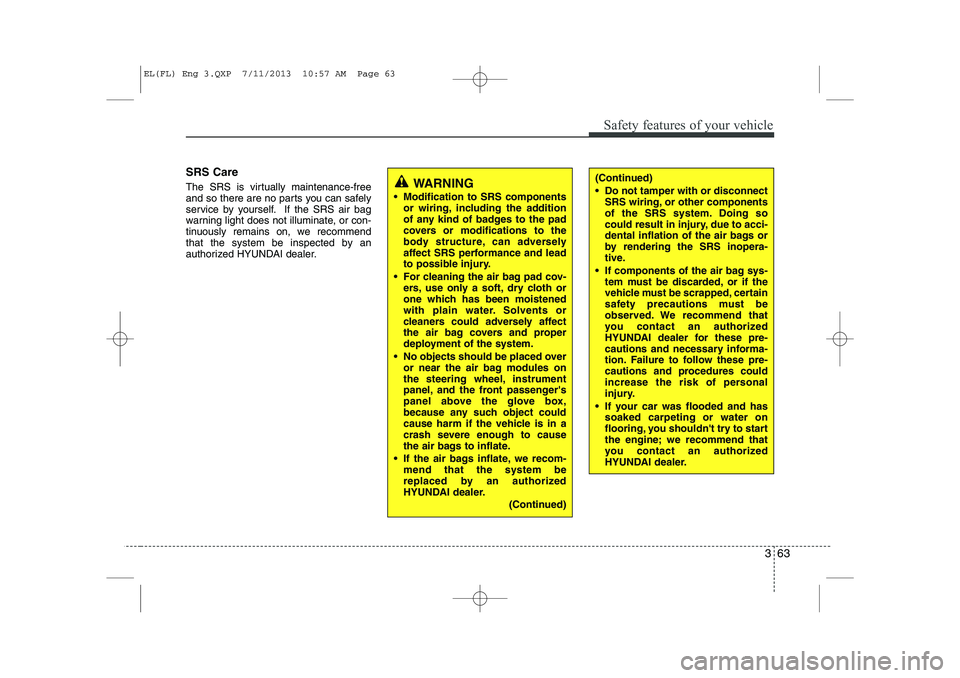
WARNING
Modification to SRS components or wiring, including the addition
of any kind of badges to the pad
covers or modifications to the
body structure, can adversely
affect SRS performance and lead
to possible injury.
For cleaning the air bag pad cov- ers, use only a soft, dry cloth or
one which has been moistened
with plain water. Solvents or
cleaners could adversely affect
the air bag covers and proper
deployment of the system.
No objects should be placed over or near the air bag modules on
the steering wheel, instrument
panel, and the front passenger's
panel above the glove box,
because any such object could
cause harm if the vehicle is in a
crash severe enough to cause
the air bags to inflate.
If the air bags inflate, we recom- mend that the system be
replaced by an authorized
HYUNDAI dealer.
(Continued)(Continued)
Do not tamper with or disconnectSRS wiring, or other components
of the SRS system. Doing so
could result in injury, due to acci-
dental inflation of the air bags or
by rendering the SRS inopera-
tive.
If components of the air bag sys- tem must be discarded, or if the
vehicle must be scrapped, certain
safety precautions must be
observed. We recommend that
you contact an authorized
HYUNDAI dealer for these pre-
cautions and necessary informa-
tion. Failure to follow these pre-
cautions and procedures could
increase the risk of personal
injury.
If your car was flooded and has soaked carpeting or water on
flooring, you shouldn't try to start
the engine; we recommend that
you contact an authorized
HYUNDAI dealer.
EL(FL) Eng 3.QXP 7/11/2013 10:57 AM Page 63
Page 537 of 1534
447
Features of your vehicle
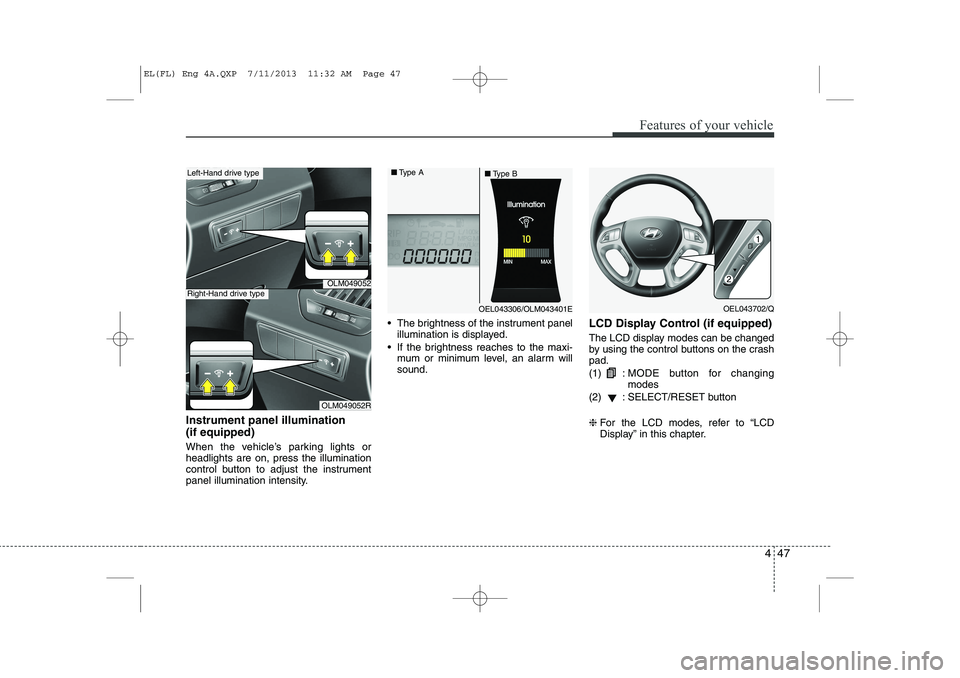
Instrument panel illumination (if equipped)
When the vehicle’s parking lights or headlights are on, press the illumination
control button to adjust the instrument
panel illumination intensity. The brightness of the instrument panel
illumination is displayed.
If the brightness reaches to the maxi- mum or minimum level, an alarm willsound. LCD Display Control (if equipped)
The LCD display modes can be changed
by using the control buttons on the crashpad. (1) :
MODE button for changing modes
(2) : SELECT/RESET button ❈ For the LCD modes, refer to “LCD
Display” in this chapter.
OLM049052
OLM049052R
Left-Hand drive type
Right-Hand drive type
OEL043306/OLM043401E
■
Type A
■Type BOEL043702/Q
EL(FL) Eng 4A.QXP 7/11/2013 11:32 AM Page 47
Page 590 of 1534
Features of your vehicle
100
4
Lighting control
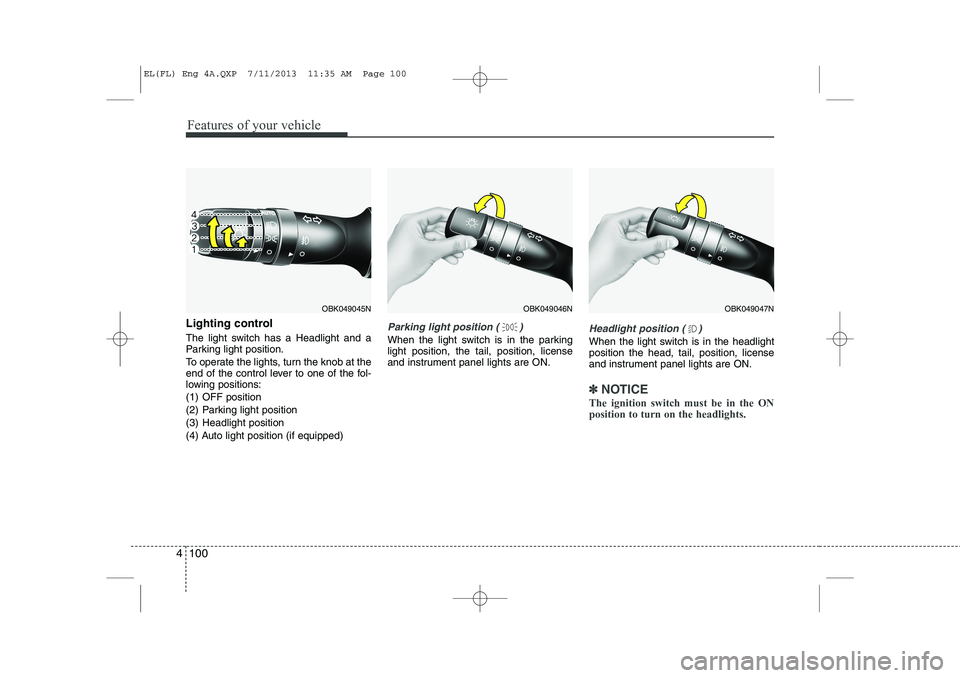
The light switch has a Headlight and a
Parking light position.
To operate the lights, turn the knob at the
end of the control lever to one of the fol-
lowing positions:
(1) OFF position
(2) Parking light position
(3) Headlight position
(4) Auto light position (if equipped)Parking light position ( )
When the light switch is in the parking light position, the tail, position, license
and instrument panel lights are ON.Headlight position ( )
When the light switch is in the headlight position the head, tail, position, license
and instrument panel lights are ON.
✽✽
NOTICE
The ignition switch must be in the ON position to turn on the headlights.
OBK049045NOBK049047NOBK049046N
EL(FL) Eng 4A.QXP 7/11/2013 11:35 AM Page 100
Page 603 of 1534
✽✽NOTICE
If you want to defrost and defog on the
front windshield, refer to “Windshield
Defrosting and Defogging” in this sec-tion.
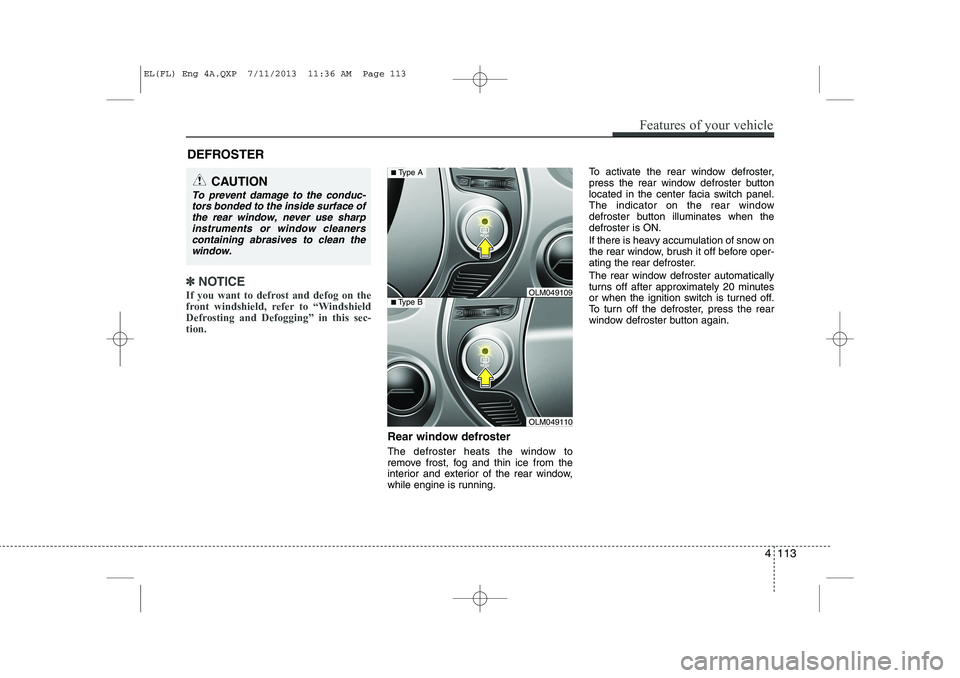
Rear window defroster
The defroster heats the window to
remove frost, fog and thin ice from the
interior and exterior of the rear window,
while engine is running. To activate the rear window defroster,
press the rear window defroster button
located in the center facia switch panel.
The indicator on the rear window
defroster button illuminates when thedefroster is ON.
If there is heavy accumulation of snow on
the rear window, brush it off before oper-
ating the rear defroster.
The rear window defroster automatically
turns off after approximately 20 minutes
or when the ignition switch is turned off.
To turn off the defroster, press the rear
window defroster button again.
DEFROSTER
CAUTION
To prevent damage to the conduc-
tors bonded to the inside surface of
the rear window, never use sharpinstruments or window cleanerscontaining abrasives to clean the window.
OLM049110
■ Type BOLM049109
■Type A
Features of your vehicle
113
4
EL(FL) Eng 4A.QXP 7/11/2013 11:36 AM Page 113
Page 608 of 1534
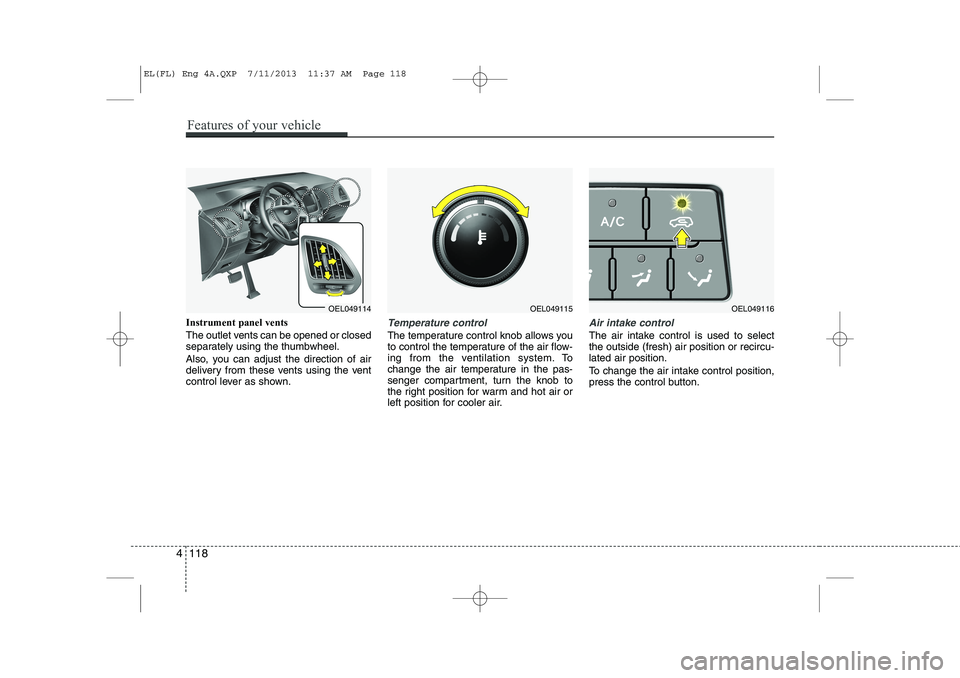
Instrument panel vents
The outlet vents can be opened or closed
separately using the thumbwheel.
Also, you can adjust the direction of air
delivery from these vents using the vent
control lever as shown.Temperature control
The temperature control knob allows you
to control the temperature of the air flow-
ing from the ventilation system. To
change the air temperature in the pas-
senger compartment, turn the knob to
the right position for warm and hot air or
left position for cooler air.
Air intake control
The air intake control is used to select the outside (fresh) air position or recircu-lated air position.
To change the air intake control position,
press the control button.
OEL049114OEL049115OEL049116
4 118
Features of your vehicle
EL(FL) Eng 4A.QXP 7/11/2013 11:37 AM Page 118
Page 617 of 1534
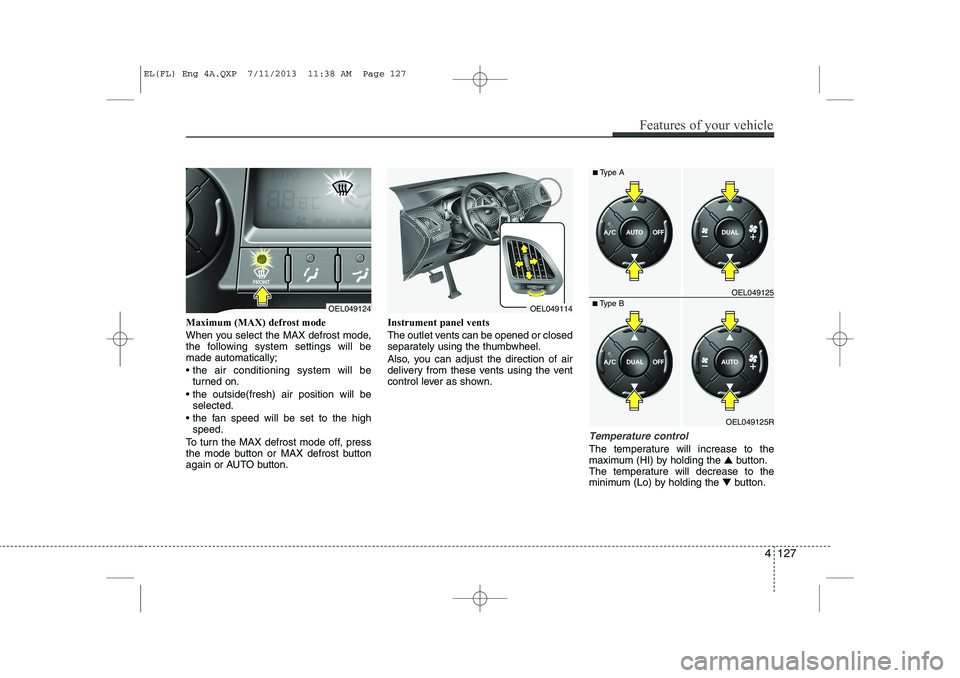
Maximum (MAX) defrost mode
When you select the MAX defrost mode,
the following system settings will bemade automatically;
the air conditioning system will beturned on.
the outside(fresh) air position will be selected.
the fan speed will be set to the high speed.
To turn the MAX defrost mode off, press
the mode button or MAX defrost button
again or AUTO button. Instrument panel vents
The outlet vents can be opened or closed
separately using the thumbwheel.
Also, you can adjust the direction of air
delivery from these vents using the vent
control lever as shown.
Temperature control
The temperature will increase to the
maximum (HI) by holding the
▲button.
The temperature will decrease to the
minimum (Lo) by holding the ▼button.
OEL049124OEL049114
OEL049125R
■
Type B OEL049125
■
Type A
Features of your vehicle
127
4
EL(FL) Eng 4A.QXP 7/11/2013 11:38 AM Page 127
Page 822 of 1534
Driving your vehicle
68
5
Following distance
Stay at least twice as far behind the vehi-
cle ahead as you would when driving
your vehicle without a trailer. This can
help you avoid situations that require
heavy braking and sudden turns.
Passing
You’ll need more passing distance up
ahead when you’re towing a trailer. And,
because of the increased vehicle length,
you’ll need to go much farther beyond the
passed vehicle before you can return to
your lane.
Backing up
Hold the bottom of the steering wheel
with one hand. Then, to move the trailer
to the left, just move your hand to the left.
To move the trailer to the right, move your
hand to the right. Always back up slowly
and, if possible, have someone guide
you.
Making turns
When you’re turning with a trailer, make
wider turns than normal. Do this so your
trailer won’t strike soft shoulders, curbs,
road signs, trees, or other objects. Avoid
jerky or sudden maneuvers. Signal well
in advance.
Turn signals when towing a trailer
When you tow a trailer, your vehicle has
to have a different turn signal flasher and
extra wiring. The green arrows on your
instrument panel will flash whenever you
signal a turn or lane change. Properly
connected, the trailer lights will also flash
to alert other drivers you’re about to turn,
change lanes, or stop.
When towing a trailer, the green arrows
on your instrument panel will flash for
turns even if the bulbs on the trailer are
burned out. Thus, you may think drivers
behind you are seeing your signals
when, in fact, they are not. It’s important
to check occasionally to be sure the trail-
er bulbs are still working. You must also
check the lights every time you discon-
nect and then reconnect the wires.
Do not connect a trailer lighting system
directly to your vehicle’s lighting system.
Use only an approved trailer wiring har-
ness.
An authorized HYUNDAI dealer can
assist you in installing the wiring harness.
EL(FL) Eng 5.QXP 7/11/2013 11:05 AM Page 68
Page 951 of 1534
Maintenance
86
7
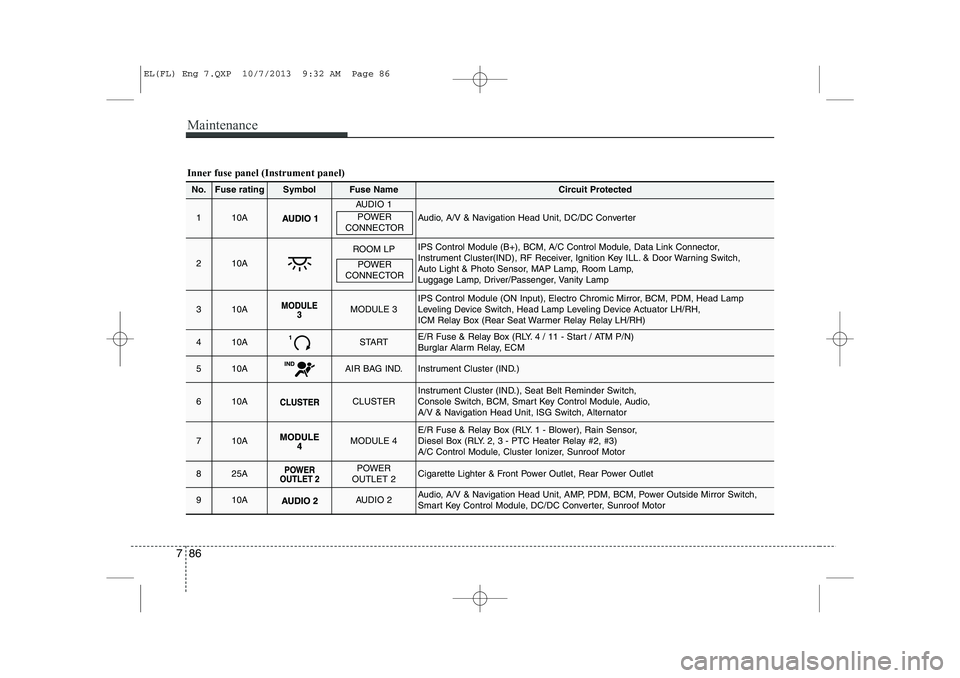
Inner fuse panel (Instrument panel)
No.Fuse ratingSymbolFuse NameCircuit Protected
110A
AUDIO 1
Audio, A/V & Navigation Head Unit, DC/DC Converter
210A
ROOM LPIPS Control Module (B+), BCM, A/C Control Module, Data Link Connector,
Instrument Cluster(IND), RF Receiver, Ignition Key ILL. & Door Warning Switch,
Auto Light & Photo Sensor, MAP Lamp, Room Lamp,
Luggage Lamp, Driver/Passenger, Vanity Lamp
310AMODULE 3IPS Control Module (ON Input), Electro Chromic Mirror, BCM, PDM, Head Lamp
Leveling Device Switch, Head Lamp Leveling Device Actuator LH/RH,
ICM Relay Box (Rear Seat Warmer Relay Relay LH/RH)
410ASTARTE/R Fuse & Relay Box (RLY. 4 / 11 - Start / ATM P/N)
Burglar Alarm Relay, ECM
510AAIR BAG IND.Instrument Cluster (IND.)
610ACLUSTERInstrument Cluster (IND.), Seat Belt Reminder Switch,
Console Switch, BCM, Smart Key Control Module, Audio,
A/V & Navigation Head Unit, ISG Switch, Alternator
710AMODULE 4E/R Fuse & Relay Box (RLY. 1 - Blower), Rain Sensor,
Diesel Box (RLY. 2, 3 - PTC Heater Relay #2, #3)
A/C Control Module, Cluster Ionizer, Sunroof Motor
825APOWER
OUTLET 2Cigarette Lighter & Front Power Outlet, Rear Power Outlet
910AAUDIO 2Audio, A/V & Navigation Head Unit, AMP, PDM, BCM, Power Outside Mirror Switch,
Smart Key Control Module, DC/DC Converter, Sunroof Motor
POWER
CONNECTOR
POWER
CONNECTOR
EL(FL) Eng 7.QXP 10/7/2013 9:32 AM Page 86
Page 1000 of 1534
Your vehicle at a glance
Interior overview . . . . . . . . . . . . . . . . . . . . . . . . . . . 2-2
Instrument panel overview . . . . . . . . . . . . . . . . . . . 2-3
Engine compartment . . . . . . . . . . . . . . . . . . . . . . . . 2-4
2
EL(FL) UK 2.QXP 8/5/2013 6:22 PM Page 1
Page 1001 of 1534
Your vehicle at a glance
2
2
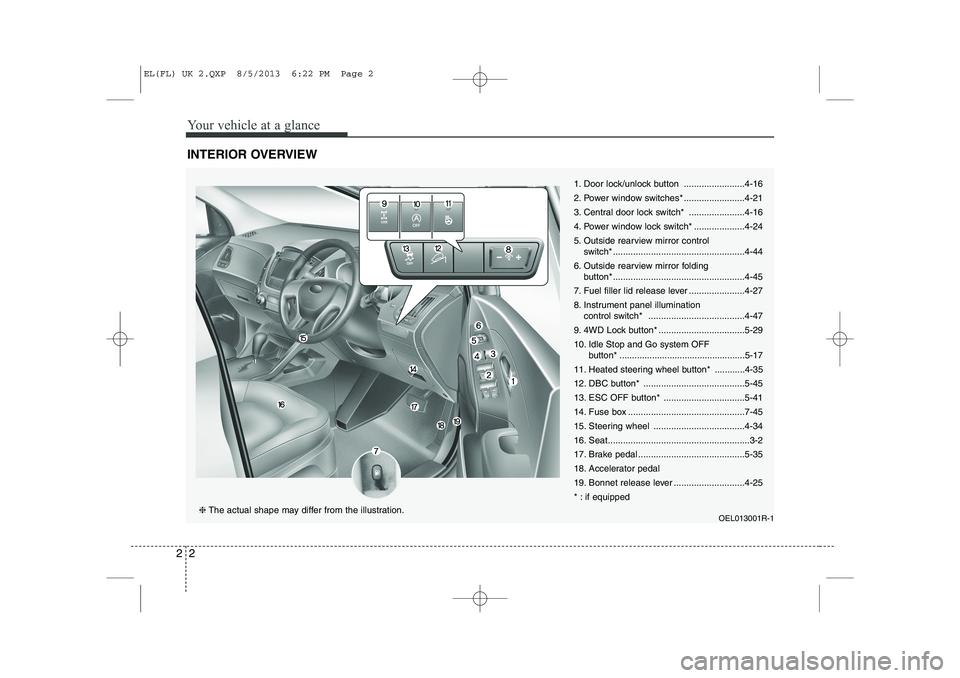
INTERIOR OVERVIEW
1. Door lock/unlock button ........................4-16
2. Power window switches* ........................4-21
3. Central door lock switch* ......................4-16
4. Power window lock switch* ....................4-24
5. Outside rearview mirror control
switch* ....................................................4-44
6. Outside rearview mirror folding button* ....................................................4-45
7. Fuel filler lid release lever ......................4-27
8. Instrument panel illumination control switch* ......................................4-47
9. 4WD Lock button* ..................................5-2910.
Idle Stop and Go system OFF
button* ..................................................5-17
11. Heated steering wheel button* ............4-35
12. DBC button* ........................................5-45
13. ESC OFF button* ................................5-41
14. Fuse box ..............................................7-45
15. Steering wheel ....................................4-34
16. Seat........................................................3-2
17. Brake pedal ..........................................5-35
18. Accelerator pedal
19. Bonnet release lever ............................4-25
* : if equipped
OEL013001R-1
❈The actual shape may differ from the illustration.
EL(FL) UK 2.QXP 8/5/2013 6:22 PM Page 2