USB HYUNDAI IX35 2014 Workshop Manual
[x] Cancel search | Manufacturer: HYUNDAI, Model Year: 2014, Model line: IX35, Model: HYUNDAI IX35 2014Pages: 1534, PDF Size: 39.76 MB
Page 1285 of 1534

Features of your vehicle
214
4
USB MODE Basic Mode Screen
1. Mode
Displays currently operating mode
2. Operation State
From Repeat/Random(Shuffle)/ Scan, dis-
plays the currently operating function
3. File Index
Displays the current file number 4. File Info
Displays information about the current file
5. Play/Pause
Changes the play/pause state
6. Play Time
Displays the current play time
7. Info
Displays detailed information for the cur- rent file
8. Random(Shuffle)
Turns the Random(Shuffle) feature on/off
9. Repeat
Turns the Repeat feature on/off
10. Copy Copies the current file into My Music
11. List
Moves to the list screen
EL(FL) UK 4B AUDIO.QXP 7/15/2013 10:21 AM Page 214
Page 1286 of 1534
4 215
Features of your vehicle
Using USB Mode
Playing/Pausing USB Files
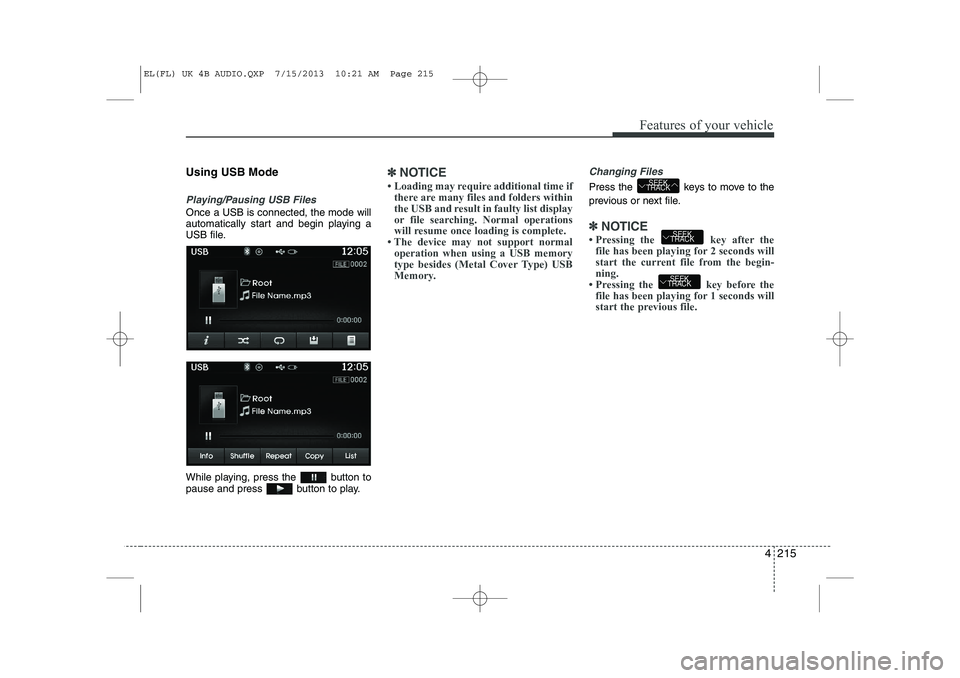
Once a USB is connected, the mode will
automatically start and begin playing a
USB file.
While playing, press the button to
pause and press button to play.
✽✽NOTICE
Page 1288 of 1534
4 217
Features of your vehicle
USB Mode Menu
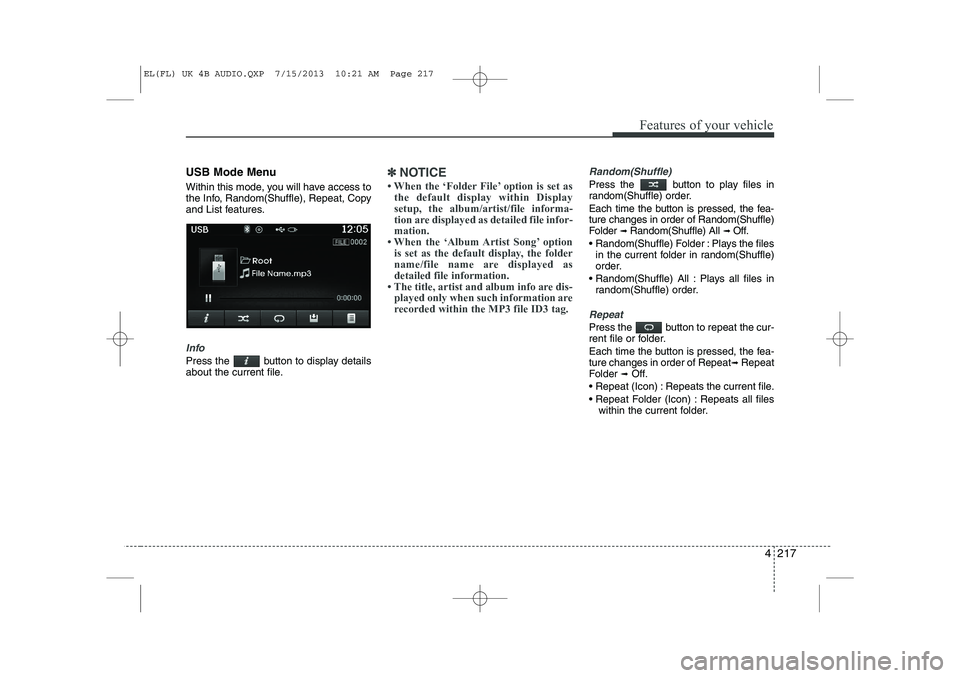
Within this mode, you will have access to
the Info, Random(Shuffle), Repeat, Copy
and List features.
Info
Press the button to display details
about the current file.
✽✽NOTICE
Page 1317 of 1534
Features of your vehicle
246
4
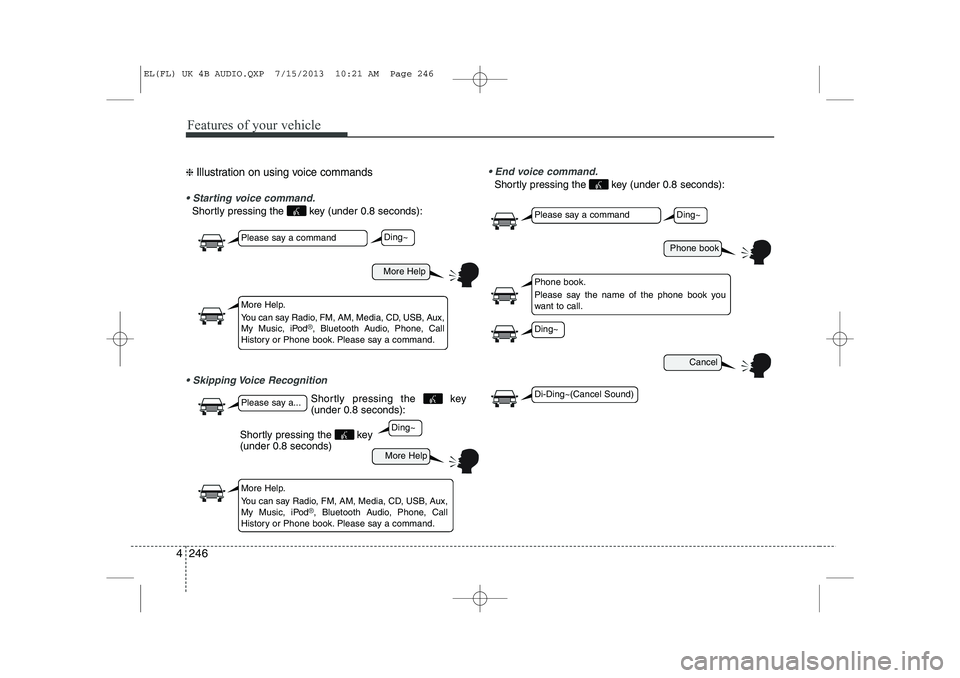
❈ Illustration on using voice commands
Starting voice command.
Shortly pressing the key (under 0.8 seconds):
Skipping Voice Recognition End voice command.
Shortly pressing the key (under 0.8 seconds):
More Help
More Help
Please say a command
Please say a...
More Help.
You can say Radio, FM, AM, Media, CD, USB, Aux,
My Music, iPod
®, Bluetooth Audio, Phone, Call
History or Phone book. Please say a command.
More Help.
You can say Radio, FM, AM, Media, CD, USB, Aux,
My Music, iPod
®, Bluetooth Audio, Phone, Call
History or Phone book. Please say a command.
Ding~
Ding~
Shortly pressing the key (under 0.8 seconds)
Phone book
Cancel
Please say a command
Phone book.
Please say the name of the phone book you
want to call.
Ding~
Di-Ding~(Cancel Sound)
Ding~
Shortly pressing the key (under 0.8 seconds):
EL(FL) UK 4B AUDIO.QXP 7/15/2013 10:21 AM Page 246
Page 1319 of 1534
Features of your vehicle
248
4
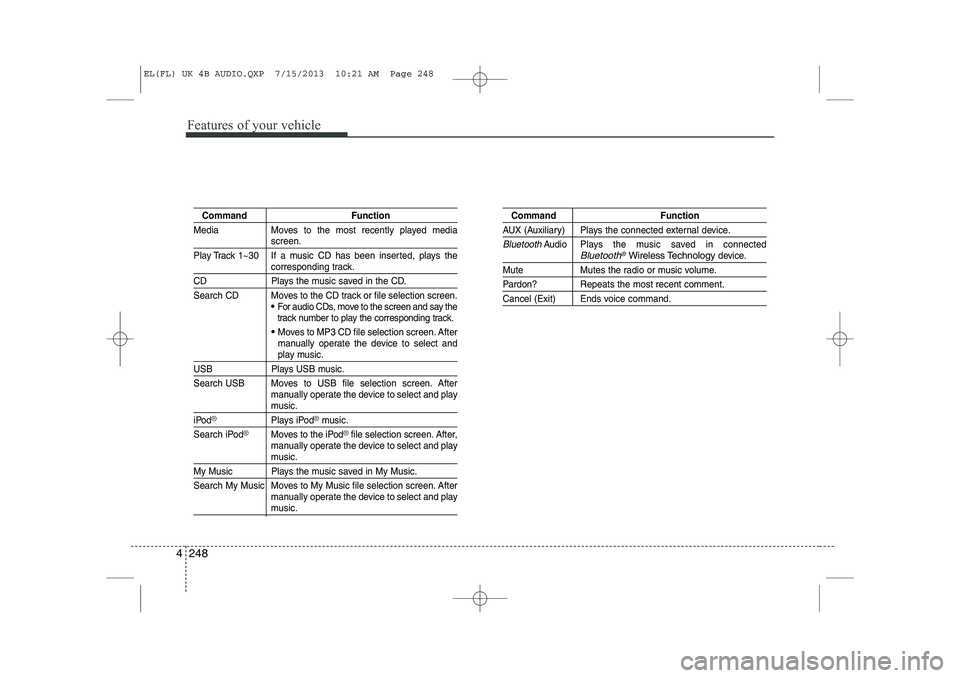
Command Function
Media Moves to the most recently played media
screen.
Play Track 1~30 If a music CD has been inserted, plays the
corresponding track.
CD Plays the music saved in the CD.
Search CD Moves to the CD track or file selection screen.
For audio CDs, move to the screen and say the
track number to play the corresponding track.
Moves to MP3 CD file selection screen. After
manually operate the device to select and
play music.
USB Plays USB music.
Search USB Moves to USB file selection screen. After manually operate the device to select and play
music.
iPod®Plays iPod®music.
Search iPod
®Moves to the iPod®file selection screen. After,
manually operate the device to select and play
music.
My Music Plays the music saved in My Music.
Search My Music Moves to My Music file selection screen. After manually operate the device to select and play
music.
Command Function
AUX (Auxiliary) Plays the connected external device.
BluetoothAudio Plays the music saved in connectedBluetooth®Wireless Technologydevice.
Mute Mutes the radio or music volume.
Pardon? Repeats the most recent comment.
Cancel (Exit) Ends voice command.
EL(FL) UK 4B AUDIO.QXP 7/15/2013 10:21 AM Page 248
Page 1321 of 1534
Features of your vehicle
250
4
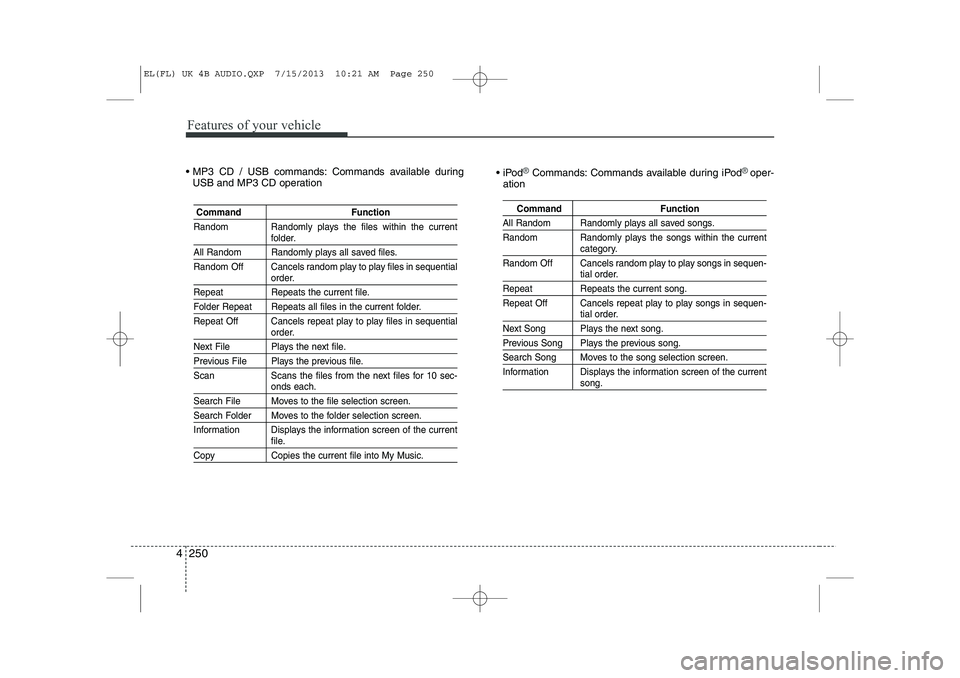
MP3 CD / USB commands: Commands available during
USB and MP3 CD operation iPod®Commands: Commands available during iPod® oper-
ation
Command Function
Random Randomly plays the files within the current
folder.
All Random Randomly plays all saved files.
Random Off Cancels random play to play files in sequential
order.
Repeat Repeats the current file.
Folder Repeat Repeats all files in the current folder.
Repeat Off Cancels repeat play to play files in sequential
order.
Next File Plays the next file.
Previous File Plays the previous file.
Scan Scans the files from the next files for 10 sec-
onds each.
Search File Moves to the file selection screen.
Search Folder Moves to the folder selection screen.
Information Displays the information screen of the current
file.
Copy Copies the current file into My Music.
Command Function
All Random Randomly plays all saved songs.
Random Randomly plays the songs within the current
category.
Random Off Cancels random play to play songs in sequen-
tial order.
Repeat Repeats the current song.
Repeat Off Cancels repeat play to play songs in sequen-
tial order.
Next Song Plays the next song.
Previous Song Plays the previous song.
Search Song Moves to the song selection screen.
Information Displays the information screen of the current
song.
EL(FL) UK 4B AUDIO.QXP 7/15/2013 10:21 AM Page 250
Page 1324 of 1534
![HYUNDAI IX35 2014 Workshop Manual 4 253
Features of your vehicle
Scroll Text
Press the key Select
[Display] Select [Scroll text]
This feature is used to scroll text dis-
played on the screen when it is too long
to be displayed at](/img/35/56237/w960_56237-1323.png "HYUNDAI IX35 2014 Workshop Manual 4 253
Features of your vehicle
Scroll Text
Press the key Select
[Display] Select [Scroll text]
This feature is used to scroll text dis-
played on the screen when it is too long
to be displayed at")
4 253
Features of your vehicle
Scroll Text
Press the key Select
[Display] Select [Scroll text]
This feature is used to scroll text dis-
played on the screen when it is too long
to be displayed at once.
When turned on, the text is repeatedly
scrolled. When turned off, the text is
scrolled just once.
MP3 Information Display
Press the key Select
[Display] Select [Song Info]
This feature is used to change the infor-
mation displayed within USB and MP3
CD modes.
1) Folder File : Displays file name andfolder name
2) Album Artist Song : Displays album name/artist name/songSETUP SETUP
EL(FL) UK 4B AUDIO.QXP 7/15/2013 10:22 AM Page 253