audio HYUNDAI IX35 2015 Owners Manual
[x] Cancel search | Manufacturer: HYUNDAI, Model Year: 2015, Model line: IX35, Model: HYUNDAI IX35 2015Pages: 550, PDF Size: 11.23 MB
Page 346 of 550
![HYUNDAI IX35 2015 Owners Manual 4 261
Features of your vehicle
System SettingMemory InformationPress the key Select [System]
Select [Memory Information]This feature displays information related
to system memory.
1) Using : Displays](/img/35/57920/w960_57920-345.png "HYUNDAI IX35 2015 Owners Manual 4 261
Features of your vehicle
System SettingMemory InformationPress the key Select [System]
Select [Memory Information]This feature displays information related
to system memory.
1) Using : Displays")
4 261
Features of your vehicle
System SettingMemory InformationPress the key Select [System]
Select [Memory Information]This feature displays information related
to system memory.
1) Using : Displays capacity currently inuse
2) Capacity : Displays total capacity
Voice Recognition Mode SettingPress the key Select
[System] Select [Voice Recognition
System]
This feature is used to select the desired
prompt feedback option from Normal and
Expert.
1) Normal : When using voice recogni- tion, provides detailed guidance
prompts
2) Expert : When using voice recognition, omits some guidance prompts✽ ✽NOTICE Voice Recognition is depend on the
Audio System.
LanguagePress the key Select
[System] Select [Language]
This feature is used to change the sys-
tem and voice recognition language.
If the language is changed, the system
will restart and apply the selected lan-
guage.
❈ Language support by region
SETUP
SETUP
SETUP
EL(FL) UK 4B AUDIO.QXP 3/13/2015 4:19 PM Page 261
procarmanuals.com
Page 347 of 550
Features of your vehicle262
4REAR VIEW CAMERA
(if equipped) The system has been equipped with a
rear view camera for user safety by
allowing a wider rear range of vision.
The rear view camera will automatical- ly operate when the ignition key is
turned ON and the transmission lever
is set to R.
The rear view camera will automatical- ly stop operating when set to a differ-
ent lever.
CAUTION
The rear view camera has beenequipped with an optical lens toprovide a wider range of vision and may appear different from the actu-al distance. For safety, directlycheck the rear and left/right sides.
EL(FL) UK 4B AUDIO.QXP 3/13/2015 4:19 PM Page 262
procarmanuals.com
Page 348 of 550
4 263
Features of your vehicle
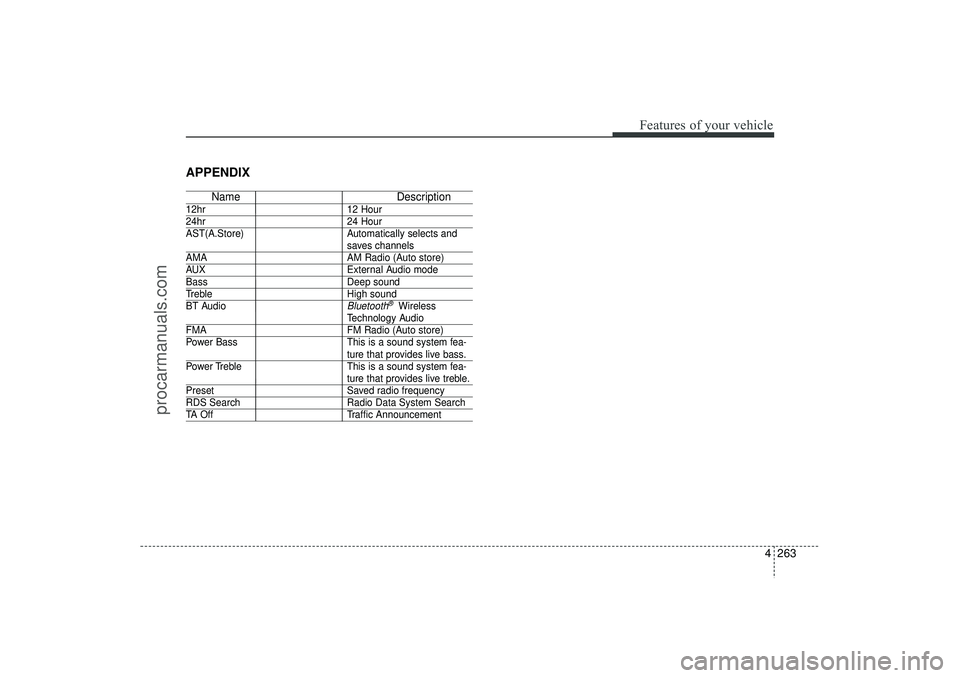
APPENDIX
NameDescription
12hr12 Hour24hr24 Hour
AST(A.Store) Automatically selects and
saves channels
AMA AM Radio (Auto store)AUXExternal Audio modeBassDeep soundTrebleHigh sound
BT Audio
Bluetooth
®Wireless
Technology Audio
FMA FM Radio (Auto store)
Power Bass This is a sound system fea-
ture that provides live bass.
Power Treble This is a sound system fea-ture that provides live treble.
Preset Saved radio frequencyRDS SearchRadio Data System SearchTA OffTraffic Announcement
EL(FL) UK 4B AUDIO.QXP 3/13/2015 4:19 PM Page 263
procarmanuals.com
Page 353 of 550
55
Driving your vehicle
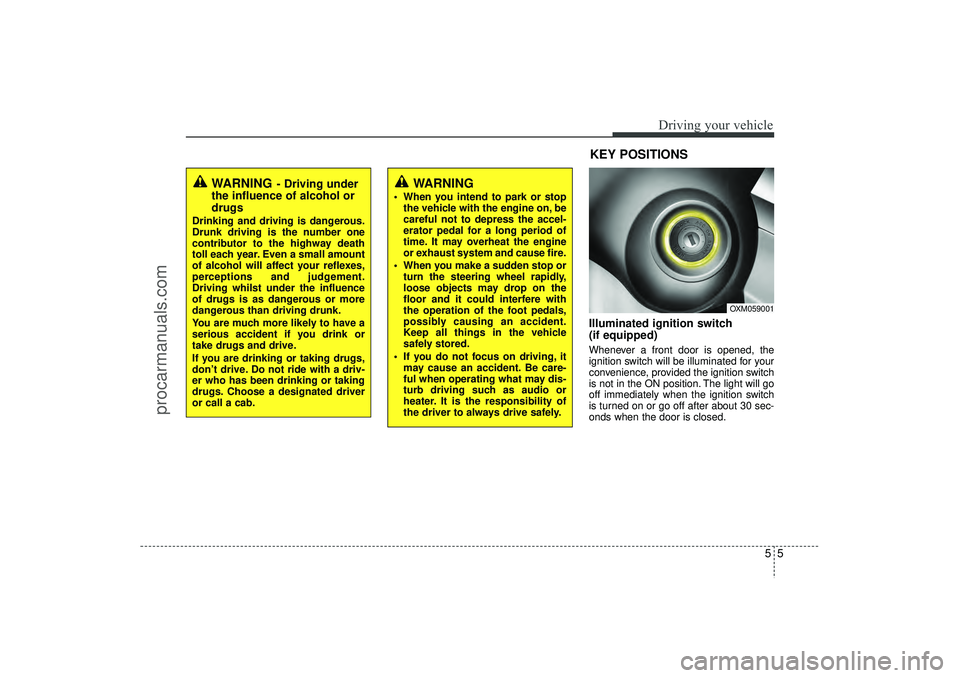
Illuminated ignition switch
(if equipped)Whenever a front door is opened, the
ignition switch will be illuminated for your
convenience, provided the ignition switch
is not in the ON position. The light will go
off immediately when the ignition switch
is turned on or go off after about 30 sec-
onds when the door is closed.
OXM059001
WARNING
- Driving under
the influence of alcohol or
drugs
Drinking and driving is dangerous.
Drunk driving is the number one
contributor to the highway death
toll each year. Even a small amount
of alcohol will affect your reflexes,
perceptions and judgement.
Driving whilst under the influence
of drugs is as dangerous or more
dangerous than driving drunk.
You are much more likely to have a
serious accident if you drink or
take drugs and drive.
If you are drinking or taking drugs,
don’t drive. Do not ride with a driv-
er who has been drinking or taking
drugs. Choose a designated driver
or call a cab.
KEY POSITIONS
WARNING
When you intend to park or stop
the vehicle with the engine on, be
careful not to depress the accel-
erator pedal for a long period of
time. It may overheat the engine
or exhaust system and cause fire.
When you make a sudden stop or turn the steering wheel rapidly,
loose objects may drop on the
floor and it could interfere with
the operation of the foot pedals,
possibly causing an accident.
Keep all things in the vehicle
safely stored.
If you do not focus on driving, it may cause an accident. Be care-
ful when operating what may dis-
turb driving such as audio or
heater. It is the responsibility of
the driver to always drive safely.
EL(FL) UK 5.QXP 12/16/2014 8:08 PM Page 5
procarmanuals.com
Page 492 of 550
Maintenance32
7Battery recharging Your vehicle has a maintenance-free,
calcium-based battery.
If the battery becomes discharged in a
short time (because, for example, the
headlights or interior lights were left on
whilst the vehicle was not in use),
recharge it by slow charging (trickle)
for 10 hours.
If the battery gradually discharges because of high electric load whilst the
vehicle is being used, recharge it at 20-
30A for two hours.
Reset itemsItems should be reset after the battery
has been discharged or the battery has
been disconnected.
Auto up/down window (See section 4)
Sunroof (See section 4)
Trip computer (See section 4)
Climate control system (See section 4)
Clock (See section 4)
Audio (See section 4)(Continued)
Before performing maintenance or recharging the battery, turn off
all accessories and stop the
engine.
The negative battery cable must be removed first and installed
last when the battery is discon-
nected.
WARNING
- Rechargingbattery
When recharging the battery,
observe the following precautions:
The battery must be removed
from the vehicle and placed in an
area with good ventilation.
Do not allow cigarettes, sparks, or flame near the battery.
Watch the battery during charg- ing, and stop or reduce the charg-
ing rate if the battery cells begin
gassing (boiling) violently or if
the temperature of the electrolyte
of any cell exceeds 49°C (120°F).
Wear eye protection when check- ing the battery during charging.
Disconnect the battery charger in the following order.
1. Turn off the battery charger main switch.
2. Unhook the negative clamp from the negative battery ter-
minal.
3. Unhook the positive clamp from the positive battery termi-
nal.
(Continued)
EL(FL) UK 7.QXP 3/4/2015 9:05 PM Page 32
procarmanuals.com
Page 506 of 550
Maintenance46
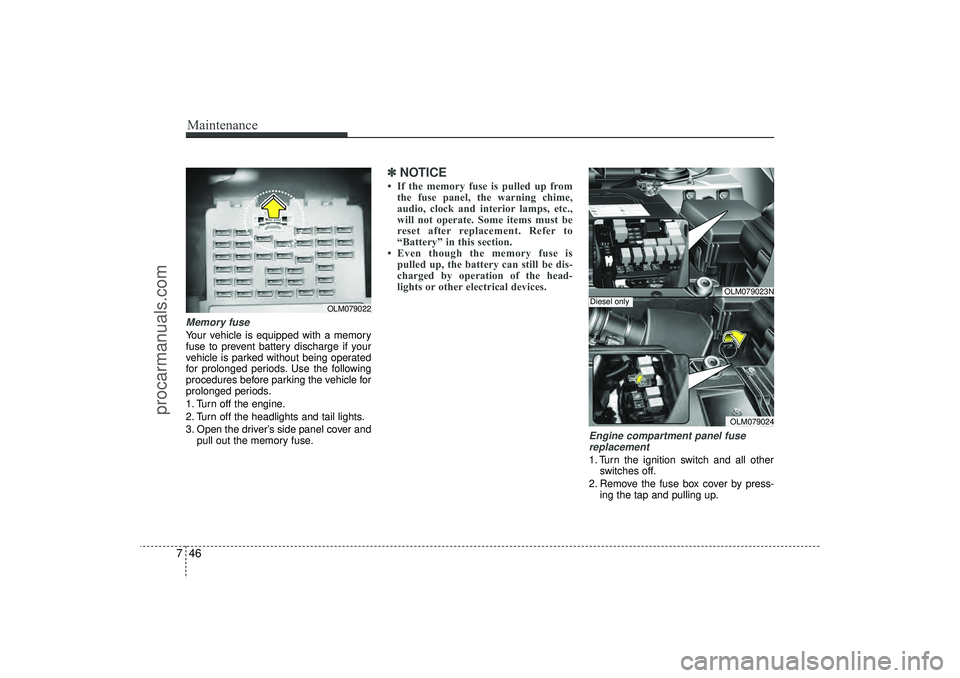
7Memory fuse Your vehicle is equipped with a memory
fuse to prevent battery discharge if your
vehicle is parked without being operated
for prolonged periods. Use the following
procedures before parking the vehicle for
prolonged periods.
1. Turn off the engine.
2. Turn off the headlights and tail lights.
3. Open the driver’s side panel cover and
pull out the memory fuse.
✽ ✽NOTICE• If the memory fuse is pulled up from
the fuse panel, the warning chime,
audio, clock and interior lamps, etc.,
will not operate. Some items must be
reset after replacement. Refer to
“Battery” in this section.
• Even though the memory fuse is pulled up, the battery can still be dis-
charged by operation of the head-
lights or other electrical devices.
Engine compartment panel fuse
replacement1. Turn the ignition switch and all other switches off.
2. Remove the fuse box cover by press- ing the tap and pulling up.
OLM079022
OLM079023NOLM079024
Diesel only
EL(FL) UK 7.QXP 3/4/2015 9:06 PM Page 46
procarmanuals.com
Page 510 of 550
Maintenance50
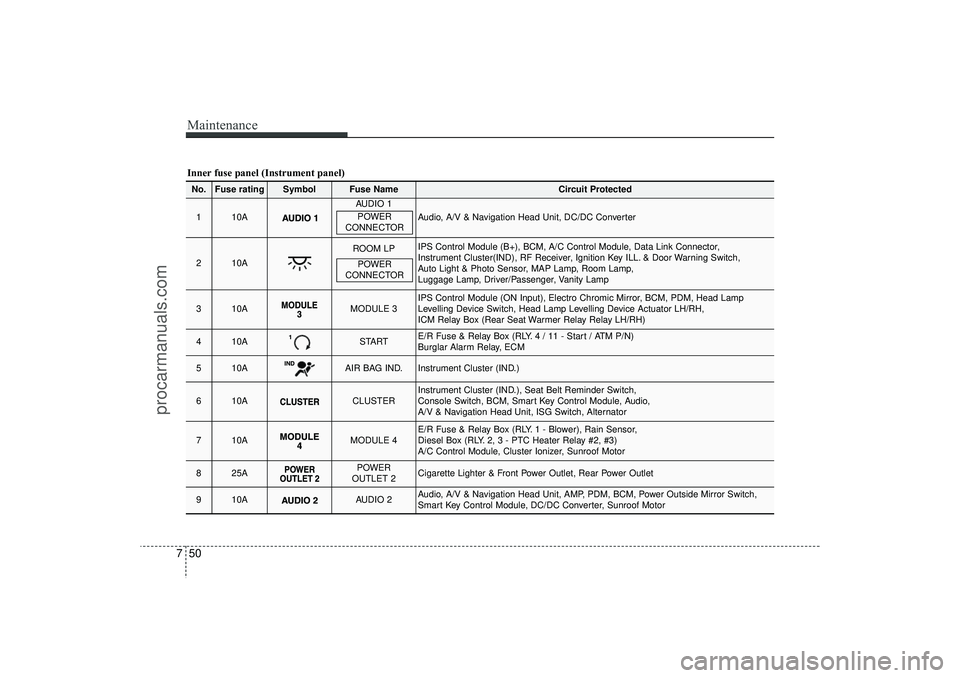
7Inner fuse panel (Instrument panel)No.
Fuse rating
Symbol
Fuse Name
Circuit Protected
1
10A
AUDIO 1
Audio, A/V & Navigation Head Unit, DC/DC Converter
2
10A
ROOM LP
IPS Control Module (B+), BCM, A/C Control Module, Data Link Connector,
Instrument Cluster(IND), RF Receiver, Ignition Key ILL. & Door Warning Switch,
Auto Light & Photo Sensor, MAP Lamp, Room Lamp,
Luggage Lamp, Driver/Passenger, Vanity Lamp
3
10A
MODULE 3
IPS Control Module (ON Input), Electro Chromic Mirror, BCM, PDM, Head Lamp
Levelling Device Switch, Head Lamp Levelling Device Actuator LH/RH,
ICM Relay Box (Rear Seat Warmer Relay Relay LH/RH)
4
10A
START
E/R Fuse & Relay Box (RLY. 4 / 11 - Start / ATM P/N)
Burglar Alarm Relay, ECM
5
10A
AIR BAG IND.
Instrument Cluster (IND.)
6
10A
CLUSTER
Instrument Cluster (IND.), Seat Belt Reminder Switch,
Console Switch, BCM, Smart Key Control Module, Audio,
A/V & Navigation Head Unit, ISG Switch, Alternator
7
10A
MODULE 4
E/R Fuse & Relay Box (RLY. 1 - Blower), Rain Sensor,
Diesel Box (RLY. 2, 3 - PTC Heater Relay #2, #3)
A/C Control Module, Cluster Ionizer, Sunroof Motor
8
25A
POWER
OUTLET 2
Cigarette Lighter & Front Power Outlet, Rear Power Outlet
9
10A
AUDIO 2
Audio, A/V & Navigation Head Unit, AMP, PDM, BCM, Power Outside Mirror Switch,
Smart Key Control Module, DC/DC Converter, Sunroof Motor
POWER
CONNECTORPOWER
CONNECTOR
EL(FL) UK 7.QXP 3/4/2015 9:07 PM Page 50
procarmanuals.com