engine HYUNDAI IX35 2016 Owner's Manual
[x] Cancel search | Manufacturer: HYUNDAI, Model Year: 2016, Model line: IX35, Model: HYUNDAI IX35 2016Pages: 550, PDF Size: 11.23 MB
Page 95 of 550
Features of your vehicle10
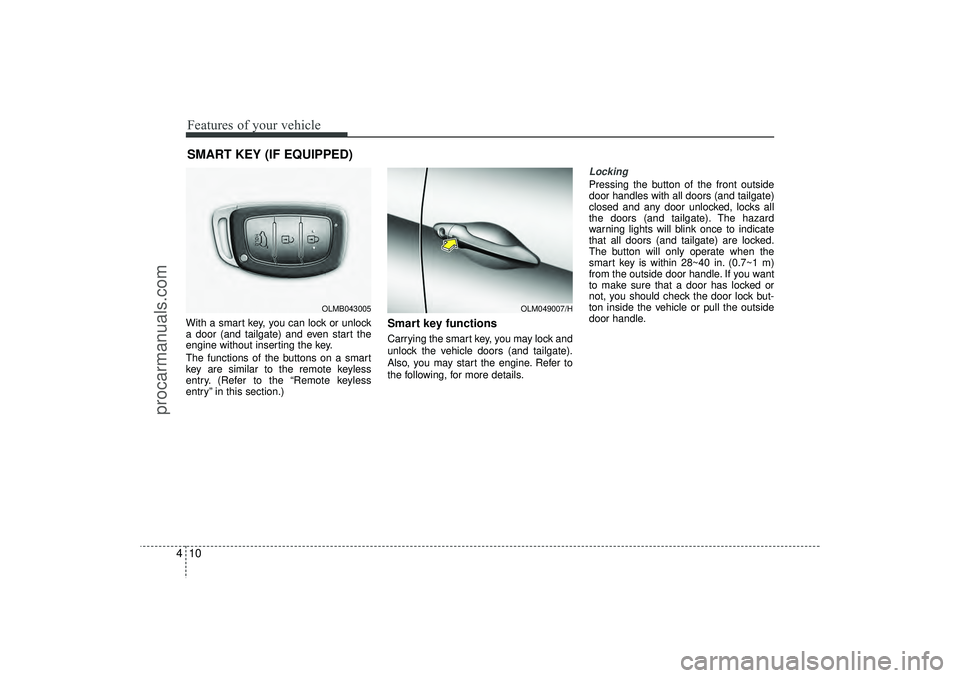
4With a smart key, you can lock or unlock
a door (and tailgate) and even start the
engine without inserting the key.
The functions of the buttons on a smart
key are similar to the remote keyless
entry. (Refer to the “Remote keyless
entry” in this section.)
Smart key functionsCarrying the smart key, you may lock and
unlock the vehicle doors (and tailgate).
Also, you may start the engine. Refer to
the following, for more details.
Locking Pressing the button of the front outside
door handles with all doors (and tailgate)
closed and any door unlocked, locks all
the doors (and tailgate). The hazard
warning lights will blink once to indicate
that all doors (and tailgate) are locked.
The button will only operate when the
smart key is within 28~40 in. (0.7~1 m)
from the outside door handle. If you want
to make sure that a door has locked or
not, you should check the door lock but-
ton inside the vehicle or pull the outside
door handle.
SMART KEY (IF EQUIPPED)
OLM049007/H
OLMB043005
EL(FL) UK 4A.QXP 2/9/2015 9:02 PM Page 10
procarmanuals.com
Page 96 of 550
411
Features of your vehicle
Even though you press the button, the
doors will not lock and the chime sounds
3 seconds if any of the following occurs:
The smart key is in the vehicle.
The engine start/stop button is in theACC or ON position.
Any door except the tailgate is opened.
Unlocking Pressing the button of the front outside
door handles with all doors (and tailgate)
closed and locked, unlocks all the doors
(and tailgate). The hazard warning lights
will blink twice to indicate that all doors
(and tailgate) are unlocked. The button
will only operate when the smart key is
within 28~40 in. (0.7~1 m) from the out-
side door handle.
When the smart key is recognized in the
area of 28~40 in. (0.7~1 m) from the front
outside door handle, other people can
also open a door without possession of
the smart key.
Tailgate unlockingIf you are within 28 ~ 40 in. (0.7 ~ 1 m)
from the outside tailgate handle, with
your smart key in possession, the tail-
gate will unlock and open when you
press the tailgate handle switch.
The hazard warning lights will blink twice
to indicate that the tailgate is unlocked.
Also, once the tailgate is opened and
then closed, the tailgate will lock auto-
matically.Start-upYou can start the engine without inserting
the key. For detailed information refer to
“Starting the engine with a smart key” in
section 5.
EL(FL) UK 4A.QXP 2/9/2015 9:02 PM Page 11
procarmanuals.com
Page 97 of 550
Features of your vehicle12
4Smart key precautions✽
✽
NOTICE• If, for some reason, you happen to lose
your smart key, you will not be able to
start the engine. Tow the vehicle, if
necessary. We recommend that you
contact a HYUNDAI authorised
repairer.
• A maximum of 2 smart keys can be registered to a single vehicle. If you
lose a smart key, you should immedi-
ately take the vehicle and key and we
recommend that you contact a
HYUNDAI authorised repairer.
• The smart key will not work if any of the following occurs:
- The smart key is close to a radiotransmitter such as a radio station or
an airport which can interfere with
normal operation of the smart key.
- The smart key is near a mobile two- way radio system or a mobile phone.
- Another vehicle’s smart key is being operated close to your vehicle.
When the smart key does not work
properly, open and close the door with
the mechanical key. If you have a
problem with the smart key, we rec-
ommend that you contact a
HYUNDAI authorised repairer. (Continued)(Continued)
• If the smart key is in close proximity
to your cell phone or smart phone, the
signal from the smart key could be
blocked by normal operation of your
cell phone or smart phone. This is
especially important when the phone
is active such as making call, receiving
calls, text messaging, and/or sending/
receiving emails. Avoid placing the
smart key and your cell phone or
smart phone in the same pants or
jacket pocket and maintain adequate
distance between the two devices.
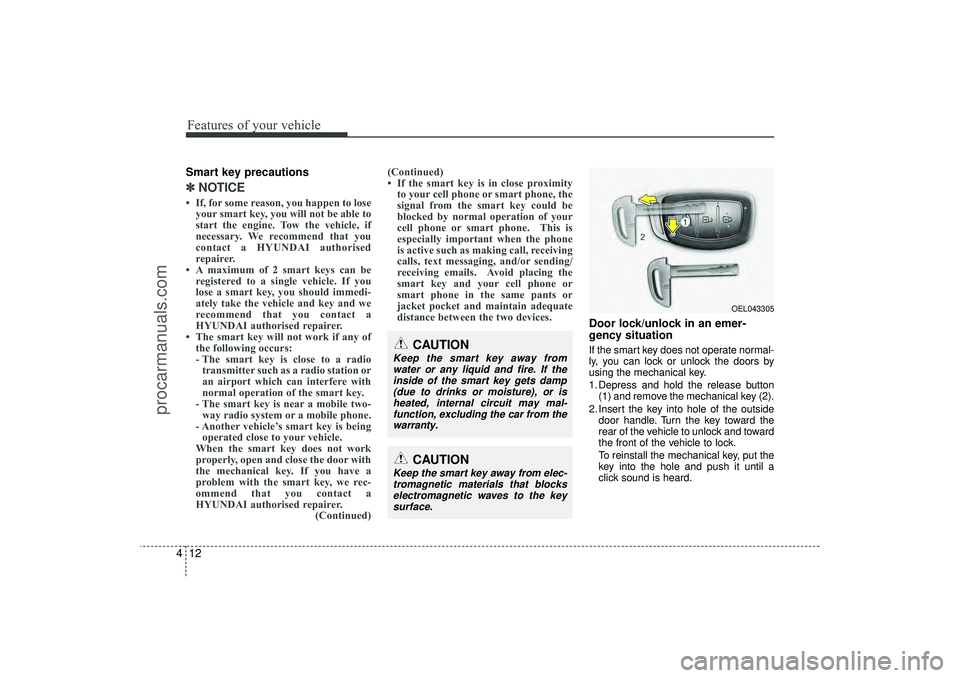
Door lock/unlock in an emer-
gency situationIf the smart key does not operate normal-
ly, you can lock or unlock the doors by
using the mechanical key.
1. Depress and hold the release button
(1) and remove the mechanical key (2).
2. Insert the key into hole of the outside door handle. Turn the key toward the
rear of the vehicle to unlock and toward
the front of the vehicle to lock.
To reinstall the mechanical key, put the
key into the hole and push it until a
click sound is heard.
CAUTION
Keep the smart key away fromwater or any liquid and fire. If theinside of the smart key gets damp(due to drinks or moisture), or is heated, internal circuit may mal-function, excluding the car from the warranty.
OEL043305
CAUTION
Keep the smart key away from elec-tromagnetic materials that blockselectromagnetic waves to the key surface.
EL(FL) UK 4A.QXP 2/9/2015 9:02 PM Page 12
procarmanuals.com
Page 98 of 550
413
Features of your vehicle
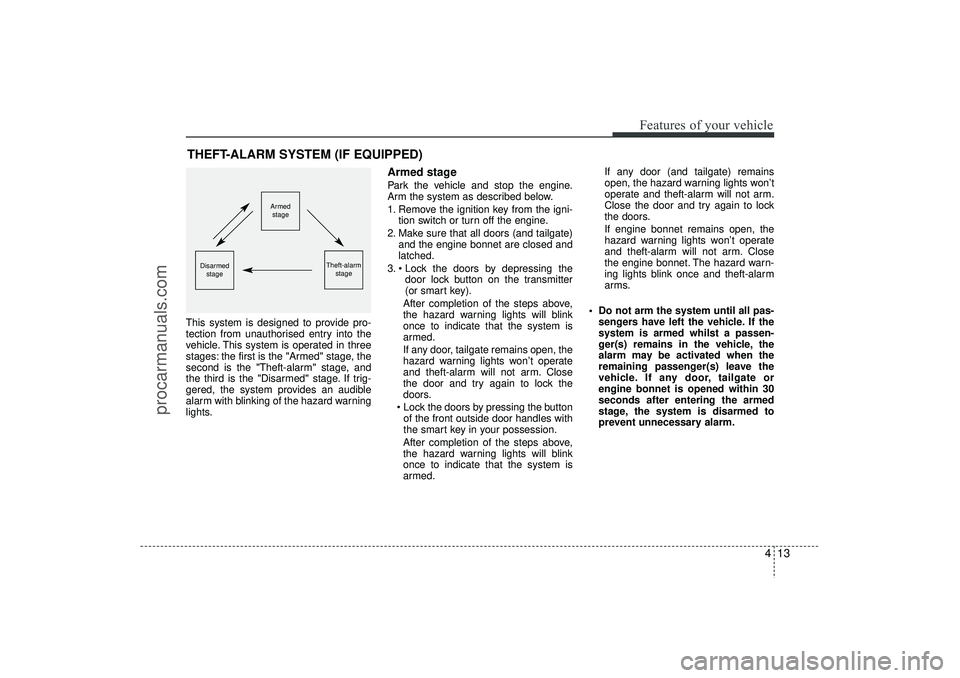
This system is designed to provide pro-
tection from unauthorised entry into the
vehicle. This system is operated in three
stages: the first is the "Armed" stage, the
second is the "Theft-alarm" stage, and
the third is the "Disarmed" stage. If trig-
gered, the system provides an audible
alarm with blinking of the hazard warning
lights.
Armed stagePark the vehicle and stop the engine.
Arm the system as described below.
1. Remove the ignition key from the igni-tion switch or turn off the engine.
2. Make sure that all doors (and tailgate) and the engine bonnet are closed and
latched.
3. Lock the doors by depressing the door lock button on the transmitter
(or smart key).
After completion of the steps above,
the hazard warning lights will blink
once to indicate that the system is
armed.
If any door, tailgate remains open, the
hazard warning lights won’t operate
and theft-alarm will not arm. Close
the door and try again to lock the
doors.
Lock the doors by pressing the button of the front outside door handles with
the smart key in your possession.
After completion of the steps above,
the hazard warning lights will blink
once to indicate that the system is
armed. If any door (and tailgate) remains
open, the hazard warning lights won’t
operate and theft-alarm will not arm.
Close the door and try again to lock
the doors.
If engine bonnet remains open, the
hazard warning lights won’t operate
and theft-alarm will not arm. Close
the engine bonnet. The hazard warn-
ing lights blink once and theft-alarm
arms.
Do not arm the system until all pas- sengers have left the vehicle. If the
system is armed whilst a passen-
ger(s) remains in the vehicle, the
alarm may be activated when the
remaining passenger(s) leave the
vehicle. If any door, tailgate or
engine bonnet is opened within 30
seconds after entering the armed
stage, the system is disarmed to
prevent unnecessary alarm.
THEFT-ALARM SYSTEM (IF EQUIPPED)
Armed
stage
Theft-alarm stage
Disarmedstage
EL(FL) UK 4A.QXP 2/9/2015 9:02 PM Page 13
procarmanuals.com
Page 99 of 550
Features of your vehicle14
4Theft-alarm stageThe alarm will be activated if any of the
following occurs whilst the system is
armed.
A front or rear door is opened without
using transmitter (or smart key).
The tailgate is opened without using transmitter (or smart key).
The engine bonnet is opened.
The siren will sound and the hazard
warning lights will blink continuously for
27 seconds, unless the system is dis-
armed. To turn off the system, unlock the
doors with the transmitter. (or smart key)
Disarmed stageThe system will be disarmed when:Transmitter- The door unlock button is pressed.
- The engine is started.
- The ignition switch is in the “ON” posi- tion for 30 seconds or more.Smart key- The door unlock button is pressed.
- The button of the front outside door ispressed whilst carrying the smart key.
- The engine is started.
After the doors are unlocked, the hazard
warning lights will blink twice to indicate
that the system is disarmed.
After pressing the unlock button, if any
door (or tailgate) is not opened within 30
seconds, the system will be rearmed.
✽ ✽ NOTICE
- Immobiliser system
• If the system is not disarmed with the
transmitter, insert the key into the
ignition switch and start the engine.
Then the system will be disarmed.
• If you lose your keys, we recommend that you consult a HYUNDAI autho-
rised repairer.
CAUTION
Do not change, alter or adjust the
theft-alarm system because it couldcause the theft-alarm system to malfunction. We recommend thatthe system be serviced by a HYUNDAI authorised repairer.
Malfunctions caused by improperalterations, adjustments or modifi- cations to the theft-alarm systemare not covered by your vehiclemanufacturer warranty.
EL(FL) UK 4A.QXP 2/9/2015 9:02 PM Page 14
procarmanuals.com
Page 103 of 550
Features of your vehicle18
4Speed sensing door lock system
(if equipped)All doors will be automatically locked
after the vehicle speed exceeds 15 km/h.
And all doors will be automatically
unlocked when you turn the engine off or
when you remove the ignition key. (if
equipped)
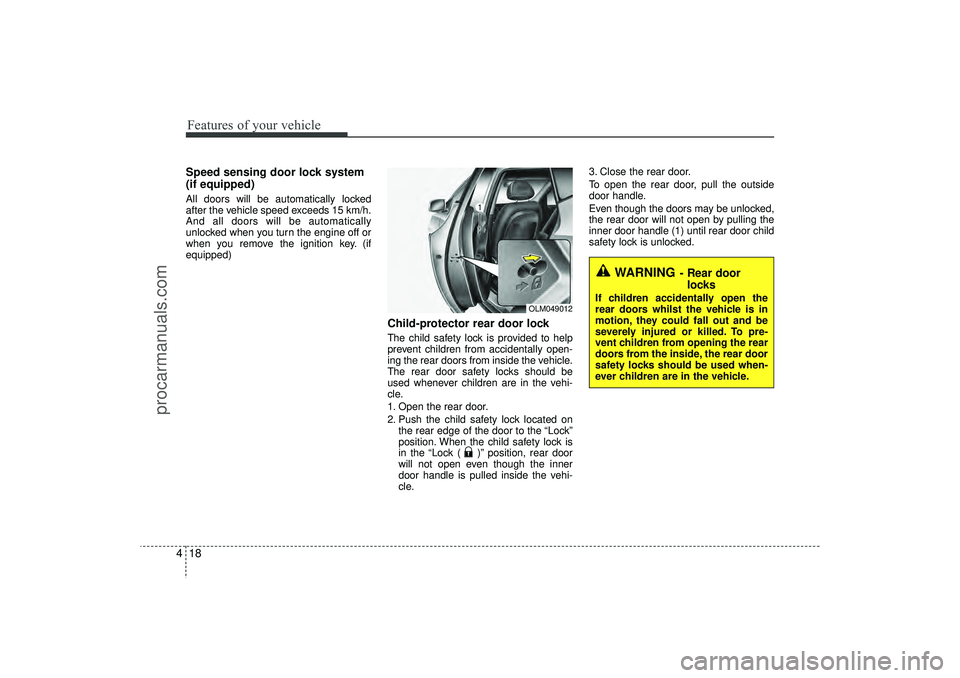
Child-protector rear door lockThe child safety lock is provided to help
prevent children from accidentally open-
ing the rear doors from inside the vehicle.
The rear door safety locks should be
used whenever children are in the vehi-
cle.
1. Open the rear door.
2. Push the child safety lock located on
the rear edge of the door to the “Lock”
position. When the child safety lock is
in the “Lock ( )” position, rear door
will not open even though the inner
door handle is pulled inside the vehi-
cle. 3. Close the rear door.
To open the rear door, pull the outside
door handle.
Even though the doors may be unlocked,
the rear door will not open by pulling the
inner door handle (1) until rear door child
safety lock is unlocked.
WARNING
- Rear door
locks
If children accidentally open the
rear doors whilst the vehicle is in
motion, they could fall out and be
severely injured or killed. To pre-
vent children from opening the rear
doors from the inside, the rear door
safety locks should be used when-
ever children are in the vehicle.
OLM049012
EL(FL) UK 4A.QXP 2/9/2015 9:03 PM Page 18
procarmanuals.com
Page 109 of 550
Features of your vehicle24
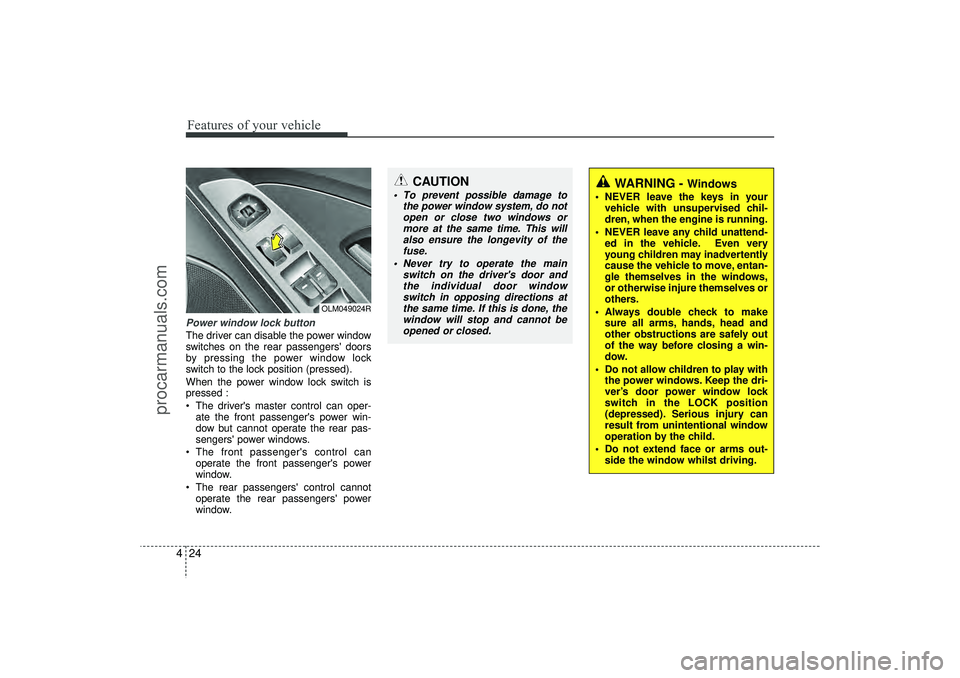
4Power window lock buttonThe driver can disable the power window
switches on the rear passengers' doors
by pressing the power window lock
switch to the lock position (pressed).
When the power window lock switch is
pressed :
The driver's master control can oper-
ate the front passenger's power win-
dow but cannot operate the rear pas-
sengers' power windows.
The front passenger's control can operate the front passenger's power
window.
The rear passengers' control cannot operate the rear passengers' power
window.
OLM049024R
CAUTION
To prevent possible damage to the power window system, do notopen or close two windows ormore at the same time. This willalso ensure the longevity of thefuse.
Never try to operate the main switch on the driver's door andthe individual door windowswitch in opposing directions atthe same time. If this is done, the window will stop and cannot beopened or closed.
WARNING -
Windows
NEVER leave the keys in your vehicle with unsupervised chil-
dren, when the engine is running.
NEVER leave any child unattend- ed in the vehicle. Even very
young children may inadvertently
cause the vehicle to move, entan-
gle themselves in the windows,
or otherwise injure themselves or
others.
Always double check to make sure all arms, hands, head and
other obstructions are safely out
of the way before closing a win-
dow.
Do not allow children to play with the power windows. Keep the dri-
ver’s door power window lock
switch in the LOCK position
(depressed). Serious injury can
result from unintentional window
operation by the child.
Do not extend face or arms out- side the window whilst driving.
EL(FL) UK 4A.QXP 2/9/2015 9:03 PM Page 24
procarmanuals.com
Page 110 of 550
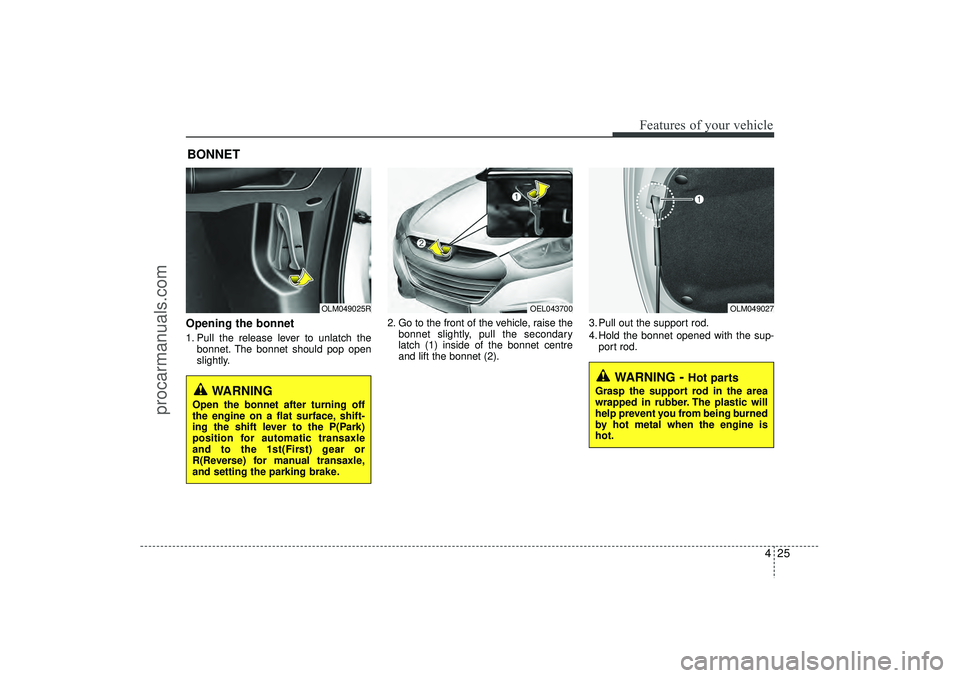
Opening the bonnet 1. Pull the release lever to unlatch thebonnet. The bonnet should pop open
slightly. 2. Go to the front of the vehicle, raise the
bonnet slightly, pull the secondary
latch (1) inside of the bonnet centre
and lift the bonnet (2). 3. Pull out the support rod.
4. Hold the bonnet opened with the sup-
port rod.BONNET
OLM049025R
OLM049027
WARNING
- Hot parts
Grasp the support rod in the area
wrapped in rubber. The plastic will
help prevent you from being burned
by hot metal when the engine is
hot.
WARNING
Open the bonnet after turning off
the engine on a flat surface, shift-
ing the shift lever to the P(Park)
position for automatic transaxle
and to the 1st(First) gear or
R(Reverse) for manual transaxle,
and setting the parking brake.
425
Features of your vehicle
OEL043700
EL(FL) UK 4A.QXP 2/9/2015 9:03 PM Page 25
procarmanuals.com
Page 111 of 550
Features of your vehicle26
4Closing the bonnet1. Before closing the bonnet, check the
following:
All filler caps in engine compartment must be correctly installed.
Gloves, rags or any other com- bustible material must be removed
from the engine compartment.
2. Return the support rod to its clip to prevent it from rattling.
3. Lower the bonnet until it is about 12 in. (30 cm) above the closed position and
let it drop. Make sure that it locks into
place.
WARNING -
Bonnet
Before closing the bonnet,ensure that all obstructions are
removed from the bonnet open-
ing. Closing the bonnet with an
obstruction present in the bonnet
opening may result in property
damage or severe personal
injury.
Do not leave gloves, rags or any other combustible material in the
engine compartment. Doing so
may cause a heat-induced fire.
WARNING
Always double check to be surethat the bonnet is firmly latched
before driving away. If it is not
latched, the bonnet could fly
open whilst the vehicle is being
driven, causing a total loss of vis-
ibility, which might result in an
accident.
The support rod must be inserted completely into the hole whenev-
er you inspect the engine com-
partment. This will prevent the
bonnet from falling and possibly
injuring you.
Do not move the vehicle with the bonnet raised. The view will be
blocked and the bonnet could fall
or be damaged.
EL(FL) UK 4A.QXP 2/9/2015 9:03 PM Page 26
procarmanuals.com
Page 112 of 550
427
Features of your vehicle
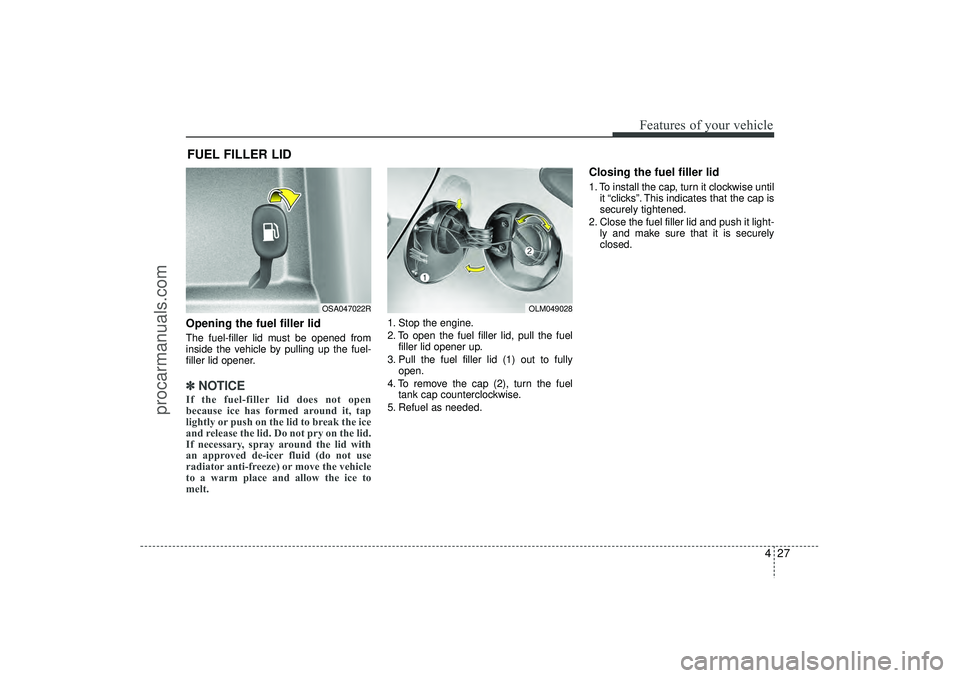
Opening the fuel filler lidThe fuel-filler lid must be opened from
inside the vehicle by pulling up the fuel-
filler lid opener.✽ ✽NOTICEIf the fuel-filler lid does not open
because ice has formed around it, tap
lightly or push on the lid to break the ice
and release the lid. Do not pry on the lid.
If necessary, spray around the lid with
an approved de-icer fluid (do not use
radiator anti-freeze) or move the vehicle
to a warm place and allow the ice to
melt.
1. Stop the engine.
2. To open the fuel filler lid, pull the fuel
filler lid opener up.
3. Pull the fuel filler lid (1) out to fully open.
4. To remove the cap (2), turn the fuel tank cap counterclockwise.
5. Refuel as needed.
Closing the fuel filler lid1. To install the cap, turn it clockwise until it “clicks”. This indicates that the cap is
securely tightened.
2. Close the fuel filler lid and push it light- ly and make sure that it is securely
closed.
FUEL FILLER LID
OSA047022R
OLM049028
EL(FL) UK 4A.QXP 2/9/2015 9:03 PM Page 27
procarmanuals.com