phone HYUNDAI IX35 2016 Workshop Manual
[x] Cancel search | Manufacturer: HYUNDAI, Model Year: 2016, Model line: IX35, Model: HYUNDAI IX35 2016Pages: 550, PDF Size: 11.23 MB
Page 343 of 550
Features of your vehicle258
4Bluetooth
®
Wireless Technology
Setting
The
Bluetooth
®word mark and logos are
registered trademarks owned by
Bluetooth SIG, Inc. and any use of such
marks is under license. Other trademarks
and trade names are those of their
respective owners. A
Bluetooth
®enabled
cell phone is required to use
Bluetooth
®
wireless technology
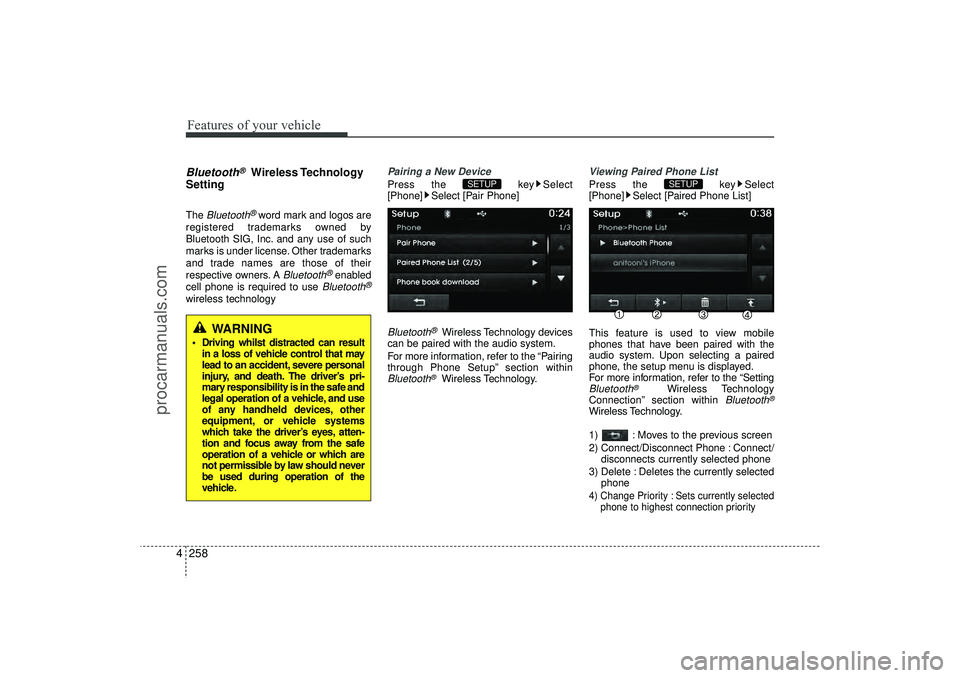
Pairing a New DevicePress the key Select
[Phone] Select [Pair Phone]Bluetooth
®Wireless Technology devices
can be paired with the audio system.
For more information, refer to the “Pairing
through Phone Setup” section within
Bluetooth
®Wireless Technology.
Viewing Paired Phone ListPress the key Select
[Phone] Select [Paired Phone List]
This feature is used to view mobile
phones that have been paired with the
audio system. Upon selecting a paired
phone, the setup menu is displayed.
For more information, refer to the “SettingBluetooth
®
Wireless Technology
Connection” section within
Bluetooth
®
Wireless Technology.
1) : Moves to the previous screen
2) Connect/Disconnect Phone : Connect/ disconnects currently selected phone
3) Delete : Deletes the currently selected phone4) Change Priority : Sets currently selected phone to highest connection priority
SETUP
SETUP
WARNING
Driving whilst distracted can resultin a loss of vehicle control that may
lead to an accident, severe personal
injury, and death. The driver’s pri-
mary responsibility is in the safe and
legal operation of a vehicle, and use
of any handheld devices, other
equipment, or vehicle systems
which take the driver’s eyes, atten-
tion and focus away from the safe
operation of a vehicle or which are
not permissible by law should never
be used during operation of the
vehicle.
EL(FL) UK 4B AUDIO.QXP 3/13/2015 4:19 PM Page 258
procarmanuals.com
Page 344 of 550
4 259
Features of your vehicle
✽
✽NOTICE BEFORE DOWN-
LOADING PHONE BOOKS • Only phone books within connected
phones can be downloaded. Also
check to see that your mobile phone
supports the download feature.
• To learn more about whether your mobile phone supports phone book
downloads, refer to your mobile
phone user’s manual.
• The Phone book for only the connect- ed phone can be downloaded. Before
downloading, check to see whether
your phone supports the download
feature.
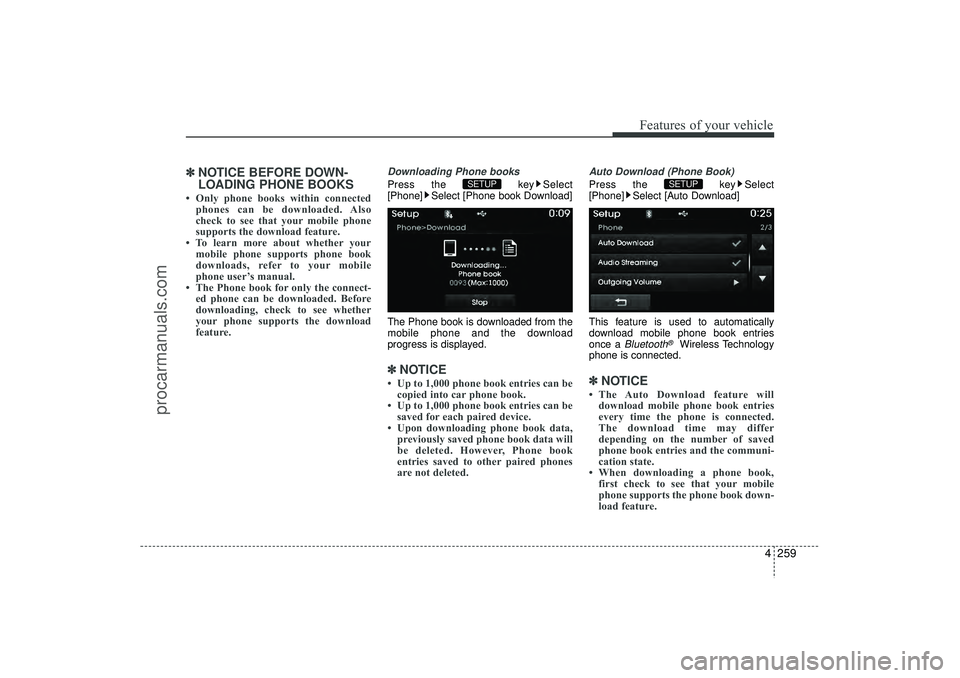
Downloading Phone booksPress the key Select
[Phone] Select [Phone book Download]
The Phone book is downloaded from the
mobile phone and the download
progress is displayed.✽ ✽ NOTICE • Up to 1,000 phone book entries can be
copied into car phone book.
• Up to 1,000 phone book entries can be saved for each paired device.
• Upon downloading phone book data, previously saved phone book data will
be deleted. However, Phone book
entries saved to other paired phones
are not deleted.
Auto Download (Phone Book)Press the key Select
[Phone] Select [Auto Download]
This feature is used to automatically
download mobile phone book entries
once a
Bluetooth
®
Wireless Technology
phone is connected.
✽ ✽ NOTICE • The Auto Download feature will
download mobile phone book entries
every time the phone is connected.
The download time may differ
depending on the number of saved
phone book entries and the communi-
cation state.
• When downloading a phone book, first check to see that your mobile
phone supports the phone book down-
load feature.
SETUP
SETUP
EL(FL) UK 4B AUDIO.QXP 3/13/2015 4:19 PM Page 259
procarmanuals.com
Page 345 of 550
![HYUNDAI IX35 2016 Workshop Manual Features of your vehicle260
4Audio StreamingPress the key Select
[Phone] Select [Audio Streaming]
When Audio Streaming is turned on, you
can play music files saved in yourBluetooth
®
Wireless Techno](/img/35/57921/w960_57921-344.png "HYUNDAI IX35 2016 Workshop Manual Features of your vehicle260
4Audio StreamingPress the key Select
[Phone] Select [Audio Streaming]
When Audio Streaming is turned on, you
can play music files saved in yourBluetooth
®
Wireless Techno")
Features of your vehicle260
4Audio StreamingPress the key Select
[Phone] Select [Audio Streaming]
When Audio Streaming is turned on, you
can play music files saved in yourBluetooth
®
Wireless Technology device
through the audio system.
Outgoing VolumePress the key Select
[Phone] Select [Outgoing Volume]
Use the , buttons to adjust the
outgoing volume level.Turning Bluetooth System OffPress the key Select
[Phone] Select [Bluetooth System Off]
Once
Bluetooth
®Wireless Technology is
turned off,
Bluetooth
®
Wireless
Technology related features will not be
supported within the audio system.
✽ ✽ NOTICE To turn Bluetooth
®Wireless Technology
back on, go to [Phone] and
press “Yes”.SETUP
SETUP SETUP
SETUP
CAUTION
Bluetooth
®
Wireless Technology
audio streaming may not be support- ed in some Bluetooth
®
Wireless
Technology phones.
EL(FL) UK 4B AUDIO.QXP 3/13/2015 4:19 PM Page 260
procarmanuals.com