change time HYUNDAI IX35 2016 Owner's Manual
[x] Cancel search | Manufacturer: HYUNDAI, Model Year: 2016, Model line: IX35, Model: HYUNDAI IX35 2016Pages: 550, PDF Size: 9.92 MB
Page 299 of 550
Features of your vehicle214
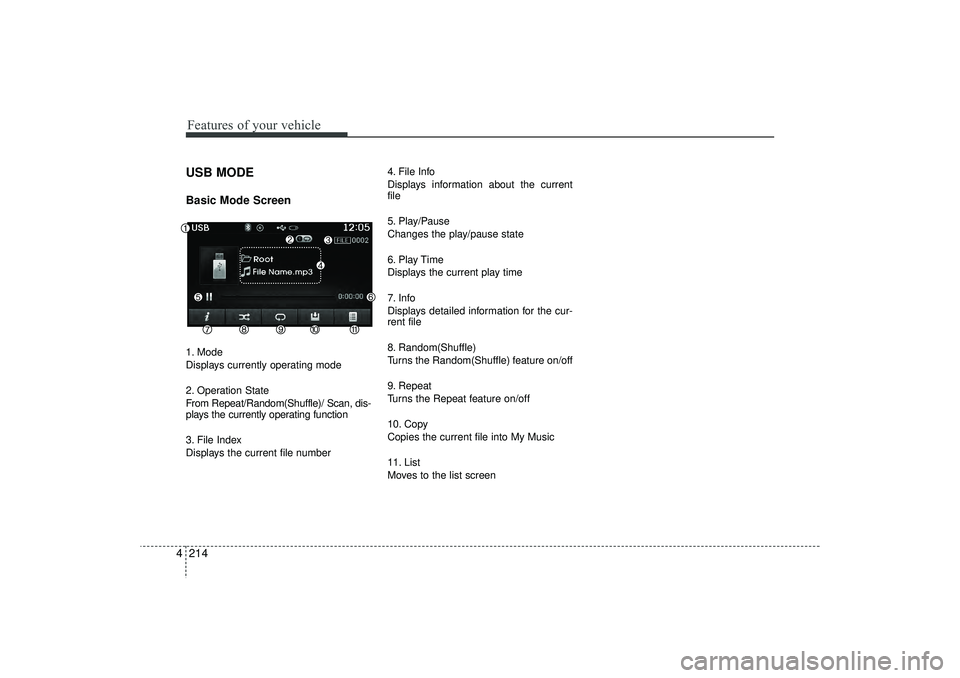
4USB MODE Basic Mode Screen1. Mode
Displays currently operating mode
2. Operation State
From Repeat/Random(Shuffle)/ Scan, dis-
plays the currently operating function
3. File Index
Displays the current file number 4. File Info
Displays information about the current
file
5. Play/Pause
Changes the play/pause state
6. Play Time
Displays the current play time
7. Info
Displays detailed information for the cur-
rent file
8. Random(Shuffle)
Turns the Random(Shuffle) feature on/off
9. Repeat
Turns the Repeat feature on/off
10. Copy
Copies the current file into My Music
11. List
Moves to the list screen
EL(FL) UK 4B AUDIO.QXP 3/13/2015 4:19 PM Page 214
Page 302 of 550
4 217
Features of your vehicle
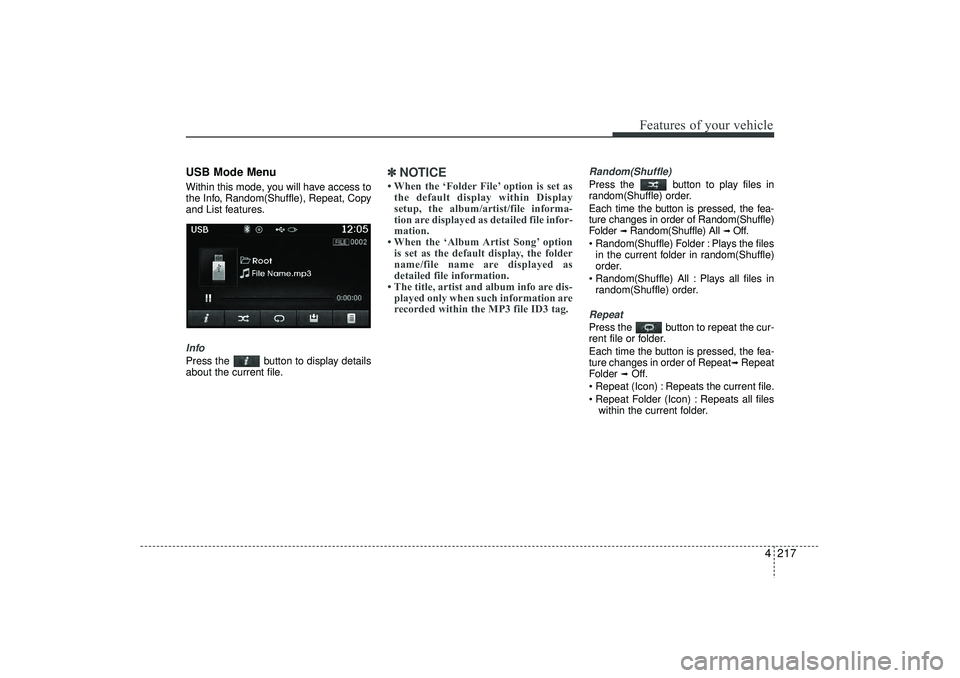
USB Mode MenuWithin this mode, you will have access to
the Info, Random(Shuffle), Repeat, Copy
and List features.InfoPress the button to display details
about the current file.
✽ ✽NOTICE • When the ‘Folder File’ option is set as
the default display within Display
setup, the album/artist/file informa-
tion are displayed as detailed file infor-
mation.
• When the ‘Album Artist Song’ option is set as the default display, the folder
name/file name are displayed as
detailed file information.
• The title, artist and album info are dis- played only when such information are
recorded within the MP3 file ID3 tag.
Random(Shuffle)Press the button to play files in
random(Shuffle) order.
Each time the button is pressed, the fea-
ture changes in order of Random(Shuffle)
Folder
➟ Random(Shuffle) All
➟ Off.
Random(Shuffle) Folder : Plays the files in the current folder in random(Shuffle)
order.
Random(Shuffle) All : Plays all files in random(Shuffle) order.
RepeatPress the button to repeat the cur-
rent file or folder.
Each time the button is pressed, the fea-
ture changes in order of Repeat
➟Repeat
Folder
➟Off.
Repeat (Icon) : Repeats the current file.
Repeat Folder (Icon) : Repeats all files within the current folder.
EL(FL) UK 4B AUDIO.QXP 3/13/2015 4:19 PM Page 217
Page 305 of 550
Features of your vehicle220
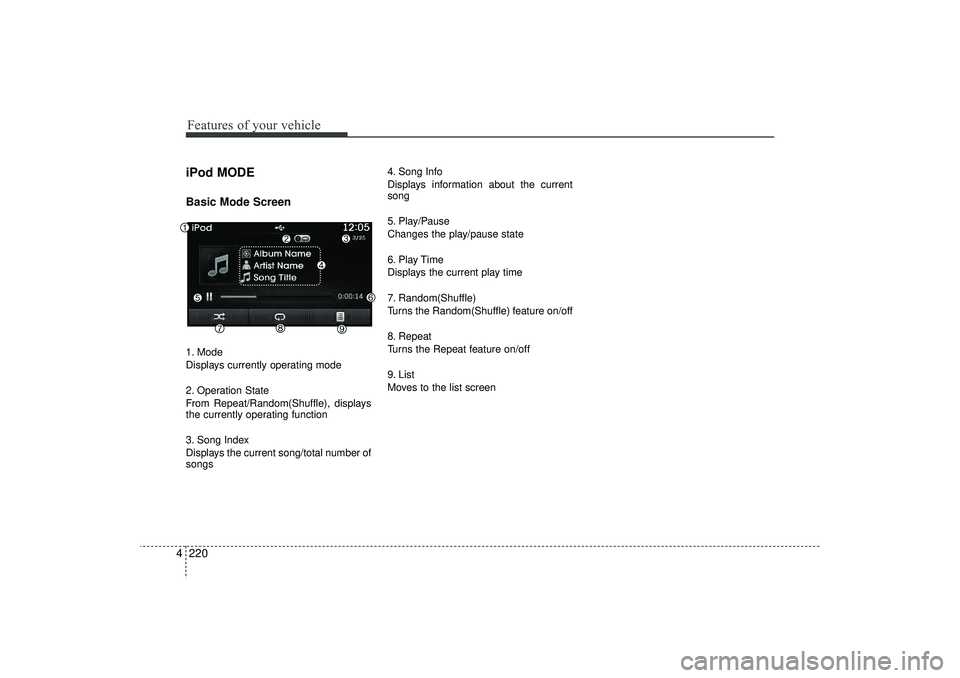
4iPod MODEBasic Mode Screen1. Mode
Displays currently operating mode
2. Operation State
From Repeat/Random(Shuffle), displays
the currently operating function
3. Song Index
Displays the current song/total number of
songs 4. Song Info
Displays information about the current
song
5. Play/Pause
Changes the play/pause state
6. Play Time
Displays the current play time
7. Random(Shuffle)
Turns the Random(Shuffle) feature on/off
8. Repeat
Turns the Repeat feature on/off
9. List
Moves to the list screen
EL(FL) UK 4B AUDIO.QXP 3/13/2015 4:19 PM Page 220
Page 310 of 550
4 225
Features of your vehicle
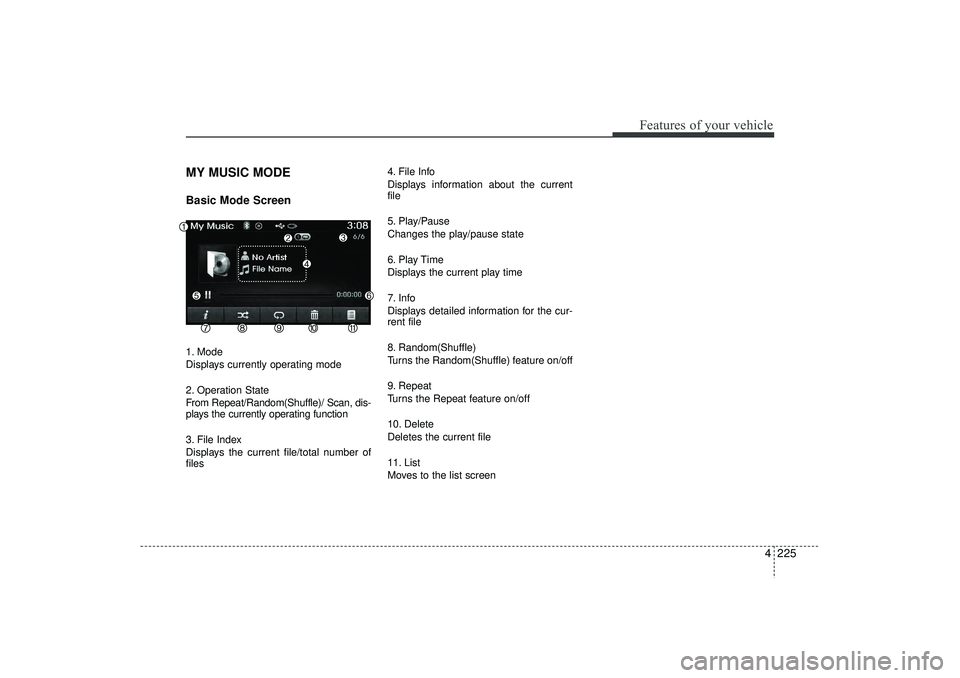
MY MUSIC MODEBasic Mode Screen1. Mode
Displays currently operating mode
2. Operation State
From Repeat/Random(Shuffle)/ Scan, dis-
plays the currently operating function
3. File Index
Displays the current file/total number of
files4. File Info
Displays information about the current
file
5. Play/Pause
Changes the play/pause state
6. Play Time
Displays the current play time
7. Info
Displays detailed information for the cur-
rent file
8. Random(Shuffle)
Turns the Random(Shuffle) feature on/off
9. Repeat
Turns the Repeat feature on/off
10. Delete
Deletes the current file
11. List
Moves to the list screen
EL(FL) UK 4B AUDIO.QXP 3/13/2015 4:19 PM Page 225
Page 341 of 550
![HYUNDAI IX35 2016 Owners Manual Features of your vehicle256
4Day SettingPress the key Select
[Clock/Day] Select [Day Settings]
Use the , buttons to set the Day,
Month and Year setting.
Time FormatPress the key Select
[Clock/Day]](/img/35/56235/w960_56235-340.png "HYUNDAI IX35 2016 Owners Manual Features of your vehicle256
4Day SettingPress the key Select
[Clock/Day] Select [Day Settings]
Use the , buttons to set the Day,
Month and Year setting.
Time FormatPress the key Select
[Clock/Day]")
Features of your vehicle256
4Day SettingPress the key Select
[Clock/Day] Select [Day Settings]
Use the , buttons to set the Day,
Month and Year setting.
Time FormatPress the key Select
[Clock/Day] Select [Time Format]
This feature is used to change the clock
format between 12hr or 24hr.
Clock DisplayPress the key Select
[Clock/Day] Select [Clock Display
(Power off)]
This feature is used to display a clock on
the screen when the audio system is
turned off.
SETUP
SETUP
SETUP
EL(FL) UK 4B AUDIO.QXP 3/13/2015 4:19 PM Page 256
Page 359 of 550
511
Driving your vehicle
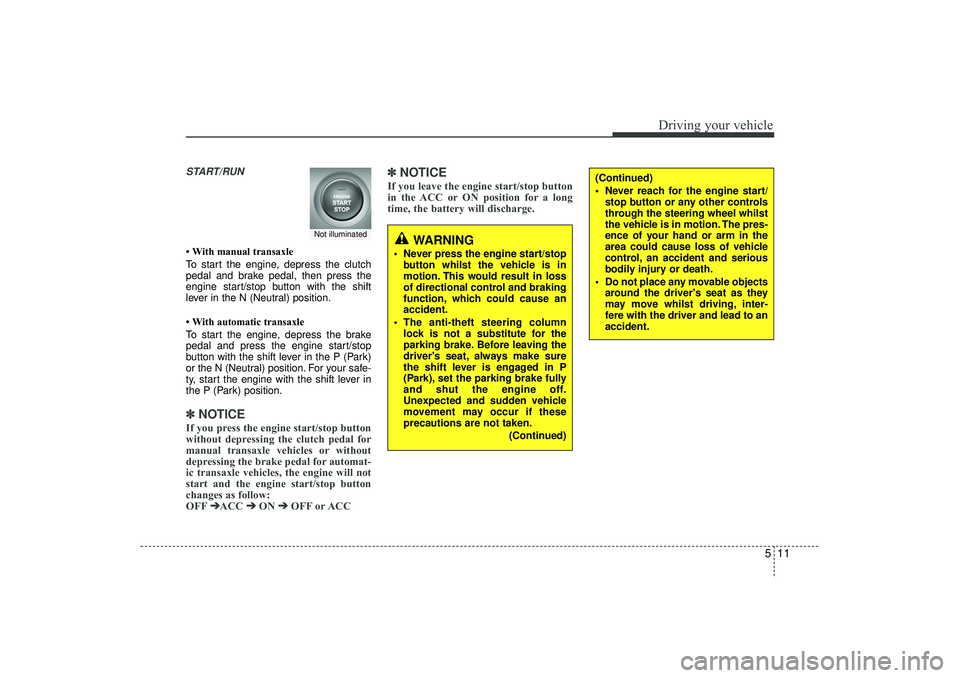
START/RUN• With manual transaxle
To start the engine, depress the clutch
pedal and brake pedal, then press the
engine start/stop button with the shift
lever in the N (Neutral) position.
• With automatic transaxle
To start the engine, depress the brake
pedal and press the engine start/stop
button with the shift lever in the P (Park)
or the N (Neutral) position. For your safe-
ty, start the engine with the shift lever in
the P (Park) position.✽ ✽
NOTICEIf you press the engine start/stop button
without depressing the clutch pedal for
manual transaxle vehicles or without
depressing the brake pedal for automat-
ic transaxle vehicles, the engine will not
start and the engine start/stop button
changes as follow:
OFF ➔ ➔
ACC ➔
➔
ON ➔
➔
OFF or ACC
✽
✽
NOTICEIf you leave the engine start/stop button
in the ACC or ON position for a long
time, the battery will discharge.
WARNING
Never press the engine start/stop
button whilst the vehicle is in
motion. This would result in loss
of directional control and braking
function, which could cause an
accident.
The anti-theft steering column lock is not a substitute for the
parking brake. Before leaving the
driver's seat, always make sure
the shift lever is engaged in P
(Park), set the parking brake fully
and shut the engine off.
Unexpected and sudden vehicle
movement may occur if these
precautions are not taken.
(Continued)
(Continued)
Never reach for the engine start/stop button or any other controls
through the steering wheel whilst
the vehicle is in motion. The pres-
ence of your hand or arm in the
area could cause loss of vehicle
control, an accident and serious
bodily injury or death.
Do not place any movable objects around the driver's seat as they
may move whilst driving, inter-
fere with the driver and lead to an
accident.
Not illuminated
EL(FL) UK 5.QXP 12/16/2014 8:08 PM Page 11
Page 378 of 550
Driving your vehicle30
5For safe four-wheel drive opera-
tion Do not drive in deep standing water or
mud conditions since such conditions
can damage your engine and/or
restrict your exhaust pipes. Do not
drive down steep hills since it requires
extreme skill to maintain control of the
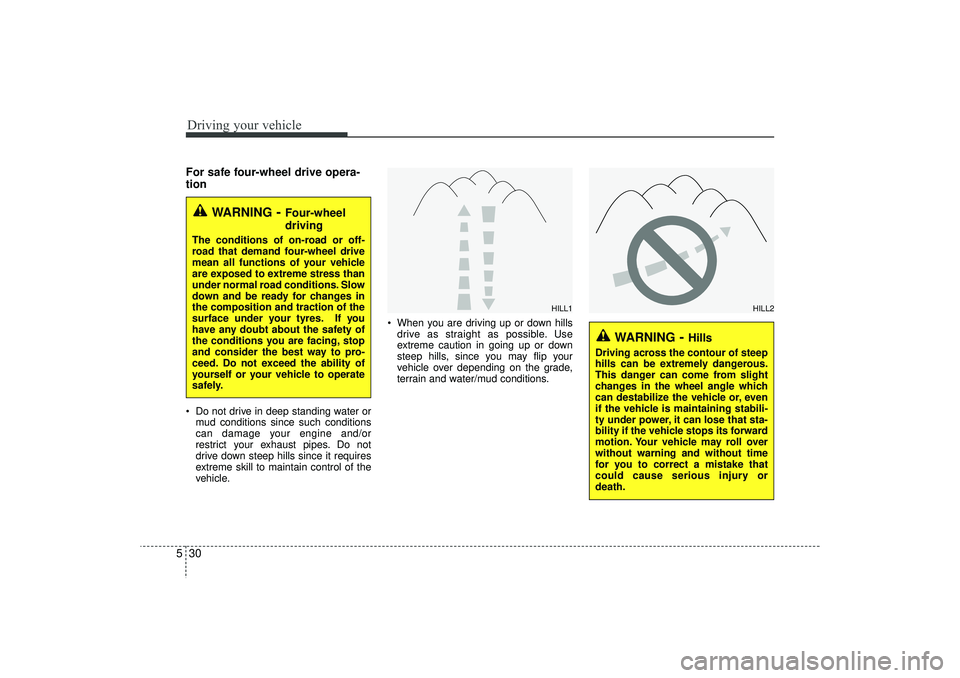
vehicle. When you are driving up or down hills
drive as straight as possible. Use
extreme caution in going up or down
steep hills, since you may flip your
vehicle over depending on the grade,
terrain and water/mud conditions.
WARNING
- Four-wheel
driving
The conditions of on-road or off-
road that demand four-wheel drive
mean all functions of your vehicle
are exposed to extreme stress than
under normal road conditions. Slow
down and be ready for changes in
the composition and traction of the
surface under your tyres. If you
have any doubt about the safety of
the conditions you are facing, stop
and consider the best way to pro-
ceed. Do not exceed the ability of
yourself or your vehicle to operate
safely.
WARNING
- Hills
Driving across the contour of steep
hills can be extremely dangerous.
This danger can come from slight
changes in the wheel angle which
can destabilize the vehicle or, even
if the vehicle is maintaining stabili-
ty under power, it can lose that sta-
bility if the vehicle stops its forward
motion. Your vehicle may roll over
without warning and without time
for you to correct a mistake that
could cause serious injury or
death.
HILL1
HILL2
EL(FL) UK 5.QXP 12/16/2014 8:09 PM Page 30
Page 380 of 550
Driving your vehicle32
5✽
✽
NOTICE• Do not drive in water if the level is
higher than the floor of the vehicle.
• Check your brake condition once you are out of mud or water. Press the
brake pedal several times as you move
slowly until you feel normal braking
forces return.
• Shorten your scheduled maintenance interval if you drive in off-road condi-
tions such as sand, mud or water.
Always wash your vehicle thoroughly
after off road use, especially cleaning
the bottom of the vehicle.
• Since the driving torque is always applied to the 4 wheels the perform-
ance of the 4WD vehicle is greatly
affected by the condition of the tyres.
Be sure to equip the vehicle with four
tyres of the same size and type.
• A full time four wheel drive vehicle cannot be towed by an ordinary tow
truck. Make sure that the vehicle is
placed on a flat bed truck for moving.
Reducing the risk of a rolloverThis multi-purpose passenger vehicle is
defined as a Sports Utility Vehicle (SUV).
SUV’s have higher ground clearance and
a narrower track to make them capable
of performing in a wide variety of off-road
applications. Specific design characteris-
tics give them a higher centre of gravity
than ordinary vehicles. An advantage of
the higher ground clearance is a better
view of the road, which allows you to
anticipate problems. They are not
designed for cornering at the same
speeds as conventional passenger vehi-
cles, any more than low-slung sports
vehicles are designed to perform satis-
factorily in off-road conditions. Due to this
risk, driver and passengers are strongly
recommended to buckle their seat belts.
In a rollover crash, an unbelted person is
more likely to die than a person wearing
a seat belt. There are steps that a driver
can make to reduce the risk of a rollover.
If at all possible, avoid sharp turns or
abrupt manoeuvres, do not load your
roof rack with heavy cargo, and never
modify your vehicle in any way.
CAUTION -
Mud or snow
If one of the front or rear wheels
begins to spin in mud, snow, etc.the vehicle can sometimes be driv-en out by depressing the accelera-tor pedal further; however avoidrunning the engine continuously athigh rpm because doing so coulddamage the 4WD system.
WARNING -
4WD driving
Avoid high cornering speed.
Do not make quick steering wheel movements, such as sharp
lane changes or fast, sharp turns.
The risk of rollover is greatly increased if you lose control of
your vehicle at high speed.
In a collision, an unbelted person is significantly more likely to die
compared to a person wearing a
seat belt.
Loss of control often occurs if two or more wheels drop off the
roadway and the driver over
steers to re-enter the roadway. In
the event your vehicle leaves the
roadway, do not steer sharply.
Instead, slow down before pulling
back into the travel lanes.
EL(FL) UK 5.QXP 12/16/2014 8:09 PM Page 32
Page 400 of 550
Driving your vehicle52
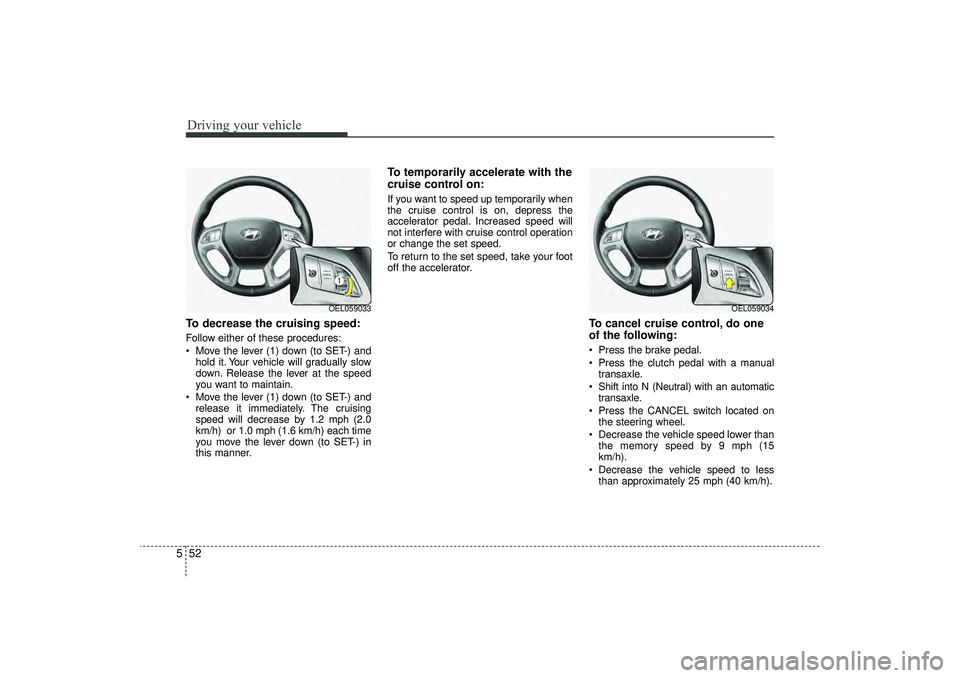
5To decrease the cruising speed:Follow either of these procedures:
Move the lever (1) down (to SET-) and
hold it. Your vehicle will gradually slow
down. Release the lever at the speed
you want to maintain.
Move the lever (1) down (to SET-) and release it immediately. The cruising
speed will decrease by 1.2 mph (2.0
km/h) or 1.0 mph (1.6 km/h) each time
you move the lever down (to SET-) in
this manner.
To temporarily accelerate with the
cruise control on:If you want to speed up temporarily when
the cruise control is on, depress the
accelerator pedal. Increased speed will
not interfere with cruise control operation
or change the set speed.
To return to the set speed, take your foot
off the accelerator.
To cancel cruise control, do one
of the following: Press the brake pedal.
Press the clutch pedal with a manualtransaxle.
Shift into N (Neutral) with an automatic transaxle.
Press the CANCEL switch located on the steering wheel.
Decrease the vehicle speed lower than the memory speed by 9 mph (15
km/h).
Decrease the vehicle speed to less than approximately 25 mph (40 km/h).
OEL059033
OEL059034
EL(FL) UK 5.QXP 12/16/2014 8:09 PM Page 52
Page 411 of 550
563
Driving your vehicle
Use high quality ethylene glycol
coolantYour vehicle is delivered with high quality
ethylene glycol coolant in the cooling
system. It is the only type of coolant that
should be used because it helps prevent
corrosion in the cooling system, lubri-
cates the water pump and prevents
freezing. Be sure to replace or replenish
your coolant in accordance with the
maintenance schedule. Before winter,
have your coolant tested to assure that
its freezing point is sufficient for the tem-
peratures anticipated during the winter.Check battery and cablesWinter puts additional burdens on the
battery system. Visually inspect the bat-
tery and cables as described in section
7. We recommend that the system be
checked by a HYUNDAI authorised
repairer.
Change to "winter weight" oil if
necessaryIn some climates it is recommended that
a lower viscosity "winter weight" oil be
used during cold weather. See section 8
for recommendations. If you aren't sure
what weight oil you should use, we rec-
ommend that you consult a HYUNDAI
authorised repairer.Check spark plugs and ignition
systemInspect your spark plugs and replace
them if necessary. Also check all ignition
wiring and components to be sure they
are not cracked, worn or damaged in any
way.
CAUTION
Chains that are the wrong size orimproperly installed can damageyour vehicle's brake lines, sus-pension, body and wheels.
Stop driving and retighten the chains any time you hear themhitting the vehicle.
WARNING
- Tyre chains
The use of chains may adversely affect vehicle handling.
Do not exceed 20 mph (30 km/h) or the chain manufacturer’s rec-
ommended speed limit, whichev-
er is lower.
Drive carefully and avoid bumps, holes, sharp turns, and other
road hazards, which may cause
the vehicle to bounce.
Avoid sharp turns or locked- wheel braking.
EL(FL) UK 5.QXP 12/16/2014 8:10 PM Page 63