phone HYUNDAI IX35 2016 Owner's Manual
[x] Cancel search | Manufacturer: HYUNDAI, Model Year: 2016, Model line: IX35, Model: HYUNDAI IX35 2016Pages: 550, PDF Size: 9.92 MB
Page 265 of 550
![HYUNDAI IX35 2016 Owners Manual Features of your vehicle180
4Phone MENU Press the key to display three
menus (Call History, Phone Book, Phone
Setup).Call historyPress the key Set [ History]
through the TUNE knob or key.
The call](/img/35/56235/w960_56235-264.png "HYUNDAI IX35 2016 Owners Manual Features of your vehicle180
4Phone MENU Press the key to display three
menus (Call History, Phone Book, Phone
Setup).Call historyPress the key Set [ History]
through the TUNE knob or key.
The call")
Features of your vehicle180
4Phone MENU Press the key to display three
menus (Call History, Phone Book, Phone
Setup).Call historyPress the key Set [ History]
through the TUNE knob or key.
The call history is displayed and can be
used to select a number and make a call.
If call history does not exist, a screen
asking whether to download call history
is displayed. (The download feature may
not be supported in some mobile
phones)
Phone BookPress the key Set [ P. Book]
through the TUNE knob or key.
The phone book is displayed and can be
used to select a number and make a call.
❈ If more than one number is saved to
one contact, then a screen showing
the mobile phone number, Home and
office number is displayed. Select the
desired number to make the call.
❈ If phone book do not exist, a screen
asking whether to download phone
book is displayed. (The download fea-
ture may not be supported in some
mobile phones)
Phone SetupPress the key Set [ Setup]
through the TUNE knob or key.
The
Bluetooth
®
Wireless Technology
mobile phone setup screen is displayed.
For more information, refer to “Phone
Setup”.
3
PHONE
2
RDM
PHONE
1
RPT
PHONEPHONE
EL(FL) UK 4B AUDIO.QXP 3/13/2015 4:19 PM Page 180
Page 266 of 550
4 181
Features of your vehicle
✽
✽NOTICE -
USING THE
Bluetooth
®Wireless Technology
MOBILE PHONE
• Do not use a mobile phone or perform Bluetooth® Wireless Technology set-
tings (e.g. pairing a phone) whilst
driving.
• Some Bluetooth
®Wireless Technology
-enabled phones may not be recog-
nized by the system or fully compati-
ble with the system.
• Before using Bluetooth
®
Wireless
Technology related features of the
audio system, refer your phone’s
User’s Manual for phone-side
Bluetooth
®Wireless Technology oper-
ations.
• The phone must be paired to the audio system to use Bluetooth
®Wireless
Technology related features.
• You will not be able to use the hands- free feature when your phone (in the
car) is outside of the mobile service
area (e.g. in a tunnel, in a under-
ground, in a mountainous area, etc.). (Continued)(Continued)
• If the mobile phone signal is poor or
the vehicles interior noise is too loud,
it may be difficult to hear the other
person’s voice during a call.
• Do not place the phone near or inside metallic objects, otherwise communi-
cations with Bluetooth
®
Wireless
Technology system or mobile service
stations can be disturbed.
• Whilst a phone is connected through Bluetooth
®Wireless Technology your
phone may discharge quicker than
usual for additional Bluetooth
®
Wireless Technology-related opera-
tions.
• Some mobile phones or other devices may cause interference noise or mal-
function to audio system. In this case,
store the device in a different location
may resolve the condition.
• Phone contact names should be saved in English or they may not be dis-
played correctly. (Continued)(Continued)
• If Priority is set upon vehicle igni-
tion(IGN/ACC ON), the Bluetooth
®
Wireless Technology phone will be
automatically connected.
Even if you are outside, the Bluetooth
®
Wireless Technology phone will be
automatically connected once you are
in the vicinity of the vehicle.
If you do not want automatic
Bluetooth
®Wireless Technology con-
nection, turn the Bluetooth
®Wireless
Technology feature off.
• The hands-free call volume and quali- ty may differ depending on the mobile
phone type.
• Bluetooth
®Wireless Technology fea-
tures can be used only when the
mobile phone has been paired and
connected with the device. For more
information on pairing and connect-
ing Bluetooth
®Wireless Technology
enabled mobile phones, refer to the
“Phone Setup” section. (Continued)
EL(FL) UK 4B AUDIO.QXP 3/13/2015 4:19 PM Page 181
Page 267 of 550
Features of your vehicle182
4(Continued)
• When a Bluetooth
®
Wireless
Technology mobile phone is connect-
ed, a ( ) icon will appear at the top of
the screen. If a ( ) icon is not dis-
played, this indicates that a Bluetooth
®
Wireless Technology enabled device
has not been connected. You must con-
nect the device before use. For more
information on Bluetooth
®Wireless
Technology mobile phones, refer to
the “Phone Setup” section.
• Pairing and connecting a Bluetooth
®
Wireless Technology enabled mobile
phone will work only when the
Bluetooth
®
Wireless Technology
option within your mobile phone has
been turned on. (Methods of turning
on the Bluetooth®Wireless Technology
enabled feature may differ depending
on the mobile phone.) (Continued)(Continued)
• In some mobile phones, starting the
ignition whilst talking through
Bluetooth
®
Wireless Technology
enabled handsfree call will result in
the call becoming disconnected.
(Switch the call back to your mobile
phone when starting the ignition.)
• Some features may not be supported in some Bluetooth
®
Wireless
Technology mobile phone and devices.
• Bluetooth
®
Wireless Technology
enabled operation may be unstable
depending on the communication
state.
• Placing the audio system within an electromagnetic environment may
result in noise interference.
EL(FL) UK 4B AUDIO.QXP 3/13/2015 4:19 PM Page 182
Page 268 of 550
4 183
Features of your vehicle
✽
✽NOTICE -
USING VOICE COM-
MAND
• The voice recognition feature of this
product supports recognition of the
commands listed within this user’s
manual.
• Whilst using voice recognition, oper- ating the steering remote control or
the device will terminate voice recog-
nition and allow you to manually
operate desired functions.
• Position the microphone above the head of the driver’s seat. For superior
performance, maintain good posture
when saying voice commands. (Continued)(Continued)
• Voice recognition may not function
properly due to outside noise. The fol-
lowing conditions can affect the per-
formance of Voice Recognition:
- When the windows and sunroof areopen
- When the heating/cooling system is on
- When passing a tunnel
- When driving on rugged and uneven roads
• After downloading Bluetooth
®
Wireless Technology phone book, the
system requires some times to convert
the phone book into voice informa-
tion. During this time, voice recogni-
tion may not operate properly.
• Upon inputting your phone book, spe- cial symbols and numbers cannot be
recognized by voice. For example, “#
John Doe%&” will be recognized as
“John Doe”.
EL(FL) UK 4B AUDIO.QXP 3/13/2015 4:19 PM Page 183
Page 270 of 550
4 185
Features of your vehicle
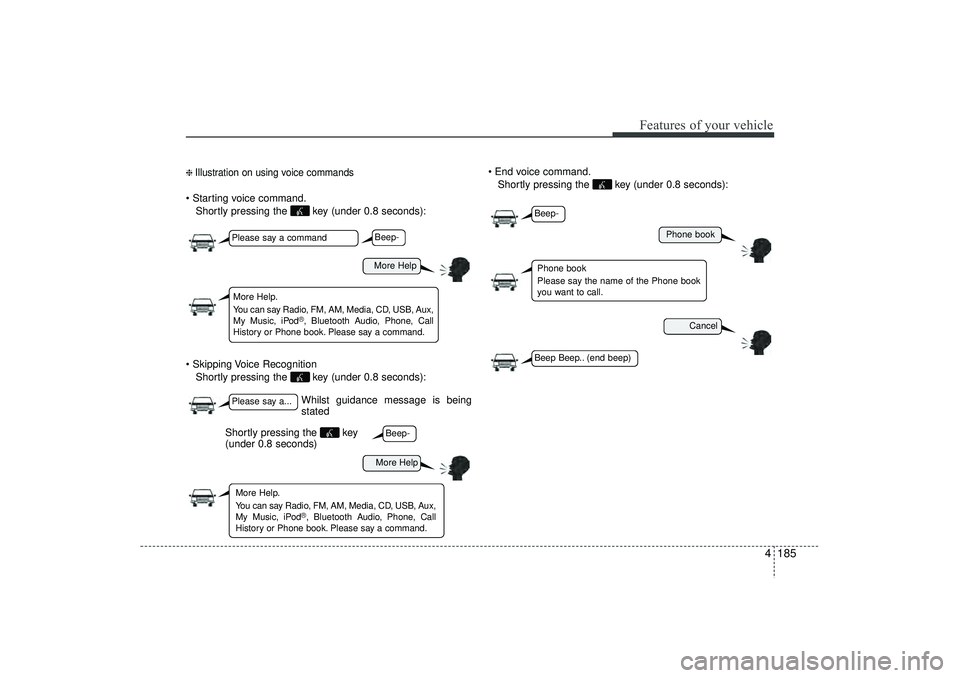
❈ Illustration on using voice commands Starting voice command.Shortly pressing the key (under 0.8 seconds):
Skipping Voice Recognition Shortly pressing the key (under 0.8 seconds): End voice command.
Shortly pressing the key (under 0.8 seconds):
Whilst guidance message is being
stated
More Help
Phone book
Cancel
More Help
Please say a commandPlease say a...More Help.
You can say Radio, FM, AM, Media, CD, USB, Aux,
My Music, iPod
®, Bluetooth A udio, Phone, Call
History or Phone book. Please say a command.
Phone book
Please say the name of the Phone book
you want to call.
More Help.
You can say Radio, FM, AM, Media, CD, USB, Aux,
My Music, iPod
®, Bluetooth A udio, Phone, Call
History or Phone book. Please say a command.
Beep-Beep-
Beep-Beep Beep.. (end beep)
Shortly pressing the key
(under 0.8 seconds)
EL(FL) UK 4B AUDIO.QXP 3/13/2015 4:19 PM Page 185
Page 271 of 550
Features of your vehicle186
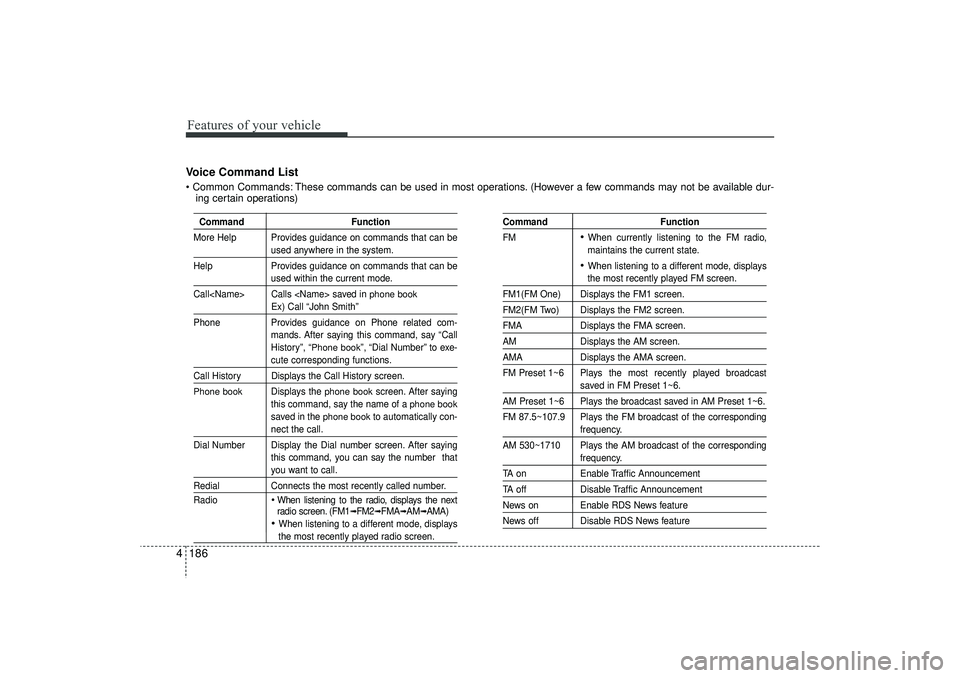
4Voice Command List Common Commands: These commands can be used in most operations. (However a few commands may not be available dur-
ing certain operations)
Command Function
More Help Provides guidance on commands that can be
used anywhere in the system.
Help Provides guidance on commands that can beused within the current mode.
Call
phone book
Ex) Call “John Smith”
Phone Provides guidance on Phone related com-
mands. After saying this command, say “Call
History”, “
Phone book
”, “Dial Number” to exe-
cute corresponding functions.
Call History Displays the Call History screen.Phone book
Displays the
phone book
screen. After saying
this command, say the name of a
phone book
saved in the
phone book
to automatically con-
nect the call.
Dial Number Display the Dial number screen. After saying this command, you can say the number thatyou want to call.
RedialConnects the most recently called number.
Radio
When listening to the radio, displays the next
radio screen. (FM1
➟FM2
➟FMA
➟AM
➟AMA)
When listening to a different mode, displaysthe most recently played radio screen.
Command Function
FM
When currently listening to the FM radio,
maintains the current state. When listening to a different mode, displaysthe most recently played FM screen.
FM1(FM One) Displays the FM1 screen.FM2(FM Two) Displays the FM2 screen.FMA Displays the FMA screen.AMDisplays the AM screen.AMADisplays the AMA screen.
FM Preset 1~6 Plays the most recently played broadcast
saved in FM Preset 1~6.
AM Preset 1~6 Plays the broadcast saved in AM Preset 1~6.
FM 87.5~107.9 Plays the FM broadcast of the corresponding
frequency.
AM 530~1710 Plays the AM broadcast of the correspondingfrequency.
TA on Enable Traffic AnnouncementTA offDisable Traffic AnnouncementNews on Enable RDS News featureNews off Disable RDS News feature
EL(FL) UK 4B AUDIO.QXP 3/13/2015 4:19 PM Page 186
Page 275 of 550
Features of your vehicle190
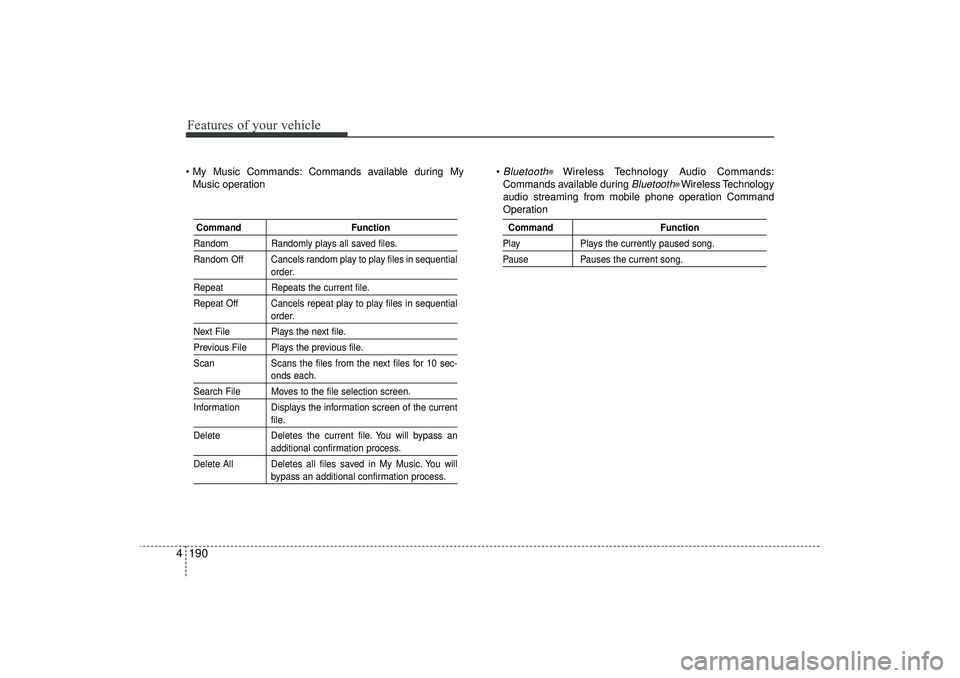
4 My Music Commands: Commands available during My
Music operation
Bluetooth
®
Wireless Technology Audio Commands:
Commands available during
Bluetooth
®Wireless Technology
audio streaming from mobile phone operation Command
Operation
Command FunctionRandom Randomly plays all saved files.
Random Off Cancels random play to play files in sequential
order.
RepeatRepeats the current file.
Repeat Off Cancels repeat play to play files in sequential
order.
Next File Plays the next file.Previous File Plays the previous file.
Scan Scans the files from the next files for 10 sec-
onds each.
Search File Moves to the file selection screen.
Information Displays the information screen of the current
file.
Delete Deletes the current file. You will bypass anadditional confirmation process.
Delete All Deletes all files saved in My Music. You willbypass an additional confirmation process.
Command FunctionPlayPlays the currently paused song.PausePauses the current song.
EL(FL) UK 4B AUDIO.QXP 3/13/2015 4:19 PM Page 190
Page 278 of 550
4 193
Features of your vehicle
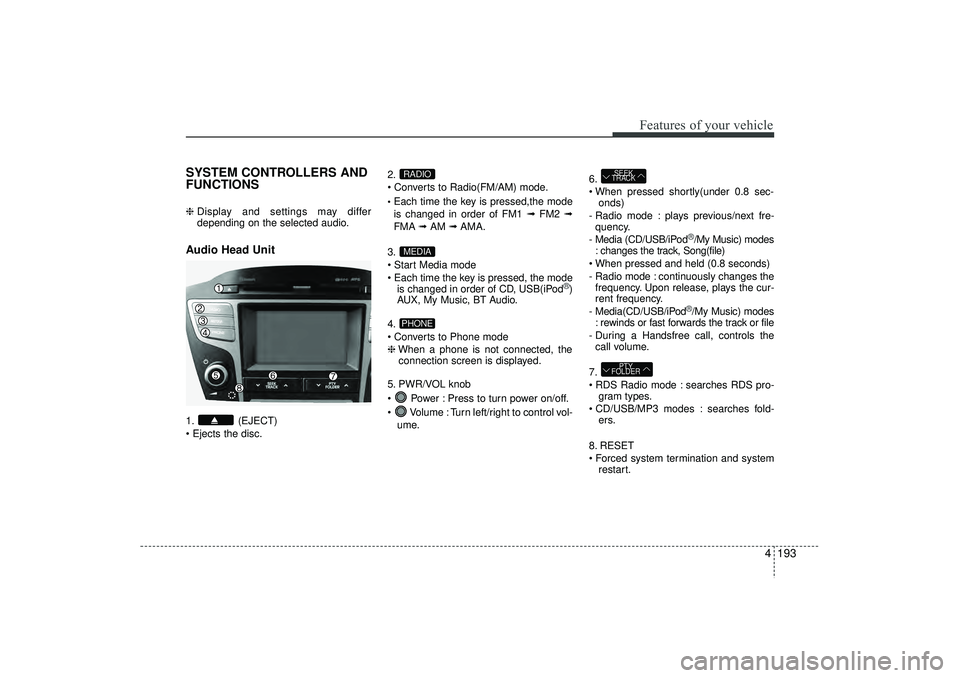
SYSTEM CONTROLLERS AND
FUNCTIONS ❈ Display and settings may differ
depending on the selected audio.Audio Head Unit 1. (EJECT)
Ejects the disc. 2.
Converts to Radio(FM/AM) mode.
Each time the key is pressed,the mode
is changed in order of FM1 ➟
FM2 ➟
FMA ➟AM ➟AMA.
3.
Start Media mode
Each time the key is pressed, the mode is changed in order of CD, USB(iPod
®)
AUX, My Music, BT Audio.
4.
Converts to Phone mode
❈ When a phone is not connected, the
connection screen is displayed.
5. PWR/VOL knob
Power : Press to turn power on/off.
Volume : Turn left/right to control vol- ume. 6.
When pressed shortly(under 0.8 sec-
onds)
- Radio mode : plays previous/next fre- quency.
- Media (CD/USB/iPod
®/My Music) modes
: changes the track, Song(file)
When pressed and held (0.8 seconds)
- Radio mode : continuously changes the frequency. Upon release, plays the cur-
rent frequency.
- Media(CD/USB/iPod®/My Music) modes
: rewinds or fast forwards the track or file
- During a Handsfree call, controls the call volume.
7.
RDS Radio mode : searches RDS pro- gram types.
CD/USB/MP3 modes : searches fold- ers.
8. RESET
Forced system termination and system restart.
PTY
FOLDERSEEK
TRACK
PHONEMEDIARADIO
EL(FL) UK 4B AUDIO.QXP 3/13/2015 4:19 PM Page 193
Page 297 of 550
Features of your vehicle212
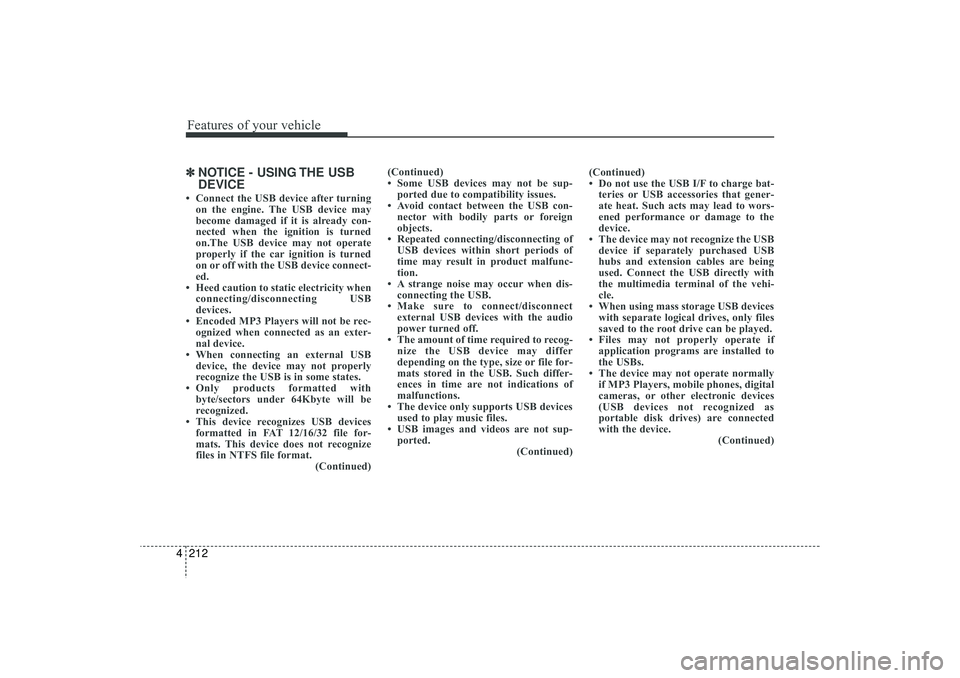
4✽
✽
NOTICE - USING THE USB
DEVICE• Connect the USB device after turning
on the engine. The USB device may
become damaged if it is already con-
nected when the ignition is turned
on.The USB device may not operate
properly if the car ignition is turned
on or off with the USB device connect-
ed.
• Heed caution to static electricity when connecting/disconnecting USB
devices.
• Encoded MP3 Players will not be rec- ognized when connected as an exter-
nal device.
• When connecting an external USB device, the device may not properly
recognize the USB is in some states.
• Only products formatted with byte/sectors under 64Kbyte will be
recognized.
• This device recognizes USB devices formatted in FAT 12/16/32 file for-
mats. This device does not recognize
files in NTFS file format. (Continued)(Continued)
• Some USB devices may not be sup-
ported due to compatibility issues.
• Avoid contact between the USB con- nector with bodily parts or foreign
objects.
• Repeated connecting/disconnecting of USB devices within short periods of
time may result in product malfunc-
tion.
• A strange noise may occur when dis- connecting the USB.
• Make sure to connect/disconnect external USB devices with the audio
power turned off.
• The amount of time required to recog- nize the USB device may differ
depending on the type, size or file for-
mats stored in the USB. Such differ-
ences in time are not indications of
malfunctions.
• The device only supports USB devices used to play music files.
• USB images and videos are not sup- ported. (Continued)(Continued)
• Do not use the USB I/F to charge bat-
teries or USB accessories that gener-
ate heat. Such acts may lead to wors-
ened performance or damage to the
device.
• The device may not recognize the USB device if separately purchased USB
hubs and extension cables are being
used. Connect the USB directly with
the multimedia terminal of the vehi-
cle.
• When using mass storage USB devices with separate logical drives, only files
saved to the root drive can be played.
• Files may not properly operate if application programs are installed to
the USBs.
• The device may not operate normally if MP3 Players, mobile phones, digital
cameras, or other electronic devices
(USB devices not recognized as
portable disk drives) are connected
with the device. (Continued)
EL(FL) UK 4B AUDIO.QXP 3/13/2015 4:19 PM Page 212
Page 298 of 550
4 213
Features of your vehicle
(Continued)
• Charging through the USB may notwork for some mobile devices.
• The device may not support normal operation when using a USB memory
type besides (Metal Cover Type) USB
Memory.
• The device may not support normal operation when using formats such as
HDD Type, CF, or SD Memory.
• The device will not support files locked by DRM (Digital Rights
Management.)
• USB memory sticks used by connect- ing an Adaptor (SD Type or CF Type)
may not be properly recognized.
• The device may not operate properly when using USB HDDs or USBs sub-
ject to connection failures caused by
vehicle vibrations. (e.g. i-stick type) (Continued)(Continued)
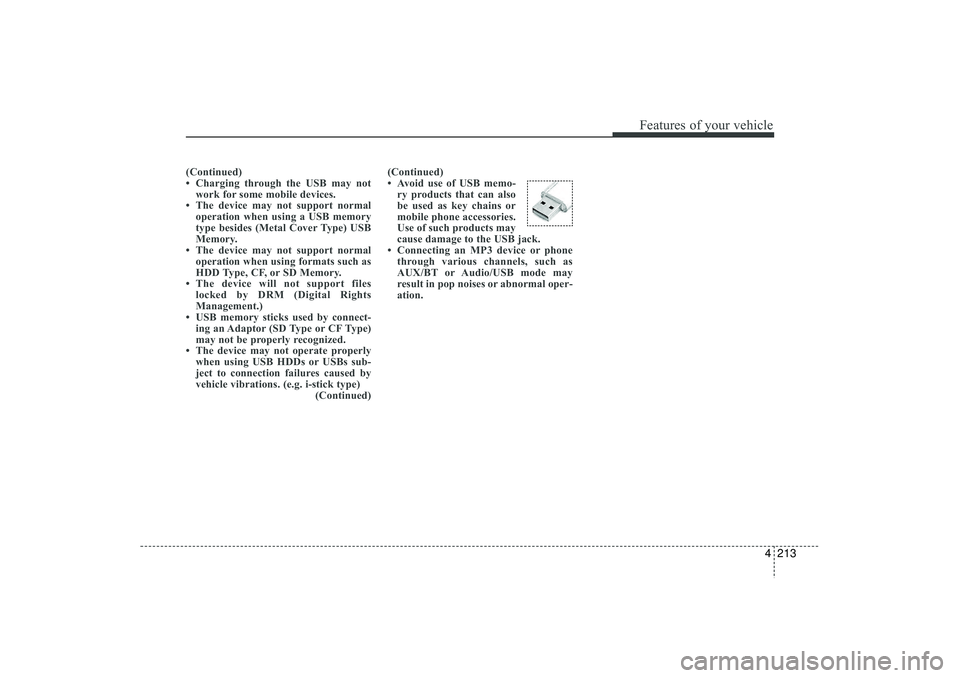
• Avoid use of USB memo-
ry products that can also
be used as key chains or
mobile phone accessories.
Use of such products may
cause damage to the USB jack.
• Connecting an MP3 device or phone through various channels, such as
AUX/BT or Audio/USB mode may
result in pop noises or abnormal oper-
ation.
EL(FL) UK 4B AUDIO.QXP 3/13/2015 4:19 PM Page 213