clock Hyundai Kona 2018 Owner's Manual - RHD (UK, Australia)
[x] Cancel search | Manufacturer: HYUNDAI, Model Year: 2018, Model line: Kona, Model: Hyundai Kona 2018Pages: 497, PDF Size: 11.7 MB
Page 21 of 497
2-5
Safety system of your vehicle
2
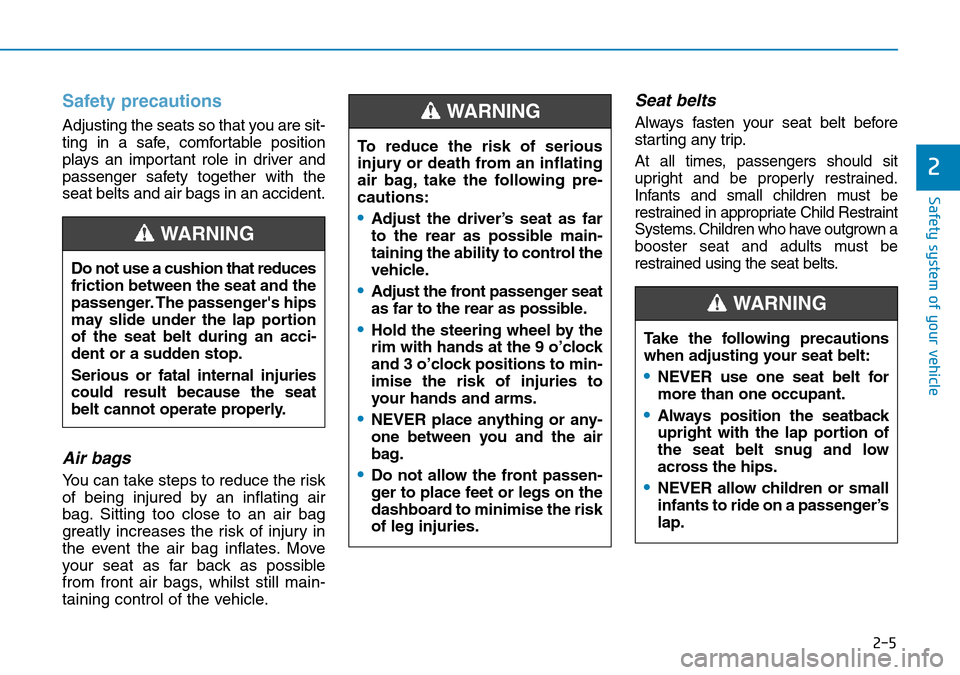
Safety precautions
Adjusting the seats so that you are sit-
ting in a safe, comfortable position
plays an important role in driver and
passenger safety together with the
seat belts and air bags in an accident.
Air bags
You can take steps to reduce the risk
of being injured by an inflating air
bag. Sitting too close to an air bag
greatly increases the risk of injury in
the event the air bag inflates. Move
your seat as far back as possible
from front air bags, whilst still main-
taining control of the vehicle.
Seat belts
Always fasten your seat belt before
starting any trip.
At all times, passengers should sit
upright and be properly restrained.
Infants and small children must be
restrained in appropriate Child Restraint
Systems. Children who have outgrown a
booster seat and adults must be
restrained using the seat belts.
Do not use a cushion that reduces
friction between the seat and the
passenger. The passenger's hips
may slide under the lap portion
of the seat belt during an acci-
dent or a sudden stop.
Serious or fatal internal injuries
could result because the seat
belt cannot operate properly.
WARNING
To reduce the risk of serious
injury or death from an inflating
air bag, take the following pre-
cautions:
•Adjust the driver’s seat as far
to the rear as possible main-
taining the ability to control the
vehicle.
•Adjust the front passenger seat
as far to the rear as possible.
•Hold the steering wheel by the
rim with hands at the 9 o’clock
and 3 o’clock positions to min-
imise the risk of injuries to
your hands and arms.
•NEVER place anything or any-
one between you and the air
bag.
•Do not allow the front passen-
ger to place feet or legs on the
dashboard to minimise the risk
of leg injuries.
WARNING
Take the following precautions
when adjusting your seat belt:
•NEVER use one seat belt for
more than one occupant.
•Always position the seatback
upright with the lap portion of
the seat belt snug and low
across the hips.
•NEVER allow children or small
infants to ride on a passenger’s
lap.
WARNING
Page 65 of 497
2-49
Safety system of your vehicle
2
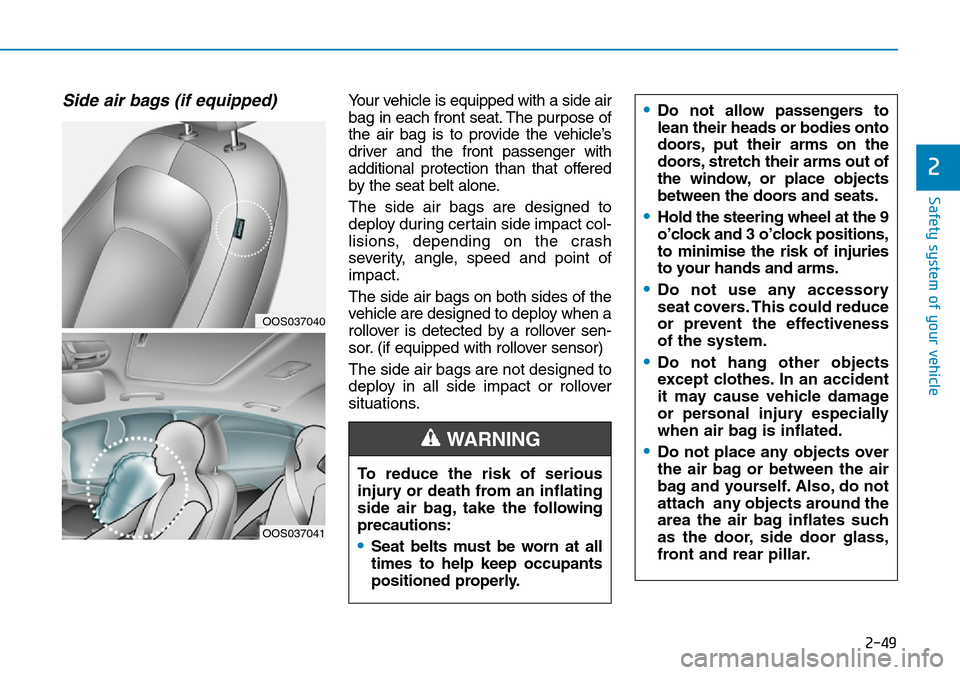
Side air bags (if equipped) Your vehicle is equipped with a side air
bag in each front seat. The purpose of
the air bag is to provide the vehicle’s
driver and the front passenger with
additional protection than that offered
by the seat belt alone.
The side air bags are designed to
deploy during certain side impact col-
lisions, depending on the crash
severity, angle, speed and point of
impact.
The side air bags on both sides of the
vehicle are designed to deploy when a
rollover is detected by a rollover sen-
sor. (if equipped with rollover sensor)
The side air bags are not designed to
deploy in all side impact or rollover
situations.•Do not allow passengers to
lean their heads or bodies onto
doors, put their arms on the
doors, stretch their arms out of
the window, or place objects
between the doors and seats.
•Hold the steering wheel at the 9
o’clock and 3 o’clock positions,
to minimise the risk of injuries
to your hands and arms.
•Do not use any accessory
seat covers. This could reduce
or prevent the effectiveness
of the system.
•Do not hang other objects
except clothes. In an accident
it may cause vehicle damage
or personal injury especially
when air bag is inflated.
•Do not place any objects over
the air bag or between the air
bag and yourself. Also, do not
attach any objects around the
area the air bag inflates such
as the door, side door glass,
front and rear pillar.
To reduce the risk of serious
injury or death from an inflating
side air bag, take the following
precautions:
•Seat belts must be worn at all
times to help keep occupants
positioned properly.
WARNING
OOS037040
OOS037041
Page 80 of 497
Low Beam Assist-Static light .......................................3-92
Welcome system..............................................................3-92
Interior lights ....................................................................3-93\
Wipers and washers ............................................3-95
Windscreen wipers..........................................................3-95
Windscreen washers ......................................................3-97
Rear window wiper and washer switch.....................3-98
Driver Assist System ...........................................3-99
Rear view monitor...........................................................3-99
Parking Distance Warning (Reverse) system .........3-100
Parking Distance Warning
(Reverse/Forward) system ........................................3-104
Defroster .............................................................3-107
Rear window defroster ...............................................3-107
Manual climate control system........................3-108
Heating and air conditioning......................................3-109
System operation ..........................................................3-112
System maintenance ....................................................3-114
Automatic climate control system ...................3-116
Automatic heating and air conditioning ..................3-117
Manual heating and air conditioning .......................3-117
System operation ..........................................................3-120
System maintenance ....................................................3-122
Windscreen defrosting and defogging ...........3-124
Manual climate control system .................................3-124
Automatic climate control system ............................3-125 Auto defogging system
(only for automatic climate control system) .........3-126
Climate control additional features.................3-127
Automatic ventilation ...................................................3-127
Sunroof inside air recirculation.................................3-127
Storage compartment ........................................3-128
Centre console storage ...............................................3-128
Glove box ........................................................................\
3-128
Sunglass holder .............................................................3-129
Multi box ........................................................................\
.3-129
Luggage tray ..................................................................3-130
Interior features.................................................3-131
Cup holder.......................................................................3\
-131
Sunvisor ........................................................................\
...3-132
Power outlet ...................................................................3-132\
Wireless mobile phone charging system ................3-133
Clock ........................................................................\
.........3-135
Clothes hanger ..............................................................3-135
Floor mat anchor(s)......................................................3-136
Luggage net (holder) ...................................................3-136
Cargo area cover ..........................................................3-137
Exterior features ...............................................3-138
Roof rack ........................................................................\
3-138
3
Page 113 of 497
3-35
Convenient features of your vehicle
3
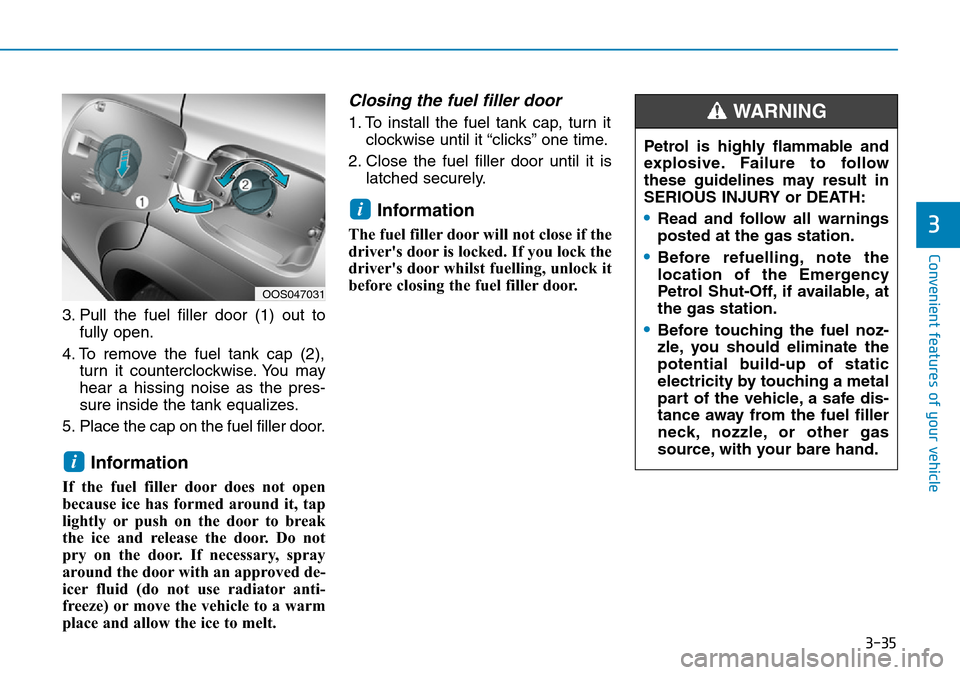
3. Pull the fuel filler door (1) out tofully open.
4. To remove the fuel tank cap (2), turn it counterclockwise. You may
hear a hissing noise as the pres-
sure inside the tank equalizes.
5. Place the cap on the fuel filler door.
Information
If the fuel filler door does not open
because ice has formed around it, tap
lightly or push on the door to break
the ice and release the door. Do not
pry on the door. If necessary, spray
around the door with an approved de-
icer fluid (do not use radiator anti-
freeze) or move the vehicle to a warm
place and allow the ice to melt.
Closing the fuel filler door
1. To install the fuel tank cap, turn it clockwise until it “clicks” one time.
2. Close the fuel filler door until it is latched securely.
Information
The fuel filler door will not close if the
driver's door is locked. If you lock the
driver's door whilst fuelling, unlock it
before closing the fuel filler door.
i
i
OOS047031
Petrol is highly flammable and
explosive. Failure to follow
these guidelines may result in
SERIOUS INJURY or DEATH:
•Read and follow all warnings
posted at the gas station.
•Before refuelling, note the
location of the Emergency
Petrol Shut-Off, if available, at
the gas station.
•Before touching the fuel noz-
zle, you should eliminate the
potential build-up of static
electricity by touching a metal
part of the vehicle, a safe dis-
tance away from the fuel filler
neck, nozzle, or other gas
source, with your bare hand.
WARNING
Page 213 of 497
![Hyundai Kona 2018 Owners Manual - RHD (UK, Australia) 3-135
Convenient features of your vehicle
3
Clock
Vehicles with Audio system
Select the [SETUP/CLOCK ]button on
the audio system ➟Select [Date/Time].
• Set time: Set the time displayed on
the audi](/img/35/16232/w960_16232-212.png "Hyundai Kona 2018 Owners Manual - RHD (UK, Australia) 3-135
Convenient features of your vehicle
3
Clock
Vehicles with Audio system
Select the [SETUP/CLOCK ]button on
the audio system ➟Select [Date/Time].
• Set time: Set the time displayed on
the audi")
3-135
Convenient features of your vehicle
3
Clock
Vehicles with Audio system
Select the [SETUP/CLOCK ]button on
the audio system ➟Select [Date/Time].
• Set time: Set the time displayed on
the audio screen.
• Time format: Choose between 12- hour and 24-hour time formats.
Vehicles with Navigation system
Select the Settings menu on the
Navigation system ➟Select
[Date/Time].
• GPS time: Displays time according to the received GNSS time.
• 24-hour: Switches to 12 hour or 24 hour.
For more details, please refer to
the separate manual that was sup-
plied with your vehicle.
Clothes hanger (if equipped)
These hangers are not designed to
hold large or heavy items. Do not hang other objects such
as hangers or hard objects
except clothes. Also, do not put
heavy, sharp or breakable
objects in the clothes pockets.
In an accident or when the cur-
tain air bag is inflated, it may
cause vehicle damage or per-
sonal injury.
WARNING
OOS047066
Do not adjust the clock whilst
driving. You may lose your steer-
ing control and cause severe
personal injury or accidents.
WARNING
OOS047065
Page 218 of 497
4-2
Multimedia System
Information
• If you install an aftermarket HIDheadlamp, your vehicle’s audio and
electronic devices may malfunction.
• Prevent chemicals such as perfume, cosmetic oil, sun cream, hand clean-
er, and air freshener from contacting
the interior parts because they may
cause damage or discolouration.
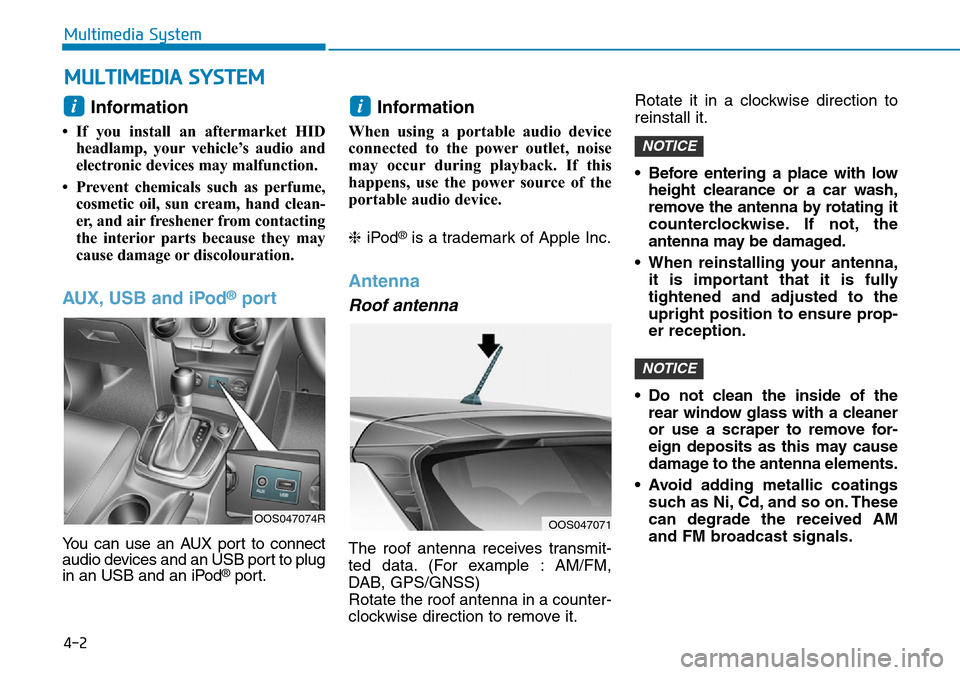
AUX, USB and iPod®port
You can use an AUX port to connect
audio devices and an USB port to plug
in an USB and an iPod
®port.
Information
When using a portable audio device
connected to the power outlet, noise
may occur during playback. If this
happens, use the power source of the
portable audio device.
❈ iPod
®is a trademark of Apple Inc.
Antenna
Roof antenna
The roof antenna receives transmit-
ted data. (For example : AM/FM,
DAB, GPS/GNSS)
Rotate the roof antenna in a counter-
clockwise direction to remove it. Rotate it in a clockwise direction to
reinstall it.
• Before entering a place with low
height clearance or a car wash,
remove the antenna by rotating it
counterclockwise. If not, the
antenna may be damaged.
• When reinstalling your antenna, it is important that it is fully
tightened and adjusted to the
upright position to ensure prop-
er reception.
• Do not clean the inside of the rear window glass with a cleaner
or use a scraper to remove for-
eign deposits as this may cause
damage to the antenna elements.
• Avoid adding metallic coatings such as Ni, Cd, and so on. These
can degrade the received AM
and FM broadcast signals.
NOTICE
NOTICE
ii
MULTIMEDIA SYSTEM
OOS047071OOS047074R
Page 225 of 497
4-9
Multimedia System
4
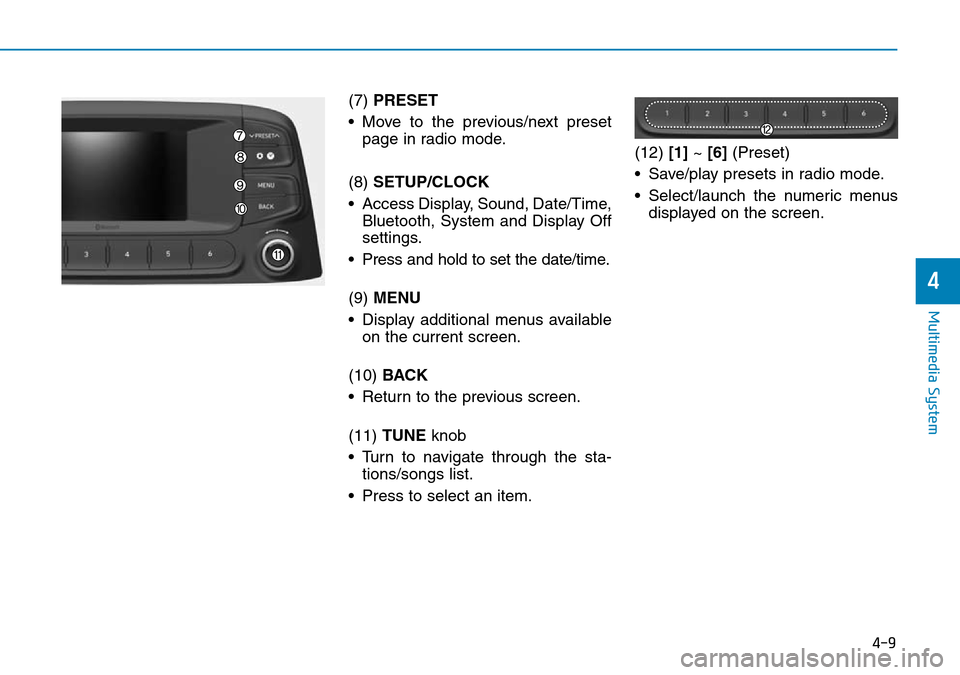
(7) PRESET
• Move to the previous/next preset page in radio mode.
(8) SETUP/CLOCK
• Access Display, Sound, Date/Time, Bluetooth, System and Display Off
settings.
• Press and hold to set the date/time.
(9) MENU
• Display additional menus available on the current screen.
(10) BACK
• Return to the previous screen.
(11) TUNE knob
• Turn to navigate through the sta- tions/songs list.
• Press to select an item. (12)
[1]~ [6] (Preset)
• Save/play presets in radio mode.
• Select/launch the numeric menus displayed on the screen.
Page 242 of 497
![Hyundai Kona 2018 Owners Manual - RHD (UK, Australia) 4-26
Multimedia System
Information
The 6-digit passkey in the image
above is an example. Refer to your
vehicle for the actual passkey.
Pairing a second Bluetooth®device
Press the [SETUP/CLOCK]button](/img/35/16232/w960_16232-241.png "Hyundai Kona 2018 Owners Manual - RHD (UK, Australia) 4-26
Multimedia System
Information
The 6-digit passkey in the image
above is an example. Refer to your
vehicle for the actual passkey.
Pairing a second Bluetooth®device
Press the [SETUP/CLOCK]button")
4-26
Multimedia System
Information
The 6-digit passkey in the image
above is an example. Refer to your
vehicle for the actual passkey.
Pairing a second Bluetooth®device
Press the [SETUP/CLOCK]button
on the audio system ➟Select
[Bluetooth] ➟Select [Connections]
➟ Select [Add new device].
- The pairing procedure from this point is identical to [Pairing the first
Bluetooth device].
Information
• Bluetooth®standby mode lasts for
three minutes. If a device is not
paired within three minutes, pairing
is cancelled. Start over from the
beginning.
• For most Bluetooth
®devices, a con-
nection is established automatically
after pairing. Some devices, howev-
er, require separate confirmation
when connecting after pairing. Be
sure to check your Bluetooth
®
device after pairing to confirm that
it has connected.
Connecting Bluetooth®devices
If there are no connected devices
Press the [PHONE] button on the
audio system or the [CALL] button in
the steering wheel remote control ➟
List of paired Bluetooth
®devices ➟
Select the desired Bluetooth®device
from the list ➟ Connect Bluetooth®.
ii
Page 247 of 497
![Hyundai Kona 2018 Owners Manual - RHD (UK, Australia) 4-31
Multimedia System
4
Setup
Access Display, Sound, Date/Time,
Bluetooth, System and Display Off
settings.
Press the [SETUP/CLOCK]button
on the audio system.
Display
Press the [SETUP/CLOCK] button](/img/35/16232/w960_16232-246.png "Hyundai Kona 2018 Owners Manual - RHD (UK, Australia) 4-31
Multimedia System
4
Setup
Access Display, Sound, Date/Time,
Bluetooth, System and Display Off
settings.
Press the [SETUP/CLOCK]button
on the audio system.
Display
Press the [SETUP/CLOCK] button")
4-31
Multimedia System
4
Setup
Access Display, Sound, Date/Time,
Bluetooth, System and Display Off
settings.
Press the [SETUP/CLOCK]button
on the audio system.
Display
Press the [SETUP/CLOCK] button
on the audio system ➟Select
[Display].
• Dimming mode: Brightness is auto- matically adjusted according to the
headlight use.
• Brightness: The brightness of the audio screen can be changed.
• Screensaver: Set the information displayed when the audio system
is switched off or the screen is
turned off.
Sound
Press the [SETUP/CLOCK] button
on the audio system ➟Select
[Sound].
• Position: Sound balance and fader can be adjusted.
• Equaliser: Sound tone colour can be adjusted.
• Speed dependent volume control: Automatically adjust volume based
on vehicle speed.
• Rear parking sensors prioritised: Automatically lower audio volume
whilst reversing.
Date/Time
Press the [SETUP/CLOCK] button
on the audio system ➟Select
[Date/Time].
• Set time: Set the time displayed on the audio screen.
• Time format: Choose betw een 12-
hour and 24-hour time formats.
• Set date: Set the date displayed on the audio screen.
Page 248 of 497
![Hyundai Kona 2018 Owners Manual - RHD (UK, Australia) 4-32
Multimedia System
Bluetooth
Press the [SETUP/CLOCK]button
➟ Select [Bluetooth].
• Connections: Control pairing, dele- tion, connection and disconnection
of Bluetooth
®devices.
• Auto conne](/img/35/16232/w960_16232-247.png "Hyundai Kona 2018 Owners Manual - RHD (UK, Australia) 4-32
Multimedia System
Bluetooth
Press the [SETUP/CLOCK]button
➟ Select [Bluetooth].
• Connections: Control pairing, dele- tion, connection and disconnection
of Bluetooth
®devices.
• Auto conne")
4-32
Multimedia System
Bluetooth
Press the [SETUP/CLOCK]button
➟ Select [Bluetooth].
• Connections: Control pairing, dele- tion, connection and disconnection
of Bluetooth
®devices.
• Auto connection priority: Set the connection priority of Bluetooth
®
devices when the vehicle is started.
• Update contacts: Contacts can be
downloaded from connected
Bluetooth
®devices.
• Bluetooth voice guidance: Play or mute voice prompts for Bluetooth
®
device pairing, connection and
errors.
Information
• When paired devices are deleted,the call history and contacts of the
device saved to the audio system are
deleted.
• For Bluetooth
®connections with
low connection priority, some time
may be required for the connection
to be established.
• Contacts can be downloaded only from the currently connected
Bluetooth
®device.
• If no Bluetooth
®device is connected,
the Download Contacts button is
disabled.
• If the language setting is Slovakian or Hungarian, Bluetooth voice guid-
ance is not supported.
System
Press the [SETUP/CLOCK] button
on the audio system ➟Select
[System].
• Language: Change the user lan- guage.
• Default: Reset the audio system.
Information
The system resets to the default val-
ues, and all saved data and settings
are lost.
Display Off
To prevent glare, the screen can be
turned off with the audio system in
operation.
Press the [SETUP/CLOCK] button
on the audio system ➟Select
[Display Off].
Information
Use ‘Screensaver’ to set the informa-
tion to be displayed when the screen is
turned off.
i
i
i