fuel type Hyundai Kona 2018 Owner's Manual - RHD (UK, Australia)
[x] Cancel search | Manufacturer: HYUNDAI, Model Year: 2018, Model line: Kona, Model: Hyundai Kona 2018Pages: 497, PDF Size: 11.7 MB
Page 8 of 497
Use of MTBE
HYUNDAI recommends avoiding
fuels containing MTBE (Methyl
Tertiary Butyl Ether) over 15.0% vol.
(Oxygen Content 2.7% weight) in
your vehicle.
Fuel containing MTBE over 15.0%
vol. (Oxygen Content 2.7% weight)
may reduce vehicle performance and
produce vapour lock or hard starting.
Do not use methanol
Fuels containing methanol (wood
alcohol) should not be used in your
vehicle.This type of fuel can reduce
vehicle performance and damage
components of the fuel system, engine
control system and emission control
system.
Fuel Additives
HYUNDAI recommends that you use
unleaded petrol which has an octane
rating of RON (Research Octane
Number) 95 / AKI (Anti Knock Index)
91 or higher.
For customers who do not use good
quality petrols including fuel addi-
tives regularly, and have problems
starting or the engine does not run
smoothly, one bottle of additives
added to the fuel tank at every
10,000 miles (15,000km).
Additives are available from your
HYUNDAI authorised repairer along
with information on how to use them.
Do not mix other additives.
Operation in foreign countries
If you are going to drive your vehicle
in another country, be sure to:
• Observe all regulations regarding registration and insurance.
• Determine that acceptable fuel is available.
F8
Introduction
Your New Vehicle Limited
Warranty may not cover dam-
age to the fuel system and any
performance problems that are
caused by the use of fuels con-
taining methanol or fuels con-
taining MTBE (Methyl Tertiary
Butyl Ether) over 15.0% vol.
(Oxygen Content 2.7% weight.)
CAUTION
Page 79 of 497
 Convenient features of your vehicle
Accessing your vehicle .........................................3-3
Remote key ........................................................................\
.3-3
Smart")
Convenient features of your vehicle
Accessing your vehicle .........................................3-3
Remote key ........................................................................\
.3-3
Smart key ........................................................................\
....3-6
Immobiliser system .........................................................3-10
Door locks .............................................................3-11
Operating door locks from outside the vehicle ......3-11
Operating door locks from inside the vehicle .........3-12
Deadlocks ........................................................................\
..3-14
Auto door lock/unlock features..................................3-15
Child-protector rear door locks ..................................3-15
Theft-alarm system.............................................3-16
Steering wheel......................................................3-17
Electric power steering (EPS) ......................................3-17
Tilt steering/Telescopic steering.................................3-17
Heated steering wheel ...................................................3-18
Horn ........................................................................\
............3-19
Mirrors ...................................................................3-19
Inside rearview mirror....................................................3-19
Outside rearview mirror ................................................3-20
Windows ................................................................3-23
Power windows................................................................3-23
Sunroof..................................................................3-27
Sunroof opening and closing .......................................3-28
Sliding the sunroof .........................................................3-28
Tilting the sunroof ..........................................................3-29
Sunshade ........................................................................\
...3-29Resetting the sunroof ....................................................3-30
Sunroof open warning ...................................................3-30
Exterior features .................................................3-31
Bonnet........................................................................\
........3-31
Tailgate.....................................................................\
..........3-32
Fuel filler door .................................................................3-34
Instrument cluster................................................3-38
Instrument cluster control ............................................3-39
Gauges and meters .........................................................3-39
Icy Road Warning Light .................................................3-42
Transmission shift indicator .........................................3-43
Manual transmission shift indicator ...........................3-43
Warning and indicator lights ........................................3-45
LCD display messages ..................................................3-58
LCD display (Cluster Type B,C) ..........................3-64
LCD display control.........................................................3-64
LCD display modes ..........................................................3-65
Trip computer and service reminder
(For cluster Type A) ............................................3-72
Trip computer ...................................................................3-72
Service reminder .............................................................3-75
Trip computer (Type B, Type C).........................3-77
Trip modes ........................................................................\
3-77
Head up display (HUD)........................................3-80
Lighting..................................................................3-83
Exterior lights ..................................................................3-83
3
Page 115 of 497
3-37
Convenient features of your vehicle
Information
Make sure to refuel your vehicle
according to the "Fuel Requirements"
suggested in the Introduction chapter.
• Do not spill fuel on the exteriorsurfaces of the vehicle. Any type
of fuel spilled on painted sur-
faces may damage the paint.
• If the fuel filler cap requires replacement, use only a genuine
HYUNDAI cap or the equivalent
specified for your vehicle. An
incorrect fuel filler cap can
result in a serious malfunction
of the fuel system or emission
control system.
NOTICE
i
3
•If pressurised fuel sprays out,
it can cover your clothes or
skin and thus subject you to
the risk of fire and burns.
Always remove the fuel cap
carefully and slowly. If the cap
is venting fuel or if you hear a
hissing sound, wait until the
condition stops before com-
pletely removing the cap.
•Always check that the fuel cap
is installed securely to pre-
vent fuel spillage in the event
of an accident.
Page 116 of 497
3-38
Convenient features of your vehicle
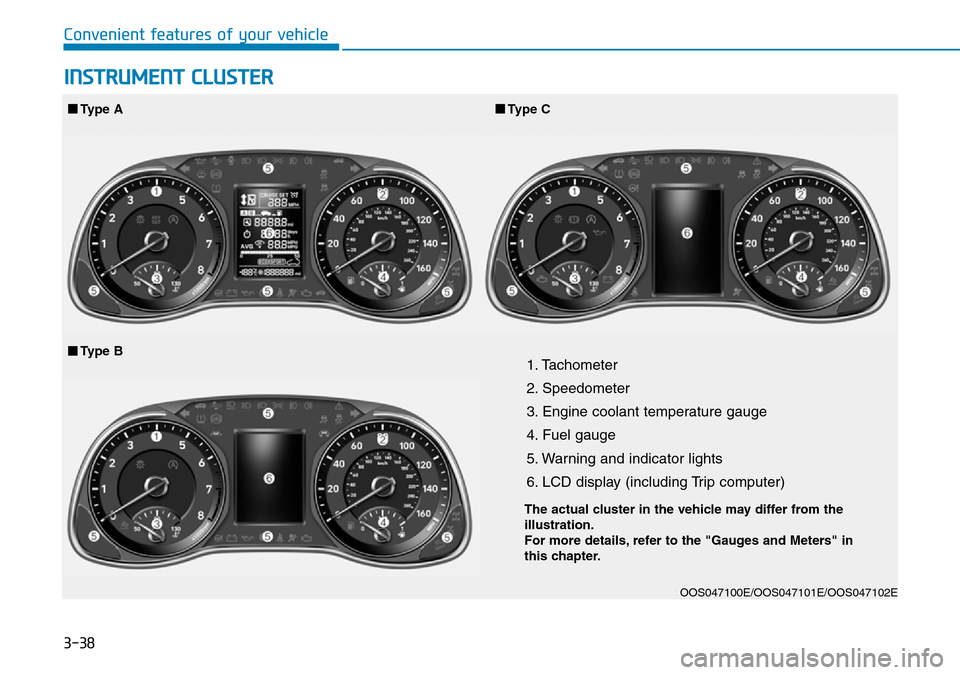
1. Tachometer
2. Speedometer
3. Engine coolant temperature gauge
4. Fuel gauge
5. Warning and indicator lights
6. LCD display (including Trip computer)
OOS047100E/OOS047101E/OOS047102E
■Type A■Type C
■Type B
INSTRUMENT CLUSTER
The actual cluster in the vehicle may differ from the
illustration.
For more details, refer to the "Gauges and Meters" in
this chapter.
Page 150 of 497
3-72
Convenient features of your vehicle
Trip computer
The trip computer is a microcomput-
er-controlled driver information sys-
tem that displays information related
to driving.
Information
Some driving information stored in the
trip computer (for example Average
Vehicle Speed) resets if the battery is
disconnected.
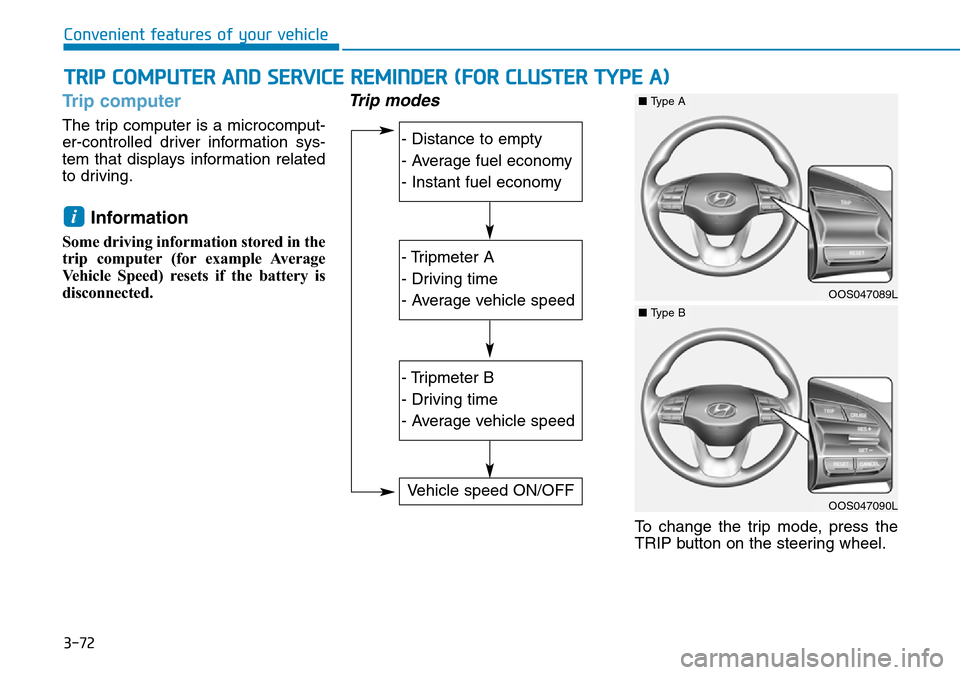
Trip modes
To change the trip mode, press the
TRIP button on the steering wheel.
i
TRIP COMPUTER AND SERVICE REMINDER (FOR CLUSTER TYPE A)
- Distance to empty
- Average fuel economy
- Instant fuel economy
- Tripmeter A
- Driving time
- Average vehicle speed
- Tripmeter B
- Driving time
- Average vehicle speed
Vehicle speed ON/OFF
OOS047089L
■Type A
OOS047090L
■Type B
Page 155 of 497
3-77
Convenient features of your vehicle
3
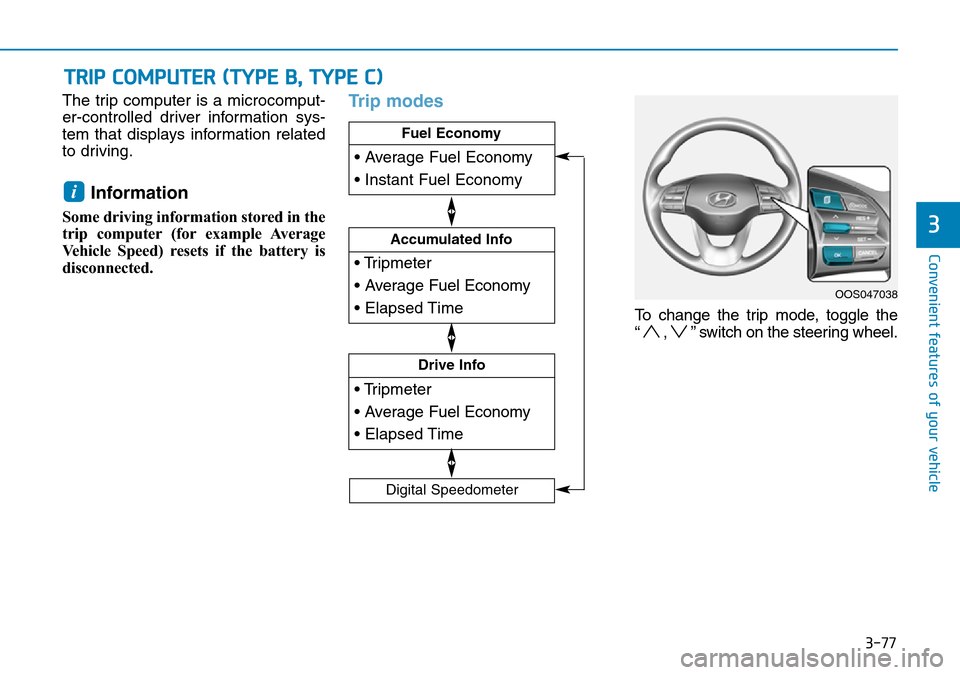
The trip computer is a microcomput-
er-controlled driver information sys-
tem that displays information related
to driving.
Information
Some driving information stored in the
trip computer (for example Average
Vehicle Speed) resets if the battery is
disconnected.
Trip modes
To change the trip mode, toggle the
“ , ” switch on the steering wheel.
i
TRIP COMPUTER (TYPE B, TYPE C)
• Tripmeter
• Average Fuel Economy
• Elapsed Time
Drive Info
• Tripmeter
• Average Fuel Economy
• Elapsed Time
Accumulated Info
• Average Fuel Economy
• Instant Fuel Economy
Fuel Economy
Digital Speedometer
OOS047038
Page 156 of 497
3-78
Convenient features of your vehicle
Fuel economy
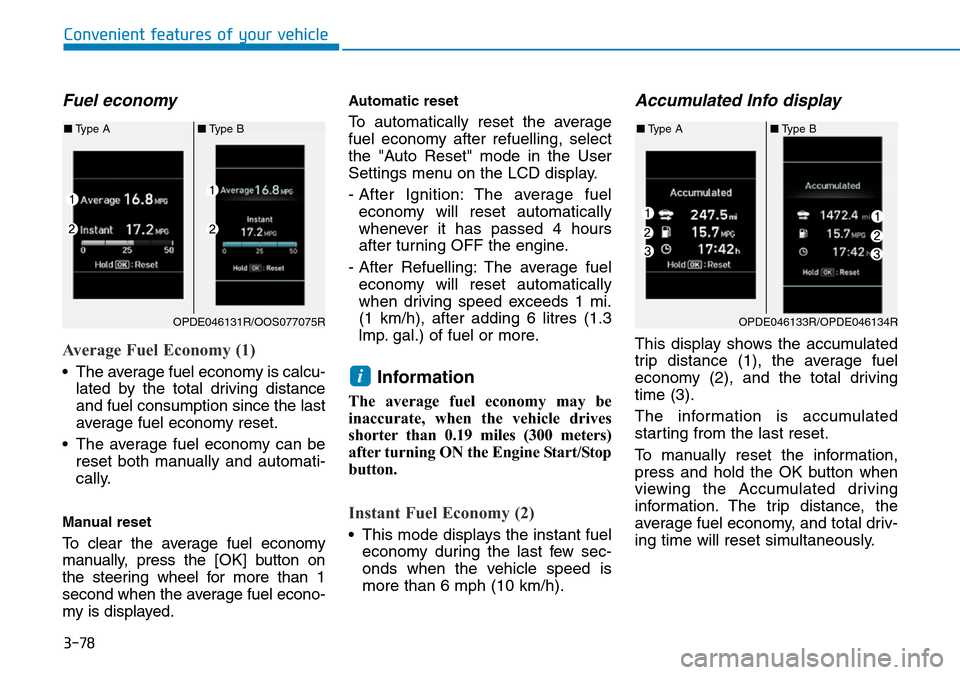
Average Fuel Economy (1)
• The average fuel economy is calcu-lated by the total driving distance
and fuel consumption since the last
average fuel economy reset.
• The average fuel economy can be reset both manually and automati-
cally.
Manual reset
To clear the average fuel economy
manually, press the [OK] button on
the steering wheel for more than 1
second when the average fuel econo-
my is displayed.
Automatic reset
To automatically reset the average
fuel economy after refuelling, select
the "Auto Reset" mode in the User
Settings menu on the LCD display.
- After Ignition: The average fuel economy will reset automatically
whenever it has passed 4 hours
after turning OFF the engine.
- After Refuelling: The average fuel economy will reset automatically
when driving speed exceeds 1 mi.
(1 km/h), after adding 6 litres (1.3
lmp. gal.) of fuel or more.
Information
The average fuel economy may be
inaccurate, when the vehicle drives
shorter than 0.19 miles (300 meters)
after turning ON the Engine Start/Stop
button.
Instant Fuel Economy (2)
• This mode displays the instant fuel economy during the last few sec-
onds when the vehicle speed is
more than 6 mph (10 km/h).
Accumulated Info display
This display shows the accumulated
trip distance (1), the average fuel
economy (2), and the total driving
time (3).
The information is accumulated
starting from the last reset.
To manually reset the information,
press and hold the OK button when
viewing the Accumulated driving
information. The trip distance, the
average fuel economy, and total driv-
ing time will reset simultaneously.
i
OPDE046131R/OOS077075R
■ Type A ■Type B
OPDE046133R/OPDE046134R
■Type A ■Type B
Page 157 of 497
3-79
Convenient features of your vehicle
3
The accumulated driving information
will continue to be counted whilst the
engine is still running (for example,
when the vehicle is in traffic or
stopped at a stop light).
Information
The vehicle must be driven for a min-
imum of 0.19 miles (300 meters) since
the last ignition key cycle before the
average fuel economy will be recalcu-
lated.
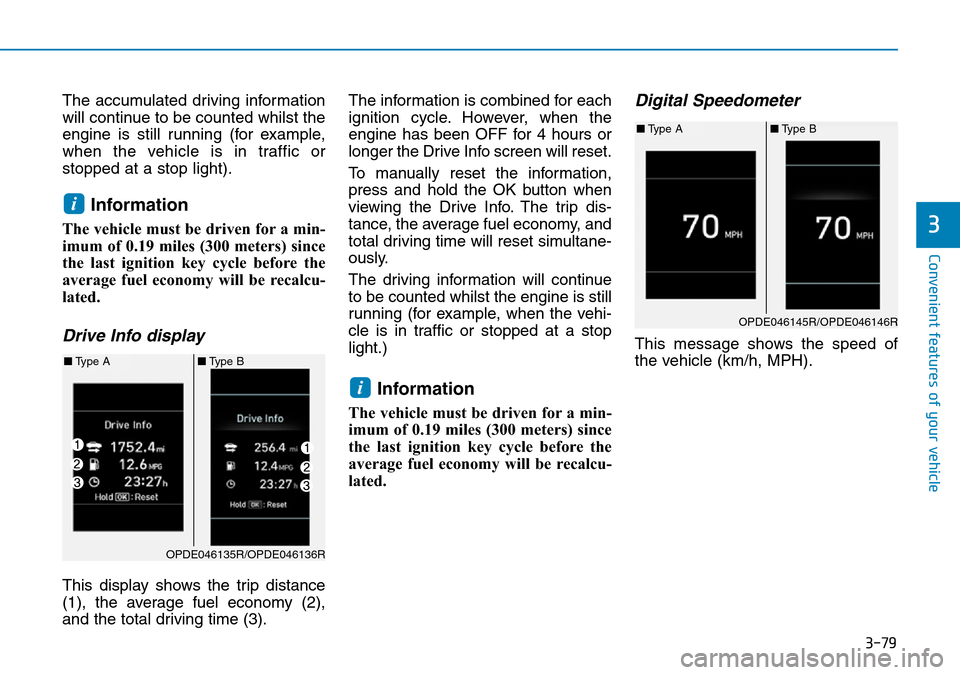
Drive Info display
This display shows the trip distance
(1), the average fuel economy (2),
and the total driving time (3).The information is combined for each
ignition cycle. However, when the
engine has been OFF for 4 hours or
longer the Drive Info screen will reset.
To manually reset the information,
press and hold the OK button when
viewing the Drive Info. The trip dis-
tance, the average fuel economy, and
total driving time will reset simultane-
ously.
The driving information will continue
to be counted whilst the engine is still
running (for example, when the vehi-
cle is in traffic or stopped at a stop
light.)
Information
The vehicle must be driven for a min-
imum of 0.19 miles (300 meters) since
the last ignition key cycle before the
average fuel economy will be recalcu-
lated.
Digital Speedometer
This message shows the speed of
the vehicle (km/h, MPH).
i
i
OPDE046135R/OPDE046136R
■
Type A ■Type B
OPDE046145R/OPDE046146R
■Type A ■Type B
Page 268 of 497
5-19
Driving your vehicle
5
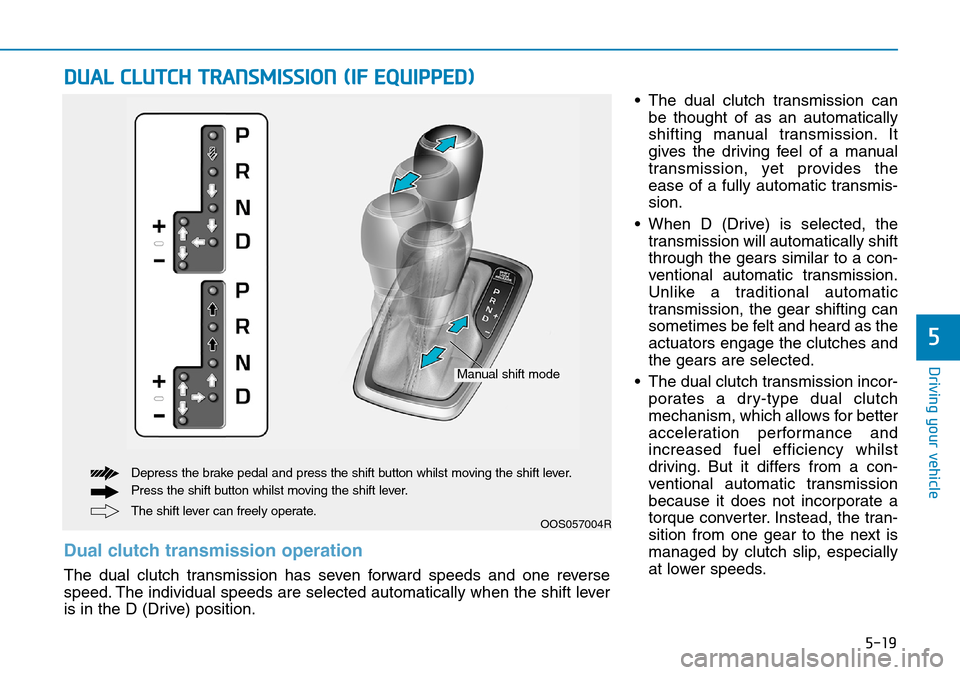
• The dual clutch transmission canbe thought of as an automatically
shifting manual transmission. It
gives the driving feel of a manual
transmission, yet provides the
ease of a fully automatic transmis-
sion.
• When D (Drive) is selected, the transmission will automatically shift
through the gears similar to a con-
ventional automatic transmission.
Unlike a traditional automatic
transmission, the gear shifting can
sometimes be felt and heard as the
actuators engage the clutches and
the gears are selected.
• The dual clutch transmission incor- porates a dry-type dual clutch
mechanism, which allows for better
acceleration performance and
increased fuel efficiency whilst
driving. But it differs from a con-
ventional automatic transmission
because it does not incorporate a
torque converter. Instead, the tran-
sition from one gear to the next is
managed by clutch slip, especially
at lower speeds.
DUAL CLUTCH TRANSMISSION (IF EQUIPPED)
OOS057004RThe shift lever can freely operate. Depress the brake pedal and press the shift button whilst moving the shift lever.
Press the shift button whilst moving the shift lever.
Manual shift mode
Dual clutch transmission operation
The dual clutch transmission has seven forward speeds and one reverse
speed. The individual speeds are selected automatically when the shift lever
is in the D (Drive) position.
Page 353 of 497
5-104
Driving your vehicle
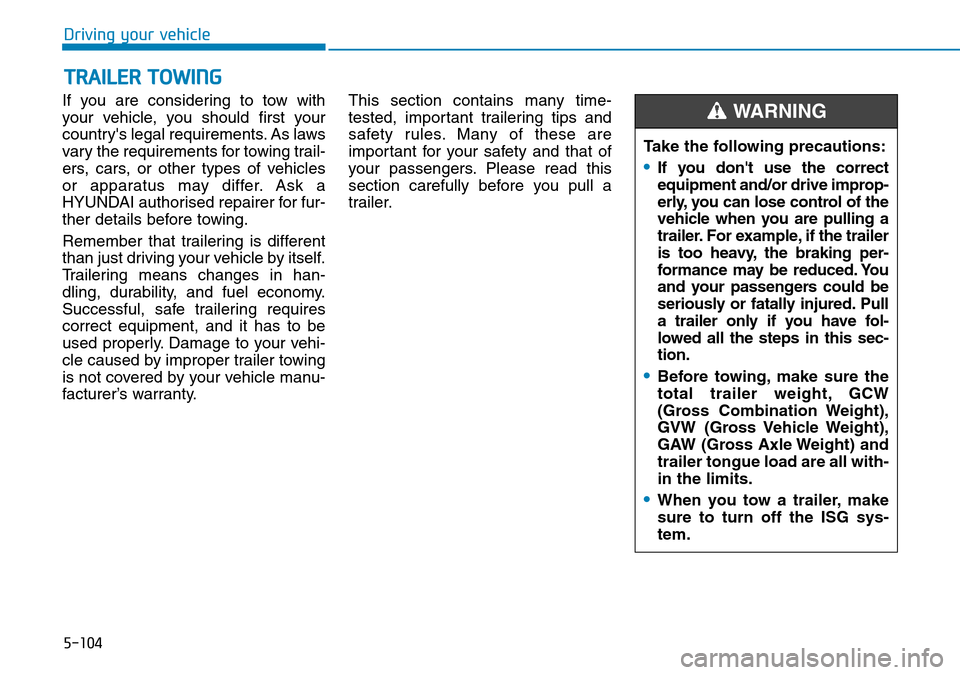
If you are considering to tow with
your vehicle, you should first your
country's legal requirements. As laws
vary the requirements for towing trail-
ers, cars, or other types of vehicles
or apparatus may differ. Ask a
HYUNDAI authorised repairer for fur-
ther details before towing.
Remember that trailering is different
than just driving your vehicle by itself.
Trailering means changes in han-
dling, durability, and fuel economy.
Successful, safe trailering requires
correct equipment, and it has to be
used properly. Damage to your vehi-
cle caused by improper trailer towing
is not covered by your vehicle manu-
facturer’s warranty. This section contains many time-
tested, important trailering tips and
safety rules. Many of these are
important for your safety and that of
your passengers. Please read this
section carefully before you pull a
trailer.
TRAILER TOWING
Take the following precautions:
•If you don't use the correct
equipment and/or drive improp-
erly, you can lose control of the
vehicle when you are pulling a
trailer. For example, if the trailer
is too heavy, the braking per-
formance may be reduced. You
and your passengers could be
seriously or fatally injured. Pull
a trailer only if you have fol-
lowed all the steps in this sec-
tion.
•Before towing, make sure the
total trailer weight, GCW
(Gross Combination Weight),
GVW (Gross Vehicle Weight),
GAW (Gross Axle Weight) and
trailer tongue load are all with-
in the limits.
•When you tow a trailer, make
sure to turn off the ISG sys-
tem.
WARNING