interior lights Hyundai Kona 2018 Owner's Manual - RHD (UK, Australia)
[x] Cancel search | Manufacturer: HYUNDAI, Model Year: 2018, Model line: Kona, Model: Hyundai Kona 2018Pages: 497, PDF Size: 11.7 MB
Page 80 of 497
Low Beam Assist-Static light .......................................3-92
Welcome system..............................................................3-92
Interior lights ....................................................................3-93\
Wipers and washers ............................................3-95
Windscreen wipers..........................................................3-95
Windscreen washers ......................................................3-97
Rear window wiper and washer switch.....................3-98
Driver Assist System ...........................................3-99
Rear view monitor...........................................................3-99
Parking Distance Warning (Reverse) system .........3-100
Parking Distance Warning
(Reverse/Forward) system ........................................3-104
Defroster .............................................................3-107
Rear window defroster ...............................................3-107
Manual climate control system........................3-108
Heating and air conditioning......................................3-109
System operation ..........................................................3-112
System maintenance ....................................................3-114
Automatic climate control system ...................3-116
Automatic heating and air conditioning ..................3-117
Manual heating and air conditioning .......................3-117
System operation ..........................................................3-120
System maintenance ....................................................3-122
Windscreen defrosting and defogging ...........3-124
Manual climate control system .................................3-124
Automatic climate control system ............................3-125 Auto defogging system
(only for automatic climate control system) .........3-126
Climate control additional features.................3-127
Automatic ventilation ...................................................3-127
Sunroof inside air recirculation.................................3-127
Storage compartment ........................................3-128
Centre console storage ...............................................3-128
Glove box ........................................................................\
3-128
Sunglass holder .............................................................3-129
Multi box ........................................................................\
.3-129
Luggage tray ..................................................................3-130
Interior features.................................................3-131
Cup holder.......................................................................3\
-131
Sunvisor ........................................................................\
...3-132
Power outlet ...................................................................3-132\
Wireless mobile phone charging system ................3-133
Clock ........................................................................\
.........3-135
Clothes hanger ..............................................................3-135
Floor mat anchor(s)......................................................3-136
Luggage net (holder) ...................................................3-136
Cargo area cover ..........................................................3-137
Exterior features ...............................................3-138
Roof rack ........................................................................\
3-138
3
Page 117 of 497
3-39
Convenient features of your vehicle
3
Instrument cluster control
Instrument panel illumination
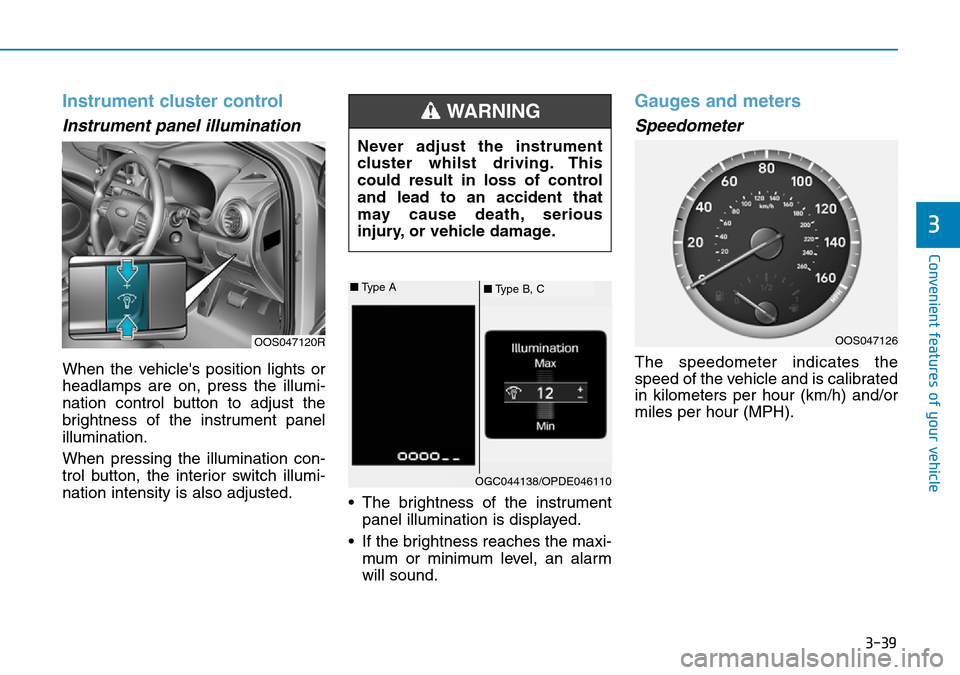
When the vehicle's position lights or
headlamps are on, press the illumi-
nation control button to adjust the
brightness of the instrument panel
illumination.
When pressing the illumination con-
trol button, the interior switch illumi-
nation intensity is also adjusted.• The brightness of the instrument
panel illumination is displayed.
• If the brightness reaches the maxi- mum or minimum level, an alarm
will sound.
Gauges and meters
Speedometer
The speedometer indicates the
speed of the vehicle and is calibrated
in kilometers per hour (km/h) and/or
miles per hour (MPH).
OOS047120R
Never adjust the instrument
cluster whilst driving. This
could result in loss of control
and lead to an accident that
may cause death, serious
injury, or vehicle damage.
WARNING
■ Type B, C
■
Type A
OGC044138/OPDE046110
OOS047126
Page 171 of 497
3-93
Convenient features of your vehicle
Interior lights
Do not use the interior lights for
extended periods when the engine
is turned off otherwise the battery
will discharge.
Interior lamp AUTO cut
The interior lamps will automatically
go off approximately 20 minutes after
the engine is turned off and the
doors are closed. If a door is opened,
the lamp will go off 40 minutes after
the engine is turned off. If the doors
are locked and the vehicle enters the
armed stage of the theft alarm sys-
tem, the lamps will go off five sec-
onds later.
Front lamps
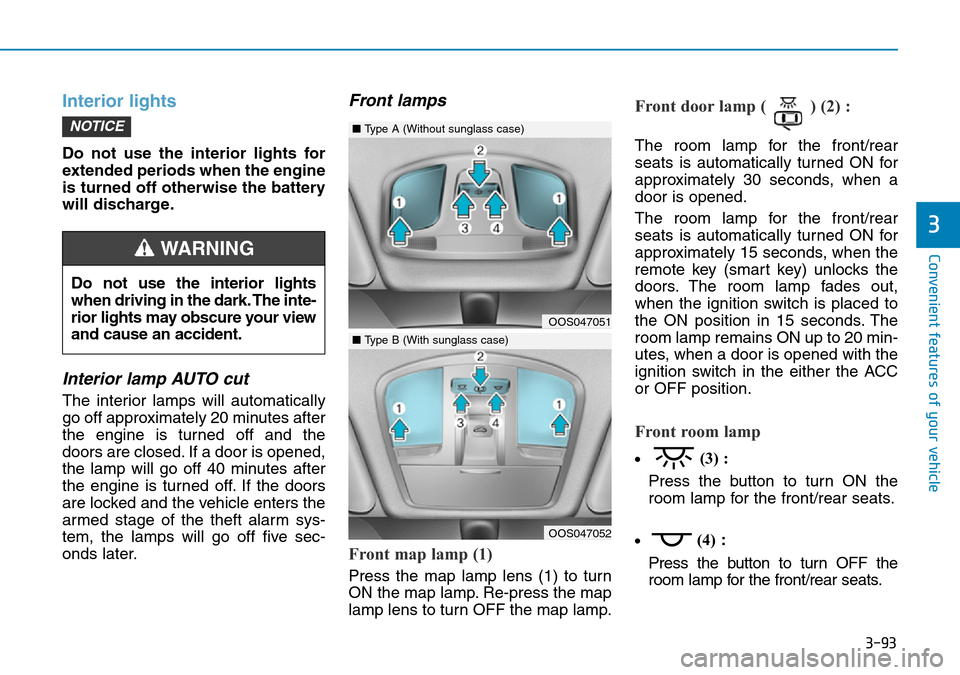
Front map lamp (1)
Press the map lamp lens (1) to turn
ON the map lamp. Re-press the map
lamp lens to turn OFF the map lamp.
Front door lamp ( ) (2) :
The room lamp for the front/rear
seats is automatically turned ON for
approximately 30 seconds, when a
door is opened.
The room lamp for the front/rear
seats is automatically turned ON for
approximately 15 seconds, when the
remote key (smart key) unlocks the
doors. The room lamp fades out,
when the ignition switch is placed to
the ON position in 15 seconds. The
room lamp remains ON up to 20 min-
utes, when a door is opened with the
ignition switch in the either the ACC
or OFF position.
Front room lamp
•(3) :
Press the button to turn ON the
room lamp for the front/rear seats.
• (4)
:
Press the button to turn OFF the
room lamp for the front/rear seats.
NOTICE
3
Do not use the interior lights
when driving in the dark. The inte-
rior lights may obscure your view
and cause an accident.
WARNING
OOS047051
OOS047052
■ Type A (Without sunglass case)
■Type B (With sunglass case)
Page 432 of 497
7-25
7
Maintenance
Battery capacity label
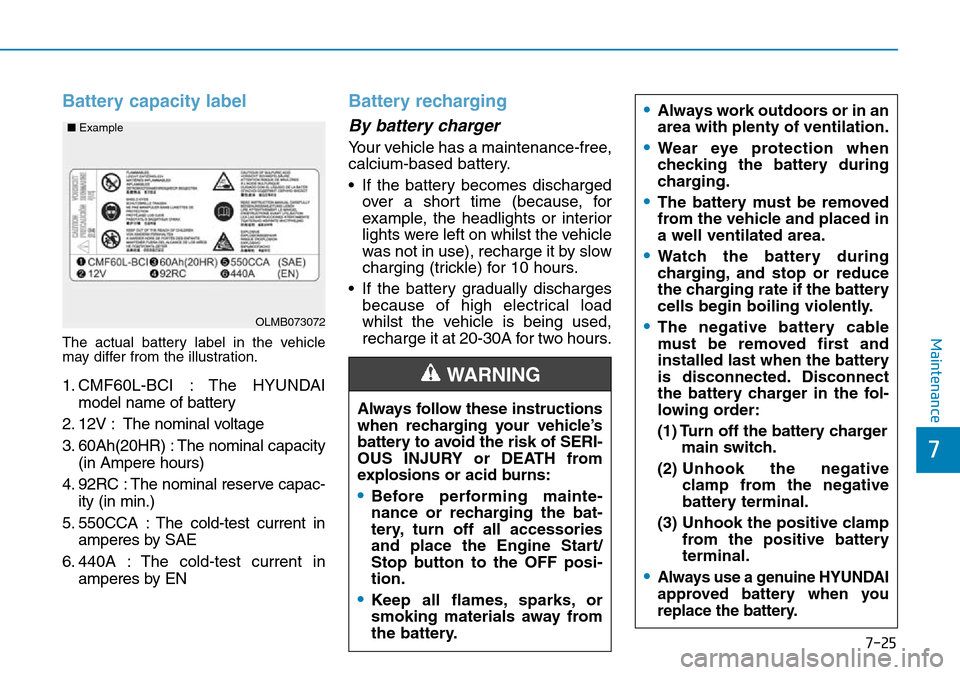
The actual battery label in the vehicle
may differ from the illustration.
1. CMF60L-BCI : The HYUNDAImodel name of battery
2. 12V : The nominal voltage
3. 60Ah(20HR) : The nominal capacity (in Ampere hours)
4. 92RC : The nominal reserve capac- ity (in min.)
5. 550CCA : The cold-test current in amperes by SAE
6. 440A : The cold-test current in amperes by EN
Battery recharging
By battery charger
Your vehicle has a maintenance-free,
calcium-based battery.
• If the battery becomes dischargedover a short time (because, for
example, the headlights or interior
lights were left on whilst the vehicle
was not in use), recharge it by slow
charging (trickle) for 10 hours.
• If the battery gradually discharges because of high electrical load
whilst the vehicle is being used,
recharge it at 20-30A for two hours.
OLMB073072
■
Example
Always follow these instructions
when recharging your vehicle’s
battery to avoid the risk of SERI-
OUS INJURY or DEATH from
explosions or acid burns:
•Before performing mainte-
nance or recharging the bat-
tery, turn off all accessories
and place the Engine Start/
Stop button to the OFF posi-
tion.
•Keep all flames, sparks, or
smoking materials away from
the battery.
WARNING
•Always work outdoors or in an
area with plenty of ventilation.
•Wear eye protection when
checking the battery during
charging.
•The battery must be removed
from the vehicle and placed in
a well ventilated area.
•Watch the battery during
charging, and stop or reduce
the charging rate if the battery
cells begin boiling violently.
•The negative battery cable
must be removed first and
installed last when the battery
is disconnected. Disconnect
the battery charger in the fol-
lowing order:
(1) Turn off the battery charger
main switch.
(2) Unhook the negative
clamp from the negative
battery terminal.
(3) Unhook the positive clamp from the positive battery
terminal.
•Always use a genuine HYUNDAI
approved battery when you
replace the battery.