fog light Hyundai Kona 2019 User Guide
[x] Cancel search | Manufacturer: HYUNDAI, Model Year: 2019, Model line: Kona, Model: Hyundai Kona 2019Pages: 485, PDF Size: 15.75 MB
Page 317 of 485
5-85
Driving your vehicle
5
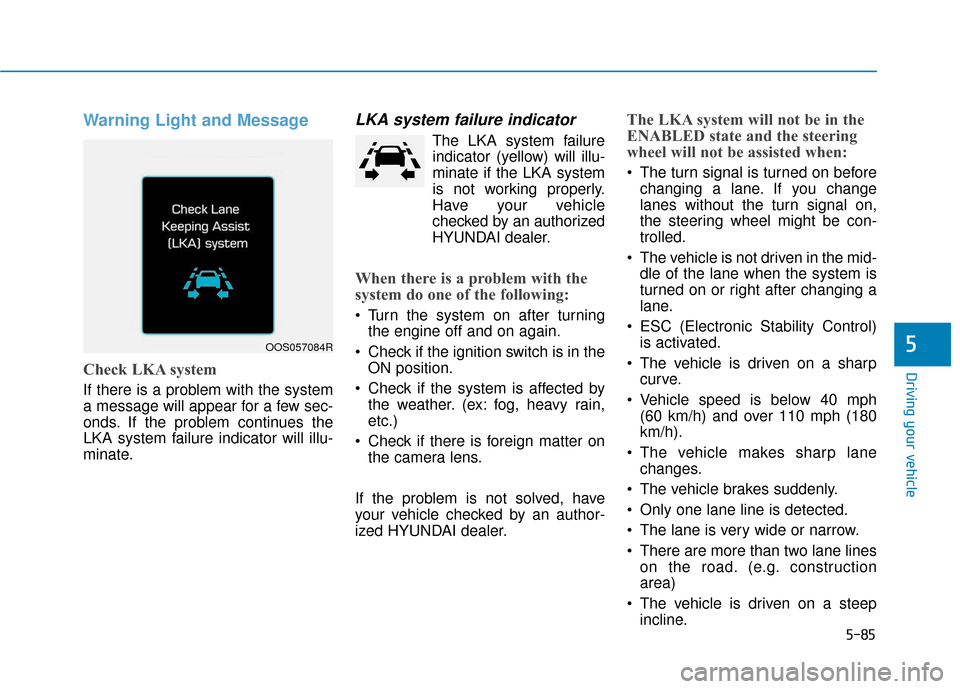
Warning Light and Message
Check LKA system
If there is a problem with the system
a message will appear for a few sec-
onds. If the problem continues the
LKA system failure indicator will illu-
minate.
LKA system failure indicator
The LKA system failureindicator (y ellow) will illu-
minate if the LKA system
is not working properly.
Have your vehicle
checked by an authorized
HYUNDAI dealer.
When there is a problem with the
system do one of the following:
Turn the system on after turning the engine off and on again.
Check if the ignition switch is in the ON position.
Check if the system is affected by the weather. (ex: fog, heavy rain,
etc.)
Check if there is foreign matter on the camera lens.
If the problem is not solved, have
your vehicle checked by an author-
ized HYUNDAI dealer.
The LKA system will not be in the
ENABLED state and the steering
wheel will not be assisted when:
The turn signal is turned on before changing a lane. If you change
lanes without the turn signal on,
the steering wheel might be con-
trolled.
The vehicle is not driven in the mid- dle of the lane when the system is
turned on or right after changing a
lane.
ESC (Electronic Stability Control) is activated.
The vehicle is driven on a sharp curve.
Vehicle speed is below 40 mph (60 km/h) and over 110 mph (180
km/h).
The vehicle makes sharp lane changes.
The vehicle brakes suddenly.
Only one lane line is detected.
The lane is very wide or narrow.
There are more than two lane lines on the road. (e.g. construction
area)
The vehicle is driven on a steep incline.
OOS057084R
Page 318 of 485
5-86
Driving your vehicle
Limitations of the System
The LKA system may operate pre-
maturely even if the vehicle does not
depart from the intended lane, OR,
the LKA system may not warn you if
the vehicle leaves the intended lane
under the following circumstances:
When the lane and road condi-
tions are poor
It is difficult to distinguish the lanemarking from the road surface or
the lane marking is faded or not
clearly marked.
There are markings on the road surface that look like a lane line
that is inadvertently being detected
by the camera.
The lane line is merged or divided. (e.g. tollgate)
The lane number increases or decreases or the lane marker are
crossing complicatedly.
There are more than two lane lines on the road in front of you.
The lanes ahead are not visible due to rain, snow, water on the
road, damaged or stained road
surface, or other factors. The shadow is on the lane marker
by a median strip, trees, etc.
The lanes are incomplete or the area is in a construction zone.
There are crosswalk signs or other symbols on the road.
The lane line in a tunnel is stained with oil, etc.
When external condition is inter-
vened
The brightness outside changes suddenly such as when entering or
exiting a tunnel or passing under a
bridge.
The brightness outside is too low such as when the headlamps are
not on at night or the vehicle is
going through a tunnel or passing
under a bridge.
There is a boundary structure in the roadway such as a concrete
barrier, guardrail and reflector post
that is inadvertently being detected
by the camera.
When light coming from a street light or an oncoming vehicle is
reflected on a wet road surface
such as a puddle in the road. The field of view in front is
obstructed by sun glare.
The lane suddenly disappears such as at the intersection.
There is not enough distance between you and the vehicle in
front to be able to detect the lane
line or the vehicle ahead is driving
on the lane line.
Driving on a steep grade, over a hill, or when driving on a curved
road.
The adverse road conditions cause excessive vehicle vibrations while
driving.
The surrounding of the inside rear view mirror temperature is high
due to direct sunlight.
When front visibility is poor
The windshield or the LKA system camera lens is blocked with dirt or
debris.
The windshield glass is fogged up; a clear view of the road is obstruct-
ed.
Placing objects on the dashboard, etc.
Page 324 of 485
5-92
Driving your vehicle
Cruise Control operation
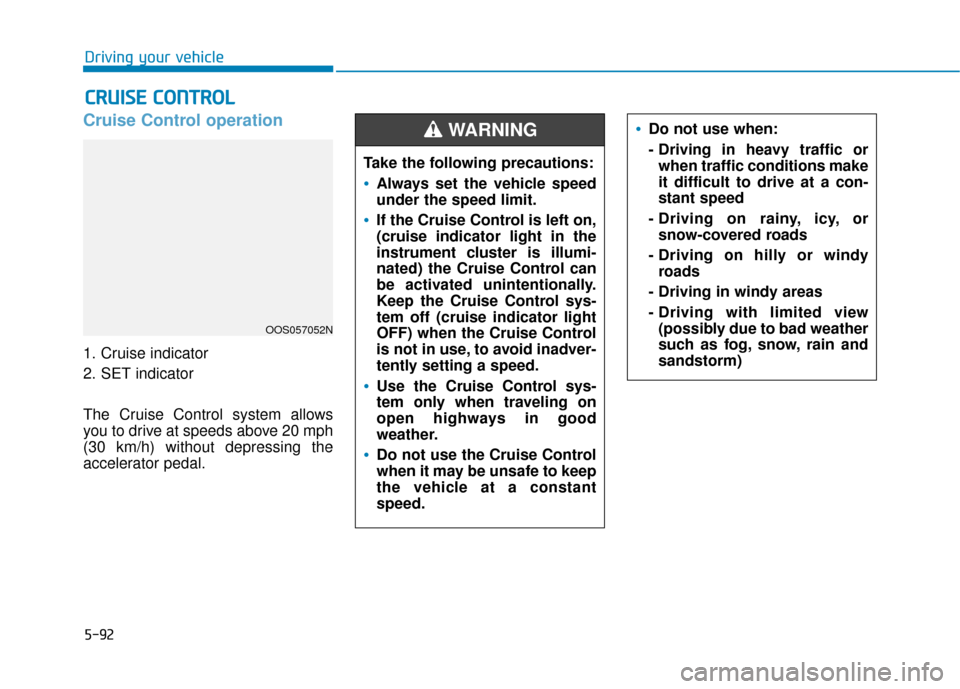
1. Cruise indicator
2. SET indicator
The Cruise Control system allows
you to drive at speeds above 20 mph
(30 km/h) without depressing the
accelerator pedal.
C CR
R U
U I
IS
S E
E
C
C O
O N
NT
TR
R O
O L
L
Do not use when:
- Driving in heavy traffic or
when traffic conditions make
it difficult to drive at a con-
stant speed
- Driving on rainy, icy, or snow-covered roads
- Driving on hilly or windy roads
- Driving in windy areas
- Driving with limited view (possibly due to bad weather
such as fog, snow, rain and
sandstorm)
Take the following precautions:
Always set the vehicle speed
under the speed limit.
If the Cruise Control is left on,
(cruise indicator light in the
instrument cluster is illumi-
nated) the Cruise Control can
be activated unintentionally.
Keep the Cruise Control sys-
tem off (cruise indicator light
OFF) when the Cruise Control
is not in use, to avoid inadver-
tently setting a speed.
Use the Cruise Control sys-
tem only when traveling on
open highways in good
weather.
Do not use the Cruise Control
when it may be unsafe to keep
the vehicle at a constant
speed.
WARNING
OOS057052N
Page 374 of 485

7
Tires and wheels ..................................................7-38
Tire Care ........................................................................\
....7-38
Recommended Cold Tire Inflation Pressures ...........7-39
Check Tire Inflation Pressure ......................................7-40
Tire Rotation...................................................................\
..7-40
Wheel Alignment and Tire Balance ............................7-41
Tire Replacement ............................................................7-42
Wheel Replacement ........................................................7-43
Tire Traction .....................................................................7-4\
3
Tire Maintenance ............................................................7-43
Tire Sidewall Labeling ....................................................7-43
Tire Terminology and Definitions................................7-47
All Season Tires ...............................................................7-50
Summer Tires ...................................................................7-50
Snow Tires ........................................................................\
7-51
Radial-Ply Tires ...............................................................7-51
Low Aspect Ratio Tires..................................................7-51
Fuses ......................................................................7-\
53
Instrument Panel Fuse Replacement..........................7-54
Engine Compartment Panel Fuse Replacement.......7-55
Fuse/Relay Panel Description ......................................7-57
Light bulbs.............................................................7-69
Headlamp, Parking Lamp, Daytime Running Light,
Turn Signal Lamp and Side Marker,
Cornering lamp..........................................................\
.......7-69
Front fog lamp .................................................................7-74
Side Repeater Lamp Replacement ..............................7-74
Rear Combination Light Bulb Replacement ..............7-75
High Mounted Stop Lamp Replacement ....................7-77
License Plate Light Bulb Replacement ......................7-78
Interior Light Bulb Replacement .................................7-78
Appearance care ..................................................7-80
Exterior Care ....................................................................7-80\
Interior Care .....................................................................7-8\
4
Emission control system .....................................7-87
Crankcase Emission Control System ..........................7-87
Evaporative Emission Control System Including
Onboard Refueling Vapor Recovery (ORVR)............7-87
Exhaust Emission Control System ..............................7-88
California perchlorate notice .............................7-91
Page 441 of 485
7-69
7
Maintenance
L
LI
IG
G H
H T
T
B
B U
U L
LB
B S
S
Consult an authorized HYUNDAI
dealer to replace most vehicle light
bulbs. It is difficult to replace vehicle
light bulbs because other parts of the
vehicle must be removed before you
can get to the bulb. This is especially
true for removing the headlamp
assembly to get to the bulb(s).
Removing/installing the headlamp
assembly can result in damage to
the vehicle.
Information
After heavy driving, rain or washing,
headlamp and trunk lenses could
appear frosty. This condition is caused
by the temperature difference
between the lamp inside and the out-
side temperature. This is similar to the
condensation on your windows inside
your vehicle during the rain and does-
n’t indicate a problem with your vehi-
cle. If the water leaks into the lamp
bulb circuitry, have your vehicle
checked by an authorized HYUNDAI
dealer.
Headlamp, Position lamp,
Daytime Running Light, Turn
signal lamp, Cornering lamp
and Side marker
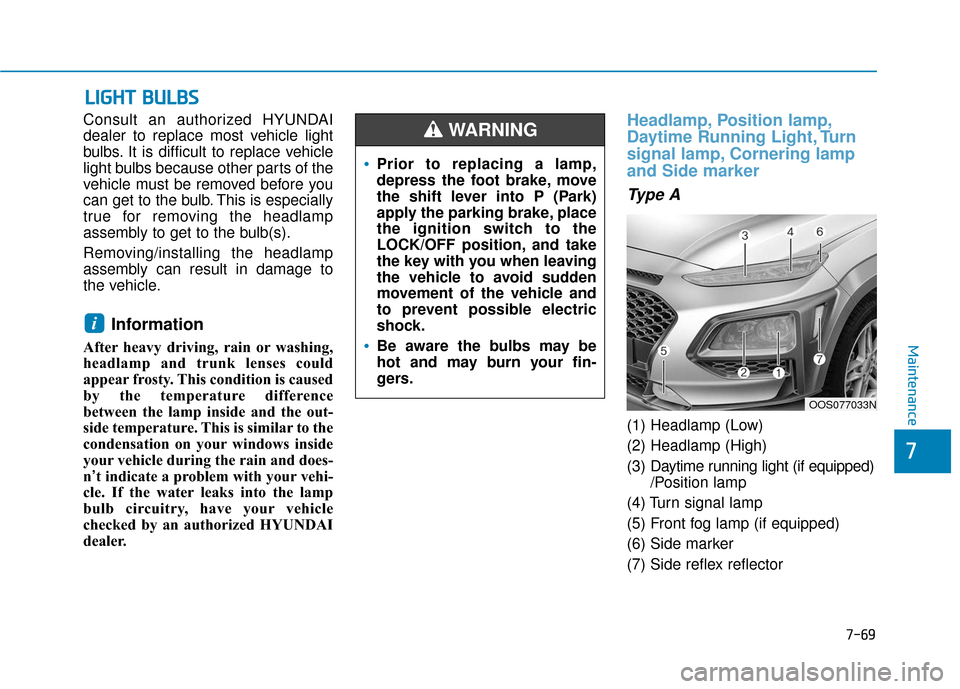
Type A
(1) Headlamp (Low)
(2) Headlamp (High)
(3) Daytime running light (if equipped)
/Position lamp
(4) Turn signal lamp
(5) Front fog lamp (if equipped)
(6) Side marker
(7) Side reflex reflector
i
Prior to replacing a lamp,
depress the foot brake, move
the shift lever into P (Park)
apply the parking brake, place
the ignition switch to the
LOCK/OFF position, and take
the key with you when leaving
the vehicle to avoid sudden
movement of the vehicle and
to prevent possible electric
shock.
Be aware the bulbs may be
hot and may burn your fin-
gers.
WARNING
OOS077033N
Page 444 of 485
7-72
Maintenance
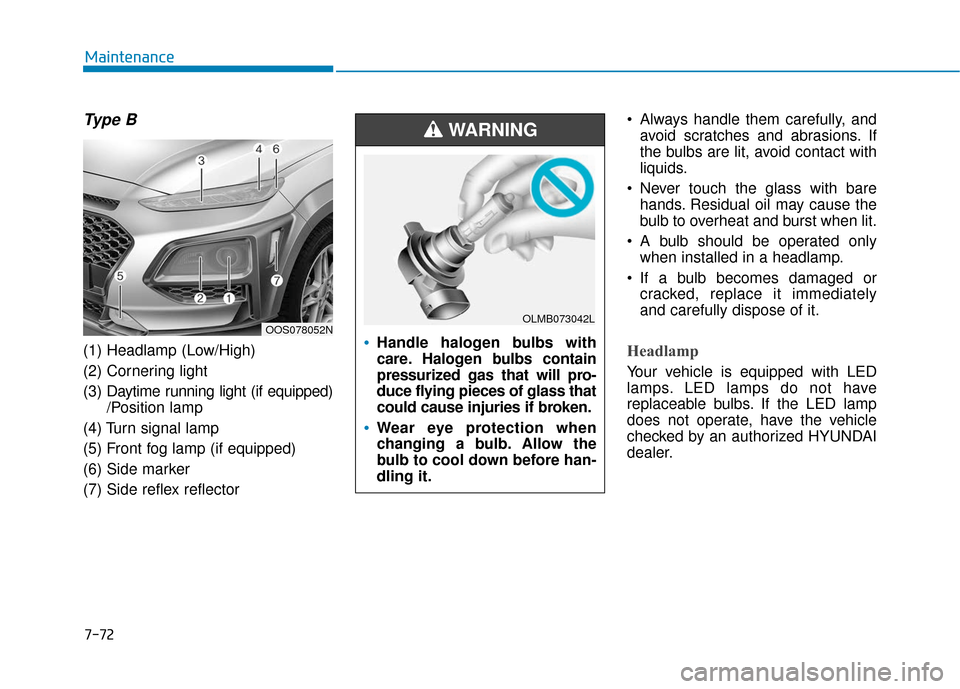
Type B
(1) Headlamp (Low/High)
(2) Cornering light
(3) Daytime running light (if equipped)
/Position lamp
(4) Turn signal lamp
(5) Front fog lamp (if equipped)
(6) Side marker
(7) Side reflex reflector Always handle them carefully, and
avoid scratches and abrasions. If
the bulbs are lit, avoid contact with
liquids.
Never touch the glass with bare hands. Residual oil may cause the
bulb to overheat and burst when lit.
A bulb should be operated only when installed in a headlamp.
If a bulb becomes damaged or cracked, replace it immediately
and carefully dispose of it.Headlamp
Your vehicle is equipped with LED
lamps. LED lamps do not have
replaceable bulbs. If the LED lamp
does not operate, have the vehicle
checked by an authorized HYUNDAI
dealer.
OOS078052NHandle halogen bulbs with
care. Halogen bulbs contain
pressurized gas that will pro-
duce flying pieces of glass that
could cause injuries if broken.
Wear eye protection when
changing a bulb. Allow the
bulb to cool down before han-
dling it.
WARNING
OLMB073042L
Page 446 of 485
7-74
Maintenance
5. Install a new bulb by inserting it into the socket and rotating it until
it locks into place.
6. Install the socket in the assembly by aligning the tabs on the socket
with the slots in the assembly.
7. Push the socket into the assembly and turn the socket clockwise.
Position lamp and daytime running
light
Your vehicle is equipped with LED
lamps. LED lamps do not have
replaceable bulbs. If the LED lamp
does not operate, have the vehicle
checked by an authorized HYUNDAI
dealer.
Side marker
If the light bulb does not operate,
have the vehicle checked by an
authorized HYUNDAI dealer.
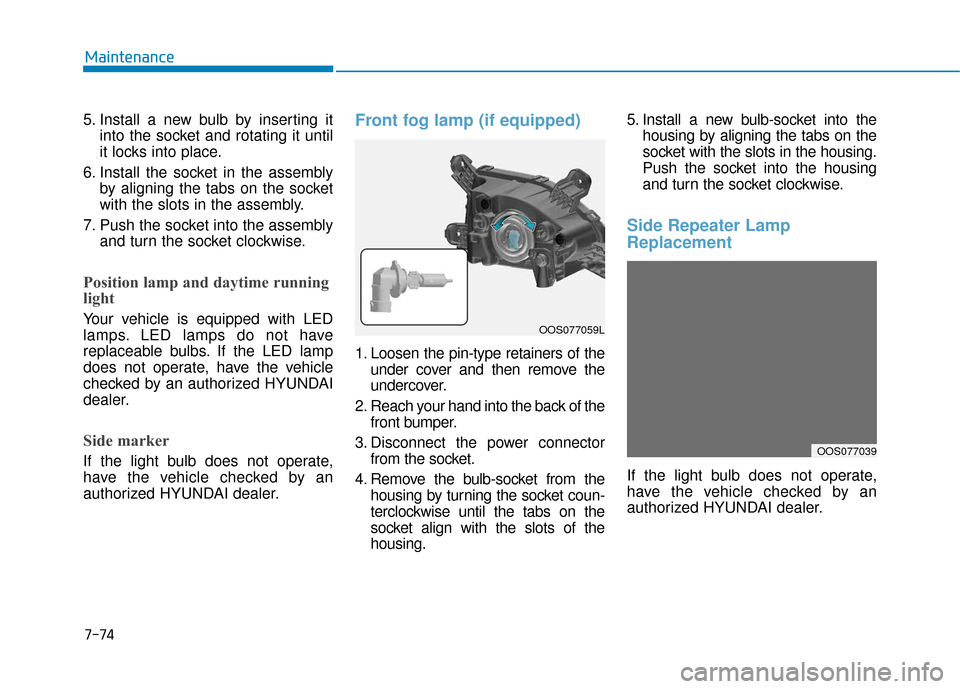
Front fog lamp (if equipped)
1. Loosen the pin-type retainers of theunder cover and then remove the
undercover.
2. Reach your hand into the back of the front bumper.
3. Disconnect the power connector from the socket.
4. Remove the bulb-socket from the housing by turning the socket coun-
terclockwise until the tabs on the
socket align with the slots of the
housing. 5. Install a new bulb-socket into the
housing by aligning the tabs on the
socket with the slots in the housing.
Push the socket into the housing
and turn the socket clockwise.
Side Repeater Lamp
Replacement
If the light bulb does not operate,
have the vehicle checked by an
authorized HYUNDAI dealer.
OOS077039
OOS077059L
Page 458 of 485
7-86
Maintenance
Caring for the leather seats - Vacuum the seat periodically toremove dust and sand on the seat.
It will prevent abrasion or damage
of the leather and maintain its qual-
ity.
- Wipe the natural leather seat cover often with dry or soft cloth.
- Use of proper leather protector may prevent abrasion of the cover
and helps maintain the color. Be
sure to read the instructions and
consult a specialist when using
leather coating or protective agent.
- Light colored (beige, cream beige) leather is easily contaminated and
the stain is noticeable. Clean the
seats frequently.
- Avoid wiping with wet cloth. It may cause the surface to crack. Cleaning the leather seats
- Remove all contaminations instant-ly. Refer to instructions below for
removal of each contaminant.
- Cosmetic products (sunscreen, foundation, etc.)
Apply cleansing cream on a cloth
and wipe the contaminated spot.
Wipe off the cream with a wet cloth
and remove water with a dry cloth.
- Beverages (coffee, soft drink, etc.) Apply a small amount of neutral
detergent and wipe until contami-
nations do not smear.
- Oil Remove oil instantly with
absorbable cloth and wipe with
stain remover used only for natural
leather.
- Chewing gum Harden the gum with ice and
remove gradually.
Cleaning the seat belt webbing
Clean the belt webbing with any mild
soap solution recommended for
cleaning upholstery or carpet. Follow
the instructions provided with the
soap. Do not bleach or re-dye the
webbing because this may weaken
the seat belt.
Cleaning the interior windowglass
If the interior glass surfaces of the
vehicle become fogged (that is, cov-
ered with an oily, greasy or waxy
film), they should be cleaned with
glass cleaner. Follow the directions
on the glass cleaner container.
Do not scrape or scratch the
inside of the rear window. This
may result in damage to the rear
window defroster grid.
NOTICE
Page 466 of 485
B
BU
U L
LB
B
W
W A
AT
TT
TA
A G
G E
E
88
Specifications, Consumer information and Reporting safety defects
Light Bulb Bulb TypeWattage
FrontHeadlamp
Low (Type A) H7 55
High (Type A) H7 55
Low (Type B) LED LED
High (Type B) LED LED
Cornering lamp H7 55
Turn signal lamp PY28/8W28
Side marker LEDLED
Turn signal lamp (Outside mirror) LEDLED
Daytime running lamp (DRL) / position lamp LEDLED
Fog lamp H835
Rear Rear combination lamp Stop/Tail (Type A)
P21/5W21/5
Tail (Type A) W5W5
Stop/Tail (Type B) LEDLED
Turn signal P21W21
Back up P21W21
High mounted stop lamp LEDLED
Side marker Type A
W5W5
Type B LEDLED
License plate lamp W5W5
8-3
Page 482 of 485
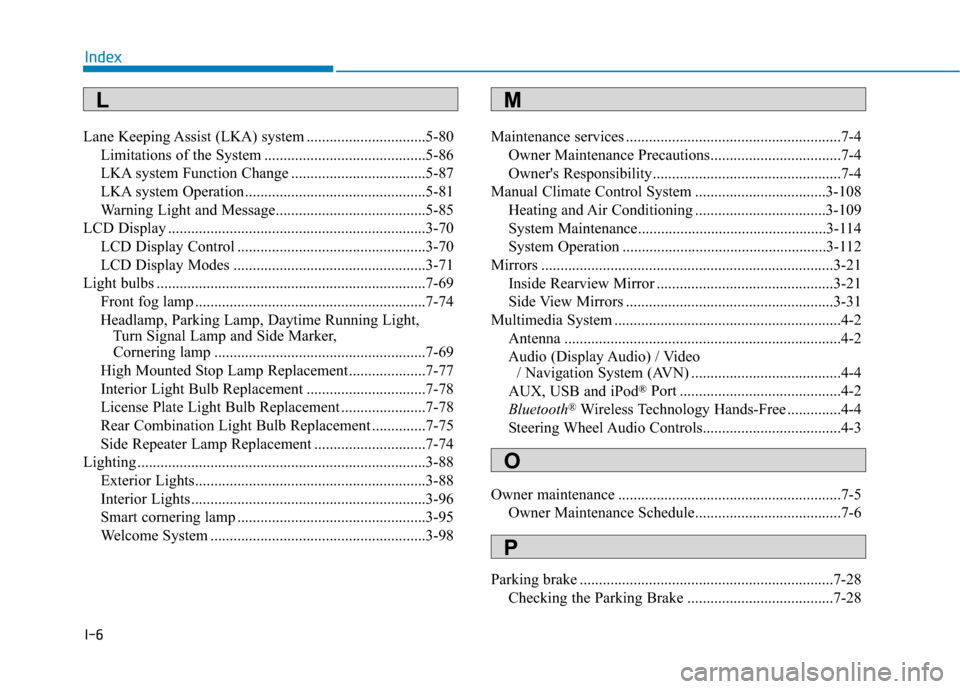
I-6
Lane Keeping Assist (LKA) system ...............................5-80Limitations of the System ..........................................5-86
LKA system Function Change ...................................5-87
LKA system Operation ...............................................5-81
Warning Light and Message.......................................5-85
LCD Display ...................................................................3-70 LCD Display Control .................................................3-70
LCD Display Modes ..................................................3-71
Light bulbs ......................................................................7-\
69 Front fog lamp ............................................................7-74
Headlamp, Parking Lamp, Daytime Running Light, Turn Signal Lamp and Side Marker, Cornering lamp .......................................................7-69
High Mounted Stop Lamp Replacement....................7-77
Interior Light Bulb Replacement ...............................7-78
License Plate Light Bulb Replacement ......................7-78
Rear Combination Light Bulb Replacement ..............7-75
Side Repeater Lamp Replacement .............................7-74
Lighting ........................................................................\
...3-88 Exterior Lights............................................................3-88
Interior Lights.............................................................3-96
Smart cornering lamp .................................................3-95
Welcome System ........................................................3-98 Maintenance services ........................................................7-4
Owner Maintenance Precautions..................................7-4
Owner's Responsibility.................................................7-4
Manual Climate Control System ..................................3-108 Heating and Air Conditioning ..................................3-109
System Maintenance.................................................3-114
System Operation .....................................................3-112
Mirrors ........................................................................\
....3-21 Inside Rearview Mirror ..............................................3-21
Side View Mirrors ......................................................3-31
Multimedia System ...........................................................4-2 Antenna ........................................................................\
4-2
Audio (Display Audio) / Video / Navigation System (AVN) .......................................4-4
AUX, USB and iPod
®Port ..........................................4-2
Bluetooth®Wireless Technology Hands-Free ..............4-4
Steering Wheel Audio Controls....................................4-3
Owner maintenance ..........................................................7-5 Owner Maintenance Schedule......................................7-6
Parking brake ..................................................................7-28 Checking the Parking Brake ......................................7-28
Index
M
O
P
L