driver assistance Hyundai Kona 2019 Owner's Manual
[x] Cancel search | Manufacturer: HYUNDAI, Model Year: 2019, Model line: Kona, Model: Hyundai Kona 2019Pages: 485, PDF Size: 15.75 MB
Page 155 of 485
3-71
Convenient features of your vehicle
3
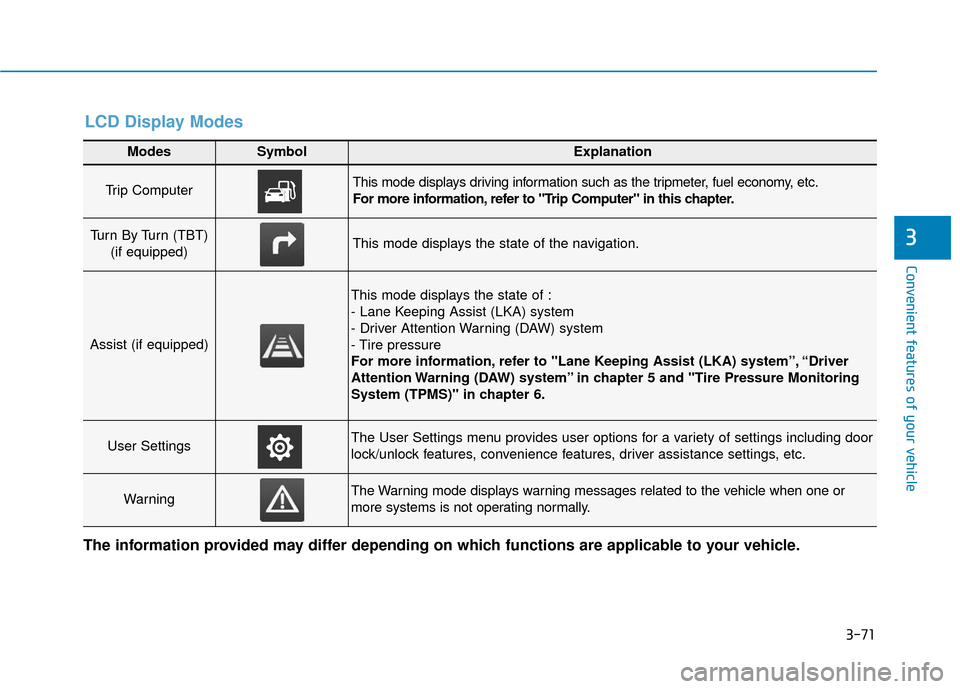
Modes SymbolExplanation
Trip Computer This mode displays driving information such as the tripmeter, fuel economy, etc.
For more information, refer to "Trip Computer" in this chapter.
Turn By Turn (TBT) (if equipped)This mode displays the state of the navigation.
Assist (if equipped)
This mode displays the state of :
- Lane Keeping Assist (LKA) system
- Driver Attention Warning (DAW) system
- Tire pressure
For more information, refer to "Lane Keeping Assist (LKA) system”, “Driver
Attention Warning (DAW) system” in chapter 5 and "Tire Pressure Monitoring
System (TPMS)" in chapter 6.
User SettingsThe User Settings menu provides user options for a variety of settings including door
lock/unlock features, convenience features, driver assistance settings, etc.
WarningThe Warning mode displays warning messages related to the vehicle when one or
more systems is not operating normally.
The information provided may differ depending on which functions are applicable to your vehicle.
LCD Display Modes
Page 158 of 485
3-74
Convenient features of your vehicle
User settings mode
In this mode, you can change the
settings of the instrument cluster,
doors, lamps, etc.
1. Head-up display (if equipped)
2. Driver Assistance
3. Door
4. Lights
5. Sound
6. Convenience
7. Service interval
8. Other
9. Language
10. Reset
The information provided may differ
depending on which functions are
applicable to your vehicle.ItemsExplanation
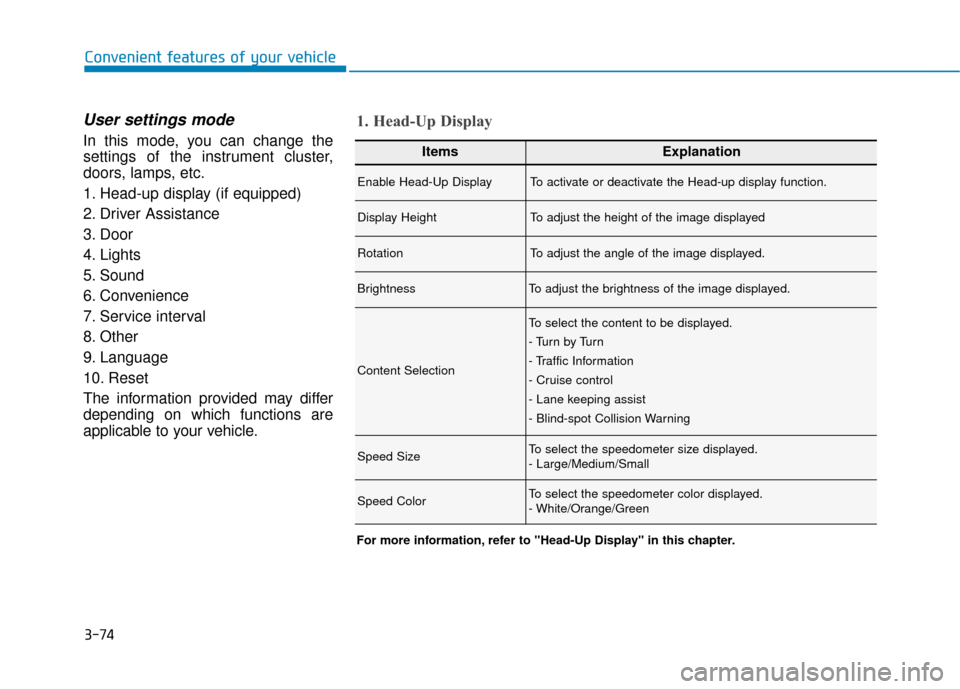
Enable Head-Up DisplayTo activate or deactivate the Head-up display function.
Display HeightTo adjust the height of the image displayed
RotationTo adjust the angle of the image displayed.
BrightnessTo adjust the brightness of the image displayed.
Content Selection
To select the content to be displayed.
- Tu r n b y Tu r n
- Traffic Information
- Cruise control
- Lane keeping assist
- Blind-spot Collision Warning
Speed SizeTo select the speedometer size displayed.
- Large/Medium/Small
Speed ColorTo select the speedometer color displayed.
- White/Orange/Green
1. Head-Up Display
For more information, refer to "Head-Up Display" in this chapter.
Page 159 of 485
3-75
Convenient features of your vehicle
3
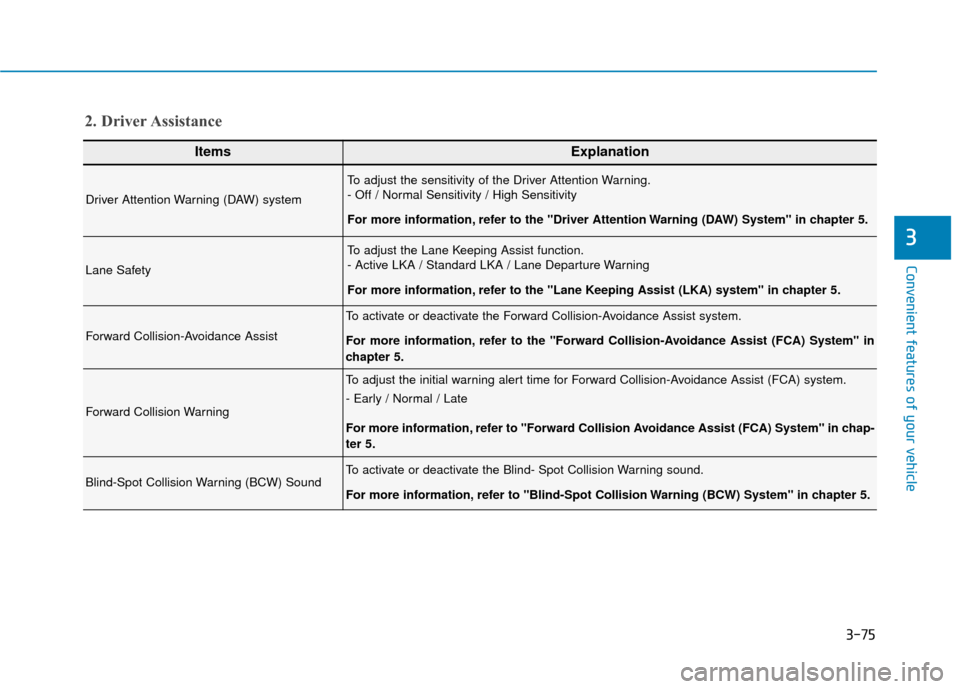
ItemsExplanation
Driver Attention Warning (DAW) system
To adjust the sensitivity of the Driver Attention Warning.
- Off / Normal Sensitivity / High Sensitivity
For more information, refer to the "Driver Attention Warning (DAW) System" in chapter 5.
Lane Safety
To adjust the Lane Keeping Assist function.
- Active LKA / Standard LKA / Lane Departure Warning
For more information, refer to the "Lane Keeping Assist (LKA) system" in chapter 5.
Forward Collision-Avoidance Assist
To activate or deactivate the Forward Collision-Avoidance Assist system.
For more information, refer to the "Forward Collision-Avoidance Assist (FCA) System" in
chapter 5.
Forward Collision Warning
To adjust the initial warning alert time for Forward Collision-Avoidance Assist (FCA) system.
- Early / Normal / Late
For more information, refer to "Forward Collision Avoidance Assist (FCA) System" in chap-
ter 5.
Blind-Spot Collision Warning (BCW) SoundTo activate or deactivate the Blind- Spot Collision Warning sound.
For more information, refer to "Blind-Spot Collision Warning (BCW) System" in chapter 5.
2. Driver Assistance
Page 177 of 485
3-93
Convenient features of your vehicle
3
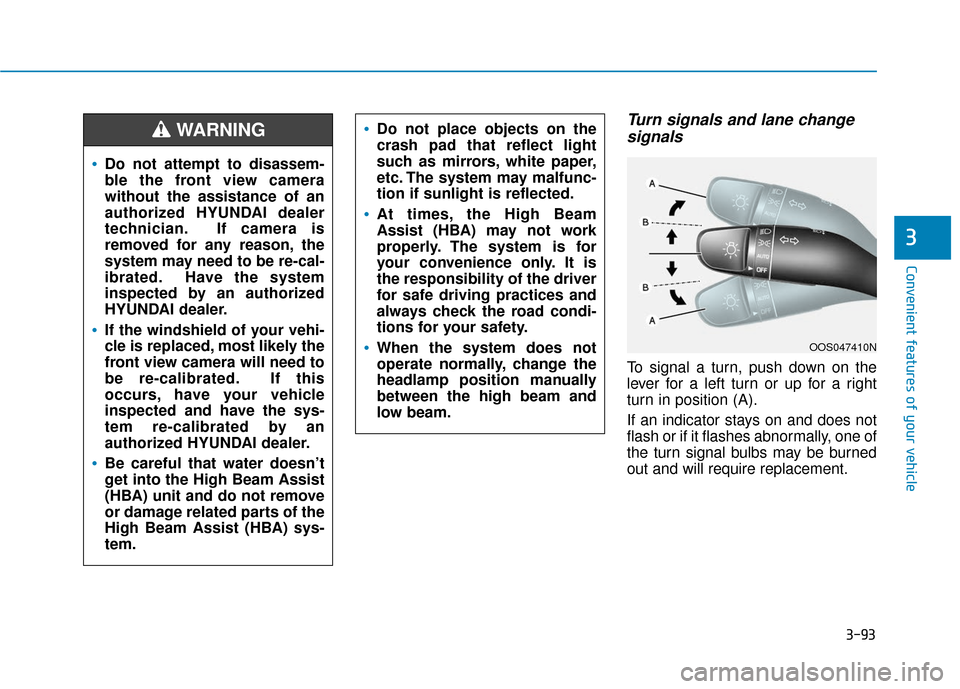
Turn signals and lane changesignals
To signal a turn, push down on the
lever for a left turn or up for a right
turn in position (A).
If an indicator stays on and does not
flash or if it flashes abnormally, one of
the turn signal bulbs may be burned
out and will require replacement.
OOS047410N
Do not attempt to disassem-
ble the front view camera
without the assistance of an
authorized HYUNDAI dealer
technician. If camera is
removed for any reason, the
system may need to be re-cal-
ibrated. Have the system
inspected by an authorized
HYUNDAI dealer.
If the windshield of your vehi-
cle is replaced, most likely the
front view camera will need to
be re-calibrated. If this
occurs, have your vehicle
inspected and have the sys-
tem re-calibrated by an
authorized HYUNDAI dealer.
Be careful that water doesn’t
get into the High Beam Assist
(HBA) unit and do not remove
or damage related parts of the
High Beam Assist (HBA) sys-
tem.
Do not place objects on the
crash pad that reflect light
such as mirrors, white paper,
etc. The system may malfunc-
tion if sunlight is reflected.
At times, the High Beam
Assist (HBA) may not work
properly. The system is for
your convenience only. It is
the responsibility of the driver
for safe driving practices and
always check the road condi-
tions for your safety.
When the system does not
operate normally, change the
headlamp position manually
between the high beam and
low beam.
WARNING
Page 271 of 485
5-39
Driving your vehicle
5 The DBC may not deactivate onsteep inclines even though the
brake or accelerator pedal is
depressed.
The DBC does not operate when:
- The shift lever is in P (Park).
- The ESC is activated.
Good Braking Practices
Wet brakes can be dangerous! The
brakes may get wet if the vehicle is
driven through standing water or if it
is washed. Your vehicle will not stop
as quickly if the brakes are wet. Wet
brakes may cause the vehicle to pull
to one side. To dry the brakes, apply the brakes
lightly until the braking action returns
to normal, taking care to keep the
vehicle under control at all times. If
the braking action does not return to
normal, stop as soon as it is safe to
do so and call an authorized
HYUNDAI dealer for assistance.
DO NOT drive with your foot resting
on the brake pedal. Even light, but
constant pedal pressure can result in
the brakes overheating, brake wear,
and possibly even brake failure.
If a tire goes flat while you are driv-
ing, apply the brakes gently and
keep the vehicle pointed straight
ahead while you slow down. When
you are moving slowly enough for it
to be safe to do so, pull off the road
and stop in a safe location.
Keep your foot firmly on the brake
pedal when the vehicle is stopped to
prevent the vehicle from rolling for-
ward.
NOTICE
If the DBC red indicator light
illuminates, the system may
have overheated or have mal-
functioned. When the warning
light illuminates even though
the DBC system has cooled off,
have your vehicle checked by
an authorized HYUNDAI dealer
as soon as possible.
WARNING
Whenever leaving the vehicle or
parking, always come to a com-
plete stop and continue to
depress the brake pedal. Move
the shift lever into P (Park) posi-
tion, then apply the parking
brake, and place the ignition
switch in the LOCK/OFF posi-
tion.
Vehicles parked with the park-
ing brake not applied or not
fully engaged may roll inadver-
tently and may cause injury to
the driver and others. ALWAYS
apply the parking brake before
exiting the vehicle.
WARNING
Page 281 of 485
5-49
Driving your vehicle
5
The second stage alarm may bedeactivated.
- To deactivate the warning chime:
Go to the ''User Settings → Driver
Assistance and deselect Blind-
Spot Collision Warning sound'' on
the LCD display.
- To activate the warning chime:
Go to the ''User Settings → Driver
Assistance and select Blind-Spot
Collision Warning sound'' on the
LCD display.
Information
The warning chime function helps
alert the driver. Deactivate this func-
tion only when it is necessary.
i
OOS057025
■ Left side
OOS057026
■ Right side
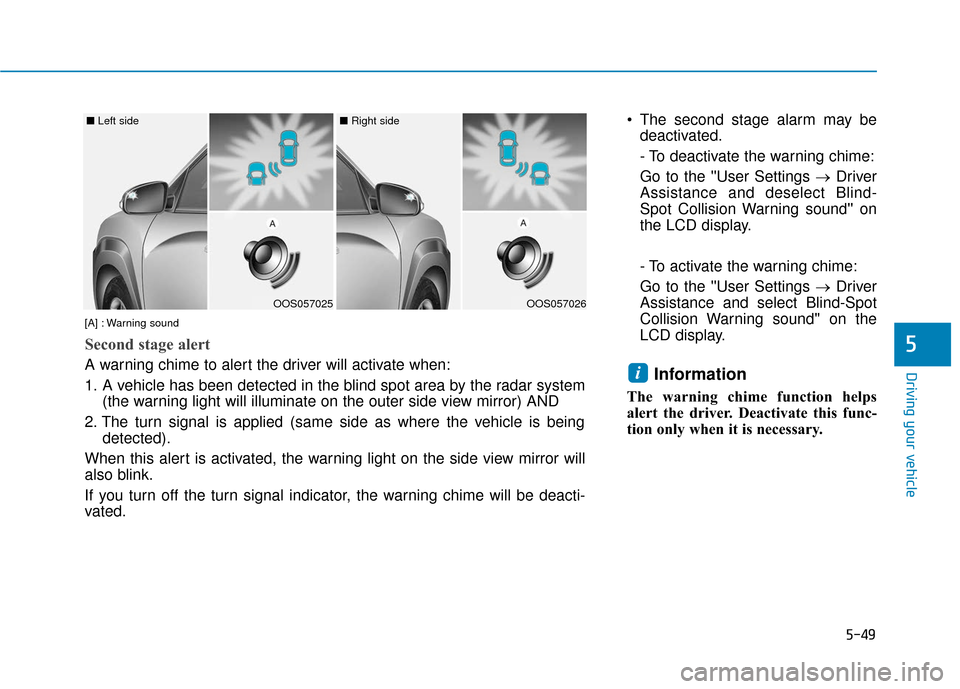
[A] : Warning sound
Second stage alert
A warning chime to alert the driver will activate when:
1. A vehicle has been detected in the blind spot area by the radar system (the warning light will illuminate on the outer side view mirror) AND
2. The turn signal is applied (same side as where the vehicle is being detected).
When this alert is activated, the warning light on the side view mirror will
also blink.
If you turn off the turn signal indicator, the warning chime will be deacti-
vated.
Page 282 of 485
5-50
Driving your vehicle
RCCW (Rear Cross-Traffic
Collision Warning)
The Rear Cross-Traffic Collision
Warning function monitors approach-
ing cross traffic from the left and right
side of the vehicle when your vehicle
is in reverse.
Operating conditions
To operate:
Go to the 'User Settings →Driver
Assistance and select Rear Cross-
Traffic Collision Warning' on the LCD
display. (For more information,
refer to "LCD Display" in chapter
3.)
The system will turn on and standby
to activate. The system will activate
when vehicle speed is below 6 mph
(10 km/h) and with the shift lever in R
(Reverse).
Information
The Rear Cross-Traffic Collision
Warning (RCCW) detecting range is
approximately 1 - 65 ft (0.5 – 20 m).
An approaching vehicle will be detect-
ed if their vehicle speed is within 2.5 -
22.5 mph (4 - 36 km/h).
Note that the detecting range may
vary under certain conditions. As
always, use caution and pay close
attention to your surroundings when
backing up your vehicle.
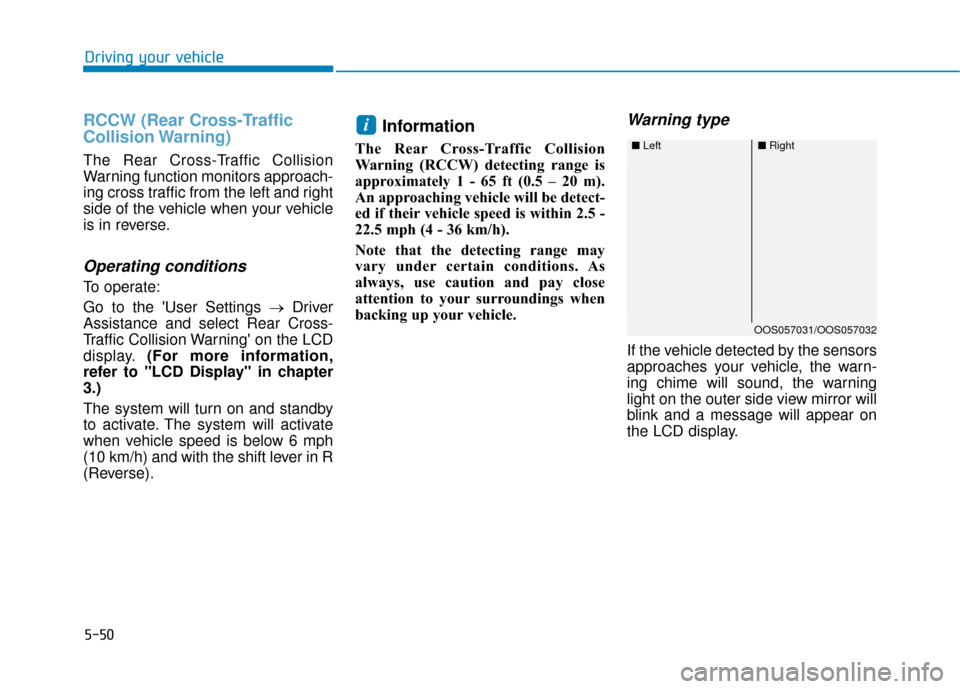
Warning type
If the vehicle detected by the sensors
approaches your vehicle, the warn-
ing chime will sound, the warning
light on the outer side view mirror will
blink and a message will appear on
the LCD display.
i
■ Left■Right
OOS057031/OOS057032
Page 287 of 485
5-55
Driving your vehicle
The Forward Collision-Avoidance
Assist (FCA) system is designed to
help detect and monitor the vehicle
ahead in the roadway through camera
recognition to warn the driver that a
collision is imminent, and if necessary,
apply emergency braking.
The camera type Forward Collision-
Avoidance Assist (FCA) systemdetects the vehicle ahead in theroadway through camera.
System setting and activation
System setting
The Forward Collision-Avoidance Assist (FCA) system is enabled
whenever the vehicle is turned on.
To turn off the system, go to the
'User settings → Driver assistance'
and deselect 'FCA (Forward
Collision Avoidance Assist)' on the
cluster LCD display.
The warning light illumi-
nates on the cluster,
when you cancel the FCA
system. The driver can
monitor the FCA ON/OFF status on
the LCD display. Also, the warning
light illuminates when the ESC
(Electronic Stability Control) is
turned off. If the warning light
remains ON when the FCA is acti-
vated, have the system checked by
an authorized HYUNDAI dealer.
F F O
O R
RW
W A
AR
RD
D
C
C O
O L
LL
LI
IS
S I
IO
O N
N-
-A
A V
VO
O I
ID
D A
A N
N C
CE
E
A
A S
SS
SI
IS
S T
T
(
( F
F C
C A
A )
)
S
S Y
Y S
ST
T E
EM
M
-
-
C
C A
A M
M E
ER
R A
A
T
T Y
Y P
PE
E
(
( I
IF
F
E
E Q
Q U
UI
IP
P P
PE
ED
D )
)
5
Take the following precautions
when using the Forward
Collision-Avoidance Assist
(FCA) system:
This system is only a supple-
mental system and it is not
intended to, nor does it
replace the need for extreme
care and attention of the driv-
er. The sensing range and
objects detectable by the sen-
sors are limited. Pay attention
to the road conditions at all
times.
NEVER drive too fast in accor-
dance with the road condi-
tions or while cornering.
Always drive cautiously to
prevent unexpected and sud-
den situations from occur-
ring. FCA does not stop the
vehicle completely and is not
a collision avoidance system.
WARNING
Page 288 of 485
5-56
The driver can select the initial warn-ing activation time on the LCD dis-
play.
Go to the 'User settings → Driver
assistance →FCW (Forward
Collision Warning) →Late/Normal/
Early'. The options for the initial Forward
Collision Warning includes the fol-
lowing:
- Early:
When this condition is selected,
the initial Forward Collision
Warning is activated earlier than
normal. This setting maximizes the
amount of distance between the
vehicle ahead before the initial
warning occurs.
Even though, 'Early' is selected if
the front vehicle suddenly stops
the initial warning activation time
may not seem fast.
If you feel the warning activates too
early, set the Forward Collision
Warning to "Normal".
- Normal: When this condition is selected,
the initial Forward Collision
Warning is activated normally. This
setting allows for a nominal
amount of distance between the
vehicle ahead before the initial
warning occurs. - Late:
When this condition is selected,
the initial Forward Collision
Warning is activated later than nor-
mal. This setting reduces the
amount of distance between the
vehicle ahead before the initial
warning occurs.
Even though, 'Late' is selected if
the front vehicle suddenly stops
the initial warning activation time
may not seem late.
Select 'Late' when traffic is light
and when driving speed is slow.
Driving your vehicle
Page 300 of 485
5-68
Driving your vehicle
The Forward Collision-avoidance
Assist (FCA) system is designed to
help detect and monitor the vehicle
ahead or detect a pedestrian (if
equipped) in the roadway through
radar signals and camera recogni-
tion to warn the driver that a collision
is imminent, and if necessary, apply
emergency braking.
System Setting and Activation
System setting
The driver can activate the FCA by placing the ignition switch to the
ON position and by selecting:
''User Settings → Driver
Assistance →Forward Collision-
Avoidance Assist (FCA)''
The FCA deactivates, when the driv-
er deselects the system setting.
F F O
O R
RW
W A
AR
RD
D
C
C O
O L
LL
LI
IS
S I
IO
O N
N-
-A
A V
VO
O I
ID
D A
A N
N C
CE
E
A
A S
SS
SI
IS
S T
T
(
( F
F C
C A
A )
)
S
S Y
Y S
ST
T E
EM
M -
-S
S E
E N
N S
SO
O R
R
F
F U
U S
SI
IO
O N
N
T
T Y
Y P
PE
E
(
( F
F R
R O
O N
NT
T
R
R A
A D
DA
A R
R
+
+
F
F R
R O
O N
NT
T
C
C A
A M
M E
ER
R A
A )
)
(
( I
IFF
E
E Q
Q U
UI
IP
P P
PE
ED
D )
)
Take the following precautions
when using the Forward
Collision-avoidance Assist (FCA)
system:
This system is only a supple-
mental system and it is not
intended to, nor does it replace
the need for extreme care and
attention of the driver. The
sensing range and objects
detectable by the sensors are
limited. Pay attention to the
road conditions at all times.
NEVER drive too fast in accor-
dance with the road condi-
tions or while cornering.
Always drive cautiously to
prevent unexpected and sud-
den situations from occur-
ring. The Forward Collision
Avoidance system may not
always stop the vehicle com-
pletely and is only intended to
help mitigate a collision that
is imminent.
WARNING