outlet Hyundai Kona 2019 Owner's Manual
[x] Cancel search | Manufacturer: HYUNDAI, Model Year: 2019, Model line: Kona, Model: Hyundai Kona 2019Pages: 485, PDF Size: 15.75 MB
Page 16 of 485
I
IN
N S
ST
T R
R U
U M
M E
EN
N T
T
P
P A
A N
N E
EL
L
O
O V
VE
ER
R V
V I
IE
E W
W
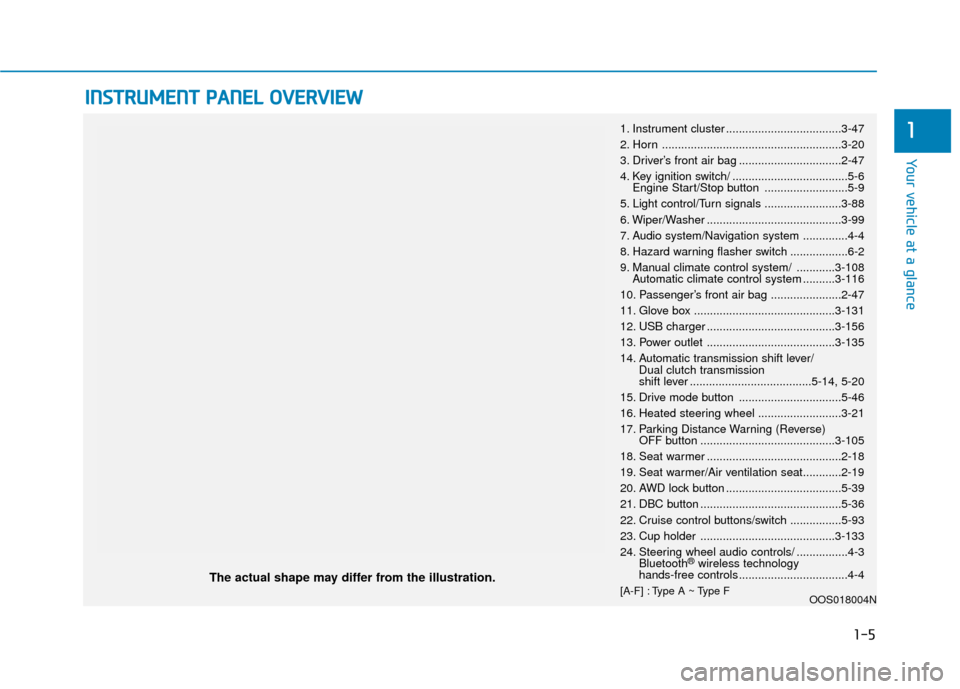
The actual shape may differ from the illustration.
1-5
Your vehicle at a glance
11. Instrument cluster ....................................3-47
2. Horn ........................................................3-20
3. Driver’s front air bag ................................2-47
4. Key ignition switch/ ....................................5-6
Engine Start/Stop button ..........................5-9
5. Light control/Turn signals ........................3-88
6. Wiper/Washer ..........................................3-99
7. Audio system/Navigation system ..............4-4
8. Hazard warning flasher switch ..................6-2
9. Manual climate control system/ ............3-108 Automatic climate control system ..........3-116
10. Passenger’s front air bag ......................2-47
11. Glove box ............................................3-131
12. USB charger ........................................3-156
13. Power outlet ........................................3-135
14. Automatic transmission shift lever/ Dual clutch transmission
shift lever ......................................5-14, 5-20
15. Drive mode button ................................5-46
16. Heated steering wheel ..........................3-21
17. Parking Distance Warning (Reverse) OFF button ..........................................3-105
18. Seat warmer ..........................................2-18
19. Seat warmer/Air ventilation seat............2-19
20. AWD lock button ....................................5-39
21. DBC button ............................................5-36
22. Cruise control buttons/switch ................5-93
23. Cup holder ..........................................3-133
24. Steering wheel audio controls/ ................4-3 Bluetooth
®wireless technology
hands-free controls ..................................4-4
[A-F] : Type A ~ Type F OOS018004N
Page 86 of 485
Wipers and Washers ............................................3-99
Windshield Wipers...........................................................3-99
Windshield Washers .....................................................3-101
Rear Window Wiper and Washer..............................3-102
Driver Assist System .........................................3-103
Rear view monitor ........................................................3-103
Parking Distance Warning (Reverse) system .........3-104
Parking Distance Warning (Reverse) system
Precautions.....................................................................3-1\
07
Manual Climate Control System.......................3-108
Heating and Air Conditioning .....................................3-109
System Operation .........................................................3-112
System Maintenance....................................................3-114
Automatic Climate Control System ..................3-116
Automatic Temperature Control Mode ....................3-117
Manual Temperature Control Mode .........................3-118
System Operation .........................................................3-121
System Maintenance....................................................3-123
Windshield Defrosting and Defogging ............3-125
Auto Defogging System (Additional Feature with
Automatic Temperature Control System)................3-127
Rear Window Defroster ..............................................3-129
Climate Control Additional Features ...............3-130
Cluster ionizer ................................................................3-130
Automatic Ventilation ...................................................3-130
Sunroof Inside Air Recirculation ...............................3-130
Storage Compartment .......................................3-131
Center Console Storage ..............................................3-131
Glove Box ........................................................................\
3-131
Sunglass Holder.............................................................3-132
Multi Box ........................................................................\
.3-132
Interior Features ................................................3-133
Cup Holder ......................................................................3-\
133
Sunvisor ........................................................................\
...3-134
Power Outlet ..................................................................3-135
Wireless Cellular Phone Charging System..............3-136
Clock ........................................................................\
.........3-138
Clothes Hanger ..............................................................3-139
Floor Mat Anchor(s).....................................................3-139
Luggage Net Holder .....................................................3-140
Cargo Area Cover..........................................................3-141
Luggage tray ..................................................................3-141
Exterior Features ...............................................3-143
Roof Side Rails ..............................................................3-143
3
Page 193 of 485
3-109
Convenient features of your vehicle
3
Heating and Air Conditioning
1. Start the engine.
2. Set the mode to the desired posi-tion.
To improve the effectiveness of heating and cooling, select the
mode according to the following:
- Heating:
- Cooling:
3. Set the temperature control to the desired position.
4. Set the air intake control to fresh mode or recirculation mode posi-
tion.
5. Set the fan speed control to the desired speed.
6. If air conditioning is desired, turn the air conditioning system on.
Mode selection
OOS047304N
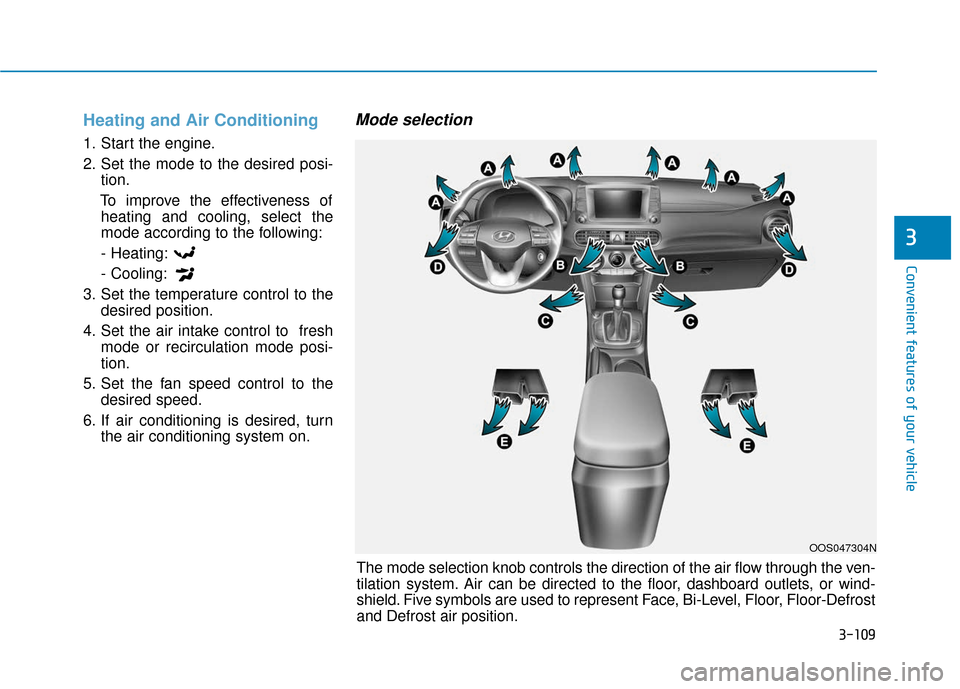
The mode selection knob controls the direction of the air flow through the ven-
tilation system. Air can be directed to the floor, dashboard outlets, or wind-
shield. Five symbols are used to represent Face, Bi-Level, Floor, Floor-Defrost
and Defrost air position.
Page 194 of 485
3-110
Convenient features of your vehicle
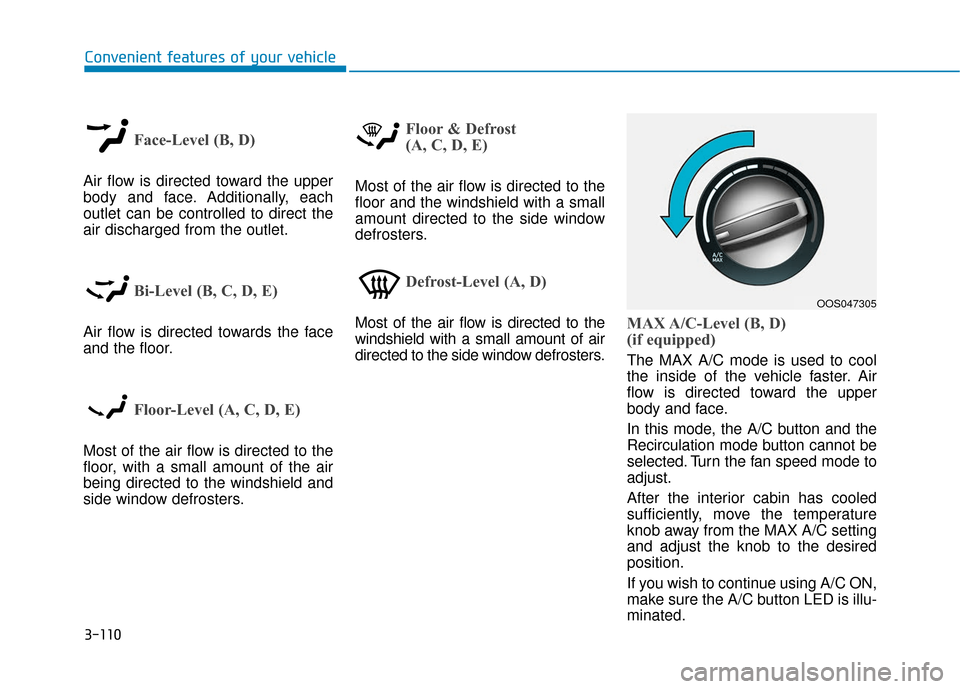
Face-Level (B, D)
Air flow is directed toward the upper
body and face. Additionally, each
outlet can be controlled to direct the
air discharged from the outlet.
Bi-Level (B, C, D, E)
Air flow is directed towards the face
and the floor.
Floor-Level (A, C, D, E)
Most of the air flow is directed to the
floor, with a small amount of the air
being directed to the windshield and
side window defrosters.
Floor & Defrost
(A, C, D, E)
Most of the air flow is directed to the
floor and the windshield with a small
amount directed to the side window
defrosters.
Defrost-Level (A, D)
Most of the air flow is directed to the
windshield with a small amount of air
directed to the side window defrosters.MAX A/C-Level (B, D)
(if equipped)
The MAX A/C mode is used to cool
the inside of the vehicle faster. Air
flow is directed toward the upper
body and face.
In this mode, the A/C button and the
Recirculation mode button cannot be
selected. Turn the fan speed mode to
adjust.
After the interior cabin has cooled
sufficiently, move the temperature
knob away from the MAX A/C setting
and adjust the knob to the desired
position.
If you wish to continue using A/C ON,
make sure the A/C button LED is illu-
minated.
OOS047305
Page 203 of 485
3-119
Convenient features of your vehicle
3
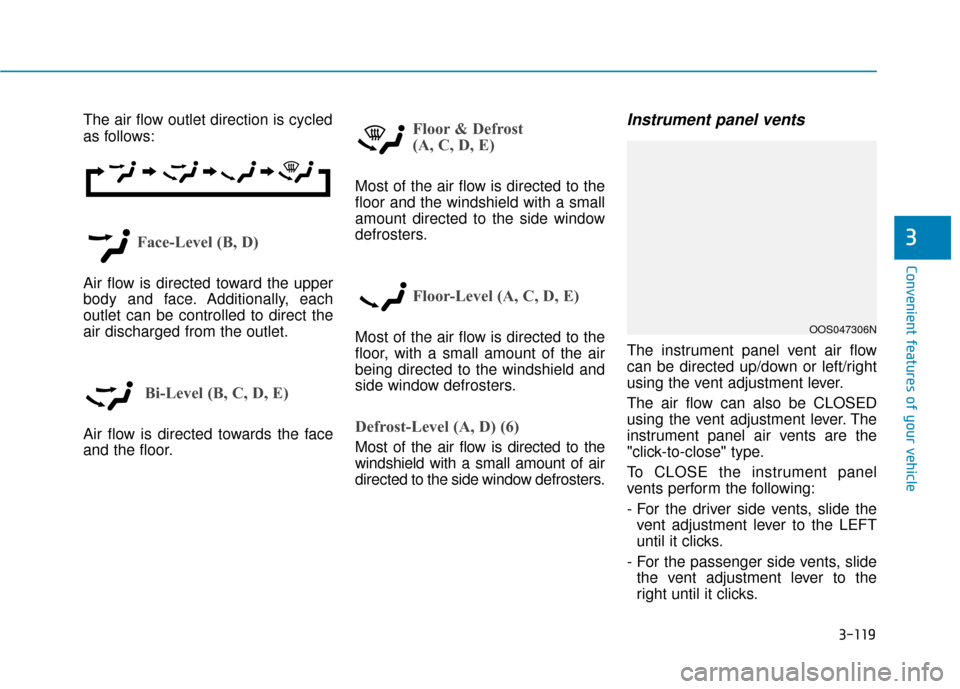
The air flow outlet direction is cycled
as follows:
Face-Level (B, D)
Air flow is directed toward the upper
body and face. Additionally, each
outlet can be controlled to direct the
air discharged from the outlet.
Bi-Level (B, C, D, E)
Air flow is directed towards the face
and the floor.
Floor & Defrost
(A, C, D, E)
Most of the air flow is directed to the
floor and the windshield with a small
amount directed to the side window
defrosters.
Floor-Level (A, C, D, E)
Most of the air flow is directed to the
floor, with a small amount of the air
being directed to the windshield and
side window defrosters.
Defrost-Level (A, D) (6)
Most of the air flow is directed to the
windshield with a small amount of air
directed to the side window defrosters.
Instrument panel vents
The instrument panel vent air flow
can be directed up/down or left/right
using the vent adjustment lever.
The air flow can also be CLOSED
using the vent adjustment lever. The
instrument panel air vents are the
"click-to-close" type.
To CLOSE the instrument panel
vents perform the following:
- For the driver side vents, slide thevent adjustment lever to the LEFT
until it clicks.
- For the passenger side vents, slide the vent adjustment lever to the
right until it clicks.
OOS047306N
Page 219 of 485
3-135
Convenient features of your vehicle
3
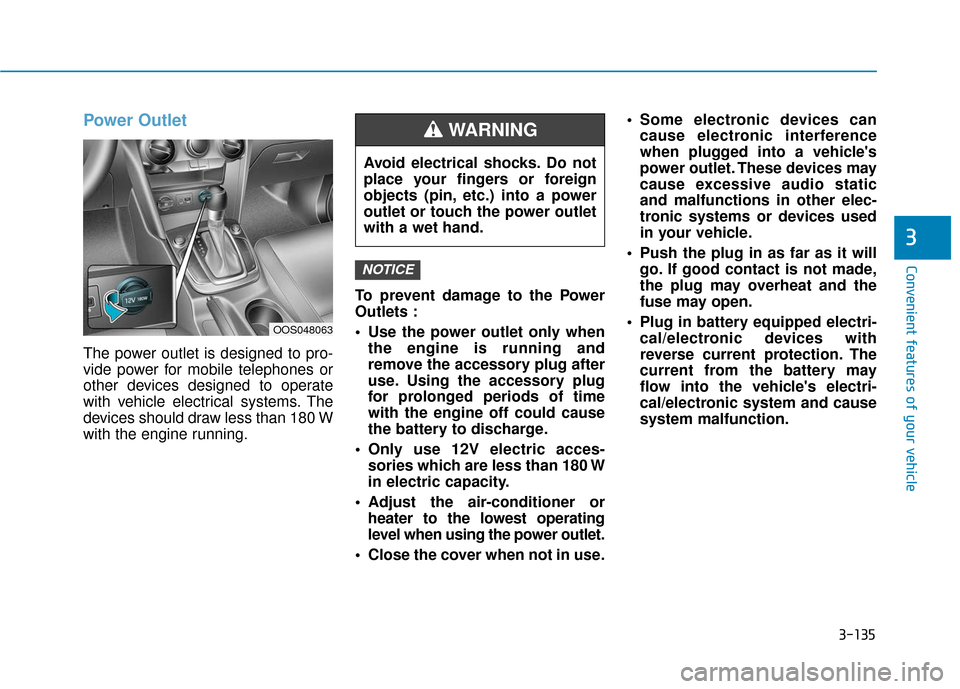
Power Outlet
The power outlet is designed to pro-
vide power for mobile telephones or
other devices designed to operate
with vehicle electrical systems. The
devices should draw less than 180 W
with the engine running.To prevent damage to the Power
Outlets :
Use the power outlet only when
the engine is running and
remove the accessory plug after
use. Using the accessory plug
for prolonged periods of time
with the engine off could cause
the battery to discharge.
Only use 12V electric acces- sories which are less than 180 W
in electric capacity.
Adjust the air-conditioner or heater to the lowest operating
level when using the power outlet.
Close the cover when not in use. Some electronic devices can
cause electronic interference
when plugged into a vehicle's
power outlet. These devices may
cause excessive audio static
and malfunctions in other elec-
tronic systems or devices used
in your vehicle.
Push the plug in as far as it will go. If good contact is not made,
the plug may overheat and the
fuse may open.
Plug in battery equipped electri- cal/electronic devices with
reverse current protection. The
current from the battery may
flow into the vehicle's electri-
cal/electronic system and cause
system malfunction.
NOTICE
OOS048063
Avoid electrical shocks. Do not
place your fingers or foreign
objects (pin, etc.) into a power
outlet or touch the power outlet
with a wet hand.
WARNING
Page 229 of 485
4-2
Multimedia System
• If you install an aftermarket HID head lamp, your vehicle's audio
and electronic devices may not
function properly.
Prevent chemicals such as per- fume, cosmetic oil, sun cream,
hand cleaner, and air freshener
from contacting the interior
parts because they may cause
damage or discoloration.
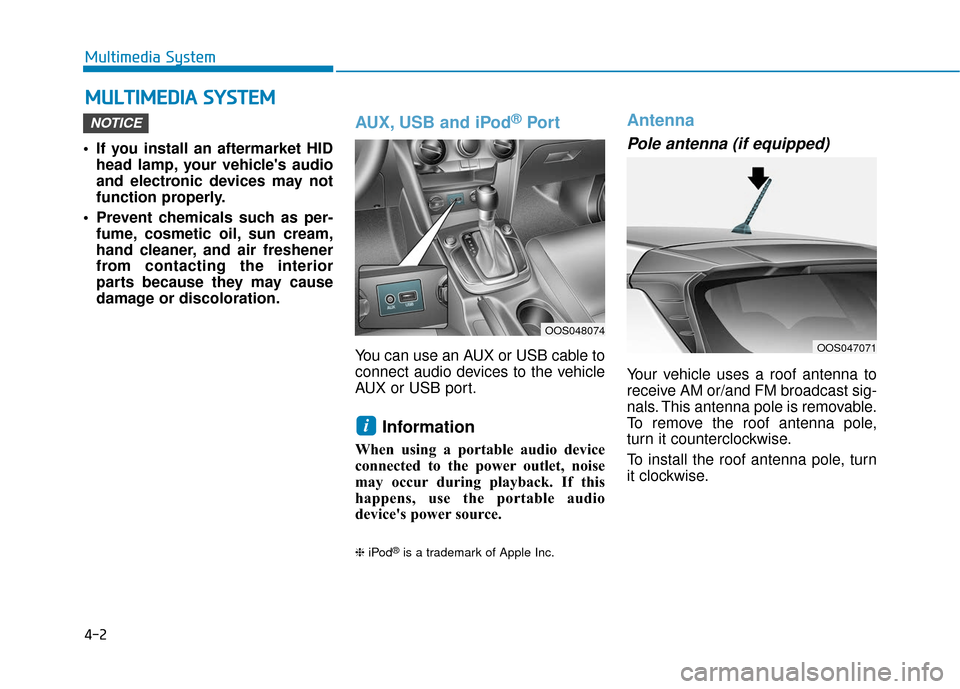
AUX, USB and iPod®Por t
You can use an AUX or USB cable to
connect audio devices to the vehicle
AUX or USB port.
Information
When using a portable audio device
connected to the power outlet, noise
may occur during playback. If this
happens, use the portable audio
device's power source.
❈ iPod®is a trademark of Apple Inc.
Antenna
Pole antenna (if equipped)
Your vehicle uses a roof antenna to
receive AM or/and FM broadcast sig-
nals. This antenna pole is removable.
To remove the roof antenna pole,
turn it counterclockwise.
To install the roof antenna pole, turn
it clockwise.
i
NOTICE
M MU
UL
LT
T I
IM
M E
ED
D I
IA
A
S
S Y
Y S
ST
T E
EM
M
OOS048074
OOS047071
Page 336 of 485
Check spark plugs and ignitionsystem
Inspect your spark plugs as
described in chapter 7 and replace
them if necessary. Also check all
ignition wiring and components to be
sure they are not cracked, worn or
damaged in any way.
Use approved window washeranti-freeze in system
To keep the water in the window
washer system from freezing, add an
approved window washer anti-freeze
solution in accordance with instruc-
tions on the container. Window wash-
er anti-freeze is available from an
authorized HYUNDAI dealer and
most auto parts outlets. Do not use
engine coolant or other types of anti-
freeze as these may damage the
paint finish.
Do not let your parking brakefreeze
Under some conditions your parking
brake can freeze in the engaged
position. This is most likely to happen
when there is an accumulation of
snow or ice around or near the rear
brakes or if the brakes are wet. If
there is a risk the parking brake may
freeze, apply it only temporarily while
you put the gear selector lever in P
and block the rear wheels so the car
cannot roll. Then release the parking
brake.
Do not let ice and snow accu-mulate underneath
Under some conditions, snow and
ice can build up under the fenders
and interfere with the steering. When
driving in severe winter conditions
where this may happen, you should
periodically check underneath the
car to be sure the movement of the
front wheels and the steering com-
ponents is not obstructed.
Don't place foreign objects ormaterials in the engine com-partment
Placement of foreign object or mate-
rials which prevent cooling of the
engine, in the engine compartment,
may cause a failure or combustion.
The manufacturer is not responsible
for the damage caused by such
placement.
To keep locks from freezing
To keep the locks from freezing,
squirt an approved de-icer fluid or
glycerine into the key opening. If a
lock is covered with ice, squirt it with
an approved de-icing fluid to remove
the ice. If the lock is frozen internally,
you may be able to thaw it out by
using a heated key. Handle the heat-
ed key with care to avoid injury.
Driving your vehicle
5-104
Page 364 of 485
6-22
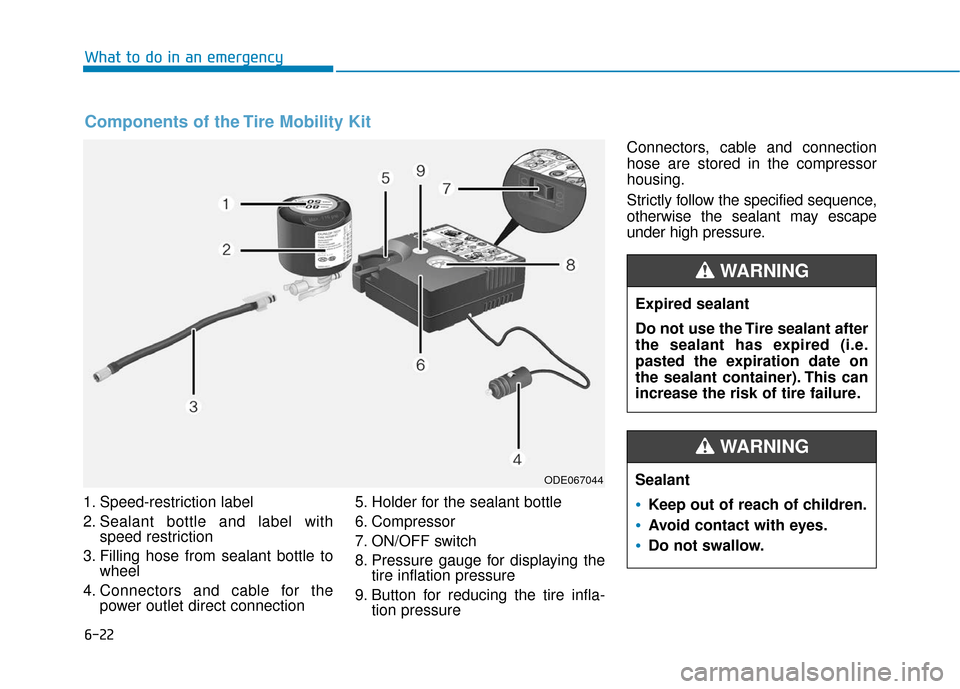
1. Speed-restriction label
2. Sealant bottle and label withspeed restriction
3. Filling hose from sealant bottle to wheel
4. Connectors and cable for the power outlet direct connection 5. Holder for the sealant bottle
6. Compressor
7. ON/OFF switch
8. Pressure gauge for displaying the
tire inflation pressure
9. Button for reducing the tire infla- tion pressure Connectors, cable and connection
hose are stored in the compressor
housing.
Strictly follow the specified sequence,
otherwise the sealant may escape
under high pressure.
What to do in an emergency
Components of the Tire Mobility Kit
ODE067044
Expired sealant
Do not use the Tire sealant after
the sealant has expired (i.e.
pasted the expiration date on
the sealant container). This can
increase the risk of tire failure.
WARNING
Sealant
Keep out of reach of children.
Avoid contact with eyes.
Do not swallow.
WARNING
Page 366 of 485
6-24
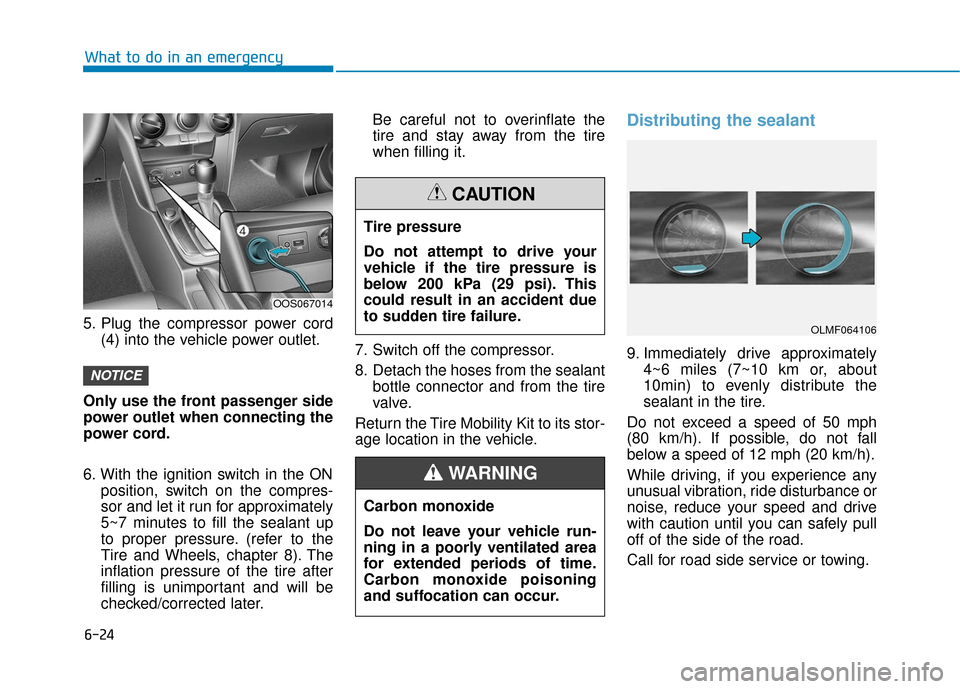
5. Plug the compressor power cord(4) into the vehicle power outlet.
Only use the front passenger side
power outlet when connecting the
power cord.
6. With the ignition switch in the ON position, switch on the compres-
sor and let it run for approximately
5~7 minutes to fill the sealant up
to proper pressure. (refer to the
Tire and Wheels, chapter 8). The
inflation pressure of the tire after
filling is unimportant and will be
checked/corrected later. Be careful not to overinflate the
tire and stay away from the tire
when filling it.
7. Switch off the compressor.
8. Detach the hoses from the sealant bottle connector and from the tire
valve.
Return the Tire Mobility Kit to its stor-
age location in the vehicle.
Distributing the sealant
9. Immediately drive approximately 4~6 miles (7~10 km or, about
10min) to evenly distribute the
sealant in the tire.
Do not exceed a speed of 50 mph
(80 km/h). If possible, do not fall
below a speed of 12 mph (20 km/h).
While driving, if you experience any
unusual vibration, ride disturbance or
noise, reduce your speed and drive
with caution until you can safely pull
off of the side of the road.
Call for road side service or towing.
NOTICE
What to do in an emergency
OOS067014
Tire pressure
Do not attempt to drive your
vehicle if the tire pressure is
below 200 kPa (29 psi). This
could result in an accident due
to sudden tire failure.
CAUTION
Carbon monoxide
Do not leave your vehicle run-
ning in a poorly ventilated area
for extended periods of time.
Carbon monoxide poisoning
and suffocation can occur.
WARNING
OLMF064106