park assist Hyundai Kona 2020 User Guide
[x] Cancel search | Manufacturer: HYUNDAI, Model Year: 2020, Model line: Kona, Model: Hyundai Kona 2020Pages: 505, PDF Size: 13.47 MB
Page 309 of 505
5-75
Driving your vehicle
5
Limitations of the System
The Forward Collision avoidance
assist (FCA) system is designed to
monitor the vehicle ahead or a
pedestrian on the roadway through
radar signals and camera recogni-
tion to warn the driver that a collision
is imminent, and if necessary, apply
emergency braking.
In certain situations, the radar sen-
sor or the camera may not be able to
detect the vehicle or pedestrian
ahead. In these cases, the FCA sys-
tem may not operate normally. The
driver must pay careful attention in
the following situations where the
FCA operation may be limited.
Detecting vehicles
The sensor may be limited when:
The radar sensor or camera isblocked with a foreign object or
debris
Inclement weather such as heavy rain or snow obscures the field of
view of the radar sensor or camera
There is interference by electro- magnetic waves
There is severe irregular reflection from the radar sensor
The radar/camera sensor recogni- tion is limited
The vehicle in front is too small to be detected (for example a motor-
cycle or a bicycle, etc.)
The vehicle in front is an oversize vehicle or trailer that is too big to
be detected by the camera recog-
nition system (for example a tractor
trailer, etc.)
The driver's field of view is not well illuminated (either too dark or too
much reflection or too much back-
light that obscures the field of view)
The vehicle in front does not have their rear lights properly turned ONThe FCA system cannot
detect the driver approaching
the side view of a parked vehi-
cle (for example on a dead
end street.)
In these cases, you must main-
tain a safe braking distance,
and if necessary, depress the
brake pedal to reduce the driv-
ing speed in order to maintain a
safe distance.
Page 310 of 505
5-76
Driving your vehicle
The outside brightness changes suddenly, for example when enter-
ing or exiting a tunnel
Light coming from a street light or an oncoming vehicle is reflected on
a wet road surface such as a pud-
dle in the road
The field of view in front is obstructed by sun glare
The windshield glass is fogged up; a clear view of the road is obstruct-
ed
The vehicle in front is driving errat- ically
The vehicle drives through a con- struction area, on an unpaved
road, or above metal materials,
such as a railway
The vehicle drives inside a building, such as a basement parking lot
The adverse road conditions cause excessive vehicle vibrations while
driving
The vehicle in front is moving verti- cally to the driving direction
The vehicle in front is stopped ver- tically
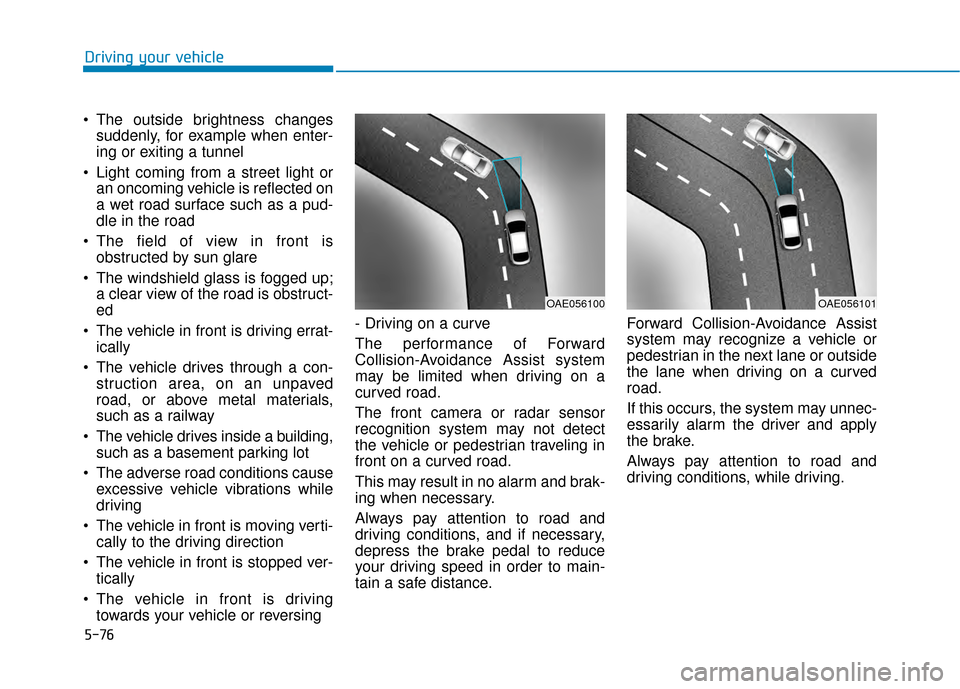
The vehicle in front is driving towards your vehicle or reversing - Driving on a curve
The performance of Forward
Collision-Avoidance Assist system
may be limited when driving on a
curved road.
The front camera or radar sensor
recognition system may not detect
the vehicle or pedestrian traveling in
front on a curved road.
This may result in no alarm and brak-
ing when necessary.
Always pay attention to road and
driving conditions, and if necessary,
depress the brake pedal to reduce
your driving speed in order to main-
tain a safe distance.
Forward Collision-Avoidance Assist
system may recognize a vehicle or
pedestrian in the next lane or outside
the lane when driving on a curved
road.
If this occurs, the system may unnec-
essarily alarm the driver and apply
the brake.
Always pay attention to road and
driving conditions, while driving.
OAE056100OAE056101
Page 334 of 505
5-100
To temporarily accelerate withthe Smart Cruise Control on
If you want to speed up temporarily
when the Smart Cruise Control is on,
depress the accelerator pedal.
Increased speed will not interfere
with Smart Cruise Control operation
or change the set speed.
To return to the set speed, take your
foot off the accelerator pedal.
If you push the toggle lever down
(SET-) at increased speed, the cruis-
ing speed will be set again pedal.
Smart Cruise Control set speedwill be temporarily canceledwhen:
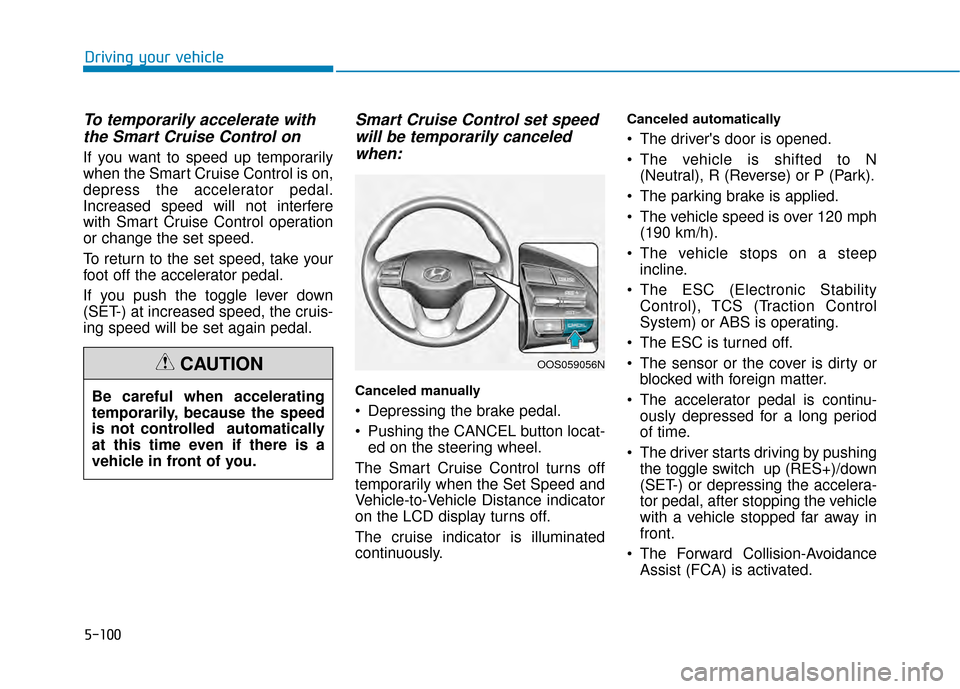
Canceled manually
Depressing the brake pedal.
Pushing the CANCEL button locat-
ed on the steering wheel.
The Smart Cruise Control turns off
temporarily when the Set Speed and
Vehicle-to-Vehicle Distance indicator
on the LCD display turns off.
The cruise indicator is illuminated
continuously.
Canceled automatically
The driver's door is opened.
The vehicle is shifted to N (Neutral), R (Reverse) or P (Park).
The parking brake is applied.
The vehicle speed is over 120 mph (190 km/h).
The vehicle stops on a steep incline.
The ESC (Electronic Stability Control), TCS (Traction Control
System) or ABS is operating.
The ESC is turned off.
The sensor or the cover is dirty or blocked with foreign matter.
The accelerator pedal is continu- ously depressed for a long period
of time.
The driver starts driving by pushing the toggle switch up (RES+)/down
(SET-) or depressing the accelera-
tor pedal, after stopping the vehicle
with a vehicle stopped far away in
front.
The Forward Collision-Avoidance Assist (FCA) is activated.
Driving your vehicle
Be careful when accelerating
temporarily, because the speed
is not controlled automatically
at this time even if there is a
vehicle in front of you.
CAUTIONOOS059056N
Page 339 of 505
5-105
Driving your vehicle
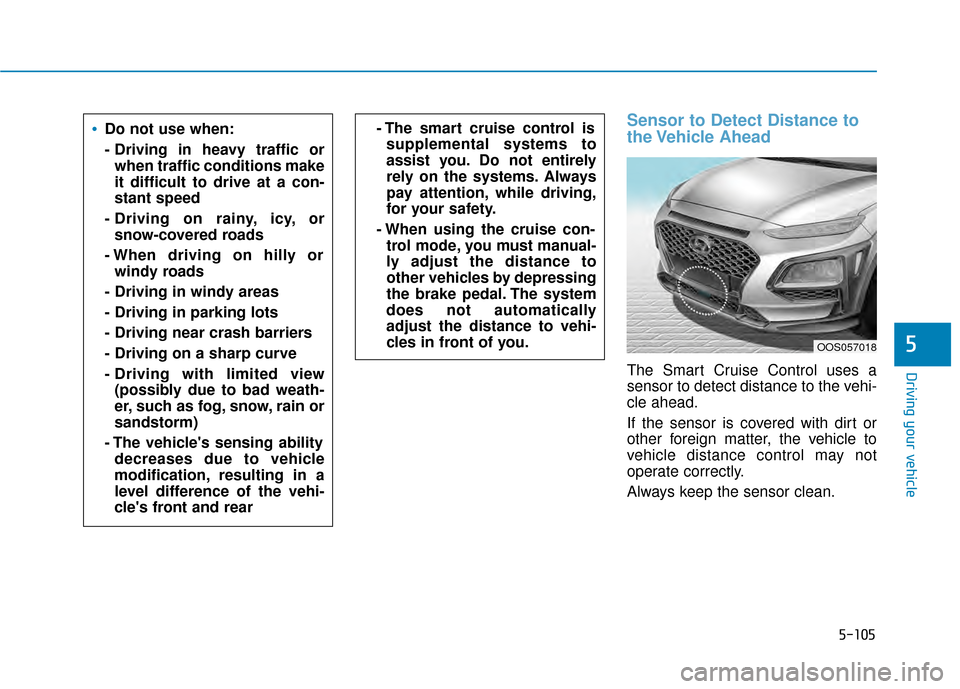
Sensor to Detect Distance to
the Vehicle Ahead
The Smart Cruise Control uses a
sensor to detect distance to the vehi-
cle ahead.
If the sensor is covered with dirt or
other foreign matter, the vehicle to
vehicle distance control may not
operate correctly.
Always keep the sensor clean.
5
Do not use when:
- Driving in heavy traffic orwhen traffic conditions make
it difficult to drive at a con-
stant speed
- Driving on rainy, icy, or snow-covered roads
- When driving on hilly or windy roads
- Driving in windy areas
- Driving in parking lots
- Driving near crash barriers
- Driving on a sharp curve
- Driving with limited view (possibly due to bad weath-
er, such as fog, snow, rain or
sandstorm)
- The vehicle's sensing ability decreases due to vehicle
modification, resulting in a
level difference of the vehi-
cle's front and rear- The smart cruise control issupplemental systems to
assist you. Do not entirely
rely on the systems. Always
pay attention, while driving,
for your safety.
- When using the cruise con- trol mode, you must manual-
ly adjust the distance to
other vehicles by depressing
the brake pedal. The system
does not automatically
adjust the distance to vehi-
cles in front of you.
OOS057018
Page 366 of 505
6-5
What to do in an emergency
6
Information
An inappropriately disposedbattery can be harmful to the
environment and human
health. Dispose of the battery
according to your local law(s)
or regulations.
To prevent damage to your vehicle:
Only use a 12-volt power supply (battery or jumper system) to
jump start your vehicle.
Do not attempt to jump start your vehicle by push-starting.
Jump starting procedure
1. Position the vehicles close enough that the jumper cables will reach,
but do not allow the vehicles to
touch.
2. Avoid fans or any moving parts in the engine compartment at all
times, even when the vehicles are
turned off.
3. Turn off all electrical devices such as radios, lights, air conditioning,
etc. Put the vehicles in P (Park)
and set the parking brakes. Turn
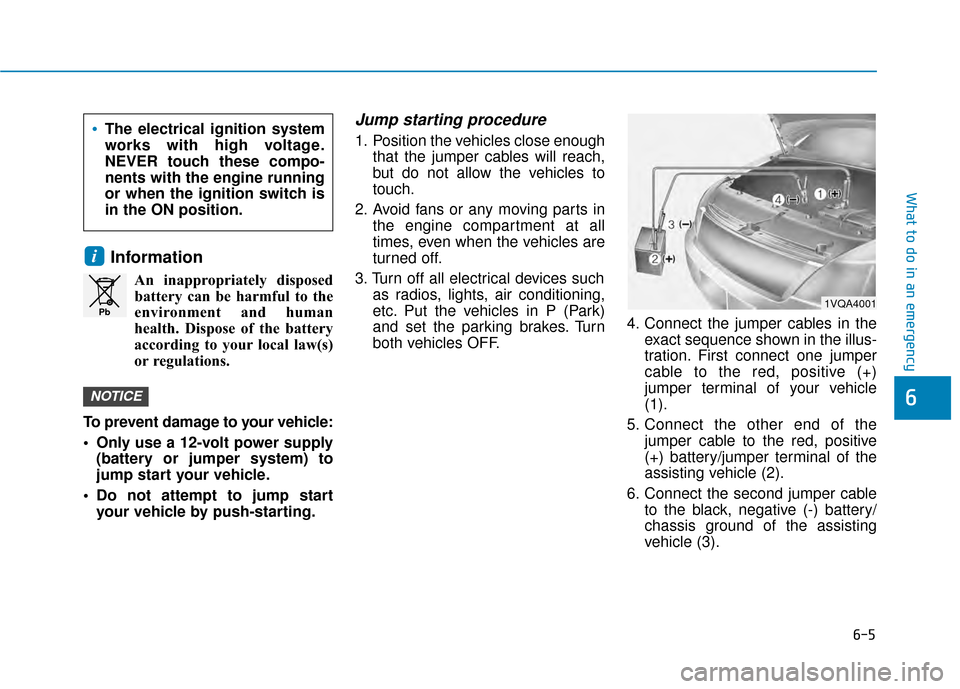
both vehicles OFF. 4. Connect the jumper cables in the
exact sequence shown in the illus-
tration. First connect one jumper
cable to the red, positive (+)
jumper terminal of your vehicle
(1).
5. Connect the other end of the jumper cable to the red, positive
(+) battery/jumper terminal of the
assisting vehicle (2).
6. Connect the second jumper cable to the black, negative (-) battery/
chassis ground of the assisting
vehicle (3).
NOTICE
i
Pb
The electrical ignition system
works with high voltage.
NEVER touch these compo-
nents with the engine running
or when the ignition switch is
in the ON position.
1VQA4001
Page 367 of 505
6-6
What to do in an emergency
7. Connect the other end of the sec- ond jumper cable to the black,
negative (-) chassis ground of
your vehicle (4).
Do not allow the jumper cables to
contact anything except the cor-
rect battery or jumper terminals or
the correct ground. Do not lean
over the battery when making
connections.
8. Start the engine of the assisting vehicle and let it run at approxi-
mately 2,000 rpm for a few min-
utes. Then start your vehicle.
If your vehicle will not start after a
few attempts, it probably requires
servicing. In this event please seek
qualified assistance. If the cause of
your battery discharging is not
apparent, have your vehicle checked
by an authorized HYUNDAI dealer. Disconnect the jumper cables in the
exact reverse order you connected
them:
1. Disconnect the jumper cable from
the black, negative (-) chassis
ground of your vehicle (4).
2. Disconnect the other end of the jumper cable from the black, neg-
ative (-) battery/chassis ground of
the assisting vehicle (3).
3. Disconnect the second jumper cable from the red, positive (+)
battery/jumper terminal of the
assisting vehicle (2).
4. Disconnect the other end of the jumper cable from the red, positive
(+) jumper terminal of your vehicle
(1). If your temperature gage indicates
overheating, you experience a loss
of power, or hear loud pinging or
knocking, the engine may be over-
heating. If this happens, you should:
1. Pull off the road and stop as soon
as it is safe to do so.
2. Place the shift lever in P (Park) and set the parking brake. If the air
conditioning is ON, turn it OFF.
3. If engine coolant is running out under the vehicle or steam is com-
ing out from the hood, stop the
engine. Do not open the hood until
the coolant has stopped running
or the steaming has stopped. If
there is no visible loss of engine
coolant and no steam, leave the
engine running and check to be
sure the engine cooling fan is
operating. If the fan is not running,
turn the engine off.
I IF
F
T
T H
H E
E
E
E N
N G
GI
IN
N E
E
O
O V
VE
ER
R H
H E
EA
A T
TS
S
Page 376 of 505
6-15
What to do in an emergency
6
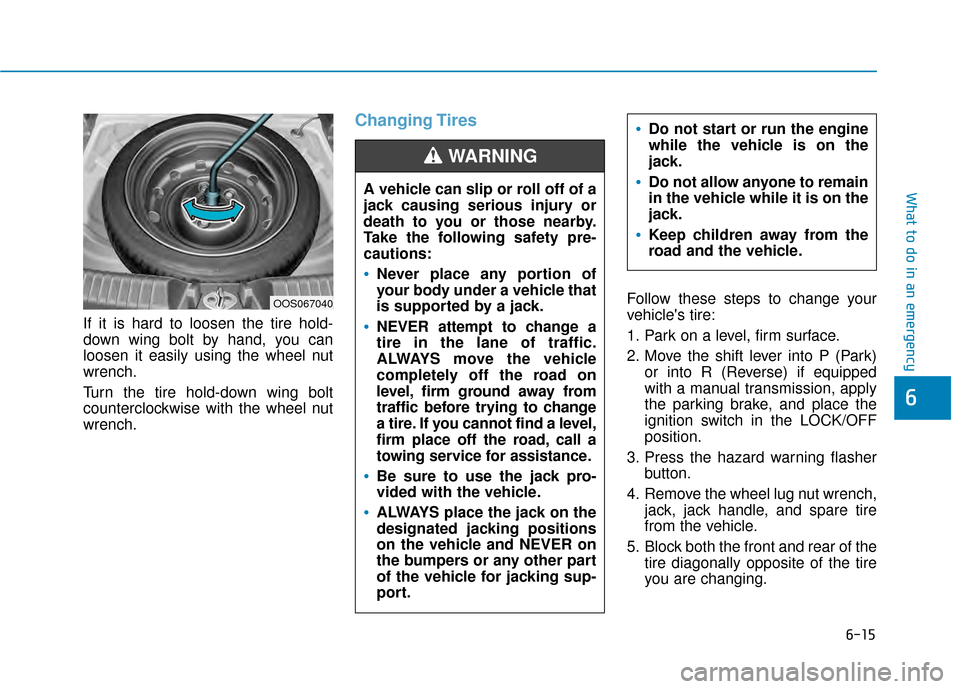
If it is hard to loosen the tire hold-
down wing bolt by hand, you can
loosen it easily using the wheel nut
wrench.
Turn the tire hold-down wing bolt
counterclockwise with the wheel nut
wrench.
Changing Tires
Follow these steps to change your
vehicle's tire:
1. Park on a level, firm surface.
2. Move the shift lever into P (Park)or into R (Reverse) if equipped
with a manual transmission, apply
the parking brake, and place the
ignition switch in the LOCK/OFF
position.
3. Press the hazard warning flasher button.
4. Remove the wheel lug nut wrench, jack, jack handle, and spare tire
from the vehicle.
5. Block both the front and rear of the tire diagonally opposite of the tire
you are changing.
A vehicle can slip or roll off of a
jack causing serious injury or
death to you or those nearby.
Take the following safety pre-
cautions:
Never place any portion of
your body under a vehicle that
is supported by a jack.
NEVER attempt to change a
tire in the lane of traffic.
ALWAYS move the vehicle
completely off the road on
level, firm ground away from
traffic before trying to change
a tire. If you cannot find a level,
firm place off the road, call a
towing service for assistance.
Be sure to use the jack pro-
vided with the vehicle.
ALWAYS place the jack on the
designated jacking positions
on the vehicle and NEVER on
the bumpers or any other part
of the vehicle for jacking sup-
port.
Do not start or run the engine
while the vehicle is on the
jack.
Do not allow anyone to remain
in the vehicle while it is on the
jack.
Keep children away from the
road and the vehicle.
WARNING
OOS067040
Page 449 of 505
7-58
Maintenance
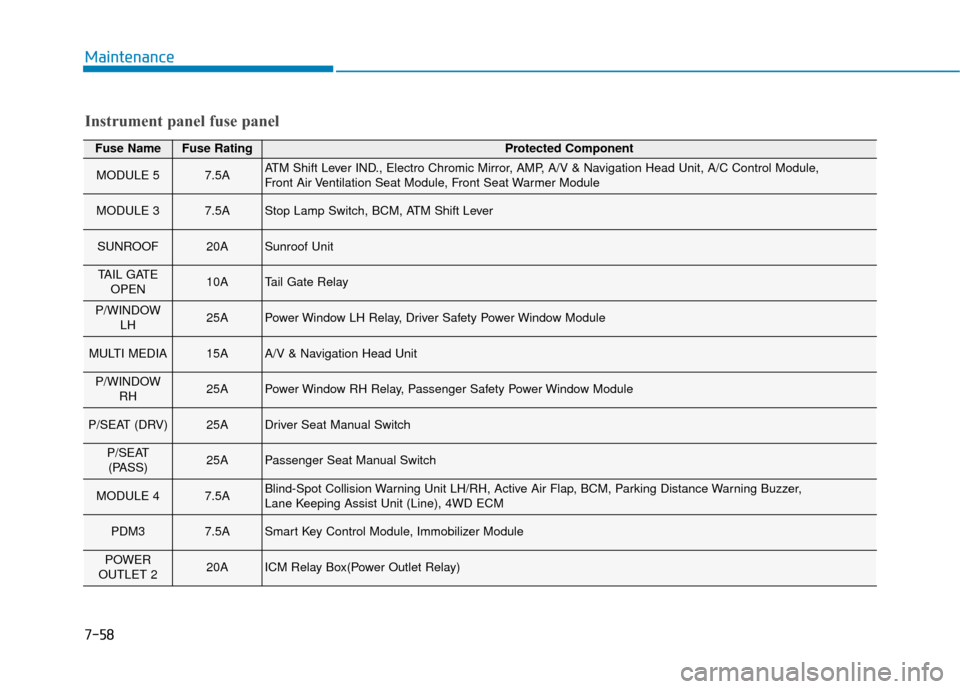
Fuse NameFuse RatingProtected Component
MODULE 57.5AATM Shift Lever IND., Electro Chromic Mirror, AMP, A/V & Navigation Head Unit, A/C Control Module,
Front Air Ventilation Seat Module, Front Seat Warmer Module
MODULE 37.5AStop Lamp Switch, BCM, ATM Shift Lever
SUNROOF20ASunroof Unit
TAIL GATEOPEN10ATail Gate Relay
P/WINDOW LH25APower Window LH Relay, Driver Safety Power Window Module
MULTI MEDIA15AA/V & Navigation Head Unit
P/WINDOWRH25APower Window RH Relay, Passenger Safety Power Window Module
P/SEAT (DRV)25ADriver Seat Manual Switch
P/SEAT(PASS)25APassenger Seat Manual Switch
MODULE 47.5ABlind-Spot Collision Warning Unit LH/RH, Active Air Flap, BCM, Parking Distance Warning Buzzer,
Lane Keeping Assist Unit (Line), 4WD ECM
PDM37.5ASmart Key Control Module, Immobilizer Module
POWER
OUTLET 220AICM Relay Box(Power Outlet Relay)
Instrument panel fuse panel
Page 499 of 505
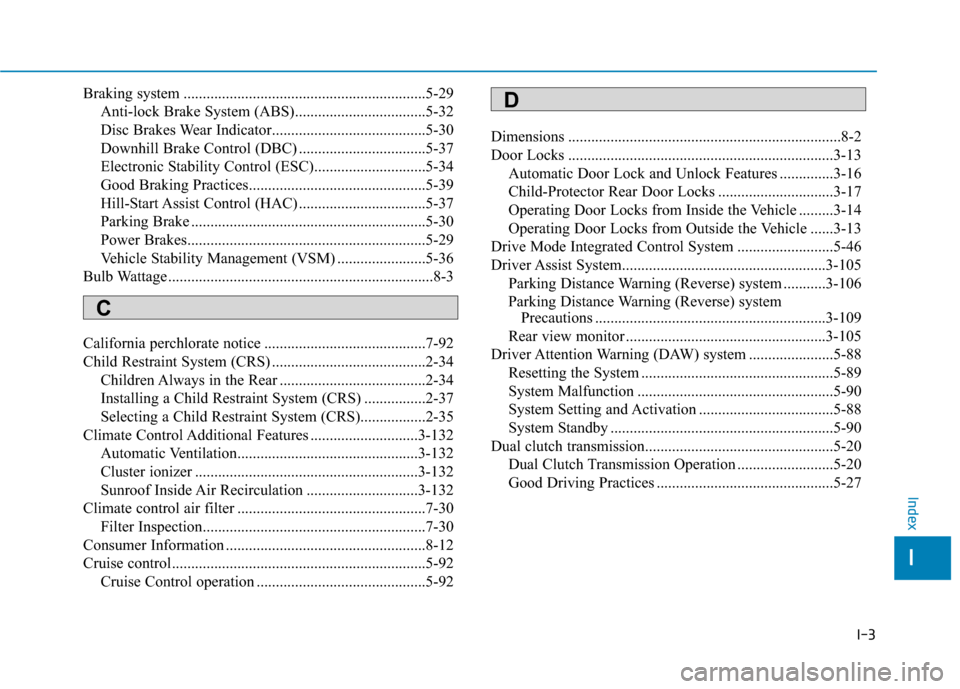
I-3
Braking system ...............................................................5-29Anti-lock Brake System (ABS)..................................5-32
Disc Brakes Wear Indicator........................................5-30
Downhill Brake Control (DBC) .................................5-37
Electronic Stability Control (ESC).............................5-34
Good Braking Practices..............................................5-39
Hill-Start Assist Control (HAC) .................................5-37
Parking Brake .............................................................5-30
Power Brakes..............................................................5-29
Vehicle Stability Management (VSM) .......................5-36
Bulb Wattage .....................................................................8-3\
California perchlorate notice ..........................................7-92
Child Restraint System (CRS) ........................................2-34 Children Always in the Rear ......................................2-34
Installing a Child Restraint System (CRS) ................2-37
Selecting a Child Restraint System (CRS).................2-35
Climate Control Additional Features ............................3-132 Automatic Ventilation...............................................3-132
Cluster ionizer ..........................................................3-132
Sunroof Inside Air Recirculation .............................3-132
Climate control air filter .................................................7-30 Filter Inspection..........................................................7-30
Consumer Information ....................................................8-12
Cruise control..................................................................5-92 Cruise Control operation ............................................5-92 Dimensions .......................................................................8\
-2
Door Locks .....................................................................3-1\
3
Automatic Door Lock and Unlock Features ..............3-16
Child-Protector Rear Door Locks ..............................3-17
Operating Door Locks from Inside the Vehicle .........3-14
Operating Door Locks from Outside the Vehicle ......3-13
Drive Mode Integrated Control System .........................5-46
Driver Assist System.....................................................3-105 Parking Distance Warning (Reverse) system ...........3-106
Parking Distance Warning (Reverse) system Precautions ............................................................3-109
Rear view monitor ....................................................3-105
Driver Attention Warning (DAW) system ......................5-88 Resetting the System ..................................................5-89
System Malfunction ...................................................5-90
System Setting and Activation ...................................5-88
System Standby ..........................................................5-90
Dual clutch transmission.................................................5-20 Dual Clutch Transmission Operation .........................5-20
Good Driving Practices ..............................................5-27
I
Index
C
D
Page 502 of 505

I-6
Interior Overview..............................................................1-4
Jump starting .....................................................................6-4\
Lane Keeping Assist (LKA) system ...............................5-80Limitations of the System ..........................................5-86
LKA system Function Change ...................................5-87
LKA system Operation ...............................................5-81
Warning Light and Message.......................................5-85
LCD Display ...................................................................3-72 LCD Display Control .................................................3-72
LCD Display Modes ..................................................3-73
Light bulbs ......................................................................7-\
69 Front fog lamp ............................................................7-74
Headlamp, Parking Lamp, Daytime Running Light, Turn Signal Lamp and Side Marker, Cornering lamp .......................................................7-69
High Mounted Stop Lamp Replacement....................7-77
Interior Light Bulb Replacement ...............................7-78
License Plate Light Bulb Replacement ......................7-78
Rear Combination Light Bulb Replacement ..............7-75
Side Repeater Lamp Replacement .............................7-74 Lighting ........................................................................\
...3-90
Exterior Lights............................................................3-90
Interior Lights.............................................................3-98
Smart cornering lamp .................................................3-97
Welcome System ......................................................3-100
Maintenance services ........................................................7-4 Owner Maintenance Precautions..................................7-4
Owner's Responsibility.................................................7-4
Manual Climate Control System...................................3-110 Heating and Air Conditioning ..................................3-111
System Maintenance.................................................3-116
System Operation .....................................................3-114
Mirrors ........................................................................\
....3-21 Inside Rearview Mirror ..............................................3-21
Side View Mirrors ......................................................3-31
Owner maintenance ..........................................................7-5 Owner Maintenance Schedule......................................7-6
Parking brake ..................................................................7-28 Checking the Parking Brake ......................................7-28
Index
M
O
P
L
J