mirror Hyundai Kona 2020 Owner's Guide
[x] Cancel search | Manufacturer: HYUNDAI, Model Year: 2020, Model line: Kona, Model: Hyundai Kona 2020Pages: 505, PDF Size: 13.47 MB
Page 315 of 505
5-81
Driving your vehicle
5
The system detects lane lines
and controls the steering
wheel by a camera, therefore,
if the lane lines are hard to
detect, the system may not
work properly.
Please refer to "Limitations of
the system".
Do not remove or damage the
related parts of LKA system.
You may not hear a warning
sound of LKA system
because of excessive audio
sound.
Do not place objects on the
dashboard that reflects light
such as mirrors, white paper,
etc. The system may malfunc-
tion if the sunlight is reflected.
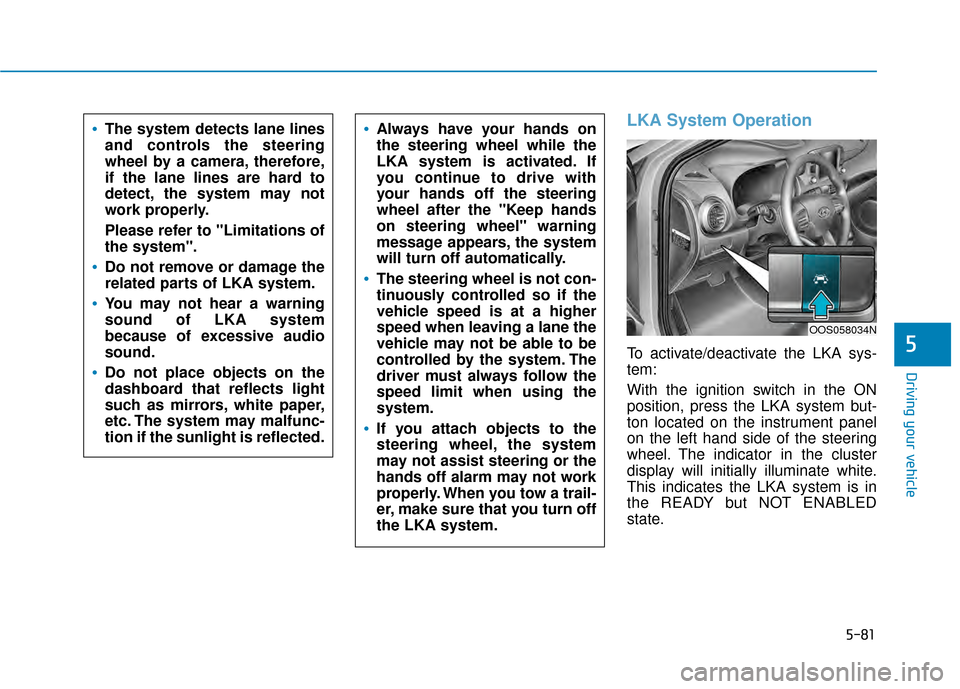
LKA System Operation
To activate/deactivate the LKA sys-
tem:
With the ignition switch in the ON
position, press the LKA system but-
ton located on the instrument panel
on the left hand side of the steering
wheel. The indicator in the cluster
display will initially illuminate white.
This indicates the LKA system is in
the READY but NOT ENABLED
state.
Always have your hands on
the steering wheel while the
LKA system is activated. If
you continue to drive with
your hands off the steering
wheel after the "Keep hands
on steering wheel" warning
message appears, the system
will turn off automatically.
The steering wheel is not con-
tinuously controlled so if the
vehicle speed is at a higher
speed when leaving a lane the
vehicle may not be able to be
controlled by the system. The
driver must always follow the
speed limit when using the
system.
If you attach objects to the
steering wheel, the system
may not assist steering or the
hands off alarm may not work
properly. When you tow a trail-
er, make sure that you turn off
the LKA system.
OOS058034N
Page 320 of 505
5-86
Driving your vehicle
Limitations of the System
The LKA system may operate pre-
maturely even if the vehicle does not
depart from the intended lane, OR,
the LKA system may not warn you if
the vehicle leaves the intended lane
under the following circumstances:
When the lane and road condi-
tions are poor
It is difficult to distinguish the lanemarking from the road surface or
the lane marking is faded or not
clearly marked.
There are markings on the road surface that look like a lane line
that is inadvertently being detected
by the camera.
The lane line is merged or divided. (e.g. tollgate)
The lane number increases or decreases or the lane marker are
crossing complicatedly.
There are more than two lane lines on the road in front of you.
The lanes ahead are not visible due to rain, snow, water on the
road, damaged or stained road
surface, or other factors. The shadow is on the lane marker
by a median strip, trees, etc.
The lanes are incomplete or the area is in a construction zone.
There are crosswalk signs or other symbols on the road.
The lane line in a tunnel is stained with oil, etc.
When external condition is inter-
vened
The brightness outside changes suddenly such as when entering or
exiting a tunnel or passing under a
bridge.
The brightness outside is too low such as when the headlamps are
not on at night or the vehicle is
going through a tunnel or passing
under a bridge.
There is a boundary structure in the roadway such as a concrete
barrier, guardrail and reflector post
that is inadvertently being detected
by the camera.
When light coming from a street light or an oncoming vehicle is
reflected on a wet road surface
such as a puddle in the road. The field of view in front is
obstructed by sun glare.
The lane suddenly disappears such as at the intersection.
There is not enough distance between you and the vehicle in
front to be able to detect the lane
line or the vehicle ahead is driving
on the lane line.
Driving on a steep grade, over a hill, or when driving on a curved
road.
The adverse road conditions cause excessive vehicle vibrations while
driving.
The surrounding of the inside rear view mirror temperature is high
due to direct sunlight.
When front visibility is poor
The windshield or the LKA system camera lens is blocked with dirt or
debris.
The windshield glass is fogged up; a clear view of the road is obstruct-
ed.
Placing objects on the dashboard, etc.
Page 325 of 505
5-91
Driving your vehicle
5
The Driver Attention Warning sys-
tem utilizes the camera sensor on
the front windshield for its opera-
tion. To keep the camera sensor in
the best condition, you should
observe the followings:
NEVER install any accessoriesor stickers on the front wind-
shield, nor tint the front wind-
shield.
NEVER locate any reflective objects (i.e. white paper, mirror)
over the dashboard. Any light
reflection may cause a malfunc-
tion of the Driver Attention Alert
(DAW) system.
Pay extreme caution to keep the camera sensor out of water.
NEVER arbitrarily disassemble the camera assembly, nor apply
any impact on the camera
assembly.
NOTICE
The Driver Attention Warning
(DAW) system may not properly
operate with limited alerting in
the following situations:
The lane detection perform-
ance is limited. (For more infor-
mation, refer to "Lane Keeping
Assist (LKA) system" in this
chapter.)
The vehicle is violently driven
or is abruptly turned for obsta-
cle avoidance (e.g. construc-
tion area, other vehicles, fallen
objects, bumpy road).
Forward drivability of the vehi-
cle is severely undermined
(possibly due to wide variation
in tire pressures, uneven tire
wear-out, toe-in/toe-out align-
ment).
The vehicle drives on a curvy
road.
The vehicle drives on a bumpy
road.
The vehicle drives through a
windy area.
The vehicle is controlled by the
following driving assist sys-
tems:
- Lane Keeping Assist (LKA)system
- Forward Collision-avoidance Assist (FCA) systemCAUTION
Playing the vehicle audio sys-
tem at high volume may offset
the Driver Attention Warning
(DAW) system warning sounds.
CAUTION
Page 349 of 505
5-115
Driving your vehicle
5
Information
The ESC system must be turned OFF
before rocking the vehicle.
If you are still stuck after rocking
the vehicle a few times, have the
vehicle pulled out by a tow vehicle
to avoid engine overheating, pos-
sible damage to the transmission,
and tire damage. See "Towing" in
chapter 6.
Smooth Cornering
Avoid braking or gear changing in
corners, especially when roads are
wet. Ideally, corners should always
be taken under gentle acceleration.
Driving at Night
Night driving presents more hazards
than driving in the daylight. Here are
some important tips to remember:
Slow down and keep more dis-tance between you and other vehi-
cles, as it may be more difficult to
see at night, especially in areas
where there may not be any street
lights.
Adjust your mirrors to reduce the glare from other driver's head-
lamps.
Keep your headlamps clean and properly aimed. Dirty or improperly
aimed headlamps will make it
much more difficult to see at night.
Avoid staring directly at the head- lamps of oncoming vehicles. You
could be temporarily blinded, and it
will take several seconds for your
eyes to readjust to the darkness.
Driving in the Rain
Rain and wet roads can make driving
dangerous. Here are a few things to
consider when driving in the rain or
on slick pavement:
Slow down and allow extra follow-ing distance. A heavy rainfall
makes it harder to see and increas-
es the distance needed to stop
your vehicle.
Turn OFF your Cruise Control.
Replace your windshield wiper blades when they show signs of
streaking or missing areas on the
windshield.
Tires should be properly main- tained with at least 2/32nds of an
inch of tread depth. If your tires do
not have enough tread, making a
quick stop on wet pavement can
cause a skid and possibly lead to
an accident. See "Tire Tread" in
chapter 7.
Turn on your headlamps to make it easier for others to see you.
NOTICE
i
Page 449 of 505
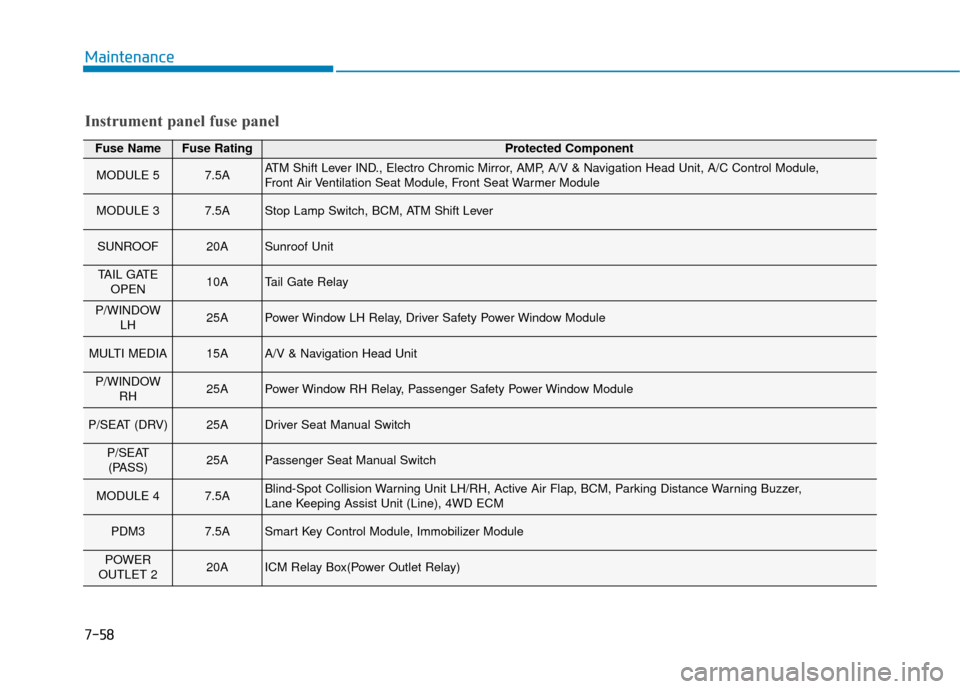
7-58
Maintenance
Fuse NameFuse RatingProtected Component
MODULE 57.5AATM Shift Lever IND., Electro Chromic Mirror, AMP, A/V & Navigation Head Unit, A/C Control Module,
Front Air Ventilation Seat Module, Front Seat Warmer Module
MODULE 37.5AStop Lamp Switch, BCM, ATM Shift Lever
SUNROOF20ASunroof Unit
TAIL GATEOPEN10ATail Gate Relay
P/WINDOW LH25APower Window LH Relay, Driver Safety Power Window Module
MULTI MEDIA15AA/V & Navigation Head Unit
P/WINDOWRH25APower Window RH Relay, Passenger Safety Power Window Module
P/SEAT (DRV)25ADriver Seat Manual Switch
P/SEAT(PASS)25APassenger Seat Manual Switch
MODULE 47.5ABlind-Spot Collision Warning Unit LH/RH, Active Air Flap, BCM, Parking Distance Warning Buzzer,
Lane Keeping Assist Unit (Line), 4WD ECM
PDM37.5ASmart Key Control Module, Immobilizer Module
POWER
OUTLET 220AICM Relay Box(Power Outlet Relay)
Instrument panel fuse panel
Page 450 of 505
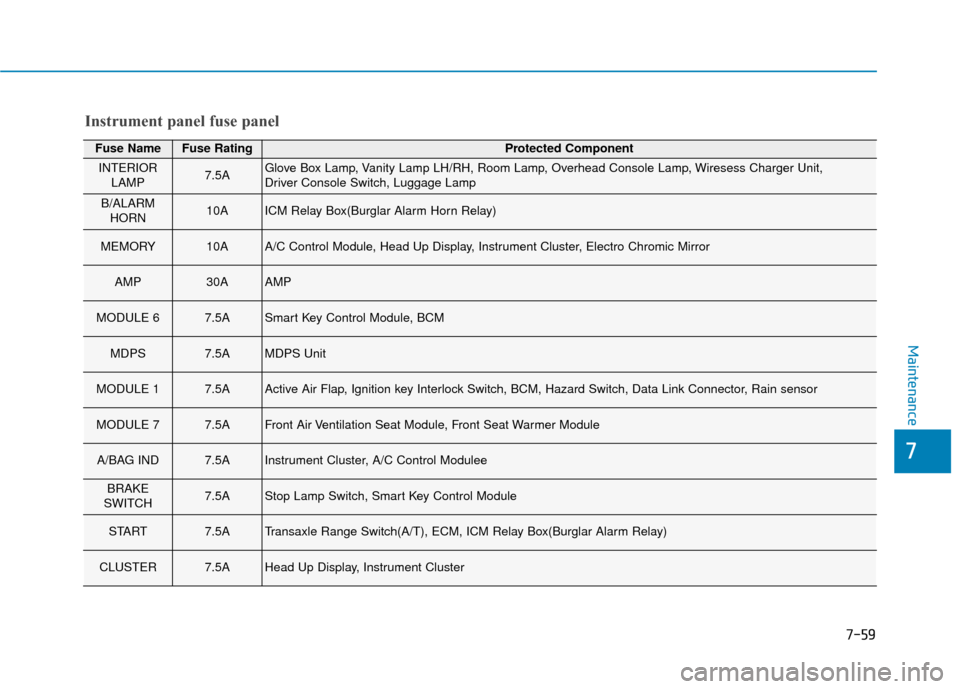
7-59
7
Maintenance
Fuse NameFuse RatingProtected Component
INTERIORLAMP7.5AGlove Box Lamp, Vanity Lamp LH/RH, Room Lamp, Overhead Console Lamp, Wiresess Charger Unit,
Driver Console Switch, Luggage Lamp
B/ALARMHORN10AICM Relay Box(Burglar Alarm Horn Relay)
MEMORY10AA/C Control Module, Head Up Display, Instrument Cluster, Electro Chromic Mirror
AMP30AAMP
MODULE 67.5ASmart Key Control Module, BCM
MDPS7.5AMDPS Unit
MODULE 17.5AActive Air Flap, Ignition key Interlock Switch, BCM, Hazard Switch, Data Link Connector, Rain sensor
MODULE 77.5AFront Air Ventilation Seat Module, Front Seat Warmer Module
A/BAG IND7.5AInstrument Cluster, A/C Control Modulee
BRAKE
SWITCH7.5AStop Lamp Switch, Smart Key Control Module
START7.5ATransaxle Range Switch(A/T), ECM, ICM Relay Box(Burglar Alarm Relay)
CLUSTER7.5AHead Up Display, Instrument Cluster
Instrument panel fuse panel
Page 451 of 505
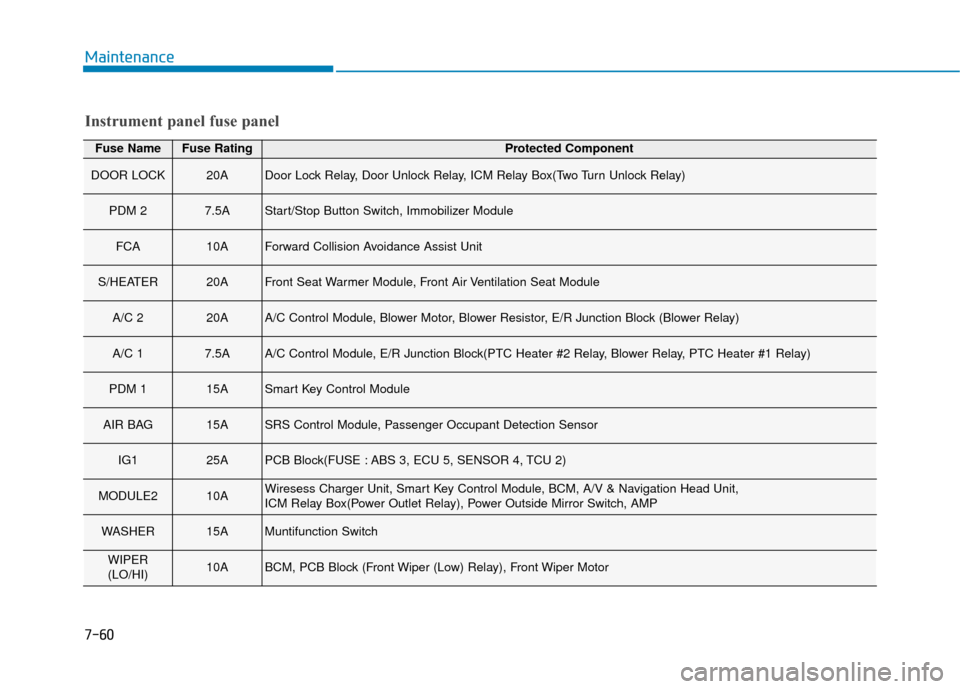
7-60
Maintenance
Fuse NameFuse RatingProtected Component
DOOR LOCK20ADoor Lock Relay, Door Unlock Relay, ICM Relay Box(Two Turn Unlock Relay)
PDM 27.5AStart/Stop Button Switch, Immobilizer Module
FCA10AForward Collision Avoidance Assist Unit
S/HEATER20AFront Seat Warmer Module, Front Air Ventilation Seat Module
A/C 220AA/C Control Module, Blower Motor, Blower Resistor, E/R Junction Block (Blower Relay)
A/C 17.5AA/C Control Module, E/R Junction Block(PTC Heater #2 Relay, Blower Relay, PTC Heater #1 Relay)
PDM 115ASmart Key Control Module
AIR BAG15ASRS Control Module, Passenger Occupant Detection Sensor
IG125APCB Block(FUSE : ABS 3, ECU 5, SENSOR 4, TCU 2)
MODULE210AWiresess Charger Unit, Smart Key Control Module, BCM, A/V & Navigation Head Unit,
ICM Relay Box(Power Outlet Relay), Power Outside Mirror Switch, AMP
WASHER15AMuntifunction Switch
WIPER
(LO/HI)10ABCM, PCB Block (Front Wiper (Low) Relay), Front Wiper Motor
Instrument panel fuse panel
Page 452 of 505
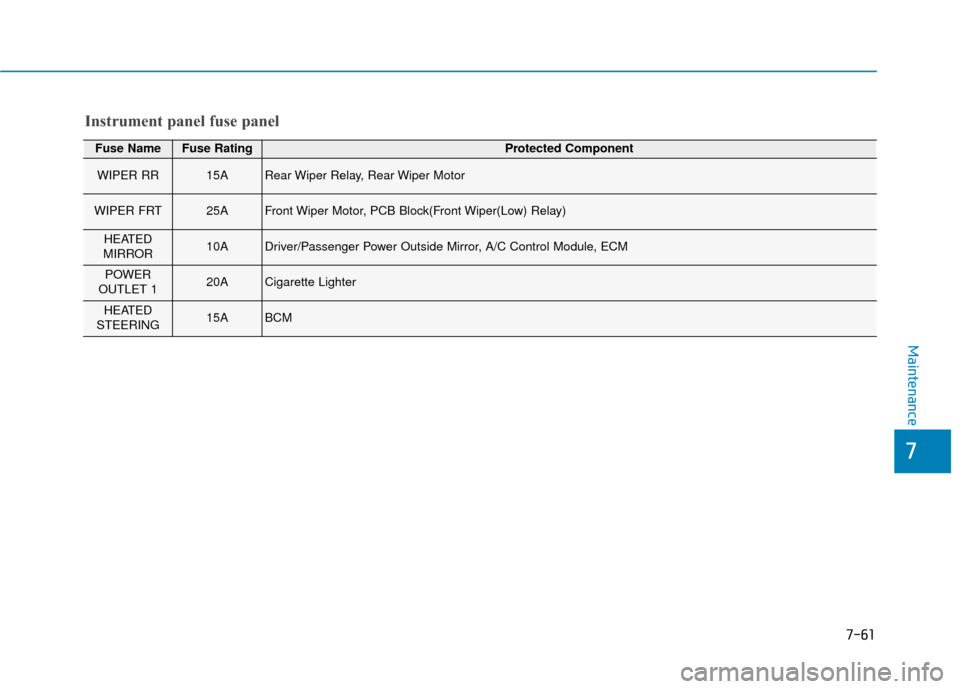
7-61
7
Maintenance
Fuse NameFuse RatingProtected Component
WIPER RR15ARear Wiper Relay, Rear Wiper Motor
WIPER FRT25AFront Wiper Motor, PCB Block(Front Wiper(Low) Relay)
HEATED
MIRROR10ADriver/Passenger Power Outside Mirror, A/C Control Module, ECM
POWER
OUTLET 120ACigarette Lighter
HEATED
STEERING15ABCM
Instrument panel fuse panel
Page 469 of 505
7-78
Maintenance
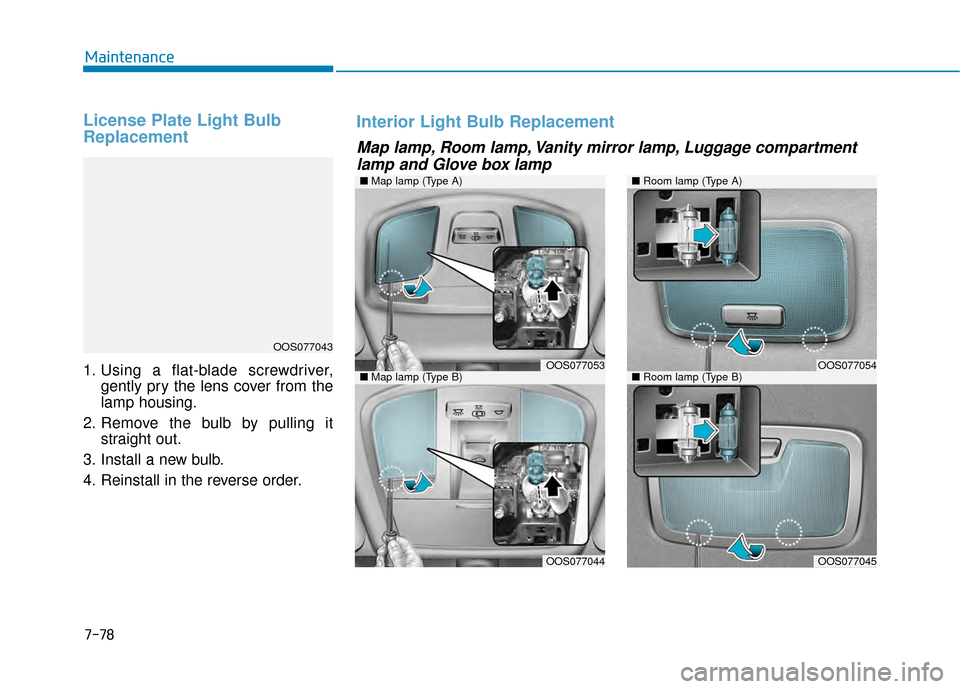
License Plate Light Bulb
Replacement
1. Using a flat-blade screwdriver,gently pry the lens cover from the
lamp housing.
2. Remove the bulb by pulling it straight out.
3. Install a new bulb.
4. Reinstall in the reverse order.
OOS077043
Map lamp, Room lamp, Vanity mirror lamp, Luggage compartment lamp and Glove box lamp
Interior Light Bulb Replacement
■ Map lamp (Type A)
OOS077053
OOS077044
■Room lamp (Type A)
■Room lamp (Type B)OOS077054
OOS077045
■Map lamp (Type B)
Page 470 of 505
7-79
7
Maintenance
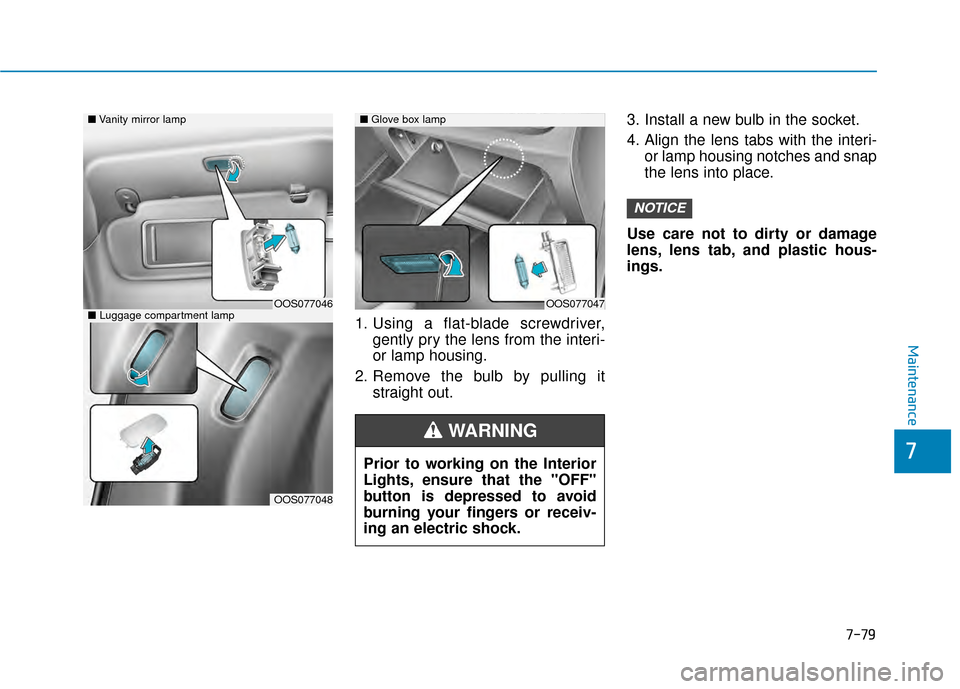
1. Using a flat-blade screwdriver,gently pry the lens from the interi-
or lamp housing.
2. Remove the bulb by pulling it straight out. 3. Install a new bulb in the socket.
4. Align the lens tabs with the interi-
or lamp housing notches and snap
the lens into place.
Use care not to dirty or damage
lens, lens tab, and plastic hous-
ings.
NOTICE
Prior to working on the Interior
Lights, ensure that the "OFF"
button is depressed to avoid
burning your fingers or receiv-
ing an electric shock.
WARNING
■ Vanity mirror lamp
■ Luggage compartment lampOOS077046
OOS077048
■Glove box lamp
OOS077047