DAW Hyundai Kona 2020 Owner's Manual
[x] Cancel search | Manufacturer: HYUNDAI, Model Year: 2020, Model line: Kona, Model: Hyundai Kona 2020Pages: 505, PDF Size: 13.47 MB
Page 155 of 505
3-71
Convenient features of your vehicle
3
Check headlight (if equipped)
This warning message is displayed if
the headlights are not operating
properly. A headlight bulb may need
to be replaced.
Information
Make sure to replace the burned out
bulb with a new one of the same wattage
rating.
Check High Beam Assist (HBA)system (if equipped)
This warning message is displayed if
there is a problem with the High Beam
Assist (HBA) system. Have the vehi-
cle inspected by an authorized
HYUNDAI dealer.
For more information, refer to
"High Beam Assist (HBA) system"
in chapter 3.
Check Forward CollisionAvoidance Assist system(if equipped)
This warning message is displayed if
there is a malfunction with the
Forward Collision-Avoidance Assist
(FCA) system. Have the vehicle
inspected by an authorized
HYUNDAI dealer.
For more information, refer to
"Forward Collision-Avoidance
Assist (FCA) system" in chapter 5.
Check Driver Attention Warning(DAW) system (if equipped)
This warning message is displayed if
there is a problem with the Driver
Attention Warning (DAW). Have the
vehicle inspected by an authorized
HYUNDAI dealer.
For more information, refer to
"Driver Attention Warning (DAW)"
in chapter 5.
Check Lane Keeping Assist(LKA) system (if equipped)
This warning message is displayed if
there is a problem with the Check
Lane Keeping Assist (LKA) system.
Have the vehicle inspected by an
authorized HYUNDAI dealer.
For more information, refer to
"Check Lane Keeping Assist
(LKA) system" in chapter 5.
i
Page 157 of 505
3-73
Convenient features of your vehicle
3
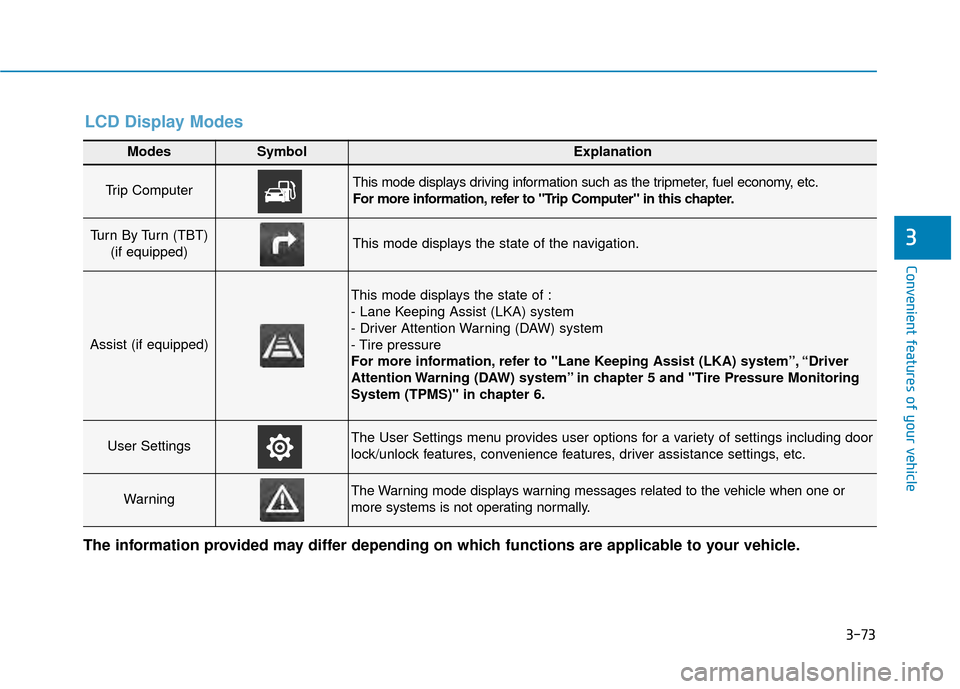
Modes SymbolExplanation
Trip Computer This mode displays driving information such as the tripmeter, fuel economy, etc.
For more information, refer to "Trip Computer" in this chapter.
Turn By Turn (TBT) (if equipped)This mode displays the state of the navigation.
Assist (if equipped)
This mode displays the state of :
- Lane Keeping Assist (LKA) system
- Driver Attention Warning (DAW) system
- Tire pressure
For more information, refer to "Lane Keeping Assist (LKA) system”, “Driver
Attention Warning (DAW) system” in chapter 5 and "Tire Pressure Monitoring
System (TPMS)" in chapter 6.
User SettingsThe User Settings menu provides user options for a variety of settings including door
lock/unlock features, convenience features, driver assistance settings, etc.
WarningThe Warning mode displays warning messages related to the vehicle when one or
more systems is not operating normally.
The information provided may differ depending on which functions are applicable to your vehicle.
LCD Display Modes
Page 159 of 505
3-75
Convenient features of your vehicle
3
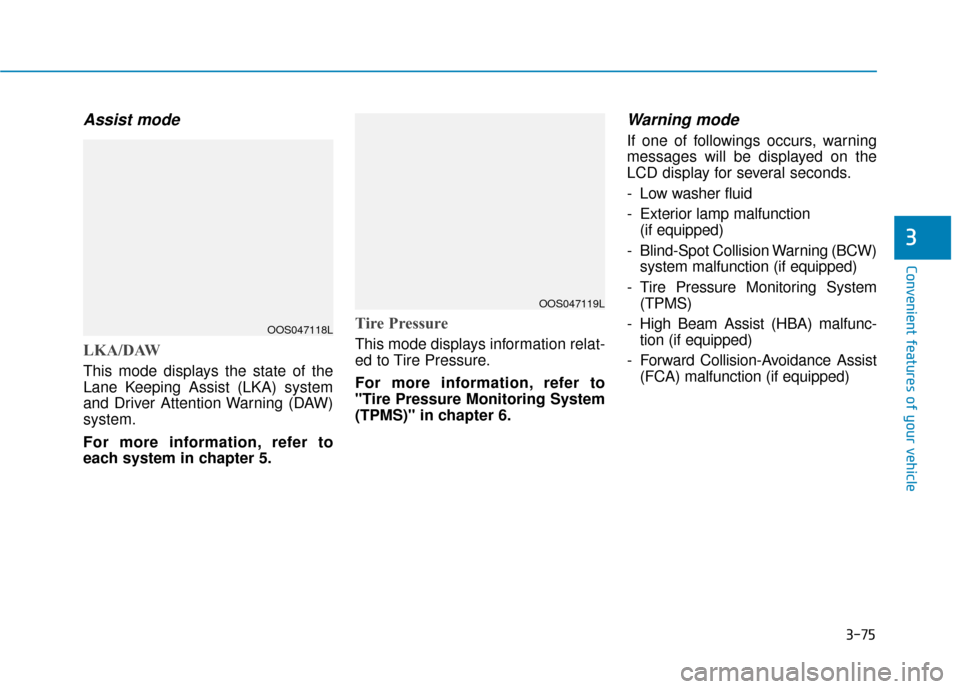
Assist mode
LKA/DAW
This mode displays the state of the
Lane Keeping Assist (LKA) system
and Driver Attention Warning (DAW)
system.
For more information, refer to
each system in chapter 5.
Tire Pressure
This mode displays information relat-
ed to Tire Pressure.
For more information, refer to
"Tire Pressure Monitoring System
(TPMS)" in chapter 6.
Warning mode
If one of followings occurs, warning
messages will be displayed on the
LCD display for several seconds.
- Low washer fluid
- Exterior lamp malfunction(if equipped)
- Blind-Spot Collision Warning (BCW) system malfunction (if equipped)
- Tire Pressure Monitoring System (TPMS)
- High Beam Assist (HBA) malfunc- tion (if equipped)
- Forward Collision-Avoidance Assist (FCA) malfunction (if equipped)
OOS047118L
OOS047119L
Page 161 of 505
3-77
Convenient features of your vehicle
3
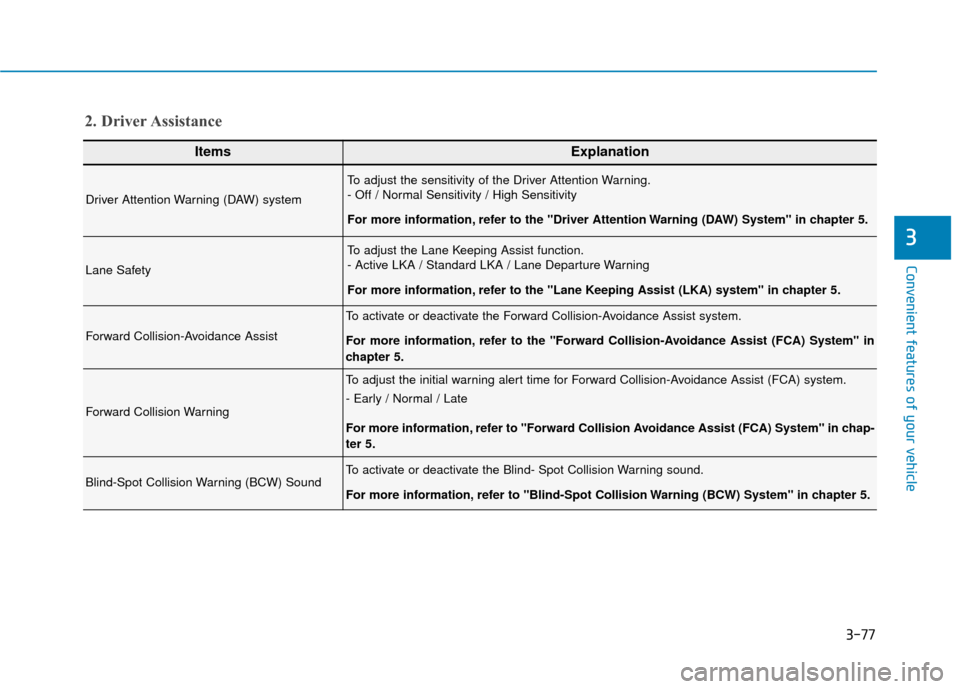
ItemsExplanation
Driver Attention Warning (DAW) system
To adjust the sensitivity of the Driver Attention Warning.
- Off / Normal Sensitivity / High Sensitivity
For more information, refer to the "Driver Attention Warning (DAW) System" in chapter 5.
Lane Safety
To adjust the Lane Keeping Assist function.
- Active LKA / Standard LKA / Lane Departure Warning
For more information, refer to the "Lane Keeping Assist (LKA) system" in chapter 5.
Forward Collision-Avoidance Assist
To activate or deactivate the Forward Collision-Avoidance Assist system.
For more information, refer to the "Forward Collision-Avoidance Assist (FCA) System" in
chapter 5.
Forward Collision Warning
To adjust the initial warning alert time for Forward Collision-Avoidance Assist (FCA) system.
- Early / Normal / Late
For more information, refer to "Forward Collision Avoidance Assist (FCA) System" in chap-
ter 5.
Blind-Spot Collision Warning (BCW) SoundTo activate or deactivate the Blind- Spot Collision Warning sound.
For more information, refer to "Blind-Spot Collision Warning (BCW) System" in chapter 5.
2. Driver Assistance
Page 174 of 505
3-90
Convenient features of your vehicle
L
LI
IG
G H
H T
TI
IN
N G
G
Exterior Lights
Lighting control
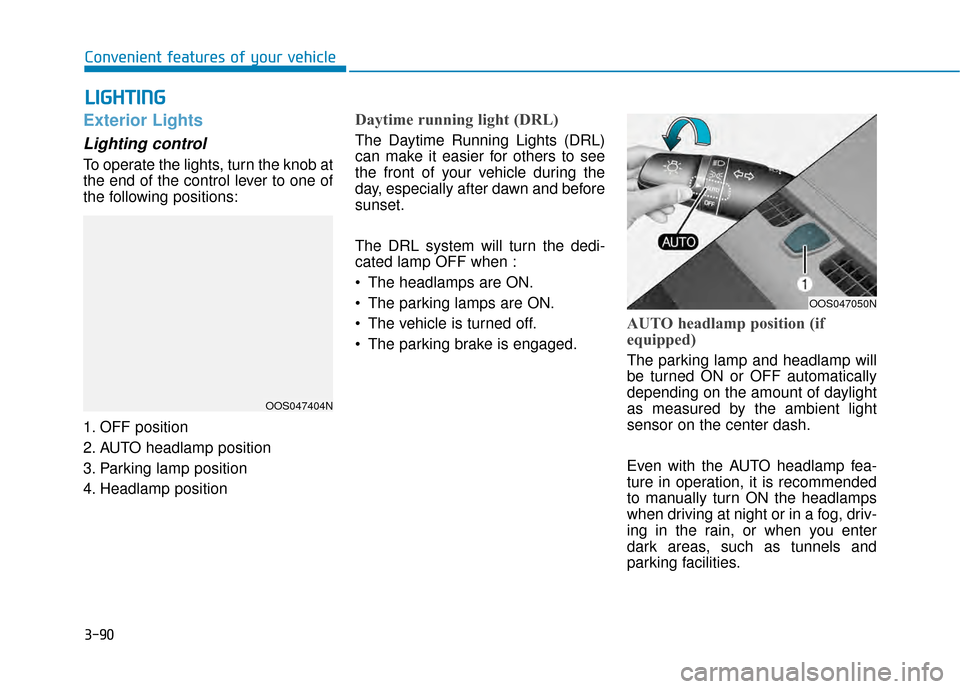
To operate the lights, turn the knob at
the end of the control lever to one of
the following positions:
1. OFF position
2. AUTO headlamp position
3. Parking lamp position
4. Headlamp position
Daytime running light (DRL)
The Daytime Running Lights (DRL)
can make it easier for others to see
the front of your vehicle during the
day, especially after dawn and before
sunset.
The DRL system will turn the dedi-
cated lamp OFF when :
• The headlamps are ON.
The parking lamps are ON.
The vehicle is turned off.
The parking brake is engaged.
AUTO headlamp position (if
equipped)
The parking lamp and headlamp will
be turned ON or OFF automatically
depending on the amount of daylight
as measured by the ambient light
sensor on the center dash.
Even with the AUTO headlamp fea-
ture in operation, it is recommended
to manually turn ON the headlamps
when driving at night or in a fog, driv-
ing in the rain, or when you enter
dark areas, such as tunnels and
parking facilities.
OOS047404N
OOS047050N
Page 236 of 505
5
Lane Keeping Assist (LKA) system ...................5-80
LKA system Operation ...................................................5-81
Warning Light and Message.........................................5-85
Limitations of the System .............................................5-86
LKA system Function Change ......................................5-87
Driver Attention Warning (DAW) system .........5-88
System Setting and Activation.....................................5-88
Resetting the System .....................................................5-89
System Standby ...............................................................5-90
System Malfunction .......................................................5-90
Cruise Control .......................................................5-92
Cruise Control operation ...............................................5-92
Smart Cruise Control system..............................5-97
Smart Cruise Control Switch ........................................5-97
Smart Cruise Control Speed .........................................5-98
Smart Cruise Control Vehicle-to-Vehicle
Distance ........................................................................\
...5-102
Sensor to Detect Distance to the Vehicle Ahead ..5-105
SCC Reaction Setting ...................................................5-107
Conventional Cruise Control Mode ...........................5-108
Limitations of the System...........................................5-108
Special Driving Conditions ................................5-114
Hazardous Driving Conditions....................................5-114
Rocking the Vehicle ......................................................5-114
Smooth Cornering .........................................................5-115
Driving at Night .............................................................5-115
Driving in the Rain ........................................................5-115
Driving in Flooded Areas.............................................5-116
Highway Driving ............................................................5-116
Reducing the risk of a rollover .................................5-117
Winter driving .....................................................5-118
Snow or Icy Conditions................................................5-118
Winter Precautions .......................................................5-120
Vehicle load limit ................................................5-122
Tire Loading Information Label .................................5-123
Trailer towing .....................................................5-127
Page 322 of 505
5-88
Driving your vehicle
The Driver Attention Warning (DAW)
System is designed as a safety fea-
ture to help reduce drowsy or inat-
tentive driving. The DAW displays a
bar graph that is intended to repre-
sent the driver's attention and fatigue
level while driving.
System Setting and Activation
System setting
The Driver Attention Warning (DAW) system is set to be in the
OFF position, when your vehicle is
first delivered to you from the fac-
tory.
To turn ON the Driver Attention Warning (DAW) system, turn on
the engine, and then select 'User
Settings →Driver Assistance →
Driver Attention Warning →High
Sensitivity/Normal Sensitivity' on
the LCD display. The driver can select the mode of
the Driver Attention Warning
(DAW) system.
- Off : The Driver Attention Warning(DAW) system is deactivated.
- Normal Sensitivity : The Driver Attention Warning (DAW) system
helps alert the driver of his/her
fatigue level or inattentive driving
practices.
- High Sensitivity : The Driver Attention Warning (DAW) system
helps alert the driver of his/her
fatigue level or inattentive driving
practices faster than Normal
mode.
The set-up of the Driver Attention Warning (DAW) system will be
maintained, as selected, when the
engine is re-started.
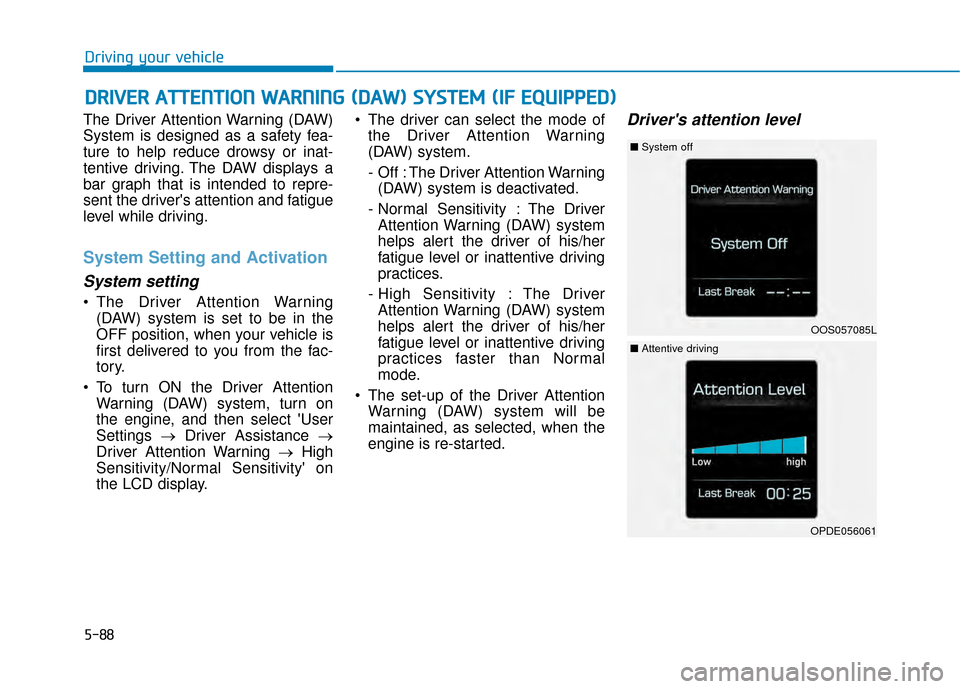
Driver's attention level
D DR
RI
IV
V E
ER
R
A
A T
TT
TE
EN
N T
TI
IO
O N
N
W
W A
AR
RN
N I
IN
N G
G
(
( D
D A
A W
W )
)
S
S Y
Y S
ST
T E
EM
M
(
( I
IF
F
E
E Q
Q U
UI
IP
P P
PE
ED
D )
)
OOS057085L
■ System off
OPDE056061
■Attentive driving
Page 323 of 505
5-89
Driving your vehicle
5
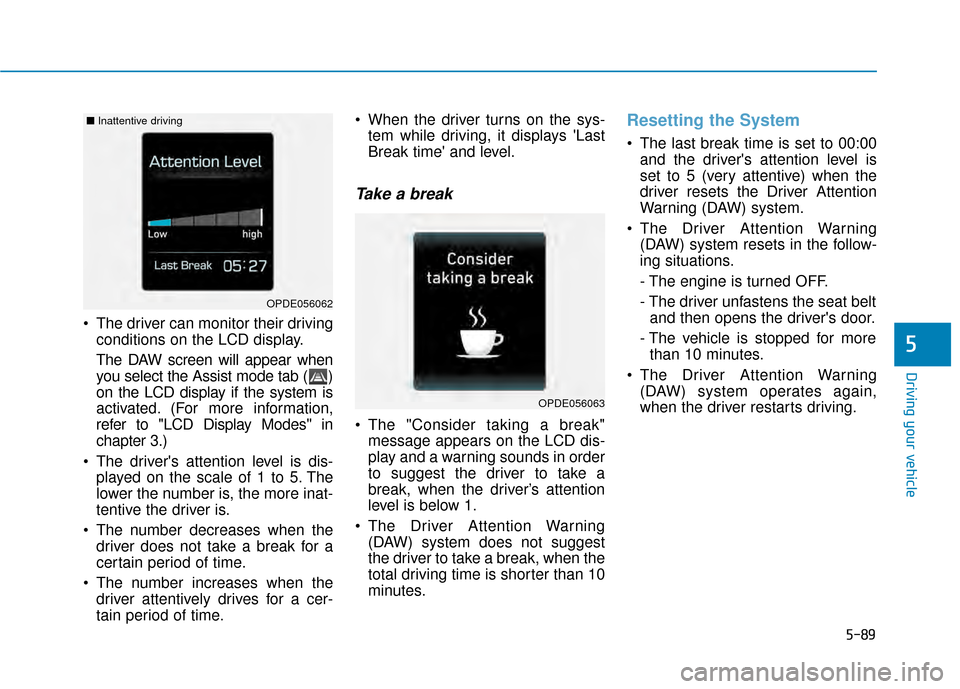
The driver can monitor their drivingconditions on the LCD display.
The DAW screen will appear when
you select the Assist mode tab ( )
on the LCD display if the system is
activated. (For more information,
refer to "LCD Display Modes" in
chapter 3.)
The driver's attention level is dis- played on the scale of 1 to 5. The
lower the number is, the more inat-
tentive the driver is.
The number decreases when the driver does not take a break for a
certain period of time.
The number increases when the driver attentively drives for a cer-
tain period of time. When the driver turns on the sys-
tem while driving, it displays 'Last
Break time' and level.
Take a break
The "Consider taking a break"message appears on the LCD dis-
play and a warning sounds in order
to suggest the driver to take a
break, when the driver’s attention
level is below 1.
The Driver Attention Warning (DAW) system does not suggest
the driver to take a break, when the
total driving time is shorter than 10
minutes.
Resetting the System
The last break time is set to 00:00and the driver's attention level is
set to 5 (very attentive) when the
driver resets the Driver Attention
Warning (DAW) system.
The Driver Attention Warning (DAW) system resets in the follow-
ing situations.
- The engine is turned OFF.
- The driver unfastens the seat beltand then opens the driver's door.
- The vehicle is stopped for more than 10 minutes.
The Driver Attention Warning (DAW) system operates again,
when the driver restarts driving.
OPDE056063
OPDE056062
■ Inattentive driving
Page 324 of 505
5-90
Driving your vehicle
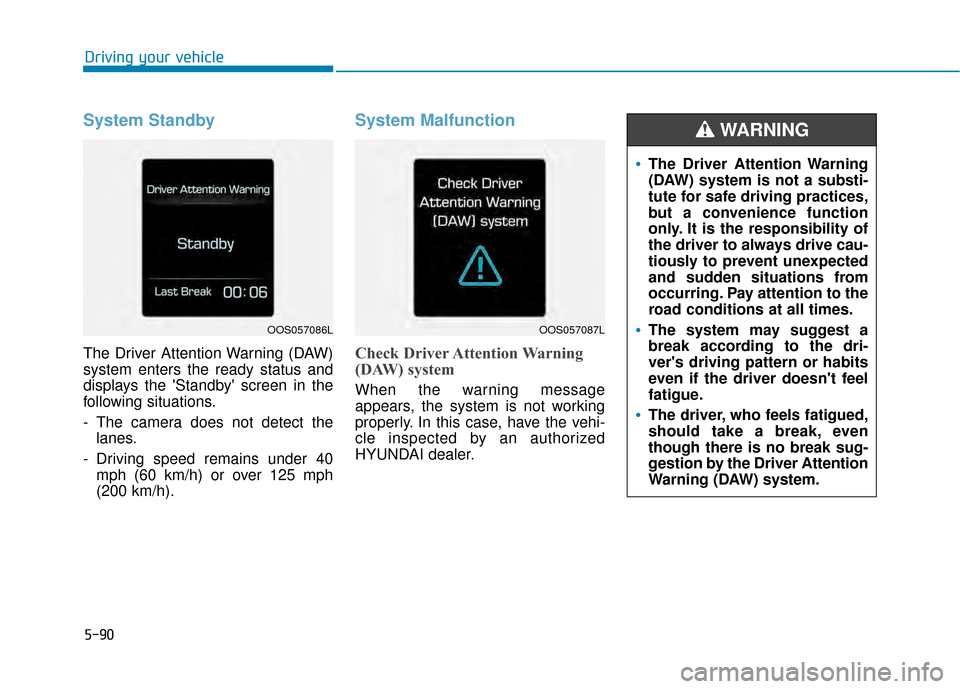
System Standby
The Driver Attention Warning (DAW)
system enters the ready status and
displays the 'Standby' screen in the
following situations.
- The camera does not detect thelanes.
- Driving speed remains under 40 mph (60 km/h) or over 125 mph
(200 km/h).
System Malfunction
Check Driver Attention Warning
(DAW) system
When the warning message
appears, the system is not working
properly. In this case, have the vehi-
cle inspected by an authorized
HYUNDAI dealer.
The Driver Attention Warning
(DAW) system is not a substi-
tute for safe driving practices,
but a convenience function
only. It is the responsibility of
the driver to always drive cau-
tiously to prevent unexpected
and sudden situations from
occurring. Pay attention to the
road conditions at all times.
The system may suggest a
break according to the dri-
ver's driving pattern or habits
even if the driver doesn't feel
fatigue.
The driver, who feels fatigued,
should take a break, even
though there is no break sug-
gestion by the Driver Attention
Warning (DAW) system.
WARNING
OOS057086LOOS057087L
Page 325 of 505
5-91
Driving your vehicle
5
The Driver Attention Warning sys-
tem utilizes the camera sensor on
the front windshield for its opera-
tion. To keep the camera sensor in
the best condition, you should
observe the followings:
NEVER install any accessoriesor stickers on the front wind-
shield, nor tint the front wind-
shield.
NEVER locate any reflective objects (i.e. white paper, mirror)
over the dashboard. Any light
reflection may cause a malfunc-
tion of the Driver Attention Alert
(DAW) system.
Pay extreme caution to keep the camera sensor out of water.
NEVER arbitrarily disassemble the camera assembly, nor apply
any impact on the camera
assembly.
NOTICE
The Driver Attention Warning
(DAW) system may not properly
operate with limited alerting in
the following situations:
The lane detection perform-
ance is limited. (For more infor-
mation, refer to "Lane Keeping
Assist (LKA) system" in this
chapter.)
The vehicle is violently driven
or is abruptly turned for obsta-
cle avoidance (e.g. construc-
tion area, other vehicles, fallen
objects, bumpy road).
Forward drivability of the vehi-
cle is severely undermined
(possibly due to wide variation
in tire pressures, uneven tire
wear-out, toe-in/toe-out align-
ment).
The vehicle drives on a curvy
road.
The vehicle drives on a bumpy
road.
The vehicle drives through a
windy area.
The vehicle is controlled by the
following driving assist sys-
tems:
- Lane Keeping Assist (LKA)system
- Forward Collision-avoidance Assist (FCA) systemCAUTION
Playing the vehicle audio sys-
tem at high volume may offset
the Driver Attention Warning
(DAW) system warning sounds.
CAUTION