brake sensor HYUNDAI KONA 2021 User Guide
[x] Cancel search | Manufacturer: HYUNDAI, Model Year: 2021, Model line: KONA, Model: HYUNDAI KONA 2021Pages: 506, PDF Size: 34.9 MB
Page 313 of 506
5-79
Driving your vehicle
5
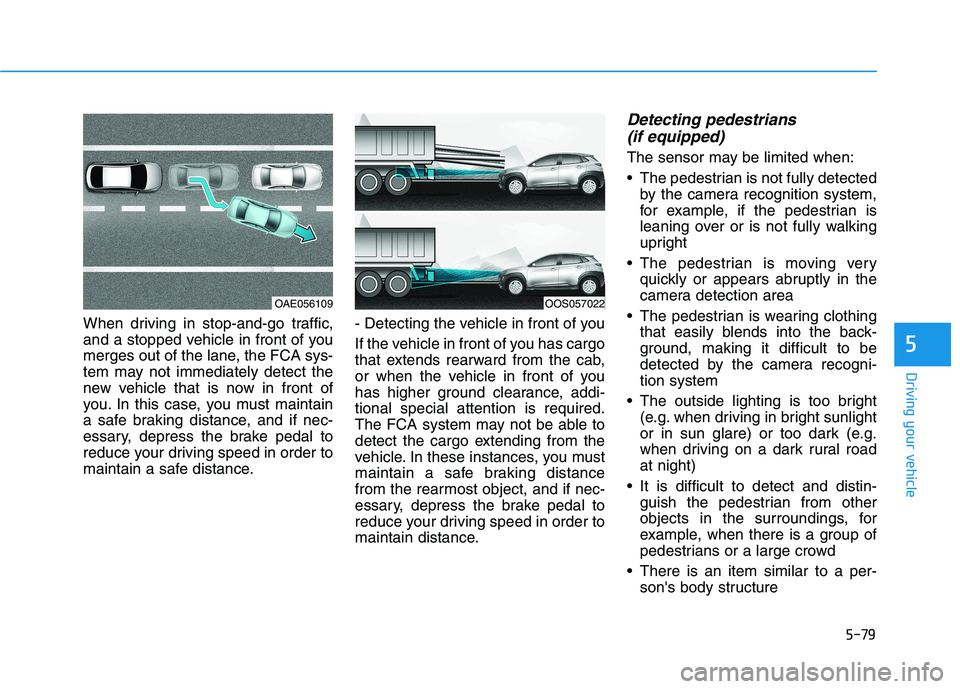
When driving in stop-and-go traffic,
and a stopped vehicle in front of you
merges out of the lane, the FCA sys-
tem may not immediately detect the
new vehicle that is now in front of
you. In this case, you must maintain
a safe braking distance, and if nec-
essary, depress the brake pedal to
reduce your driving speed in order to
maintain a safe distance.- Detecting the vehicle in front of you
If the vehicle in front of you has cargo
that extends rearward from the cab,
or when the vehicle in front of you
has higher ground clearance, addi-
tional special attention is required.
The FCA system may not be able to
detect the cargo extending from the
vehicle. In these instances, you must
maintain a safe braking distance
from the rearmost object, and if nec-
essary, depress the brake pedal to
reduce your driving speed in order to
maintain distance.
Detecting pedestrians
(if equipped)
The sensor may be limited when:
The pedestrian is not fully detected
by the camera recognition system,
for example, if the pedestrian is
leaning over or is not fully walking
upright
The pedestrian is moving very
quickly or appears abruptly in the
camera detection area
The pedestrian is wearing clothing
that easily blends into the back-
ground, making it difficult to be
detected by the camera recogni-
tion system
The outside lighting is too bright
(e.g. when driving in bright sunlight
or in sun glare) or too dark (e.g.
when driving on a dark rural road
at night)
It is difficult to detect and distin-
guish the pedestrian from other
objects in the surroundings, for
example, when there is a group of
pedestrians or a large crowd
There is an item similar to a per-
son's body structure
OOS057022OAE056109
Page 335 of 506
5-101
Driving your vehicle
5
To temporarily accelerate with
the Smart Cruise Control on
If you want to speed up temporarily
when the Smart Cruise Control is on,
depress the accelerator pedal.
Increased speed will not interfere
with Smart Cruise Control operation
or change the set speed.
To return to the set speed, take your
foot off the accelerator pedal.
If you push the toggle lever down
(SET-) at increased speed, the cruis-
ing speed will be set again pedal.
Smart Cruise Control set speed
will be temporarily canceled
when:
Canceled manually
Depressing the brake pedal.
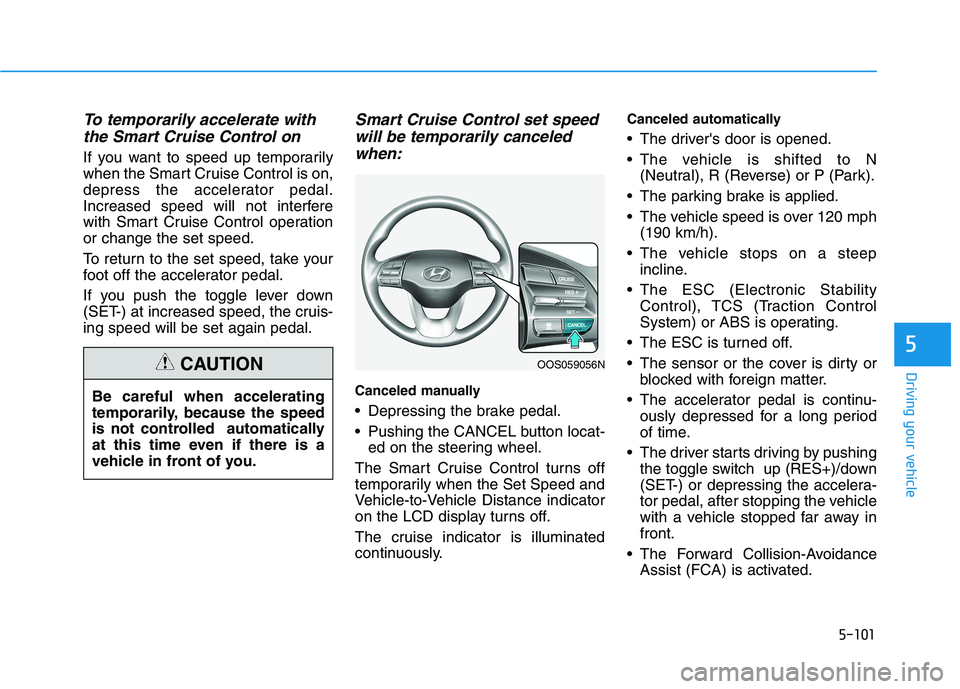
Pushing the CANCEL button locat-
ed on the steering wheel.
The Smart Cruise Control turns off
temporarily when the Set Speed and
Vehicle-to-Vehicle Distance indicator
on the LCD display turns off.
The cruise indicator is illuminated
continuously.
Canceled automatically
The driver's door is opened.
The vehicle is shifted to N
(Neutral), R (Reverse) or P (Park).
The parking brake is applied.
The vehicle speed is over 120 mph
(190 km/h).
The vehicle stops on a steep
incline.
The ESC (Electronic Stability
Control), TCS (Traction Control
System) or ABS is operating.
The ESC is turned off.
The sensor or the cover is dirty or
blocked with foreign matter.
The accelerator pedal is continu-
ously depressed for a long period
of time.
The driver starts driving by pushing
the toggle switch up (RES+)/down
(SET-) or depressing the accelera-
tor pedal, after stopping the vehicle
with a vehicle stopped far away in
front.
The Forward Collision-Avoidance
Assist (FCA) is activated. Be careful when accelerating
temporarily, because the speed
is not controlled automatically
at this time even if there is a
vehicle in front of you.
CAUTIONOOS059056N
Page 340 of 506
5-106
Driving your vehicle
Sensor to Detect Distance to
the Vehicle Ahead
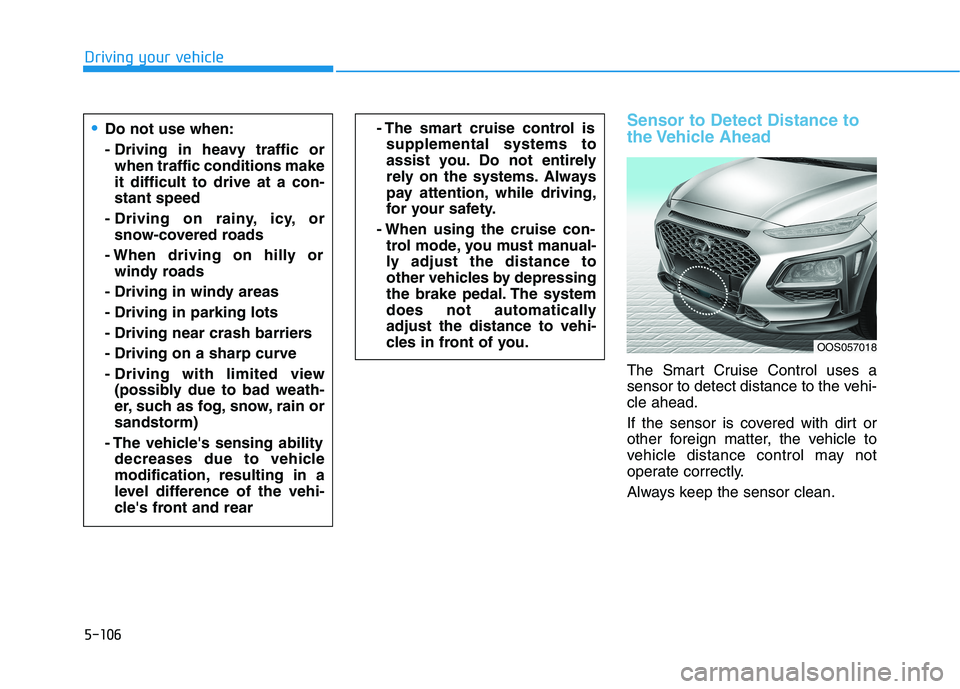
The Smart Cruise Control uses a
sensor to detect distance to the vehi-
cle ahead.
If the sensor is covered with dirt or
other foreign matter, the vehicle to
vehicle distance control may not
operate correctly.
Always keep the sensor clean.
Do not use when:
- Driving in heavy traffic or
when traffic conditions make
it difficult to drive at a con-
stant speed
- Driving on rainy, icy, or
snow-covered roads
- When driving on hilly or
windy roads
- Driving in windy areas
- Driving in parking lots
- Driving near crash barriers
- Driving on a sharp curve
- Driving with limited view
(possibly due to bad weath-
er, such as fog, snow, rain or
sandstorm)
- The vehicle's sensing ability
decreases due to vehicle
modification, resulting in a
level difference of the vehi-
cle's front and rear- The smart cruise control is
supplemental systems to
assist you. Do not entirely
rely on the systems. Always
pay attention, while driving,
for your safety.
- When using the cruise con-
trol mode, you must manual-
ly adjust the distance to
other vehicles by depressing
the brake pedal. The system
does not automatically
adjust the distance to vehi-
cles in front of you.
OOS057018
Page 345 of 506
5-111
Driving your vehicle
5
Lane changing
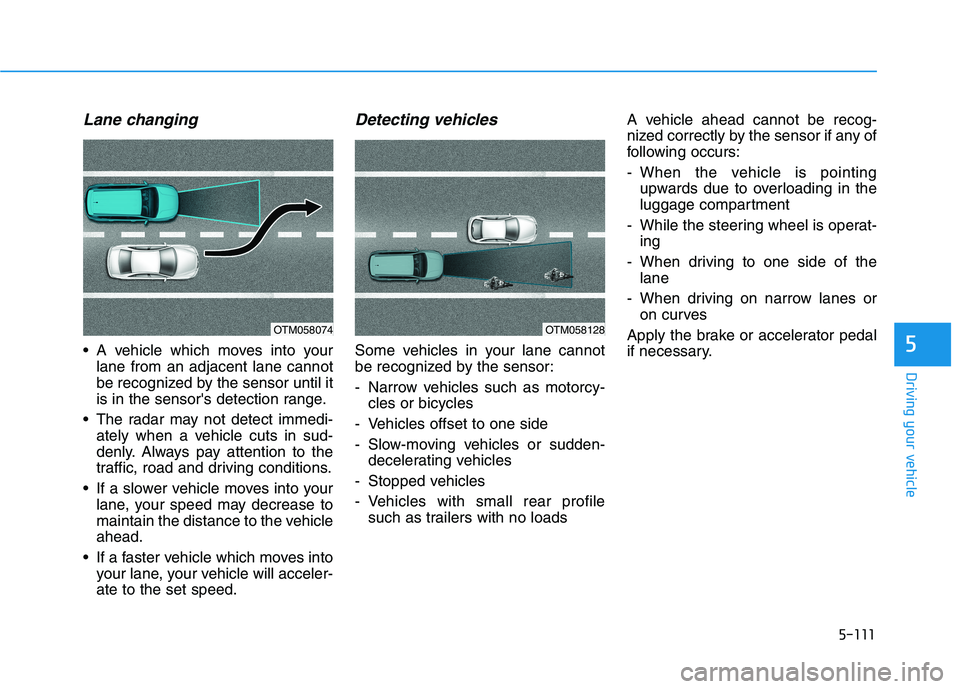
A vehicle which moves into your
lane from an adjacent lane cannot
be recognized by the sensor until it
is in the sensor's detection range.
The radar may not detect immedi-
ately when a vehicle cuts in sud-
denly. Always pay attention to the
traffic, road and driving conditions.
If a slower vehicle moves into your
lane, your speed may decrease to
maintain the distance to the vehicle
ahead.
If a faster vehicle which moves into
your lane, your vehicle will acceler-
ate to the set speed.
Detecting vehicles
Some vehicles in your lane cannot
be recognized by the sensor:
- Narrow vehicles such as motorcy-
cles or bicycles
- Vehicles offset to one side
- Slow-moving vehicles or sudden-
decelerating vehicles
- Stopped vehicles
- Vehicles with small rear profile
such as trailers with no loadsA vehicle ahead cannot be recog-
nized correctly by the sensor if any of
following occurs:
- When the vehicle is pointing
upwards due to overloading in the
luggage compartment
- While the steering wheel is operat-
ing
- When driving to one side of the
lane
- When driving on narrow lanes or
on curves
Apply the brake or accelerator pedal
if necessary.
OTM058074OTM058128
Page 390 of 506
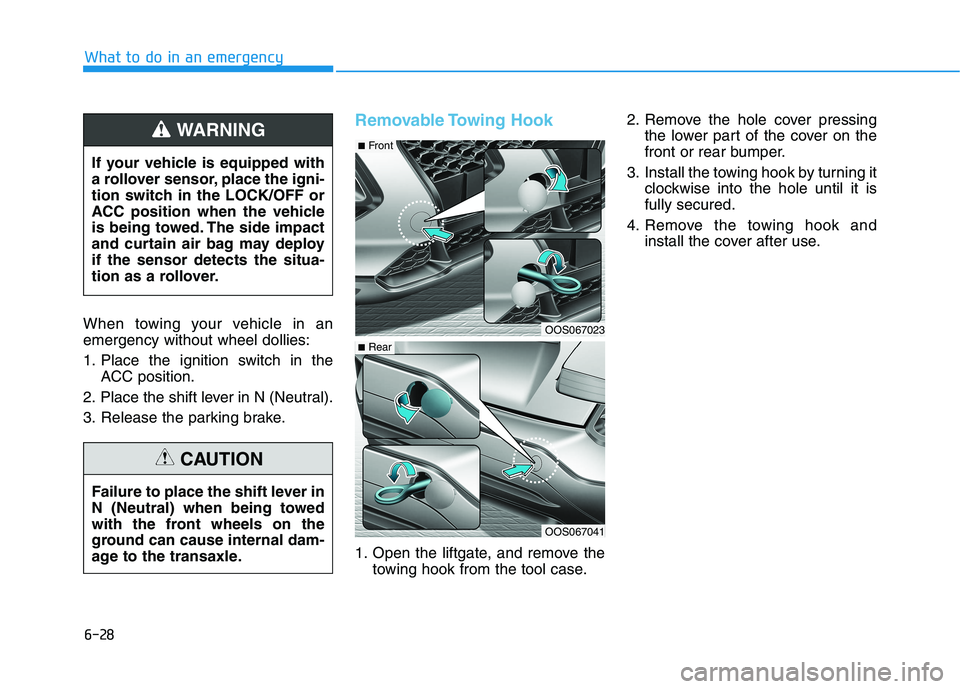
When towing your vehicle in an
emergency without wheel dollies:
1. Place the ignition switch in the
ACC position.
2. Place the shift lever in N (Neutral).
3. Release the parking brake.
Removable Towing Hook
1. Open the liftgate, and remove the
towing hook from the tool case.2. Remove the hole cover pressing
the lower part of the cover on the
front or rear bumper.
3. Install the towing hook by turning it
clockwise into the hole until it is
fully secured.
4. Remove the towing hook and
install the cover after use. If your vehicle is equipped with
a rollover sensor, place the igni-
tion switch in the LOCK/OFF or
ACC position when the vehicle
is being towed. The side impact
and curtain air bag may deploy
if the sensor detects the situa-
tion as a rollover.
WARNING
Failure to place the shift lever in
N (Neutral) when being towed
with the front wheels on the
ground can cause internal dam-
age to the transaxle.
CAUTION
OOS067023
OOS067041
■Front
■Rear
What to do in an emergency
6-28
Page 451 of 506
7-59
7
Maintenance
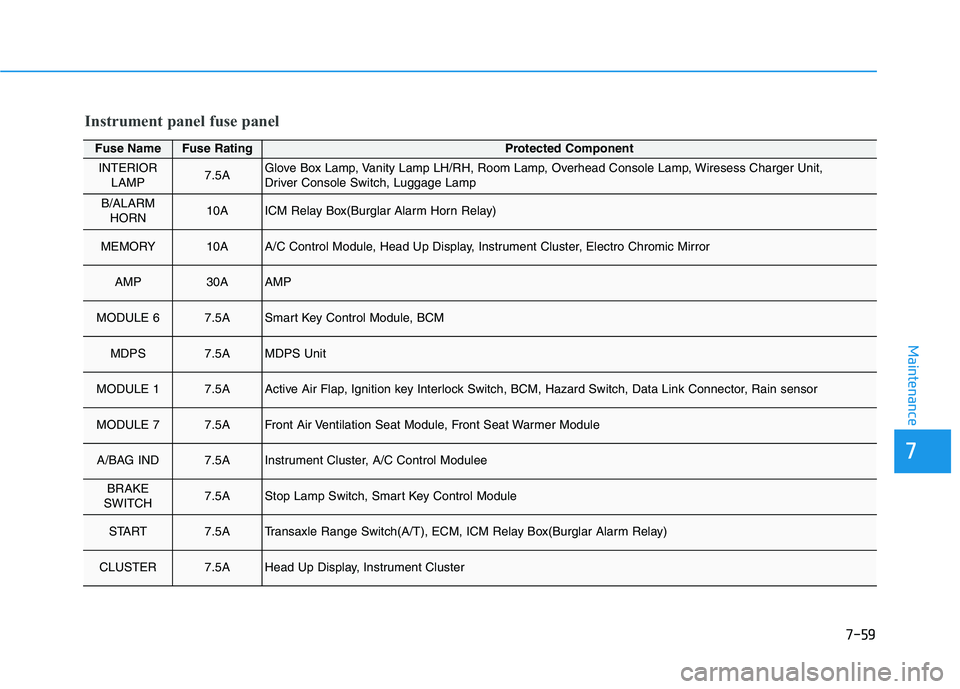
Fuse NameFuse RatingProtected Component
INTERIOR
LAMP7.5AGlove Box Lamp, Vanity Lamp LH/RH, Room Lamp, Overhead Console Lamp, Wiresess Charger Unit,
Driver Console Switch, Luggage Lamp
B/ALARM
HORN10AICM Relay Box(Burglar Alarm Horn Relay)
MEMORY10AA/C Control Module, Head Up Display, Instrument Cluster, Electro Chromic Mirror
AMP30AAMP
MODULE 67.5ASmart Key Control Module, BCM
MDPS7.5AMDPS Unit
MODULE 17.5AActive Air Flap, Ignition key Interlock Switch, BCM, Hazard Switch, Data Link Connector, Rain sensor
MODULE 77.5AFront Air Ventilation Seat Module, Front Seat Warmer Module
A/BAG IND7.5AInstrument Cluster, A/C Control Modulee
BRAKE
SWITCH7.5AStop Lamp Switch, Smart Key Control Module
START7.5ATransaxle Range Switch(A/T), ECM, ICM Relay Box(Burglar Alarm Relay)
CLUSTER7.5AHead Up Display, Instrument Cluster
Instrument panel fuse panel
Page 472 of 506
7-80
Maintenance
A AP
PP
PE
EA
AR
RA
AN
NC
CE
E
C
CA
AR
RE
E
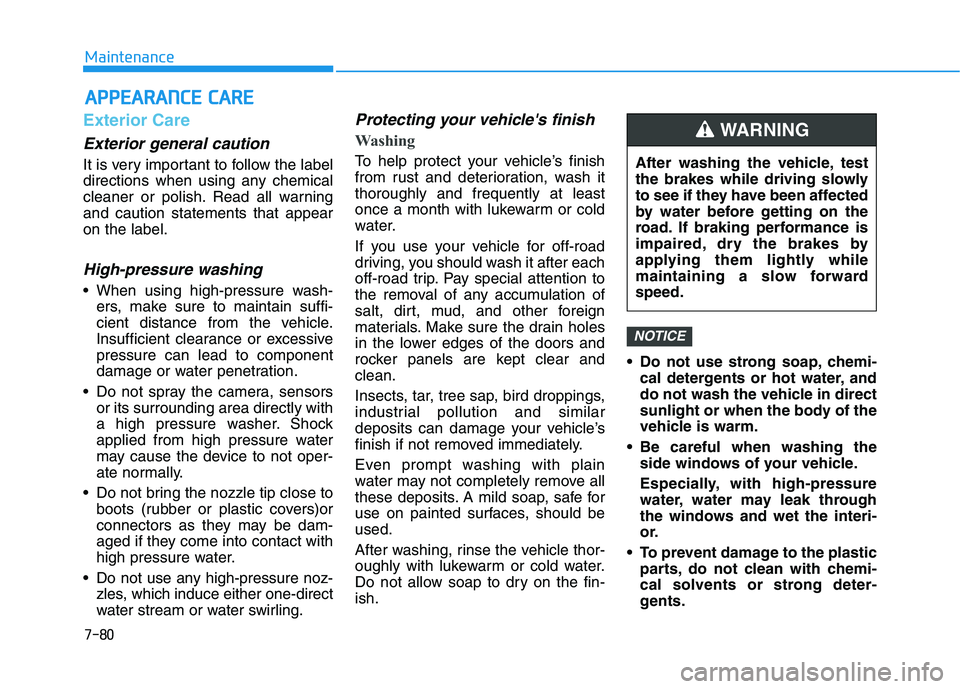
Exterior Care
Exterior general caution
It is very important to follow the label
directions when using any chemical
cleaner or polish. Read all warning
and caution statements that appear
on the label.
High-pressure washing
When using high-pressure wash-
ers, make sure to maintain suffi-
cient distance from the vehicle.
Insufficient clearance or excessive
pressure can lead to component
damage or water penetration.
Do not spray the camera, sensors
or its surrounding area directly with
a high pressure washer. Shock
applied from high pressure water
may cause the device to not oper-
ate normally.
Do not bring the nozzle tip close to
boots (rubber or plastic covers)or
connectors as they may be dam-
aged if they come into contact with
high pressure water.
Do not use any high-pressure noz-
zles, which induce either one-direct
water stream or water swirling.
Protecting your vehicle's finish
Washing
To help protect your vehicle’s finish
from rust and deterioration, wash it
thoroughly and frequently at least
once a month with lukewarm or cold
water.
If you use your vehicle for off-road
driving, you should wash it after each
off-road trip. Pay special attention to
the removal of any accumulation of
salt, dirt, mud, and other foreign
materials. Make sure the drain holes
in the lower edges of the doors and
rocker panels are kept clear and
clean.
Insects, tar, tree sap, bird droppings,
industrial pollution and similar
deposits can damage your vehicle’s
finish if not removed immediately.
Even prompt washing with plain
water may not completely remove all
these deposits. A mild soap, safe for
use on painted surfaces, should be
used.
After washing, rinse the vehicle thor-
oughly with lukewarm or cold water.
Do not allow soap to dry on the fin-
ish. Do not use strong soap, chemi-
cal detergents or hot water, and
do not wash the vehicle in direct
sunlight or when the body of the
vehicle is warm.
Be careful when washing the
side windows of your vehicle.
Especially, with high-pressure
water, water may leak through
the windows and wet the interi-
or.
To prevent damage to the plastic
parts, do not clean with chemi-
cal solvents or strong deter-
gents.
NOTICE
After washing the vehicle, test
the brakes while driving slowly
to see if they have been affected
by water before getting on the
road. If braking performance is
impaired, dry the brakes by
applying them lightly while
maintaining a slow forward
speed.
WARNING
Page 499 of 506
I-2
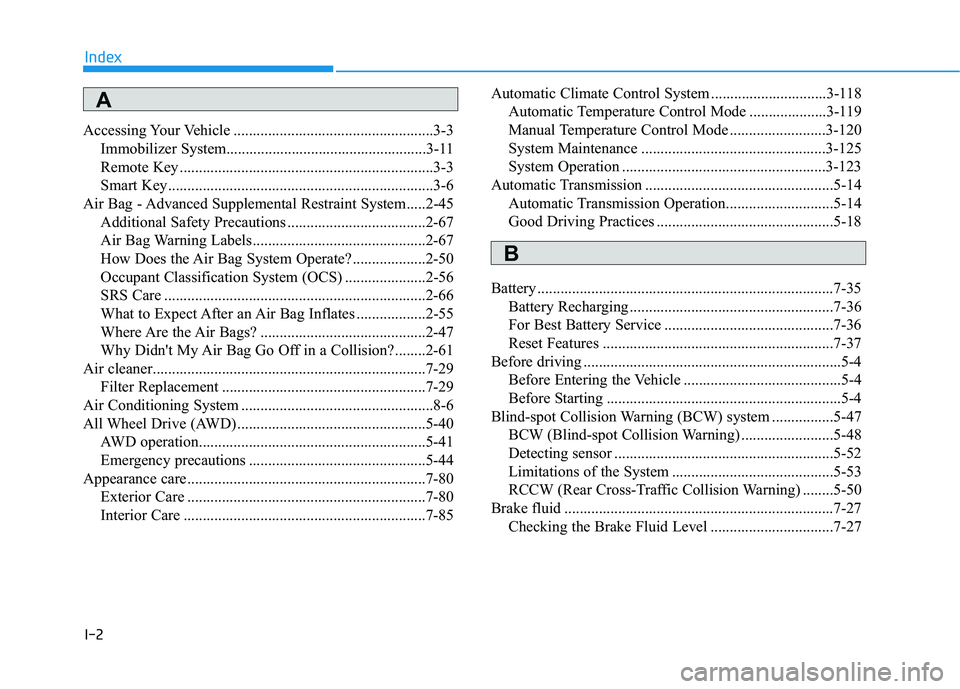
Accessing Your Vehicle ....................................................3-3
Immobilizer System....................................................3-11
Remote Key ..................................................................3-3
Smart Key.....................................................................3-6
Air Bag - Advanced Supplemental Restraint System.....2-45
Additional Safety Precautions ....................................2-67
Air Bag Warning Labels.............................................2-67
How Does the Air Bag System Operate? ...................2-50
Occupant Classification System (OCS) .....................2-56
SRS Care ....................................................................2-66
What to Expect After an Air Bag Inflates ..................2-55
Where Are the Air Bags? ...........................................2-47
Why Didn't My Air Bag Go Off in a Collision?........2-61
Air cleaner.......................................................................7-29
Filter Replacement .....................................................7-29
Air Conditioning System ..................................................8-6
All Wheel Drive (AWD) .................................................5-40
AWD operation...........................................................5-41
Emergency precautions ..............................................5-44
Appearance care..............................................................7-80
Exterior Care ..............................................................7-80
Interior Care ...............................................................7-85Automatic Climate Control System ..............................3-118
Automatic Temperature Control Mode ....................3-119
Manual Temperature Control Mode .........................3-120
System Maintenance ................................................3-125
System Operation .....................................................3-123
Automatic Transmission .................................................5-14
Automatic Transmission Operation............................5-14
Good Driving Practices ..............................................5-18
Battery .............................................................................7-35
Battery Recharging .....................................................7-36
For Best Battery Service ............................................7-36
Reset Features ............................................................7-37
Before driving ...................................................................5-4
Before Entering the Vehicle .........................................5-4
Before Starting .............................................................5-4
Blind-spot Collision Warning (BCW) system ................5-47
BCW (Blind-spot Collision Warning) ........................5-48
Detecting sensor .........................................................5-52
Limitations of the System ..........................................5-53
RCCW (Rear Cross-Traffic Collision Warning) ........5-50
Brake fluid ......................................................................7-27
Checking the Brake Fluid Level ................................7-27
Index
A
B