phone HYUNDAI KONA 2021 User Guide
[x] Cancel search | Manufacturer: HYUNDAI, Model Year: 2021, Model line: KONA, Model: HYUNDAI KONA 2021Pages: 506, PDF Size: 34.9 MB
Page 223 of 506
3-139
Convenient features of your vehicle
3
To charge a cellular phone
The wireless cellular phone charging
system charges only the Qi-enabled
cellular phones ( ). Read the label
on the cellular phone accessory
cover or visit your cellular phone
manufacturer's website to check
whether your cellular phone supports
the Qi technology.
The wireless charging process starts
when you put a Qi-enabled cellular
phone on the wireless charging unit.
1. Remove other items, including the
smart key, from the wireless
charging unit. If not, the wireless
charging process may be inter-
rupted. Place the cellular phone
on the center of the charging pad.
2. The indicator light is orange when
the cellular phone is charging. The
indicator light turns green when
phone charging is complete.
3. You can turn ON or OFF the wire-
less charging function in the user
settings mode on the instrument
cluster. For further information,
refer to the "LCD Display Modes"
in this chapter.If your cellular phone is not charging:
- Slightly change the position of the
cellular phone on the charging pad.
- Make sure the indicator light is
orange.
The indicator light will blink orange
for 10 seconds if there is a malfunc-
tion in the wireless charging system.
In this case, temporarily stop the
charging process, and re-attempt to
charge your cellular phone again.
The system warns you with a mes-
sage on the LCD display if the cellu-
lar phone is still on the wireless
charging unit after the engine is
turned OFF and the front door is
opened.
Information
For some manufacturer's cellular
phones, the system may not warn you
even though the cellular phone is left
on the wireless charging unit. This is
due to the particular characteristic of
the cellular phone and not a malfunc-
tion of the wireless charging. The wireless cellular phone
charging system may not sup-
port certain cellular phones,
which are not verified for the Qi
specification ( ).
When placing your cellular
phone on the charging mat,
position the phone in the middle
of the mat for optimal charging
performance. If your cell phone
is off to the side, the charging
rate may be less and in some
cases the cell phone may experi-
ence higher heat conduction.
In some cases, the wireless
charging may stop temporarily
when the Smart Key is used,
either when starting the vehicle
or locking/unlocking the doors,
etc.
When charging certain cellular
phones, the charging indicator
may not change to green when
the cell phone is fully charged.
NOTICE
i
Page 224 of 506
3-140
Convenient features of your vehicle
The wireless charging process
may temporarily stop, when tem-
perature abnormally increases
inside the wireless cellular
phone charging system. The
wireless charging process
restarts, when temperature falls
to a certain level.
The wireless charging process
may temporarily stop when
there is any metallic item, such
as a coin, between the wireless
cellular phone charging system
and cellular phone.
When charging some cell
phones with the case still
applied,the wireless charging
speed may decrease and the
wireless charging may stop.
If the cellular phone has a thick
cover, the wireless charging may
not be possible.
If the cell phone is not complete-
ly contacting the charging pad,
wireless charging may not oper-
ate properly.
Some magnetic items like credit
cards, phone cards or rail tickets
may be damaged if left with the
cellular phone during the charg-
ing process. If the cellular phone without the
wireless charging function or
the metallic items are placed on
the charging pad, it may cause
slight noise. This noise does not
affect the cellular phone and the
vehicle, because this noise is an
operating sound during deter-
mining the item on the charging
pad.
Information
If the ignition switch is OFF, the
charging also stops.
Information
This device complies with part 15 of
the FCC Rules.
Operation is subject to the following
two conditions:
1. This device may not cause harmful
interference, and
2. This device must accept any inter-
ference received, including inter-
ference that may cause undesired
operation.
Clock
Vehicles with Audio system
Select the [SETUP]button on the
audio system ➟Select [Date/Time].
Set time: Set the time displayed on
the audio screen.
Time format: Choose between 12-
hour and 24-hour time formats.
Vehicles with Navigation system
Select the Settings menu on the
Navigation system➟Select
[Date/Time].
GPS time: Displays time according
to the received GNSS time.
24-hour: Switches to 12 hour or 24
hour.
i
i
Do not attempt to adjust the
clock while driving. Doing so
may result in distracted driving
which may lead to an accident
involving personal injury or
death.
WARNING
Page 233 of 506
4-4
Infotainment System
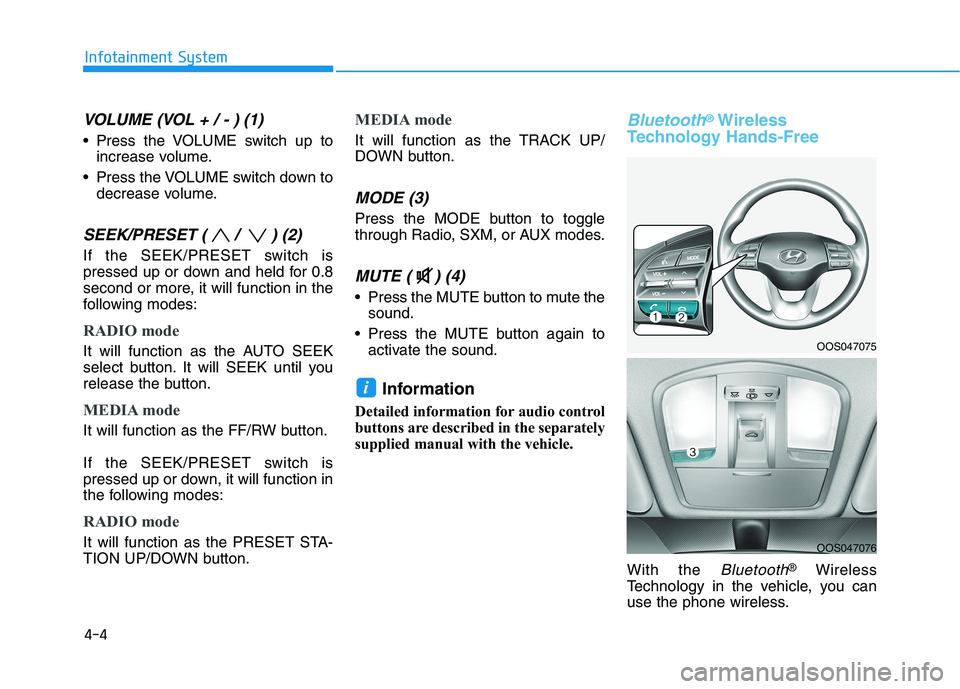
VOLUME (VOL + / - ) (1)
Press the VOLUME switch up to
increase volume.
Press the VOLUME switch down to
decrease volume.
SEEK/PRESET ( / ) (2)
If the SEEK/PRESET switch is
pressed up or down and held for 0.8
second or more, it will function in the
following modes:
RADIO mode
It will function as the AUTO SEEK
select button. It will SEEK until you
release the button.
MEDIA mode
It will function as the FF/RW button.
If the SEEK/PRESET switch is
pressed up or down, it will function in
the following modes:
RADIO mode
It will function as the PRESET STA-
TION UP/DOWN button.
MEDIA mode
It will function as the TRACK UP/
DOWN button.
MODE (3)
Press the MODE button to toggle
through Radio, SXM, or AUX modes.
MUTE ( ) (4)
Press the MUTE button to mute the
sound.
Press the MUTE button again to
activate the sound.
Information
Detailed information for audio control
buttons are described in the separately
supplied manual with the vehicle.
Bluetooth®Wireless
Technology Hands-Free
With the Bluetooth®Wireless
Technology in the vehicle, you can
use the phone wireless.
i
OOS047075
OOS047076
Page 234 of 506
(1) Call / Answer button
(2) Call end button
(3) Microphone
Detailed information for the
Bluetooth®
Wireless Technology hands-free is
described in the Vehicle Infotainment
User's Manual.
Audio (Display Audio) / Video /
Navigation System (AVN)
(if equipped)
Detailed information for the AVN sys-
tem is described in the Vehicle
Infotainment User's Manual.
4-5
Infotainment System
4
Page 502 of 506
I-5
If the engine overheats ......................................................6-6
If the engine will not start.................................................6-3
If the Engine Doesn't Turn Over or
Turns Over Slowly ....................................................6-3
If the Engine Turns Over Normally
but Doesn't Start ........................................................6-3
If you have a flat tire (With spare tire) ...........................6-14
Changing Tires ...........................................................6-15
Jack and Tools ............................................................6-14
If you have a flat tire (with tire mobility kit) .................6-20
Checking the tire inflation pressure ...........................6-25
Components of the Tire Mobility Kit.........................6-22
Distributing the sealant ..............................................6-24
Introduction ................................................................6-20
Notes on the safe use of the Tire Mobility Kit ..........6-21
Using the Tire Mobility Kit........................................6-23
Ignition switch ..................................................................5-6
Engine Start/Stop Button ..............................................5-9
Key Ignition Switch .....................................................5-6
Important Safety Precautions............................................2-2
Air Bag Hazards ...........................................................2-2
Always Wear Your Seat Belt ........................................2-2
Control Your Speed ......................................................2-2
Driver Distraction.........................................................2-2
Keep Your Vehicle in Safe Condition ..........................2-2
Restrain All Children....................................................2-2Infotainment System .........................................................4-2
Antenna ........................................................................4-2
Audio (Display Audio) / Video
/ Navigation System (AVN) .......................................4-4
AUX, USB and iPod
®Port ..........................................4-2
Bluetooth®Wireless Technology Hands-Free ..............4-4
Steering Wheel Audio Controls....................................4-3
In case of an emergency while driving .............................6-2
If the Engine Stalls at a Crossroad or Crossing ...........6-2
If the Engine Stalls While Driving...............................6-2
If you Have a Flat Tire While Driving.........................6-3
Instrument Cluster...........................................................3-49
Gauges and Meters .....................................................3-51
Instrument Cluster Control .........................................3-50
LCD Display Messages ..............................................3-67
Transmission shift indicator .......................................3-54
Warning and Indicator Lights.....................................3-55
Instrument Panel Overview ..............................................1-5
Interior Features ............................................................3-135
Cargo Area Cover .....................................................3-142
Clock ........................................................................3-140
Clothes Hanger .........................................................3-140
Cup Holder ...............................................................3-135
Floor Mat Anchor(s) .................................................3-141
Luggage Net Holder .................................................3-141
Luggage tray.............................................................3-144
Power Outlet.............................................................3-137
Sunvisor ....................................................................3-136
Wireless Cellular Phone Charging System ..............3-138
I
Index
I