wheel HYUNDAI KONA 2021 Repair Manual
[x] Cancel search | Manufacturer: HYUNDAI, Model Year: 2021, Model line: KONA, Model: HYUNDAI KONA 2021Pages: 506, PDF Size: 34.9 MB
Page 322 of 506
5-88
Driving your vehicle
LKA system Function Change
The driver can change LKA to Lane
Departure Warning (LDW) system or
change the LKA system mode
between Standard LKA and Active
LKA from the LCD display. Go to the
'User Settings →Driver Assistance →
Lane Keeping Assist →Lane
Departure Warning/Standard
LKA/Active LKA'.
Lane Departure Warning
LDW system alerts the driver with a
visual warning and a warning alarm
when the system detects the vehicle
departing the lane. The steering
wheel will not be controlled.
Standard LKA
The Standard LKA mode guides the
driver to help keep the vehicle within
the lanes. It rarely controls the steer-
ing wheel, when the vehicle drives
well inside the lanes. However, it
starts to control the steering wheel,
when the vehicle is about to deviate
out of the lanes.
Active LKA
The Active LKA mode provides more
frequent steering wheel control in
comparison with the Standard LKA
mode. Active LKA can help reduce
the driver's fatigue to assist the
steering for maintaining the vehicle
in the middle of the lane.
Information
This device complies with Part 15 of
the FCC rules.
Operation is subject to the following
two conditions:
1. This device may not cause harmful
interference.
2. This device must accept any inter-
ference received, including interfer-
ence that may cause undesired
operation.
i
Page 328 of 506
5-94
Driving your vehicle
Information
• During normal cruise control opera-
tion, when the SET switch is activat-
ed or reactivated after applying the
brakes, the cruise control will ener-
gize after approximately 3 seconds.
This delay is normal.
• Before activating the cruise control
function, the system will check to
verify that the brake switch is oper-
ating normally. Depress the brake
pedal at least once after turning ON
the ignition or starting the engine.
To set Cruise Control speed
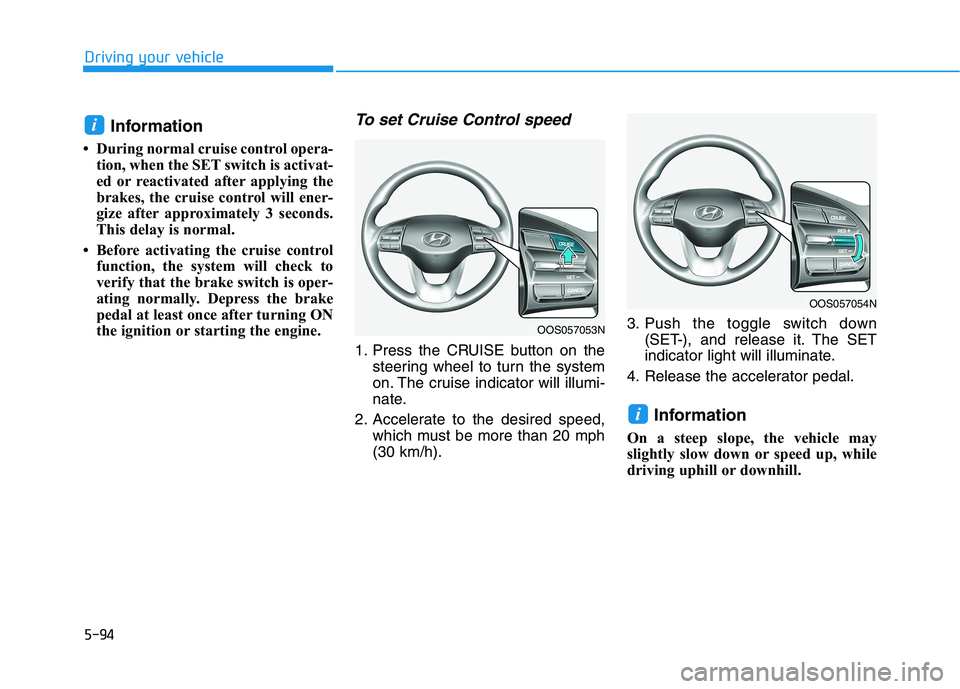
1. Press the CRUISE button on the
steering wheel to turn the system
on. The cruise indicator will illumi-
nate.
2. Accelerate to the desired speed,
which must be more than 20 mph
(30 km/h).3. Push the toggle switch down
(SET-), and release it. The SET
indicator light will illuminate.
4. Release the accelerator pedal.
Information
On a steep slope, the vehicle may
slightly slow down or speed up, while
driving uphill or downhill.
i
i
OOS057054N
OOS057053N
Page 330 of 506
5-96
Driving your vehicle
To temporarily accelerate with
the Cruise Control ON
Depress the accelerator pedal. When
you take your foot off the accelerator,
the vehicle will return to the previ-
ously set speed.
If you push the toggle switch down
(SET-) at the increased speed, the
Cruise Control will maintain the
increased speed.
Cruise Control will be canceled
when:
Depressing the brake pedal.
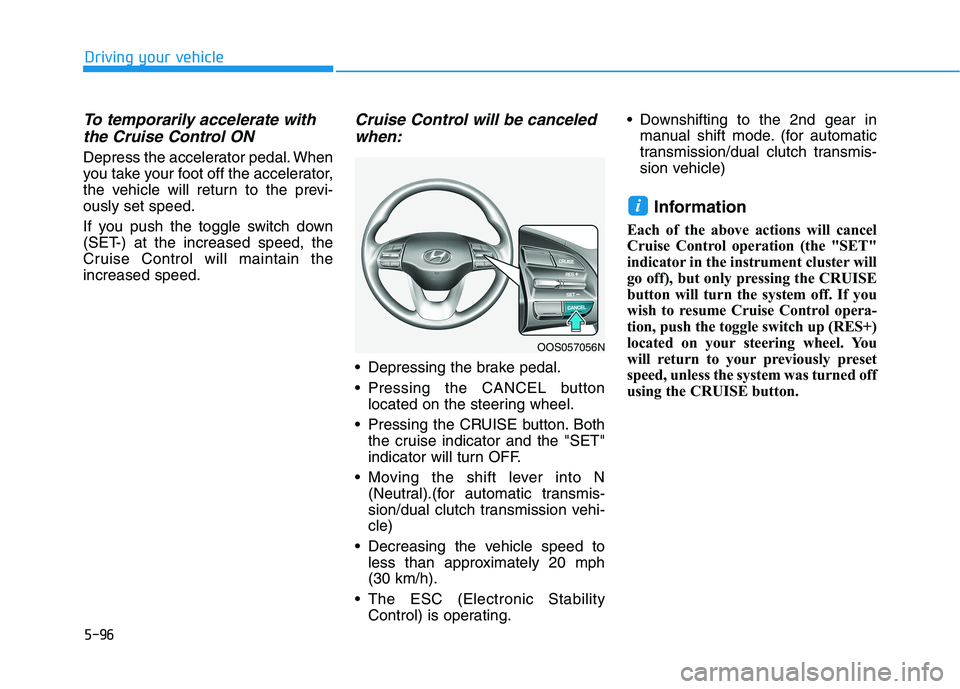
Pressing the CANCEL button
located on the steering wheel.
Pressing the CRUISE button. Both
the cruise indicator and the "SET"
indicator will turn OFF.
Moving the shift lever into N
(Neutral).(for automatic transmis-
sion/dual clutch transmission vehi-
cle)
Decreasing the vehicle speed to
less than approximately 20 mph
(30 km/h).
The ESC (Electronic Stability
Control) is operating. Downshifting to the 2nd gear in
manual shift mode. (for automatic
transmission/dual clutch transmis-
sion vehicle)
Information
Each of the above actions will cancel
Cruise Control operation (the "SET"
indicator in the instrument cluster will
go off), but only pressing the CRUISE
button will turn the system off. If you
wish to resume Cruise Control opera-
tion, push the toggle switch up (RES+)
located on your steering wheel. You
will return to your previously preset
speed, unless the system was turned off
using the CRUISE button.
i
OOS057056N
Page 333 of 506
5-99
Driving your vehicle
5
Smart Cruise Control Speed
To set Smart Cruise Control
speed
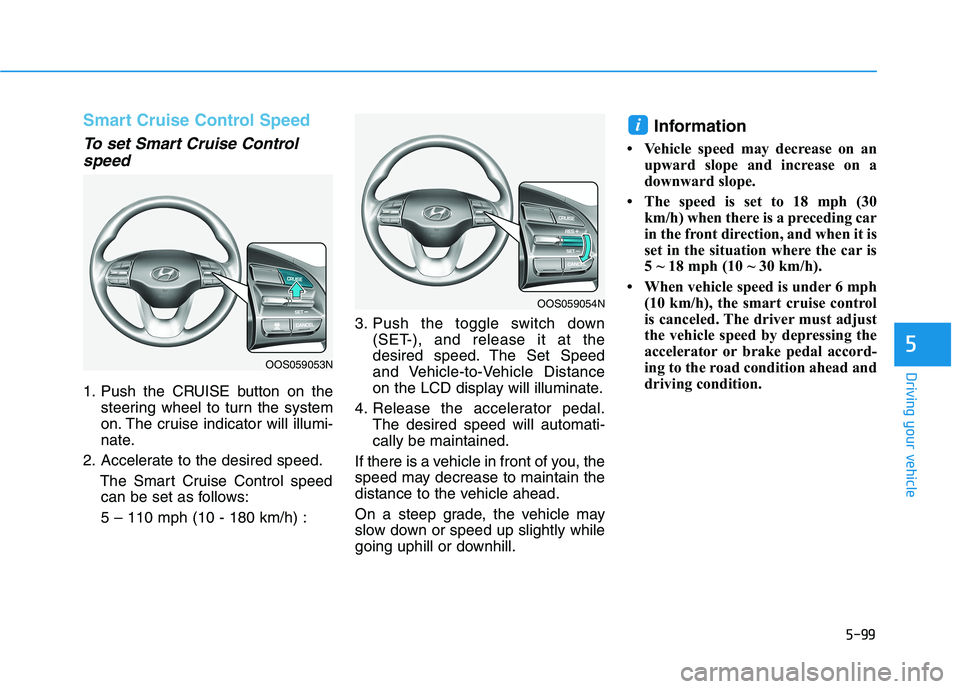
1. Push the CRUISE button on the
steering wheel to turn the system
on. The cruise indicator will illumi-
nate.
2. Accelerate to the desired speed.
The Smart Cruise Control speed
can be set as follows:
5 – 110 mph (10 - 180 km/h) :3. Push the toggle switch down
(SET-), and release it at the
desired speed. The Set Speed
and Vehicle-to-Vehicle Distance
on the LCD display will illuminate.
4. Release the accelerator pedal.
The desired speed will automati-
cally be maintained.
If there is a vehicle in front of you, the
speed may decrease to maintain the
distance to the vehicle ahead.
On a steep grade, the vehicle may
slow down or speed up slightly while
going uphill or downhill.
Information
• Vehicle speed may decrease on an
upward slope and increase on a
downward slope.
• The speed is set to 18 mph (30
km/h) when there is a preceding car
in the front direction, and when it is
set in the situation where the car is
5 ~ 18 mph (10 ~ 30 km/h).
• When vehicle speed is under 6 mph
(10 km/h), the smart cruise control
is canceled. The driver must adjust
the vehicle speed by depressing the
accelerator or brake pedal accord-
ing to the road condition ahead and
driving condition.
i
OOS059053N
OOS059054N
Page 335 of 506
5-101
Driving your vehicle
5
To temporarily accelerate with
the Smart Cruise Control on
If you want to speed up temporarily
when the Smart Cruise Control is on,
depress the accelerator pedal.
Increased speed will not interfere
with Smart Cruise Control operation
or change the set speed.
To return to the set speed, take your
foot off the accelerator pedal.
If you push the toggle lever down
(SET-) at increased speed, the cruis-
ing speed will be set again pedal.
Smart Cruise Control set speed
will be temporarily canceled
when:
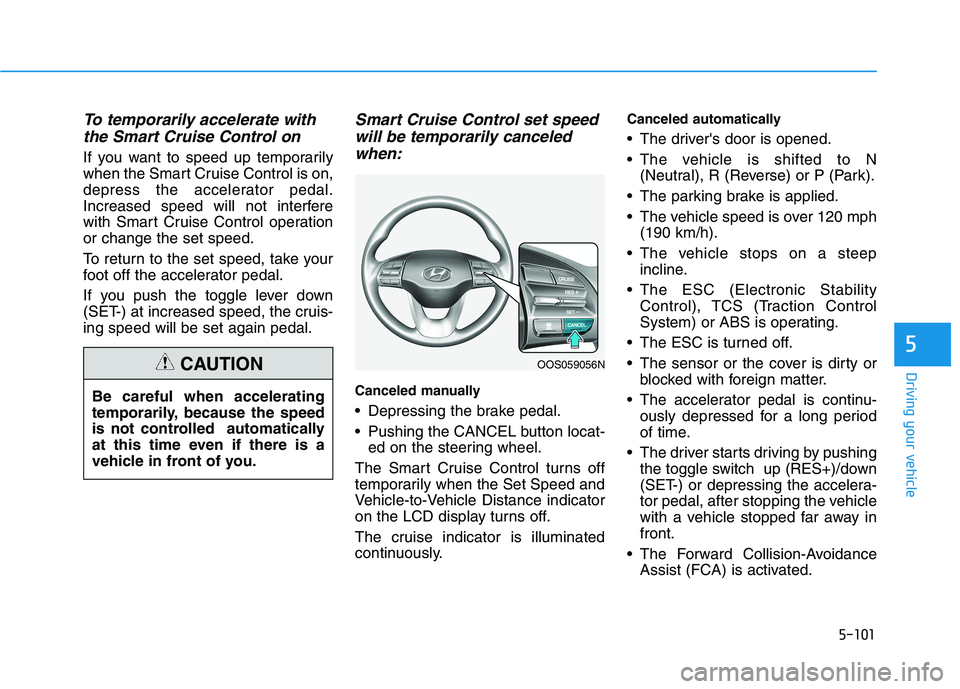
Canceled manually
Depressing the brake pedal.
Pushing the CANCEL button locat-
ed on the steering wheel.
The Smart Cruise Control turns off
temporarily when the Set Speed and
Vehicle-to-Vehicle Distance indicator
on the LCD display turns off.
The cruise indicator is illuminated
continuously.
Canceled automatically
The driver's door is opened.
The vehicle is shifted to N
(Neutral), R (Reverse) or P (Park).
The parking brake is applied.
The vehicle speed is over 120 mph
(190 km/h).
The vehicle stops on a steep
incline.
The ESC (Electronic Stability
Control), TCS (Traction Control
System) or ABS is operating.
The ESC is turned off.
The sensor or the cover is dirty or
blocked with foreign matter.
The accelerator pedal is continu-
ously depressed for a long period
of time.
The driver starts driving by pushing
the toggle switch up (RES+)/down
(SET-) or depressing the accelera-
tor pedal, after stopping the vehicle
with a vehicle stopped far away in
front.
The Forward Collision-Avoidance
Assist (FCA) is activated. Be careful when accelerating
temporarily, because the speed
is not controlled automatically
at this time even if there is a
vehicle in front of you.
CAUTIONOOS059056N
Page 343 of 506
5-109
Driving your vehicle
5
Conventional Cruise Control
Mode
The driver may choose to switch to
use the conventional Cruise Control
mode (speed only control function)
by following these steps:
1. Push the CRUISE button on the
steering wheel to turn the system
on. The cruise ( ) indi-
cator will illuminate.
2. Push and hold the Vehicle-to-
Vehicle Distance button for more
than 2 seconds.
3. Choose between "Smart Cruise
Control" and "Cruise Control".
Information
When the system is turned OFF using
the CRUISE button or the CRUISE
button is turned ON after the vehicle
is restarted with the POWER button,
conventional cruise control will be dis-
abled and Smart Cruise Control mode
will be enabled again.
Limitations of the System
The Smart Cruise Control system
may have limits to its ability to detect
distance to the vehicle ahead due to
road and traffic conditions.
i
When using the conventional
Cruise Control mode, you must
manually adjust the distance to
other vehicles by depressing
the brake pedal. The system
does not automatically adjust
the distance to vehicles in front
of you.
WARNING
Page 345 of 506
5-111
Driving your vehicle
5
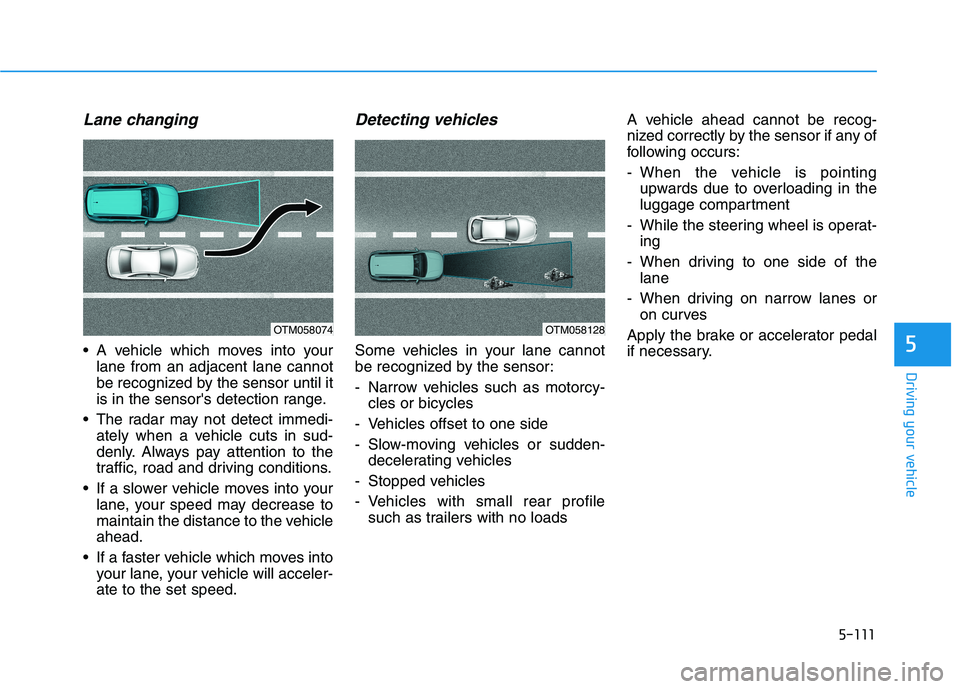
Lane changing
A vehicle which moves into your
lane from an adjacent lane cannot
be recognized by the sensor until it
is in the sensor's detection range.
The radar may not detect immedi-
ately when a vehicle cuts in sud-
denly. Always pay attention to the
traffic, road and driving conditions.
If a slower vehicle moves into your
lane, your speed may decrease to
maintain the distance to the vehicle
ahead.
If a faster vehicle which moves into
your lane, your vehicle will acceler-
ate to the set speed.
Detecting vehicles
Some vehicles in your lane cannot
be recognized by the sensor:
- Narrow vehicles such as motorcy-
cles or bicycles
- Vehicles offset to one side
- Slow-moving vehicles or sudden-
decelerating vehicles
- Stopped vehicles
- Vehicles with small rear profile
such as trailers with no loadsA vehicle ahead cannot be recog-
nized correctly by the sensor if any of
following occurs:
- When the vehicle is pointing
upwards due to overloading in the
luggage compartment
- While the steering wheel is operat-
ing
- When driving to one side of the
lane
- When driving on narrow lanes or
on curves
Apply the brake or accelerator pedal
if necessary.
OTM058074OTM058128
Page 349 of 506
5-115
Driving your vehicle
5
Hazardous Driving Conditions
When hazardous driving elements
are encountered such as water,
snow, ice, mud and sand, take the
below suggestions:
Drive cautiously and keep a longer
braking distance.
Avoid abrupt braking or steering.
When your vehicle is stuck in snow,
mud, or sand, use second gear.
Accelerate slowly to avoid unnec-
essary wheel spin.
Put sand, rock salt, tire chains or
other non-slip materials under the
wheels to provide additional trac-
tion while the vehicle becomes
stuck in ice, snow, or mud.
Rocking the Vehicle
If it is necessary to rock the vehicle
to free it from snow, sand, or mud,
first turn the steering wheel right and
left to clear the area around your
front wheels. Then, shift back and
forth between R (Reverse) and a for-
ward gear.
Try to avoid spinning the wheels, and
do not race the engine.
To prevent transmission wear, wait
until the wheels stop spinning before
shifting gears. Release the accelera-
tor pedal while shifting, and press
lightly on the accelerator pedal while
the transmission is in gear. Slowly
spinning the wheels in forward and
reverse directions causes a rocking
motion that may free the vehicle.
S SP
PE
EC
CI
IA
AL
L
D
DR
RI
IV
VI
IN
NG
G
C
CO
ON
ND
DI
IT
TI
IO
ON
NS
S
Downshifting with an automatic
transmission/dual clutch trans-
mission while driving on slip-
pery surfaces can cause an
accident. The sudden change in
tire speed could cause the tires
to skid. Be careful when down-
shifting on slippery surfaces.
WARNING
If the vehicle is stuck and
excessive wheel spin occurs,
the temperature in the tires can
increase very quickly. If the tires
become damaged, a tire blow
out or tire explosion can occur.
This condition is dangerous -
you and others may be injured.
Do not attempt this procedure if
people or objects are anywhere
near the vehicle.
If you attempt to free the vehicle,
the vehicle can overheat quickly,
possibly causing an engine
compartment fire or other dam-
age. Try to avoid spinning the
wheels as much as possible to
prevent overheating of either the
tires or the engine. DO NOT
allow the vehicle to spin the
wheels above 35 mph (56 km/h).
WARNING
Page 351 of 506
5-117
Driving your vehicle
5
Driving too fast through large pud-
dles can affect your brakes. If you
must go through puddles, try to
drive through them slowly.
If you believe your brakes may be
wet, apply them lightly while driv-
ing until normal braking operation
returns.
Hydroplaning
If the road is wet enough and you are
going fast enough, your vehicle may
have little or no contact with the road
surface and actually ride on the
water. The best advice is SLOW
DOWN when the road is wet.
The risk of hydroplaning increas-
es as the depth of tire tread
decreases, refer to "Tire Tread" in
chapter 7.
Driving in Flooded Areas
Avoid driving through flooded areas
unless you are sure the water is no
higher than the bottom of the wheel
hub. Drive through any water slowly.
Allow adequate stopping distance
because brake performance may be
reduced.
After driving through water, dry the
brakes by gently applying them sev-
eral times while the vehicle is moving
slowly.
Highway Driving
Tires
Adjust the tire inflation, as specified.
Under-inflation may overheat or
damage the tires.
Do not install worn-out or damaged
tires, which may reduce traction or
adversely affect vehicle handling.
This could lead to sudden tire failure
that may cause loss of vehicle con-
trol resulting in an accident.
Information
Never over-inflate your tires above the
maximum inflation pressure, as speci-
fied on your tires.
Fuel, engine coolant and engine
oil
Driving at higher speeds on the high-
way consumes more fuel and is less
efficient than driving at a slower,
more moderate speed. Maintain a
moderate speed in order to conserve
fuel when driving on the highway.
Be sure to check both the engine
coolant level and the engine oil
before driving.
Drive belt
A loose or damaged drive belt may
overheat the engine.
i
Page 353 of 506
5-119
Driving your vehicle
5
W WI
IN
NT
TE
ER
R
D
DR
RI
IV
VI
IN
NG
G
The severe weather conditions of
winter quickly wear out tires and
cause other problems. To minimize
winter driving problems, you should
take the following suggestions:
Snow or Icy Conditions
You need to keep sufficient distance
between your vehicle and the vehicle
in front of you.
Apply the brakes gently. Speeding,
rapid acceleration, sudden brake
applications, and sharp turns are
potentially very hazardous practices.
During deceleration, use engine
braking to the fullest extent. Sudden
brake applications on snowy or icy
roads may cause the vehicle to skid.
To drive your vehicle in deep snow, it
may be necessary to use snow tires
or to install tire chains on your tires.
Always carry emergency equipment.
Some of the items you may want to
carry include tire chains, tow straps
or chains, a flashlight, emergency
flares, sand, a shovel, jumper cables,
a window scraper, gloves, ground
cloth, coveralls, a blanket, etc.
Snow tires
If you mount snow tires on your vehi-
cle, make sure to use radial tires of
the same size and load range as the
original tires. Mount snow tires on all
four wheels to balance your vehicle’s
handling in all weather conditions.
The traction provided by snow tires
on dry roads may not be as high as
your vehicle's original equipment
tires. Check with the tire dealer for
maximum speed recommendations.
Information
Do not install studded tires without
first checking local, state and munici-
pal regulations for possible restric-
tions against their use.
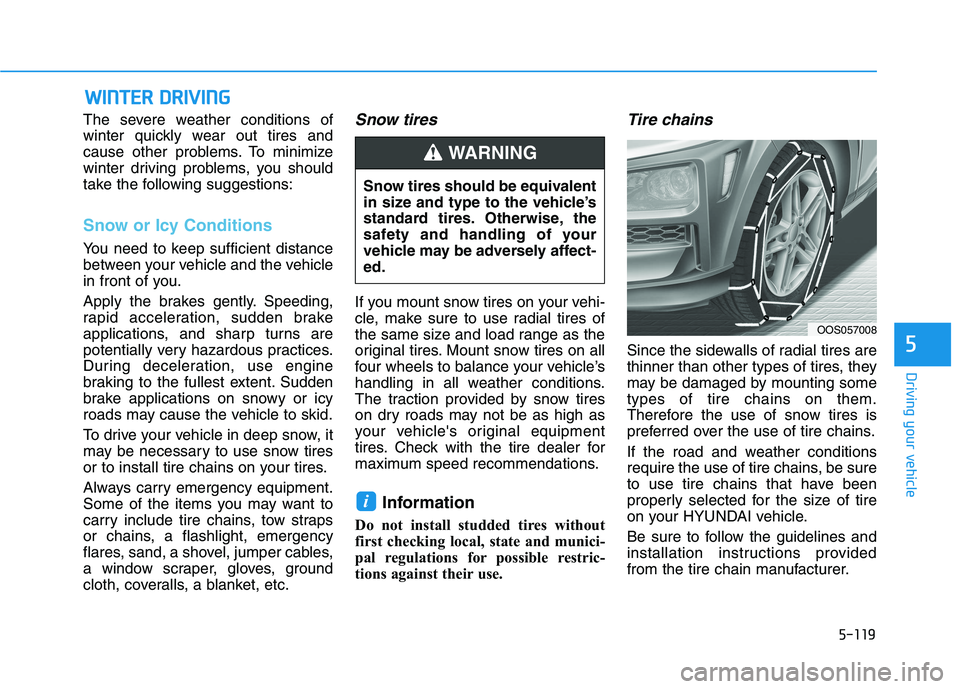
Tire chains
Since the sidewalls of radial tires are
thinner than other types of tires, they
may be damaged by mounting some
types of tire chains on them.
Therefore the use of snow tires is
preferred over the use of tire chains.
If the road and weather conditions
require the use of tire chains, be sure
to use tire chains that have been
properly selected for the size of tire
on your HYUNDAI vehicle.
Be sure to follow the guidelines and
installation instructions provided
from the tire chain manufacturer.
i
Snow tires should be equivalent
in size and type to the vehicle’s
standard tires. Otherwise, the
safety and handling of your
vehicle may be adversely affect-
ed.
WARNING
OOS057008