light HYUNDAI KONA 2021 Manual Online
[x] Cancel search | Manufacturer: HYUNDAI, Model Year: 2021, Model line: KONA, Model: HYUNDAI KONA 2021Pages: 506, PDF Size: 34.9 MB
Page 227 of 506
3-143
Convenient features of your vehicle
3
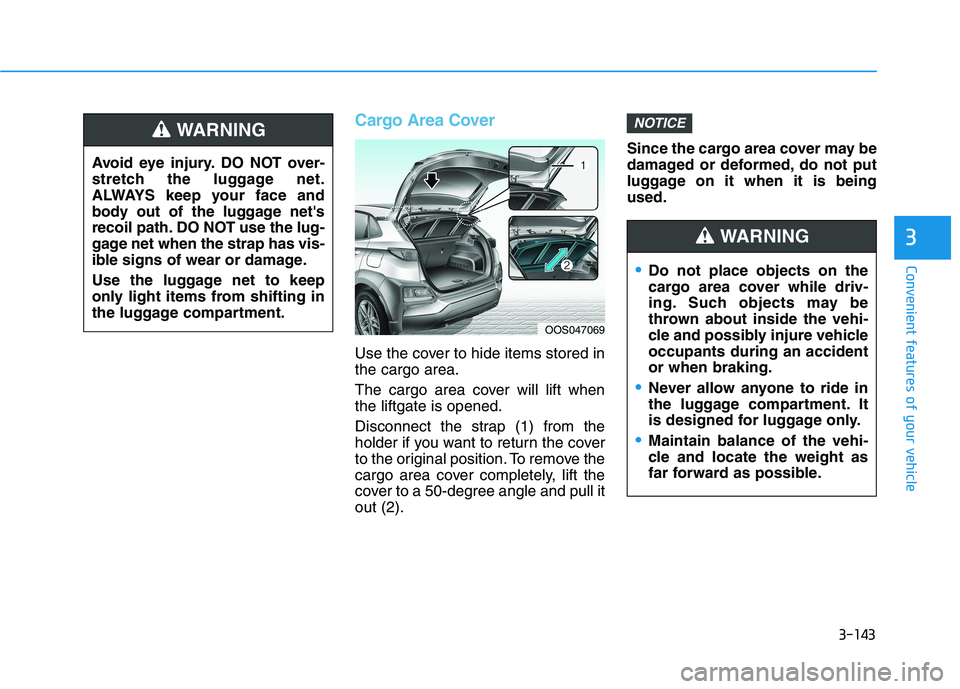
Cargo Area Cover
Use the cover to hide items stored in
the cargo area.
The cargo area cover will lift when
the liftgate is opened.
Disconnect the strap (1) from the
holder if you want to return the cover
to the original position. To remove the
cargo area cover completely, lift the
cover to a 50-degree angle and pull it
out (2).Since the cargo area cover may be
damaged or deformed, do not put
luggage on it when it is being
used.
NOTICE
Do not place objects on the
cargo area cover while driv-
ing. Such objects may be
thrown about inside the vehi-
cle and possibly injure vehicle
occupants during an accident
or when braking.
Never allow anyone to ride in
the luggage compartment. It
is designed for luggage only.
Maintain balance of the vehi-
cle and locate the weight as
far forward as possible.
WARNING
OOS047069
Avoid eye injury. DO NOT over-
stretch the luggage net.
ALWAYS keep your face and
body out of the luggage net's
recoil path. DO NOT use the lug-
gage net when the strap has vis-
ible signs of wear or damage.
Use the luggage net to keep
only light items from shifting in
the luggage compartment.
WARNING
Page 236 of 506
5
Lane Keeping Assist (LKA) system ...................5-81
LKA system Operation ...................................................5-82
Warning Light and Message.........................................5-86
Limitations of the System .............................................5-87
LKA system Function Change ......................................5-88
Driver Attention Warning (DAW) system .........5-89
System Setting and Activation.....................................5-90
Resetting the System .....................................................5-90
System Standby ...............................................................5-91
System Malfunction .......................................................5-91
Cruise Control .......................................................5-93
Cruise Control operation ...............................................5-93
Smart Cruise Control system..............................5-98
Smart Cruise Control Switch ........................................5-98
Smart Cruise Control Speed .........................................5-99
Smart Cruise Control Vehicle-to-Vehicle
Distance ...........................................................................5-103
Sensor to Detect Distance to the Vehicle Ahead ..5-106
SCC Reaction Setting ...................................................5-108
Conventional Cruise Control Mode ...........................5-109
Limitations of the System...........................................5-109
Special Driving Conditions ................................5-115
Hazardous Driving Conditions....................................5-115
Rocking the Vehicle ......................................................5-115
Smooth Cornering .........................................................5-116
Driving at Night .............................................................5-116
Driving in the Rain ........................................................5-116
Driving in Flooded Areas.............................................5-117
Highway Driving ............................................................5-117
Reducing the risk of a rollover .................................5-118
Winter driving .....................................................5-119
Snow or Icy Conditions................................................5-119
Winter Precautions .......................................................5-121
Vehicle load limit ................................................5-123
Tire Loading Information Label .................................5-124
Trailer towing .....................................................5-128
Page 238 of 506
5-4
Driving your vehicle
Before Entering the Vehicle
• Be sure all windows, outside mir-
ror(s), and outside lights are clean
and unobstructed.
Remove frost, snow, or ice.
Visually check the tires for uneven
wear and damage.
Check under the vehicle for any
sign of leaks.
Be sure there are no obstacles
behind you if you intend to back up.
Before Starting
Make sure the hood, the liftgate,
and the doors are securely closed
and locked.
Adjust the position of the seat and
steering wheel.
Adjust the inside and outside
rearview mirrors.
Verify all the lights work.
Fasten your seatbelt. Check that all
passengers have fastened their
seatbelts.
Check the gauges and indicators in
the instrument panel and the mes-
sages on the instrument display
when the ignition switch is in the
ON position.
Check that any items you are car-
rying are stored properly or fas-
tened down securely. CALIFORNIA PROPOSITION 65
WARNING
Engine exhaust and a wide vari-
ety of automobile components
including components found in
the interior furnishings in a
vehicle, contain or emit harmful
chemicals known to the State of
California to cause cancer and
birth defects and reproductive
harm. In addition, certain fluids
contained in vehicles and cer-
tain products of components
contain or emit chemicals
known to the State of California
to cause cancer and birth
defects or other reproductive
harm.WARNING
B BE
EF
FO
OR
RE
E
D
DR
RI
IV
VI
IN
NG
G
Page 240 of 506
5-6
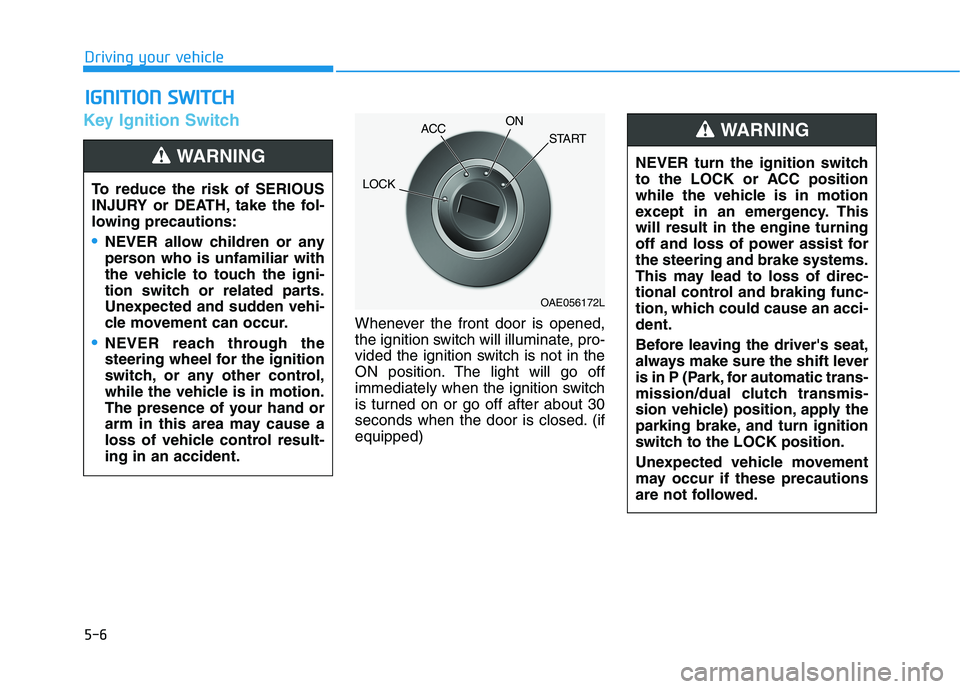
Key Ignition Switch
Whenever the front door is opened,
the ignition switch will illuminate, pro-
vided the ignition switch is not in the
ON position. The light will go off
immediately when the ignition switch
is turned on or go off after about 30
seconds when the door is closed. (if
equipped)
I IG
GN
NI
IT
TI
IO
ON
N
S
SW
WI
IT
TC
CH
H
Driving your vehicle
To reduce the risk of SERIOUS
INJURY or DEATH, take the fol-
lowing precautions:
NEVER allow children or any
person who is unfamiliar with
the vehicle to touch the igni-
tion switch or related parts.
Unexpected and sudden vehi-
cle movement can occur.
NEVER reach through the
steering wheel for the ignition
switch, or any other control,
while the vehicle is in motion.
The presence of your hand or
arm in this area may cause a
loss of vehicle control result-
ing in an accident.
WARNING NEVER turn the ignition switch
to the LOCK or ACC position
while the vehicle is in motion
except in an emergency. This
will result in the engine turning
off and loss of power assist for
the steering and brake systems.
This may lead to loss of direc-
tional control and braking func-
tion, which could cause an acci-
dent.
Before leaving the driver's seat,
always make sure the shift lever
is in P (Park, for automatic trans-
mission/dual clutch transmis-
sion vehicle) position, apply the
parking brake, and turn ignition
switch to the LOCK position.
Unexpected vehicle movement
may occur if these precautions
are not followed.
WARNING
OAE056172L
LOCKACCON
START
Page 241 of 506
5-7
Driving your vehicle
5
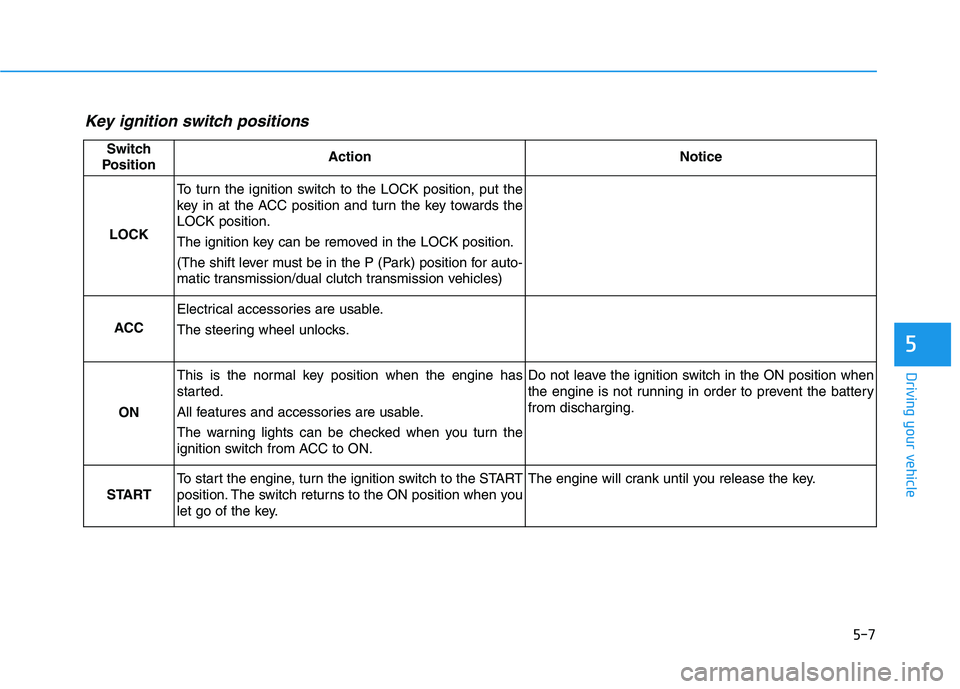
Key ignition switch positions
Switch
PositionActionNotice
LOCK
To turn the ignition switch to the LOCK position, put the
key in at the ACC position and turn the key towards the
LOCK position.
The ignition key can be removed in the LOCK position.
(The shift lever must be in the P (Park) position for auto-
matic transmission/dual clutch transmission vehicles)
ACC
Electrical accessories are usable.
The steering wheel unlocks.
ON
This is the normal key position when the engine has
started.
All features and accessories are usable.
The warning lights can be checked when you turn the
ignition switch from ACC to ON.Do not leave the ignition switch in the ON position when
the engine is not running in order to prevent the battery
from discharging.
START
To start the engine, turn the ignition switch to the START
position. The switch returns to the ON position when you
let go of the key.The engine will crank until you release the key.
Page 245 of 506
5-11
Driving your vehicle
5
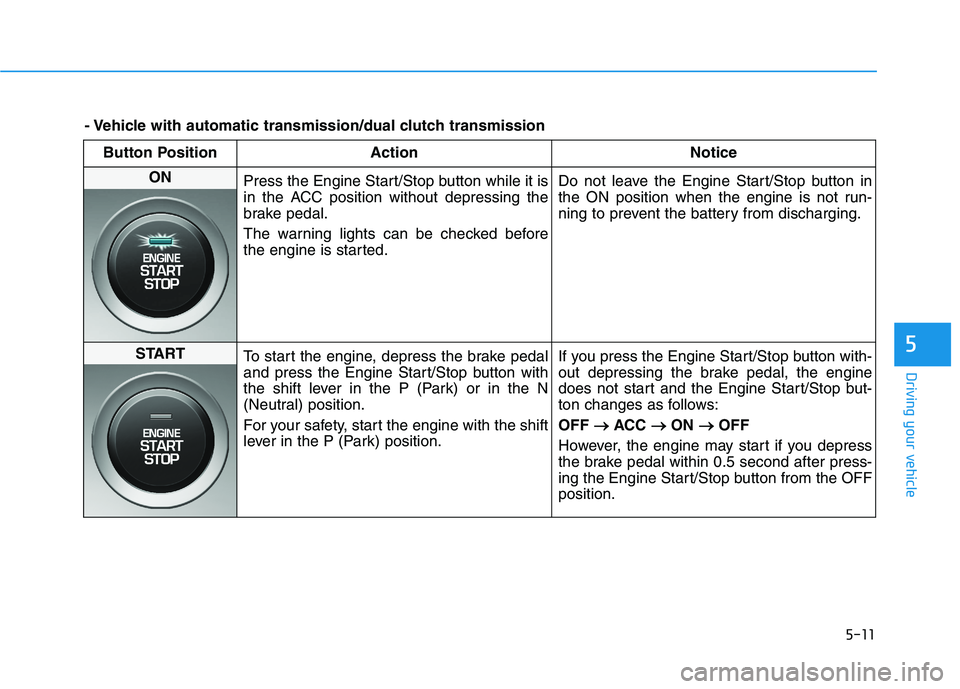
Button Position Action Notice
ON
Press the Engine Start/Stop button while it is
in the ACC position without depressing the
brake pedal.
The warning lights can be checked before
the engine is started.Do not leave the Engine Start/Stop button in
the ON position when the engine is not run-
ning to prevent the battery from discharging.
START
To start the engine, depress the brake pedal
and press the Engine Start/Stop button with
the shift lever in the P (Park) or in the N
(Neutral) position.
For your safety, start the engine with the shift
lever in the P (Park) position.If you press the Engine Start/Stop button with-
out depressing the brake pedal, the engine
does not start and the Engine Start/Stop but-
ton changes as follows:
OFF → →
ACC → →
ON → →
OFF
However, the engine may start if you depress
the brake pedal within 0.5 second after press-
ing the Engine Start/Stop button from the OFF
position.
- Vehicle with automatic transmission/dual clutch transmission
Page 253 of 506
5-19
Driving your vehicle
5
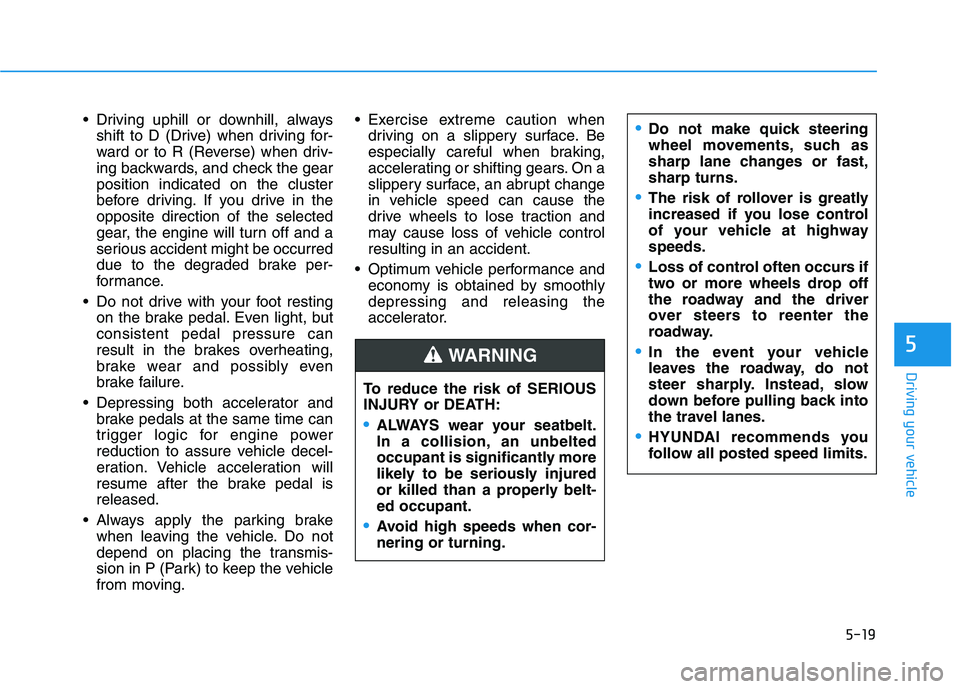
Driving uphill or downhill, always
shift to D (Drive) when driving for-
ward or to R (Reverse) when driv-
ing backwards, and check the gear
position indicated on the cluster
before driving. If you drive in the
opposite direction of the selected
gear, the engine will turn off and a
serious accident might be occurred
due to the degraded brake per-
formance.
Do not drive with your foot resting
on the brake pedal. Even light, but
consistent pedal pressure can
result in the brakes overheating,
brake wear and possibly even
brake failure.
Depressing both accelerator and
brake pedals at the same time can
trigger logic for engine power
reduction to assure vehicle decel-
eration. Vehicle acceleration will
resume after the brake pedal is
released.
Always apply the parking brake
when leaving the vehicle. Do not
depend on placing the transmis-
sion in P (Park) to keep the vehicle
from moving. Exercise extreme caution when
driving on a slippery surface. Be
especially careful when braking,
accelerating or shifting gears. On a
slippery surface, an abrupt change
in vehicle speed can cause the
drive wheels to lose traction and
may cause loss of vehicle control
resulting in an accident.
Optimum vehicle performance and
economy is obtained by smoothly
depressing and releasing the
accelerator.
To reduce the risk of SERIOUS
INJURY or DEATH:
ALWAYS wear your seatbelt.
In a collision, an unbelted
occupant is significantly more
likely to be seriously injured
or killed than a properly belt-
ed occupant.
Avoid high speeds when cor-
nering or turning.
WARNING
Do not make quick steering
wheel movements, such as
sharp lane changes or fast,
sharp turns.
The risk of rollover is greatly
increased if you lose control
of your vehicle at highway
speeds.
Loss of control often occurs if
two or more wheels drop off
the roadway and the driver
over steers to reenter the
roadway.
In the event your vehicle
leaves the roadway, do not
steer sharply. Instead, slow
down before pulling back into
the travel lanes.
HYUNDAI recommends you
follow all posted speed limits.
Page 255 of 506
5-21
Driving your vehicle
5
The dual clutch transmission incor-
porates a dry-type dual clutch
mechanism, which allows for better
acceleration performance and
increased fuel efficiency while driv-
ing. But it differs from a conven-
tional automatic transmission
because it does not incorporate a
torque converter. Instead, the tran-
sition from one gear to the next is
managed by clutch slip, especially
at lower speeds. As a result, shifts
are sometimes more noticeable,
and a light vibration can be felt as
the transmission shaft speed is
matched with the engine shaft
speed. This is a normal condition of
the dual clutch transmission.
The dry-type clutch transfers
torque more directly and provides
a direct-drive feeling which may
feel different from a conventional
automatic transmission. This may
be more noticeable when launch-
ing the vehicle from a stop or when
traveling at low, stop-and-go vehi-
cle speeds. When rapidly accelerating from a
lower vehicle speed, the engine
rpm may increase dramatically as
a result of clutch slip as the dual
clutch transmission selects the cor-
rect gear. This is a normal condi-
tion.
When accelerating from a stop on
an incline, press the accelerator
smoothly and gradually to avoid
any shudder feeling or jerkiness.
When traveling at a lower vehicle
speed, if you release the accelera-
tor pedal quickly, you may feel
engine braking before the trans-
mission changes gears. This
engine braking feeling is similar to
operating a manual transmission at
low speed.
When driving downhill, you may
wish to move the gear shift lever to
Manual Shift mode and downshift
to a lower gear in order to control
your speed without using the brake
pedal excessively.
When you turn the engine on and
off, you may hear clicking sounds
as the system goes through a self-
test. This is a normal sound for the
dual clutch transmission. During the first 1000 miles, you
may feel that the vehicle may not
be smooth when accelerating at
low speed. During this break-in
period, the shift quality and per-
formance of your new vehicle is
continuously optimized.
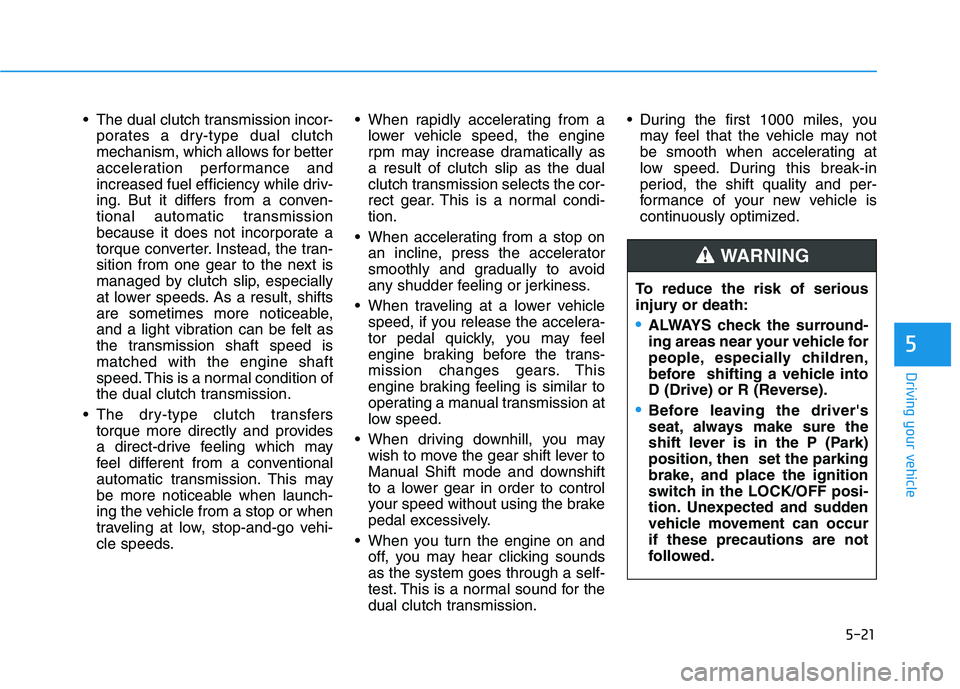
To reduce the risk of serious
injury or death:
ALWAYS check the surround-
ing areas near your vehicle for
people, especially children,
before shifting a vehicle into
D (Drive) or R (Reverse).
Before leaving the driver's
seat, always make sure the
shift lever is in the P (Park)
position, then set the parking
brake, and place the ignition
switch in the LOCK/OFF posi-
tion. Unexpected and sudden
vehicle movement can occur
if these precautions are not
followed.
WARNING
Page 262 of 506
5-28
Driving your vehicle
Do not drive with your foot resting
on the brake pedal. Even light, but
consistent pedal pressure can
result in the brakes overheating,
brake wear and possibly even
brake failure.
Depressing both accelerator and
brake pedals at the same time can
trigger logic for engine power
reduction to assure vehicle decel-
eration. Vehicle acceleration will
resume after the brake pedal is
released.
When driving in Manual Shift
mode, slow down before shifting to
a lower gear. Otherwise, the lower
gear may not be engaged if the
engine rpms are outside of the
allowable range.
Always apply the parking brake
when leaving the vehicle. Do not
depend on placing the transmis-
sion in P (Park) to keep the vehicle
from moving. Exercise extreme caution when
driving on a slippery surface. Be
especially careful when braking,
accelerating or shifting gears. On a
slippery surface, an abrupt change
in vehicle speed can cause the
drive wheels to lose traction and
may cause loss of vehicle control
resulting in an accident.
Optimum vehicle performance and
economy is obtained by smoothly
depressing and releasing the
accelerator.
Do not make quick steering
wheel movements, such as
sharp lane changes or fast,
sharp turns.
The risk of rollover is greatly
increased if you lose control
of your vehicle at highway
speeds.
Loss of control often occurs if
two or more wheels drop off
the roadway and the driver
over steers to reenter the
roadway.
In the event your vehicle
leaves the roadway, do not
steer sharply. Instead, slow
down before pulling back into
the travel lanes.
HYUNDAI recommends you
follow all posted speed limits.
To reduce the risk of SERIOUS
INJURY or DEATH:
ALWAYS wear your seatbelt.
In a collision, an unbelted
occupant is significantly more
likely to be seriously injured
or killed than a properly belt-
ed occupant.
Avoid high speeds when cor-
nering or turning.
WARNING
Page 263 of 506
5-29
Driving your vehicle
5
Power Brakes
Your vehicle has power-assisted
brakes that adjust automatically
through normal usage.
If the engine is not running or is
turned off while driving, the power
assist for the brakes will not work.
You can still stop your vehicle by
applying greater force to the brake
pedal than typical. The stopping dis-
tance, however, will be longer than
with power brakes.
When the engine is not running, the
reserve brake power is partially
depleted each time the brake pedal
is applied. Do not pump the brake
pedal when the power assist has
been interrupted.
Pump the brake pedal only when
necessary to maintain steering con-
trol on slippery surfaces.
B BR
RA
AK
KI
IN
NG
G
S
SY
YS
ST
TE
EM
M
Take the following precautions:
Do not drive with your foot
resting on the brake pedal.
This will create abnormal high
brake temperatures, exces-
sive brake lining and pad
wear, and increased stopping
distances.
When descending down a
long or steep hill, move the
gear shift lever to Manual
Shift Mode and manually
downshift to a lower gear in
order to control your speed
without using the brake pedal
excessively. Applying the
brakes continuously will
cause the brakes to overheat
and could result in a tempo-
rary loss of braking perform-
ance.
Wet brakes may impair the
vehicle's ability to safely slow
down; the vehicle may also
pull to one side when the
brakes are applied. Applying
the brakes lightly will indicate
whether they have been
affected in this way. Always
test your brakes in this fash-
ion after driving through deep
water. To dry the brakes, light-
ly tap the brake pedal to heat
up the brakes while maintain-
ing a safe forward speed until
brake performance returns to
normal. Avoid driving at high
speeds until the brakes func-
tion correctly.WARNING