Cruise HYUNDAI KONA 2022 User Guide
[x] Cancel search | Manufacturer: HYUNDAI, Model Year: 2022, Model line: KONA, Model: HYUNDAI KONA 2022Pages: 579, PDF Size: 35.31 MB
Page 321 of 579
Driving your vehicle
6-64
NOTICE
If you are still stuck after rocking the
vehicle a few times, have the vehicle
pulled out by a tow vehicle to avoid
engine overheating, possible damage to
the transmission, and tire damage. See
“Towing” section in chapter 8.
Smooth cornering
Avoid braking or gear changing in
corners, especially when roads are wet.
Ideally, corners should always be taken
under gentle acceleration.
Driving at night
Night driving presents more hazards than
driving in the daylight. Here are some
important tips to remember:
Slow down and keep more distance
between you and other vehicles, as it
may be more difficult to see at night,
especially in areas where there may
not be any street lights.
Adjust your mirrors to reduce the glare
from other drivers’ headlamps.
Keep your headlamps clean and
properly aimed. Dirty or improperly
aimed headlamps will make it much
more difficult to see at night.
Avoid staring directly at the
headlamps of oncoming vehicles. You
could be temporarily blinded, and it
will take several seconds for your eyes
to readjust to the darkness.
Driving in the rain
Rain and wet roads can make driving
dangerous. Here are a few things to
consider when driving in the rain or on
slick pavement:
Slow down and allow extra following
distance. A heavy rainfall makes
it harder to see and increases the
distance needed to stop your vehicle.
Turn OFF your Cruise Control. (if
equipped)
Replace your windshield wiper blades
when they show signs of streaking or
missing areas on the windshield.
Be sure your tires have enough tread.
If your tires do not have enough tread,
making a quick stop on wet pavement
can cause a skid and possibly lead to
an accident. See “Tire replacement”
in chapter 9.
Turn on your headlamps to make it
easier for others to see you.
Driving too fast through large puddles
can affect your brakes. If you must go
through puddles, try to drive through
them slowly.
If you believe your brakes may be wet,
apply them lightly while driving until
normal braking operation returns.
Hydroplaning
If the road is wet enough and you are
going fast enough, your vehicle may
have little or no contact with the road
surface and actually ride on the water.
The best advice is SLOW DOWN when
the road is wet.
The risk of hydroplaning increases as
the depth of tire tread decreases, refer
to “Tire Tread” section in chapter 9.
Page 333 of 579
7
Driving Safety
Forward Collision–Avoidance Assist (FCA) (Front view camera only) ................... 7-2
Forward Collision–Avoidance Assist (FCA) (Sensor fusion) .................................. 7-14
Lane Keeping Assist (LKA) ...................................................................................... 7-29
Blind-Spot Collision-Avoidance Assist (BCA) ........................................................ 7-35
Safe Exit Warning (SEW) ..........................................................................................7-49
Driver Attention Warning (DAW) ............................................................................ 7-54
Driving Convenience
Cruise Control (CC) .................................................................................................7-60
Smart Cruise Control (SCC) ....................................................................................7-64
Navigation-Based Smart Cruise Control (NSCC) ...................................................7-81
Lane Following Assist (LFA) ....................................................................................7-88
Highway Driving Assist (HDA) ................................................................................. 7-92
Parking Safety
Rear View Monitor (RVM) .......................................................................................7-99
Rear Cross-Traffic Collision-Avoidance Assist (RCCA) ........................................7-102
Reverse Parking Distance Warning (PDW) .............................................................7-113
Declaration of conformity ............................................................................. 7-116
7. Driver assistance system
Page 392 of 579
Driver assistance system
7-60
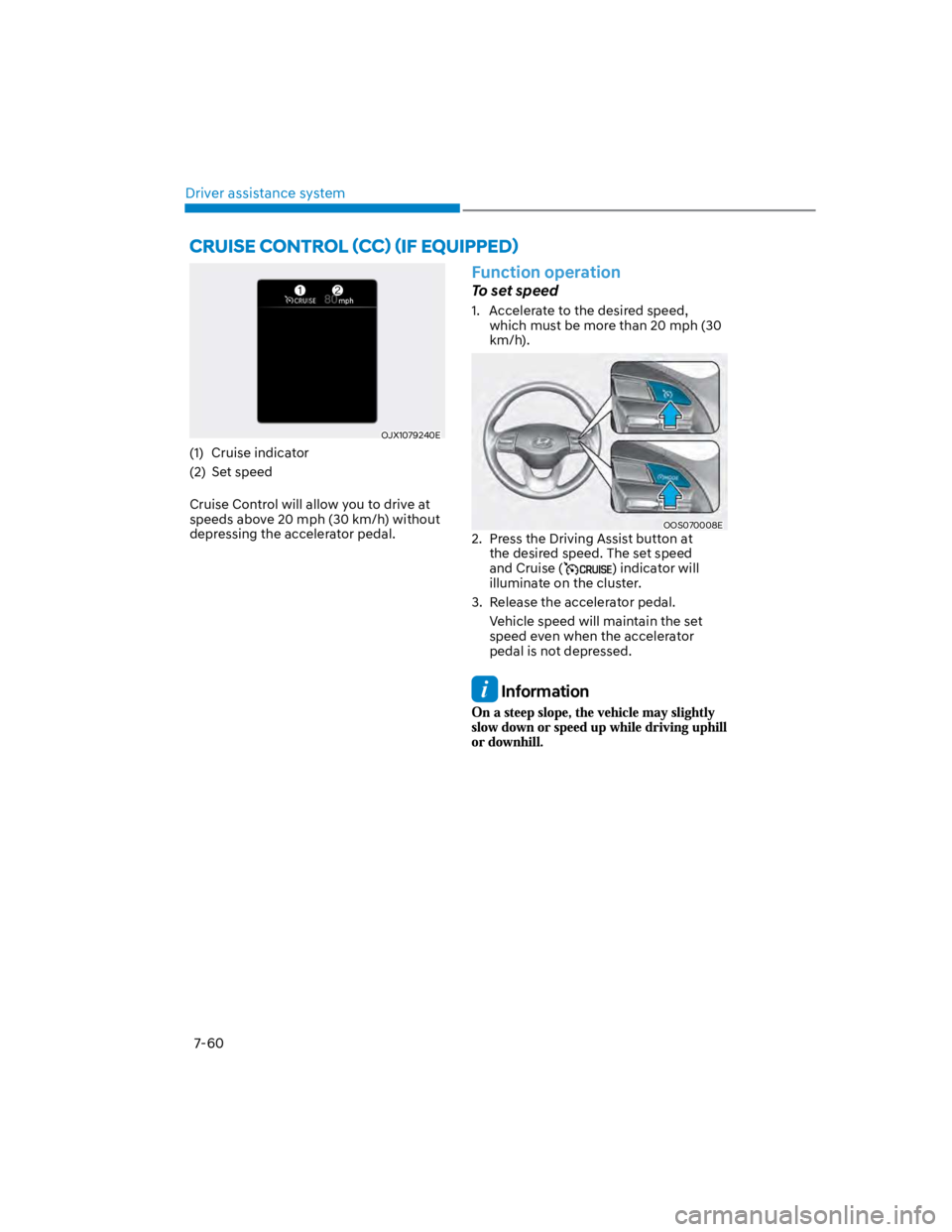
OJX1079240E
(1) Cruise indicator
(2) Set speed
Cruise Control will allow you to drive at
speeds above 20 mph (30 km/h) without
depressing the accelerator pedal.
Function operation
To set speed
1. Accelerate to the desired speed,
which must be more than 20 mph (30
km/h).
OOS070008E
2. Press the Driving Assist button at
the desired speed. The set speed
and Cruise () indicator will
illuminate on the cluster.
3. Release the accelerator pedal.
Vehicle speed will maintain the set
speed even when the accelerator
pedal is not depressed.
Information
Page 394 of 579
Driver assistance system
7-62
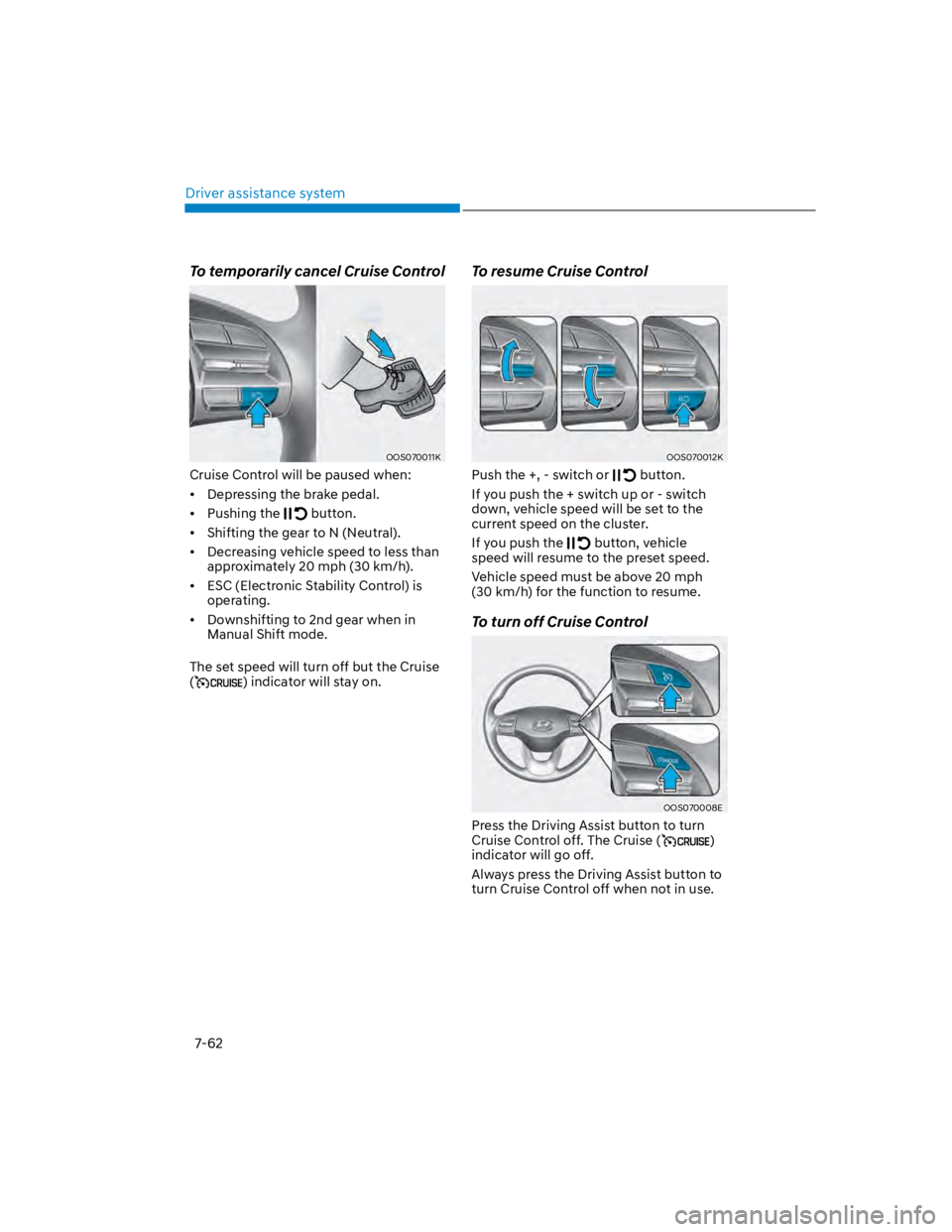
To temporarily cancel Cruise Control
OOS070011K
Cruise Control will be paused when:
Depressing the brake pedal.
Pushing the button.
Shifting the gear to N (Neutral).
Decreasing vehicle speed to less than
approximately 20 mph (30 km/h).
ESC (Electronic Stability Control) is
operating.
Downshifting to 2nd gear when in
Manual Shift mode.
The set speed will turn off but the Cruise
() indicator will stay on.
To resume Cruise Control
OOS070012K
Push the +, - switch or button.
If you push the + switch up or - switch
down, vehicle speed will be set to the
current speed on the cluster.
If you push the button, vehicle
speed will resume to the preset speed.
Vehicle speed must be above 20 mph
(30 km/h) for the function to resume.
To turn off Cruise Control
OOS070008E
Press the Driving Assist button to turn
Cruise Control off. The Cruise ()
indicator will go off.
Always press the Driving Assist button to
turn Cruise Control off when not in use.
Page 395 of 579
07
7-63
WARNING
Take the following precautions when
using Cruise Control:
Always set the vehicle speed to the
speed limit in your region.
Keep Cruise Control off when the
function is not in use, to avoid
inadvertently setting a speed. Check
that the Cruise () indicator is
off.
Cruise Control does not substitute
for proper and safe driving. It is the
responsibility of the driver to always
drive safely and should always be
aware of unexpected and sudden
situations from occurring.
Always drive cautiously to prevent
unexpected and sudden situations
from occurring. Pay attention to the
road conditions at all times.
Do not use Cruise Control when it
may be unsafe to keep the vehicle at
a constant speed:
-When driving in heavy traffic, or
when traffic conditions make it
difficult to drive at a constant
speed
-When driving on rainy, icy, or
snow-covered roads
-When driving on hilly or windy
roads
-When driving in windy areas
-When driving with limited view
(possibly due to bad weather, such
as fog, snow, rain and sandstorm)
-When gear state is N (Neutral) for
manual transmission.
Do not shift the gear to N (Neutral)
while the cruise control is activating
without clutch pedal depressed.
Information
1.
2.
3.
Information
Page 396 of 579
Driver assistance system
7-64
Smart Cruise Control is designed to
help detect the vehicle ahead and
help maintain the desired speed and
minimum distance between the vehicle
ahead.
Overtaking Acceleration Assist
While Smart Cruise Control is operating,
if the function judges that the driver is
determined to overtake the vehicle in
front, acceleration will be assisted.
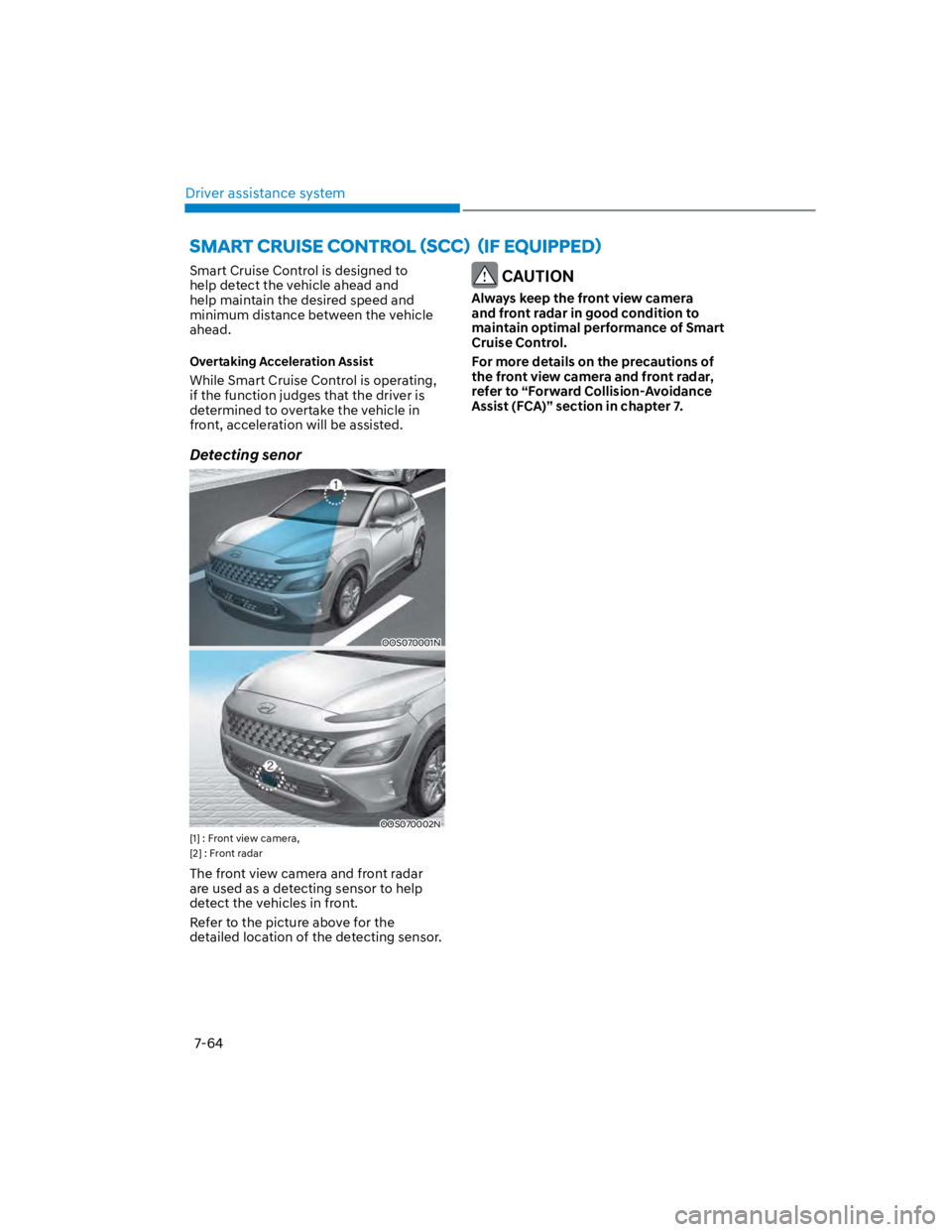
Detecting senor
OOS070001N
OOS070002N
[1] : Front view camera,
[2] : Front radar
The front view camera and front radar
are used as a detecting sensor to help
detect the vehicles in front.
Refer to the picture above for the
detailed location of the detecting sensor.
CAUTION
Always keep the front view camera
and front radar in good condition to
maintain optimal performance of Smart
Cruise Control.
For more details on the precautions of
the front view camera and front radar,
refer to “Forward Collision-Avoidance
Assist (FCA)” section in chapter 7.
Page 397 of 579
07
7-65
Smart Cruise Control settings
Setting features
OOS070008E
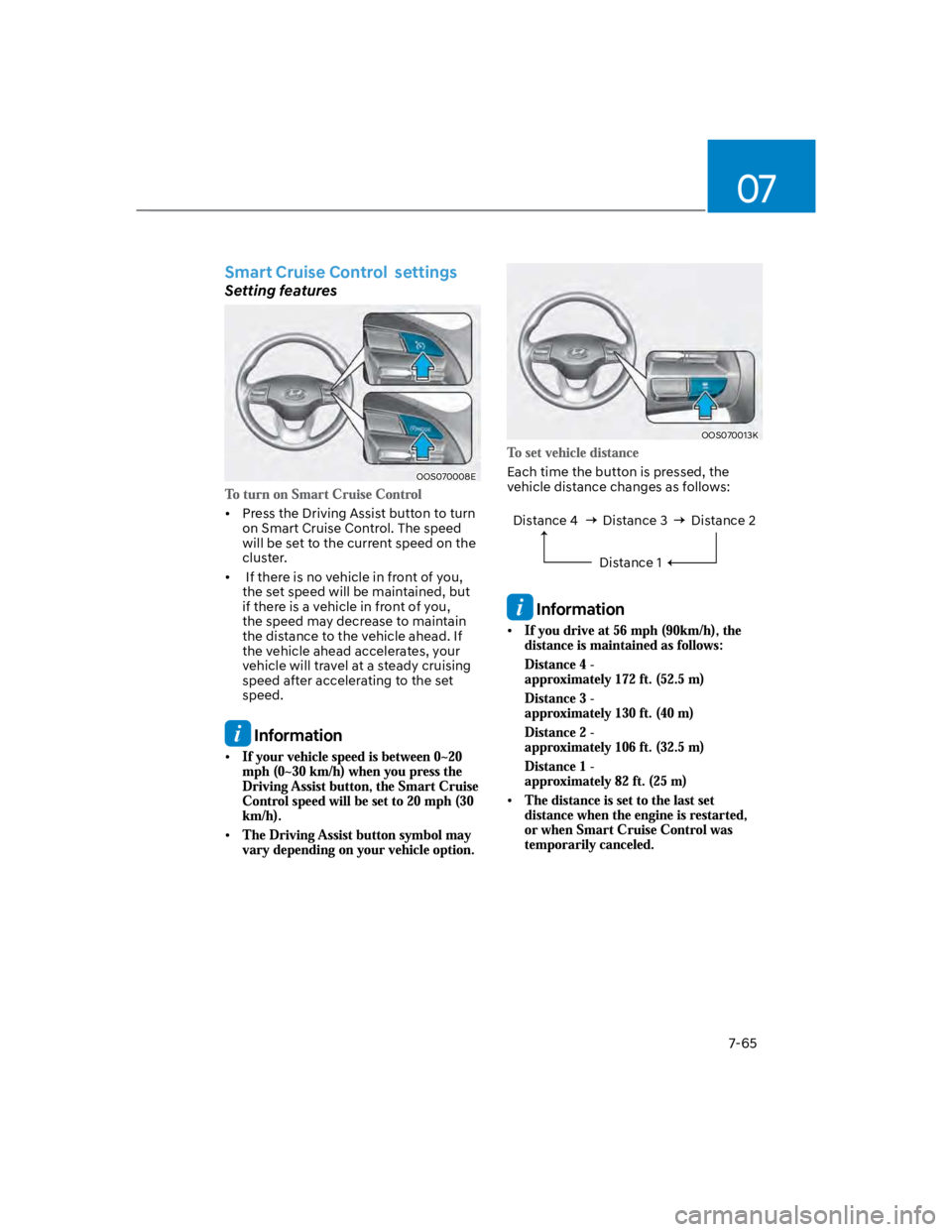
Press the Driving Assist button to turn
on Smart Cruise Control. The speed
will be set to the current speed on the
cluster.
If there is no vehicle in front of you,
the set speed will be maintained, but
if there is a vehicle in front of you,
the speed may decrease to maintain
the distance to the vehicle ahead. If
the vehicle ahead accelerates, your
vehicle will travel at a steady cruising
speed after accelerating to the set
speed.
Information
OOS070013K
Each time the button is pressed, the
vehicle distance changes as follows:
Distance 4 Distance 3
Distance 1
Distance 2
Information
Page 399 of 579
07
7-67
OOS070011E
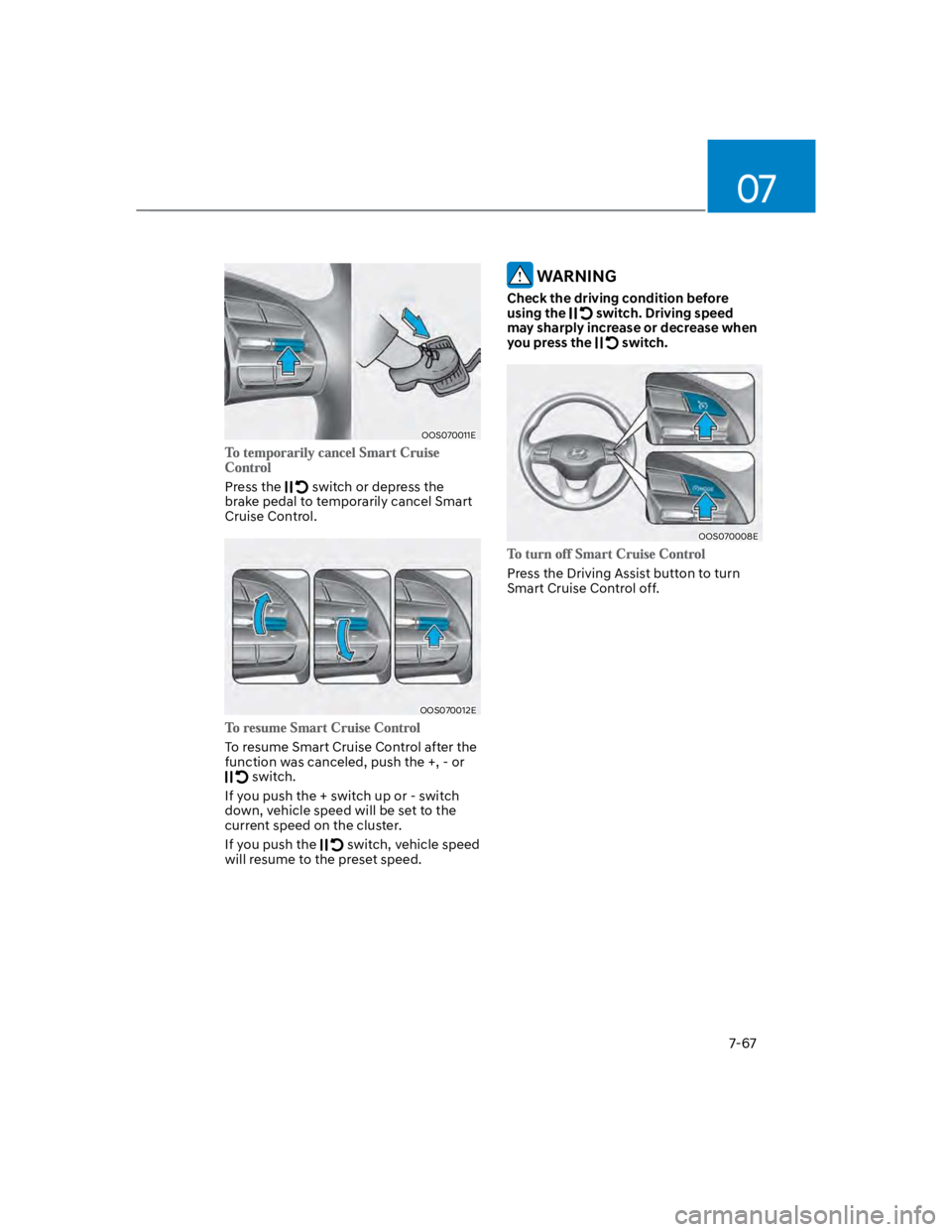
Press the switch or depress the
brake pedal to temporarily cancel Smart
Cruise Control.
OOS070012E
To resume Smart Cruise Control after the
function was canceled, push the +, - or
switch.
If you push the + switch up or - switch
down, vehicle speed will be set to the
current speed on the cluster.
If you push the switch, vehicle speed
will resume to the preset speed.
WARNING
Check the driving condition before
using the switch. Driving speed
may sharply increase or decrease when
you press the switch.
OOS070008E
Press the Driving Assist button to turn
Smart Cruise Control off.
Page 400 of 579
Driver assistance system
7-68
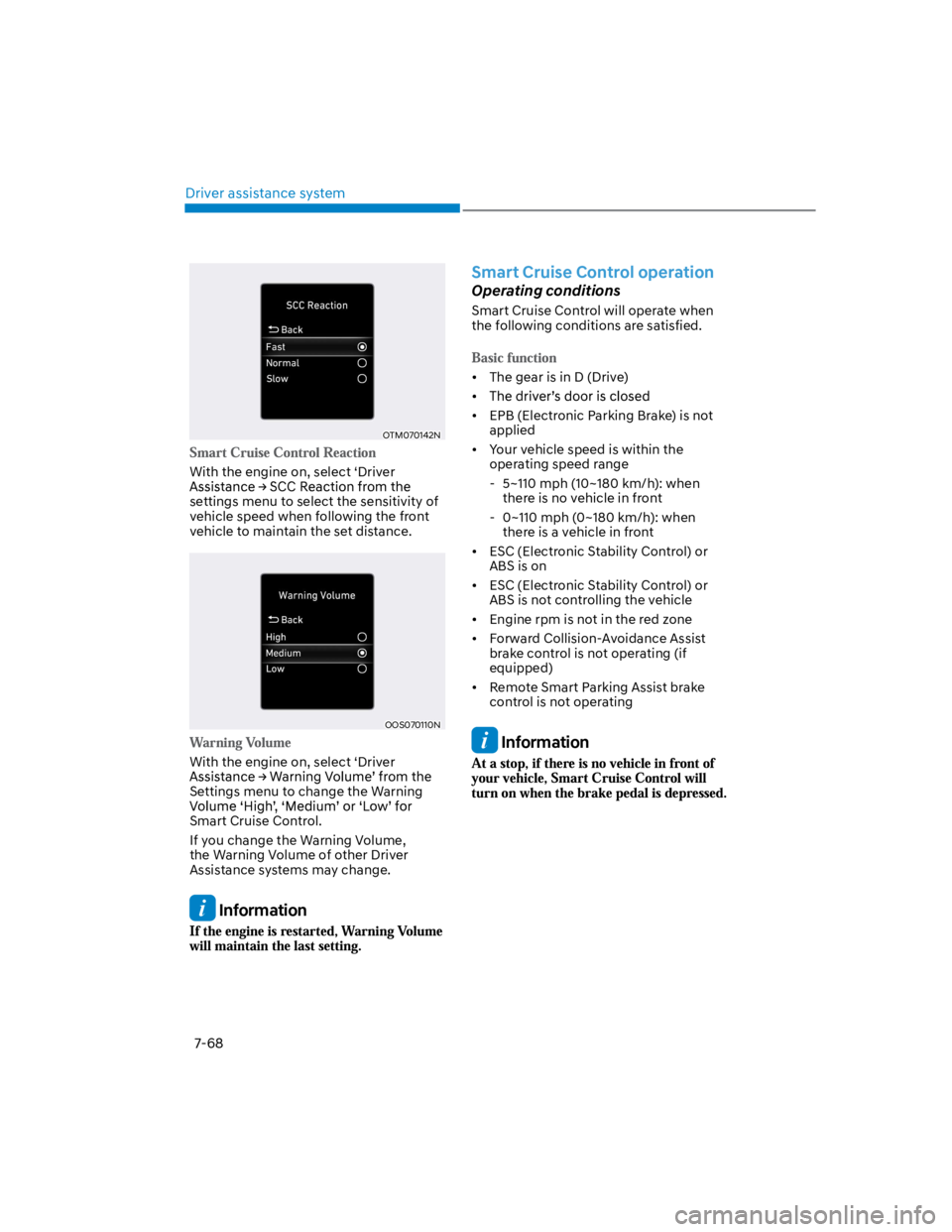
OTM070142N
With the engine on, select ‘Driver
settings menu to select the sensitivity of
vehicle speed when following the front
vehicle to maintain the set distance.
OOS070110N
With the engine on, select ‘Driver
Settings menu to change the Warning
Smart Cruise Control.
If you change the Warning Volume,
the Warning Volume of other Driver
Assistance systems may change.
Information
Smart Cruise Control operation
Operating conditions
Smart Cruise Control will operate when
the following conditions are satisfied.
The gear is in D (Drive)
EPB (Electronic Parking Brake) is not
applied
Your vehicle speed is within the
operating speed range
- 5~110 mph (10~180 km/h): when
there is no vehicle in front
- 0~110 mph (0~180 km/h): when
there is a vehicle in front
ESC (Electronic Stability Control) or
ABS is on
ESC (Electronic Stability Control) or
ABS is not controlling the vehicle
Engine rpm is not in the red zone
Forward Collision-Avoidance Assist
brake control is not operating (if
equipped)
Remote Smart Parking Assist brake
control is not operating
Information
Page 401 of 579
07
7-69
Overtaking Acceleration Assist will
operate when the turn signal indicator
is turned on to the left (left-hand drive)
or turned on to the right (right-hand
drive) while Smart Cruise Control is
operating, and the following conditions
are satisfied:
Your vehicle speed is above 40 mph
(60 km/h)
The hazard warning flasher is off
A vehicle is detected in front of your
vehicle
Deceleration is not needed to
maintain distance with the vehicle in
front
WARNING
When the turn signal indicator is
turned on to the left (left-hand drive)
or turned on to the right (right-
hand drive) while there is a vehicle
ahead, the vehicle may accelerate
temporarily. Pay attention to the
road conditions at all times.
Regardless of your countries driving
direction, Overtaking Acceleration
Assist will operate when the
conditions are satisfied. When
using the function in countries with
different driving direction, always
check the road conditions at all
times.
Smart Cruise Control display and
control
Basic function
You can see the status of the Smart
Cruise Control operation in the Driving
Assist mode on the cluster. Refer to “LCD
Display Modes” section in chapter 4.
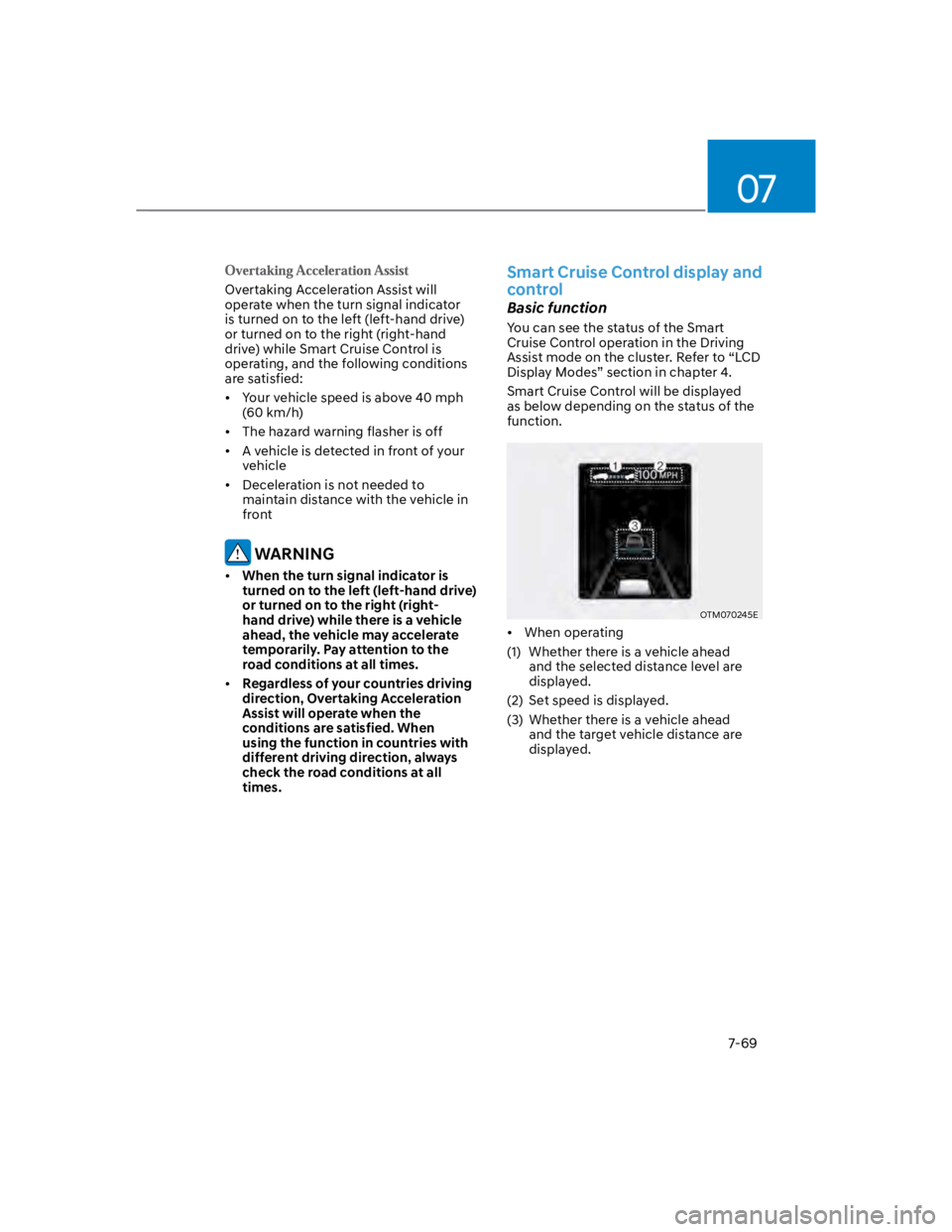
Smart Cruise Control will be displayed
as below depending on the status of the
function.
OTM070245E
When operating
(1) Whether there is a vehicle ahead
and the selected distance level are
displayed.
(2) Set speed is displayed.
(3) Whether there is a vehicle ahead
and the target vehicle distance are
displayed.