Transmission HYUNDAI KONA 2022 User Guide
[x] Cancel search | Manufacturer: HYUNDAI, Model Year: 2022, Model line: KONA, Model: HYUNDAI KONA 2022Pages: 579, PDF Size: 35.31 MB
Page 175 of 579
05
5-41
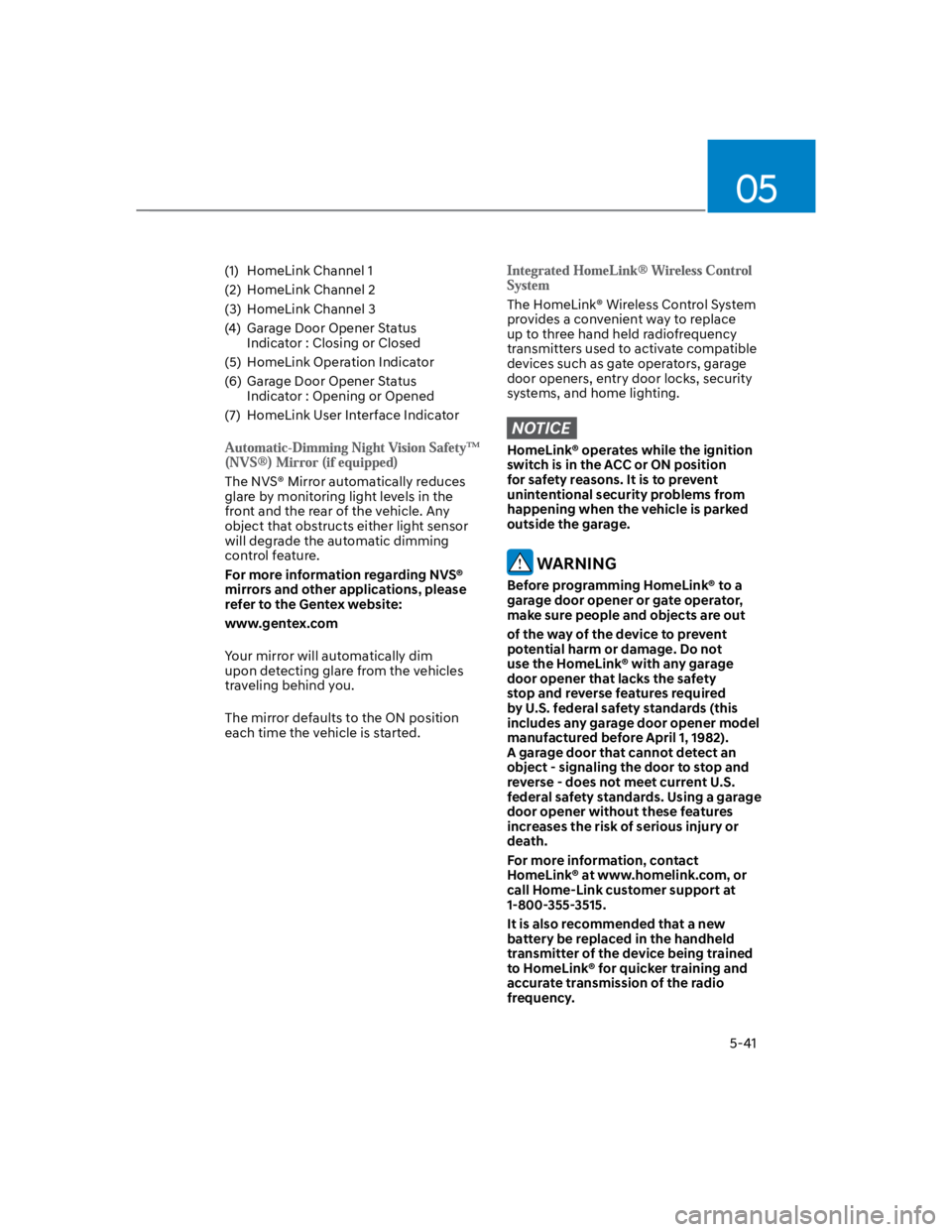
(1) HomeLink Channel 1
(2) HomeLink Channel 2
(3) HomeLink Channel 3
(4) Garage Door Opener Status
Indicator : Closing or Closed
(5) HomeLink Operation Indicator
(6) Garage Door Opener Status
Indicator : Opening or Opened
(7) HomeLink User Interface Indicator
The NVS® Mirror automatically reduces
glare by monitoring light levels in the
front and the rear of the vehicle. Any
object that obstructs either light sensor
will degrade the automatic dimming
control feature.
For more information regarding NVS®
mirrors and other applications, please
refer to the Gentex website:
www.gentex.com
Your mirror will automatically dim
upon detecting glare from the vehicles
traveling behind you.
The mirror defaults to the ON position
each time the vehicle is started.
The HomeLink® Wireless Control System
provides a convenient way to replace
up to three hand held radiofrequency
transmitters used to activate compatible
devices such as gate operators, garage
door openers, entry door locks, security
systems, and home lighting.
NOTICE
HomeLink® operates while the ignition
switch is in the ACC or ON position
for safety reasons. It is to prevent
unintentional security problems from
happening when the vehicle is parked
outside the garage.
WARNING
Before programming HomeLink® to a
garage door opener or gate operator,
make sure people and objects are out
of the way of the device to prevent
potential harm or damage. Do not
use the HomeLink® with any garage
door opener that lacks the safety
stop and reverse features required
by U.S. federal safety standards (this
includes any garage door opener model
manufactured before April 1, 1982).
A garage door that cannot detect an
object - signaling the door to stop and
reverse - does not meet current U.S.
federal safety standards. Using a garage
door opener without these features
increases the risk of serious injury or
death.
For more information, contact
HomeLink® at www.homelink.com, or
call Home-Link customer support at
1-800-355-3515.
It is also recommended that a new
battery be replaced in the handheld
transmitter of the device being trained
to HomeLink® for quicker training and
accurate transmission of the radio
frequency.
Page 176 of 579
Convenient features
5-42
The following steps show how to
program HomeLink. If you have any
questions or are having difficulty
programming your HomeLink buttons,
refer to the HomeLink website or call
the HomeLink customer support tollfree
number. Do this, before going back to
the dealer who sold you the car.
Visit the HomeLink website at: www.
homelink.com. Then at the top of the
page, choose your vehicle make. Then
watch the You Tube video, and/or
access additional website information.
If you choose to access the website
via your cell phone, scan the QR code.
Or, call HomeLink customer support
at 1-800-355-3515 (Please have the
vehicle make/model AND the opener
device make/model readily available.)
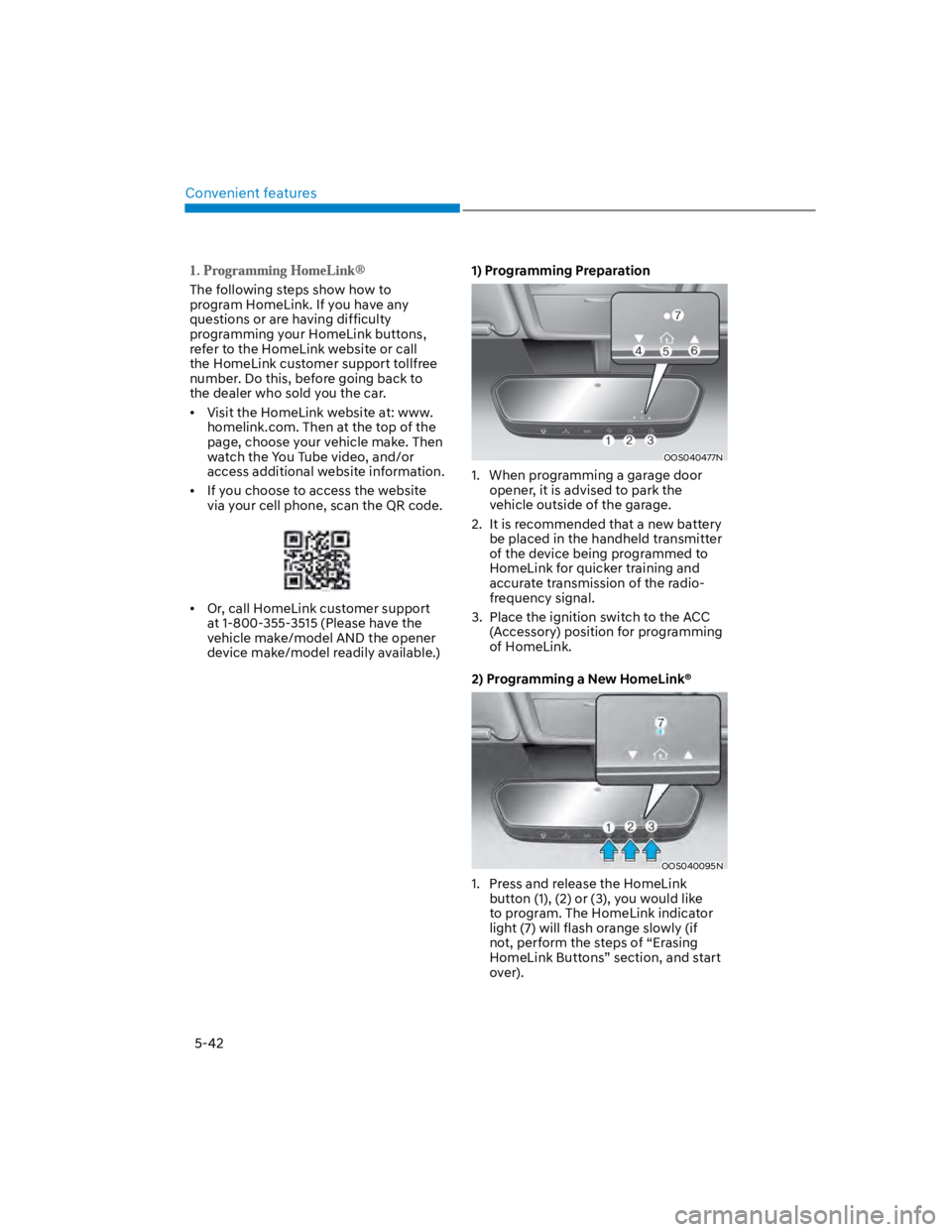
1) Programming Preparation
OOS040477N
1. When programming a garage door
opener, it is advised to park the
vehicle outside of the garage.
2. It is recommended that a new battery
be placed in the handheld transmitter
of the device being programmed to
HomeLink for quicker training and
accurate transmission of the radio-
frequency signal.
3. Place the ignition switch to the ACC
(Accessory) position for programming
of HomeLink.
2) Programming a New HomeLink®
OOS040095N
1. Press and release the HomeLink
button (1), (2) or (3), you would like
to program. The HomeLink indicator
light (7) will flash orange slowly (if
not, perform the steps of “Erasing
HomeLink Buttons” section, and start
over).
Page 179 of 579
05
5-45
4) Canadian Programming
Canadian radio-frequency laws require
transmitter remote signals to “time-
out” (or quit) after a couple seconds of
transmission, which may not be long
enough for HomeLink to pick up the
signal during programming.
If you live in Canada or you are having
difficulties programming a gate operator
or garage door opener by using the
programming procedures, replace
“Programming a New HomeLink Button”
step 3 with the following:
While the HomeLink indicator light (7)
is flashing orange, press and release
(“cycle”) your device’s handheld remote
every two seconds until the HomeLink
indicator light (7) changes from orange
to green. You may now release the hand-
held remote button. Then proceed with
“Programming a New HomeLink Button”
step 4.
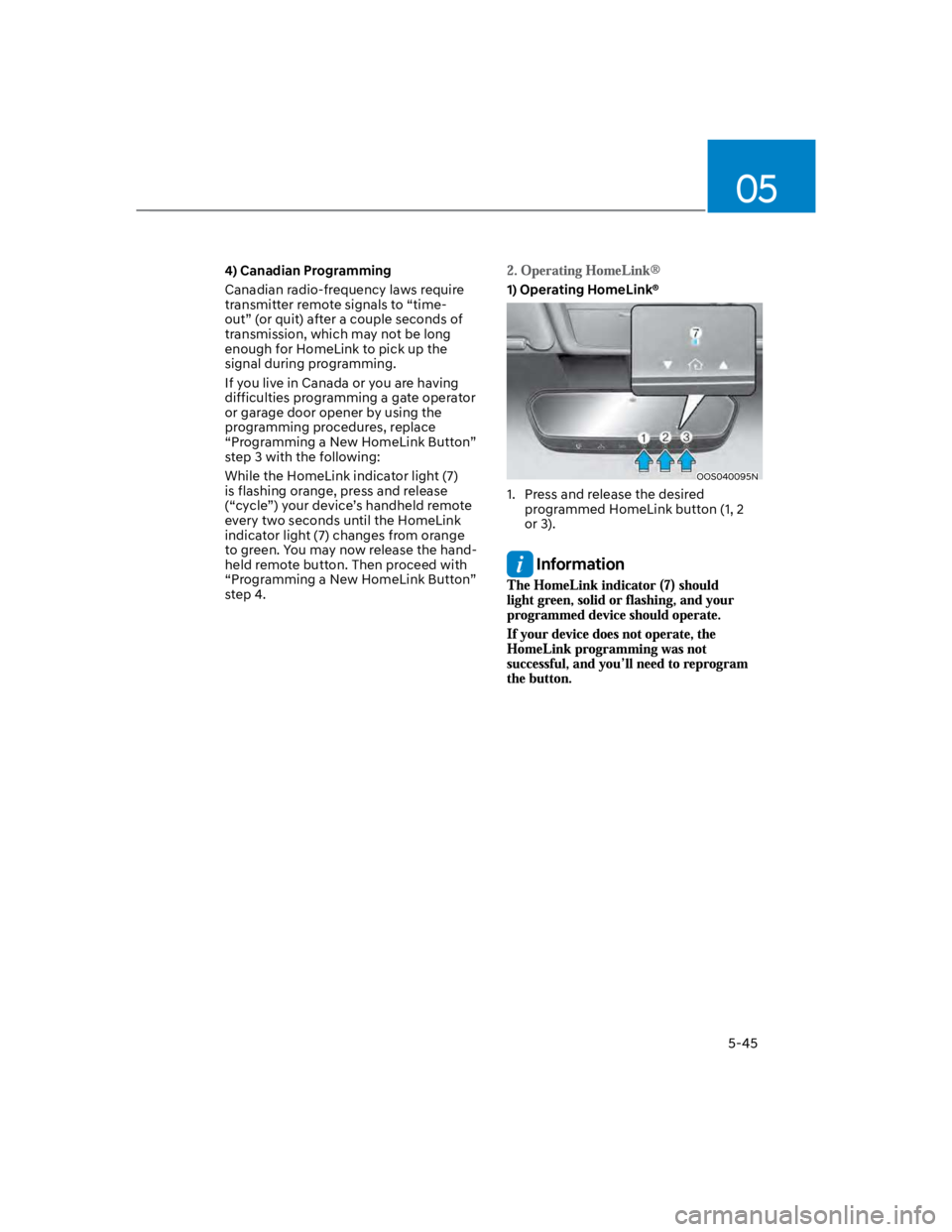
1) Operating HomeLink®
OOS040095N
1. Press and release the desired
programmed HomeLink button (1, 2
or 3).
Information
Page 258 of 579
6
Before driving .................................................................................................... 6-4
Before entering the vehicle ........................................................................................ 6-4
Before starting ............................................................................................................. 6-4
Ignition switch ................................................................................................... 6-5
Key ignition switch .......................................................................................................6-5
Key ignition switch positions ...................................................................................... 6-6
Starting the engine ....................................................................................................... 6-7
Engine Start/Stop button ................................................................................. 6-8
Engine Stop/Start button positions ........................................................................... 6-9
Starting the engine ..................................................................................................... 6-10
Turning off the engine ................................................................................................. 6-11
Remote start ............................................................................................................... 6-12
Intelligent variable transmission ..................................................................... 6-13
Intelligent variable transmission operation .............................................................. 6-13
Parking ........................................................................................................................ 6-16
Good driving practices ................................................................................................6-17
Dual clutch transmission .................................................................................6-18
Dual clutch transmission operation .......................................................................... 6-18
Parking ........................................................................................................................6-24
Good driving practices .............................................................................................. 6-25
Braking system ................................................................................................ 6-26
Power-assist brakes ...................................................................................................6-26
Disc brakes wear indicator ........................................................................................6-26
Parking Brake .............................................................................................................. 6-27
Electronic Parking Brake (EPB) .................................................................................6-28
Auto Hold ....................................................................................................................6-33
Anti-lock Brake System (ABS) ................................................................................... 6-36
Electronic Stability Control (ESC) ............................................................................ 6-38
Vehicle Stability Management (VSM) ..................................................................... 6-40
Hill-Start Assist Control (HAC) .................................................................................. 6-41
Downhill Brake Control (DBC) ................................................................................. 6-42
Good braking practices ............................................................................................. 6-45
Four wheel drive (4WD) ..................................................................................6-46
Four Wheel Drive (4WD) operation ...........................................................................6-47
Emergency precautions ............................................................................................. 6-51
Reducing the risk of a rollover ...................................................................................6-52
6. Driving your vehicle
Page 262 of 579
06
6-5
WARNING
To reduce the risk of SERIOUS INJURY or
DEATH, take the following precautions:
NEVER allow children or any person
who is unfamiliar with the vehicle to
touch the ignition switch or related
parts. Unexpected and sudden
vehicle movement can occur.
NEVER reach through the steering
wheel for the ignition switch, or any
other control, while the vehicle is in
motion. The presence of your hand
or arm in this area may cause a loss
of vehicle control resulting in an
accident.
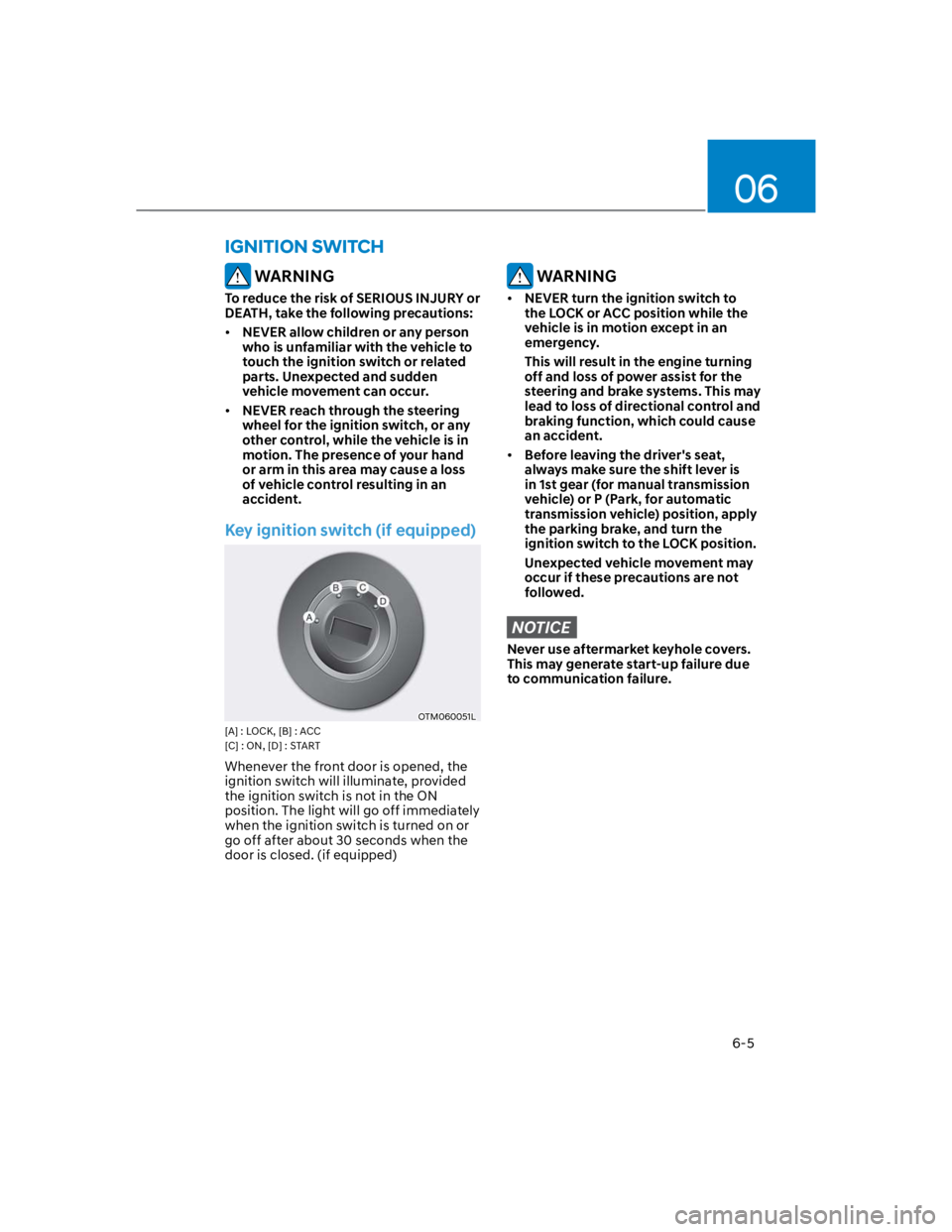
Key ignition switch (if equipped)
OTM060051L
[A] : LOCK, [B] : ACC
[C] : ON, [D] : START
Whenever the front door is opened, the
ignition switch will illuminate, provided
the ignition switch is not in the ON
position. The light will go off immediately
when the ignition switch is turned on or
go off after about 30 seconds when the
door is closed. (if equipped)
WARNING
NEVER turn the ignition switch to
the LOCK or ACC position while the
vehicle is in motion except in an
emergency.
This will result in the engine turning
off and loss of power assist for the
steering and brake systems. This may
lead to loss of directional control and
braking function, which could cause
an accident.
Before leaving the driver's seat,
always make sure the shift lever is
in 1st gear (for manual transmission
vehicle) or P (Park, for automatic
transmission vehicle) position, apply
the parking brake, and turn the
ignition switch to the LOCK position.
Unexpected vehicle movement may
occur if these precautions are not
followed.
NOTICE
Never use aftermarket keyhole covers.
This may generate start-up failure due
to communication failure.
IGNITION SWITCH
Page 270 of 579
06
6-13
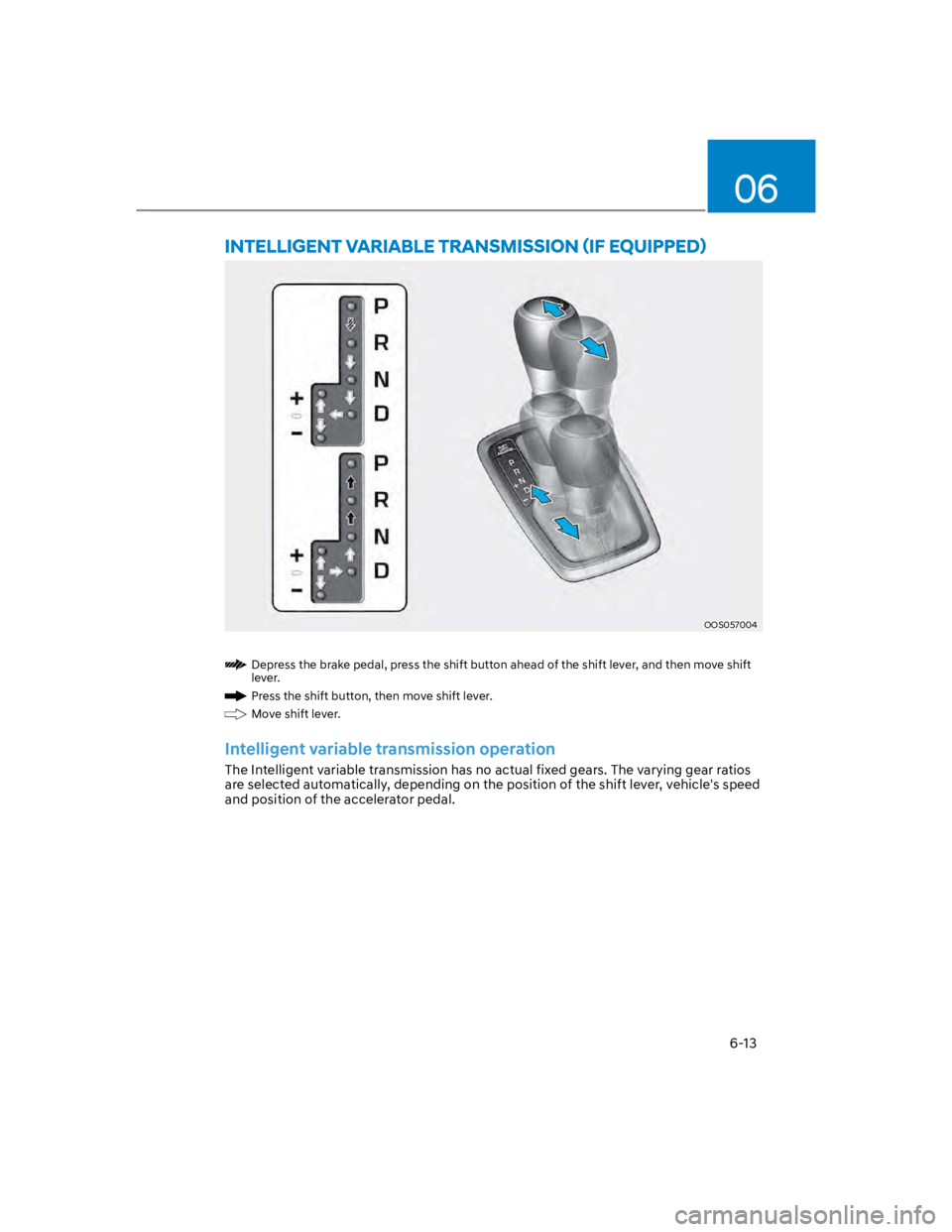
OOS057004
Depress the brake pedal, press the shift button ahead of the shift lever, and then move shift
lever.
Press the shift button, then move shift lever.
Move shift lever.
Intelligent variable transmission operation
The Intelligent variable transmission has no actual fixed gears. The varying gear ratios
are selected automatically, depending on the position of the shift lever, vehicle's speed
and position of the accelerator pedal.
Page 271 of 579

Driving your vehicle
6-14
The indicator in the instrument cluster
displays the shift lever position when the
ignition switch is in the ON position.
WARNING
To reduce the risk of serious injury or
death:
ALWAYS check the surrounding
areas near your vehicle for people,
especially children, before shifting a
vehicle into D (Drive) or R (Reverse).
Before leaving the driver’s seat,
always make sure the shift lever
is in the P (Park) position, then set
the parking brake, and place the
ignition switch in the LOCK/OFF
position. Unexpected and sudden
vehicle movement can occur if these
precautions are not followed.
Do not use engine braking (shifting
from a high gear to lower gear)
rapidly on slippery roads. The vehicle
may slip causing an accident.
P (Park)
Always come to a complete stop before
shifting into P (Park).
To shift from P (Park), you must depress
firmly on the brake pedal and make sure
your foot is off the accelerator pedal.
If you have done all of the above and
still cannot shift the lever out of P
(Park), see "Shift-Lock Release" in this
chapter.
The shift lever must be in P (Park) before
turning the engine off.
WARNING
Shifting into P (Park) while the
vehicle is in motion may cause you to
lose control of the vehicle.
After the vehicle has stopped, always
make sure the shift lever is in P
(Park), apply the parking brake, and
turn the engine off.
When parking on an incline, shift
the gear to P (Park) and apply the
parking brake to prevent the vehicle
from rolling downhill.
Do not use the P (Park) position in
place of the parking brake.
R (Reverse)
Use this position to drive the vehicle
backward.
NOTICE
Always come to a complete stop before
shifting into or out of R (Reverse); you
may damage the transmission if you
shift into R (Reverse) while the vehicle is
in motion.
Page 272 of 579
06
6-15
N (Neutral)
The wheels and transmission are not
engaged.
Use N (Neutral) if you need to restart a
stalled engine, or if it is necessary to stop
with the engine ON. Shift into P (Park)
if you need to leave your vehicle for any
reason.
Always depress the brake pedal when
you are shifting from N (Neutral) to
another gear.
WARNING
Do not shift into gear unless your foot is
firmly on the brake pedal. Shifting into
gear when the engine is running at high
speed can cause the vehicle to move
very rapidly. You could lose control of
the vehicle and hit people or objects.
D (Drive)
This is the normal forward driving
position. The transmission will
automatically shift to the optimal gear
ratio, providing better fuel efficiency and
a smoother ride.
For extra power when passing another
vehicle or driving uphill, depress the
accelerator further until you feel the
transmission downshift to a lower gear.
The DRIVE MODE switch, located on the
shift lever console, allows the driver to
switch from NORMAL mode to SPORT
mode.
For more details, refer to "Drive Mode
Integrated Control System" later in this
chapter.
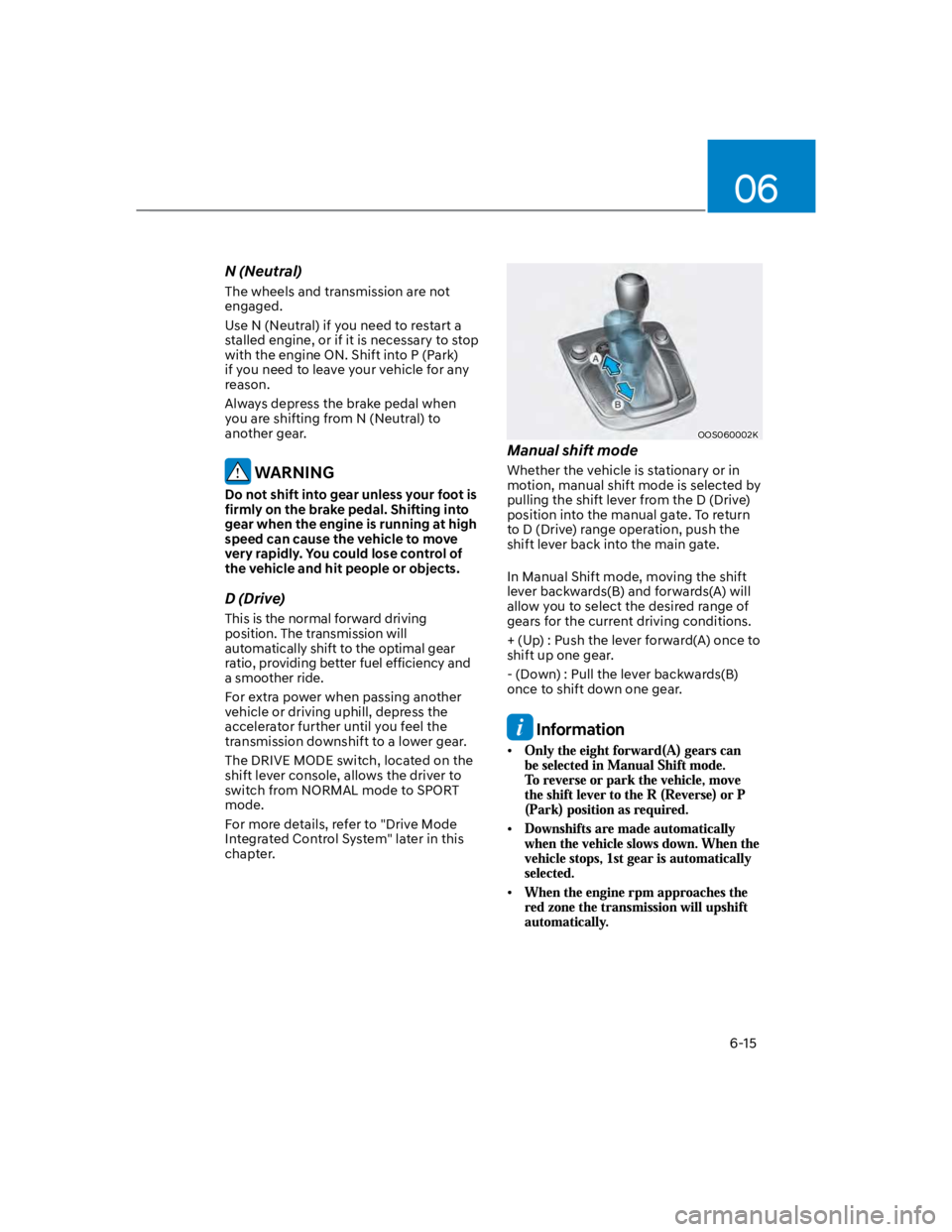
OOS060002K
Manual shift mode
Whether the vehicle is stationary or in
motion, manual shift mode is selected by
pulling the shift lever from the D (Drive)
position into the manual gate. To return
to D (Drive) range operation, push the
shift lever back into the main gate.
In Manual Shift mode, moving the shift
lever backwards(B) and forwards(A) will
allow you to select the desired range of
gears for the current driving conditions.
+ (Up) : Push the lever forward(A) once to
shift up one gear.
- (Down) : Pull the lever backwards(B)
once to shift down one gear.
Information
Page 273 of 579
Driving your vehicle
6-16
Shift-lock system
To shift the transmission from P (Park)
into R (Reverse):
1. Depress and hold the brake pedal.
2. Start the engine or place the ignition
switch in the ON position.
3. Move the shift lever.
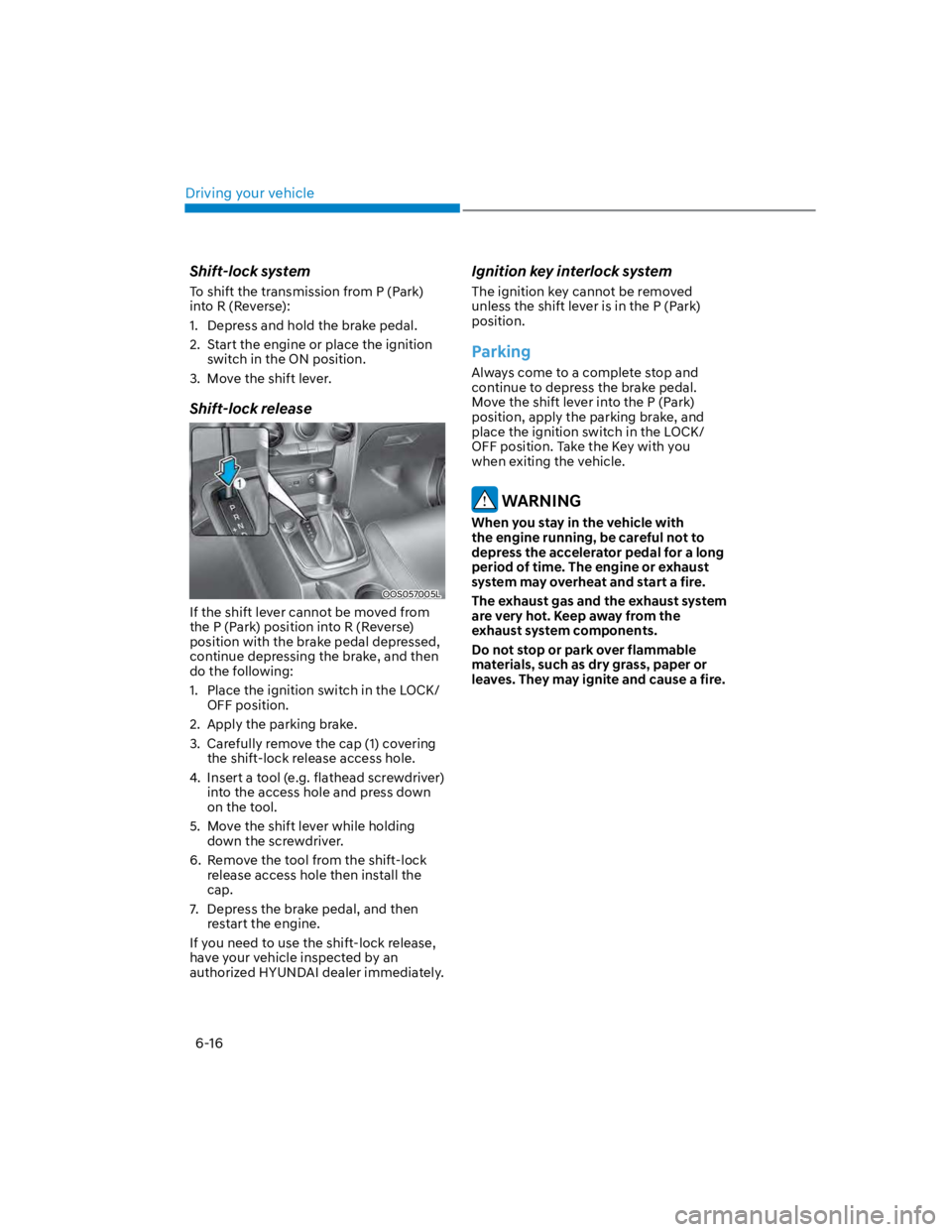
Shift-lock release
OOS057005L
If the shift lever cannot be moved from
the P (Park) position into R (Reverse)
position with the brake pedal depressed,
continue depressing the brake, and then
do the following:
1. Place the ignition switch in the LOCK/
OFF position.
2. Apply the parking brake.
3. Carefully remove the cap (1) covering
the shift-lock release access hole.
4. Insert a tool (e.g. flathead screwdriver)
into the access hole and press down
on the tool.
5. Move the shift lever while holding
down the screwdriver.
6. Remove the tool from the shift-lock
release access hole then install the
cap.
7. Depress the brake pedal, and then
restart the engine.
If you need to use the shift-lock release,
have your vehicle inspected by an
authorized HYUNDAI dealer immediately.
Ignition key interlock system
The ignition key cannot be removed
unless the shift lever is in the P (Park)
position.
Parking
Always come to a complete stop and
continue to depress the brake pedal.
Move the shift lever into the P (Park)
position, apply the parking brake, and
place the ignition switch in the LOCK/
OFF position. Take the Key with you
when exiting the vehicle.
WARNING
When you stay in the vehicle with
the engine running, be careful not to
depress the accelerator pedal for a long
period of time. The engine or exhaust
system may overheat and start a fire.
The exhaust gas and the exhaust system
are very hot. Keep away from the
exhaust system components.
Do not stop or park over flammable
materials, such as dry grass, paper or
leaves. They may ignite and cause a fire.
Page 274 of 579

06
6-17
Good driving practices
Never move the shift lever from P
(Park) or N (Neutral) to any other
position with the accelerator pedal
depressed.
Never move the shift lever into P
(Park) when the vehicle is in motion.
Be sure the vehicle is completely
stopped before you attempt to shift
into R (Reverse) or D (Drive).
Do not move the shift lever to N
(Neutral) when driving. Doing so
may result in an accident because
of a loss of engine braking and the
transmission could be damaged.
Driving uphill or downhill, always shift
to D (Drive) when driving forward or to
R (Reverse) when driving backwards,
and check the gear position indicated
on the cluster before driving. If you
drive in the opposite direction of the
selected gear, the engine will turn
off and a serious accident might be
occurred due to the degraded brake
performance.
Do not drive with your foot resting
on the brake pedal. Even light, but
consistent pedal pressure can result
in the brakes overheating, brake wear
and possibly even brake failure.
Depressing both accelerator
and brake pedals at the same
time can trigger logic for engine
power reduction to assure vehicle
deceleration. Vehicle acceleration
will resume after the brake pedal is
released.
When driving in Manual Shift mode,
slow down before shifting to a lower
gear. Otherwise, the lower gear may
not be engaged if the engine rpms are
outside of the allowable range.
Always apply the parking brake when
leaving the vehicle. Do not depend on
placing the transmission in P (Park) to
keep the vehicle from moving.
Exercise extreme caution when
driving on a slippery surface. Be
especially careful when braking,
accelerating or shifting gears. On a
slippery surface, an abrupt change
in vehicle speed can cause the drive
wheels to lose traction and may cause
loss of vehicle control resulting in an
accident.
Optimum vehicle performance and
economy is obtained by smoothly
depressing and releasing the
accelerator.
WARNING
To reduce the risk of SERIOUS INJURY
or DEATH:
ALWAYS wear your seatbelt. In a
collision, an unbelted occupant
is significantly more likely to be
seriously injured or killed than a
properly belted occupant.
Avoid high speeds when cornering or
turning.
Do not make quick steering wheel
movements, such as sharp lane
changes or fast, sharp turns.
The risk of rollover is greatly
increased if you lose control of your
vehicle at highway speeds.
Loss of control often occurs if two or
more wheels drop off the roadway
and the driver over steers to reenter
the roadway.
In the event your vehicle leaves
the roadway, do not steer sharply.
Instead, slow down before pulling
back into the travel lanes.
HYUNDAI recommends you follow all
posted speed limits.